If you want to:
- Start a blog but don’t know where to start.
- Avoid the black hole of scattered advice on “how to start a blog.”
- Explore what creating a blog from scratch looks like.
- Learn how to write blog posts.
You’re in the right place!

But let’s get one thing out of the way first: If you’re holding back on blogging because you had to Google “what is WordPress,” relax — you can create a blog with even the most basic knowledge.
In under 20 minutes, this step-by-step guide will show you how to start a blog using WordPress.
How do you start a blog? Pick a focused niche and a memorable name, sign up for web hosting, register a domain, and install WordPress. Then choose a theme, write and publish your first post, optimize it for search engines, and promote it on social media and in your niche’s communities.
You’ll find actionable strategies to start blogging from the ground up, tips from expert bloggers, and the technicalities behind the scenes — simplified.
Let’s start blogging!
What is a blog?
Blog
A blog is a type of website that publishes ‘blog posts’ or web articles regularly. These entries are usually presented in reverse chronological order.
Each blog post is part of your overall blog. Think of it like a chapter in a book.
Whether you’re a hobbyist, a budding writer, or someone looking to expand marketing efforts for your brand, blogs still pull a crowd: only 17% of consumers say they never read blogs, and 18% read them daily, per HubSpot’s consumer survey (updated 2025). That’s a pretty big audience!
Plus, around 80% of marketers report success with their content marketing year after year, per Orbit Media’s 12th Annual Blogger Survey (2025). This could be inbound leads, conversions, or simply the number of people who enjoy reading what you have to say.
What are the benefits of starting a blog?
If you’re here, you’re probably convinced of the benefits of blogging. Nonetheless, let’s quickly cover the key advantages:
- Make money blogging: Blogging can help you bring in income, whether you’re working on an existing business or starting a new one. In a popular, profitable niche, you can realistically earn $30,000–$50,000 in your first year, per Ryan Robinson’s blogger income guide (updated June 2026). You’ve got to be consistent, though.
- Get better at digital marketing: Digital marketing is one of the most in-demand skills. Marketers who prioritize blogging are 13x more likely to see a positive return on investment (ROI), per HubSpot’s State of Inbound report (2014). That’s a big deal!
- Find your community: A personal or company blog page is an excellent way to meet people with similar interests. As a blogger, you can establish relationships with other writers and content creators. For brands, it lets you build connections with your online audience. In practice, that community is how growth happens: guest posts, link roundups, and newsletter swaps usually start with a comment on someone else’s blog.
- Have a creative outlet: Got a favorite TV series that was canceled? Think Vancouver is the prettiest place on Earth? Whatever it is, write it down! A blog is a great outlet for self-expression and a terrific emotional release.
Alright. With that background out of the way, let’s get down to business.
How to start a blog in 11 easy steps
Here’s everything you need to know to start a profitable blog. In short: pick a niche, name your blog, get hosting and install WordPress, research competitors, plan your content, brainstorm post ideas, pick a theme, write your first post, optimize it for search, publish, and promote.
1. Pick your blog niche
A blog niche is the specific topic your blog focuses on. Think of it as choosing a lane on a busy highway — your very own corner of the internet. All of the blog content you create will be unified by this theme.
Basically, instead of writing about everything under the sun, you concentrate on a particular topic.
For example:
- Instead of “fitness,” you might want to create a blog about yoga for beginners.
- Instead of “technology,” focus on smartphone photography tips.
- Instead of “travel,” perhaps you need to start with budget backpacking in Europe.
When you’re looking to start a blog, how do you pick your niche?
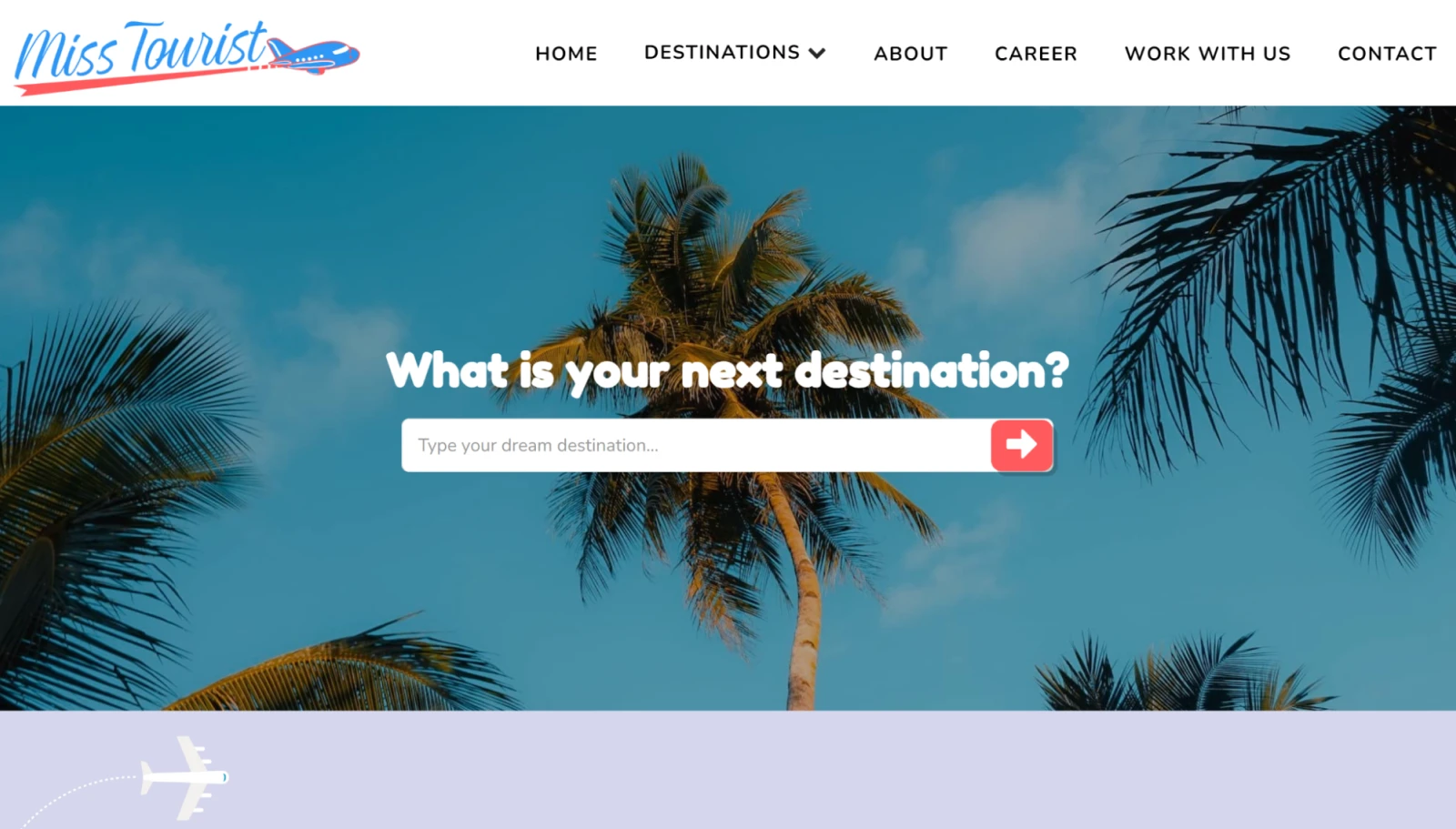
Yulia Saf runs misstourist.com, a travel blog she says attracts 400,000 visitors a month. According to her, “niche selection is critical,” and the “magic lies where passion and skills intersect.”
She says, “For beginners, I’d say, start at the intersection of your interest and expertise.”
Niche selection is critical.
So, think about two things:
- What are you most passionate about?
- What are you good at?
2. Choose your blog name
“What’s in a name,” you say? A lot, actually. When you define your niche, you can choose a name for your blog that grows with you. A blog name can help readers identify with your content, learn to associate it with your brand, and make your digital space more memorable.
As you consistently blog and get traction, you can then think about starting to make money.
Most blog names can be separated into two categories:
- Keyword-based: These are names that contain relevant keywords to describe the blog’s purpose or theme. Some examples include British Beauty Blogger and Car and Driver.
- Brand-based: These blog names focus on a brand and are usually shorter and more memorable. A few examples are Kotaku and BMWBLOG.
If you feel stuck and need inspiration, try an online name generator. These provide potential names based on a word or phrase. One of our favorite tools is Blog Name Generator:
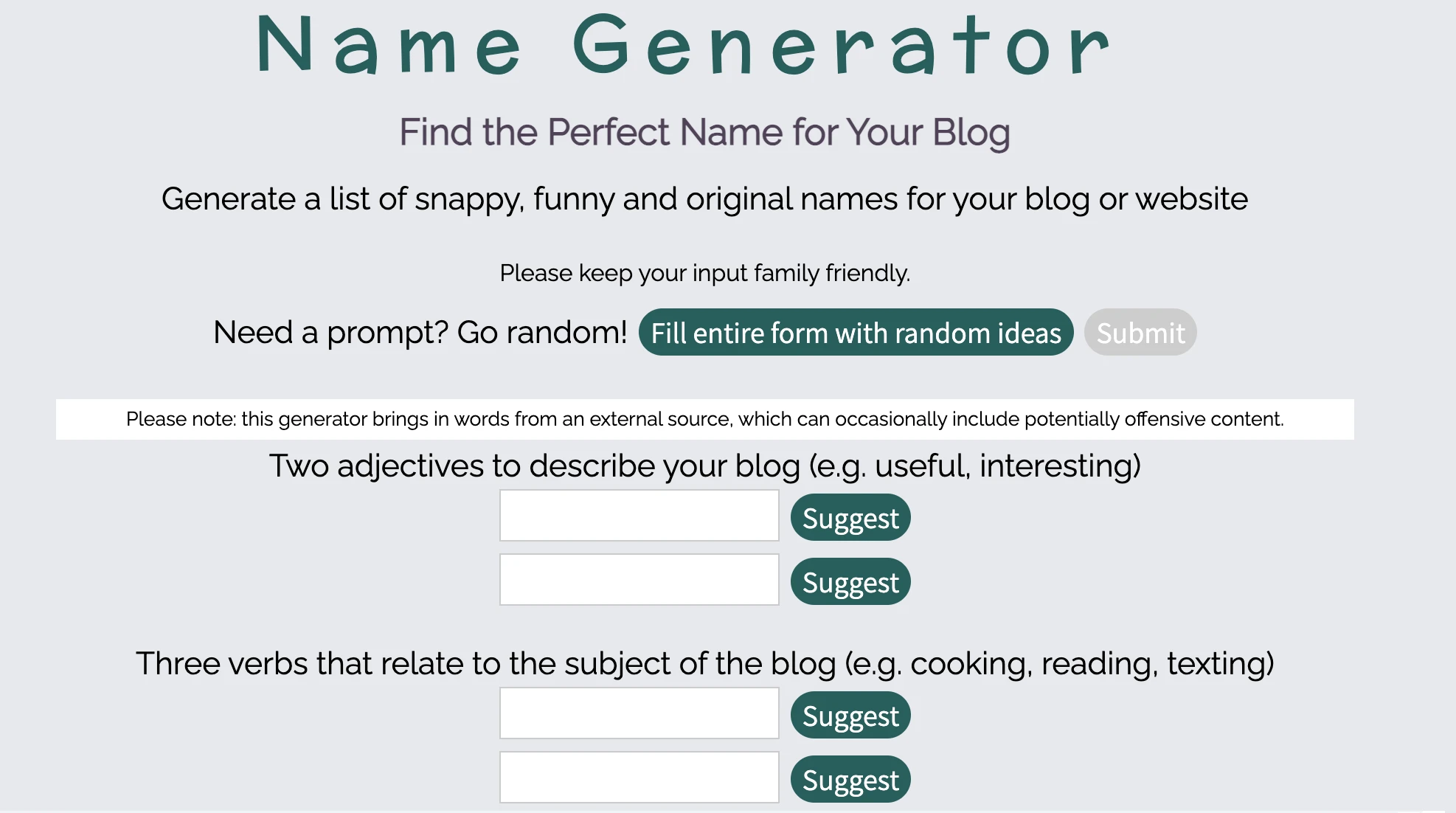
This site asks you to enter some information related to your blog, including its tone and subject matter. It then creates a series of names that you can use for inspiration.
A great blog name should be:
- Clear and relevant: Quickly let readers know what your blog is about. Make sure your niche is accurately described with keywords.
- Short and sweet: Use two or three words to make it easier to remember. Longer names can work, but shorter ones are generally more memorable.
- Easy to remember: Try to avoid complex spelling or numbers. Easy-to-spell and easy-to-pronounce blog names are more likely to be remembered.
Remember to search for the availability of your blog name first so you don’t accidentally encroach on someone else’s trademark. And if your first-choice domain is taken, don’t panic. Say yogaforbeginners.com is gone: try yogaforbeginners.net, add a short word (theyogabeginner.com), or flip the phrasing (beginneryoga.com) — then recheck availability before you commit to the name.
What’s the best site to start a blog?
For most new bloggers, the best site to start a blog is a self-hosted WordPress site. You control your content, your domain, and how you make money — and the open source WordPress software already runs 41.2% of all websites, per W3Techs (July 2026). That’s our honest recommendation, and it’s the method this guide teaches. The honest caveat: you manage your own hosting, updates, and backups (or pay a managed host to do it), so WordPress asks a little more of you than the free platforms.
Here’s how the popular platforms stack up:
| Platform | Typical cost | Ownership and portability | Monetization |
|---|---|---|---|
| Self-hosted WordPress | Free software; hosting typically runs a few dollars a month, and premium themes or plugins can add to that | You own the site and can export it or switch hosts, though migrations and maintenance are your job | Anything you like: ads, affiliate links, products, memberships |
| Substack | Free to publish | You keep your mailing list and subscriber payments, but the blog itself lives on Substack, with slim design options | Paid subscriptions are the main path |
| Medium | Free to publish | Minimal customization; the audience you build belongs to Medium’s platform, not your domain | Limited and platform-controlled |
| Blogger | Free (Google); blogspot.com address unless you buy a custom domain | Hosted by Google with basic templates; a hard place to build a distinct brand | Built-in Google AdSense ads |
| Wix and other website builders | Varies by plan | Built for general websites first, blogs second; moving your content off a builder later takes real work | Depends on plan |
Bottom line: Free platforms are a fine way to test the waters. If you want a blog you control (your domain, your content, your monetization), start with WordPress on your own domain. The rest of this guide shows you how.
How much does it cost to start a blog?
Less than most hobbies. A realistic first-year budget for a self-hosted WordPress blog looks like this:
- Domain name: Typically $10–$20/year for a .com — and domain registration is free for the first year with annual DreamHost hosting plans.
- Web hosting: Entry-level plans typically run just a few dollars a month; see DreamHost’s web hosting plans for current pricing.
- Theme: $0 to start. Thousands of free themes cover a new blog’s needs; premium themes are an optional upgrade later.
- Plugins and email: The essential plugins (SEO, backups, scheduling) have solid free versions. Professional email is optional at launch: DreamHost’s current plans include mailboxes free for the first 3 months, so check the plans page for ongoing email pricing.
All in, you can realistically launch for under $100 in your first year, often much less — with optional extras like paid mailboxes or a premium theme on top.
3. Get your blog online
Now that you’ve settled on a blog name and niche, it’s time to bring your blog online.
Nikola Baldikov of InBound Blogging says, “Choose your hosting method carefully because migrating a website isn’t always easy. If you’re serious about blogging, think about scaling. How will you monetize your blog in the future? What website customization and SEO options do you have? Do your research before you make your choice.”
If you’re serious about blogging, think about scaling.
Hosting Provider
A hosting provider is a business that charges a fee in exchange for “renting” server space and resources. You can choose any hosting provider that you want to launch a new website.
You don’t need to worry about technical jargon. We’ll break it down for you step-by-step here.
There are two key components you’ll need to launch your blog:
- A blog host: This is your blog’s digital home. It’s where all the files for your blog are stored online. Whenever someone types the address of your blog into their browser, the host delivers your content.
- Blogging software: Essentially, this is what you use to create and maintain your blog. These are like the Lego blocks that build your online space.
The good news is that many blog hosts offer popular blogging platforms as part of their packages. (Example: Psst… Us! DreamHost.)
WordPress is one of the most popular platforms for both beginners and seasoned bloggers. In fact, 41.2% of all websites use WordPress, per W3Techs (July 2026). Among its many benefits are its flexibility, ease of use, and extensive community support. (We’ll learn how to install it in a hot minute.)
Step 1: Purchase web hosting
WordPress doesn’t provide hosting for your blog. Instead, it’s a content management system (CMS) you install on a server. Don’t worry — this isn’t as complex as it might sound.
Content Management System (CMS)
A Content Management System (CMS) is a software or application that provides a user-friendly interface for you to design, create, manage, and publish content.
You will need to sign up for a web hosting plan to get your site online.
To help you out, let’s look at the main types of hosting that are available:
- Shared hosting is the least expensive option for new bloggers. DreamHost web hosting plans start at just a few dollars a month.
- Virtual Private Server (VPS) is slightly more costly but improves performance. As such, this kind of hosting is recommended if you want to focus on growing your blog.
- Dedicated hosting is the most expensive and powerful option. You get an entire server dedicated to your site alone. This is typically unnecessary for a blog unless your site draws unusually high traffic or you want complete control.
It’s also smart to look for hosting companies specializing in WordPress hosting specifically, as that means their services will be well-optimized for the platform.
DreamHost offers several WordPress hosting options. For a brand-new blog, our entry-level web hosting plans are usually the practical starting point: they cost a few dollars a month and provide plenty of resources. When your blog starts drawing serious traffic, or you’d rather not handle maintenance yourself, DreamPress, DreamHost’s managed WordPress hosting, is the more useful upgrade.
To purchase a web hosting plan, select Sign Up Now on the plans page. Next, you’ll need to choose the billing term for your hosting account: monthly, yearly, or a multi-year term. The longer your term, the bigger your discount on hosting.
DreamHost web hosting comes in three tiers — Launch, Growth, and Scale — which differ mainly in how many websites, monthly visits, and gigabytes of storage you get. Even the entry-level Launch plan includes a free domain for the first year and mailboxes for professional email (free for the first 3 months on current plans), so you can set up a specialized email address @yourdomain from day one.
Step 2: Register your domain name
Next, you’ll register a free domain name (which is included with all annual terms) or enter a domain you already own.
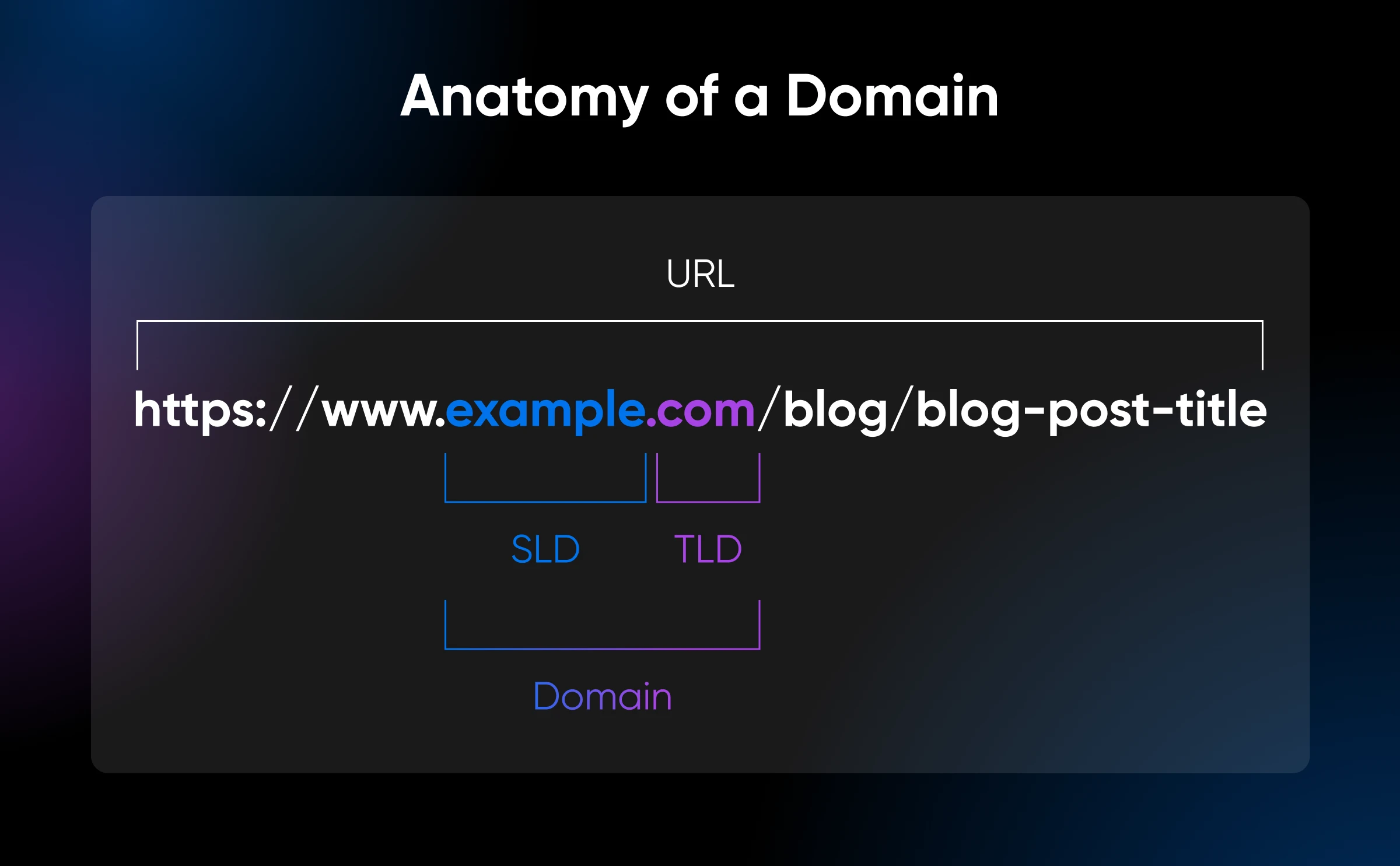
Your domain name is the URL people will use to access your blog. When it comes to creating a domain name, there are several things you’ll want to consider. One of the basic steps involves choosing which TLD you want to use, such as .com or .org.
Note: If you’re pressed for time or unsure which top-level domain (TLD) would be right for your site, you can easily add one later.
Step 3: Install WordPress
For a WordPress blog, you’ll need to, well, install WordPress. If you checked the Pre-Install WordPress box during the sign-up process, you can move on to the next step.
There are two main ways you can install WordPress:
- Manual installation: This requires you to manually upload and configure the WordPress software on your site. While the process is quick, we only recommend this approach if you’re technically savvy.
- One-click installation: This is an option offered by many web hosts, which allows you to install WordPress on your site almost instantly. As such, you don’t have to worry about configuration or manually installing any files.
A one-click installation tool simplifies the process to start your blog — quickly.
Here’s how you can install WordPress using the DreamHost WordPress installer.
4. Research your competition
Congratulations, your blog now has a digital home! Let’s zoom out to see what your competition is doing. Think of it like reverse engineering success. Look for successful blogs in your niche to suss out your competitors. What are they doing that’s working?
Look at how they build credibility with their strategies and tactics without copying them outright.
Here are some tips for analyzing competitors effectively:
- Identify true competitors: Not everyone is a rival. Consider blogs that target the same audience and niche as your own. Think about factors such as the blog’s topics, tone, and target audience. For example, it’s highly unlikely a family blogger will also write about decentralized finance.
- Learn from their aesthetics: In a 2004 University of Sheffield study of health websites (Sillence et al.), 94% of first-impression mistrust was related to visual design. Take note of each competitor’s branding, color scheme, and theme. Finding out what visual cues resonate within your niche is great. For example, a sustainable-living blog might use earthy colors, whereas a tech blog might use more sleek, modern designs. Take note of overlapping interests and how you can differentiate your content.
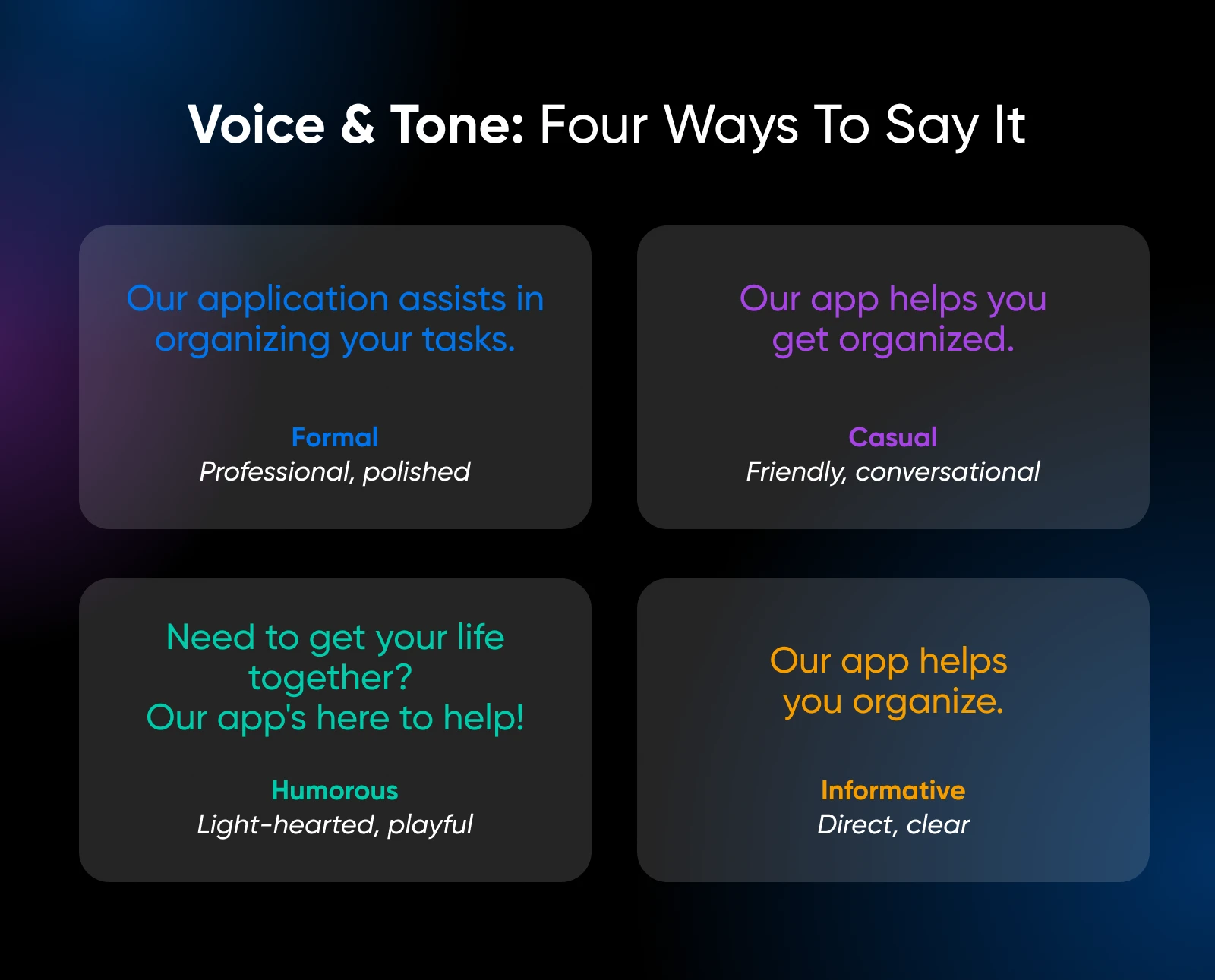
- Analyze their voice: What’s their style of writing? How formal, casual, or humorous is the tone? You don’t want to duplicate them, but you can find out what makes their content work.
Above all — know your strengths. If in-depth tech reviews aren’t your forte, maybe another writing style would be more in your wheelhouse. Your focus should be on what is realistically achievable and, more importantly, enjoyable.
5. Create a high-level blog content strategy
An effective blog content strategy involves systematically driving traffic to your blog and bringing in new readers through an actionable plan.
You may be asking, “Do I really need one?”
You need a blog content strategy if you want your readers to become loyal fans. Because loyal fans will consistently drive traffic to your site and help you monetize your blog over time. A successful content strategy starts with understanding your audience, their pain points, and your unique value proposition.
Here’s how to set up a blog content strategy:
- Define your blog’s purpose and goals: Decide what your blog’s primary objective is. What type of blog is it? A personal blog? A company blog as part of a broader content strategy? What is your goal? Is it to promote your personal brand, drive sales, or educate your audience?
- Deep dive into your audience: Build fictional representations of your ideal readers, including demographics, psychographics, pain points, and goals.
- Articulate your unique selling proposition (USP): Identify what makes your blog unique. How do you stand out from your competition?
- Establish content pillars: These will shape the identity of your blog. Choose a few primary topics to focus on. Ideally, they should be aligned with your blog’s overall mission and resonate with your audience’s interests. Then, within each pillar, develop subtopics to create a well-rounded blog content strategy.
What does this plan look like in action? Let’s look at a blog content strategy for an eco-conscious thrifting enthusiast based on what we’ve discussed above:
- Purpose and goals: Inspire and educate others about how thrifting can help you live a more sustainable life. Aims to promote ethical consumption, collaborate with sustainable brands, and build an eco-conscious thrift community.
- Ideal reader: People who care about the environment and are looking for fashionable and affordable clothing. They place a high value on individuality, sustainability, and ethical consumption. They often have difficulty finding sources of sustainable fashion and feel overwhelmed by fast fashion.
- Unique angle: Curate thrifted looks and provide styling tips for different body types and occasions using unique thrifted items. Emphasize thrifting’s creative and personal aspects.
- Content pillars: Thrifting 101 — how to find hidden treasures, thrift store etiquette, and tips for beginners; Thrifting Fashion — DIY fashion projects, thrifted outfit ideas, and styling challenges; Thrifting on a Budget — thrift store hauls, upcycling ideas, and money-saving tips.
Include visuals
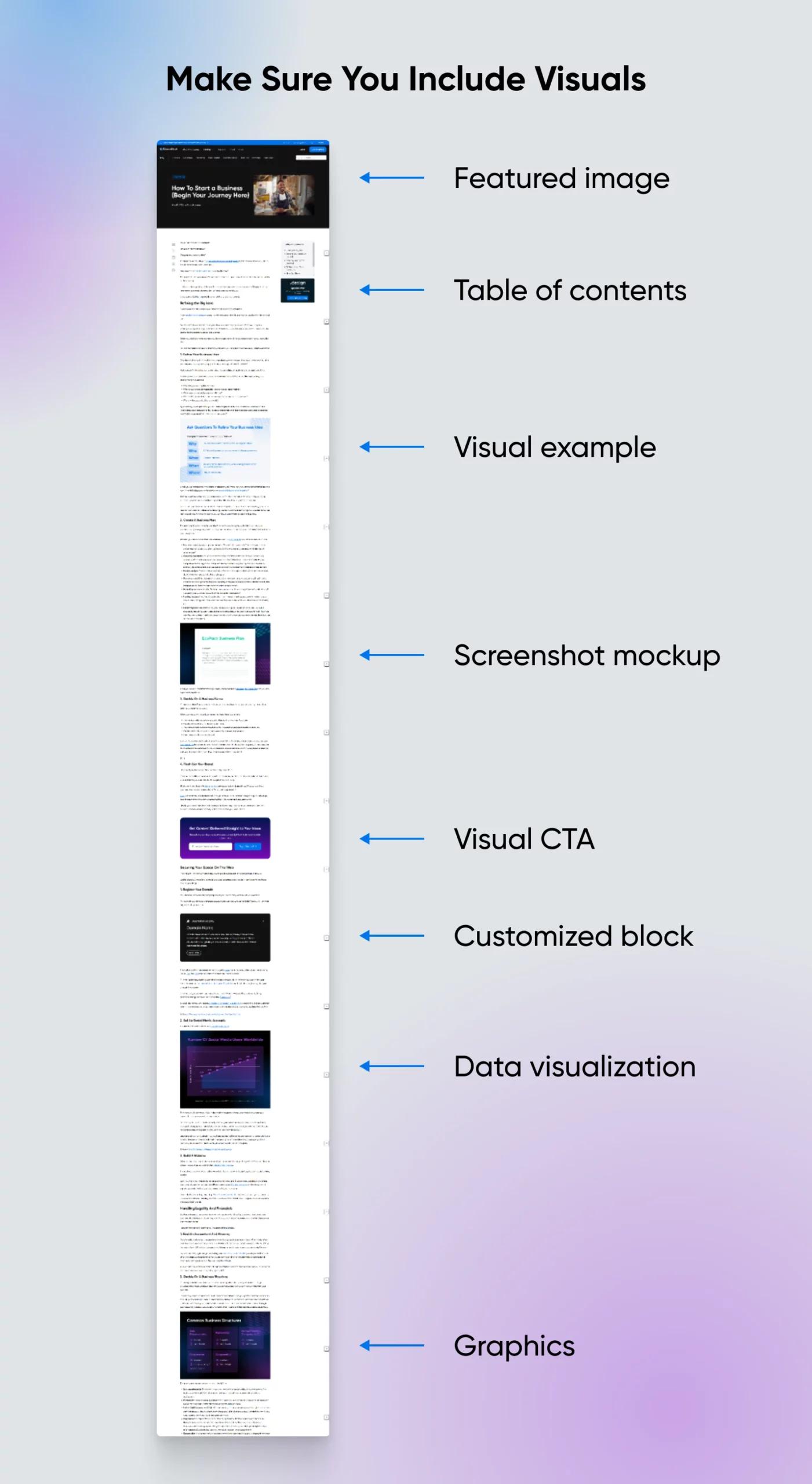
Every blog needs image content. Most visitors skim rather than read word-for-word, which makes well-placed visuals incredibly valuable. Per Nielsen Norman Group’s classic 2008 analysis, users read at most 20–28% of the words on a page, which is why images are so important for conveying your message.
Here are some ways to make your blog stand out:
- Make your data visually appealing: Diagrams, charts, and graphs break down large amounts of data into simple, digestible visual summaries. They’re like mini-stories that capture your readers’ attention and convey complex information quickly.
- Create quote images: Don’t bury your best quotes in text. Bring them to life with stunning visuals. You can customize premade templates with tools like QuotesCover and Canva in seconds. Simply choose a background, select your font, add your quote, and you’re done!
- Try stock photos: While not the most original, they’re helpful when you don’t have a lot of time or creative juice left in you. In most cases, a generic image is almost always better than a blank space. There are lots of free tools for stock photographs you can test out, like Unsplash, Pexels, and Pixabay.
- Use an image at every “scroll depth” in the entire blog post: Imagine a reader scrolling down and finding something visually engaging every time. That’s exactly what you want.
Once you’ve established your blog’s foundation, it’s time to brainstorm blog post ideas.
6. Brainstorm blog post ideas
Brainstorming blog post ideas can be overwhelming. But you’re not going in blind — and an AI assistant like ChatGPT or Claude can speed up topic brainstorming and outlining. Just keep the actual writing, and the first-hand experience behind it, your own.
Based on your content pillars, find blog post topics through keyword research. We recommend using the Ahrefs Keyword Generator, because it’s comprehensive and free:
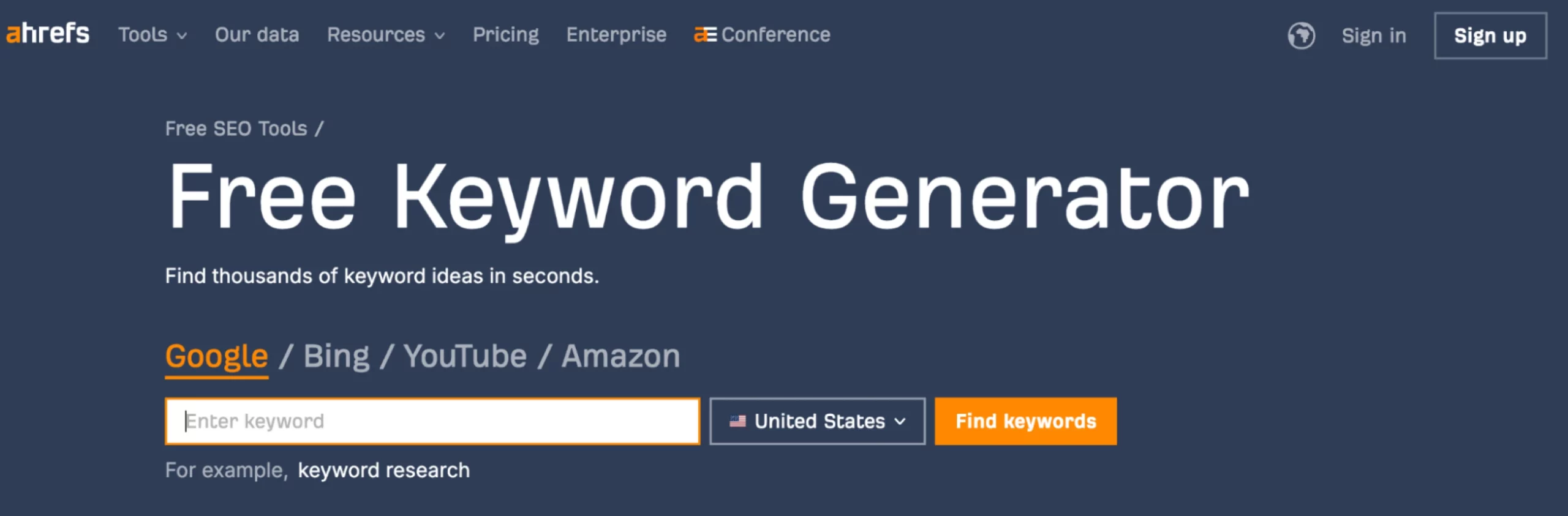
With this tool, you can search for keywords related to your blog to see what your audience is interested in. For example, if you enter the keyword “men’s fashion,” you’ll see that popular keywords include “y2k men’s fashion” and “1920s men’s fashion.”
Here are some more tips on how to create a steady stream of content:
- Newsjacking: Use current events and trends to create timely, relevant content in your niche. For example, if you run a fitness blog, you can cover landmark sporting events like the Olympics and create workout routines based on the athletes’ training plans.
- List posts: Create easy-to-consume content like “Top 10” or “How-To” lists. Say you have a personal blog about vegan cooking. Here’s an idea: “5 Best Vegan Protein Sources.”
- Personal experiences: Tell your stories and offer insight into your niche. If you’re a travel blogger, you can share a personal story about getting lost in a foreign city.
- Competitor analysis: Follow what’s working for your competitors, but add your own twist. For instance, if you’re in the eco-conscious fashion niche, you may see a popular fashion blogger creating content on sustainable fashion. You could create a similar series that focuses on pocket-friendly, sustainable options.
Nerd note: It may seem like a small, silly thing, but talking about yourself on your blog is important — don’t neglect your blog’s About Me page. This page is crucial for helping readers get to know you, your purpose, and what they can expect to find on your site.
“This is one of the most highly trafficked pages on any blog because it tells people who you are, gives your background, and explains why someone should follow you,” writes Matthew Karsten, travel blogger at The Expert Vagabond. “Keep it fun and personable. Let your readers know who you are!”
7. Customize your blog with free WordPress themes
The visual appeal of your blog is important. Why, you ask? Consider this: Stanford’s 2002 web-credibility research (Fogg et al.) found that 46.1% of consumers assessed a site’s credibility partly on its visual design.
Before you start writing, let’s design your blog so it reflects who you are and what you want to talk about.
You can easily change the appearance of your blog with a free WordPress theme.
A theme works like a template you can install on your site, which determines its layout and overall design. Some themes also include additional functionality, and there are plenty of free and premium themes to choose from.
For the time being, you only need to worry about finding the one that fits your blog’s intended style. Picking the right theme can be a struggle if you don’t know where to look, but an excellent place to start is the official WordPress Theme Directory:
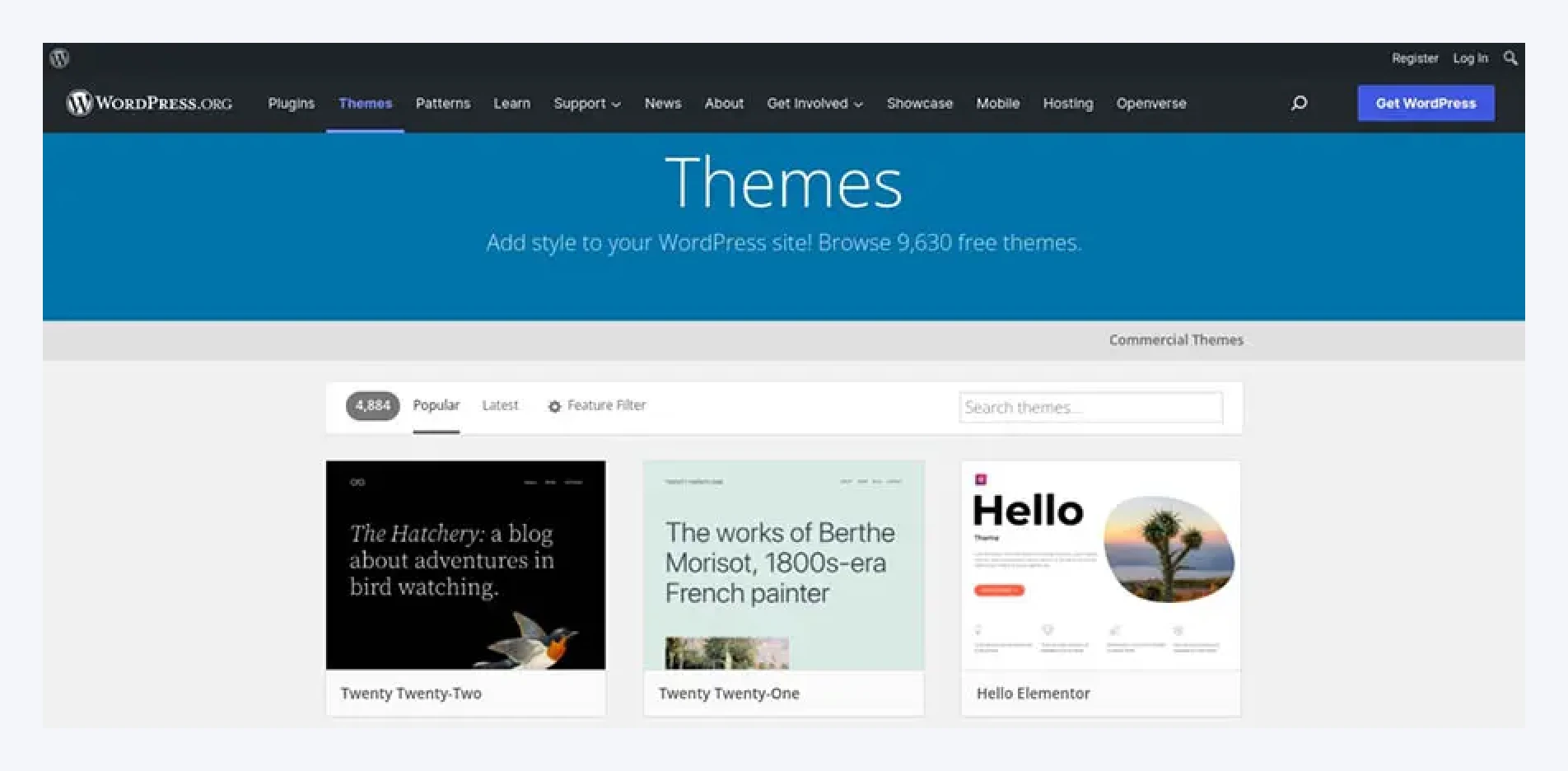
Here, you’ll find thousands of free themes in several different categories. You’ll probably want to use the Feature Filter to narrow down the options:
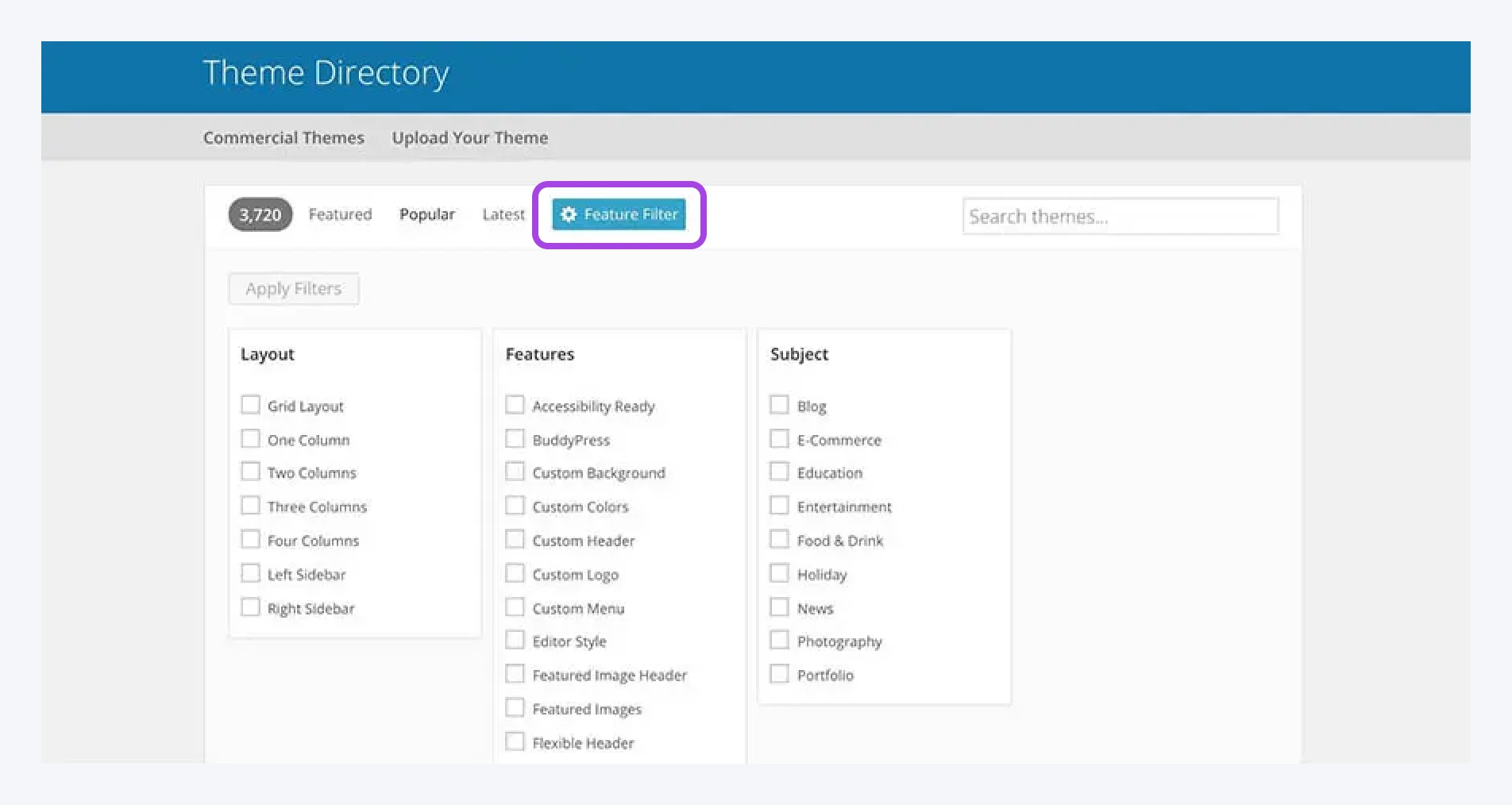
As you can see, there’s even a search filter called Blog. If you select this, you’ll see all the themes created specifically with blogs in mind:

When you find a theme you want to use, you can download it and install it on your site. You can also do this through your WordPress dashboard by navigating to Appearance > Themes:
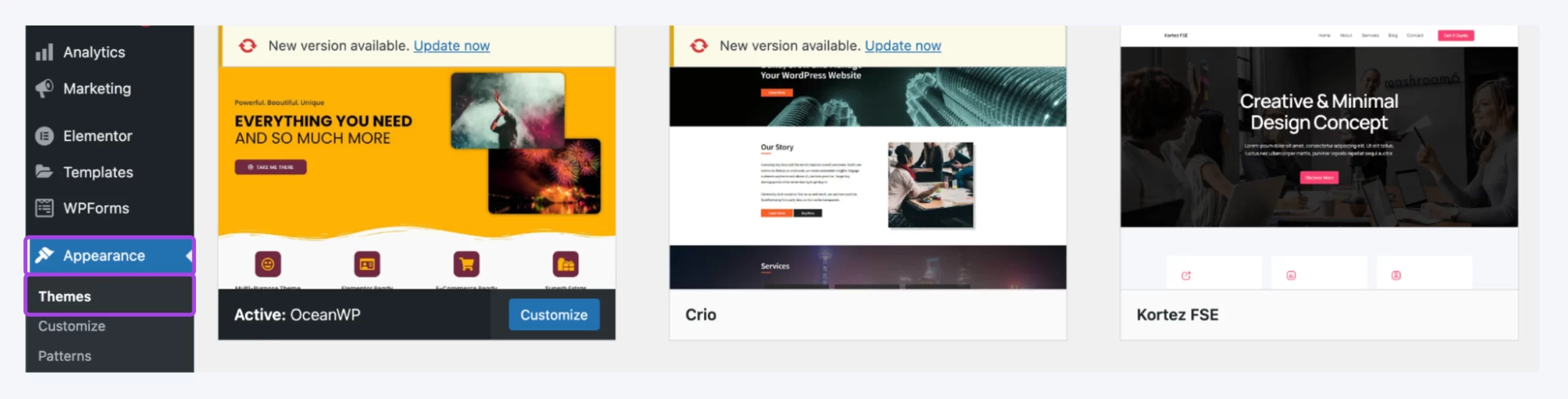
Here, you’ll see your currently installed themes. You can install new ones by clicking on Add New. This opens the Theme Directory again, letting you download and activate themes directly from this interface.
Hover over your choice, and click on Install:
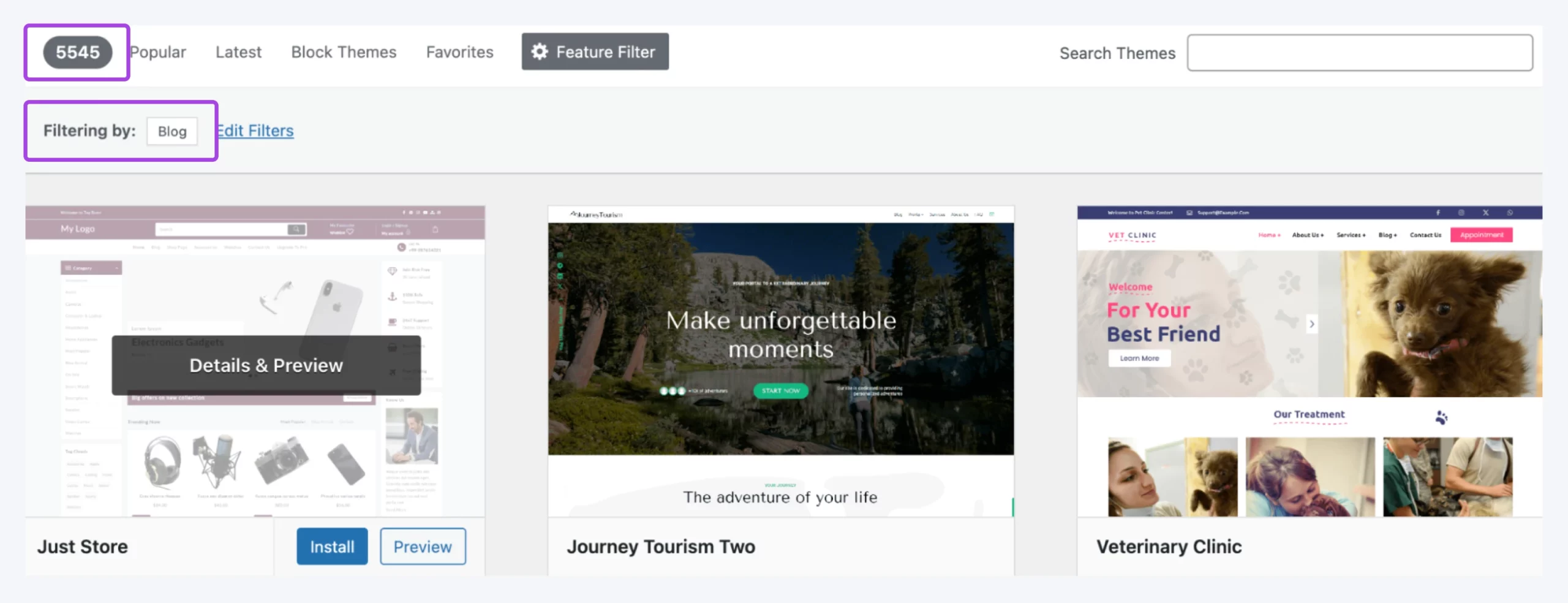
After the theme installs, click Activate to set it as the current theme for your site.
Et voilà! That’s the theme installed. You can now adjust its colors, typography, menus, and layout to fit your blog.
8. Write your first blog post
Next up: write a blog post — the main event in blogging.
A typical blog post usually clocks in at 600–2,000 words or more.
Once you’ve found the right keywords, start writing your first blog post. Here are some basics to get the blogging ball rolling:
- Choose an attention-grabbing post title: The key to creating a snappy headline is to make it informative and specific. Try to describe the article’s contents while still keeping it concise.
- Create an outline: Divide the post into clear sections with descriptive headings. The first step to writing a successful blog post is planning out your key points and the flow of your writing beforehand.
- Write a compelling introduction: First impressions matter, especially in blog posts. Flop in those opening lines, and your readers are gone. So, tell a story, crack a joke, share a mind-blowing statistic — whatever it takes to catch their attention. Then, explain the why. In what way does your post provide a solution to a problem? How will it benefit them? Show them the value, and they’ll stick around for the juicy details.
- Flesh out the outline: Dig into each point. When you hit a snag, do some quick research to find more information, examples, and data. Remember to cite your sources — accuracy and credibility build trust.
- Give thought to your calls to action: Oleg Segal of DealA says, “Having a call to action in each post, whether it’s to subscribe, share, or leave a comment, can help in engaging your readers and building a community.”
Looking for more tips? Here’s our step-by-step guide on how to write a great blog post.
9. Optimize your blog posts for search engines
We aren’t done just yet. Optimizing your posts for specific keywords can increase the likelihood that they’ll appear when users search for them.
This is known as search engine optimization (SEO) and is necessary for increasing traffic and visibility for your blog. SEO involves several tasks, including (but not limited to) increasing your site’s speed and getting backlinks from other sites.
Backlink
A backlink is a link from one website to another. If site A links to site B, B has a backlink from A. Similarly, if site B links to site A, A gains a backlink from B.
Boris Dzhingarov, CEO of ESBO, says, “Learn what SEO stands for and don’t be afraid to try it yourself. Although not everyone is tech-savvy, optimizing your content for best SEO practices isn’t something that requires hard IT skills.”
Although not everyone is tech-savvy, optimizing your content for best SEO practices isn’t something that requires hard IT skills.
Let’s explore a couple of ways you can optimize your blog posts for visitors and search engines.
1. Install an SEO plugin
Earlier, we discussed the importance of keyword research when finding topic ideas. Keywords are phrases that people enter into search engines to find what they’re looking for.
When it comes to your blog, the most essential step is to optimize the posts themselves. Several SEO tools can help you do this; one of the most popular options is Yoast SEO:
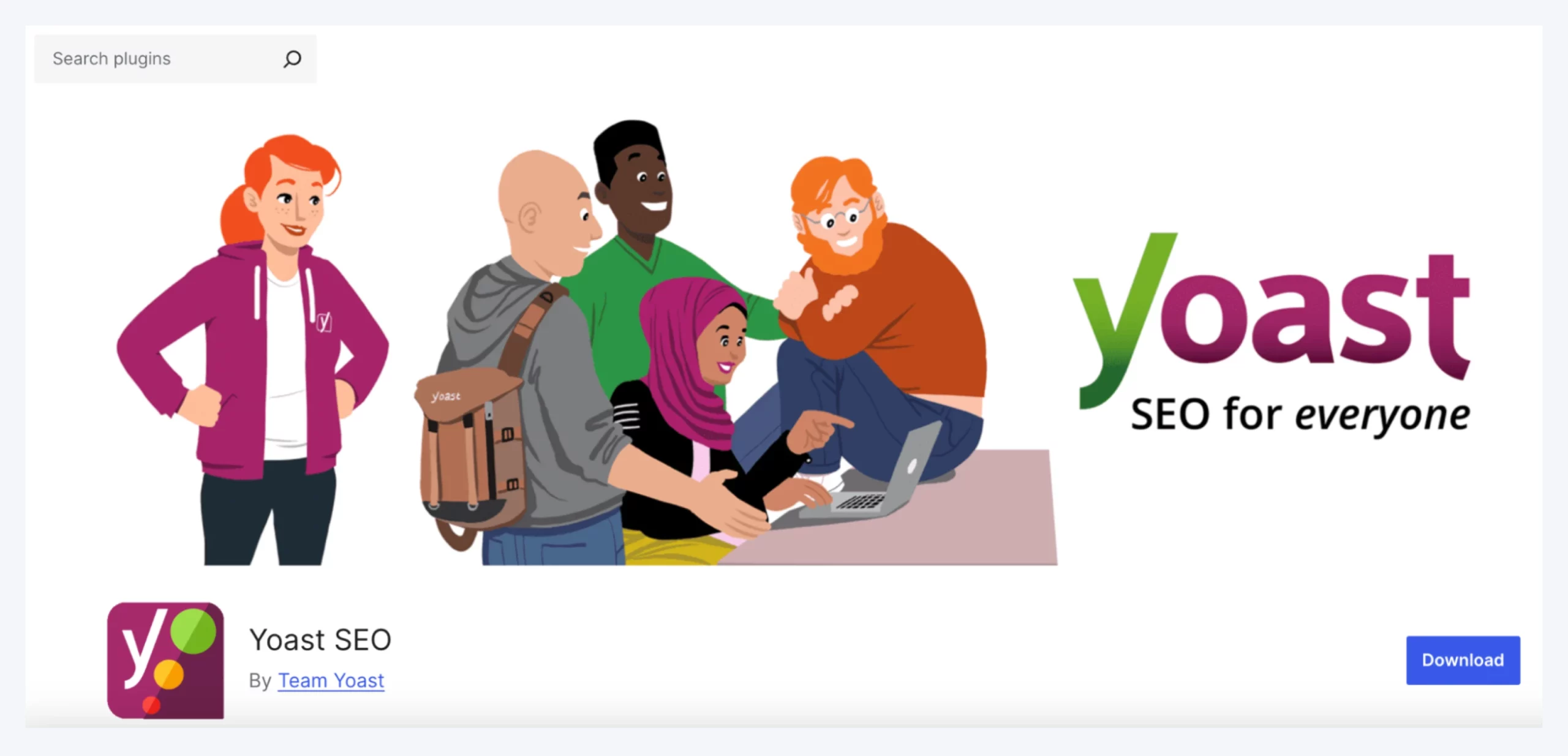
Yoast SEO is a freemium plugin that adds a new section to your WordPress editor:
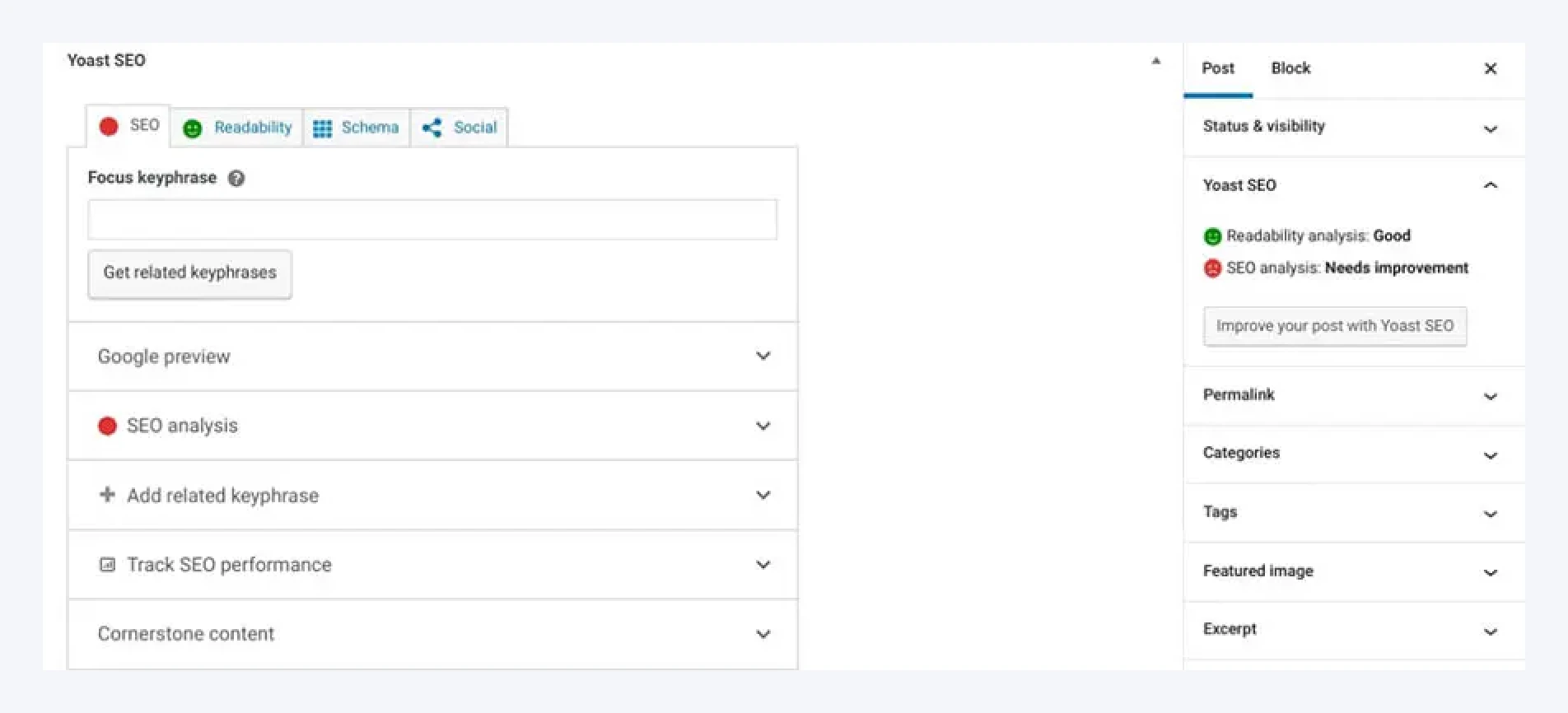
Here, you can set a “keyphrase” for your post, which is the keyword you want to optimize for. Once you’ve done that, Yoast will show you in real time how well-optimized the post is, giving you specific advice on how to improve it:
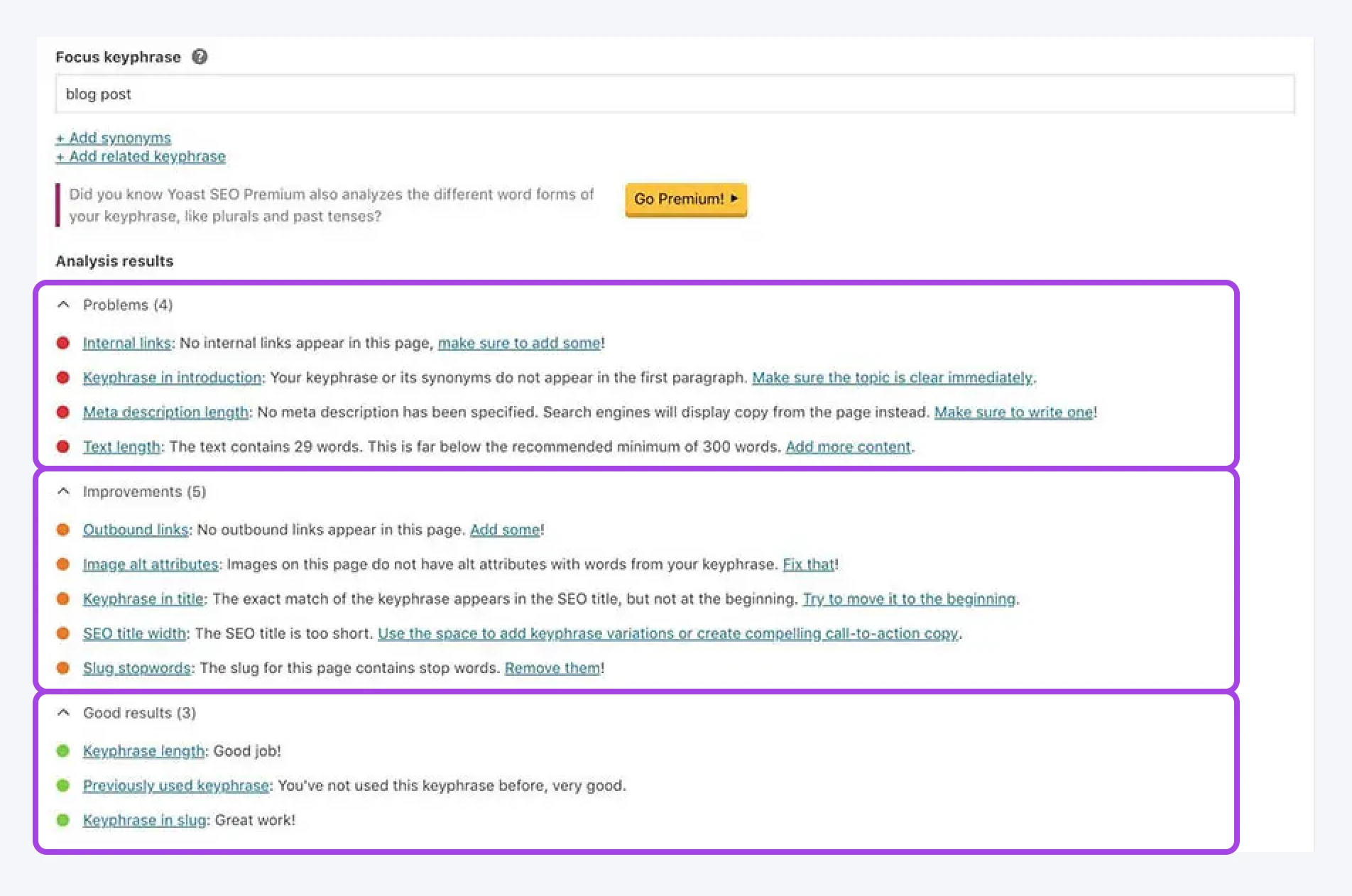
Yoast SEO also lets you add a meta description, a snippet of text that appears alongside the post in search results. By adding a description and following these guidelines, your blog posts are more likely to rank higher in relevant search results. (DreamHost’s SEO Toolkit add-on can help here, too.)
2. Set a schedule (and stick to it)
Google tends to favor sites that publish unique and relevant content on a consistent basis. It’s also important to publish posts on a schedule to help boost readership.
Michael Sandford launched his music blog, Pink Wafer, in 2018, and he says it reached over 90,000 monthly users at its peak. In terms of posting frequency, he recommends “being realistic with yourself.”
“At my peak, I used to post between four and 10 articles per month. Four wasn’t too difficult, but 10 is quite hard-going. However, there is no hard and fast rule for what’s right. If you have one article that is performing really well, your time may be best spent promoting that one article, rather than forcing yourself to write articles that you think may not work out so well.”
If you have one article that is performing really well, your time may be best spent promoting that one article, rather than forcing yourself to write articles that you think may not work out so well.
According to the experts we’ve interviewed, if you’re just starting a blog, you can realistically aim for two blog posts per month to gain momentum.
They all have one piece of overlapping advice, though: progress over perfection.
The good news is that there are tools to help you stick to your schedule. One such solution is the Editorial Calendar plugin:
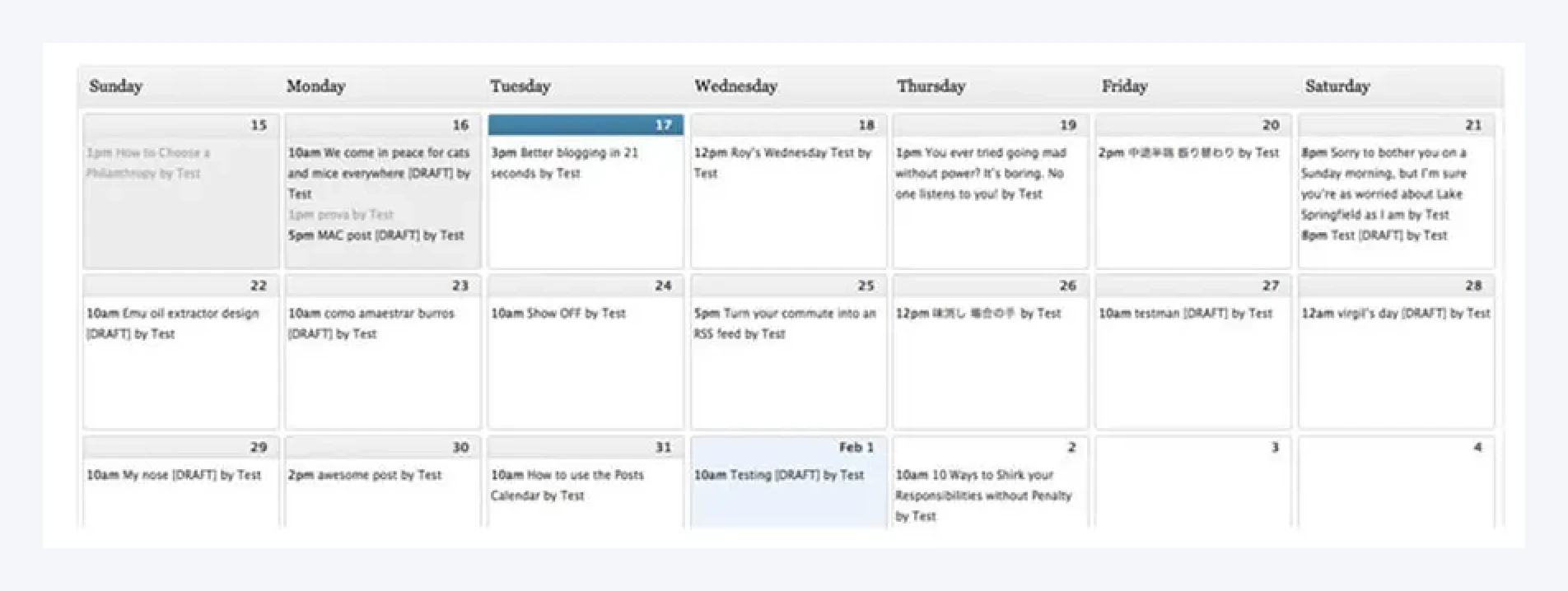
This tool lets you create a calendar for your posts and even schedule drafts to be published at a specific time and date. You can easily track upcoming deadlines and follow your schedule without any risk of slipping up.
10. Publish your blog post!
To get started, access your admin dashboard and click on Posts > Add New:
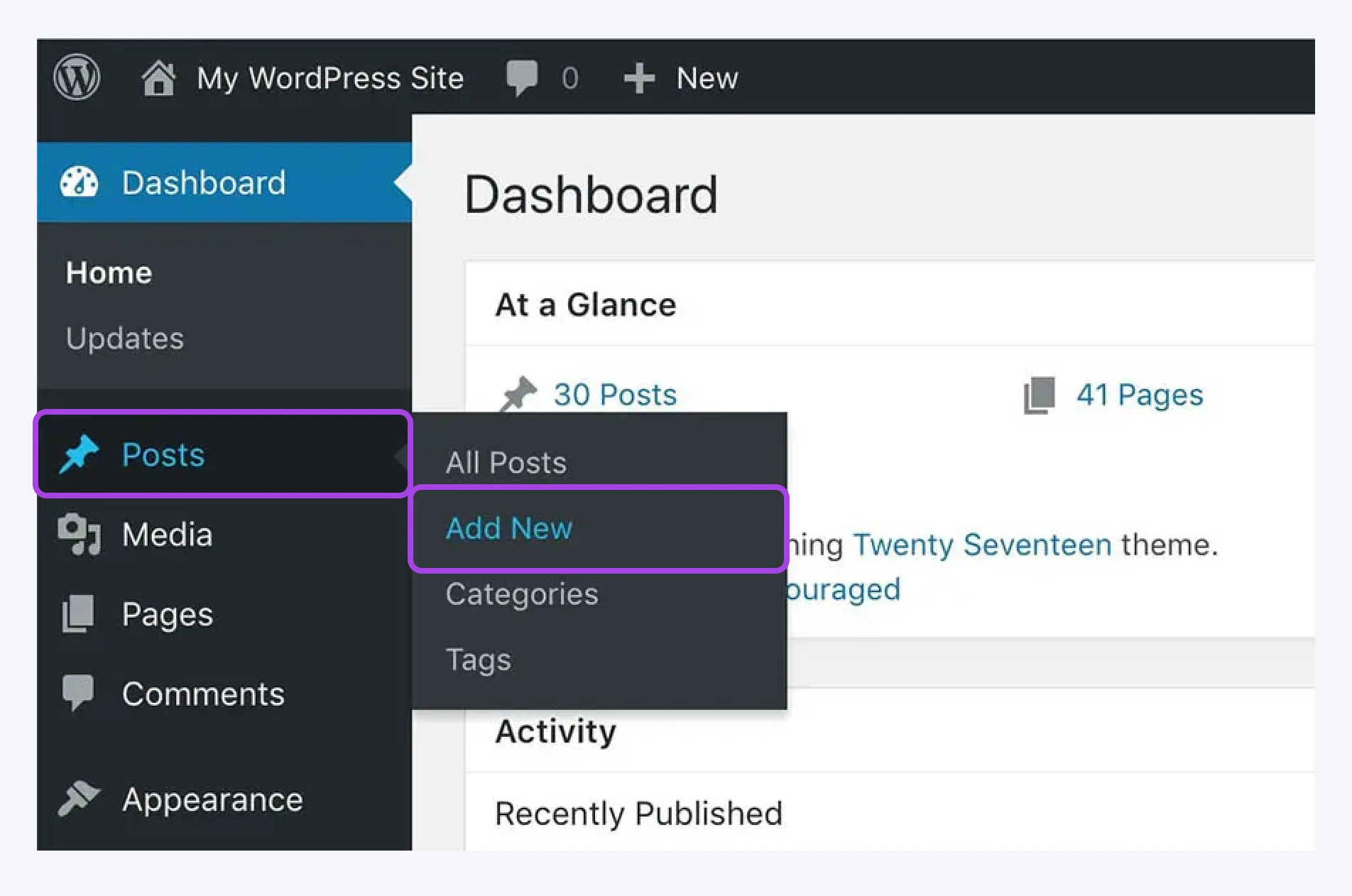
This opens the WordPress editor:
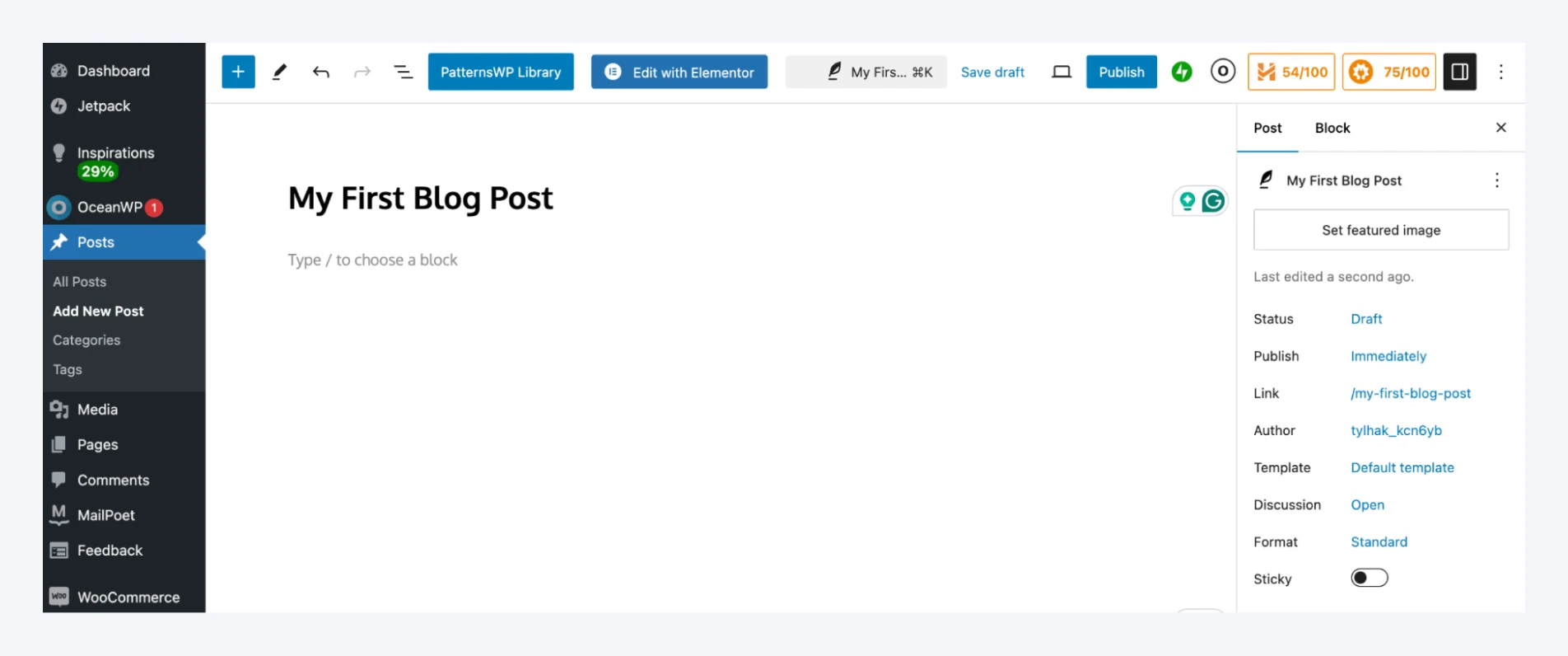
Here, you can start putting together your content. You can write directly within the CMS or copy-paste it from Google Docs or Word.
Next, you can type in or paste your body text by typing in the main paragraph block:
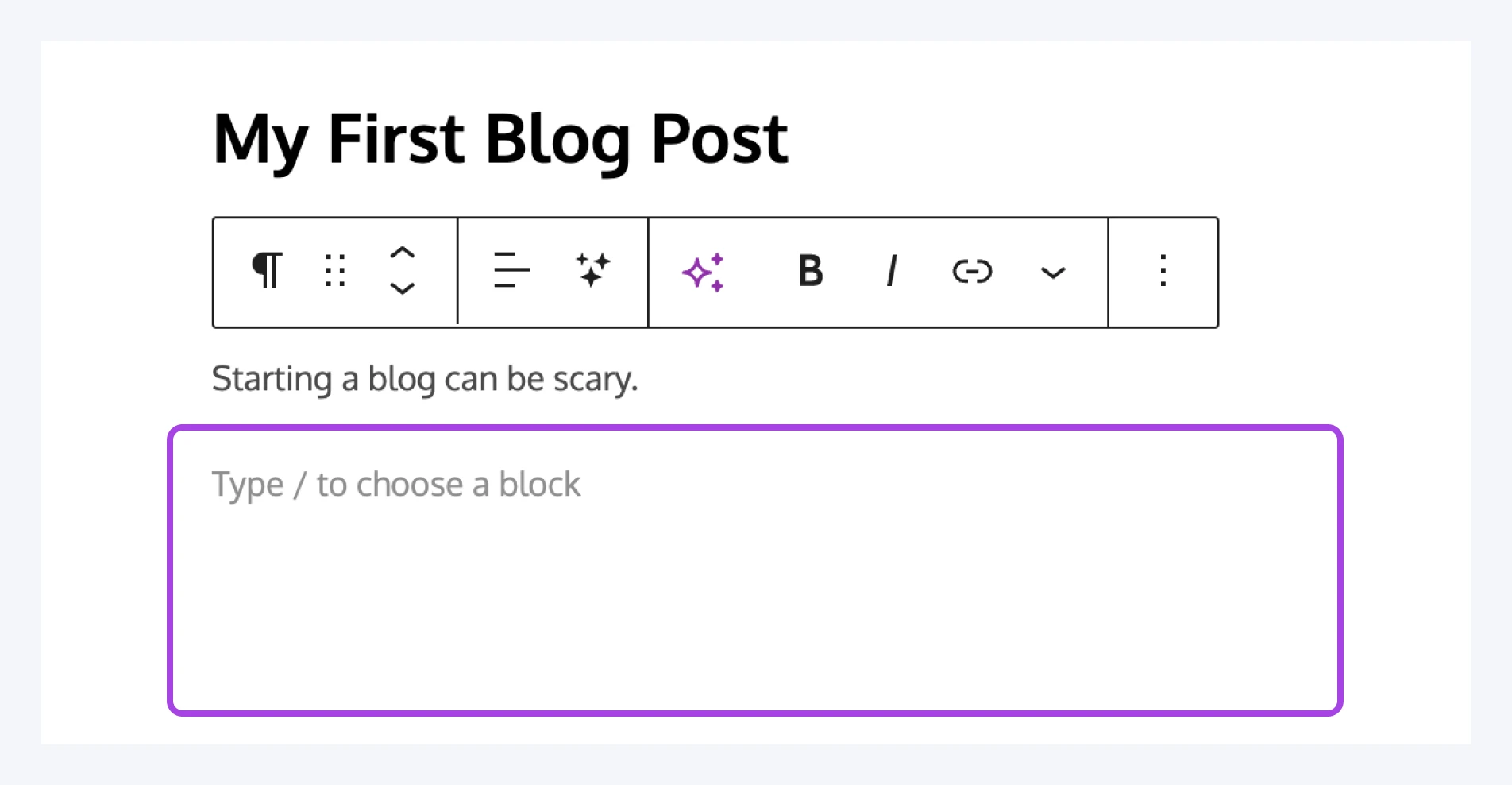
Once you have text on the page, you’ll find several options in the right-hand sidebar:
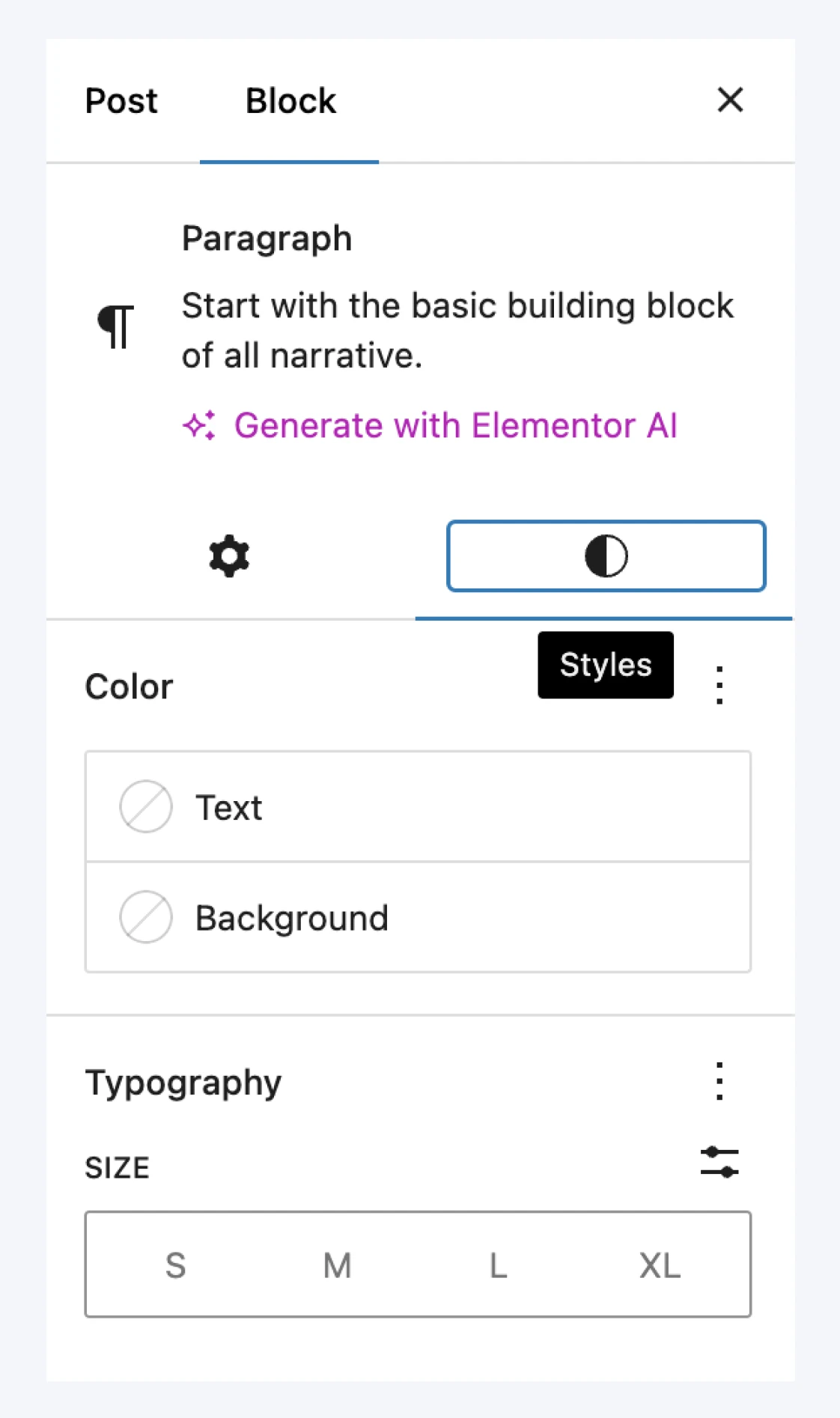
These settings will differ depending on the type of content you’re creating. You can add images and other media to your post by placing a dedicated block into the editor:
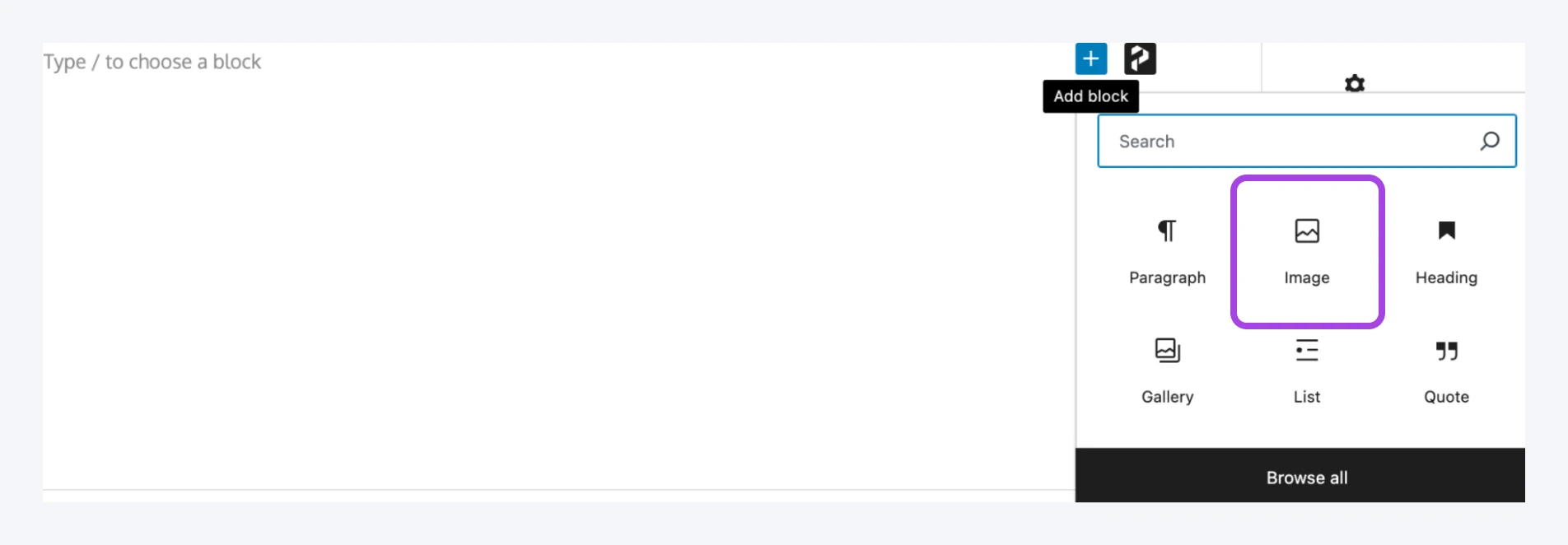
For example, selecting an Image block will let you upload a new image file or choose an existing one from your Media Library:
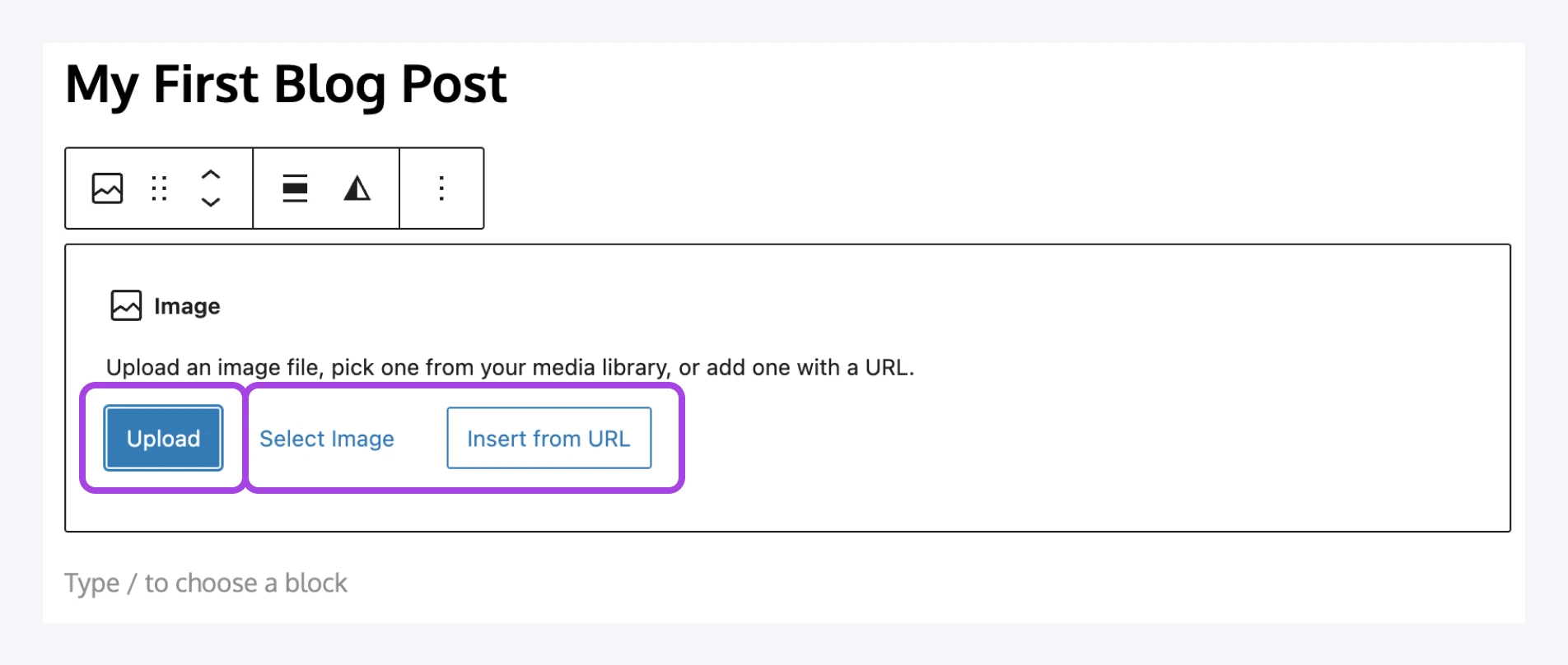
When you’ve completed your post, you can add the finishing touches. Consider assigning it one or more categories and tags. These help you organize each post based on its type and topic.
Finally, you can set a featured image for the post. The format of this image depends on your theme, but it’s usually featured on your blog’s homepage and at the top of the post. Select your headline and use the Featured Image option in the sidebar to choose a file:
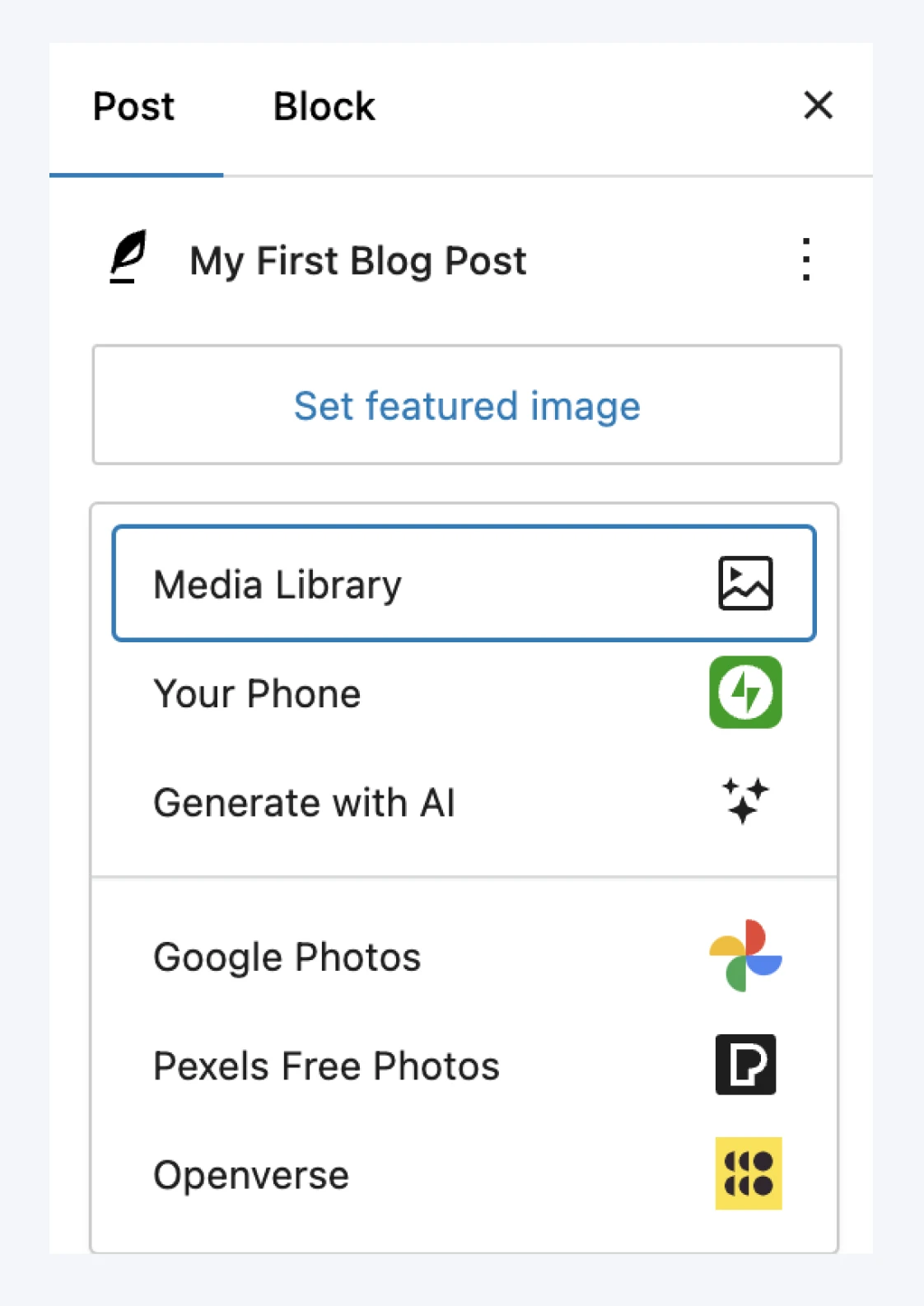
Salut, dear friend! Your brand new blog post is ready to fly the coop. Go ahead and click on the Publish button in the top-right corner to make it go live:
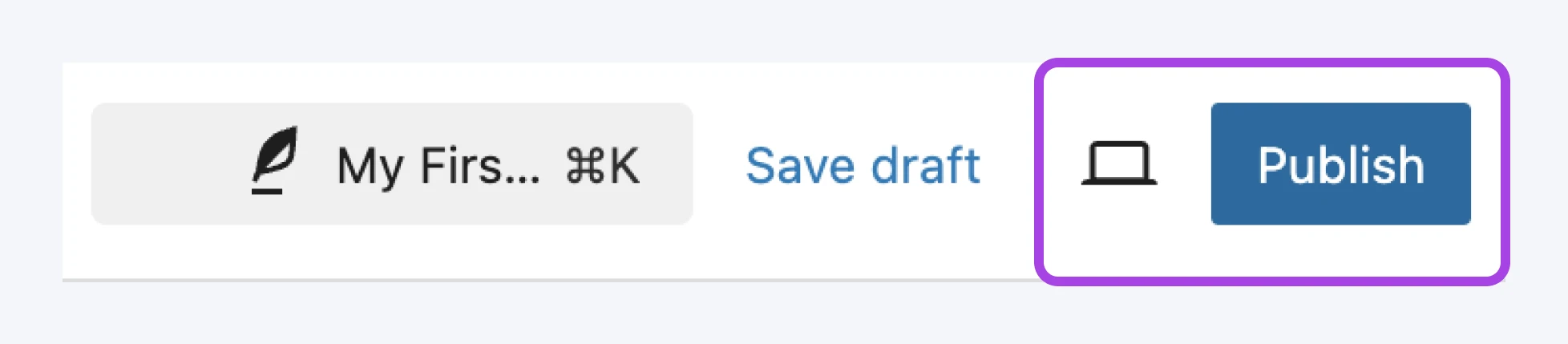
If you’d like to change how and when the post appears on your site, you can opt to delay its publication. You can also select the post visibility, which determines who can see it, or you can simply save it as a draft if you want to continue working on it later.
11. Promote your blog
You’ve designed your blog and created stellar content. Now, it’s time to shout it from the rooftops. You’re ready to start making money from your blog.
- Share your posts on social media: This helps you gain more exposure while encouraging those in your network to share your content with their own followers.
- Make your posts easy to share right from your website: One way to do this is by adding social media buttons to your posts, which you can do using the Jetpack plugin:
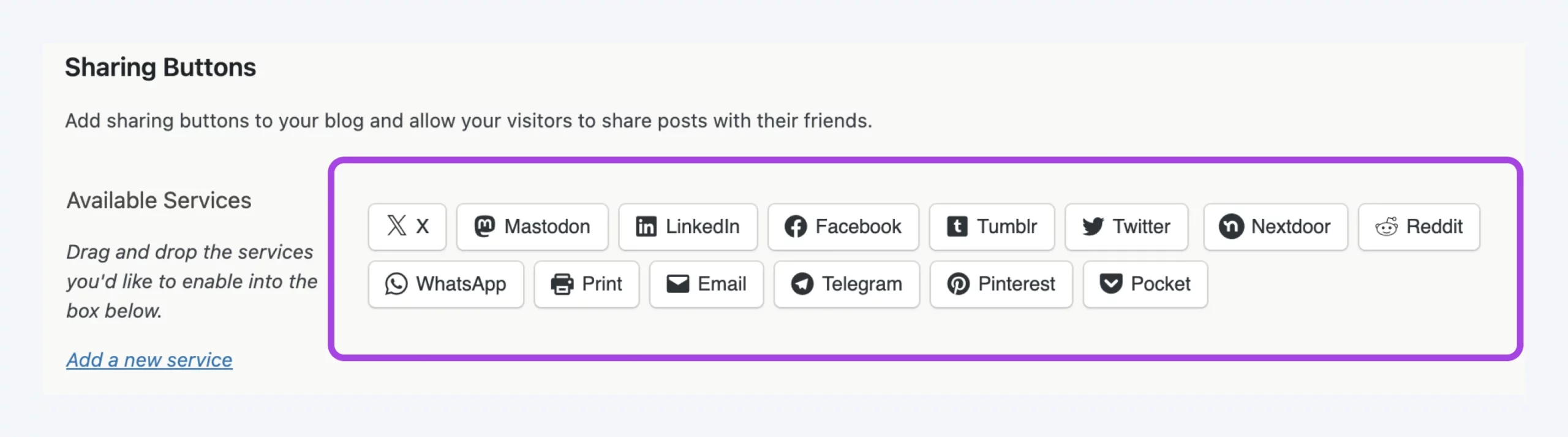
The plugin allows you to add social media sharing buttons to your posts and integrate with the most popular platforms. Jetpack also lets you automatically share your posts on social media.
- Share your blog posts in relevant forums or groups: This can help you generate more traffic and engagement.
- Partner with other websites in your niche: If you have the opportunity to guest blog on another site, you can promote your blog posts there as well, which can help you reach a new audience.
Bonus: monetize your blog
Once your blog has steady readers, you can start turning that attention into income. On average, bloggers make around $45,000 a year, per Ryan Robinson’s blogger income guide (updated June 2026) — though most earn little in their first few months. Here are the four main methods, roughly in the order they become realistic:
- Affiliate marketing: Recommend products you actually use and earn a commission when readers buy. It works even with modest traffic, which makes it the classic first monetization method. Start with our beginner’s guide to affiliate marketing.
- Display ads: Ad networks pay per impression or click. Easy to set up, but the checks stay small until your traffic is meaningful — treat ads as a later addition, not a launch strategy.
- Sponsored posts: Brands pay to reach your audience. Realistic once you have an engaged niche readership you can show them — a simple media kit helps.
- Digital products and services: Ebooks, courses, templates, or freelance work sold to your readers. The highest margins of the bunch, and a small, loyal audience is enough to start.
Your blogging journey FAQs
Can I start a blog for free?
Yes — platforms like Blogger, Medium, and Substack let you publish for free, but your blog lives on their platform, under their branding and monetization rules. A self-hosted WordPress blog costs a few dollars a month in web hosting, but it gives you control of your domain, content, design, and monetization. Pair it with an email list if you want a direct, portable relationship with your audience.
What if I can’t decide on a blog name or topic?
Stumped on a blog name or niche? No problem! Dive in headfirst. Often, clarity comes from action, not endless planning. Choosing a focused niche can boost your earning potential, but you can blog about anything. So, pick a topic, start writing, and let your blog grow as you do.
Is it possible to start a blog without any technical knowledge?
Today, anyone can create a blog. And by anyone, we mean even your five-year-old nephew. You don’t need to be an expert at coding or design. You can set up your blog easily with user-friendly platforms and comprehensive guides like this one.
Do I need to be a good writer or an expert to start a blog?
No. A conversational voice and genuine interest in your topic matter more than credentials or polished prose. The eco-thrifting blogger from our Step 5 example doesn’t need a fashion degree; she needs opinions about $4 jackets. Your writing sharpens with every post, so start where you are.
Can you still make money blogging?
Yes! You can still make money as a blogger. Some people make a full-time living from it. So, how can you monetize a blog? Some generate their income through ads, affiliate marketing, and selling products, earning an average of $45,000 a year, per Ryan Robinson’s income guide (updated June 2026).
From sponsored content to creating and selling online courses or digital products, you can further monetize your blog, including launching a podcast to diversify your income stream.
How long does it take for a new blog to get traffic?
Expect months, not weeks. Most bloggers earn little in their first few months, per Ryan Robinson’s blogger income guide (updated June 2026), and growth compounds from there. And don’t lean on search alone: build an email list and show up in your niche’s communities — an audience you own outlasts any algorithm, including AI search summaries.
Worried AI makes blogging pointless? Content strategist Joe Pulizzi argues the opposite in Orbit Media’s 2025 blogger survey: “Those people who decide to drop blogging because of AI will be making a poor strategic decision… blogging could be the trojan horse for getting found in AI results.”
Start a WordPress blog today
Your new blog is just a few clicks away from becoming a reality. Let your inner writer out, share your passions, and start building your online space. Remember that every great blog started with just one post.
Ready to start a WordPress blog? We recommend checking out our DreamHost WordPress hosting plans. They’re affordable options for first-time bloggers. If you want something more powerful, take a look at DreamPress: our managed WordPress hosting service.
Your blogging journey begins today.

Build the Website You’ve Always Wanted
From first idea to full launch, get everything you need to succeed online.
See More