
There’s never been a better time to run an e-commerce store or create an online business.
E-commerce keeps growing faster than retail as a whole. In the first quarter of 2026, online sales grew 9.8% year over year — about two and a half times the pace of total retail — and accounted for 16.9% of all U.S. retail sales, per the U.S. Census Bureau.
That means there’s a lot to gain by getting into online sales. However, e-commerce sales and marketing can be confusing, especially if you’ve never sold anything online (besides your old sofa).
You don’t have to figure it all out alone, though. There are lots of great solutions to help you get an online boutique up and running in no time. To set yourself up for success, spend some time learning about your options and choose an e-commerce tool that’s flexible and feature-rich yet easy to scale with your growing business.
To help you get there, we’ll explore Shopify and WooCommerce, two of the most popular e-commerce solutions. We’ll talk you through the basics of running an e-commerce website, where each platform shines and where it falls short, compare their features, and see how they stack up against each other.
The short version: WooCommerce and Shopify are the two most widely used ways to build an online store. WooCommerce is a free, open-source plugin that turns a WordPress site into a fully owned store, while Shopify is a hosted subscription platform that bundles hosting, checkout, and support. The trade-off is how much control a store owner wants versus how much convenience they’ll pay for. (Jump to the seven-factor comparison.)
Let’s jump right in!
Why You Should Consider Running An E-Commerce Website
An e-commerce website is any site that sells products and services — in other words, an online store. It could be a retail giant, a self-hosted platform selling handcrafts, or part of a larger website, like the stock photo repositories included in many online photography portfolios.
There are some stand-out benefits to running an e-commerce store:
- Online stores have low overhead costs because you don’t have to pay for a physical location.
- You can reach a wider audience and make more sales because you’re not limited to only serving customers who can visit your store in person.
- Your online store is open for business 24/7, further expanding its reach and potential to attract visitors.
- You can develop a passive income stream by automating sales and fulfillment. Earn money while you sleep!
There’s certainly some upfront work involved in creating an e-commerce store and an ongoing effort to run it. However, the potential returns make the investment worthwhile. If you decide that building an online store is right for you, the first step is to decide how to host your online store and what platform it will run on.
Why Quality Web Hosting Is Vital To Your E-commerce Website
Unless you have your own personal server, you will need a hosting provider for your e-commerce site. A web host connects your site to the internet, making it available to visitors. Without a hosting service, your site lives only on your computer.
Your choice of hosting provider will affect the performance and functionality of your self-hosted platform and directly impact your customers’ experience.
When looking for a web host for your e-commerce site, look for the following criteria:
- Performance: Your host affects your store’s speed and reliability, which can greatly impact your bottom line.
- Uptime: A broken site can result in lost sales. Choose a hosting provider who ensures your site experiences little or no downtime.
- Security: Ensuring the safety of your customers’ personal data is non-negotiable, so your web host should have an excellent reputation for security.
- Support: When you’re running an online store, you need to know you can get customer service when you need it.
While not impossible, changing hosts after you’ve established your online store can be challenging, so spend a little time understanding which hosting solution is right for you.
For e-commerce sites, DreamHost offers dedicated online store hosting — WooCommerce for full control, or Ecwid if you want a simpler start — built around performance, uptime, security, and support.
What To Look for In An E-Commerce Platform
Your e-commerce platform shapes your store’s performance and functionality just as much as your web host does — so it’s worth choosing carefully.
There’s a wide range of e-commerce platforms at all price points and levels of complexity. As you’re sorting through the options, consider these seven criteria:
- Features: It’s possible to add features to your store, but your job will be easier if your chosen solution has everything you need out of the box.
- Security: Ensure the platform meets security requirements and standards to protect customer information and privacy.
- Flexibility: Look for an e-commerce platform that is flexible enough to meet your online store’s evolving needs.
- Scalability: The solution should be scalable to meet your store’s expanding needs as your business grows.
- Search engine optimization (SEO): An online store that’s well-optimized for search engines will attract more visitors and drive more sales.
- Customer support: Customer support is crucial for your e-commerce business. Does the platform offer 24/7 live support? What do existing customers say about the platform’s ability to resolve issues in a timely manner?
- AI features: Platforms now ship AI for everything from writing product descriptions to answering shopper questions. Check what’s built in — and what costs extra.
SEO
Search Engine Optimization (SEO) is the practice of improving a site’s ranking in search results. Search results are aggregated based on a number of factors, including a site’s relevance and quality. Optimizing your site for these factors can help boost your rankings.
Let’s take a closer look at how WooCommerce and Shopify meet these criteria.
WooCommerce Vs. Shopify: An Introduction
WooCommerce and Shopify distinguish themselves in the e-commerce space through their widespread use, adaptability, and comprehensive features. We’ll explore each platform before comparing them across seven key criteria to identify their strengths.
WooCommerce
WooCommerce is a plugin for WordPress, the world’s most-used content management system. WordPress powers 41.5% of all websites, per W3Techs (2026), which also finds that about one in five WordPress sites runs WooCommerce — more than 4 million online stores in total, per Store Leads (2026).
Which is a lot.
Plugin
WordPress plugins are add-ons that enable you to extend the Content Management System’s (CMS) functionality. You can use plugins for almost everything, from adding e-commerce features to WordPress to implementing page builders or using Search Engine Optimization (SEO) tools.
WordPress is a great solution for building a website. Its free open-source platform is powerful and flexible and provides access to a plethora of free themes and plugins. So how do you turn WordPress into a store?
That’s where WooCommerce comes in.
Adding WooCommerce to your WordPress website allows you to take advantage of this easy-to-use, customizable e-commerce platform. Setting up a store with WooCommerce is simple, as is dealing with payment, shipping, and other common tasks. There’s a huge library of WooCommerce extensions for users who need more options.
Related: Ready, Set, Sell! A Comprehensive Introduction To WooCommerce
Shopify

Shopify is a comprehensive e-commerce platform that contains most of what you’ll need to set up an online store in one simple package. It’s beginner-friendly and enables you to build and customize your store, list your products, and attract customers quickly. Shopify handles multiple types of payments, fulfills orders, and tracks key performance metrics so you can see how well your store is performing.
They also offer monthly subscription plans for different-sized businesses.
WooCommerce Vs. Shopify Comparison: 7 Key Factors
In case it isn’t clear yet, we’ll shout it on the internet — Shopify and WooCommerce both have a lot to offer. They’re beginner-friendly solutions that provide all the basics you need to set up your online store, and they have an awesome range of nifty features.
But the question remains: which one should you use for your website?
To help you make that call, let’s compare these platforms using the seven criteria we introduced earlier.
1. Features
Without access to the necessary features, your store may not meet your expectations in functionality, appearance, or performance. We’ll examine the core offerings of both platforms, as well as the advanced features available through premium plans or extensions.
WooCommerce Features:
- The ability to sell services, physical goods, and digital products.
- Customizable storefront with the option to create individual product pages and display variations.
- Inventory tracking and management.
- Customizable shopping cart and checkout process, multiple payment methods, and various third-party payment processors.
- Multiple shipping methods and zones.
- Functionality to handle product reviews, discount codes, and coupons.
- A mobile-friendly and translation-ready platform.
- Analytics features to track your traffic, earnings, and performance metrics.
Since WooCommerce runs on WordPress, you can add just about any feature to your store by using WooCommerce themes and WordPress plugins. There is also a store full of extensions that add payment options, shipping options, social media integration, and more.
Shopify Basic Plan Features:
- Hundreds of themes you can use to customize your store.
- Payment gateway options, a secured shopping cart, and multiple shipping and fulfillment options.
- Support for credit card payments.
- Associated apps that help you run your store from a mobile device.
- A dashboard where you can analyze key data about your sales and customers.
- Social media integration options.
- Space for unlimited products.
- Ways to incorporate product reviews, discount codes, and coupons.
Higher-tier plans add perks like lower card-processing rates, more staff accounts, and deeper analytics with custom reporting. Shopify also has an app store where you can download add-ons that provide functionality such as third-party payment gateways, social media, shipping, and accounting.
When it comes to robust features, both Shopify and WooCommerce shine. Each e-commerce platform includes everything you’ll need and comes with ways to add additional features easily. However, we have to give the slight edge to WooCommerce simply because, as an open-source platform, it gives you access to thousands of additional plugins to improve the performance and functionality of your store and website.
2. Security
Anyone running an e-commerce site should be concerned with security. After all, you’re handling customer information, including sensitive personal data such as credit card and bank account details. If you want to keep your customers safe and promote trust in your e-commerce site, you’ll need to ensure it’s as secure as possible.
Fortunately, both of these solutions have strong security features. Shopify stores are automatically PCI compliant (the payment-card industry’s security standard). This means your customers can trust their credit card information is kept secure. (You can even display a security badge on your store to let customers know their data is safe.) Shopify also lets you control user access to your site and monitor your store for vulnerabilities and potential hacks using your dashboard. Finally, all plans include a free TLS certificate — a crucial way to ensure all data flowing through your site is secure.
SSL/TLS
SSL stands for secure sockets layer. SSL is a protocol for maintaining a secure connection and protecting sensitive data to keep internet users safe during online transactions, login sequences, and more. Transport layer security (TLS) is the successor to SSL that’s in place today and handles vulnerabilities even more effectively.
WooCommerce incorporates several vital security features developed with industry-standard coding practices and stringent security protocols to enhance protection. It also lives on WordPress, a very secure platform that’s frequently updated to address the latest security threats and vulnerabilities. Plus, you can stay informed on security threats through the WooCommerce blog posts and community forum and use WP plugins to protect your website from threats.
When considered as a part of the larger WordPress platform, WooCommerce has the potential to be the more secure option. Shopify handles more of the security work for you out of the box, so it’s the safer bet if you don’t intend to take any extra steps. However, there are dozens of easy ways to tighten up the security of your WooCommerce site.
3. Flexibility
We mentioned a few customization options in the features section, but let’s dive a little deeper into each platform’s flexibility. After all, there are a lot of e-commerce stores, and if you want yours to be successful, it will need to stand out from the crowd.
Shopify’s flexibility is mainly seen through its themes. Some come in multiple styles, so you can pick the best version for your store. Once you choose a theme, you can customize it by changing the colors, fonts, and imagery to match your unique branding and vision. Certain themes come with additional customizable options, though because Shopify is a closed platform, most will not enable you to make radical changes to your store.
On the other hand, as a WordPress plugin, WooCommerce benefits from the flexibility offered by both platforms. With WordPress alone, you can customize just about every aspect of your site using themes, plugins, and coding. Plus, there’s a dedicated community that creates new WooCommerce plugins and themes for WooCommerce stores every day.
In short, WooCommerce is the clear winner here. Don’t get us wrong — Shopify is a fairly flexible platform. However, with Shopify, you can only do so much to alter the functionality and appearance of your site. With WooCommerce and WordPress, the sky’s the limit!
4. Scalability
Although your e-commerce site may start small, it will grow over time, so it’s smart to think ahead. That’s why you’ll want to choose a scalable e-commerce solution. In other words, the e-commerce platform should handle your store’s needs, no matter how small it starts or how big it gets.
Shopify fits the bill in this area. Each pricing plan has room for unlimited products and file storage. Higher-tier (and more expensive) plans offer extra useful features for larger stores with more complex needs. As your store grows over time, you can upgrade to get exactly the features you need.
The core WooCommerce platform is already scalable, enabling you to create just about any size and type of store (and site). However, the real magic is in WooCommerce extensions and plugins. You can easily add advanced functionality for payments, shipping, analytics, and more by downloading and installing the right extension or plugin.
Both platforms are nearly tied in this area. Shopify is somewhat more scalable, but that benefit comes with the cost of a higher pricing tier. In contrast, WooCommerce is impressively scalable, considering the core solution is free, and many of the plugins and extensions you’ll need are free or affordable.
5. Search Engine Optimization (SEO)
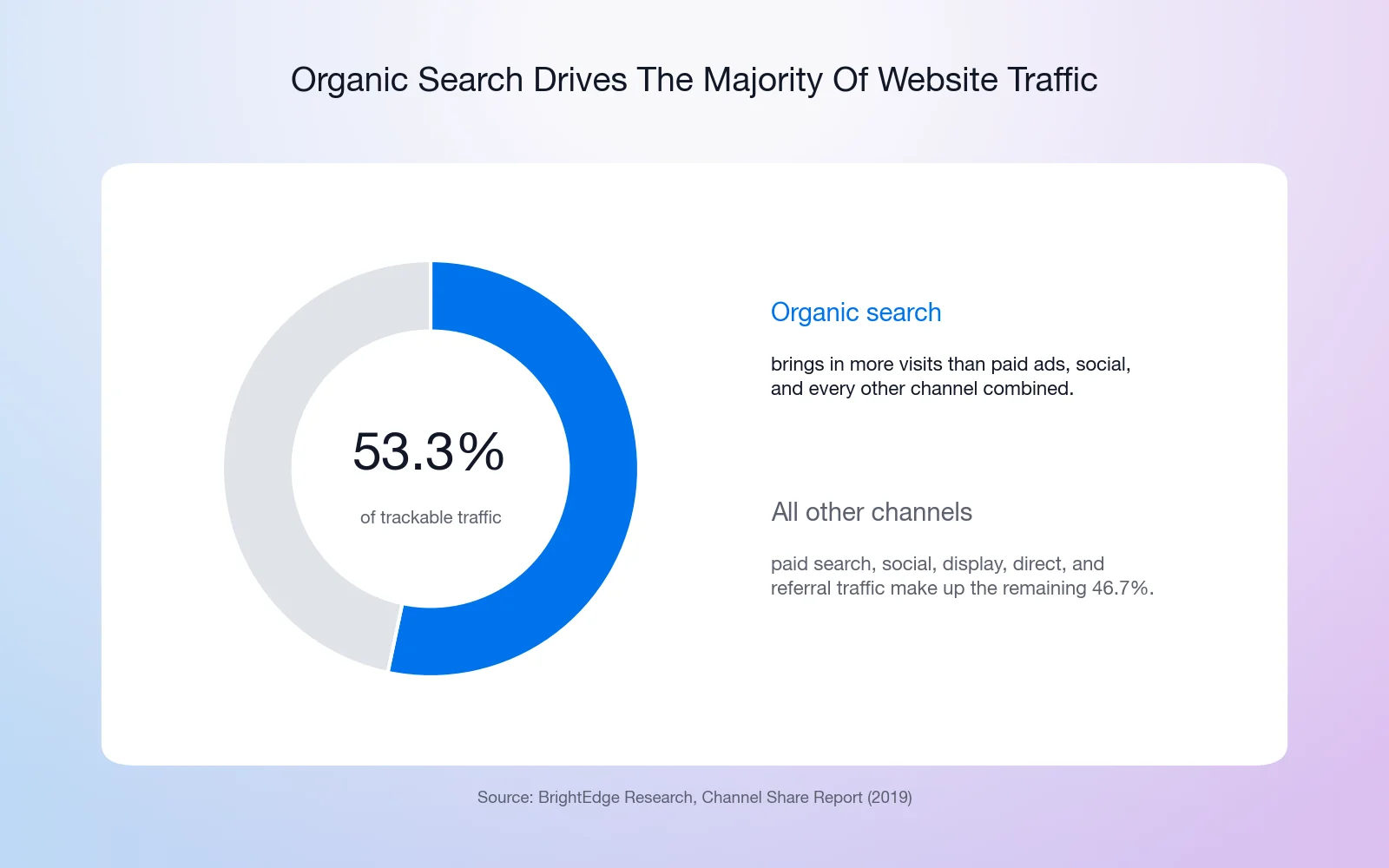
SEO is a collection of strategies to help your website rank higher in search engines like Google. Organic search remains the biggest single source of site traffic — 53.3% of trackable visits, per BrightEdge Research’s channel study (2019, still the most comprehensive figure available). One 2026 caveat: AI search summaries are shrinking how many searches become clicks — Pew Research Center (2025) found users click a traditional result in just 8% of searches with an AI summary, versus 15% without — which makes strong store SEO even more valuable for the clicks that remain.
Shopify offers several resources to help your store rank well in search. It automatically generates a sitemap and lets you customize title tags, meta descriptions, URLs, alt tags, and filenames. It’s all meant to help you get your store to that coveted #1 spot on Google.
WooCommerce is built using code optimized for SEO and also offers SEO resources to help customers optimize their websites. It also lets you use powerful WordPress SEO plugins like Yoast SEO to provide extra SEO mojo to your store.
Which e-commerce platform is best for your store’s SEO depends on how much customization you want to do. If your approach is “Set it and forget it,” Shopify offers a solid SEO feature set. On the other hand, if you want to tweak every aspect of your site’s SEO, WooCommerce and WordPress give you the best potential SEO boost.
6. Customer Support
Whether you’ve run an e-commerce store before or not, at some point, you’re going to need a hand. When you’ve got an important question, a problem you aren’t sure how to fix, or your site just crashed and it’s 3:00 a.m. — you need help, and you need it now!
Shopify provides several levels of customer support. There’s a comprehensive help center where you can find everything from tutorials to troubleshooting guides and 24/7 support via live chat on every plan — priority phone support is reserved for its top-tier plans. You can also join the Shopify community to get support from other shoppers, join discussion groups, and access additional support and learning options.
WooCommerce offers many self-serve support options, including detailed product documentation, user communities on GitHub, and an online troubleshooting guide. Paid subscribers can also submit trouble tickets to the WooCommerce developers. If you can’t solve the trouble yourself, you can also get (paid) support from third-party WooCommerce experts.
For this criterion, we have to give the edge to Shopify’s comprehensive support network and access to 24/7 live support. WooCommerce has a large user community and public support resources, but you’ll have to incur additional costs for live support.
7. AI Features
AI has become a genuine differentiator between these two platforms — and the clearest example of their different philosophies.
Shopify builds AI directly into the product. Sidekick, its AI commerce assistant, is built into every store and can draft content, analyze your sales, and handle store tasks from a chat box. Shopify’s plans also lean into AI-driven selling — the company now pitches the ability to sell inside AI chat apps as a standard feature.
WooCommerce takes the same ecosystem approach it takes with everything else. There’s no single first-party assistant; instead, the WordPress plugin world supplies AI tools for product descriptions, chat, personalization, and search, and recent WordPress core releases have been laying the groundwork for plugins to expose their features to AI agents. You choose the AI you want — and you’re never locked into one vendor’s model.
If you want AI that works out of the box, Shopify has the edge. If you’d rather pick your own tools (or skip AI features you don’t need), WooCommerce’s open ecosystem leaves the choice with you.
The Takeaway
Building an e-commerce site is like most things in life — the more effort you put in, the better your results will be. Doing a little upfront research and planning will help you build a thriving online store and attract and retain customers. And if you want to start your store off on the right foot, you need to build it with the best possible tools.
In this post, we’ve covered Shopify and WooCommerce. Both are excellent e-commerce platforms, with plenty to recommend them:
Shopify In A Nutshell
Shopify’s comprehensive solution makes it easy to start an online store. Sure, you’ll have to pay a monthly fee, but that gives access to a well-integrated set of useful features and live customer support. Shopify is flexible and scalable, letting you customize your site to meet your needs and add features as your store grows. It also offers industry-standard security features, powerful built-in SEO functionality, and a built-in AI assistant (Sidekick).
WooCommerce In A Nutshell
Getting started with WooCommerce is a little more complicated. To begin, you need to create a WordPress site and install and configure the WooCommerce platform. Also, while WooCommerce comes with an impressive suite of features, you’ll need to manually find and install the right plugins or extensions to add extra functionality. However, those plugins and extensions also give you access to all the flexibility, scalability, security, SEO, and support options you could need.
In short, these platforms are designed for different types of users. Shopify lets you quickly build a store and then run it without any extra fuss. You can get a functional and reliable store right away with very little effort.
In contrast, WooCommerce requires a bit more customization and technical knowledge. It’s a powerful platform for users willing to spend some time tweaking and perfecting their online stores since it provides access to many more features and add-ons than Shopify.
The ultimate plus for WooCommerce and WordPress? Because they’re both open-source platforms, you can rest assured that you own your online content. Your store lives on your own personal website, so you don’t have to stress about changes to the e-commerce platform or the solution provider losing your data. As a website owner, you’re in complete control — with the exclusive rights to use your content to grow your audience and make more money online.
WooCommerce Vs. Shopify FAQ
Is WooCommerce cheaper than Shopify?
It can be. The WooCommerce plugin is free — you pay for hosting, a domain, and any premium extensions — so a lean store can undercut Shopify’s subscription. Costs converge as you add paid extensions. Shopify’s pricing is more predictable; WooCommerce’s is more controllable.
Which is easier for beginners?
Shopify is faster to launch because hosting, checkout, and support come bundled. WooCommerce takes more setup — WordPress, hosting, then the plugin — but managed WooCommerce hosting closes most of that gap by handling installation, updates, and performance for you.
Which is better for SEO?
Both cover the essentials: sitemaps, editable titles and meta descriptions, and clean URLs. Shopify handles the fundamentals automatically, while WooCommerce offers deeper control through WordPress SEO plugins like Yoast. Hands-off, choose Shopify; maximum control, choose WooCommerce.
Can I switch from Shopify to WooCommerce later?
Yes. Products, customers, and orders can be exported from Shopify and imported into WooCommerce using migration tools or CSV files. Rebuilding your storefront design is the bigger lift — which is why it pays to choose deliberately up front.
How Do You E-Commerce?
What’s been your experience with Shopify or WooCommerce? Do you have a preference?

Ready To Open Your Online Store?
Sell anything, anywhere, anytime with confidence — and let DreamHost power your success.
See Store Hosting