
TL;DR: The WordPress software itself is free and open source — but a working website built on it usually isn’t. You’ll also need hosting, a domain name, and often a premium theme or plugins.
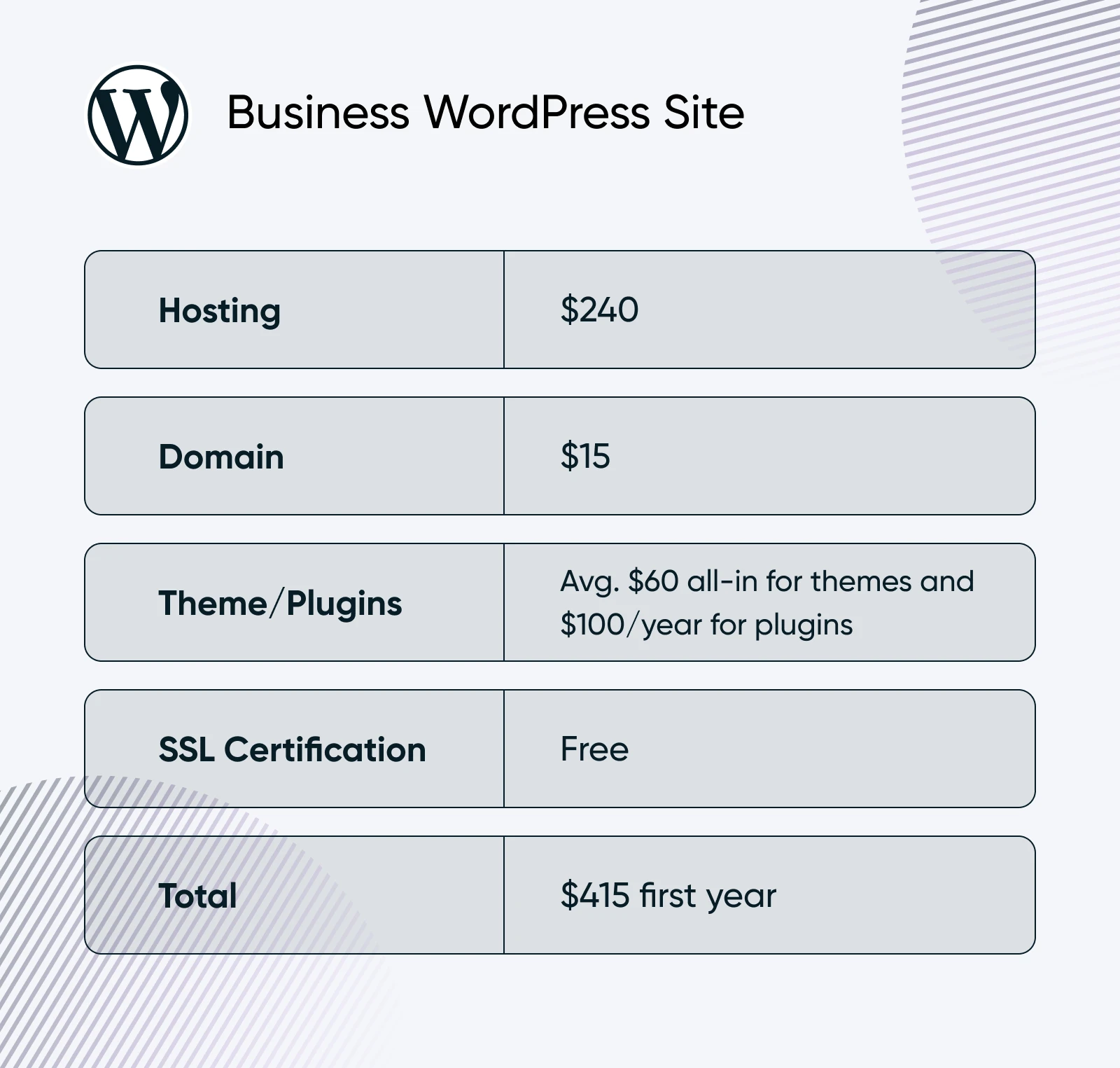
- By our estimates, a typical WordPress business site costs about $415 in the first year: roughly $240 for managed WordPress hosting, $15 for a domain, $20–$100 (one time) for a premium theme, and $0–$200 for plugins.
- An e-commerce site typically runs about $375 the first year, and a fully custom build could cost about $1,945–$10,945 in the first year, then roughly $945 a year before maintenance. A $0 site is possible on WordPress.com’s free plan — with trade-offs like ads, a shared subdomain, and 1 GB of storage.
Imagine you just won a free house.
It’s brand new and paid off — you can quit your job tomorrow!
But wait, you’ll still have to pay the (ever-rising) property taxes.
And the utilities? They’re quadruple what you paid in your apartment.
Of course, you’re still thrilled about the free house, but those dreams of early retirement may need to wait a bit longer.
Working with WordPress is like moving into a house like the one above. It’s free on the surface, but it really can’t operate without several things that very often cost money. To create a fully functional website, you also need a few additional essentials, such as a domain name, a hosting plan, and a theme.
So, how much does it cost to build a site with WordPress? That depends on several factors.
The AI website builder that turns conversation into designer-level sites. Free with hosting.
Start Free Trial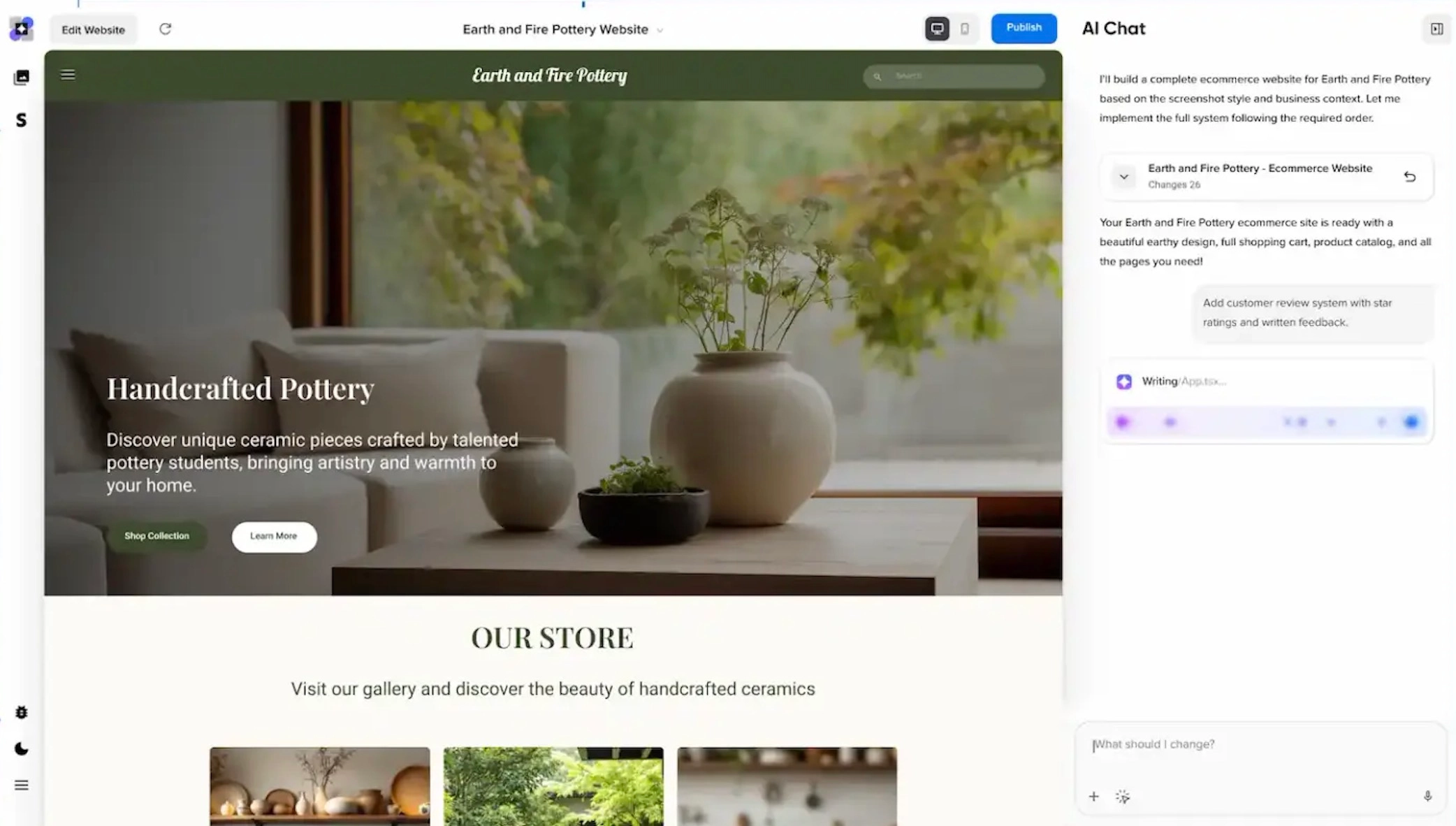
Renewal rates and add-on fees can change the long-term total, so compare them before you buy.
Not us.
Join us as we break down the moving parts and sample costs of building and operating several types of WordPress websites.
Let’s talk money, honey!
What Is WordPress? (And Why Are We Focusing on It?)
WordPress is an open-source (AKA, publicly accessible and editable) platform that lets you easily create and manage websites, whether you’re building a simple blog, a portfolio, an e-commerce store, or a complex business site.
WordPress runs 40.7% of all websites — and 58.9% of the sites whose content management system is known — according to W3Techs (August 2026). That makes WordPress the most widely used content management system (CMS) on the web, and it’s why we’ve honed in on it for this article.
One of the best things about WordPress is that it’s deeply customizable, thanks to an extensive range of themes and plugins. From tech-savvy business founders to beginner-level side-hustlers, WordPress provides a variety of tools and resources to create a professional and functional website.
Is WordPress.com or WordPress.org Actually Free?
Here’s the short answer: the WordPress software from WordPress.org is completely free to download and use. The costs come from everything a live website needs around it — hosting, a domain, and any premium themes or plugins. WordPress.com, meanwhile, has a genuinely free plan, but it comes with real limits.
WordPress.org is the *technically* fully-free option. It’s self-hosted, which lets you build your website with WordPress software while managing your site yourself. The platform itself is free to access and use, but you’ll very likely need to shell out something to cover hosting, at least.
WordPress.com, on the other hand, is a hosted service that handles the technical side for you. It’s free to get started, but lifting the free plan’s limits on customization, features, and storage will cost you.
Generally speaking, if you prefer a simpler, fully-managed approach for a personal or (very) small website, WordPress.com can work. However, for greater flexibility and control — which you’ll likely want if your website generates income — WordPress.org is the way to go.
| WordPress.org Site | WordPress.com Site | |
| Cost | $0 plus hosting fees | Free plan, plus paid tiers (Personal through Commerce). A custom domain and more storage require a paid plan. |
| Open Source | Yes | Hosted service built on the open-source WordPress software |
| Customization | Infinitely customizable | Limited on the free plan; expands with paid tiers |
| Plugins | Install anything — 70,000+ free plugins, plus premium ones | Plugin installs come with paid plans |
| E-Commerce | Unlimited control over your store | E-commerce features vary by plan; check WordPress.com’s current plan comparison |
| Customer Support | WordPress offers community forums and guidelines. Your hosting provider may also offer support. | Community forum support on the free plan; support from staff on paid plans |
| Website Maintenance | You maintain your site and security | Managed by WordPress.com |
Deep Dive: Cost of a WordPress Business Site (~$415 First Year)

First, it’s important to remember that there’s no one way to build a WordPress website.
You can make a site completely for free, or you can spend tens of thousands of dollars. It all comes down to your preferences and what you want to spend.
What you need to know is what you’re actually going to spend to get a professional-looking website. One that won’t embarrass you, blow your budget halfway through, or hit you with surprise fees six months after it’s up and running!
So let’s get right into it. Here are realistic annual budgets — our estimates, with no promotional tricks — to set up and manage a WordPress site for your business.
Managed WordPress Hosting: ~$240 per Year
To build a website with WordPress.org, you’ll need to provide your own host, which is the company that stores your website files so that they can be accessed via the internet.
The cost of web hosting varies depending on the type and provider you choose. The key types of web hosting include entry-level web hosting, VPS, dedicated, and managed. For a business website, we recommend managed WordPress hosting, which not only buys you server space for your website, but also includes WordPress-focused services that make site management simpler and safer.
With DreamPress, DreamHost’s managed WordPress hosting, that means WordPress comes pre-installed, backups run daily and are stored offsite, bandwidth is unmetered, staging takes one click, a content delivery network (Bunny CDN) is included, migration from your old host is handled free by our experts, and 24/7 support comes from actual WordPress specialists.
For this breakdown, we budget $20 a month — $240 a year — for managed WordPress hosting. If that’s more than your project needs, entry-level DreamHost web hosting costs considerably less and still includes daily backups, unmetered bandwidth, and unlimited free SSL certificates.
Remember that your WordPress hosting provider is your site’s partner, so review your options carefully and choose the best (and ideally WordPress-focused!) hosting platform for your business needs.
Domain: ~$15 per Year
Your domain name is your website’s address on the internet. For example, ours is www.dreamhost.com.
Domain Name
Domain names are like an address for the internet, making it easier to find websites without having to remember a complex string of numbers. They’re also helpful in distinguishing one website from another because each domain name must be unique.
Your domain is the first impression visitors get of your site, so choosing a good one is crucial!
Domain names can be very affordable, which is why we budget about $15 a year here. That said, prices vary widely depending on the popularity of the name and the domain extension (.com, .net, .org, etc.), and registrars often discount the first year — so always check the renewal rate, because that’s what you’ll pay long term. You can see current registration and renewal rates by extension on our domain pricing page.
One more money-saver: DreamHost hosting plans on 1-year or multi-year terms include a free domain for the first year. Otherwise, our domain name search tool can give you an idea of what you could spend on different domain names.
WordPress Theme: ~$20–$100 (One Time)
A WordPress theme is a set of files that acts as a pre-designed template for your site, giving businesses a helpful starting point when it comes to style and layout.
Unless you’re a very specialized business requiring a custom site from scratch (typically more expensive than starting with a theme), you’re gonna need a WordPress theme.
Your theme will catch visitors’ eyes when they first land on your site, and it will (hopefully) make your website stand out and be easy to navigate.
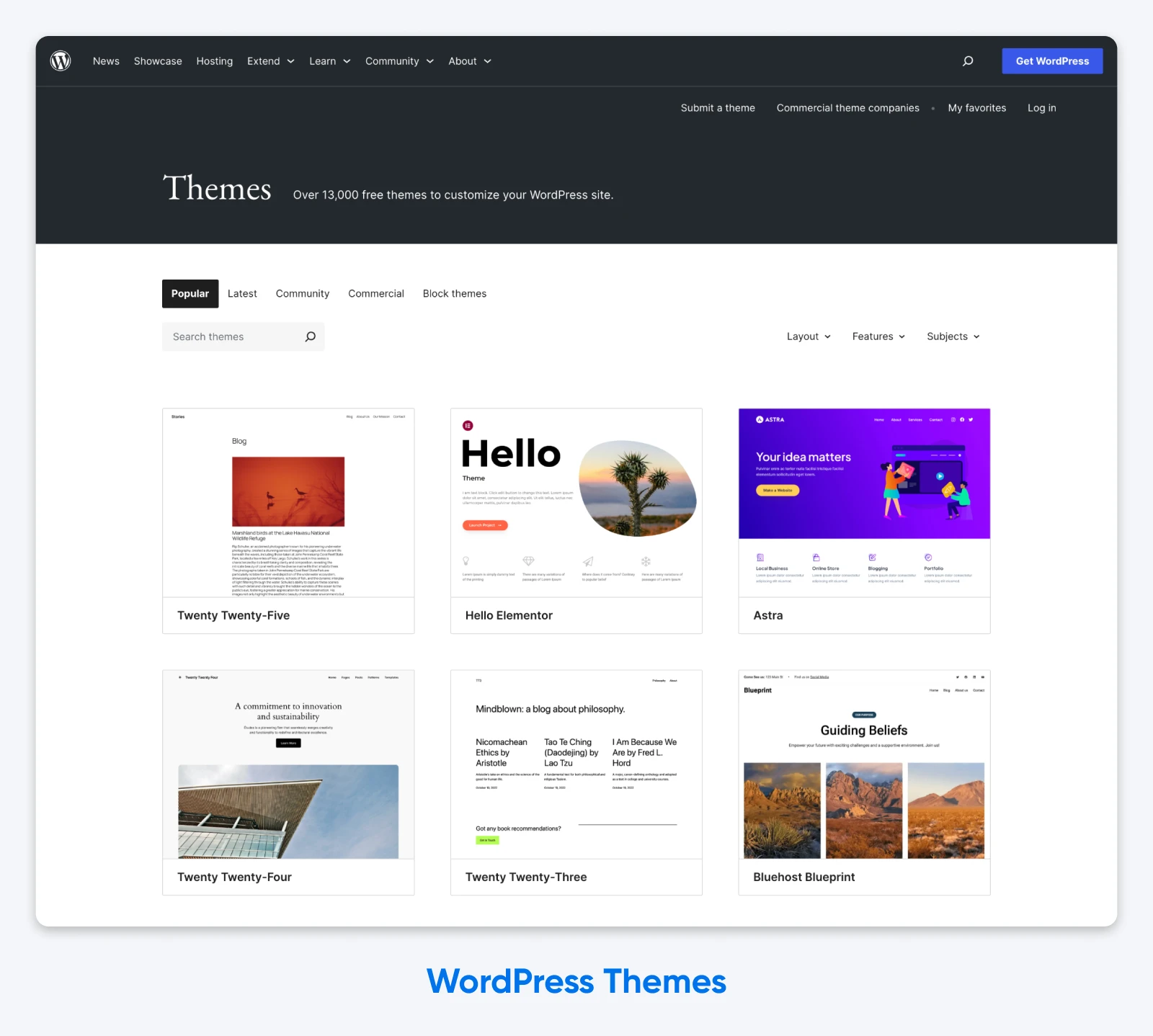
Obviously, you want the best WordPress theme possible, right? Luckily, even top-of-the-line themes don’t have to break the bank. Themes from the WordPress.org theme directory are free, and the popular ones are well-maintained. Then, there are tons of impressive themes for sale on the internet (Envato is a huge marketplace, for example) that you can choose based on features, look, ease of use, and price.
Considering the huge range of themes available, it’s hard to nail down an average cost. In our experience, they can range from a one-time fee of $20 to $100. As subscription pricing becomes more popular, we expect more themes to shift from one-time purchases to recurring fees, which may cost you a bit more in the long run.
We recommend finding reviews for any themes you like, checking out as many samples as you can, and reading up on important info such as support and security details before making your final purchase.
WordPress Plugins: ~$0–$200 a Year
Plugins can be installed on WordPress sites to extend their functionality and features, allowing you to do a whole host of things, including adding contact forms, SEO tools, security enhancements, and more.
There are over 70,000 free plugins in the WordPress.org plugin directory, plus tons of premium plugins whose advanced features, in our experience, run from about $50 to $200 yearly. Just like with themes, the options are nearly endless, and what you end up paying is totally up to you based on the capabilities you prioritize.
In fact, there are so many plugins on the market, it can be overwhelming to even know where to start. If you’re feeling the pressure, we put together a list of the best WordPress plugins based on what real site owners are using — enjoy!
SSL Certificate: Free With Many Hosts
A quick jargon-buster: today’s certificates technically use TLS, the protocol that succeeded SSL, but the industry still calls them SSL certificates. Whatever you call them, they’re what encrypts the connection between your site and its visitors, keeping user data safe during a browsing session.
That’s especially important for business sites where visitors share information such as payment or contact details. Without a valid certificate, it’s common for browsers (Chrome, Firefox, etc.) to warn visitors away from your site with an error message.
Naturally, this is a critical element of maintaining a WordPress business website. That’s why many hosting providers include an SSL certificate built into the cost of web hosting — every DreamHost web hosting plan, for example, includes unlimited free SSL certificates.
If your host doesn’t offer SSL certificates, you can purchase one on your own. There is a huge range of pricing based on how much validation and coverage you need: the certificate reseller SSL2BUY lists certificates from $6 to $2,000 per year (as of August 2026).
Bonus: What Are the Prices of Other WordPress Site Types?
Let’s take it one step further.
Come along as we walk through sample price breakdowns for a few more types of WordPress sites, so you’ll be sure to find an option that fits your needs.
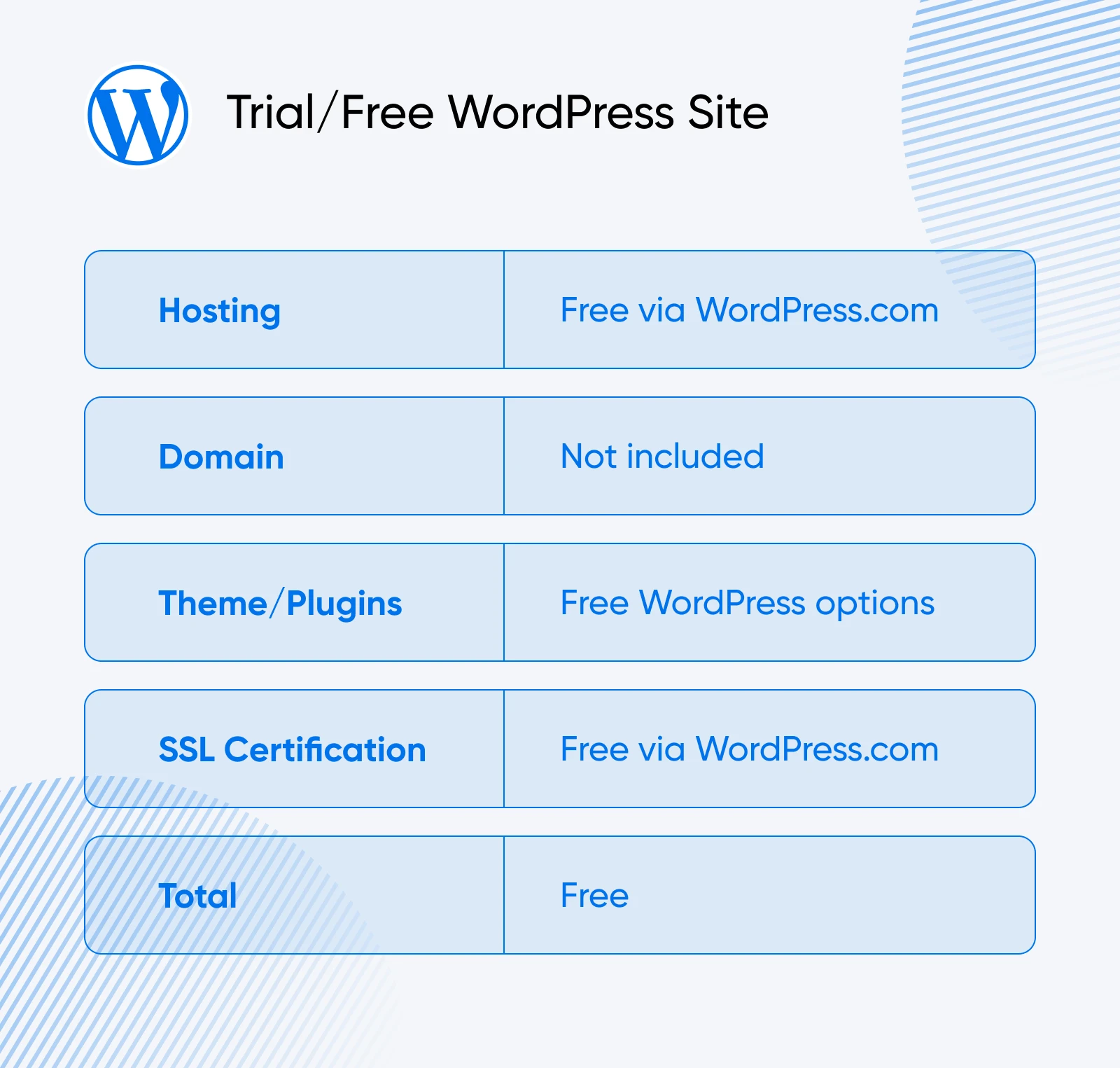
Trial Run/Small WordPress Site: Free
When you just need to get a site up and running for the first time — or to test the waters before you splash out — there’s no price point like free!
As long as you’re not picky about the functionality or look, WordPress.com’s free plan lets you set up a website in minutes for no money down.
This is perfect for the person who wants a personal site, blog, or trial run.
Keep in mind these limitations of the free plan:
- A custom domain name isn’t included, so your URL will end with “.wordpress.com” — custom domains require a paid plan
- Storage is capped at 1 GB, which fills up fast once you add images and media
- Customization is limited to the included themes — plugin installs come with paid plans
- WordPress.com displays ads to your visitors that you can’t remove unless you upgrade to a paid account
As they say, there’s no such thing as a free lunch. That said, if you’re willing to go with the flow and don’t mind the limitations, a free site might be just what you’re looking for.
Best for: Those with simple needs, who can manage with limited functionality and customization.
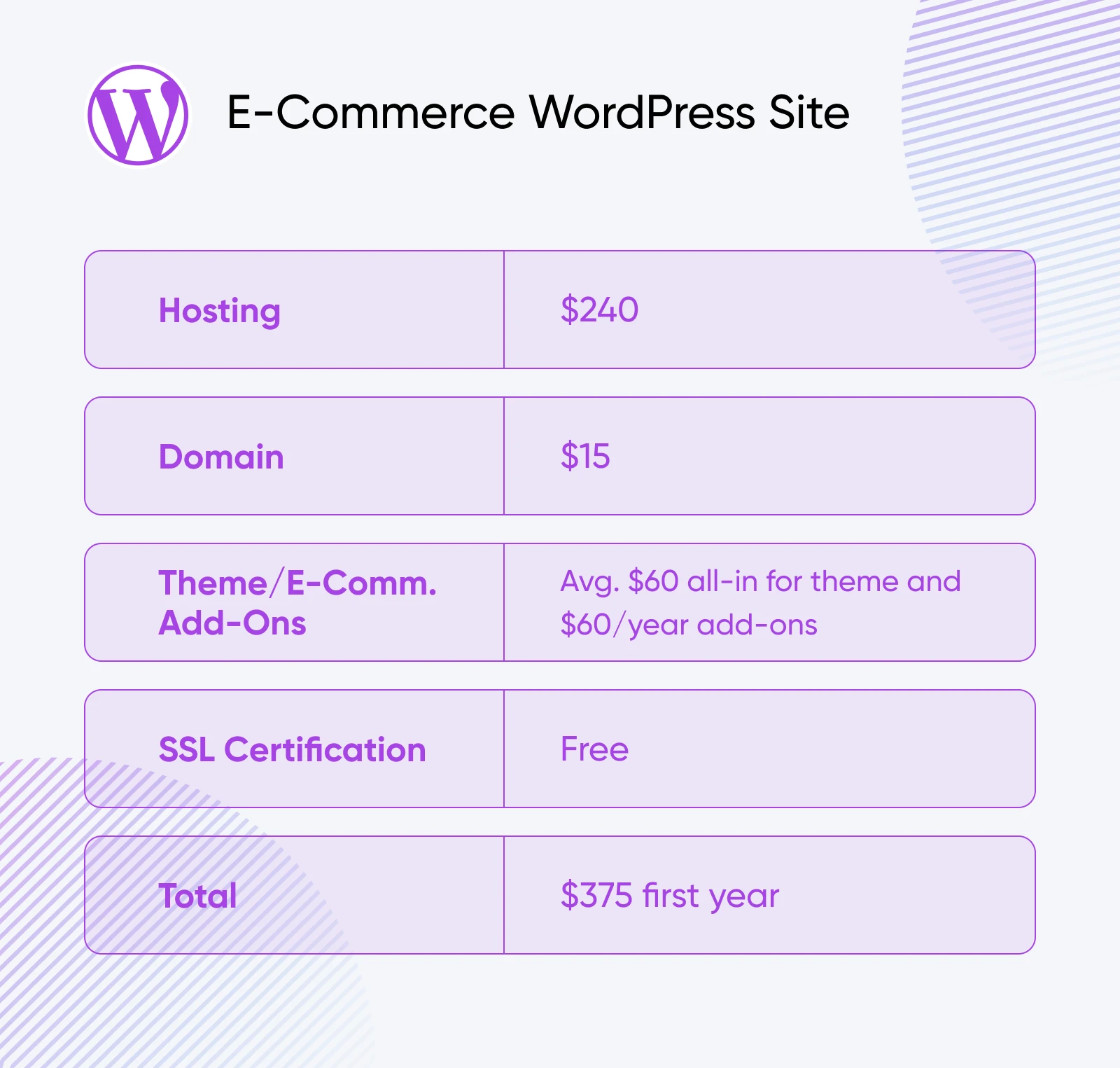
E-Commerce WordPress Site: ~$375 for the First Year
If you run an online store, your WordPress website will need e-commerce features. That means it’s time to upgrade from the free offerings.
Two options for adding these features are Ecwid and WooCommerce.
Ecwid is an independent tool that you can add to your site, while WooCommerce is already a WordPress plugin.
Pricing will depend on which of these you choose, among other things. Let’s dig into the deets.
WordPress E-Commerce Hosting: ~$240 Each Year
Just like for most small to medium-sized business owners, we recommend that those in the e-commerce game invest in managed WordPress hosting for the support, security, uptime, and other capabilities you need to keep customers comin’ back for more. We’ll estimate $20 a month, or $240 a year, for this worthwhile expense. (One sizing note: Ecwid runs well on entry-level web hosting, while WooCommerce is hungrier — it typically needs a premium plan like DreamPress.)
Domain: ~$15 per Year
As we mentioned, we budget about $15 a year for a domain — and if your registrar discounts the first year, check what renewal will cost before you commit.
WordPress Theme & E-Commerce Add-Ons: ~$60 One-Time + $60 per Year
When it comes to running an e-commerce website on WordPress, it’s often worth upgrading your theme. Not only will your store look more professional, but it may also function better and could be easier to customize.
Plus, many premium e-commerce themes come with pre-installed plugins that are useful for online stores and ready to accept digital payments, reducing the cost and effort on your end.
WooCommerce is a free plugin with hundreds of optional free and paid extensions, and Ecwid’s plans range from $5/month (Starter) to $149/month (Unlimited) when billed monthly, with a 16% discount for annual billing (as of August 2026).
Just like with the basic business site, we predict a theme should cost you between $20–$100, one time. We’ll skip the plugin costs, assuming your payment platform of choice will have all the features you need for a while. If you start with the basics — free WooCommerce, or Ecwid’s $5-a-month Starter plan — you could spend just $60 a year on e-commerce add-ons. Nice!
SSL Certification: Free
Many hosting packages come with a free pre-installed SSL certificate, so your customers can make their online purchases with confidence that their sensitive data will stay safe and secure.
Best for: Online sellers who need reliable and secure e-commerce functionality, with room to expand.
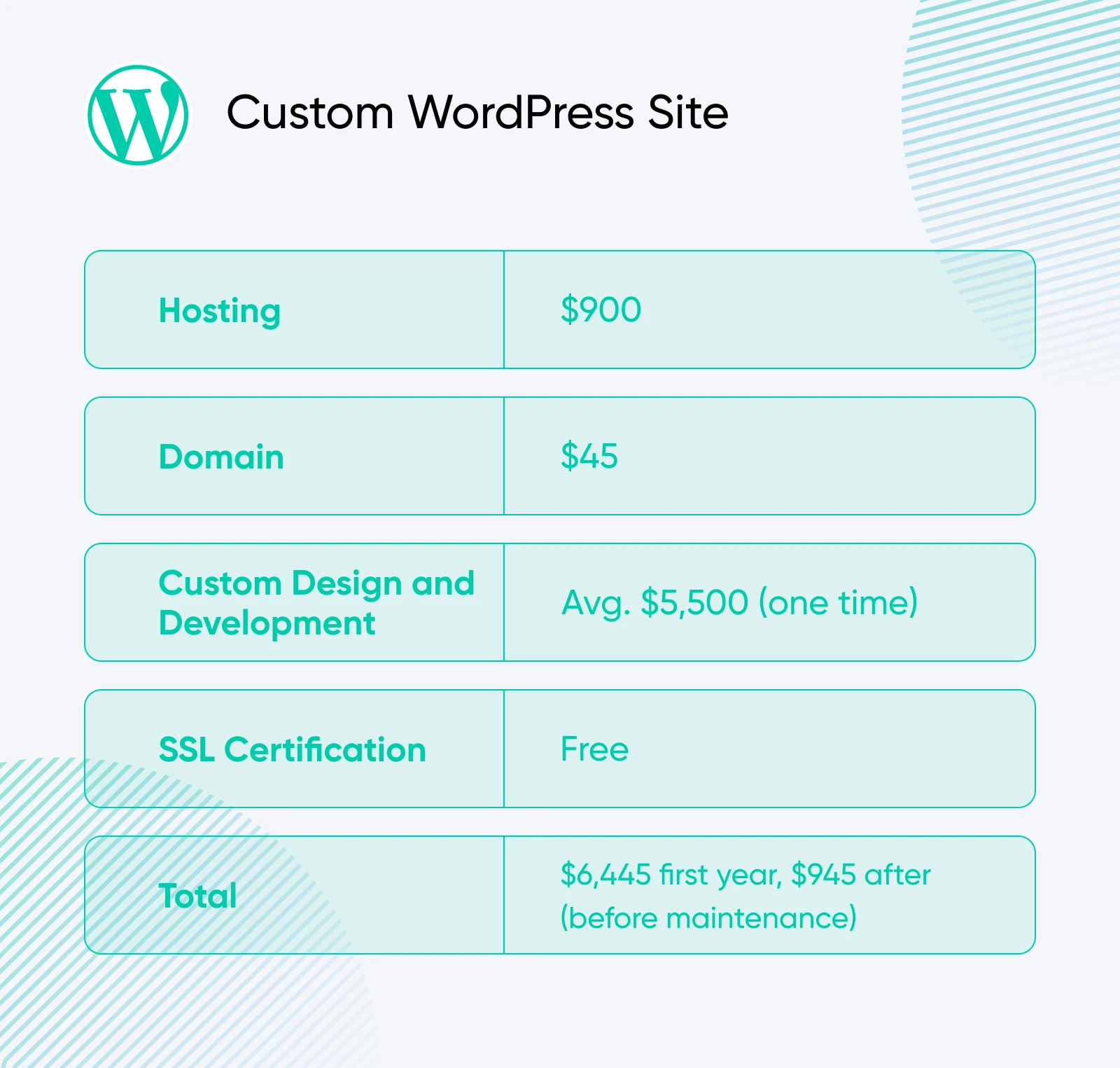
Custom WordPress Site: ~$6,445 the First Year, $945 After (Before Maintenance)
Want the website of your dreams? If you pay for it, you can build it.
Just know that the cost to create a WordPress site completely from scratch is the least predictable. By far the most expensive part is hiring a web designer and/or developer to complete your site. Depending on the complexity and features you want, this can cost thousands of dollars.
Of course, the benefit is getting to customize everything, from the look and feel of your website down to every last feature.
Here’s what you need if you decide to go this route:
Professional WordPress Hosting: ~$900 per Year
If your site has high-capacity needs and top-of-the-line performance requirements, we suggest hosting with dedicated resources and priority support — managed VPS or dedicated server territory — with room for large monthly traffic volumes and expanded storage and memory.
For this estimate, we budget $75 per month for hosting at this level.
Domain(s): ~$45 per Year
For a custom website, you may want additional domain names that redirect to your site. For example, you could have both cupcakesbyhannah.com and cupcakes-by-hannah.net direct visitors to the same place to ensure the maximum number of potential customers find you online.
Let’s estimate that you want three total domains. At about $15 each, you’re looking at just $45 a year to name your site — not bad in the scheme of things.
Custom Web Design/Development: ~$1,000–$10,000 One Time
Forget a packaged theme and plugins.
For a custom site, you’ll need a professional designer and/or developer to build your ideal online presence from the ground up. Fees for these services vary widely depending on experience level and your local market; for this estimate, we assume $100 per hour.
If you need assistance finding qualified help, our professional services team can help bring your vision to life.
SSL Certification: Free
We really hope the host you choose to keep your custom site online is legit enough to provide everything you need on the SSL front as part of their overall package. Keep in mind that if you have several domains to protect, you will need to look for multi-domain SSL certificates and make sure they have coverage for the number of domains you have.
Bought independently, multi-domain SSL certificates can start as low as $18 per year (as of August 2026).
Best for: Those who need the most functional and on-brand WordPress site money can buy.
WordPress Cost FAQs
Is WordPress really free to use?
Yes, technically. The website-building software from WordPress.org is completely free to download and use! However, you’ll still need to pay for essentials like web hosting and a domain name, and most businesses also want at least a few premium (AKA paid) themes and plugins.
You can also build a site for free on WordPress.com, but this comes at a cost of a different kind, such as ads, limited customization, and just 1 GB of storage.
How much does a WordPress site actually cost in 2026?
By our estimates, a small/medium-sized business WordPress site typically costs around $415 for the first year. That includes hosting (~$240/year), a domain (~$15/year), a premium theme (~$20–$100 once), and plugins (~$0–$200/year). E-commerce and custom sites can cost more depending on functionality, design, and traffic needs (higher traffic = more hosting resources).
How much does WordPress cost per month?
Budget roughly $25–$35 per month in the first year for a typical business site. The WordPress software is $0 — the recurring costs are hosting (we budget $20/month for managed WordPress hosting), a domain (about $15 a year, or a little over $1 a month), and any premium theme or plugin renewals. A hobby site on entry-level web hosting costs less per month, while e-commerce and custom builds cost more.
What’s the cost for WordPress themes and plugins?
Many plugins are free — the WordPress.org directory alone has over 70,000 — but in our experience, advanced ones with premium features or support often cost between $50 to $200 per year.
Similarly, WordPress offers thousands of free themes. If you’re interested in better design and deeper customization, support, and more, premium themes typically come with a one-time fee of $20 to $100.
What’s the ongoing cost of maintaining a WordPress site?
After setup, in our experience most WordPress business sites cost between $200 and $500 per year to maintain — mainly for hosting, plugin renewals, and updates to keep up with design trends and security/performance needs. Larger or custom-built sites can cost more.
What’s the biggest hidden cost of WordPress that people overlook?
Surprise renewal fees! Introductory and renewal prices can differ, so compare the long-term rate before buying hosting, domains, or plugins. Our advice is to always check renewal pricing before committing — it’s why every DreamHost plan card shows its exact auto-renewal rate before you buy. And if a vendor is sketchy about these fees — keep shopping.
The Bottom Line on WordPress + Its Costs
Naturally, there isn’t a single cost for a WordPress site. It will always depend on your goals, needs, and budget. You can spin up a free starter site in minutes, launch a professional business website for just a few hundred dollars a year, or invest thousands into a fully custom build.
What matters most is understanding what actually goes into creating a good site and what each of those elements can cost you, so you’re never caught off guard by hidden fees or renewal spikes.
No matter your direction or what you choose to spend, WordPress will likely remain your best option as one of the most flexible, cost-effective, and scalable platforms out there.

Unbeatable WordPress Hosting
Reliable, lightning-fast hosting solutions specifically optimized for WordPress.
See More