Somewhere in your work bag or under an employee’s car seat, a once-important receipt has faded into illegibility.
What was a legitimate deduction is now a mystery purchase you’ll regret not documenting more accurately come tax season. Multiply that over the year, and you’ve got a real problem.
The fix isn’t a better shoebox. Expense tracking is recording every business-related cost as it happens, and categorization is sorting those costs into consistent groups so you can see where the money goes. With bank feeds and receipt scanning, both can run automatically, in real time — before anything has a chance to fade.
Here’s how to build a system that actually keeps up with your business.
Understanding Expense Tracking and Categorization
Expense tracking is the process of recording every business-related purchase or cost.
Categorization means organizing those expenses into clear groups so you can understand where money is going and prepare accurate financial reports.
With the right setup, bank feeds, receipt scanning, and accounting integrations capture and categorize expenses automatically — in real time.
What Expenses Do I Need to Track?
If it supports your business operations, it should be tracked.
Many business owners only monitor large expenses and overlook smaller recurring costs that add up over time. Consistent tracking creates a more accurate picture of profitability and helps ensure you don’t miss deductions later.
Common business expenses include:
- Office rent and utilities
- Internet and phone bills
- Employee wages and contractor payments
- Software and SaaS subscriptions
- Marketing and advertising
- Business travel and meals
- Mileage
- Equipment purchases
- Continuing education and certifications
- Client gifts
- Shipping and postage
- Insurance premiums
- Website hosting and digital infrastructure
How to Categorize Business Expenses
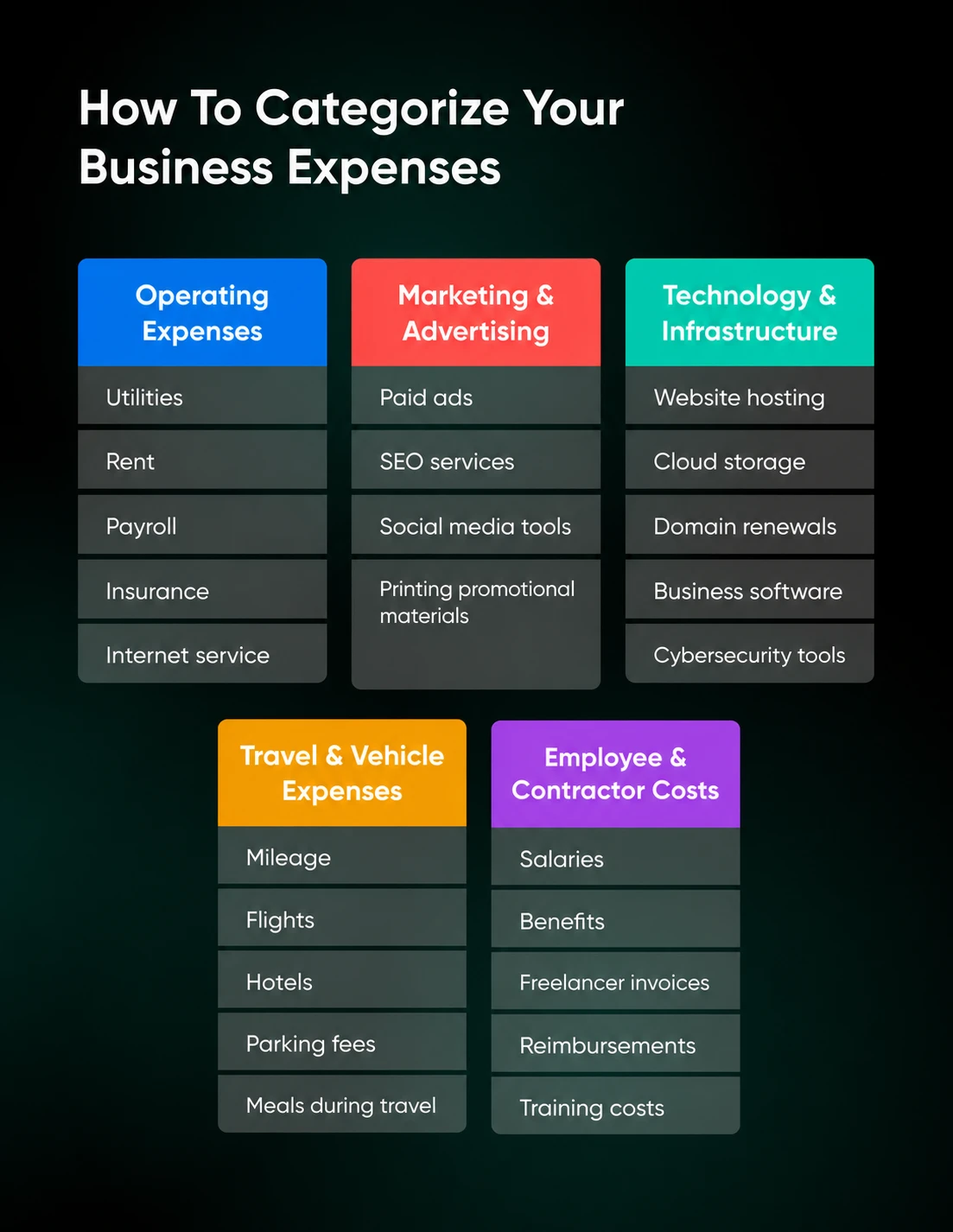
Typical categories include:
Operating Expenses
These are the day-to-day costs of running your business.
Examples:
- Utilities
- Rent
- Payroll
- Insurance
- Internet service
Marketing and Advertising
Anything related to customer acquisition and brand awareness.
Examples:
- Paid ads
- SEO services
- Social media tools
- Printing promotional materials
Technology and Infrastructure
This category becomes increasingly important as businesses rely more heavily on digital operations.
Examples:
- Website hosting
- Cloud storage
- Domain renewals
- Business software
- Cybersecurity tools
Travel and Vehicle Expenses
Useful for consultants, contractors, service businesses, and sales-driven companies.
Examples:
- Mileage
- Flights
- Hotels
- Parking fees
- Meals during travel
Employee and Contractor Costs
These categories help track labor expenses more accurately.
Examples:
- Salaries
- Benefits
- Freelancer invoices
- Reimbursements
- Training costs
The more consistent your categories become, the easier it is to generate reports, forecast cash flow, and identify areas where spending may be creeping upward.
How to Set Up Automated Expense Capture
Automation is where expense tracking starts saving serious time.
Instead of manually entering every transaction, modern tools can automatically import, organize, and store financial data from multiple sources.
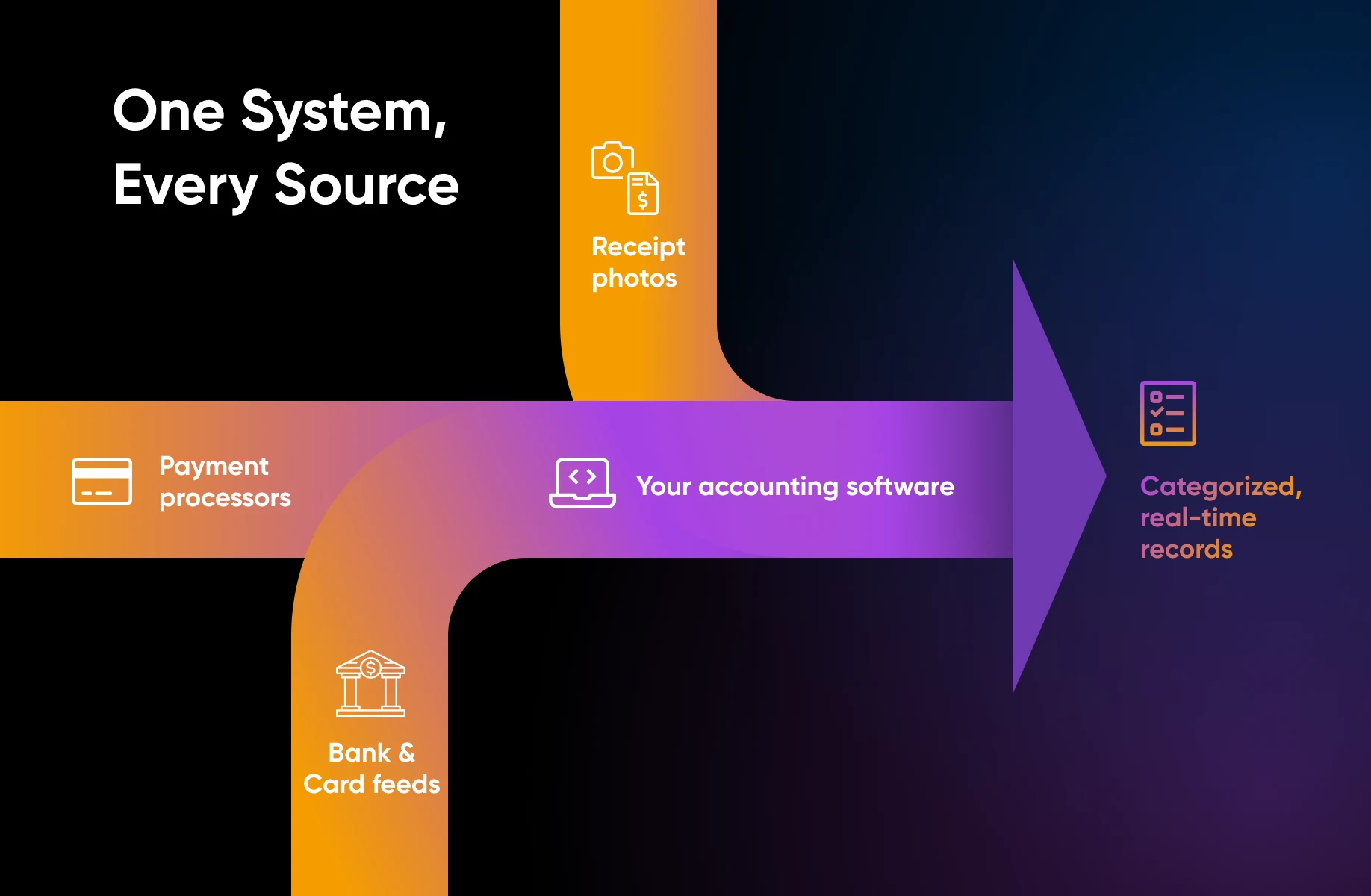
Here’s a practical setup process:
Connect Your Financial Accounts
Start by linking your business bank accounts, credit cards, payment processors, and accounting software into one connected system.
Most modern expense management tools can automatically import transactions through bank feeds, which significantly reduces manual data entry and lowers the risk of missing expenses.
Instead of constantly switching between platforms or updating spreadsheets by hand, you can view imported financial activity in one place.
Use Receipt Scanning Tools
Receipt scanning apps allow employees or business owners to photograph receipts immediately after purchases. Optical character recognition (OCR) technology extracts key information automatically.
This creates searchable digital records while reducing lost paperwork.
Create Approval Workflows
For businesses with employees or contractors, automated approval workflows can simplify the reimbursement process dramatically.
Team members can submit expenses digitally, managers can approve requests within the platform, and reimbursements can sync directly with accounting records automatically. This is especially useful for businesses where employees regularly travel, meet clients, or purchase supplies, since it creates a cleaner process while reducing administrative bottlenecks.
Automate Invoice Follow-Ups
Automated invoicing systems help you collect money sooner by sending invoices immediately, scheduling payment reminders, tracking invoice statuses, and notifying clients about overdue balances. Instead of chasing payments through emails and phone calls, the workflow runs itself.
This matters more than it sounds. In the 2025 Intuit QuickBooks Small Business Late Payments Report (a January 2025 survey of 2,487 US small businesses), 56% reported being owed money from unpaid invoices — an average of $17,500 per business. Businesses with a higher share of overdue invoices were more likely to report cash flow problems (50% vs. 34%) and were 1.7x more likely to say they’d become more reliant on credit cards over the past year. And in QuickBooks’ July 2026 Small Business Insights survey, almost half (49%) of small businesses said poor financial or resource management is holding them back.
Centralize Your Financial Systems
One of the biggest operational improvements growing businesses can make is reducing the number of disconnected financial tools they rely on.
Many companies still juggle spreadsheets, email attachments, paper receipts, separate invoicing systems, and standalone accounting software that do not communicate with one another. Centralizing these processes into connected platforms creates better visibility into cash flow, simplifies reporting, and reduces duplicate work.
If your business hosts a client portal or payment page, choose a dependable hosting environment. DreamHost web hosting comes with in-house, around-the-clock support.
Key Features to Look For in Expense Tracking Tooling
As operations become more complex, you’ll want systems that reduce admin work instead of adding more friction.
Receipt Scanning and Storage
Digital receipt capture is now essential for growing businesses.
Look for tools that can automatically extract vendor and purchase data, store receipts securely in the cloud, match receipts to transactions, and make records searchable during tax season.
Automating this process can eliminate hours of manual organization and reduce the risk of missing deductions.
Mileage and Time Tracking
If you or your employees travel for business, mileage tracking can become a valuable deduction opportunity.
Automated mileage tools use GPS tracking to record trips, separate business and personal travel, and generate tax-ready reports automatically. Time tracking features can also help service businesses connect billable hours directly to projects and invoices.
Credit Card and Bank Integrations
Strong integrations are one of the most important features in any expense tracking platform.
Good tools should sync with business bank accounts, credit cards, payroll systems, accounting software, and payment processors. More specifically, tools in these categories you already use.
Deep integrations increase real-time visibility into spending and cash flow without requiring duplicate data entry across multiple systems.
Reporting and Forecasting
Numbers are only useful if you can read them fast.
Look for dashboards that provide cash flow visibility, expense trends, revenue forecasting, budget comparisons, and tax estimates. The faster you can understand your financial position, the faster you can make confident decisions about hiring, spending, and growth.
Expense Tracking and Categorization Apps to Consider
Finally ready to find your own?
Here are a few easy-to-use tools for expense tracking and categorization:
- Zoho Expense is a lightweight expense management tool with a little more juice than similar apps: Its autoscan feature pulls data from receipts, mileage can be logged with a swipe, corporate card transactions automatch to uploaded receipts, and you can set approval workflows, budgets, and per diem rules on top.
- Pleo gives employees virtual or physical company cards with spend limits built in: It combines business cards, expense management, accounts payable, and reimbursements in one platform that syncs with your books across currencies and entities. Pleo says 40,000+ companies across Europe use it.
- Rydoo is built for multinational finance teams: Its AI scanner turns a receipt into a pre-filled expense in under 10 seconds, it carries official tax, per diem, and mileage data for over 80 countries, and it connects with more than 35 finance, ERP, HR, and travel tools.
- Sage Expense Management (formerly Fyle) works with the Visa, Mastercard, and American Express business cards you already have: Cardholders get a text the moment a card is swiped, reply with a photo of the receipt, and OCR extracts the merchant, date, amount, and category. Approved expenses sync to accounting tools like QuickBooks, NetSuite, Xero, and Sage. It’s very low friction for employees.
Why Does Expense Tracking and Categorization Matter?
The tax-time scramble starts to disappear when you capture expenses in real time. Instead of digging through emails and paper receipts, your records are already organized and searchable.
You also gain clearer visibility into whether payroll is covered, which projects are most profitable, and when it’s safe to invest in growth.
And if you’re still laying the groundwork for the business itself, start with our walkthrough of the financial and legal steps to setting up a new small business — clean books are a lot easier when the foundation is solid.
Expense Tracking and Categorization FAQs
Can Expense Trackers Automate Receipt Capture and Categorization?
Yes. Modern expense trackers pair OCR receipt scanning with bank and card feeds: you snap (or text, or forward) a photo of a receipt, the software extracts details like the vendor, date, amount, and category, and the expense is matched to the imported card transaction. Zoho Expense does this with its autoscan feature, and Sage Expense Management does it by text message on your existing business credit cards.
How Can I Automate Expense Tracking?
Connect your business bank accounts, credit cards, and payment processors to one expense platform so transactions import automatically through bank feeds. Then add receipt scanning so purchases get documented at the register, set up approval workflows for employee spending, and sync everything with your accounting software so nothing gets entered twice.
How Should I Categorize My Business Expenses?
Start with broad groups such as operating expenses, marketing and advertising, technology and infrastructure, travel and vehicle expenses, and employee and contractor costs. Then map transactions to categories that align with your accounting system and tax-reporting needs, and apply those categories consistently. Ask an accountant or tax professional how to classify ambiguous purchases.
What Is the Best App for Capturing Receipts and Tracking Expenses?
It depends on how your team spends. For small teams that want receipt scanning, mileage, and approvals in one lightweight tool, start with Zoho Expense. If you’d rather control spending with company cards, look at Pleo. Multinational teams with ERP systems should look at Rydoo, and if you want to keep your existing business credit cards and submit receipts by text, Sage Expense Management is the low-friction pick.
Does the IRS Accept Electronic Expense Records?
The IRS says you may choose any recordkeeping system suited to your business that clearly shows your income and expenses, and that all requirements that apply to hard copy books and records also apply to electronic records. For expenses, your supporting documents should identify the payee, the amount paid, proof of payment, the date incurred, and a description of what was purchased.
Cleaner Books Start Here
Expense tracking stops being a slog the moment it stops being manual.
When transactions flow in through bank feeds, receipts get scanned the second they’re handed over, and categories apply themselves — the tax-time scramble fades faster than a receipt for a $1,000 business expense left on your dashboard for days.
Start by tracking everything that supports your operations — especially the small recurring costs that are easy to wave off.
Sort these expenses into consistent categories, then automate the capture by connecting your accounts, adding receipt scanning, building approval workflows for your team, and centralizing the disconnected tools that don’t talk to each other.
When you shop for software to help create this system, weigh receipt handling, mileage and time tracking, integrations, and reporting, since those are the features that cut admin work instead of adding to it.
Trade the April panic for a clear, current view of which projects pay off, whether payroll is covered, and when it’s time to focus on growth.

Stop Chasing Invoices. Automate Your Business Finances.
A free playbook for small businesses: automate expense tracking, payments, cash flow forecasting, and tax prep from one connected system.
Get the Free eBook