
Your app doesn’t live entirely on a phone or in a browser. The machinery behind it needs somewhere to run. App hosting (also called application hosting) is the infrastructure and services that run an application’s server-side components: the databases, APIs, user authentication, and business logic behind every web and mobile app. Your users only ever see the frontend. App hosting is everything that keeps the rest of it online.
That server-side — the backend — needs storage, computing power, and connectivity, around the clock.
Whether you’re building a web app, an Android or iOS app, or all three at once, the backend needs a reliable home so it can answer every request your users send.
If this is your first time deploying an app for web or mobile, this might seem a tad complicated. But fret not!
This guide will help you compare app hosting models, understand their trade-offs, and choose a sensible setup before launch.
Sound good? Let’s get started!
What is app hosting?
App hosting refers to the process of providing the necessary infrastructure and services to deploy, run, and manage an application’s server-side components — for web and mobile apps alike. These components typically handle tasks such as data storage, user authentication, server-side processing, and more.
Apps generally consist of two parts: The client-side (frontend) and the server-side (backend). The client-side is the user interface that runs in the browser or on the user’s device, while the server-side manages the data, logic, and communication between the app and various services.
6 app hosting options to consider
The server-side components of an app require a reliable environment to operate — app hosting services provide this environment for web and mobile apps alike. Depending on the needs of the application and the needs of the developers, application hosting can involve various types of infrastructure, such as:
1. Traditional hosting
With “traditional” hosting or dedicated server hosting, your application’s server-side components are hosted on physical servers, often managed by a hosting provider. The provider is responsible for maintaining the hardware, providing network connectivity, and ensuring uptime.
You could also host your app with a server you own and maintain. (If you don’t mind a hot server running in your bedroom 24/7.)
Advantages of traditional hosting
Consider traditional hosting like buying a gigantic pickup truck. It’s a high-performance machine. You’ll get full control over the server setup and configuration. You’ll generally get more CPU power and memory.
CPU
A CPU is a central processing unit, or ‘brain,’ of a computer. It interprets and carries out the basic instructions that operate a computer. The term ‘CPU’ is often used interchangeably with ‘processor.’
It’s certainly the best option if you need high scalability, high performance, and total control over the system and security.
But, if you’re looking for a daily driver, it may be a bit overkill.
Disadvantages of traditional hosting
If we could all spring for our own dedicated server, we’d probably do it.
The obvious limitation is pricing. Although prices vary by provider, renting (or buying) a dedicated server is pretty much always the most expensive option.
You’ll also need to know and understand a bit more about hosting and server configuration to get the most out of a traditional hosting setup.
2. Virtual private servers (VPS)
VPS hosting involves dividing a physical server into multiple virtual servers, each with its own operating system and resources.
This allows multiple applications to be hosted on a single physical server while maintaining isolation between them. VPS hosting provides more control and customization than standard web hosting, but less hardware control than a dedicated server, and it still requires server management and maintenance.
To take our analogy from above, this is more like sharing a pickup truck.
Advantages of VPS
VPS is often considered a middle ground: you get a high level of customization and a decent level of performance.
This also makes it much more affordable than buying or renting an entire server, but for good reason.
Modern VPS plans have also cut way down on the setup burden. DreamHost’s Self-Managed VPS plans, for example, include a one-click app library (Node.js, Docker, PostgreSQL, and more) that preinstalls a working stack for you.
Disadvantages of VPS
VPS hosting will always be limited by your share of the resources on the server. The way VPS hosting works is that the CPU power and memory are split across multiple sites or web applications.
You’re generally guaranteed a certain amount of resources, but you could experience real-time performance issues if, let’s say, your site goes viral or there’s a significant spike in traffic or users.
3. Cloud hosting
Cloud hosting services, such as Amazon Web Services (AWS), Google Cloud Platform, and Microsoft Azure, provide virtualized infrastructure and managed services to host and run applications.
Cloud hosting offers flexibility, scalability, and reliability, allowing developers to easily deploy and manage their applications without worrying about underlying hardware and networking.
Resources can be provisioned or released as needed, and costs are typically based on usage.
Cloud hosting (or cloud computing) is sort of the inverse of VPS. Rather than a single server being divided up into multiple instances, a cloud hosting setup will pull resources from multiple servers to provide the computing power you need to handle your current traffic or users.
Cloud Hosting
Traditional web hosting houses a website on a physical server. On the other hand, ‘cloud hosting’ uses multiple virtual (remote) servers for the same task.
Advantages of cloud hosting
Cloud hosting is, essentially, infinitely scalable.
In theory, there are no limitations to the resources you can pull for a specific project. This makes it ideal for site or mobile app hosting, which might see big swings in traffic and users.
Pricing is also pay-as-you-go based on resources, meaning you only pay for what you use.
Disadvantages of cloud hosting
The downside of hosting a mobile app with a pay-for-what-you-use model is that if you get way more traffic or users than expected, your bill could also be higher than you expect.
4. Platform-as-a-service (PaaS)
PaaS providers, such as Heroku or Google App Engine, offer a complete development and hosting environment, including the infrastructure, runtime, and necessary tools.
It’s sort of like leasing a pickup truck, but you can only drive it on certain roads. You don’t have to worry about maintenance or upkeep, but you’re also relying on the company to provide you with everything you need to get up and running with your app. Plus, you’re locked into using the tools and systems offered by the provider.
Advantages of PaaS
PaaS makes it super simple to start, build, and deploy a mobile app. With the right provider, you can be up and running in a matter of hours. You won’t need to tinker with servers or install a bunch of applications.
Most PaaS offerings are also pay-as-you-go.
Disadvantages of PaaS
Since you’re leasing the pickup truck and can only drive it on certain roads, PaaS has some limitations depending on your chosen provider.
For instance, they may or may not offer support for popular services like Docker or Kubernetes.
Certain software development kits (SDKs) may or may not be available.
Now, if you can find the right provider that aligns with your preferred tool stack, you can use PaaS as a SaaS solution for mobile app development, deployment, and hosting.
One more option has emerged here: self-hosted PaaS software like Dokploy, which recreates the push-to-deploy workflow on a server you control. You get the convenience of the leased truck without the road restrictions, as long as you don’t mind maintaining the truck yourself — more on this in the one-click section below.
5. Mobile backend-as-a-service (MBaaS)
MBaaS platforms, like Firebase or Parse (now open-source), are specialized app hosting services designed for mobile applications. They provide pre-built backend components, APIs, and tools that can speed up app development and hosting. (Firebase isn’t mobile-only these days: it positions itself as Google’s mobile and web app development platform, complete with a dedicated App Hosting product.)
API
An Application Programming Interface (API) is a set of functions that allows applications to access data and interact with external components. An API is essentially a courier that delivers messages from a client to a server and vice versa.
Think of services like user authentication or push notifications. MBaaS offers these out of the box.
It’s like a dongle for your laptop connected to a bunch of microservices you can tap into with a few clicks.
This means you have complete control over the frontend, and then you plug in the dongle to connect to backend services. Bringing it back to the pickup truck metaphor, this would be like leasing a truck, but you can only drive it to certain destinations.
Advantages of MBaaS
Like PaaS, MBaaS is popular as a quick and simple solution that gets you up and running without much (or any) fuss.
It’s ideal for folks who aren’t super deep into backend coding and setup, and who don’t want to deal with managing relational databases and wiring up microservices.
It’s kind of like a template for app development.
That doesn’t make it a bad choice for more advanced users, but it can be limiting.
Disadvantages of MBaaS
While many of the larger MBaaS providers have a lot of flexibility and tons of extensions or services, you’re still limited to what they offer.
That limits the amount of customization you can do and the amount of control you have over the environment and app performance, and generally relies heavily on the provider to ensure everything goes smoothly.
6. Containers and serverless
Two newer models round out the list. Containers package your app’s code together with its runtime and dependencies so it runs the same way on any server — Docker is the industry-standard format, and platforms like Google Kubernetes Engine run fleets of containers at scale (per Google Cloud’s hosting options guide, 2026).
Serverless goes one step further: you hand the platform a function, some source code, or a container, and it spins up instances only when requests or events arrive. Google Cloud, for example, points web backends and event-driven apps to its serverless Cloud Run platform, which scales automatically and can scale to zero, so you aren’t billed during periods of zero requests (Google Cloud, 2026).
In pickup-truck terms, serverless is a rideshare. A truck shows up when you have something to haul, and you don’t pay a dime while it sits idle.
Advantages of containers and serverless
Portability and pricing. A containerized app moves between providers with little rework because the container carries its environment with it. And pay-per-use billing with scale-to-zero means a low-traffic app can cost next to nothing between bursts.
You also skip server management entirely on serverless platforms: no OS updates, no capacity planning.
Disadvantages of containers and serverless
There’s a learning curve: Docker and (especially) Kubernetes are their own skill sets. Serverless platforms also impose constraints that traditional servers don’t — Cloud Run caps request timeouts at 60 minutes, for example (Google Cloud, 2026) — and like any pay-per-use model, a traffic spike can spike the bill.
If your app is event-driven, spiky, or already containerized, this model deserves a hard look before you rent fixed servers.
Choosing the right hosting infrastructure
Here’s the short version: heavy, predictable traffic points to a dedicated server or VPS; variable or unknown traffic points to cloud, serverless, PaaS, or MBaaS; and if backend work isn’t your thing, MBaaS does the most for you. The table below compares all six options at a glance, and the sections that follow dig into each factor.
| Option | Cost model | Scalability | Control | Management burden | Best for |
|---|---|---|---|---|---|
| Dedicated server | Fixed monthly (highest) | Vertical (upgrade the hardware) | Total | High | High-traffic, resource-heavy apps |
| VPS | Fixed monthly (low) | Limited to your slice of the server | High | Medium (lower with one-click app installs) | Steady, predictable workloads on a budget |
| Cloud hosting | Pay-as-you-go | Near-unlimited | High | Medium–high | Fast-growing or spiky traffic |
| Containers & serverless | Pay-per-use, can scale to zero | Automatic | Medium | Low–medium | Event-driven and variable workloads |
| PaaS | Pay-as-you-go or tiered | Automatic, within platform limits | Medium | Low | Fast launches on a supported stack |
| MBaaS | Tiered or usage-based | Automatic | Low | Lowest | Mobile backends without backend code |
Scalability
Is your mobile app going to be as big as Flappy Bird? (Flappy Bird? Anyone?)
Then you’ll need an option that allows for scalable performance.
If you know, for sure, that you’ll be getting a lot of traffic and need a lot of resources, then dedicated or VPS hosting is probably best for you.
If you’re not 100% sure how much traffic you’re going to receive or you know it will fluctuate, then you’ll probably want a pay-for-what-you-use option: Cloud hosting, serverless, PaaS, or MBaaS.
Performance
Are you running state-of-the-art, resource-intensive tech that’s going to eat up tons of computing power? Better go with a dedicated server for your quantum computing mobile app. (Okay, quantum-computer-powered mobile app hosting isn’t a thing. Yet.)
If you’re running an average application, then any of the other hosting options will probably suffice.
DevOps & frameworks
Here’s the big question: How did/will you build the world’s hottest new app?
Chances are, you have specific ideas about the languages, frameworks, microservices, and overall architecture you will use. (And if an AI coding assistant scaffolded half your backend, count that as part of the stack too — a platform that deploys straight from a Git repo will take AI-generated projects with less friction than a raw server.)
Consider finding a PaaS or MBaaS that aligns with that stack. Already shipping with Docker? A container platform, or a VPS you configure yourself, keeps that workflow intact.
If you can’t find the right provider, you’ll need to get a bit more custom and look at cloud, VPS, or getting a “dedi” (that’s slang for dedicated server).
If you don’t have any allegiance to particular tool stacks and you’re willing to learn whatever it takes to get your app up and running, then PaaS or MBaaS are probably the best options.
How one-click apps changed VPS hosting
The classic app hosting trade-off between control and convenience is shrinking. Many VPS providers now preinstall complete application stacks, so you get root-level control and a working environment in one step. DreamHost’s Self-Managed VPS plans include a one-click app library covering runtimes, databases, deployment platforms, and self-hosted AI tools.
This isn’t a seventh option — it’s what changed inside the VPS option, and it isn’t unique to one host: DigitalOcean and Linode ship similar app marketplaces. Here’s what DreamHost’s version looks like for the stack this guide has been describing:
- Node.js: The runtime arrives preinstalled, with PM2 (which keeps your app running and restarts it if it crashes), an Nginx reverse proxy (which routes incoming web traffic to your app), and SSL already configured. That’s the environment setup you’d otherwise assemble by hand.
- Docker + Portainer: If your app already ships as a container, both arrive preconfigured, and Portainer lets you manage multi-container stacks from a visual dashboard instead of the command line.
- Dokploy: The self-hosted PaaS we mentioned earlier. Connect GitHub or GitLab, push your code, and Dokploy handles builds, databases, and SSL from a visual dashboard. It’s a Heroku- or Vercel-style workflow, except you pay a flat monthly rate and the whole thing stays portable because it runs on your server.
- Databases: PostgreSQL comes preinstalled, and full root access means you can add whatever extensions your app needs. Supabase bundles a database, auth, file storage, and real-time APIs as an open-source Firebase alternative.
- AI and automation: The same library includes n8n for workflow automation and always-on AI agents like OpenClaw. Because they run on your server rather than someone else’s platform, your workflows, credentials, and data stay under your control.
Every Self-Managed VPS plan pairs the app library with full root access and unmetered bandwidth with $0 overage fees, so a traffic surge doesn’t come with a transfer bill. Sustained growth still means moving up a plan tier, but you’ll see that coming. What one-click installs don’t do is manage the server for you: patching the OS, watching resource usage, and handling backups are still yours. You’re saving the setup, not the upkeep. In pickup-truck terms: it’s still the shared truck — it just arrives with the toolbox already bolted in and the tank full.
Choosing an app hosting provider
Every app has its own requirements in terms of performance, scalability, security, and functionality. While there’s no shortage of options to meet these requirements, the abundance of hosting providers does not make it easy to pick the right one from the bunch.
The section above may have helped you narrow down which hosting option is right for you, but now there are a bunch of different providers offering that specific solution.
Let’s say you’ve landed on cloud hosting, but there are 20 different vendors that offer some flavor of cloud computing products.
How do you choose?
Unless you want to sign up for a trial with every single one of them to see which one works out best (hey, we’ve all been there), you’ll want to research a few key factors to help you narrow it down.
Here’s a primer on the factors you need to consider to choose the right hosting solution for your app:
Performance and reliability
Perhaps the most crucial feature of any hosting product is its performance (in reality and not just on paper) and its reliability when users are trying to access your app.
Do some digging. Look for information on the location and number of data centers that the provider has, see which CDNs they connect with, and read real user reviews to get a sense of how often there are issues with uptime or latency.
CDN
CDN is an abbreviation for ‘Content Delivery Network’. It refers to a geographically-distributed network of web servers (and their data centers). The entities that make up a CDN collaborate to ensure speedy content delivery via the internet.
Look for providers that offer service level agreements (SLAs) with uptime guarantees and clear procedures for handling outages and downtime.
Security
Assess the provider’s security measures, such as data encryption, user authentication, access controls, and regular security updates. Ensure the provider complies with relevant data protection regulations and industry standards for your specific use case.
Look for certifications like ISO 27001, SOC 1/2/3, or other seals of approval.
You may also want to do a bit of digging to see if this particular host has experienced past security issues and how they handle legal or government requests.
Cost
Understand their pricing model (e.g., pay-as-you-go, fixed monthly fees, or tiered plans) and evaluate whether it aligns with your budget and expected usage patterns.
But take that one level deeper and make sure that you calculate how your costs might tally up based on your real-world requirements. Since hosting pricing can sometimes be complex, you’ll want to carefully consider how the fees might add up before deciding which is most affordable.
Here’s a rough sketch for a small app with a modest user base: unmanaged VPS plans across the industry typically run roughly $5–$20/month (see the DreamHost VPS hosting page for current plans), while a dedicated server usually costs several times that. Pay-per-use platforms can undercut both at low traffic: Google’s App Engine standard environment includes 29 hours of F1 instance time free per day (per Google Cloud, August 2026), and serverless platforms that scale to zero don’t bill you at all between requests.
Whatever you’re leaning toward, run your expected usage through the provider’s own pricing calculator before you commit. The cheapest sticker price isn’t always the cheapest bill.
Support
Consider the level of support and maintenance offered by the provider. Look for providers with comprehensive documentation, responsive customer support, and proactive monitoring to address potential issues before they impact your app.
Ease of use
Evaluate the provider’s user interface, management tools, and automation options to ensure they are easy to use. This can simplify your app deployment and maintenance processes.
Stack compatibility, portability, and lock-in
Check that the provider runs your languages, runtimes, and operating system before anything else — a great platform that doesn’t support your framework is no platform at all. Watch for contracts and up-front commitments, too.
Then ask the question nobody asks until it hurts: how hard is it to leave? Standard building blocks travel well. A containerized app or a plain SQL database can move to a new host with modest effort, and code written for a VPS or dedicated server runs anywhere comparable. Proprietary pieces don’t travel: rewriting an app built around a platform’s own APIs and services is real engineering work, so PaaS and MBaaS carry the highest exit costs.
You don’t have to avoid managed platforms — just choose with the exit in mind. Prefer standard runtimes and databases where you can, keep your data exportable, and know what a migration would take before you sign up.
Reviews
Messaging on the website is one thing, but hearing from real customers will tell you what to expect.
Check reviews, case studies, and testimonials from other developers and businesses using the provider. This can give you insights into the provider’s strengths and weaknesses and help you make a more informed decision.
How to implement app hosting
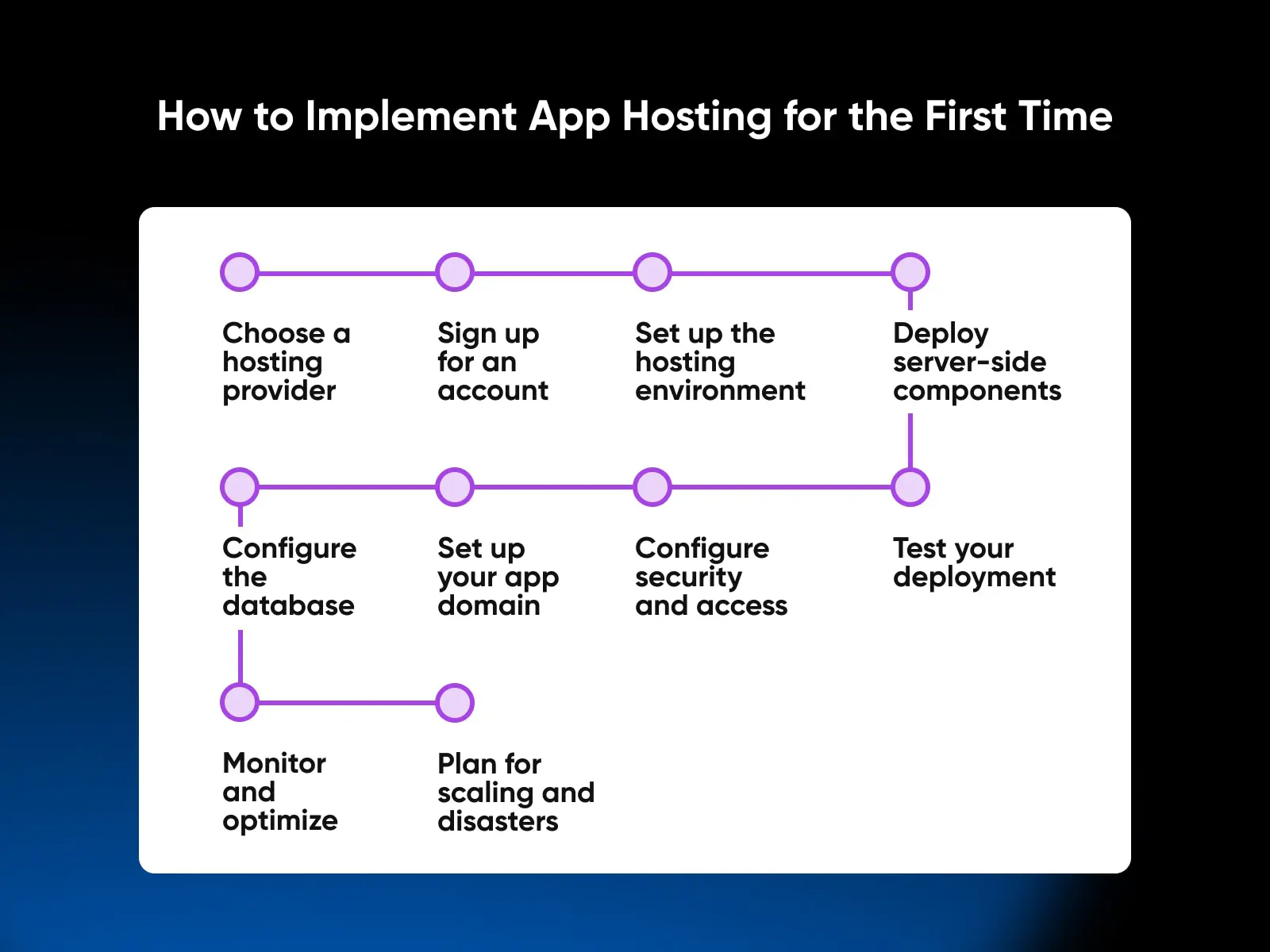
Due to the inherently technical nature of app development, it can be a bit more complex to configure a hosting environment so that it’s able to support the server-side components of a mobile or web app. So here’s a quick overview of the process to help you get started:
One shortcut before the list: on a VPS with one-click apps, step 3 mostly disappears and the SSL setup in step 6 arrives preconfigured — installing Node.js from DreamHost’s app library delivers the runtime, process manager, and web server ready to go. Deploying your code, configuring your database, and pointing your domain are still on you.
- Choose a hosting provider: Based on your application’s requirements, scalability needs, cost, and other factors, select the appropriate app hosting provider and type (e.g., traditional hosting, VPS, cloud hosting, containers/serverless, PaaS, or MBaaS).
- Sign up for an account: Register for an account with your chosen hosting provider, and select the appropriate plan or resource allocation based on your needs.
- Set up the hosting environment: Depending on the provider and hosting type, you may need to configure the server environment, install an operating system, set up a web server (e.g., Apache, Nginx), and install necessary runtime environments and frameworks (e.g., Node.js, Python, Ruby on Rails).
- Deploy your application’s server-side components: Upload your application’s backend code and files to the hosting environment using the provider’s recommended deployment method (e.g., Git, FTP, or provider-specific tools). This includes server-side scripts, database files, and any required dependencies.
- Configure the database: If your application uses a database, create and configure the database instance (e.g., MySQL, PostgreSQL, MongoDB) according to your application’s requirements. You may also need to import your database schema and initial data.
- Set up domain and security certificate: If you have a custom domain for your application, configure the DNS settings to point to your hosting provider’s servers. Additionally, install and configure an SSL certificate to enable secure HTTPS connections.
- Configure security features and access controls: Implement and configure security measures such as user authentication, data encryption, and access controls to protect your application and its data.
- Test your deployment: Ensure that your application is running correctly on the hosting environment by testing its functionality and performance. Address any issues or bugs that arise during testing.
- Monitor and optimize: Once your application is live, continuously monitor its performance and resource usage. Identify bottlenecks and optimize your hosting environment as needed (e.g., by adding resources, implementing caching, or using a content delivery network).
- Plan for scaling and disaster recovery: Develop strategies for handling increased demand and ensuring application availability, including redundancy, failover mechanisms, regular backups, and disaster recovery plans.
Evaluate before you invest
If you invest in a solid hosting environment from the start, you can enhance your app’s performance, reliability, scalability, and security, leading to happier and more satisfied users. However, with the number of options out there in the wild, it’s important to carefully consider your app’s requirements and establish evaluation criteria that help you choose the right platform for your hosting.
At DreamHost, we’re all about web hosting with purpose. We believe that with the right tools and support system, every developer can bring their dreams to life.
Before you go, here are quick answers to the app hosting questions we hear most.
App hosting FAQs
What’s the difference between app hosting and web hosting?
Web hosting serves websites; app hosting runs an application’s backend — its databases, APIs, and authentication. The two overlap: a VPS or dedicated server can do both jobs, while specialized platforms like PaaS and MBaaS handle application backends only.
Where can I host an Android app’s backend?
Anywhere that runs your server stack: a VPS, a dedicated server, a cloud platform, a PaaS like Heroku, or an MBaaS like Firebase. The app itself ships through the app store — only its server-side components live on your host.
Can I host a mobile app on a VPS?
Yes. Your app’s API and database run on a VPS like any other server-side software. You get more control than a managed platform offers, but you’re responsible for securing, maintaining, and scaling the server yourself; a one-click app install handles the initial setup.
How much does app hosting cost?
It ranges widely by model. Unmanaged VPS plans typically run roughly $5–$20/month, pay-per-use serverless platforms can cost almost nothing at low traffic, and dedicated servers cost the most. Run your expected usage through each provider’s pricing calculator before committing.
Do I need my own server to launch an app?
No. PaaS and MBaaS platforms manage servers for you — you deploy code, and they handle the infrastructure. You only need your own server (VPS or dedicated) when you want full control over the environment and its configuration.
What’s the fastest way to host an app on a VPS?
Use a one-click app install. DreamHost’s Self-Managed VPS plans include an app library that preinstalls complete stacks (Node.js with PM2 and Nginx, Docker + Portainer, Dokploy for Git push-to-deploy, plus databases like PostgreSQL and Supabase), so the environment is ready as soon as the server is.
Subscribe to our blog to stay up-to-date on our latest ideas, tutorials, reviews, and more.

App Hosting on a DreamHost Self-Managed VPS
Launch your backend from the one-click app library — Node.js, Docker + Portainer, Dokploy, Supabase, and more — with full root access, unmetered bandwidth, and $0 overage fees.
Explore the App Library