Asking for reviews as a small business is one of those tasks that sounds simple until you actually try to do it. Then you’re standing in front of a customer having flashbacks to being in middle school, selling raffle tickets to fundraise for a marching band competition. Awkward.
The thing is, you know reviews matter. And your competition knows reviews matter. Google definitely knows reviews matter. It’s just that asking for them can feel uncomfy, especially while you’re juggling work, like ringing up orders or answering emails.
So take some good news to heart: You don’t need to beg or bribe for reviews. What you do need is a review generation system: a simple, repeatable way to ask real customers for honest reviews at the right moment, then respond in a way that makes your business look attentive, professional, and human.
Here’s how to build that system without being pushy, spammy, or the business owner equivalent of a pop-up ad.
What is a review generation system?
A review generation system is a repeatable process for earning customer reviews: ask every real customer for honest feedback shortly after a completed purchase, visit, or service, make the review link easy to reach, follow up once, and respond to every review you receive. No fake reviews, no gating, no hidden incentives — just a habit your business can actually sustain.
Why reviews matter for visibility and conversion
Reviews influence how Google assesses your business’s prominence.
That matters because Google ranks small business visibility based on a combination of relevance, distance, and prominence. Therefore, review count and ratings feed into prominence — Google says more reviews and positive ratings can help your business’s local ranking.
Having more meaningful, positive reviews can improve your local performance, but that’s only part of the picture; reviews also contain natural language that Google uses to understand what your business does.
For example, a bakery that gets multiple reviews mentioning “wedding cakes” and “gluten-free options” is sending extra relevance signals to Google for those services.
Those signals now reach beyond Maps, too. Per BrightLocal’s Local Consumer Review Survey (2026), 45% of consumers used AI tools like ChatGPT for local business recommendations in the past year, up from 6% the year before — and those tools cite reviews in their answers, which makes a steady stream of genuine reviews matter even more.
But beyond just rankings, reviews can impact conversion rates: 97% of consumers read reviews for local businesses, per BrightLocal’s Local Consumer Review Survey (2026). When a customer is comparing two similar businesses, and one has genuine, recent reviews with personalized responses, they’re going to choose the one that feels more trustworthy.
How to ask for reviews (without being pushy)
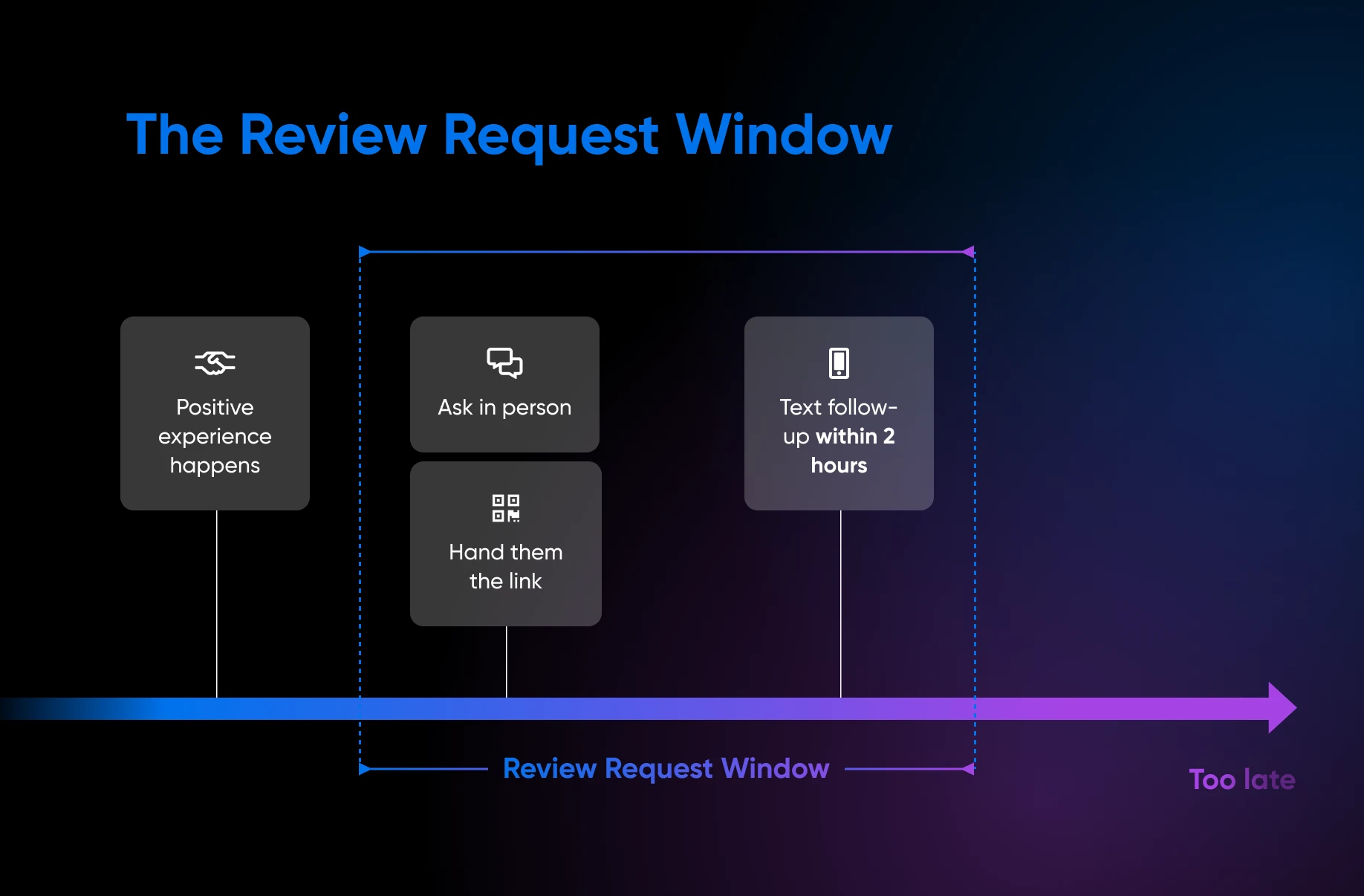
The best time to ask is at the natural end of the transaction: the job just wrapped, the order just arrived, the customer just checked out. The experience is fresh and the ask feels like part of the interaction. And because the trigger is the milestone, not the mood, every customer gets the same invitation.
One note before the scripts: Google comes first for most local businesses (71% of consumers use it to read local business reviews, per BrightLocal, 2026), but it isn’t the only platform that matters. Depending on your industry, customers may also check Facebook, Yelp, or an industry-specific directory. Don’t try to chase every site. Pick the one or two platforms your customers actually use, and send most requests to Google plus that one — the ask works the same way everywhere.
Here’s what to do, depending on your business type:
In-person businesses
- After completing a transaction, say something like, “Thank you so much. It was great working with you! If you have a minute, an honest Google review means a lot to us. Here’s a QR code if you want an easy way to get there.”
- Hand the customer a card or receipt insert with a QR code that links directly to your Google review form. You can generate a QR code from your Google Business Profile dashboard under “Read Reviews” and then “Get more reviews.” Your custom review link and a QR code will appear.
Note: This only works in a desktop browser. - Don’t just single out happy-looking customers. Ask consistently.
Service businesses
- At the end of a service call, say, “Glad we could get that sorted for you. Mind if I send you a quick link to leave a Google review? Honest feedback helps a lot, and it only takes about 30 seconds.”
- Follow up via text within two hours. Send your review link with a short, personal note. Don’t use scripts that feel copy-pasted.
- If you use a CRM or job management tool, you can automate this as a post-completion follow-up (more on automation in the tools section below).
What not to do: fake reviews, gated reviews, and messy incentives
When it comes to reviews, mistakes are common — and they come with real risks.
The FTC’s Consumer Reviews and Testimonials Rule, effective Oct. 21, 2024, turned several bad review behaviors into enforceable violations that could result in civil penalties.
Google’s content policies also prohibit reviews that aren’t based on real experiences, as well as reviews that are paid for directly or indirectly.
Here’s what to avoid:
- Fake reviews: Reviews written by employees, friends, or paid reviewers with no actual customer experience. Google prohibits this fake engagement and may remove it, and the FTC now allows civil penalties for knowing violations.
- Incentivized reviews without disclosure: Offering discounts, free products, or gifts in exchange for reviews. On Google, incentivized reviews are prohibited outright — disclosed or not. On platforms that allow them, the FTC requires disclosure, and the incentive can never be conditioned on the review being positive.
- Review gating: Sending customers through a screening process where only those who indicate they’ll leave a positive review get directed to your review page.
- Bulk or coordinated review campaigns: Organizing groups of people to leave reviews at the same time. Google’s systems flag unusual review activity.
A simple rule of thumb: stick to asking real customers for reviews, politely, and let the reviews be whatever they are.
Responding to reviews (good and bad)
Every response you write may be read by all your potential customers who land on your profile, and how you respond shows them how you treat people and how you handle feedback.
For positive reviews, aim to personalize your responses. Don’t use the same three sentences for every five-star review; mention a specific product, service, or occasion. Thank the customer genuinely and make it clear there’s a real person behind the response. An AI assistant can draft a decent first pass, but personalize it yourself (name the product or occasion) and fact-check it before posting, or the reply reads like a template.
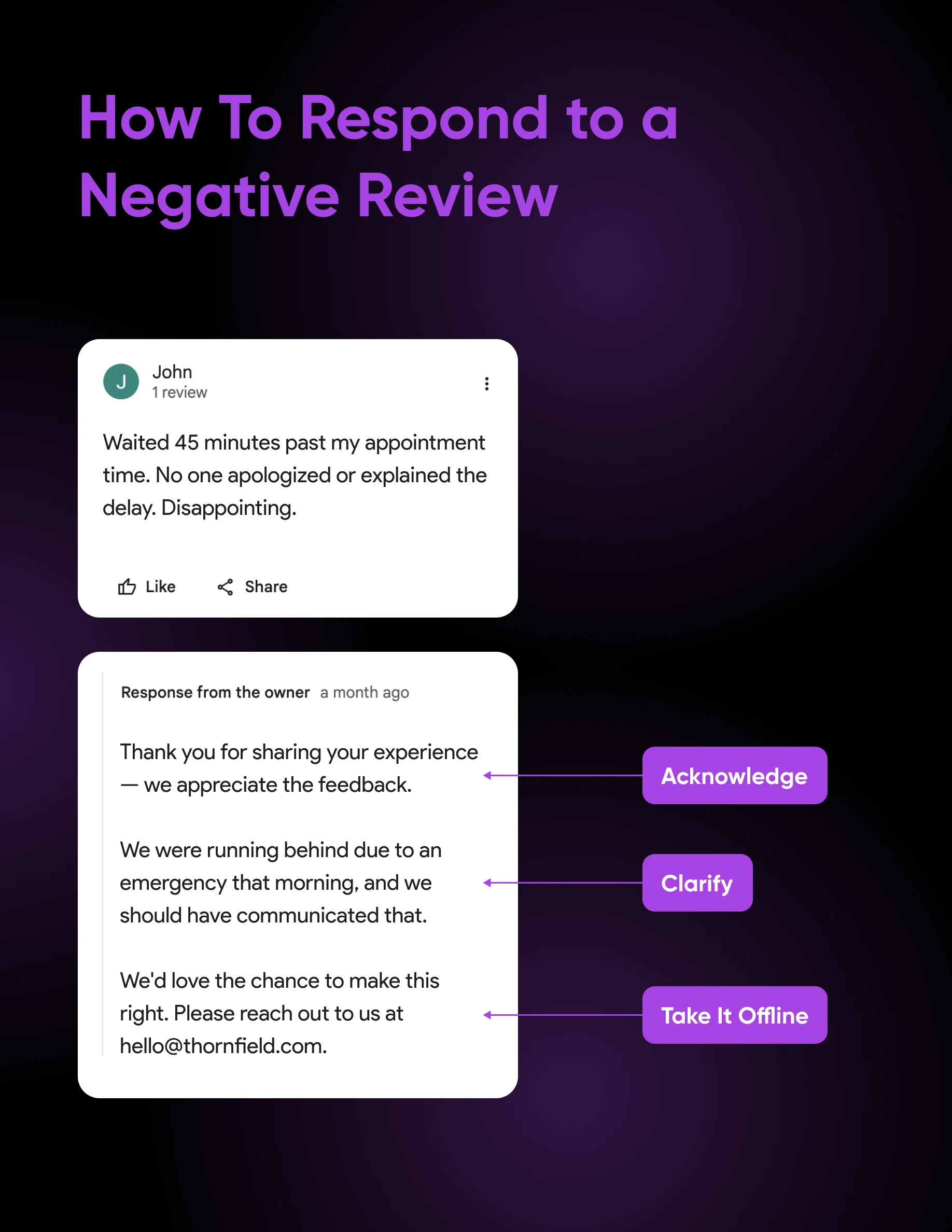
For negative reviews, use this framework:
- Acknowledge: Thank the customer for the feedback, even if it stings. Don’t start with a defense.
- Clarify when appropriate: If there’s a factual inaccuracy, you can gently correct it without being combative.
- Invite offline resolution: Offer your phone number or email so the conversation can continue privately. Say something like, “We’d love the opportunity to make this right. Please reach out to us at [contact].”
- Stay professional: You aren’t writing for this reviewer. You’re writing for the next 100 people who will read the exchange. Arguing, getting defensive, or revealing customer information all make your business look bad.
Regardless of whether a review is positive or negative, never include in your response:
- The customer’s last name or personal details.
- Accusations or blame-shifting.
- Marketing language or promotional text.
- Anything that could escalate the exchange.
Review generation tools and workflows
Reviews need management, but this doesn’t need to be a huge issue. With a lightweight system and the right tools, you can handle review generation in just a few minutes per week. Here’s what to do:
- Designate an owner: One person needs to be responsible for checking and responding to reviews. It often falls through the cracks because it’s “everyone’s job.”
- Set a goal for response timelines: Aim to respond to all reviews within 72 hours. For negative reviews, aim for 24 hours.
- Use Google’s notification settings: Google Business Profile can send you an email or push notification when a new review arrives. Turn this on so you don’t miss any.
- Automate the ask: You don’t have to send every request by hand. Google’s own review link and QR code can go on receipts, in thank-you emails, and at the end of chat conversations, and most CRMs, booking tools, and point-of-sale systems can send that link by email or text automatically after a completed job or purchase. Automate the delivery, never the reviews: every request still goes to a real customer, with no filter on who gets the link.
- Keep track of recurring themes: Reviews can be an excellent source of data. If three different reviews mention that customers couldn’t find your phone number online, that’s operational feedback you can address. Track what customers keep saying and fix things when you can.
Once you have a solid base of positive reviews, put them to work on your website. A WordPress plugin like Smash Balloon pulls your Google reviews automatically and embeds them as regular on-page text rather than an iframe, so the review content is crawlable by search engines and inherits your theme’s fonts and styles out of the box.
Should you use a review generation tool or service?
Most small businesses don’t need to pay for review generation: the DIY system above covers it. Paid automation makes sense when a month of the subscription costs less than the staff time you’d otherwise spend sending requests by hand, and a done-for-you service only makes sense when reviews span several platforms and nobody on your team has time to own them.
Here’s what each level looks like:
- DIY: You share your Google review link or QR code yourself and respond from your Google Business Profile. Free, and enough for most businesses with a steady but modest customer flow.
- Request-automation software: Tools that send your review link by email or text when a job closes or an order ships, usually triggered from your CRM or booking system, and pull reviews from multiple platforms into one inbox. Published pricing is the exception in this category: NiceJob, one of the few vendors that posts rates, charges $75/month for its review-automation plan with no contract (as of August 2026), while larger platforms like Podium and Birdeye publish no standard prices and quote custom plans per business or location. Weigh any quote against the hours of manual follow-up it replaces.
- Managed services: An agency runs requests, monitoring, and responses for you. You’re paying for time, not magic: a service can only do what you could do yourself, under the same rules. Prices vary too widely to quote honestly (they depend on location count, platforms, and whether responses are included), so get exact answers before signing: the monthly price per location, any setup fee or contract minimum, whether text messages cost extra, and precisely how and to whom requests get sent.
Whatever you choose, the same rules apply. Google can restrict Business Profiles over policy violations, and the FTC rule covers reputation-management companies and review brokers, too. Vet any review generation tool or service against this checklist:
- No gating funnels: If the workflow surveys customers first and only routes happy ones to Google, that’s review gating — Google prohibits selectively soliciting positive reviews, and the FTC rule treats review suppression as a violation.
- No guaranteed review counts or star ratings: Nobody can promise reviews from real customers. A guarantee is a sign the reviews won’t be real.
- No incentives, hidden or disclosed: On Google, offering anything in exchange for a review is prohibited, full stop.
- Requests go only to your real customers: The tool should work from your actual customer list, not a pool of paid reviewers.
Build a review generation system you can actually keep up with
Review generation works best when it becomes part of how your business operates, not an afterthought or a task you need to scramble to keep up with.
Start small: Pick one milestone that makes sense as your trigger to ask for reviews, like immediately after checkout, at the end of a service call, or when an order is delivered. Then make the next step easy with a direct link to your Google review page, a QR code, or a follow-up text.
From there, build a habit: check reviews regularly, respond to all, and watch for patterns. That’s what turns review generation from a chore into something that actually works for your business.
FAQs about Google review generation
Can you buy Google reviews?
No. Google prohibits reviews that have been paid for, directly or in kind, and removes them as fake engagement. Buying reviews also risks civil penalties under the FTC’s Consumer Reviews and Testimonials Rule, which prohibits creating, buying, or selling fake reviews.
Can you offer discounts or incentives for Google reviews?
No. Google prohibits offering incentives (payment, discounts, or free goods or services) in exchange for any review, even with disclosure. On platforms that do allow incentivized reviews, the FTC requires clear disclosure and prohibits conditioning the incentive on a positive review.
Can you make money from Google reviews?
Not legitimately. Reviews that have been paid for violate Google’s content policies and get removed, and the FTC rule exposes both buyers and sellers of fake reviews to civil penalties. For businesses, the payoff of reviews is indirect: local visibility and customer trust.
How do I get a Google review link or QR code?
From your Google Business Profile, select “Read Reviews,” then “Get more reviews” to copy your review link or download a QR code. QR codes can currently only be generated in a desktop browser, not on mobile devices.
Is review gating allowed?
No. Review gating (screening customers and only sending likely-positive ones to your review page) violates Google’s policy against selectively soliciting positive reviews, and the FTC’s rule treats review suppression as a violation. Send every customer the same link and accept the results.

Get Found When Nearby Customers Search
Fewer than half of local businesses have complete, consistent information across Google, their website, and the rest of the internet — and Google explicitly favors the ones that do. This 35-page playbook gives small business owners a complete system for Google Business Profile, Maps, reviews, and local SEO content so your business shows up when “near me” searches happen.
Get The Playbook