
Local SEO can feel extremely productive when you don’t know whether it’s working.
You spend hours updating your Google Business Profile, adding photos, fixing your hours, writing a post, and asking customers for reviews. But, uh, did any of it bring in customers?
If you’re not sure, this article is for you — because all that work only matters if you can measure its impact, and tracking the right numbers helps you make better decisions. You need to be able to see whether people are finding you, clicking, calling, and booking. And that means you need to know which metrics are useful and which ones are just noise.
Here’s the short answer: to measure local SEO performance, track three layers — Google Business Profile performance metrics (views, calls, direction requests, and website clicks), grid-based local rank tracking across your service area, and GA4 conversion tracking of the visitors your profile sends to your website. Then roll those numbers into one simple monthly report. This guide walks through each layer, what the numbers mean, and how to turn them into a report you’ll actually use.
Google Business Profile performance metrics
Your Google Business Profile dashboard includes a “Performance” section that shows how customers interact with your profile. Here’s some of what it can tell you:
| Metric | What It Means | What To Watch For |
| Searches | The search terms people used to find your business, updated at the start of each month | New or growing search terms that match the services you want to be found for |
| Views | How many unique people viewed your profile on Search and Maps (each person counts once per day) | Shifts between Search and Maps can indicate where discovery is happening |
| Directions | How many people asked for directions to your location | Increases that show foot traffic intent |
| Calls | The number of times customers clicked the call button on your profile | Increases indicate high-intent searches, not just people browsing |
| Website Clicks | How many people clicked through to your website | Increases show customers moving deeper into your pipeline. Track alongside website conversion data to see if those visits convert. |
Not every metric will move in sync, but that’s a feature, not a bug. Diverging trends can reveal where the real opportunities lie.
Check these monthly, not daily. Daily fluctuations will drive you crazy without telling you much. Longer-term trends offer real business insights.
How do you know whether the numbers are good? Benchmark against yourself, not a universal standard. Compare each month to your trailing 3-month average and to the same month last year, so seasonality doesn’t masquerade as a problem (or a win). Watch ratios, too: calls and direction requests per view tell you whether your profile persuades, while raw views only tell you whether it appears. Treat a change as real when it holds for 2 or more months in a row, or shows up across several metrics at once — a single-month dip is usually noise.
How do you track local rankings?
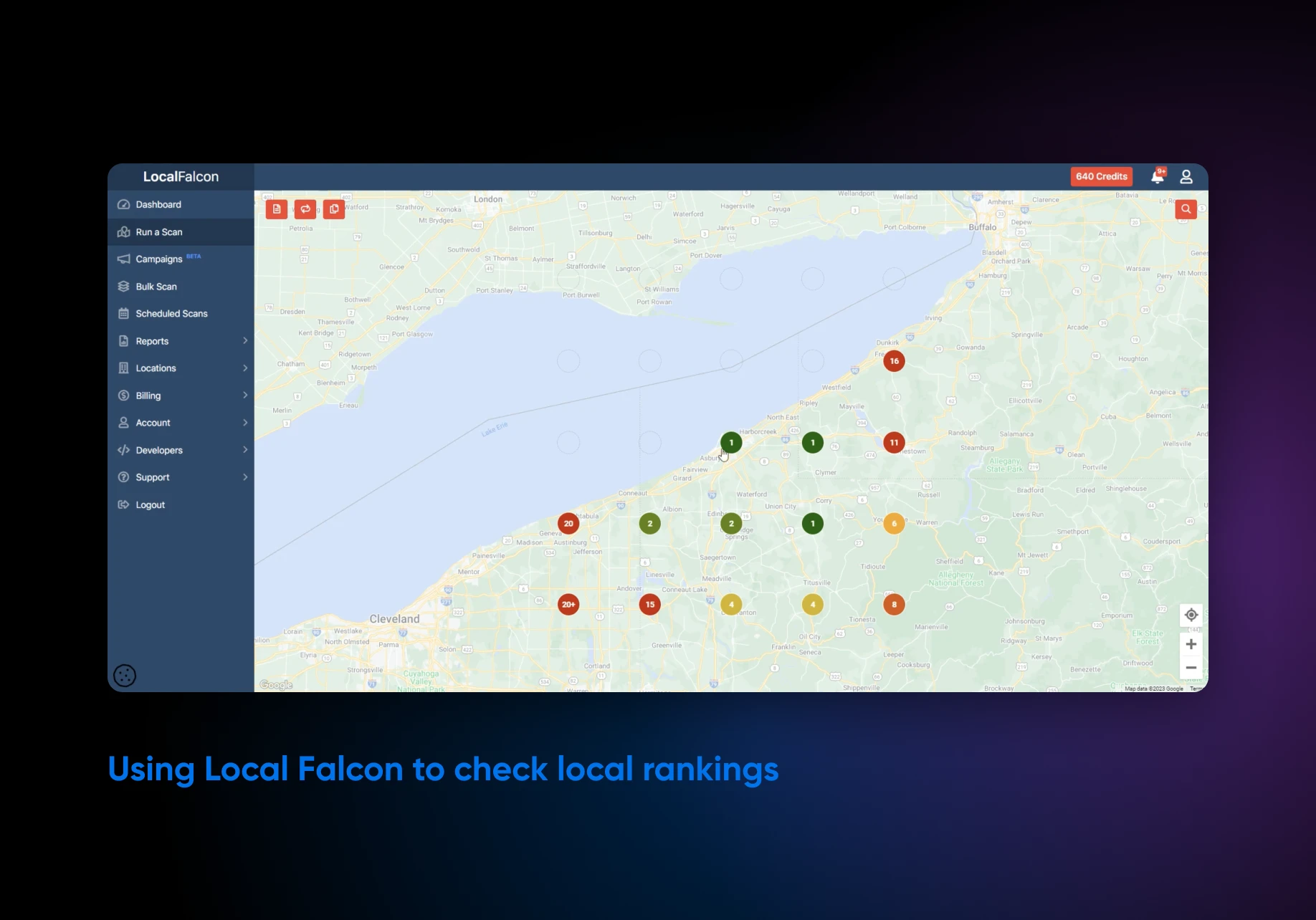
With a local rank tracking tool: software that checks your Maps rankings from many points across your service area, not just from your own address. You need one because Google Business Profile data has a big limitation — it doesn’t tell you where you’re ranking. You could be the No. 1 result from your own address, but invisible three miles away, and Google Business Profile doesn’t surface that gap.
That’s where local rank tracking tools come in. Tools like Local Falcon and BrightLocal let you see your rankings from different points across a geographic grid. They answer questions like:
- Where do you appear in Maps across town, not just from your own location?
- Are you more visible in some neighborhoods than others?
- Are your service area pages actually improving visibility in the places you care about?
- Are you showing up for the searches you want, or only for branded searches where someone already knows your name?
For most businesses, Google Business Profile performance data is enough to start with. You should only add a local ranking tool if you’re investing in local content, running a service-area business, or trying to break into a new neighborhood. Want a one-time baseline first? Run a free scan with one of the trackers above and file the results as month zero in your report, so every later month has a number to beat. And some trackers, Local Falcon included, now also show whether your business appears in AI answers from ChatGPT, Gemini, and Google’s AI results — worth checking if your customers search that way.
Conversion tracking for local traffic
Local traffic only matters if it leads to something real. Depending on your business, that could mean any of these:
- Contact form submissions
- Online orders
- Appointment requests
- Quote requests
- Phone number clicks (tap-to-call on mobile)
- Bookings
- Custom inquiry forms
- Directions requests
To measure these conversions, you’ll need Google Analytics 4 (GA4) installed and configured on your website. GA4 is free, and once configured, it lets you track each of these actions as events and mark the important ones as key events (GA4’s current name for conversion actions). You can then see which actions are happening, on which pages, and where the traffic came from.
The key is separating Google Business Profile traffic from other sources.
The cleanest approach: add UTM parameters to the website URL in your Google Business Profile settings. Something like:
?utm_source=google&utm_medium=organic&utm_campaign=gbp
Once that’s in place, GBP clicks show up as their own labeled source in GA4 — no guesswork. If you haven’t done that yet, you can approximate it by creating a segment filtered to source = google / organic plus your key landing pages.
One caveat: plenty of local conversions never touch your website. A customer who taps “Call” or “Directions” on your Maps listing has converted without triggering a single GA4 event, so count Google Business Profile’s calls and direction requests as conversions in their own right rather than trying to reconcile them with your analytics. For anything both tools miss, ask new customers “How did you find us?” or put a dedicated tracking phone number on your profile.
Finally, attach a rough dollar value so the counts mean something. Multiply your monthly leads by the share that typically become customers, then by your average job or order value: 15 quote requests at a 30% close rate and a $400 average job is $1,800 in likely revenue. If you don’t know your close rate yet, treat leads times job value as your maximum pipeline, not expected revenue, and tighten the estimate once you’ve tracked a few months of outcomes.
How to build a simple local SEO report
A local SEO report pulls your Google Business Profile metrics, website analytics, local rankings, and review activity into one document so you can see whether local visibility is turning into customer action. It answers three questions: are more people finding you, are they engaging with you, and are they becoming customers?
Group your numbers into three KPI buckets so the report tells a story instead of dumping data:
- Visibility: Google Business Profile searches and views, plus local rankings if you use a rank tracker.
- Engagement: calls, direction requests, website clicks, and new reviews (count and average rating).
- Conversions: key events from your GBP-tagged traffic in GA4, plus calls and direction requests counted as conversions in their own right.
Keep the report to one page: this month’s numbers next to last month’s and the same month last year, one sentence on what changed, and one sentence on what you’ll do about it. A spreadsheet with one row per month is genuinely enough.
If you’re reporting to someone else (an owner, a partner, or a client), make two versions. The stakeholder version is the one-pager: headline numbers, what changed, and what happens next, in plain language. The operational version is your working file, with the full checklist below and the raw metrics behind it. Nobody signing the checks wants to read your UTM parameters.
Want a free local SEO dashboard instead?
Google’s Data Studio (formerly Looker Studio) is free for creating and viewing reports, and it connects directly to GA4, so your traffic and key events can refresh themselves on a live dashboard. There’s a catch for local work, though: Google doesn’t offer a native Business Profile connector, so you’ll either paste those metrics into your report each month or pay for a third-party connector. For most single-location businesses, the monthly spreadsheet is less work.
Monthly optimization checklist
This checklist is the working half of your monthly local SEO report: run it once a month, log what you find in the report, and you’ll keep your local visibility moving in the right direction.
Check Your Profile:
- Confirm hours are correct, including any upcoming holidays or seasonal changes.
- Check for any suggested edits Google may have applied to your profile and approve or reject them.
- Verify your phone number and website URL are accurate and working properly.
Activity:
- Publish one new Google post.
- Add at least one new photo to your Google profile.
- Check for new customer questions and answer any that haven’t been answered yet.
Reviews:
- Respond to all unanswered reviews, positive or negative.
- Send review requests to recent customers who haven’t been asked yet.
- Note any recurring themes in the last month’s reviews.
Citations & Listings:
- Spot-check 2-3 directories or listings for accuracy against your NAP (Name, Address, Phone) master record.
- Look for any new listings that may have been auto-generated; correct inaccurate information and remove duplicates.
Website & Content:
- Identify 1-3 new content ideas you can pursue this month. If you’re stuck, check customer questions or reviews, or let the DreamHost SEO Toolkit suggest guided SEO tasks and keyword opportunities (it’s a DIY add-on for your site, not a local rank tracker).
- Update any seasonal or time-sensitive page content.
Metrics:
- Review your top local page’s performance in GA4, including traffic and conversions.
- Check for trends in your Google Business Profile metrics.
- Identify one specific thing to improve next month based on what you saw.
All the tracking in the world only pays off if the destination (your website) gives customers a reason to stay and act. DreamPress is DreamHost’s managed WordPress hosting, built so a slow or unreliable site doesn’t waste the visits your local SEO work earns.
Local SEO measurement FAQs
How do I track local SEO rankings?
Use a geo-grid rank tracker like Local Falcon or BrightLocal. These tools check your Google Maps position from many points across your service area, so you can see where you’re visible and where you disappear — something Google Business Profile data can’t show you.
What should a local SEO report include?
Three KPI groups: visibility (profile searches and views, local rankings), engagement (calls, direction requests, website clicks, new reviews), and conversions (GA4 key events, plus calls and direction requests). Compare each against last month and the same month last year, and end with one next step.
How often should I check local SEO metrics?
Monthly. Daily fluctuations are mostly noise, and local SEO changes take weeks to show up in the data. A monthly review is frequent enough to catch real trends and light enough that you’ll actually keep doing it.
Is Google Business Profile data enough to measure local SEO?
To start, yes. The Performance report shows searches, views, calls, direction requests, and website clicks. Add GA4 to see what visitors do on your website, and add a rank tracker only if you serve multiple areas or invest in local content.
Can I build a local SEO dashboard for free?
Yes. Google’s Data Studio (formerly Looker Studio) is free and connects directly to GA4, though Google Business Profile metrics need a manual monthly paste or a third-party connector. A simple spreadsheet with one row per month works fine, too.
Keep measuring, then make one smart move
Local SEO measurement doesn’t need to become a giant reporting task with color-coded tabs, printed charts, and a monthly meeting. A one-page report and a simple checklist will do.
It just needs to help you answer some important, practical questions, like:
- Are more people finding your business?
- Are they taking meaningful action?
- Are your local pages, reviews, profile updates, and citations moving things in the right direction?
A monthly reporting rhythm is enough to spot trends without reacting to every tiny fluctuation. But as you review your numbers, resist the urge to fix everything at once. Choose just one next step (update a local page, add new photos, respond to unanswered reviews, improve a contact form, or test a clearer call-to-action on your website).
Local visibility gets stronger through steady, specific improvements, and measurement tells you where to aim your efforts, so you do the work most likely to help real customers find you and trust you.

Get Found When Nearby Customers Search
Fewer than half of local businesses have complete, consistent information across Google, their website, and the rest of the internet — and Google explicitly favors the ones that do. This 35-page playbook gives small business owners a complete system for Google Business Profile, Maps, reviews, and local SEO content so your business shows up when “near me” searches happen.
Get The Playbook