Paperclip's README puts the relationship in one line: If OpenClaw is an employee, Paperclip is the company.
Hermes and OpenClaw each have a built-in adapter in Paperclip, so the agent you already run can join it as one of its employees.
On a 4 GB test VM (not a DreamHost server), Paperclip's connection check for Hermes passed when we gave it a wrong key. The same check refused to call Hermes by its container name, and the OpenClaw check said warn
even with the right token. You'll find what each check said in the table below.
What each one does
Rows come from each project's docs, read October 16, 2026, and our product pages, re-checked October 22, except idle memory, which we measured.
| Paperclip | OpenClaw | Hermes Agent | |
|---|---|---|---|
| Its job | Hands agents tickets, with an org chart, budgets and an audit log | An always-on assistant you message on chat apps | An always-on assistant that turns finished tasks into skills |
| Does the work itself | Through the agents it runs or connects | Yes | Yes |
| How it joins Paperclip | It's the board | OpenClaw Gateway adapter, over ws:// or wss:// | Hermes Gateway adapter, calling Hermes's API on port 8642 |
| Maker's sizing | 1 vCPU and 2 GB to get started, per its installation guide | 1 GB minimum, 2 GB or more recommended | 1 GB minimum, 2 to 4 GB recommended by its Docker docs |
| Idle memory we measured | About 1,215 MiB | About 1,024 MiB | About 310 MiB, or about 557 MiB with its dashboard |
| Our server arrives with | Paperclip behind Caddy's HTTPS, admin made, signups closed | OpenClaw bound to localhost, dashboard through an SSH tunnel | Hermes and its dashboard behind Caddy with automatic HTTPS |
Run OpenClaw or Hermes alone if
You want one always-on assistant you message. Both connect to Telegram, WhatsApp and Slack, and Hermes also turns finished tasks into skills it reuses.
Add Paperclip on top if
You run several agents and want each one to have a job, a monthly budget and a manager. You'll get tickets you can follow and a log of what each one did. Your OpenClaw or Hermes stays on as one of the workers.
Use Paperclip without a worker if
Claude Code and Codex cover the work. Both come installed in the container on our Paperclip server, and Paperclip can hire either one before you connect anything else.
Our guide to Hermes vs OpenClaw helps you pick a worker. If every agent you'd run is a Claude Code session, see Claude Code agent teams or Paperclip, which covers what Claude Code's own agent teams do and when Paperclip is the next step.
Do OpenClaw and Hermes already do this?
They do some of it. OpenClaw's FAQ lists multi-agent routing, with separate agents per channel, account or task.
Hermes ships bundled skills for Claude Code and Codex, so a Hermes agent can already hand coding work to either one. Paperclip sits above all of them, with your Claude Code agent, Codex agent and Hermes worker on one org chart and taking tickets from one queue. Agents wake when you assign work, or on optional timer heartbeats.
Paperclip shipped three releases between October 2 and October 12, 2026, and our own Paperclip page calls it MIT-licensed and moving fast.
Start with one worker and a small budget.
What Paperclip's connection checks told us
Paperclip can test an adapter's settings before a task runs. We ran that check through its API (POST /api/companies/<id>/adapters/<type>/test-environment) with no model key anywhere, pointing it at Hermes on 127.0.0.1:8642 or by name, and at OpenClaw on a shared Docker network.
| What we entered | Result | What the check said |
|---|---|---|
| Hermes on 127.0.0.1, right key | Pass | Hermes Gateway health endpoint is reachable. |
| Hermes on 127.0.0.1, wrong key | Pass | Same as the right key |
| Hermes by container name | Fail | Refused the http:// address and asked for HTTPS |
| OpenClaw, right token | Warn | Gateway connect probe succeeded, plus a note suggesting wss:// |
| OpenClaw, wrong token | Warn | Gateway challenge was received, but connect probe was rejected. |
| OpenClaw, no token | Warn | No gateway credentials detected in adapter config. |
The check only asks Hermes's health page. That page needs no key, so a mistyped API_SERVER_KEY stays hidden until the first task fails.
Paperclip's Hermes adapter accepts an http:// address only on the same machine, such as 127.0.0.1 or localhost, and wants https:// for anything else. The Docker bridge address 172.17.0.1 got the same answer as the container name, so on one server Hermes shares Paperclip's network namespace, as in the steps below.
For OpenClaw, the overall status read warn
whether the token was right, wrong or missing. The probe line is what tells them apart, and with no token you also get a line saying no credentials were found.
Running Paperclip and a worker on one server
Our Paperclip server doesn't include OpenClaw or Hermes, so you add one with root access and keep it updated yourself. We tested these steps against Paperclip's quickstart compose file, where the Paperclip service is called paperclip. On our server Paperclip keeps its data in /opt/paperclip, so find its compose project with docker compose ls and check the service name with docker compose ps first.
If your worker is Hermes
- Add a provider key and set two spending limits
Get your login over SSH, name your company and add a provider key, since the Anthropic, OpenAI and Gemini fields ship empty.
Before you switch on any agent's heartbeat, give each agent a monthly budget, as Paperclip's first-five-minutes guide advises. Budgets show under Audit, on the Budgets tab, but an agent you hire in the app arrives without one, so set it with the CLI's
budget agent:updatecommand or the API, as the costs guide explains. Then cap spending with your model provider. - Start Hermes inside Paperclip's network
Hermes's API server listens on 127.0.0.1 inside its container by default, so you'll run its official Docker image in Paperclip's network namespace, where that address is Paperclip's own
127.0.0.1too. It doesn't need a published port. We added this service to Paperclip's compose project, pinned to the Hermes version we tested, and it came up beside Paperclip without a port of its own. You'll need a provider key for Hermes too, which our run didn't use.yamlservices: hermes: image: nousresearch/hermes-agent:v0.22.2 restart: unless-stopped network_mode: "service:paperclip" volumes: - ./data/hermes:/opt/data environment: API_SERVER_ENABLED: "true" API_SERVER_KEY: "${API_SERVER_KEY}" # plus one provider key, e.g. OPENROUTER_API_KEY command: ["gateway", "run"] depends_on: - paperclip - Add a Hermes Gateway agent and give it a small task
Add an agent. Choose the Hermes Gateway adapter. Enter
http://127.0.0.1:8642as the API base URL and the HermesAPI_SERVER_KEYas its key, as Paperclip's onboarding notes describe. Run the check. Then assign one small task.
If your worker is OpenClaw
Paperclip's agent form lists the OpenClaw Gateway adapter as Coming soon.
OpenClaw joins by invite instead. Our test covered the network step and the adapter's check. We left the invite out, since OpenClaw's agent reads it with a model key and our run used none.
- Put OpenClaw on Paperclip's network
Start OpenClaw from its own Docker files, find both container names with
docker ps, and join them on a shared network, as our test did:bashdocker network create agents docker network connect agents <paperclip> docker network connect --alias openclaw-gateway \ agents <openclaw-gateway> - Send OpenClaw the invite
In Paperclip's company settings, find the Invites section and click Generate OpenClaw Invite Prompt. Paste the prompt into OpenClaw's main chat as one message, then approve the join request in Paperclip. OpenClaw must reach Paperclip by an allowed hostname. We got a 403,
This hostname is not allowed,
when we called Paperclip by its IP address, and Paperclip's OpenClaw adapter docs show how you'd allow one withpaperclipai allowed-hostname. If the first task stops atpairing required,
approve the new device inside OpenClaw too, since that's a separate approval. - Read the probe line
Run the adapter's check. Look for
Gateway connect probe succeeded.
On a shared Docker network, expect a note suggestingwss://alongside it.
How much memory the pair needs
Most of the memory goes to Paperclip itself. A Hermes worker uses about 310 MiB of its own. Paperclip's quickstart image runs a Node server, about 890 MiB on its own, beside an embedded PostgreSQL database. Paperclip's installation guide says any Linux VPS with 1 vCPU and 2 GB of RAM is enough to get started, and our Paperclip page quotes the same figure. On a 2 GB server you'd have well under 1 GB left for agent runs.
| What you run | Idle memory we measured | Plan that fits |
|---|---|---|
| Paperclip alone, to try it | About 1,215 MiB, with 2,476 MiB of the VM left | Stack 4 |
| Paperclip and a Hermes worker | About 1,465 MiB, with 2,247 MiB left | Stack 4 to try it, Stack 8 once agents work |
| Paperclip and an OpenClaw worker | About 2,175 MiB, with 1,611 MiB left | Stack 4 to try it, Stack 8 once agents work |
| Paperclip with a handful of busy agents | Not measured, since each agent run adds a process | Stack 16 or a second server |
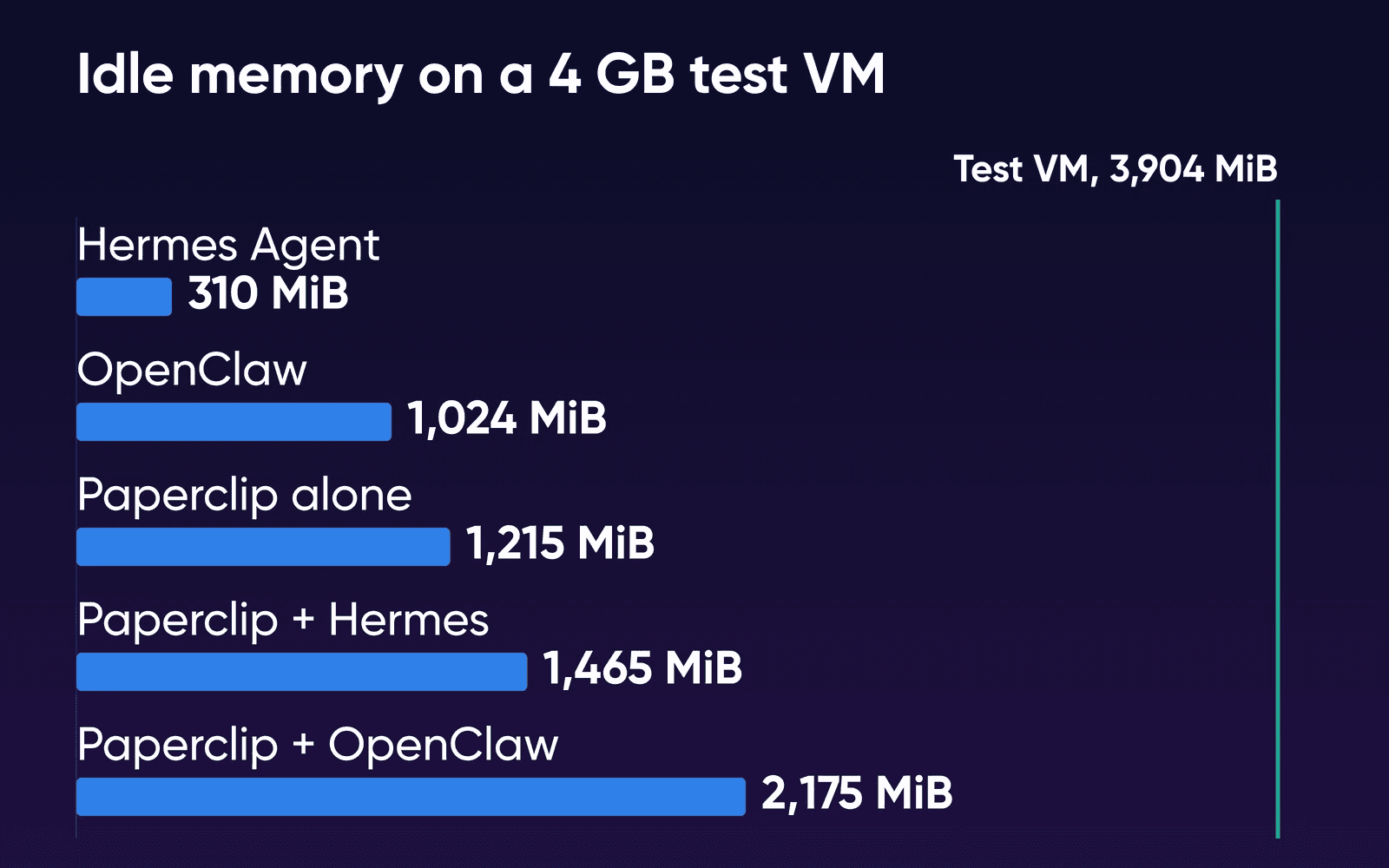
Both pairs fit in 4 GB at idle. Agent runs come out of what's left. Paperclip starts each Claude Code or Codex run as a child process inside its own container, and past a handful of busy agents its VPS guide suggests you move those runs to separate machines. We didn't measure a working run, so we can't say how many busy agents fit on Stack 8. Stack 8 adds memory with the same 2 vCPU as Stack 4, and Stack 16 is the first plan with 4 vCPU. You can move up from Stack 4 later, though moving down isn't supported.
Our Paperclip image adds swap, which our VM didn't have. That gives a short spike somewhere to land, but swap is far slower than memory, so don't count it when you size.
Disk is less of a squeeze than memory. Unpacked, the images take 9.19 GB for Paperclip, 4.5 GB for Hermes and 5.18 GB for OpenClaw. You'll need 14 to 15 GB of disk for Paperclip and one worker, out of 75 GB on Stack 4 or 150 GB on Stack 8. At idle, Paperclip kept about 5.6% of one vCPU busy with its heartbeat timer and database, and each worker stayed under 2%.
What Paperclip's budgets can't see
You give each agent a monthly dollar limit in Paperclip, and the whole company gets a monthly ceiling too. At 80% you get a warning, and the agent keeps working. At 100% Paperclip pauses the agent and starts no more heartbeats until you raise the budget or the month resets on the 1st (UTC). In the release we read, the 80% card wrongly says the agent is paused, which Paperclip's costs guide says a later release fixes.
The limit counts only recorded spend, and Paperclip's README says usage reporting and work already in flight can delay a stop. For OpenClaw, Paperclip's adapter code records a run's cost as $0 when OpenClaw's report carries no dollar figure. Our Paperclip page warns about the same gap, and it points out that a Paperclip budget pauses Paperclip without touching your provider's billing.
Already have an OpenClaw or Hermes server?
You can keep that server as it is. Paperclip can call a worker on another server, and with the worker on a server of its own, a crash or update there leaves your board running.
For Hermes on another server, Paperclip needs an https:// address, since its adapter takes http:// only on the same machine. Our Hermes image already serves its dashboard through Caddy with automatic HTTPS, and Paperclip's Hermes adapter accepts a dashboard address and maps it to Hermes's API. Turn on the API server with its own key, then test with a small first task.
For OpenClaw, Paperclip takes a ws:// or wss:// address it can reach, and its check suggests wss:// between servers. Our OpenClaw image binds to localhost and you reach its dashboard through an SSH tunnel, so you'll set up your own HTTPS address or a private network before Paperclip can connect. To start OpenClaw on a server of its own, follow the OpenClaw install guide.
How we measured
The VM ran Ubuntu 24.04.4 under Colima on an Apple M2 Mac: arm64, 2 vCPU, 4 GB of memory (3,904 MiB visible), no swap and Docker 29.5.2. DreamHost ran the test there on October 16, 2026. No DreamHost server was involved. Each app came from its maker's published image at a fixed version, and we recorded each digest. Paperclip 2026.1012.0 ran from its quickstart compose file, Hermes Agent v0.22.2 inside Paperclip's network, and OpenClaw 2026.10.4 from its own setup script on a shared Docker network. Each figure is the median of 12 docker stats MEM USAGE
readings taken 5 seconds apart after a 10-minute settle. OpenClaw's figure on its own and Hermes's figure with its dashboard come from the same VM's run for our OpenClaw-or-Hermes guide. On October 22, 2026, we checked every DreamHost plan, price and product statement here against the live Paperclip, OpenClaw and Hermes Agent VPS Hosting pages.
Our servers use x86 AMD EPYC processors, and our Paperclip image adds Caddy and may be laid out differently from the quickstart file, so you won't see identical figures there. No agent took a task, and no model answered because there wasn't a key to call one with. Each setup ran once. We didn't run all three apps together, and we didn't run the OpenClaw invite.
Paperclip, OpenClaw and Hermes FAQs
Does Paperclip cost anything?
Paperclip is free and MIT-licensed. You pay for the server and for your model provider, directly. Paperclip's first-five-minutes guide tells you to plan on $5 to $20 to try it and $20 to $100 a month for an active company.
What starts spending once I add a key?
Every heartbeat, task and comment an agent handles is a call your provider charges for, per Paperclip's costs guide. An agent on a 15-minute heartbeat makes roughly four times the calls of an hourly one, so give background agents long intervals. Paperclip's own 30-second timer kept running on our test VM with no key, and nothing called a model.
Can Paperclip start Hermes itself, without a second container?
Paperclip has a Hermes adapter that runs the Hermes command-line tool, but Paperclip's Docker image installs Claude Code, Codex, OpenCode, Gemini CLI and Kimi Code, and no Hermes. You'd have to add Hermes inside Paperclip's container yourself, and an update to the image would likely remove it. The Hermes Gateway route leaves both images as their makers ship them.
Can Paperclip, OpenClaw and Hermes all run on one server?
We measured one worker at a time. Paperclip with OpenClaw came to about 2,175 MiB at idle, and a Hermes worker used about 310 MiB, so the three would likely fit in 8 GB at idle, though we didn't run them together. Agent runs add memory, so watch usage and give a worker its own server if it gets tight.
Sources
- Paperclip VPS Hosting, DreamHost, read Oct 22, 2026. dreamhost.com/hosting/vps/paperclip
- OpenClaw VPS Hosting, DreamHost, read Oct 22, 2026. dreamhost.com/hosting/vps/openclaw
- Hermes Agent VPS Hosting, DreamHost, read Oct 22, 2026. dreamhost.com/hosting/vps/hermes-agent
- VPS Hosting, DreamHost, read Oct 22, 2026. dreamhost.com/hosting/vps
- Paperclip README, Paperclip (GitHub), read Oct 16, 2026. github.com/paperclipai/paperclip
- Paperclip releases, Paperclip (GitHub), read Oct 16, 2026. github.com/paperclipai/paperclip/releases
- Adapters overview, Paperclip docs, read Oct 16, 2026. docs.paperclip.ing/reference/adapters/overview
- Hermes Gateway adapter, Paperclip docs, read Oct 16, 2026. docs.paperclip.ing/reference/adapters/hermes-gateway
- OpenClaw Gateway adapter, Paperclip docs, read Oct 16, 2026. docs.paperclip.ing/reference/adapters/openclaw-gateway
- Hermes Gateway onboarding, Paperclip (GitHub), read Oct 16, 2026. github.com/paperclipai/paperclip/blob/master/doc/HERMES_GATEWAY_ONBOARDING.md
- OpenClaw onboarding, Paperclip (GitHub), read Oct 16, 2026. github.com/paperclipai/paperclip/blob/master/doc/OPENCLAW_ONBOARDING.md
- OpenClaw gateway adapter run code (execute.ts), Paperclip (GitHub), read Oct 16, 2026. github.com/paperclipai/paperclip/blob/master/packages/adapters/openclaw-gateway/src/server/execute.ts
- Paperclip Dockerfile, Paperclip (GitHub), read Oct 16, 2026. github.com/paperclipai/paperclip/blob/master/Dockerfile
- Installation, Paperclip docs, read Oct 22, 2026. docs.paperclip.ing/guides/getting-started/installation
- Your first five minutes, Paperclip docs, read Oct 16, 2026. docs.paperclip.ing/guides/getting-started/five-minute-path
- Deploy Paperclip to a VPS, Paperclip docs, read Oct 16, 2026. docs.paperclip.ing/how-to/deploy-to-vps-or-fly
- Costs, Paperclip docs, read Oct 16, 2026. docs.paperclip.ing/guides/day-to-day/costs
- What is OpenClaw?, OpenClaw docs, read Oct 16, 2026. docs.openclaw.ai/help/faq/what-is-openclaw
- FAQ: providers and hosting, OpenClaw docs, read Oct 16, 2026. docs.openclaw.ai/help/faq-first-run/providers-and-hosting
- Docker, OpenClaw docs, read Oct 16, 2026. docs.openclaw.ai/install/docker
- Docker, Hermes Agent docs, read Oct 16, 2026. hermes-agent.nousresearch.com/docs/user-guide/docker
- Hermes Agent README, Nous Research (GitHub), read Oct 16, 2026. github.com/NousResearch/hermes-agent
- Hermes bundled skills for coding agents, Nous Research (GitHub), read Oct 19, 2026. github.com/NousResearch/hermes-agent/tree/main/skills/autonomous-ai-agents