In the ten days to October 21, OpenClaw shipped five stable releases and Hermes Agent six, so we also tested what a feature list can't show: moving a test agent from one to the other, in both directions.
You can leave in either direction. On one small test VM (not a DreamHost server) we moved an invented test agent from OpenClaw to Hermes with hermes claw migrate, then back with openclaw migrate hermes. The persona, memory files and skills came across both times. Both moves also stalled on something neither maker's guide mentions: on Docker installs each agent keeps its files private to its own user, so the other can't read them until you hand it a copy it owns. Hermes didn't report an error. It said Nothing to migrate from OpenClaw
.
What each one used on our test VM
Our Linux test VM was arm64, with 2 vCPU and 4 GB of memory, the same size as our Stack 4 plan. We started each agent once from its maker's Docker files, with no AI model connected, and read its memory 2 and 10 minutes later. The full method is at the end of the page.
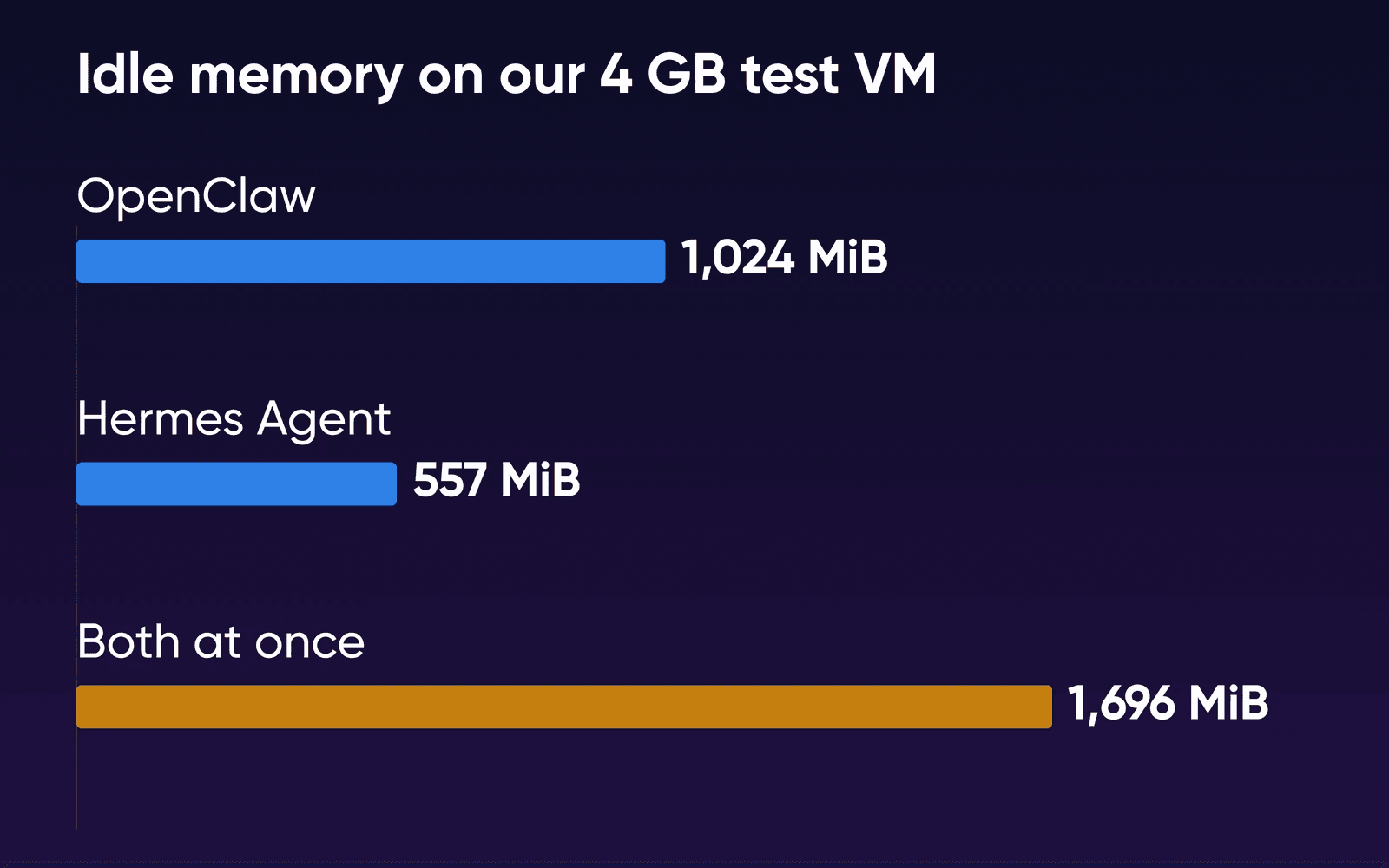
OpenClaw's gateway is the heavier of the two. It sat at 1,038 MiB after 2 minutes and 1,024 MiB after 10, and its memory high-water mark hit 1,737 MiB while it was starting up. Hermes, which runs its gateway and web dashboard in one container, read 583 MiB and then 557 MiB. Neither kept the processor busy. At 10 minutes, OpenClaw's median was 1.4% of one vCPU and Hermes's 0.9%.
OpenClaw's hardware FAQ lists 1 vCPU and 1 GB of memory as the minimum and recommends 2 GB or more. Size your server by the recommendation, since the idle gateway alone sat at about 1 GB before it had a channel, a chat or a key. Nous's Docker docs give Hermes a 1 GB minimum and recommend 2 to 4 GB, and say browser tools need at least 2 GB. On disk, the two unpacked images and their data came to about 10 GB, so you'll keep most of a 75 GB plan free.
Which one fits how you work
Hermes bills itself as self-improving. It turns a task it's finished into a skill it can reuse, and it searches its own past conversations. Its script-only cron jobs let you run a script on a schedule with no model call. Our test job fired on time with no key configured at all, so a job like an uptime check or a nightly report makes no model call. OpenClaw's scheduler came with three built-in jobs, and its payload docs list a --command job that runs a shell command with no model call. We didn't try one.
On OpenClaw's side, its own comparison page lists channels Hermes doesn't, among them Nextcloud Talk, Twitch, Urbit and three ways into Zalo. Community skills and plugins come from ClawHub, its public registry. The same comparison page describes its maker, the OpenClaw Foundation, as an independent nonprofit with no paid tier.
If you already run one of them and it does what you need, keep it. The import commands work, but you'd still re-pair WhatsApp, rebuild scheduled jobs and tidy skills, so switch only for a feature the other agent has. If you already pay for Claude Code, Hermes Agent vs Claude Code covers what an always-on agent adds. To run either one under a manager with budgets and tickets, see Paperclip vs OpenClaw or Hermes.
Choose OpenClaw if
You message your assistant from an app only OpenClaw lists, such as Zalo, Twitch or Nextcloud Talk, or you want its community skills and a nonprofit maker with no paid tier. Budget about 1 GB of memory for the idle gateway.
Choose Hermes Agent if
You want an agent that writes skills from finished tasks and searches its own history, or email conversations and Home Assistant events as channels.
Try both if
You can't pick yet. Together they idled at 1,696 MiB on our 4 GB test VM with about 2 GB to spare, and each imports the other's settings, memory files and skills.
How to switch from OpenClaw to Hermes
Our test agent was an invented bakery assistant on OpenClaw 2026.10.4, with a persona, five memory entries, two days of notes and two skills. We moved it to a fresh Hermes v0.22.2 by following Hermes's migration guide, between the makers' Docker installs. The whole import run, container start included, took about 6 seconds once Hermes could read the files.
- Save what the import won't bring
OpenClaw keeps its state in
~/.openclawand its workspace, where the memory files live, in~/.openclaw/workspace. Its Docker file mounts that same host folder, plus login secrets from a separate~/.openclaw-auth-profile-secretsfolder, so copy that too. Copy both off the server, because a Git copy of your workspace alone misses session history and logins.Save your
openclaw cron listoutput too. Hermes's docs say scheduled jobs are archived for you to rebuild, but our import didn't pick up OpenClaw's three built-in jobs at all (No cron configuration found
). If Hermes will run on a second server, copy the folder there withrsync -aand run the remaining steps on that server. - Give Hermes a copy it can read
OpenClaw's files are readable only by its own user, uid 1000. Hermes runs as uid 10000 in its image. If your setup's users differ, you can check each folder's owner with
ls -ln.bashsudo cp -a ~/.openclaw /srv/openclaw-copy sudo chown -R 10000:10000 /srv/openclaw-copy - Stop Hermes and preview the import
We stopped the Hermes container first. Then we ran the import from its image, with the copy mounted read-only and Hermes's data folder at
/opt/data. The preview lists what it would import and what it would skip. A dry run doesn't change anything. Add--workspace-targetto tell it where yourAGENTS.mdgoes, or it stays behind.bashdocker stop hermes docker run --rm \ -v /srv/openclaw-copy:/src/openclaw:ro \ -v ~/.hermes:/opt/data \ nousresearch/hermes-agent:v0.22.2 \ claw migrate --dry-run \ --source /src/openclaw \ --workspace-target /opt/data/workspaceOn a native install, run the same preview as
hermes claw migrate --dry-runwith--source /srv/openclaw-copyand--workspace-target ~/.hermes/workspace. - Apply it with --overwrite
A fresh Hermes counts its own default persona and model as two conflicts. It wouldn't apply until we added
--overwrite. It writes a restore-point zip first. You can restore it withhermes import <zip>. API keys come across only with--migrate-secrets, and only the ones on Hermes's allowlist.bashdocker run --rm \ -v /srv/openclaw-copy:/src/openclaw:ro \ -v ~/.hermes:/opt/data \ nousresearch/hermes-agent:v0.22.2 \ claw migrate --preset full --overwrite --yes \ --source /src/openclaw \ --workspace-target /opt/data/workspace docker start hermes - Check memory and finish the parts that don't move
Hermes's docs say imported memory is deduped, but an entry we'd repeated in a daily note showed up twice, so read your
MEMORY.md. Start a new session, because imported skills and memory won't load in the session you're in. Re-pair WhatsApp withhermes whatsapp. Recreate scheduled jobs withhermes cron create. Then stop OpenClaw's gateway so only Hermes answers your bots, and once you're happy,hermes claw cleanuprenames the leftover OpenClaw folders to.pre-migration/.
Our OpenClaw-to-Hermes import moved 8 items and skipped 25, and the restore zip was 1.2 MB.
Came across to Hermes
- The persona and AGENTS.md
- MEMORY.md and USER.md, with the daily notes merged in
- Both skills, listed in hermes skills list and the dashboard
- The model setting
Stayed behind or archived
- API keys, which need the migrate-secrets option
- BOOTSTRAP.md and IDENTITY.md, archived
- Gateway, plugin and skills-registry settings, archived
- OpenClaw's built-in scheduled jobs and session reset timers
How to switch from Hermes to OpenClaw
OpenClaw's import needs a fresh OpenClaw setup, so run it before you build up state on the new side, or apply with --overwrite once you've read the plan. Per OpenClaw's guide, it copies the persona and AGENTS.md and brings skills with their support files. Hermes's MEMORY.md and USER.md go on the end of OpenClaw's own memory files. Sessions, scheduled jobs, logs, state databases and channel pairings go into a report folder for review and are never loaded.
- Back up OpenClaw yourself and stop its gateway
OpenClaw writes its own backup before an import, but on its Docker install our backup landed inside the one-off CLI container and was gone when the container exited.
bashsudo cp -a ~/.openclaw ~/openclaw-before-import docker compose stop openclaw-gateway - Give OpenClaw a copy it can read
Hermes's files are private to uid 10000, so OpenClaw hit the same wall. Its own user is uid 1000.
bashsudo cp -a ~/.hermes /srv/hermes-copy sudo chown -R 1000:1000 /srv/hermes-copy - Preview and apply from the CLI container
--frompoints the import at the copy, mounted into the one-off container from OpenClaw's Docker file.bashdocker compose run --rm -v /srv/hermes-copy:/src/hermes \ openclaw-cli migrate hermes --dry-run --from /src/hermes docker compose run --rm -v /srv/hermes-copy:/src/hermes \ openclaw-cli migrate apply hermes --yes --from /src/hermesIf you run the import interactively, it asks whether to bring your keys and logins, with yes already selected. The
--yesform imports non-secret state only unless you add--include-secrets. - Start the gateway and run doctor inside it
The documented
docker compose run --rm openclaw-cliform refusedstatus,doctorandskills listwhile the gateway was running, so useexecfor your day-to-day commands.bashdocker compose start openclaw-gateway docker compose exec openclaw-gateway \ node dist/index.js doctor - Tidy skills and bring AGENTS.md over by hand
OpenClaw copied 60 skills, our 2 plus the 58 skill folders Hermes had synced from its bundle, and
doctorwarned that they shadow 11 of OpenClaw's own, including github and apple-notes. Delete the ones you don't want from~/.openclaw/workspace/skills. OpenClaw's--skillflag imports only the skills you name, which we didn't test.AGENTS.mddidn't come back at all. Our copy sat in Hermes's workspace folder, where the first import put it, and OpenClaw only archives that folder.bashsudo cp /srv/hermes-copy/workspace/AGENTS.md \ ~/.openclaw/workspace/ sudo chown 1000:1000 ~/.openclaw/workspace/AGENTS.md
The preview listed 81 items and no conflicts, and the import run took about 4 seconds. The persona, the model setting and both memory files arrived, with Hermes's entries under an Imported from Hermes
marker.
Side by side
We read both projects' docs on October 16, 2026, when the latest releases were OpenClaw 2026.10.4 and Hermes Agent v0.22.2, and re-checked them on October 21, when the latest were 2026.10.5 and v0.22.4. The memory, disk, time and no-key rows come from one run of each maker's Docker files on our arm64 test VM.
| OpenClaw | Hermes Agent | |
|---|---|---|
| Made by | OpenClaw Foundation, a nonprofit | Nous Research |
| License | MIT, free | MIT, free |
| Runs on | Node.js 24.16+ or 26.1+ | Python 3.14 |
| Known for | Channel breadth, community skills | Skills from finished tasks, search of past sessions |
| Channels only it lists | Zalo, Twitch, Nextcloud Talk, Urbit | Email conversations, Home Assistant events, ntfy, SimpleX |
| Maker's stated size | 1 GB minimum, 2 GB+ recommended | 1 GB minimum, 2 to 4 GB recommended |
| Idle memory, 10 minutes | 1,024 MiB | 557 MiB |
| Image on disk (download) | 5.18 GB (1.26 GB) | 4.5 GB (1.10 GB) |
| Data after first start | 146 MB | 13 to 16 MB, after our tests |
| Seconds to dashboard | 25, with its setup script | 10 |
| Skills it ships with | 49 listed, 15 ready to use | 53, all enabled |
| Chat with no model key | Tried OpenAI, got a 401 error | Says no provider is connected |
| Dashboard | Control UI, port 18789 | Web dashboard, port 9119 |
| Opening the dashboard on our servers | Through an SSH tunnel | Over HTTPS through Caddy |
| Imports the other | openclaw migrate hermes | hermes claw migrate |
| Version we tested | 2026.10.4, released Oct 16, 2026 | v0.22.2, released Oct 15, 2026 |
The channel rows come from OpenClaw's comparison page, which also warns that the two catalogs' counts are not directly comparable.
Both cover Telegram, WhatsApp, Slack, Discord and Signal. Hermes reaches iMessage through BlueBubbles. Check that your own app is in the Hermes list or OpenClaw's before you choose on channels.
Running both while you decide
With the two started together on our 4 GB VM, OpenClaw read 1,140 MiB after 10 minutes and Hermes 557 MiB, and the VM still had 2,081 MB available. That's about 115 MiB more than OpenClaw read alone, so plan on 1.0 to 1.15 GB for it at idle. We didn't connect a model, and we'd expect a working agent to use more than these idle figures. Their default ports don't clash: OpenClaw's compose file uses 18789, 18790 and 3978, and Hermes's uses 8642 and 9119.
Give each of your agents its own bot. Hermes's FAQ says each messaging platform needs exclusive access to a bot token, so a second gateway polling the same Telegram bot won't connect. If you imported an OpenAI or Copilot login from one agent to the other, sign in again on one side before you run both. OpenClaw's migration notes say the two shouldn't share one refresh grant, the saved sign-in each uses to stay logged in.
Hermes's dashboard login
Hermes's username and password login comes from HERMES_DASHBOARD_BASIC_AUTH_USERNAME and HERMES_DASHBOARD_BASIC_AUTH_PASSWORD. Set both before you start its Docker example.
How we measured
DreamHost ran the test on October 16, 2026. The VM ran Ubuntu 24.04.4 through Colima on an Apple-silicon Mac, with 2 vCPU, 3,904 MB of usable memory, no swap and Docker 29.5.2. OpenClaw 2026.10.4 started from the setup script and compose file published with that release, with onboarding skipped by the script's own switch. Hermes Agent v0.22.2 started from the compose example on its Docker page, with the username and password login added so the dashboard would run. We'd downloaded the images first. We ran each setup once, so each memory figure is the median of 12 docker stats readings taken 5 seconds apart within that one run, rounded to the nearest MiB. OpenClaw's second start, in the both-at-once run, read about 115 MiB higher, which gives a sense of how far a repeat could move. The start-up peak is the high-water mark the kernel keeps for each container, a different counter from the idle readings. The switch timings cover the whole one-off container run, start-up included.
We re-checked every doc, version and price on this page on October 21, 2026, and didn't rerun the test on the newer releases. On October 22 we checked every DreamHost plan, price and product statement here against the live OpenClaw and Hermes Agent VPS Hosting pages. We didn't give either agent a model key, bot token or account. Nobody chatted with them, so the figures show each agent sitting ready. The switch used invented test data and no secrets. We didn't test answer quality, model cost, a week of real use, live chat channels, moving keys or session history, either maker's native installer, or the switch on our own images. Our OpenClaw and Hermes images are set up differently from the makers' Docker files, so your numbers will differ.
OpenClaw and Hermes Agent FAQs
Is Hermes really better than OpenClaw?
Not across the board. Pick Hermes for skills it writes from finished tasks and for email conversations or Home Assistant events, and OpenClaw for apps only it lists, such as Zalo or Twitch. Hermes also idled at about half OpenClaw's memory on our test VM, 557 MiB against 1,024 MiB, and both fit in 4 GB.
Can Hermes and OpenClaw work together?
They can share a server. Their default ports don't clash, and together they idled at 1,696 MiB on our 4 GB test VM. Give each its own bot token. One Hacker News commenter chains them, with Hermes handing tasks to OpenClaw.
Does Hermes have a GUI like OpenClaw?
Both have one. Hermes has a web dashboard on port 9119, and OpenClaw has its Control UI on port 18789. On our servers, Hermes's dashboard is served over HTTPS through Caddy, and you reach OpenClaw's through an SSH tunnel.
Can I try either without paying for an AI model?
Partly. On our test VM both installed, opened their dashboards and ran their status checks with no key. Chat didn't work: Hermes said no provider was connected, and OpenClaw tried OpenAI and got a 401 error. Hermes's script-only jobs ran on schedule. The model bill is separate, and our guide to what a month of Hermes costs works it out.
Which plan do I need for one agent?
Stack 4. OpenClaw recommends 2 GB of memory or more, and Nous recommends 2 to 4 GB for Hermes. Our Hermes page's guidance is to start on Stack 4 and move up when you add gateways or heavier jobs. For bigger setups, see which VPS plan you need.
Sources
- OpenClaw VPS Hosting, DreamHost, read Oct 22, 2026. dreamhost.com/hosting/vps/openclaw
- Hermes Agent VPS Hosting, DreamHost, read Oct 22, 2026. dreamhost.com/hosting/vps/hermes-agent
- OpenClaw and Hermes Agent, OpenClaw docs, read Oct 21, 2026. docs.openclaw.ai/start/why-openclaw/openclaw-and-hermes-agent
- ClawHub, OpenClaw docs, read Oct 21, 2026. docs.openclaw.ai/clawhub
- FAQ: providers, hardware, and hosting, OpenClaw docs, read Oct 21, 2026. docs.openclaw.ai/help/faq-first-run/providers-and-hosting
- FAQ: quick start and first-run setup, OpenClaw docs, read Oct 16, 2026. docs.openclaw.ai/help/faq-first-run/quick-start
- Install, OpenClaw docs, read Oct 16, 2026. docs.openclaw.ai/install
- Docker, OpenClaw docs, read Oct 16, 2026. docs.openclaw.ai/install/docker
- Gateway ports, already running, and remote mode, OpenClaw docs, read Oct 16, 2026. docs.openclaw.ai/help/faq/gateway-ports-and-remote-mode
- Migrating from Hermes, OpenClaw docs, read Oct 21, 2026. docs.openclaw.ai/install/migrating-hermes
- openclaw migrate, OpenClaw docs, read Oct 16, 2026. docs.openclaw.ai/cli/migrate
- docker-compose.yml at v2026.10.4, OpenClaw (GitHub), read Oct 16, 2026. github.com/openclaw/openclaw/blob/v2026.10.4/docker-compose.yml
- Docker setup script, OpenClaw (GitHub), read Oct 16, 2026. github.com/openclaw/openclaw/blob/main/scripts/docker/setup.sh
- OpenClaw releases, OpenClaw (GitHub), read Oct 21, 2026. github.com/openclaw/openclaw/releases
- OpenClaw image tags, Docker Hub, read Oct 16, 2026. hub.docker.com/r/openclaw/openclaw/tags
- Migrate from OpenClaw, Hermes Agent docs, read Oct 21, 2026. hermes-agent.nousresearch.com/docs/guides/migrate-from-openclaw
- Hermes Agent documentation, Hermes Agent docs, read Oct 16, 2026. hermes-agent.nousresearch.com/docs
- Docker, Hermes Agent docs, read Oct 21, 2026. hermes-agent.nousresearch.com/docs/user-guide/docker
- Web Dashboard, Hermes Agent docs, read Oct 16, 2026. hermes-agent.nousresearch.com/docs/user-guide/features/web-dashboard
- Script-only cron jobs, Hermes Agent docs, read Oct 16, 2026. hermes-agent.nousresearch.com/docs/guides/cron-script-only
- Automation payloads, OpenClaw docs, read Oct 21, 2026. docs.openclaw.ai/automation/cron-jobs/payloads
- FAQ, Hermes Agent docs, read Oct 16, 2026. hermes-agent.nousresearch.com/docs/reference/faq
- Installation, Hermes Agent docs, read Oct 16, 2026. hermes-agent.nousresearch.com/docs/getting-started/installation
- Messaging platforms, Hermes Agent docs, read Oct 21, 2026. hermes-agent.nousresearch.com/docs/user-guide/messaging
- Hermes Agent releases, Nous Research (GitHub), read Oct 21, 2026. github.com/NousResearch/hermes-agent/releases
- Hermes Agent repository, Nous Research (GitHub), read Oct 16, 2026. github.com/NousResearch/hermes-agent
- Hermes Agent image tags, Docker Hub, read Oct 16, 2026. hub.docker.com/r/nousresearch/hermes-agent/tags
- Hacker News comment on running both, Hacker News, posted Aug 31, 2026, read Oct 16, 2026. news.ycombinator.com/item?id=49508739