Paperclip's own comparison, published October 7, says to use Anthropic's agent view when one person dispatches and checks several background sessions, and agent teams when several Claude instances need to coordinate. If you pay $20 a month for Claude Pro and every agent you run is Claude, you may not need anything else.
Agent teams and Claude Code's other ways to run several agents
As of October 2026, Claude Code has five built-in ways to split up work, and in every one of them the workers are Claude sessions. Other tools join as MCP servers.
- Subagents are helpers inside one session. Each takes a side task in its own context and hands back a summary.
- Agent view is one screen, opened with
claude agents, for sending off background sessions and watching them. It's a research preview. - Agent teams have a lead session that splits up a project while teammates share a task list and message each other. They're experimental and stay off until you set
CLAUDE_CODE_EXPERIMENTAL_AGENT_TEAMS=1. - Dynamic workflows run a script that starts many subagents and cross-checks what they find.
- Projects keep one ongoing conversation at claude.ai/code that starts parallel threads, mostly in Anthropic's cloud. They're in public beta on Pro and Max.
Agent teams come closest to a crew that stays together, but they're built for one sitting. A session has exactly one team, /resume doesn't bring back in-process teammates, and a teammate's background work can't outlive the lead's process. You can also turn teams on inside a cloud session, so a team keeps working after you close the laptop. Anthropic says teams work best when teammates can work independently, as in debugging with competing hypotheses, and suggests starting with 3 to 5 teammates and 5 or 6 tasks each. For sequential work or edits to the same files, you'll do better with one session or subagents. Anthropic also lists these limits: teammates can't start teams of their own, the lead stays the lead for the whole session, task status can lag behind the work, and shutting a teammate down waits for its current step. We didn't run agent teams ourselves, so this part comes from Anthropic's page.
Agent teams also use more tokens. Anthropic's costs page puts agent teams at about 7x the tokens of a standard session when teammates run in plan mode, and each active teammate keeps using tokens until it exits. At API prices, a large team on a long task pays for every teammate's output: $10 per million output tokens on Sonnet 5.5, or $20 on Opus 5.5, before input tokens.
How to turn on agent teams
These steps follow Anthropic's agent teams page, read October 22, 2026, which has the full reference.
- Set the switch
Add the switch to the
envblock of yoursettings.json, or export the same variable in your shell:json{ "env": { "CLAUDE_CODE_EXPERIMENTAL_AGENT_TEAMS": "1" } }While it's on, a subagent Claude names for itself launches as a teammate, so a team can form when you didn't ask for one. Set it back to
0to stop that. - Ask for the team in an interactive session
Describe the task and the teammates in plain words, for example:
Spawn three teammates to explore this from different angles: one on UX, one on technical architecture, one playing devil's advocate.
Claude doesn't start teammates inclaude -pruns or Agent SDK sessions. If it hands the work to subagents instead, ask for an agent team by name. - Choose how you watch them
By default every teammate runs inside your terminal. Pick one in the agent panel with the arrow keys and press Enter to read or message it. Split panes, one per teammate, need tmux or iTerm2 with its
it2command-line tool. - Shut teammates down by name
Ask the lead to shut a named teammate down. The team's config folder goes away when the session ends, and its task list stays on disk.
Anthropic's page also has advice for getting good work from a team:
- Put the task's details in the spawn prompt, since teammates load your project's CLAUDE.md but not the lead's conversation.
- Give each teammate its own set of files, because two teammates editing one file overwrite each other.
- Name a model per teammate in the prompt if you want a cheaper one, such as
Use Sonnet for each teammate.
- Expect permission prompts from every teammate to show up in the lead's session, so approve common actions before you start.
Agent view runs each background session as its own Claude Code process under a supervisor, so the work goes on with no terminal open. A cloud session keeps running after you close your laptop,
counts toward your plan's usage limits and carries no separate charge for the cloud machine. Cloud scheduled tasks, which Anthropic used to call routines, run in Anthropic's cloud on a schedule (at most once an hour), on an API call or on a GitHub event. Team and Enterprise plans can also run cloud sessions on their own machines with self-hosted environments, a public beta.
Where Claude Code's own tools stop
Anthropic's cloud keeps work going with the laptop closed when your code is on github.com. For anything else you need a machine that stays on. In the table, on your computer
covers agent view and agent teams, and Anthropic's cloud
covers cloud sessions, projects and cloud scheduled tasks. It reflects the vendors' docs on October 21, 2026, and our own test.
| On your computer | Anthropic's cloud | Paperclip on your server | |
|---|---|---|---|
| Keeps working with the laptop closed | Only while the computer stays awake. Sleep pauses sessions and shutdown stops them | Yes, within your plan's limits | Yes, while the server is up |
| Agents from other vendors | No, Claude only | No, Claude only | Yes: Codex, Gemini CLI, OpenCode and more |
| Monthly spending cap per agent | No. A per-run cap in headless mode and one limit for the account | No. One monthly limit for the account | Yes. It stops the agent's next run once the spend is recorded |
| Task and approval record across days | No. Tasks stay on disk, but teammates end with the session | One account's projects (beta) | Yes: tasks, approvals and an activity log |
| More than one person on the same work | No | Partly. You can share a cloud session's link, but cloud scheduled tasks belong to one account | Yes, other people join as board members |
| Code that isn't on github.com | Yes | Limited. Projects need github.com | Yes, any repo the server can clone (our reading of the adapter docs) |
| Databases and tools on the same machine | Yes | Through a project thread on your computer, or self-hosted environments on Team and Enterprise | Yes, for tools inside Paperclip's container (our reading of its deploy guide) |
| What it costs beyond Claude | Nothing | No separate charge, but projects use your plan limits faster | A VPS plan, plus per-token API bills from each provider |
| Status | Agent view: research preview. Agent teams: experimental | Projects: public beta. Cloud scheduled tasks: research preview | Open source (MIT) and moving fast |
Anthropic's own limits work per run or per account. Claude Code's --max-budget-usd flag stops a headless run once its estimated spend reaches a dollar amount, though the CLI reference warns that spend can pass the cap. Pro and Max accounts get one monthly spend limit when usage credits are on, and API users set limits per workspace. None of those is a monthly budget for each agent. Paperclip enforces a per-agent cap separately from the company's, so one runaway agent pauses while the others keep their budget.
The vendor row splits them too: Paperclip works with OpenClaw, Claude Code, Codex, Cursor, Gemini CLI, OpenCode, Hermes and more, and four of those CLIs come installed on our Paperclip VPS Hosting image. If you're weighing Paperclip against a single always-on agent, the guide to Paperclip vs OpenClaw or Hermes covers that choice.
If the only problem is a laptop that sleeps, Claude Code runs by itself on a Linux server and you can skip Paperclip. Anthropic's Remote Control docs say to start claude inside tmux or screen on a remote machine, so the session survives when you disconnect from SSH. Agent view's supervisor is documented for Linux too. Sign in with an API key or a claude setup-token from your plan. One waiting run took about 210 MiB on our test VM (not a DreamHost server), so we'd start a few all-Claude sessions on Stack 4, though without Paperclip you also go without its per-agent budgets. If what you want is one assistant you message rather than a crew of coding agents, see OpenClaw vs Claude Code.
Which setup fits
Stay with Claude Code's own tools if
Every agent is Claude. Agent teams and agent view suit work you watch from your computer the same day, and Anthropic's cloud keeps github.com work going with the laptop closed, through projects or cloud scheduled tasks.
Run Claude Code alone on a server if
Every agent is Claude, but your code or tools live off github.com, or you want sessions that stay up around the clock. Start them in tmux or under agent view's supervisor.
Add Paperclip to that server if
You run Codex or Gemini beside Claude, want each agent held to its own monthly budget, or need other people to see and approve the same tasks.
What several agents take from a server's memory
Paperclip with five Claude Code agents mid-run peaked at about 2 GB on our 4 GB test VM, which is why we'd start a Paperclip server on Stack 8. We ran Claude Code by itself and then inside Paperclip's own image, on a VM the size of our Stack 4 plan. A local stand-in answered in place of Anthropic's model.
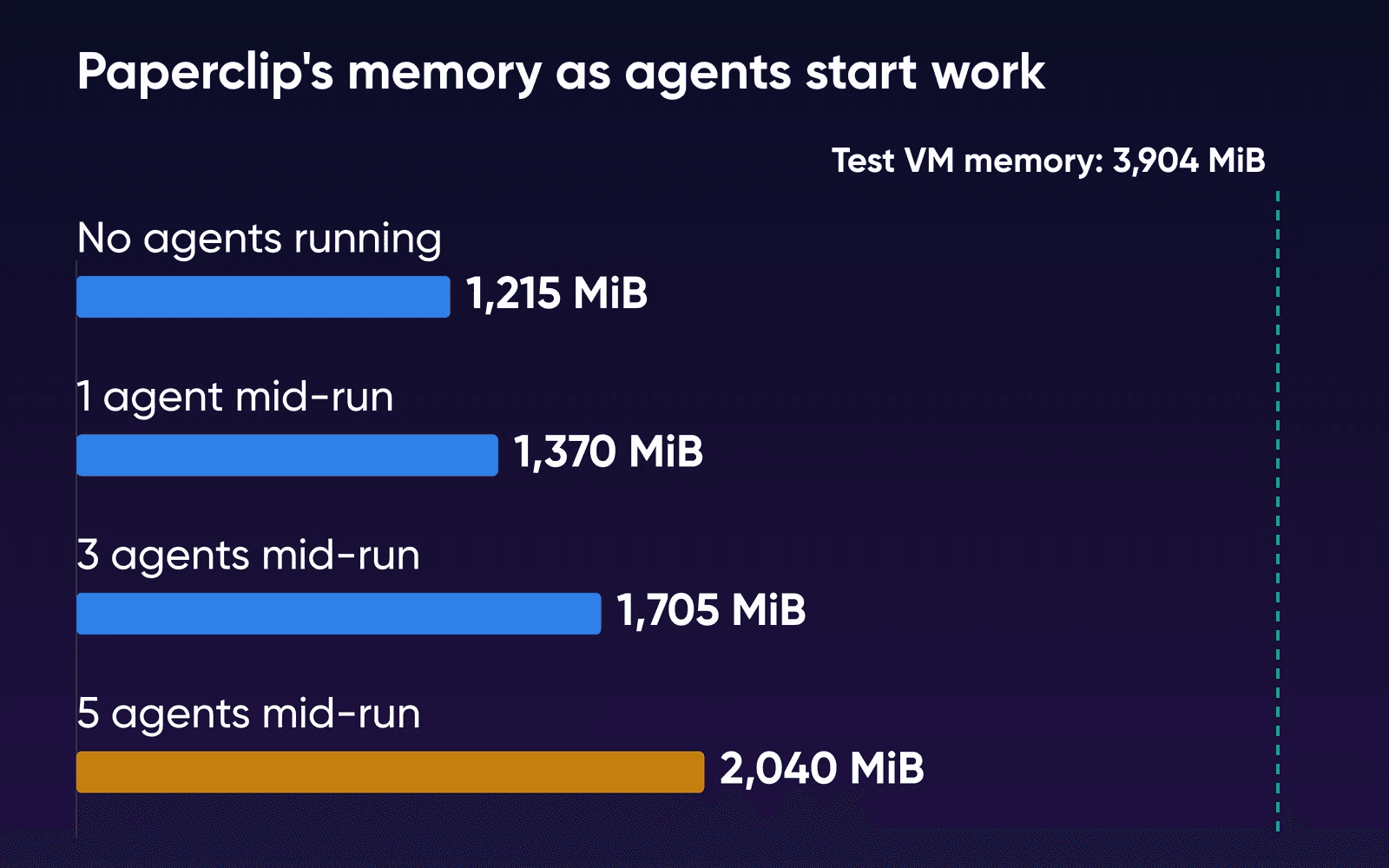
Paperclip itself took more memory than any one agent, about 1,215 MiB idle after a fresh start and a 10-minute settle, in the run we did for our Paperclip, OpenClaw and Hermes guide. It sat at 1,070 to 1,165 MiB just before each test, and each agent mid-run added roughly 170 to 300 MiB on top. Three peaked at 1,705 MiB and five at 2,040 MiB as they started, and five then held about 1,925 MiB while they worked. The VM still had 1,470 MiB available, and no swap was used. About 60 seconds after the runs ended, Paperclip was back near 1,170 MiB, because it closes each Claude Code process when its run is done and keeps the session for next time.
Claude Code on its own is lighter: one headless run waiting on a reply used about 210 MiB, and each extra run added 85 to 95 MiB, since the runs share most of the program's memory. Twelve at once added about 1 GB to the VM's used memory and left about 2,400 MiB available, so we didn't find where 4 GB runs out.
Treat those as floors, since your real sessions carry far more context and tool output than our stand-in did, and Claude Code shows a critical memory warning when one session's heap passes 2.5 GB. Paperclip's 1,215 MiB plus one session that size would take nearly all of the 3,904 MiB our 4 GB VM could use. Paperclip's deploy guide says its local adapters run as child processes in the same container, and past a handful of busy agents it suggests separate runner machines.
| What you run | Memory on our 4 GB test VM | Plan that fits |
|---|---|---|
| Claude Code alone, 12 runs waiting | About 1 GB added, about 2,400 MiB still available | Stack 4 |
| Paperclip with no agents running | About 1,215 MiB | Stack 4 |
| Paperclip with 1 agent mid-run | 1,370 MiB at peak | Stack 4 |
| Paperclip with 5 agents mid-run | 2,040 MiB at peak, 1,470 MiB still available | Stack 8, for room as sessions grow |
| Many busy agents, or agents running builds and test suites | Not measured | Stack 16 for 4 vCPU, or runners on a second server |
Stack 8 keeps Stack 4's 2 vCPU, and our test didn't load the CPU. If your Claude Code agents run builds and test suites, look at Stack 16's 4 vCPU or a separate runner server. Paperclip's image took 9.19 GB and its data folder held 89 MB after all our runs, and that's a small slice of Stack 8's 150 GB. You can move up a plan later: our VPS Hosting page says your environment moves with you, and scaling down to a smaller Stack isn't currently supported. DreamHost's Help Center describes moving down as a new server and a data move.
When a Paperclip budget stops an agent
Paperclip warns at 80% of a budget and hard-stops at 100%. At the stop, it pauses the agent, cancels the run that's in progress and won't schedule more heartbeats until you raise the cap or the month resets. The tasks stay assigned.
On the same VM, we gave one agent a $1 monthly cap. Then we had the stand-in report 2 million input tokens on a single run, about $4 at Sonnet 5.5 prices. Paperclip recorded $4.00 when the run finished and opened a hard stop 0.03 seconds later. The agent showed as paused at our next check, about 6 seconds after that, and the next wake was refused with Agent is paused because its budget hard-stop was reached.
Paperclip books a Claude Code run's cost when the run reports it at the end, so in our test the cap didn't stop the run that pushed it over and only stopped the next one. Ours gave no 80% warning first. The README says enforcement works from recorded spend, so usage reporting and work already in flight can delay a stop. We didn't test whether a cap cancels a run still going, as the docs say, or Claude Code's per-run --max-budget-usd flag inside Paperclip.
Using your Claude subscription on a server
Anthropic's terms don't rule it out. Its legal and compliance page says nothing in them prevents you from signing in to the unmodified Claude Code binary with your own subscription, even where a platform hosts Claude Code. For scripts and servers, claude setup-token makes a one-year token, and it needs a Pro, Max, Team or Enterprise plan, per the authentication docs.
Paperclip adds its own rule. Its Anthropic connector turns off subscription sign-in on the server host for deployments reached over the internet with a login, unless an admin sets up a trusted runtime host. By our reading of the connector docs, that covers a Paperclip server like ours, which you reach over the internet with an admin login. On our image, the Anthropic, OpenAI and Gemini key fields also ship empty. So plan on an Anthropic API key, billed per token. If you'd rather use your subscription, read the connector docs first, since we didn't try a setup token inside Paperclip or see how a subscription run counts against its budget.
Anthropic says advertised Pro and Max limits assume ordinary, individual use of Claude Code. If several agents will run all day on a personal plan, check Anthropic's terms first.
What API billing costs
Anthropic counts per developer and Paperclip per agent or per company, so the figures don't line up exactly, but Paperclip's estimates are lower:
- Claude Code, enterprise average (Anthropic): about $13 per developer per active day, or $150 to $250 a month.
- A moderately active Paperclip worker agent: $3 to $15 a month.
- An active Paperclip company: $20 to $100 a month.
Read them on Anthropic's costs page, Paperclip's cost guide and its quickstart. Max plans now include $100 to $200 a month in API credits for the Claude Platform. Anthropic's pricing page doesn't spell out the credits' terms, so check them in your Console before you count them against an agent's key.
Moving from agent teams to Paperclip
You can start with a single agent. Paperclip's Claude Code adapter runs Anthropic's Claude Code CLI on the server, in a working directory you set for each agent.
- Clone your repos onto the server
Give each agent its own folder with the repo checked out. Claude reads the project's CLAUDE.md at the start of every conversation, so your instructions come along with the code. Paperclip resumes an agent's Claude Code session on the next heartbeat as long as the working directory hasn't moved. On Paperclip's own image, our first run failed until the folder belonged to the container's
nodeuser (chown -R node:node). - Create one Claude Code agent per role
Use the
claude_localadapter and set an absolute working directory for each agent. Put the API key in as a Paperclip secret. On our test, Paperclip refused a key typed straight into the agent's environment. - Set a monthly cap on each agent
Give every agent a monthly budget from day one, and set spend limits with your model providers too.
- Wake one agent, then add the rest
Per Paperclip's README, agents wake for assigned work, follow-up messages or a schedule you set, so timer heartbeats are optional. Assign one task, watch the run and its cost, then bring in the next role.
DreamHost's Help Center says a VPS doesn't include server management, automated backups or application-level support. Paperclip keeps its database, agent workspaces and files in /opt/paperclip on our image, and paperclip-backup makes an archive that you copy off the server yourself.
How we checked
DreamHost ran the test on October 16, 2026, and re-checked every doc, price and plan on this page on October 21. On October 22 we re-read Anthropic's agent teams page and checked every DreamHost plan, price and product statement here against the live Paperclip and VPS Hosting pages and the Help Center. The VM ran Ubuntu 24.04.4 through Colima on an Apple-silicon Mac. It was arm64 with 2 vCPU, 4 GB of memory (3,904 MiB usable), no swap and Docker 29.5.2. Every Claude Code process pointed at a stand-in model server on the VM with a dummy key and an empty home folder, so nothing reached Anthropic. We sampled Claude Code's processes every second (shared pages counted once) and Paperclip's container about every 2 seconds, so its peaks are lower bounds. The single-run figure is the median of three 90-second runs, and the others come from one run each.
Our VPS plans run on AMD EPYC processors and the VM is arm64, so you should read the numbers as a guide to relative size. We didn't run the 8 GB size, agent teams, an interactive session left open, CPU-heavy work or any real model work. Nobody ran the same job through agent teams and a Paperclip company to compare token bills.
Claude Code agents and Paperclip FAQs
How do I turn on Claude Code agent teams?
Set CLAUDE_CODE_EXPERIMENTAL_AGENT_TEAMS to 1 in your shell or in settings.json, start an interactive Claude Code session and ask it to spawn teammates for the task, per Anthropic's agent teams page. Teams are experimental, and a team ends with the session that leads it.
Does Paperclip replace Claude Code?
No. Paperclip runs agents such as Claude Code and organizes them into a company with roles, budgets and approvals. You'll still need Claude Code and an Anthropic account or key.
Can a Paperclip agent lead an agent team?
No. Paperclip's Claude Code adapter runs Claude Code headless, and Anthropic's docs say teammates can only be spawned from an interactive session. In Paperclip, the org chart does that job: one Claude Code agent per role, each with its own tasks and budget.
Can I run Paperclip on my laptop instead of a server?
Yes. Paperclip is a Node.js server with a web UI, and it runs on your own machine with Node.js 24.11 or newer, per its installation guide. Its scheduled wakeups only fire while it's up, though, so a laptop that sleeps or shuts down pauses the whole company until it's back.
What happened to Vibe Kanban?
Its company shut down on April 10, 2026, and the project now continues as community-maintained open source that runs locally. For several agents on your own machine, agent view does that job inside Claude Code. Claude Squad runs Claude Code, Codex or Gemini sessions in separate git workspaces from your terminal.
Sources
- Paperclip VPS Hosting, DreamHost, read Oct 22, 2026. dreamhost.com/hosting/vps/paperclip
- VPS Hosting, DreamHost, read Oct 22, 2026. dreamhost.com/hosting/vps
- Upgrade a VPS, DreamHost Help Center, read Oct 22, 2026. help.dreamhost.com/hc/en-us/articles/50605427977364-Upgrade-a-VPS
- VPS overview, DreamHost Help Center, read Oct 22, 2026. help.dreamhost.com/hc/en-us/articles/50476238203028-VPS-overview
- Run agents in parallel, Anthropic (Claude Code docs), read Oct 21, 2026. code.claude.com/docs/en/agents
- Orchestrate teams of Claude Code sessions, Anthropic (Claude Code docs), read Oct 22, 2026. code.claude.com/docs/en/agent-teams
- Manage multiple agents with agent view, Anthropic (Claude Code docs), read Oct 21, 2026. code.claude.com/docs/en/agent-view
- Use Claude Code in the cloud, Anthropic (Claude Code docs), read Oct 21, 2026. code.claude.com/docs/en/claude-code-on-the-web
- Let Claude coordinate ongoing work with Projects, Anthropic (Claude Code docs), read Oct 21, 2026. code.claude.com/docs/en/claude-projects
- Automate work with scheduled tasks, Anthropic (Claude Code docs), read Oct 21, 2026. code.claude.com/docs/en/routines
- Self-hosted environments, Anthropic (Claude Code docs), read Oct 21, 2026. code.claude.com/docs/en/self-hosted-environments
- CLI reference, Anthropic (Claude Code docs), read Oct 21, 2026. code.claude.com/docs/en/cli-reference
- Platforms and integrations, Anthropic (Claude Code docs), read Oct 21, 2026. code.claude.com/docs/en/platforms
- Remote Control, Anthropic (Claude Code docs), read Oct 21, 2026. code.claude.com/docs/en/remote-control
- Manage costs effectively, Anthropic (Claude Code docs), read Oct 21, 2026. code.claude.com/docs/en/costs
- Advanced setup (system requirements), Anthropic (Claude Code docs), read Oct 21, 2026. code.claude.com/docs/en/setup
- Troubleshooting, Anthropic (Claude Code docs), read Oct 21, 2026. code.claude.com/docs/en/troubleshooting
- Authentication, Anthropic (Claude Code docs), read Oct 21, 2026. code.claude.com/docs/en/authentication
- Legal and compliance, Anthropic (Claude Code docs), read Oct 21, 2026. code.claude.com/docs/en/legal-and-compliance
- Best practices for Claude Code, Anthropic (Claude Code docs), read Oct 21, 2026. code.claude.com/docs/en/best-practices
- Plans and pricing, Anthropic, read Oct 21, 2026. claude.com/pricing
- API pricing, Anthropic, read Oct 21, 2026. platform.claude.com/docs/en/about-claude/pricing
- Manage Multiple Claude Code and Codex Sessions, Paperclip, published Oct 7, 2026, read Oct 21, 2026. paperclip.ing/blog/manage-multiple-claude-code-codex-sessions
- Paperclip README, Paperclip (GitHub), read Oct 21, 2026. github.com/paperclipai/paperclip
- Paperclip overview (llms.txt), Paperclip, read Oct 21, 2026. paperclip.ing/llms.txt
- Set a monthly budget and enforce it, Paperclip docs, read Oct 21, 2026. docs.paperclip.ing/how-to/set-monthly-budget
- Costs and budgets, Paperclip docs, read Oct 21, 2026. docs.paperclip.ing/guides/day-to-day/costs
- Five-minute path, Paperclip docs, read Oct 21, 2026. docs.paperclip.ing/guides/getting-started/five-minute-path
- Claude Code adapter, Paperclip docs, read Oct 21, 2026. docs.paperclip.ing/reference/adapters/claude-code
- Anthropic connector, Paperclip docs, read Oct 21, 2026. docs.paperclip.ing/connectors/anthropic
- Deploy to a VPS, Paperclip docs, read Oct 21, 2026. docs.paperclip.ing/how-to/deploy-to-vps-or-fly
- Add a human teammate, Paperclip docs, read Oct 21, 2026. docs.paperclip.ing/how-to/add-a-human-teammate
- Goodbye bloop (Vibe Kanban shutdown), Bloop AI, read Oct 21, 2026. vibekanban.com/blog/shutdown
- Claude Squad README, smtg-ai (GitHub), read Oct 21, 2026. github.com/smtg-ai/claude-squad