If your RDS for MySQL database still runs MySQL 8.0, your bill grew a new line in August. RDS ended standard support for 8.0 on July 31, 2026, and AWS moved those databases into paid Extended Support unless it had been turned off for that database. On a db.t4g.micro, that fee is $146 a month, more than ten times what the database itself costs.
Three other lines each add less than that fee, and they're the ones to look for on your own bill first: a standby copy in a second zone, CPU above the instance's baseline, and paid technical support.
What each line of a small RDS bill costs
Every AWS price on this page is for US East (N. Virginia), on demand unless we say otherwise, and before tax. RDS rates come from AWS's price file, read October 19, 2026, and the rest from AWS's pricing pages. We've counted a month as 730 hours. The database is a db.t4g.micro (2 vCPU, 1 GiB of memory) running MySQL 8.4, with 20 GB of gp3 storage and the console's default 7 days of backups. The app server sits in the same Availability Zone, where AWS doesn't charge for data transfer.
| Line on the bill | This database, per month | AWS's rate |
|---|---|---|
| Instance, one zone | $11.68 | $0.016 an hour |
| Storage, gp3, 20 GB | $2.30 | $0.115 per GB-month |
| Backups | $0.00 | Free up to the 20 GB you provisioned, then $0.095 per GB-month |
| Reads and writes | $0.00 | 3,000 IOPS included on gp3 from 20 to 399 GiB |
| The database on its own | $13.98 | The four lines above |
| Standby copy (Multi-AZ) | +$13.98 | $0.032 an hour instead of $0.016, and $0.23 instead of $0.115 per GB-month |
| CPU above the baseline | +$21.90 at 30% average CPU | $0.075 per vCPU-hour |
| Technical support (Business Support+) | +$29.00 | $29 or 9% of your AWS bill, whichever is more |
| Extended Support, MySQL 8.0 | +$146.00 | $0.10 per vCPU-hour |
| Public IPv4 address | +$3.65, only if it has one | $0.005 an hour |
| Data out to the internet | Depends on your traffic | 100 GB a month free, then $0.09 per GB |
| Data to an app server in another zone | Depends on your traffic | $0.01 per GB each way |
Here are those add-ons as monthly totals, each on top of the single-zone database.
| Your RDS setup (1 GiB, 20 GB) | Amazon RDS for MySQL, per month | MySQL VPS business, 1 GB RAM, monthly |
|---|---|---|
| With a standby copy (Multi-AZ) | $27.96 | $25/mo |
| One zone, CPU averaging 30% | $35.88 | |
| One zone, with AWS Business Support+ | $42.98 | |
| One zone, still on MySQL 8.0 | $159.98 |
On a bigger instance, a db.t4g.small (2 GiB, 50 GB) costs $58.95 a month with a standby, and a db.t4g.medium (4 GiB, 120 GB) costs $121.77. In DreamHost's panel plan list, VPS business has 1 GB of RAM and 20 GB of disk, VPS professional 2 GB and 50 GB, and VPS enterprise 4 GB and 120 GB, so the last two match those sizes. Their prices are on the MySQL VPS page. Pick by the size of your data: our guide to how much RAM MySQL needs measured where each plan's memory stops fitting.
Where a small RDS bill grows
A standby copy doubles it
AWS's own FAQ calls Multi-AZ a natural fit for production environments. You pay for the standby as a second instance, and storage costs twice as much per GB, so both lines of the database double.
CPU above the baseline bills by the hour
A t4g.micro can use 10% of each of its 2 vCPUs around the clock, going by AWS's credit table for burstable instances, which we've applied to RDS's db.t4g. RDS runs every db.t4g in Unlimited mode, so a busy database never slows to that baseline. AWS bills the extra instead, whenever average CPU over 24 hours sits above it, at $0.075 per vCPU-hour. At 30% average CPU, the micro runs 292 vCPU-hours a month over its allowance. The CPUCredits line on your own bill shows what yours costs.
Technical support is a separate plan
AWS's free Basic Support covers 24/7 customer service, documentation and the re:Post forum. Technical support cases start with Business Support+, at $29 a month or 9% of your AWS bill, whichever is more. On a database this small, 9% comes to about $1.26, so you'd pay the $29 minimum.
MySQL 8.0 now costs extra
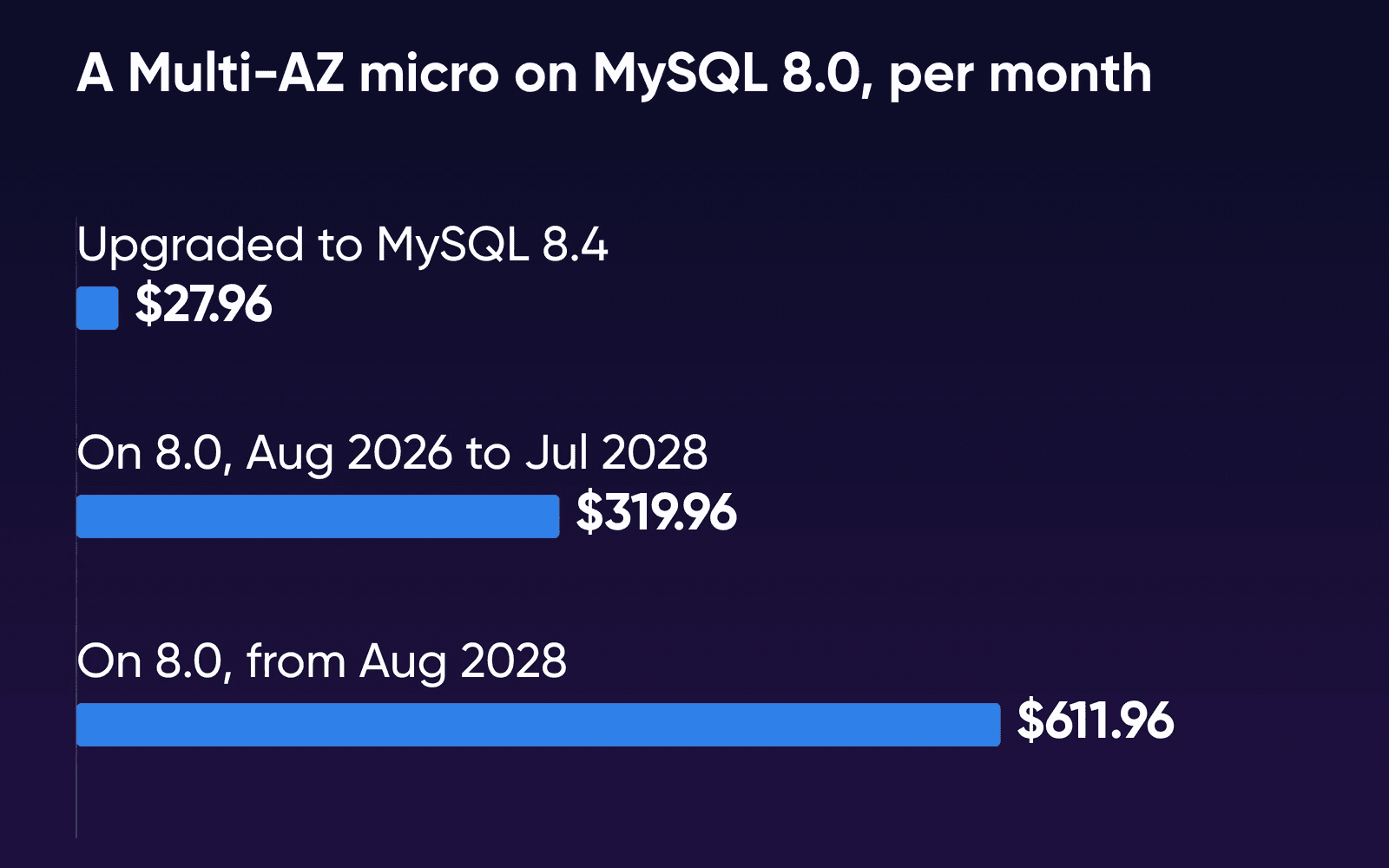
Since August 1, 2026, every RDS for MySQL 8.0 database that wasn't opted out has been enrolled automatically, at $0.10 per vCPU-hour in US East. Opting out now doesn't keep 8.0 for free: a database already past the date upgrades itself to the next major version. AWS charges the fee on the standby too, so a Multi-AZ micro on 8.0 pays $292 of it and $319.96 in all. Reserved Instance discounts don't apply to it. The rate doubles to $0.20 on August 1, 2028, which takes that Multi-AZ micro to $611.96 a month, and Extended Support for 8.0 ends on July 31, 2029.
Read your own RDS bill
You'll need access to the AWS account's billing pages to check these.
- Filter last month's costs to RDS
In Cost Explorer, filter by Service to Relational Database Service, then break the cost down by usage type.
- Match each usage type to its line
Look for usage types containing these names:
InstanceUsage(one zone) orMulti-AZUsage(with a standby),GP3-Storage,ChargedBackupUsage(backups past the free allowance),CPUCredits(CPU above the baseline),ExtendedSupport(the MySQL 8.0 fee) andDataTransfer-Out-Bytes(data out to the internet). AWS Support bills as its own service, and a public IPv4 address on the database shows up under VPC charges. - Check the engine version
Open the database in the RDS console and look at its engine version. Anything starting with 8.0 is in Extended Support unless it was opted out.
What each price includes
| Amazon RDS for MySQL | MySQL VPS | |
|---|---|---|
| Backups | Automatic, kept 0 to 35 days (7 by default in the console), with restore to any point in that window | DreamHost's Help Center says it keeps 5 days of database backups, which aren't guaranteed, so keep your own |
| The server | Multi-AZ adds a standby, billed as a second instance | One private, managed server that runs only MySQL. The page lists no standby copy |
| Technical support | From $29 a month with Business Support+ | Unlimited 24/7 support included |
| CPU | Burstable, with CPU above the baseline billed per vCPU-hour | Dedicated resources, at the plan's monthly price |
| Data out | Billed per GB past the free allowance | Unlimited bandwidth & traffic |
| Upkeep | AWS runs the engine. You start major-version upgrades, and RDS upgrades the database itself only if Extended Support is turned off or ends | DreamHost handles maintenance and OS updates |
| Where your app runs | Best in the same Availability Zone, where data transfer is free | Best on your DreamHost plan in the same data center, which the MySQL VPS is added to |
The MySQL VPS page says root and SSH access aren't available, and it points you to a Dedicated Server for MySQL's config files.
Your app moves with the database
This page prices the MySQL VPS, the add-on for an app that runs on DreamHost hosting. DreamHost's Help Center describes a MySQL VPS as an add-on to a DreamHost plan, such as Web Hosting, Managed VPS or Dedicated. So you need a DreamHost hosting plan too. The Managed VPS page says a Managed VPS hosts your website files and applications, so it can take the place of the app server you run on AWS now. You'll want its price beside your EC2 line when you compare. An app on AWS could connect from outside once you allow its IP address, but every query would then cross the internet between two providers, and DreamHost's Help Center advises you to keep both in the same data center. If you'd rather run MySQL yourself, with root and your own settings, that's a VPS such as Stack 8, the plan DreamHost's VPS page labels For apps running in production
, where you install and update MySQL yourself.
If your site is already on DreamHost and only feels slow, start with whether your database is slowing your site. For the engine choice itself, see MariaDB vs MySQL.
What leaving RDS costs
AWS gives every account 100 GB of data out to the internet free each month, across all its services, and charges $0.09 per GB past that in US East. If you're moving all your data off AWS, or off one AWS service, AWS also offers eligible customers free data transfer out for the move, and its pricing page sends you to AWS Customer Support to ask.
On October 19, 2026, we timed the move on a test VM (not a DreamHost server) to see how big that transfer is and how long it takes, and priced the file at AWS's rate.
| Database size | Import into 1 GB of RAM | Dump time | Dump file (gzipped) |
|---|---|---|---|
| 1.04 GB | 28.8 seconds | 6.7 seconds | 0.90 GB (0.43 GB) |
| 5.17 GB | 2 min 47 s | 42.4 seconds | 4.53 GB (2.17 GB) |
| 10.33 GB | 6 min 33 s | 91.0 seconds | 9.08 GB (4.34 GB) |
Your app has to stop writing while you dump the database, copy the file and import it, or the last changes stay behind on RDS. Gzipping the 10 GB dump added about 6 minutes on our VM, and the network copy's time depends on your connection. A server with 1 GB of RAM imported as fast as one with 4 GB, and none of the imports ran out of memory. To find the row that's nearest yours, DreamHost's size query lists each database's size in MB, data and indexes together, and it works on RDS too.
One charge keeps running after the move. A stopped RDS instance still bills its storage and backups, and RDS starts it again by itself after seven days. That's why the last step deletes it instead of stopping it.
Move a small database to a MySQL VPS
These steps assume you've moved your app to a DreamHost plan, or you're moving it at the same time. The MySQL VPS page lists MySQL 8.0, and DreamHost's Help Center says you can contact support to request 8.4. If your RDS database runs 8.4, ask for that upgrade before you import, so the dump goes into the same major version.
- Add the MySQL VPS to your DreamHost plan
Follow the Help Center's steps to add a MySQL VPS. DreamHost's Help Center says setup can take a few hours, and that DreamHost moves every database already on your account to the new server at midnight Pacific time.
- Create the empty database in the panel
Create the database and its user on the panel's MySQL Databases page. DreamHost's Help Center says databases can only be created there, never during an import.
- Dump the database from RDS
Put the app in maintenance mode. Then, from a machine that can reach RDS, such as your app server on AWS, dump the one database by name. Leaving out
--databaseskeepsCREATE DATABASElines out of the file, so it imports into the database you just made.bashmysqldump -h your-db.abc123.us-east-1.rds.amazonaws.com -u admin -p \ --single-transaction --routines --triggers --set-gtid-purged=OFF \ appdb > appdb.sql--single-transactiongives a consistent copy of InnoDB tables without locking them.--set-gtid-purged=OFFleaves out aSET @@GLOBAL.GTID_PURGEDline, since DreamHost's Help Center article on MySQL user limits rules outSET GLOBALon a MySQL VPS. - Remove DEFINER clauses from triggers and routines
DreamHost's Help Center says a MySQL VPS runs triggers and stored routines but won't accept a
DEFINERset by a user without root, so it says to remove it. This strips them from the file and keeps the original asappdb.sql.bak, which you can delete once the import works:bashsed -E -i.bak 's/DEFINER=`[^`]+`@`[^`]+`//g' appdb.sql - Copy the file to your DreamHost server
Compress the dump and copy it to your DreamHost server over SSH:
bashgzip appdb.sql scp appdb.sql.gz your-user@your-dreamhost-server:~/Once it's on the DreamHost server, unpack it with
gunzip appdb.sql.gz. - Import over SSH and switch the app
DreamHost's Help Center says a file of 64 MB or more has to be imported over SSH instead of phpMyAdmin. From your DreamHost server, run the import with the hostname, user and database from your panel:
bashmysql -h your-mysql-hostname -u dbuser -p appdb < appdb.sqlLeave disk room for the import. On our test server, MySQL's binary log, which is on by default, grew by about the size of the dump, so ask support how your MySQL VPS handles it if your data is near the plan's disk. Then point the app's database settings at the new host, check it, and take it out of maintenance mode. Take a final RDS snapshot, keep it until you're sure, then delete the instance.
How we measured
DreamHost ran the move on October 19, 2026, on a test VM on an Apple-silicon Mac (arm64, 2 vCPU, about 4 GB of memory, Ubuntu 24.04.4), with MySQL 8.4.11 from Docker's official image as source and target. The three databases were 10 tables of sysbench test data. We dumped each one three times with the flags in the steps above, plus --databases, and report the median. Each dump was imported once into a fresh server capped at 1 GB of memory with MySQL's default 128 MB buffer pool, and once at 4 GB with a 2 GB buffer pool. Every import finished, and the row count we checked on one of the ten tables matched the source.
Neither end was Amazon RDS or a DreamHost MySQL VPS, so treat the times as a rough guide to scale. We didn't time the network copy. Sysbench fills tables with random text that barely compresses, so a real app's gzipped dump is likely to be smaller.
Which way to go
Upgrade on RDS first if
Your bill shows an ExtendedSupport line. Moving to MySQL 8.4 stops it, and you can decide about anything else afterward.
Stay on RDS if
Your app runs on AWS and stays there, or you rely on Multi-AZ failover and point-in-time restore. A single-zone micro with light CPU is also cheap enough to leave alone.
Add a MySQL VPS if
Your app runs on DreamHost Web Hosting or Managed VPS, or is moving there, and you want one monthly database price with upkeep and 24/7 support included.
Amazon RDS cost FAQs
Is Amazon RDS free for a new AWS account?
It's free only while your credits last. Accounts opened since July 15, 2025 get $100 in credits at sign-up and can earn up to $100 more. The old 12-month free tier in AWS's RDS FAQ has run out for every account opened before then. Price your RDS month as if the credits were gone.
Would a Reserved Instance lower my RDS bill?
Yes, on the instance line. A one-year, no-upfront reservation brings the single-zone micro to $10.77 a month with its storage, and the Multi-AZ micro to $21.61, by AWS's price file. It doesn't discount the MySQL 8.0 Extended Support fee.
Can an app outside DreamHost use a MySQL VPS?
Yes. DreamHost's Help Center says to add the app server's IP address under Allowable Hosts in the panel, since the default accepts DreamHost servers only. Every query then crosses the internet, and the Help Center advises keeping the web and database servers in the same data center.
Do I need a DreamHost hosting plan to get a MySQL VPS?
Yes. DreamHost's Help Center describes it as an add-on to a DreamHost hosting plan, such as Web Hosting, Managed VPS or Dedicated.
How long does moving a database off RDS take?
It takes minutes for a small database. On our test VM (not a DreamHost server), a 10.33 GB database took about 8 minutes to dump and import, plus the time to copy the file over your connection.
I run PostgreSQL on RDS. Does this apply?
The prices on this page are for RDS for MySQL only. For PostgreSQL, see what managed PostgreSQL costs beside one server.
Sources
- AWS Price List API: Amazon RDS, US East (N. Virginia), publication Oct 6, 2026, Amazon Web Services, read Oct 19, 2026. pricing.us-east-1.amazonaws.com/offers/v1.0/aws/AmazonRDS/current/us-east-1/index.json
- Amazon RDS for MySQL pricing, Amazon Web Services, read Oct 19, 2026. aws.amazon.com/rds/mysql/pricing
- MySQL on Amazon RDS versions (release calendar), Amazon Web Services, read Oct 16, 2026. docs.aws.amazon.com/AmazonRDS/latest/UserGuide/MySQL.Concepts.VersionMgmt.html
- Amazon RDS Extended Support overview, Amazon Web Services, read Oct 16, 2026. docs.aws.amazon.com/AmazonRDS/latest/UserGuide/extended-support-overview.html
- Amazon RDS Extended Support charges, Amazon Web Services, read Oct 16, 2026. docs.aws.amazon.com/AmazonRDS/latest/UserGuide/extended-support-charges.html
- Amazon RDS DB instance storage, Amazon Web Services, read Oct 16, 2026. docs.aws.amazon.com/AmazonRDS/latest/UserGuide/CHAP_Storage.html
- Introduction to backups, Amazon Web Services, read Oct 16, 2026. docs.aws.amazon.com/AmazonRDS/latest/UserGuide/USER_WorkingWithAutomatedBackups.html
- Backup retention period, Amazon Web Services, read Oct 16, 2026. docs.aws.amazon.com/AmazonRDS/latest/UserGuide/USER_WorkingWithAutomatedBackups.BackupRetention.html
- Upgrades of the RDS for MySQL DB engine, Amazon Web Services, read Oct 19, 2026. docs.aws.amazon.com/AmazonRDS/latest/UserGuide/USER_UpgradeDBInstance.MySQL.html
- Overview of Amazon RDS Blue/Green Deployments, Amazon Web Services, read Oct 19, 2026. docs.aws.amazon.com/AmazonRDS/latest/UserGuide/blue-green-deployments-overview.html
- Multi-AZ DB instance deployments, Amazon Web Services, read Oct 16, 2026. docs.aws.amazon.com/AmazonRDS/latest/UserGuide/Concepts.MultiAZSingleStandby.html
- DB instance class types, Amazon Web Services, read Oct 16, 2026. docs.aws.amazon.com/AmazonRDS/latest/UserGuide/Concepts.DBInstanceClass.Types.html
- Key concepts for burstable performance instances, Amazon Web Services, read Oct 16, 2026. docs.aws.amazon.com/AWSEC2/latest/UserGuide/burstable-credits-baseline-concepts.html
- Stopping an Amazon RDS DB instance temporarily, Amazon Web Services, read Oct 21, 2026. docs.aws.amazon.com/AmazonRDS/latest/UserGuide/USER_StopInstance.html
- Amazon RDS FAQs, Amazon Web Services, read Oct 16, 2026. aws.amazon.com/rds/faqs
- On-Demand pricing: data transfer, Amazon Web Services, read Oct 19, 2026. aws.amazon.com/ec2/pricing/on-demand
- Overview of data transfer costs for common architectures, AWS Architecture Blog, read Oct 19, 2026. aws.amazon.com/blogs/architecture/overview-of-data-transfer-costs-for-common-architectures
- Amazon VPC pricing (public IPv4 addresses), Amazon Web Services, read Oct 16, 2026. aws.amazon.com/vpc/pricing
- AWS Support pricing, Amazon Web Services, read Oct 19, 2026. aws.amazon.com/premiumsupport/pricing
- Compare AWS Support plans, Amazon Web Services, read Oct 16, 2026. aws.amazon.com/premiumsupport/plans
- AWS Free Tier, Amazon Web Services, read Oct 19, 2026. aws.amazon.com/free
- Filtering the data that you want to view (Cost Explorer), Amazon Web Services, read Oct 19, 2026. docs.aws.amazon.com/cost-management/latest/userguide/ce-filtering.html
- mysqldump, MySQL 8.4 Reference Manual, Oracle (MySQL), read Oct 16, 2026. dev.mysql.com/doc/refman/8.4/en/mysqldump.html
- MySQL VPS Hosting, DreamHost, read Oct 19, 2026. dreamhost.com/hosting/managed-vps/mysql
- MySQL VPS overview, DreamHost Help Center, read Oct 16, 2026. help.dreamhost.com/hc/en-us/articles/215945917
- Adding or deleting a MySQL VPS, DreamHost Help Center, read Oct 16, 2026. help.dreamhost.com/hc/en-us/articles/215945927
- Changing your MySQL VPS billing plan, DreamHost Help Center, read Oct 21, 2026. help.dreamhost.com/hc/en-us/articles/47277282397076
- How do I migrate my database to DreamHost?, DreamHost Help Center, read Oct 16, 2026. help.dreamhost.com/hc/en-us/articles/215039938
- MySQL limitations due to shared hosting, DreamHost Help Center, read Oct 16, 2026. help.dreamhost.com/hc/en-us/articles/115000263911
- Managing MySQL users, allowable hosts, and privileges, DreamHost Help Center, read Oct 16, 2026. help.dreamhost.com/hc/en-us/articles/215575787
- Troubleshooting site slowness, DreamHost Help Center, read Oct 16, 2026. help.dreamhost.com/hc/en-us/articles/215836488
- Optimize a database, DreamHost Help Center, read Oct 19, 2026. help.dreamhost.com/hc/en-us/articles/215036388
- Database FAQs, DreamHost Help Center, read Oct 16, 2026. help.dreamhost.com/hc/en-us/articles/215571837