About 60% of the WordPress sites in WordPress.org's database version chart run MariaDB, and about 40% run MySQL. WordPress takes either one: MariaDB 10.11 or later, or MySQL 8.0 or later. You probably won't notice the engine under your site until it moves to a host that runs the other one.
A move like that can stall on one line of error text. Someone exporting from MySQL 8.0 into MariaDB got Unknown collation utf8mb4_0900_ai_ci on every try, and their Stack Exchange question has 74,574 views. On our test server (not a DreamHost server), the opposite move failed the same way. A table made with MariaDB 11.8's default collation stopped a MySQL 8.4 import with Unknown collation: 'utf8mb4_uca1400_ai_ci', while a WordPress database moved cleanly in both directions.
Which engine each DreamHost plan runs
Every DreamHost plan where we run the database for you uses MySQL. DreamHost's Help Center version table lists 8.0 for shared MySQL and 8.0 or 8.4 for Dedicated, depending on the Ubuntu release. The MySQL VPS page lists MySQL 8.0. The query below shows what yours runs.
| Plan | Engine | Version | Getting MySQL 8.4 |
|---|---|---|---|
| Web Hosting (shared) | MySQL | 8.0 | Servers move to 8.4 on DreamHost's schedule, and you can't request it |
| Managed VPS | MySQL, on the shared database servers | 8.0 | Same as shared hosting, since your databases live there |
| DreamPress | MySQL, per the Help Center | MySQL 8 (run the query below for the exact version) | The upgrade notes don't cover DreamPress |
| MySQL VPS | MySQL | 8.0 on the product page (run the query below to see yours) | The Help Center says to contact support to request 8.4 |
| Dedicated | MySQL, on the same machine as your site | 8.0 on Ubuntu Noble or Jammy, 8.4 on Ubuntu Resolute | Moves to 8.4 are underway, or ask for an upgrade to Ubuntu Resolute |
| LAMP Stack VPS | MariaDB | Not named on the product page (run the query below) | You have root, so you can install MySQL instead |
| Ghost VPS | MySQL | Not named on the product page | You have root and manage it yourself |
| VPS with a plain Linux image | The one you install | Whatever your Linux release packages | Install the one you want |
Managed VPS keeps your databases on DreamHost's shared MySQL servers, so it follows the shared row. The Dedicated plan is where you can also install any MySQL version you like, according to DreamHost's Help Center MySQL overview.
On shared hosting, if your app needs MySQL 8.4 before your server moves, the Help Center's answer is to add a MySQL VPS and move your databases to it. Before you add one, see whether your database is slowing your site, and if you're pricing a cloud database too, RDS for MySQL pricing next to a private MySQL server.
How to check yours
- Open phpMyAdminLog in to phpMyAdmin from your DreamHost panel, or from your own server's tools.
- Click the SQL tabIt opens a box where you can type a query against the server.
- Run the version query
Paste this and run it:
sqlSELECT VERSION();A MySQL server answers with a plain number, such as
8.4.11. A MariaDB server names itself in the answer, and ours returned11.8.9-MariaDB-ubu2404.
On a VPS you set up yourself, the Linux release decides what apt install gives you. Ubuntu 24.04 ships MySQL 8.0 and MariaDB 10.11. Ubuntu 26.04 ships MySQL 8.4 and MariaDB 11.8. Debian 13 has MariaDB 11.8 and no MySQL server package at all, and its default-mysql-server package installs MariaDB. Our test confirmed that, and it showed Ubuntu's default-mysql-server going the other way: it installs MySQL, 8.4 on 26.04 and 8.0 on 24.04. On our LAMP Stack VPS, the same query tells you which MariaDB version you got. If you haven't picked the Linux yet, our guide to which Linux to run on your VPS compares the four we offer.
What's different between MySQL 8.4 and MariaDB 11.8
MariaDB is made by MySQL's original developers. The two have drifted apart, and MariaDB's own list of differences is long. These are the rows a site owner can run into.
| MySQL 8.4 | MariaDB 11.8 | When you'd notice | |
|---|---|---|---|
| Default collation for utf8mb4 text | utf8mb4_0900_ai_ci | utf8mb4_uca1400_ai_ci | When you import a dump made on the other engine |
| JSON columns | Stored in a binary format | Stored as LONGTEXT | Only if your own code works with JSON fields |
The -> and ->> JSON shorthand | Works | Arrives in MariaDB 13.1 | Queries that used it failed on 11.8 in our test |
| Binary log and Performance Schema | Both on as shipped | Both off as shipped | When you compare the two side by side |
| Replication IDs (GTIDs) | MySQL's format | A separate format of its own | Only if you copy changes from one engine to the other live |
| License | GPL (Community Edition) | GPL (version 2) | You won't: both are GPL and free to run on your own server |
You'll most likely meet the collation row first. MySQL 8 tags new text columns with utf8mb4_0900_ai_ci, and MariaDB 11.4 and later use utf8mb4_uca1400_ai_ci, per MariaDB's compatibility matrix. An export carries those names in every CREATE TABLE line. MariaDB's list of differences says 11.8 knows 550 collations, including 44 aliases it added in 11.4.5 to ease replication from MySQL. In our test, MariaDB 11.8 took a MySQL 8.4 table tagged utf8mb4_0900_ai_ci without complaint. The reverse failed, because MySQL 8.4 doesn't know utf8mb4_uca1400_ai_ci, and the import stopped with ERROR 1273. WordPress doesn't hit either problem. It created every table as utf8mb4_unicode_520_ci on both engines.
The shipped defaults matter if you compare the two yourself. MySQL 8.4 turns binary logging on out of the box, and MariaDB leaves its binary log off. Performance Schema follows the same split: on in MySQL, off in MariaDB 11.8. A side-by-side test that leaves both untouched compares two settings files as much as two engines, so we ran ours both ways.
Memory, speed and disk on our test server
With nothing connected, MySQL sat at 427 MiB of memory and MariaDB at 137 MiB. We ran the official MySQL 8.4.11 and MariaDB 11.8.9 images one at a time on a test VM with 2 vCPU and 4 GB of memory, the same size as our Stack 4 plan.
| MySQL 8.4 | MariaDB 11.8 | |
|---|---|---|
| Memory at idle | 427 MiB | 137 MiB |
| Memory right after the benchmark | 545 MiB, or 290 MiB with its log and Performance Schema off | 189 MiB |
| Transactions a second, as shipped | 1,163 | 1,311 |
| Transactions a second, defaults matched | 1,356 | 1,311 (its shipped settings already match) |
| 95th-percentile response time, as shipped | 4.49 ms | 4.18 ms |
| Image on disk (arm64) | 233 MB | 104 MB |
| First start on an empty disk | 5.2 seconds | 4.2 seconds |
| Restart with data | 0.7 seconds | 2.9 seconds |
On speed the two came out about the same once the settings matched. Each engine ran the benchmark once per setting, which is too few runs to call either one faster.
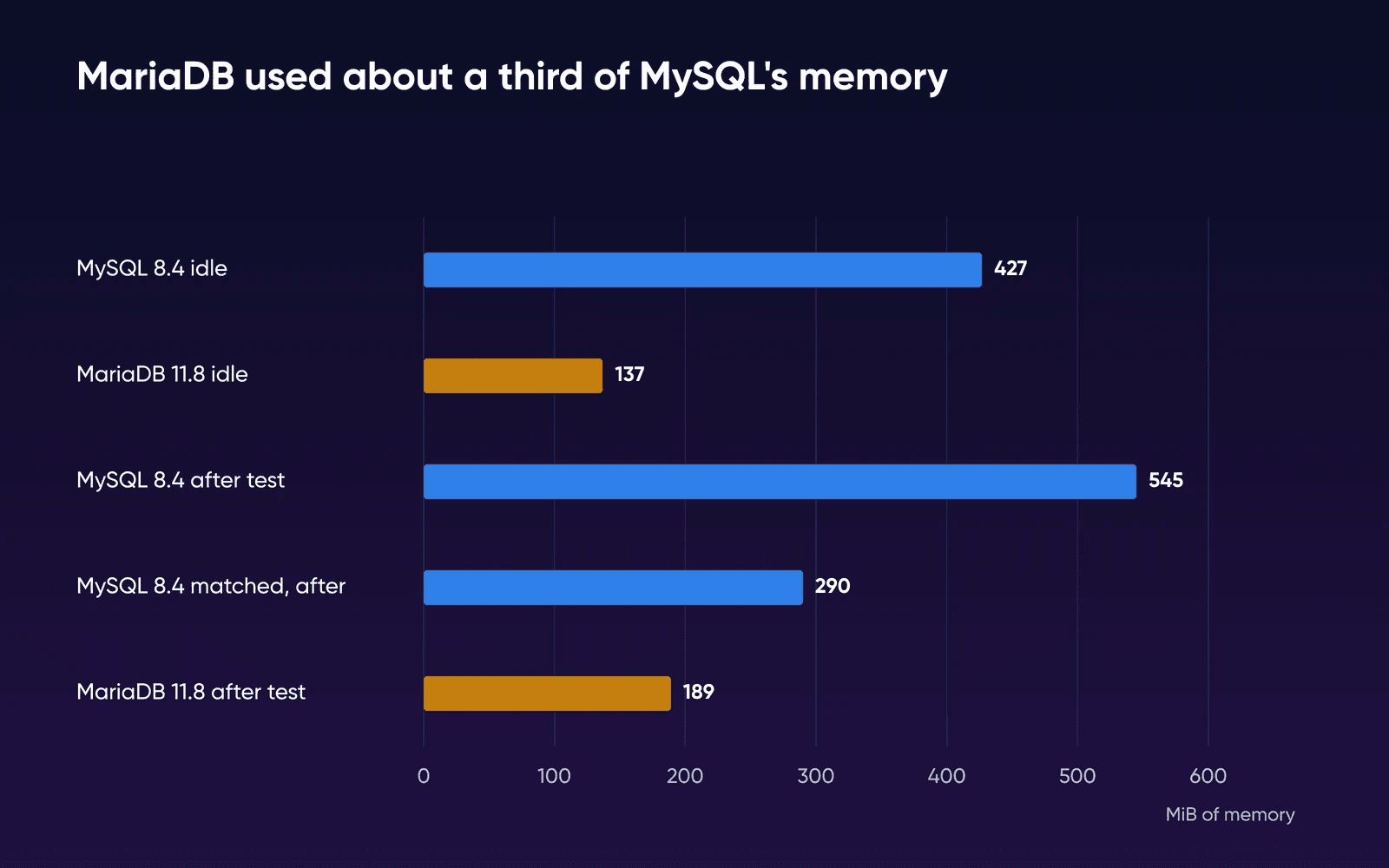
You'd feel the memory gap on a small server, where the database shares RAM with PHP and your web server. Of our test VM's 3,904 MB, 3,465 MB was still available with MariaDB idling and 3,136 MB with MySQL. Right after the benchmark, turning MySQL's two shipped extras off cut its gap over MariaDB from 356 MiB to 101 MiB. For sizing a database server, see how much RAM MySQL needs.
Does your app care?
We installed WordPress 7.1.3 on each engine, generated 200 posts and 500 comments, and loaded the home page without an error on either. The apps in the table below are like that: check your app's requirements page before you think about the engine, and you'll usually find both listed with a minimum version. These come from each app's own page, read on October 16, 2026.
| App | MySQL | MariaDB |
|---|---|---|
| WordPress | 8.0 or later | 10.11 or later |
| WooCommerce | 8.0 or later | 10.6 or later |
| Drupal 11 | 8.0 or later | 10.6 or later |
| Drupal 12 | 8.0 or later | 10.11 or later |
| Joomla 6 | 8.0.13 minimum, 8.4 recommended | 10.6 supported (10.4 minimum), 12.0 recommended |
| Laravel 12 | 5.7 or later | 10.3 or later |
| Matomo 6 | 8.0 or later | 10.6 or later |
| Nextcloud 35 | 8.4 or 9.7 | 10.11, 11.4, 11.8 or 12.3 (recommended) |
| Ghost | MySQL 8, the only database supported in production | Not supported |
Ghost is the one app here that cares. Its supported databases page says MySQL 8 is the only supported database in production, and it strongly recommends moving off MariaDB if you're on it.
Nextcloud 35 is worth a second look too. Its requirements list MySQL 8.4 and 9.7 and leave 8.0 off. On a server you run yourself, use MySQL 8.4 or one of the MariaDB versions it lists.
Moving a database between them
To move a database between MySQL and MariaDB in either direction, you export it to a SQL file and import that file. MariaDB's migration guide answers Can I perform an in-place upgrade?
with a plain No
for anyone coming from MySQL 8.0 or 8.4. You can't copy the files across.
- Check the version on both serversRun
SELECT VERSION();on the old server and the new one. Knowing which engine you're leaving tells you which collation names to look for in step 3. - Export with the old server's own tool
On MySQL, use MySQL's
mysqldump. MariaDB's migration guide asks for it, since MariaDB's ownmariadb-dumphasn't been tested much against MySQL. On MariaDB, usemariadb-dump. Name one database and leave out--databases, so the file has noCREATE DATABASEline:bashmysqldump --user=USER \ --password \ --single-transaction \ --routines --triggers \ --hex-blob \ DBNAME > site.sqlDreamHost's import errors article explains that a
CREATE DATABASEline makes the import fail with ERROR 1044. If you're moving into DreamPress, leave out--routinesand--triggers, because DreamPress MySQL servers don't support stored routines or triggers. - Swap any collation names the new server doesn't knowA WordPress database usually skips this step, since WordPress used
utf8mb4_unicode_520_cion both engines in our test and moved both ways with no errors. Tables that carry the server's default collation can fail in one direction. MySQL 8.4 stopped onUnknown collation: 'utf8mb4_uca1400_ai_ci'in a MariaDB 11.8 export, while MariaDB 11.8 accepted MySQL'sutf8mb4_0900_ai_ci. Older MariaDB versions reject it, as in the Stack Exchange question. Replace the unknown name throughout the file withutf8mb4_unicode_520_ci, which both engines know, then import again. That's the fix the top Stack Exchange answers used, and it's the collation WordPress picked on both engines in our test. - Import into an empty databaseCreate the database and its user in your panel first, then import the file in phpMyAdmin or with the
mysqlclient. In our test, dumps frommysqldumpandmariadb-dumpset their own character set. If you pipe a hand-written SQL file into themysqlclient inside the official MySQL Docker image, add--default-character-set=utf8mb4: without it, that client fell back to latin1 in our test and garbled accented letters. - Test the site before you switch DNSLoad a few pages, log in to the admin, run a search and save a post.
Which one to pick
Keep the one you have if
Your app lists both, as WordPress, WooCommerce, Drupal, Joomla, Laravel, Matomo and Nextcloud do. A switch costs you an export and an import, and your app gains nothing from it.
Choose MySQL 8.4 if
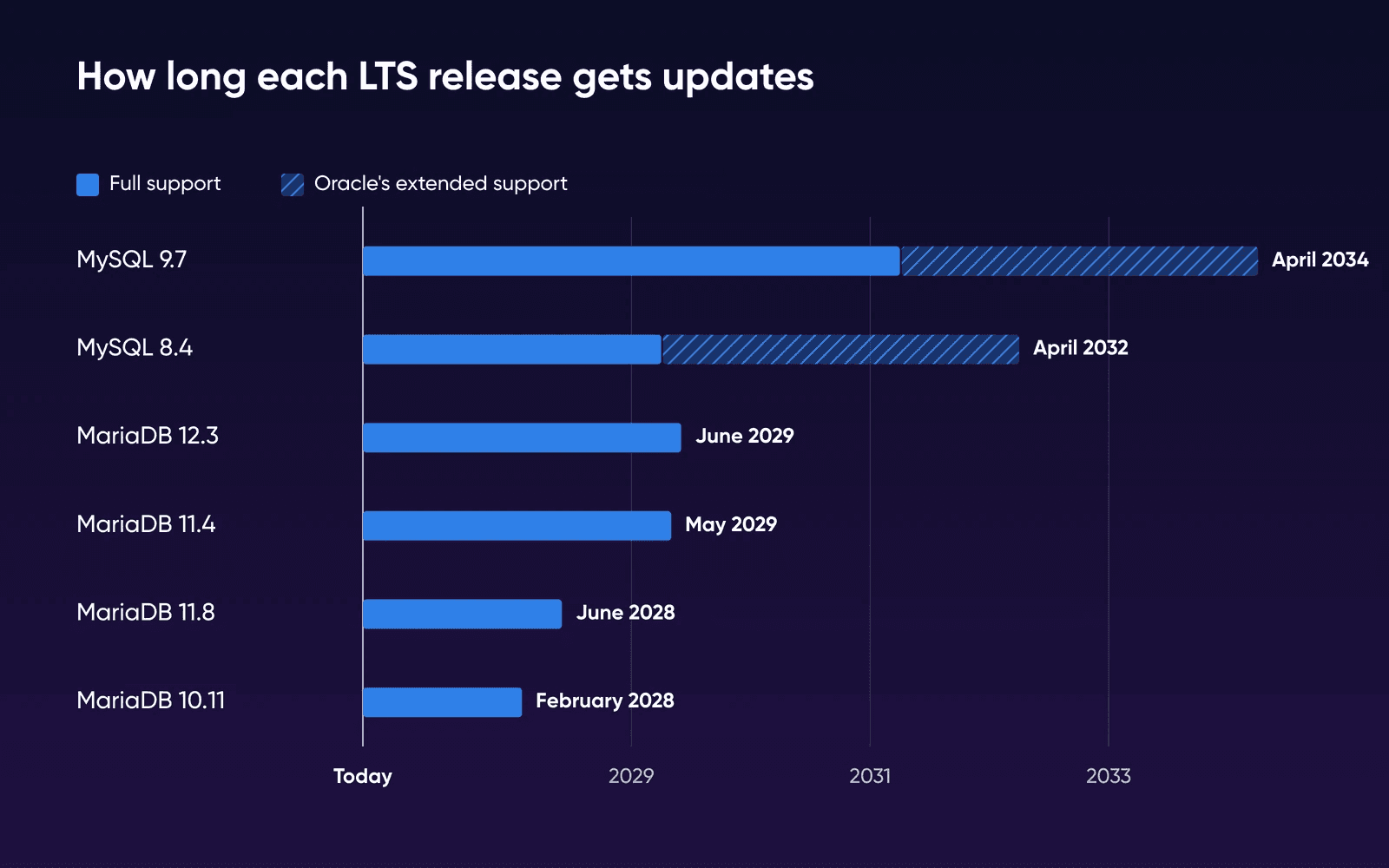
Your app supports only MySQL, like Ghost, or your own code uses MySQL-only features such as the ->> JSON shorthand. 8.4 gets updates until 2032, counting Oracle's extended support.
Go with MariaDB if
You're on our LAMP Stack VPS or a Debian 13 server, where MariaDB is what you get, or you run a small server yourself and want the smaller memory footprint, as long as your app lists it.
Our pick for a PHP site is the engine your host already runs, kept on a supported version.
If you're on MySQL 8.0, your next step is MySQL 8.4, and you can stay with MySQL to get there. Oracle moved MySQL 8.0 to Sustaining Support on April 21, 2026, and it tells users to upgrade to 8.4 or 9.7. DreamHost's Help Center says Dedicated servers are already moving to 8.4, shared servers move on DreamHost's own schedule, and MySQL VPS customers can contact support to request it.
How we measured
We ran the test on October 19, 2026, on a VM under Colima on an Apple M2 Mac: arm64, 2 vCPU, 3,904 MB of visible memory, no swap, Ubuntu 24.04.4 and Docker 29.5.2. We didn't use a DreamHost server. We used the official mysql:8.4.11 and mariadb:11.8.9 images, pinned by digest, and changed nothing for the as-shipped runs. Idle memory is the median of 12 docker stats readings taken 5 seconds apart after a 2-minute settle, and it hadn't moved 10 minutes later. The benchmark was sysbench 1.0.20's oltp_read_write test with 4 tables of 100,000 rows, which fit in each engine's default 128 MB buffer pool, 4 threads, a 60-second warm-up and then one 120-second run per engine and setting.
Our VPS and Dedicated servers use AMD EPYC processors, so compare the engines by ratio and don't expect the same absolute numbers there. We didn't test a MySQL VPS, shared MySQL or our LAMP Stack image. Each benchmark ran once, on synthetic data that's simpler than a real site's traffic. MariaDB's run also logged 683 errors that sysbench retries and counts separately (about 6 a second), and MySQL's logged none; we didn't look into why. The WordPress check covered the install, generated content and page loads, and each move used the source engine's own dump tool.
MySQL and MariaDB FAQs
Is MariaDB replacing MySQL?
No. Both projects shipped a new long-term support release in 2026, MySQL 9.7 in April and MariaDB 12.3 in May. MySQL 9.7 gets updates until April 2034 and MariaDB 12.3 until June 2029.
Is MariaDB better or faster than MySQL?
About the same speed once the settings match, in our one-run test. As shipped, MariaDB used about a third of MySQL's memory. Right after our benchmark, with MySQL's binary log and Performance Schema off, the gap was about 100 MiB. Neither wins everywhere: Ghost supports only MySQL, and Debian 13 and our LAMP Stack VPS give you MariaDB.
Can I switch my site from MySQL to MariaDB, or back?
Yes, you can. Export the database to a SQL file and import it on the other engine, as in the steps above. Copying the data files doesn't work from MySQL 8 to MariaDB.
Will my site notice when DreamHost moves its server from MySQL 8.0 to 8.4?
Most sites won't. MySQL 8.4 reserves four words that 8.0 didn't (MANUAL, PARALLEL, QUALIFY and TABLESAMPLE), and DreamHost's Help Center says WordPress, Drupal and most plugins and themes already escape names like those. If your own code uses one of them as a name, wrap it in backticks in the query.
Which one does DreamHost use?
DreamHost's Help Center (MySQL overview and Managed VPS overview) says MySQL runs on shared hosting, Managed VPS, DreamPress, MySQL VPS and Dedicated servers. Our LAMP Stack VPS ships MariaDB. On any other VPS you install the one you want, and SELECT VERSION(); shows what any server runs.
Sources
- Using reserved words in MySQL 8 (MySQL version table), DreamHost Knowledge Base, read Oct 19, 2026. help.dreamhost.com/hc/en-us/articles/30003134864276-Using-reserved-words-in-MySQL-8
- MySQL overview, DreamHost Knowledge Base, read Oct 16, 2026. help.dreamhost.com/hc/en-us/articles/215099117-MySQL-overview
- MySQL VPS overview, DreamHost Knowledge Base, read Oct 16, 2026. help.dreamhost.com/hc/en-us/articles/215945917-MySQL-VPS-overview
- Managed VPS overview, DreamHost Knowledge Base, read Oct 16, 2026. help.dreamhost.com/hc/en-us/articles/215280058-Managed-VPS-overview
- DreamPress overview, DreamHost Knowledge Base, read Oct 16, 2026. help.dreamhost.com/hc/en-us/articles/214581158-DreamPress-overview
- Troubleshooting database import errors, DreamHost Knowledge Base, read Oct 16, 2026. help.dreamhost.com/hc/en-us/articles/221615208-Troubleshooting-database-import-errors
- MySQL VPS Hosting, DreamHost, read Oct 19, 2026. dreamhost.com/hosting/managed-vps/mysql
- LAMP Stack VPS Hosting, DreamHost, read Oct 19, 2026. dreamhost.com/hosting/vps/lamp
- Ghost VPS Hosting, DreamHost, read Oct 16, 2026. dreamhost.com/hosting/vps/ghost
- MySQL 8.0 end of life notice, Oracle (MySQL), read Oct 16, 2026. mysql.com/support/eol-notice.html
- MySQL releases: Innovation and LTS, MySQL 8.4 Reference Manual, read Oct 16, 2026. dev.mysql.com/doc/refman/8.4/en/mysql-releases.html
- The binary log, MySQL 8.4 Reference Manual, read Oct 16, 2026. dev.mysql.com/doc/refman/8.4/en/binary-log.html
- The JSON data type, MySQL 8.4 Reference Manual, read Oct 16, 2026. dev.mysql.com/doc/refman/8.4/en/json.html
- MySQL Community Edition, Oracle (MySQL), read Oct 16, 2026. mysql.com/products/community
- MySQL release dates and support, endoflife.date, read Oct 16, 2026. endoflife.date/mysql
- About MariaDB Server, and maintenance policy, MariaDB Foundation, read Oct 16, 2026. mariadb.org/about/#maintenance-policy
- Incompatibilities and feature differences between MariaDB 11.8 and MySQL 8, MariaDB documentation, read Oct 16, 2026. mariadb.com/docs/release-notes/community-server/about/compatibility-and-differences/incompatibilities-and-feature-differences-between-mariadb-11-8-and-mysql-8
- MySQL to MariaDB migration: the master guide, MariaDB documentation, read Oct 16, 2026. mariadb.com/docs/server/server-management/install-and-upgrade-mariadb/migrating-to-mariadb/moving-from-mysql/mysql-to-mariadb-migration-the-master-guide
- MySQL to MariaDB compatibility matrix, MariaDB documentation, read Oct 16, 2026. mariadb.com/docs/server/server-management/install-and-upgrade-mariadb/migrating-to-mariadb/moving-from-mysql/mysql-to-mariadb-compatibility-matrix
- Replication and binary log system variables, MariaDB documentation, read Oct 16, 2026. mariadb.com/docs/server/ha-and-performance/standard-replication/replication-and-binary-log-system-variables
- WordPress requirements, WordPress.org, read Oct 16, 2026. wordpress.org/about/requirements
- WordPress database versions (stats API), WordPress.org, read Oct 16, 2026. api.wordpress.org/stats/mysql/1.0
- WooCommerce server requirements, WooCommerce, read Oct 16, 2026. woocommerce.com/document/server-requirements
- Supported databases, Ghost docs, read Oct 16, 2026. docs.ghost.org/faq/supported-databases
- System requirements (Nextcloud 35), Nextcloud, read Oct 16, 2026. docs.nextcloud.com/server/stable/admin_manual/installation/system_requirements.html
- Database server requirements, Drupal.org, read Oct 16, 2026. drupal.org/docs/getting-started/system-requirements/database-server-requirements
- Technical requirements, Joomla, read Oct 16, 2026. manual.joomla.org/docs/get-started/technical-requirements
- Database: getting started (Laravel 12), Laravel, read Oct 16, 2026. laravel.com/framework/docs/12.x/database
- Matomo requirements, Matomo, read Oct 16, 2026. matomo.org/faq/on-premise/matomo-requirements
- mysql-server in Ubuntu 26.04 (resolute), Ubuntu packages, read Oct 16, 2026. packages.ubuntu.com/resolute/mysql-server
- mysql-server in Ubuntu 24.04 (noble), Ubuntu packages, read Oct 16, 2026. packages.ubuntu.com/noble/mysql-server
- mariadb-server in Ubuntu 24.04 (noble), Ubuntu packages, read Oct 16, 2026. packages.ubuntu.com/noble/mariadb-server
- mariadb-server in Ubuntu 26.04 (resolute), Ubuntu packages, read Oct 16, 2026. packages.ubuntu.com/resolute/mariadb-server
- mariadb-server versions in Debian 13 (trixie), Debian, read Oct 16, 2026. qa.debian.org/madison.php?package=mariadb-server&table=debian&s=trixie
- MySQL to MariaDB: unknown collation utf8mb4_0900_ai_ci, Database Administrators Stack Exchange, read Oct 16, 2026. dba.stackexchange.com/questions/248904/mysql-to-mariadb-unknown-collation-utf8mb4-0900-ai-ci