This guide sizes a MySQL VPS, the add-on for a site that's already on DreamHost hosting. MySQL VPS comes in four sizes, with 500 MB, 1 GB, 2 GB or 4 GB of RAM in DreamHost's panel plan list. To see which size a database needs, we ran 460 MB, 1.8 GB and 4.6 GB databases under each plan's memory on a test VM (not a DreamHost server) and counted how many reads MySQL answered from memory. An accepted Server Fault answer sets MySQL's cache to about 80% of the server's memory. Our results below show where that goes wrong on small servers. If you run your own database server on a VPS instead, the same numbers tell you where to set the pool.
The whole database doesn't have to fit in RAM. Matthew Boehm, who answers for Percona on its forum, told a user who asked that a 4 TB database can run on 2 GB of RAM at about 100 read-only queries a second. If you haven't yet confirmed that the database is what slows your pages, because a slow plugin or a missing page cache can look the same from the outside, start with our guide to finding out if your database is slowing your site.
What MySQL keeps in the InnoDB buffer pool
Most of it goes to one cache. InnoDB, the engine that stores your tables, keeps table and index data in its buffer pool as it reads them. If the data a query needs is already there, MySQL answers from memory. If it isn't, MySQL goes to disk. Something older gets pushed out to make room. MySQL's manual warns that a pool that's too small keeps flushing pages it needs again a moment later.
Its size is a setting, innodb_buffer_pool_size. MySQL's default is 128 MB on any server. With its automatic setting for a machine that runs only MySQL, MySQL keeps 128 MB below 1 GB of memory and takes half the memory from 1 GB to 4 GB. DreamHost doesn't publish the cache size each plan uses, and a MySQL VPS has no root or SSH access, so the setting isn't yours to change.
The rest of MySQL's memory doesn't shrink with the plan. On our test VM, MySQL 8.4 at its stock settings used about 470 MB before any query ran, with only a 128 MB cache. MySQL's own count showed where it went: besides the cache, a 64 MB log buffer and about 150 MB for the Performance Schema, MySQL's built-in activity tracker. Under load, once the cache had filled, the server process ran about 450 to 740 MB above it. On a 4 GB server that's a small share. On 1 GB, it's most of the memory.
What we measured at each plan's RAM
DreamHost ran this test on October 19, 2026 on a test VM (arm64, 2 vCPU), with a hard memory limit set to each plan's RAM. It isn't a DreamHost server, so read the results as what each plan's memory can hold.
We read each run by its hit rate, the share of reads MySQL answered from its cache. A database fits when 99% or more of its reads come from memory and MySQL doesn't crash. Between 95% and 99% it's tight. Below 95% it's too small. The 95% line is Boehm's: at 95% or higher, he says, you have enough memory. The 99% line is our own, stricter mark.
| Your whole database | 1 GB RAM | 2 GB RAM | 4 GB RAM | Plan that fits |
|---|---|---|---|---|
| About 0.5 GB (ours: 460 MB) | 99.9%+, fits | 99.9%+, fits | 99.9%+, fits | VPS business |
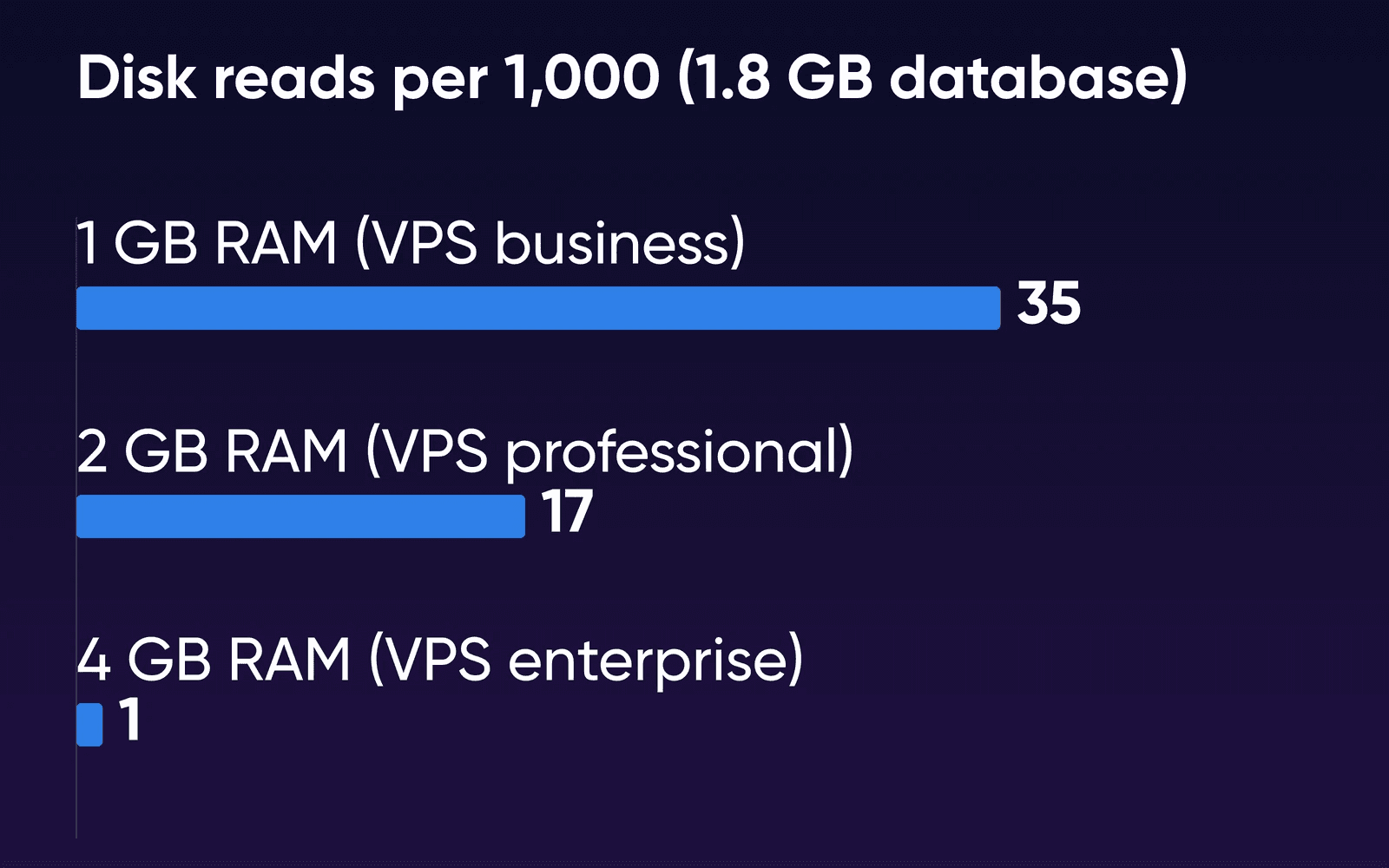
| About 2 GB (ours: 1.8 GB) | 96.5%, tight | 98.3%, tight | 99.9%, fits | VPS professional |
| About 5 GB (ours: 4.6 GB) | 94.5%, fell behind | 96.0%, tight | 97.7%, tight | VPS enterprise |
| Busy all over (search, reports) | Not measured | Not measured | Not measured | Ask support |
For the 1.8 GB database, that means about 35 of every 1,000 reads went to disk on 1 GB, 17 on 2 GB and 1 on 4 GB.
The buffer pool size mattered as much as the RAM. Here's the 1.8 GB database on 2 GB of memory at each pool size we tried:
| Cache size on 2 GB of RAM | Reads from memory | What happened |
|---|---|---|
| 128 MB, MySQL's default | 93.7% | Ran, but most of the memory sat unused |
| 1,024 MB, about half | 98.3% | Ran steadily |
| 1,536 MB, about three quarters | Crashed | MySQL stopped at the memory limit |
With MySQL's 128 MB default, hit rates stayed around 92 to 96% at every limit from 1 GB to 4 GB. A cache of about half the RAM never crashed. About three quarters crashed MySQL on 1 GB and 2 GB once the database was bigger than the cache, because the fixed part above it had nowhere to go. On 4 GB, three quarters ran fine. On a server you run yourself, that makes about half the RAM the safe starting point for innodb_buffer_pool_size at 1 GB and 2 GB, with three quarters left for servers of 4 GB or more, going by our single runs.
A 512 MB limit was too small for MySQL 8.4's stock settings. MySQL used about 470 MB of it before any query ran, and each run stopped when it reached the limit, even with the 460 MB database. VPS basic has 500 MB in DreamHost's panel plan list, and the MySQL VPS page says the server comes pre-configured. A server set up to use less memory could do better than our stock one. DreamHost doesn't publish VPS basic's settings, so ask support what it suits before you put a busy database on it.
Why the busy part matters more than the total
The bottom line is ‘you need as much memory as your active dataset’.
In the same answer, Boehm puts the active part at about 10 to 20% of the total and calls it typical. A store with three years of orders reads this month's orders and its live products far more often than an invoice from 2023. Our test load worked the same way: it kept returning to a busy core of rows, which is how a 4.6 GB database got 97.7% of its reads from a 2 GB cache.
A report that totals every order since launch makes all of those rows busy at once. We didn't run that worst case, so we can't say how much lower it would score. If your site leans on search, reports or exports across old data, treat the table's rows as the best case and pick a plan up.
Check your own database before you pick
You'll need only the panel and phpMyAdmin for the first two steps, and they work on the plan you're on now.
- Find out which MySQL server you're on
Open the MySQL Databases page in your panel and read the server name at the top. DreamHost's Help Center article on viewing database logs explains the names: one starting with
iad1is shared MySQL, andsqlfollowed by a number means you're already on a private MySQL server. - Measure how big your databases are
Run this query in phpMyAdmin's SQL tab or over SSH. It comes from DreamHost's Help Center article on optimizing a database and shows each database's data and indexes in MB.
sqlSELECT table_schema "database", sum(data_length + index_length)/1024/1024 "size in MB" FROM information_schema.TABLES GROUP BY table_schema; - Match the total to a row
Add up every database on your account, since DreamHost's Help Center says it moves all of them to a new MySQL VPS. Find that total in the table above. If it falls between two rows, take the plan for the larger row. That leaves room for the data to grow. We didn't measure real WordPress or WooCommerce databases, so your own total is the number to use.
- Check the hit rate after the move
A MySQL VPS runs only your databases, so its counters describe your databases alone. Read
Innodb_buffer_pool_read_requestsandInnodb_buffer_pool_readswithSHOW GLOBAL STATUS LIKE 'Innodb_buffer_pool_read%';, then work out 1 minus reads divided by read requests.SHOW VARIABLES LIKE 'innodb_buffer_pool_size';shows the cache size your plan got, in bytes, so you can compare it with the table. On our test VM, a user with rights to one database could read both. On shared MySQL the counters cover every database on that server, which is why this check waits until after the move.
When to move up a plan
Move up when the hit rate slips under 95% and stays there as your data grows. The MySQL VPS page says you can scale up your RAM from the MySQL VPS control panel, and DreamHost's Help Center says the unused part of the old plan is credited toward the new one.
Don't pay for memory before you've looked at your slowest queries. Later in the same Percona thread, a user's tuning report showed a 100% hit rate next to millions of joins that used no index, and Boehm's reply was short: No amount of ram will fix a bad query.
Our guide to finding slow MySQL queries shows how to find them with Query Monitor and EXPLAIN. For tuning a MySQL server you run yourself, see our post on improving database performance on a VPS.
Past 4 GB of busy data
If the busy part of your data outgrows VPS enterprise's 4 GB, DreamHost has two larger homes for it. A Dedicated Server comes with 16 GB of RAM or more and runs MySQL on the same machine as your site. DreamHost's Help Center MySQL overview says that suits software that moves large amounts of data between the app and MySQL, and the MySQL VPS page says you get MySQL's config files there. If you'd rather run your own database server, a VPS goes up to 32 GB of RAM on Stack 32, where you install MySQL and set the buffer pool yourself.
If you're weighing a cloud database instead, our guide to RDS for MySQL pricing next to a private MySQL server prices both.
How we measured
DreamHost ran the test on October 19, 2026, on Ubuntu 24.04.4 under Colima on an Apple-silicon Mac: arm64, 2 vCPU and no swap. MySQL 8.4.11 ran from the official Docker image at its default settings, except the cache size under test and two options we turned off (saving the cache between restarts, and the binary log). A Docker memory limit of 512 MB, 1 GB, 2 GB or 4 GB stood in for each plan. Each database was made of sysbench tables, 1 million rows each. sysbench 1.0.20 drove a mixed read and write load that favors a busy core of rows, 8 threads at a steady 360 transactions a second. Each run had a warm-up of 2 minutes (5 for the 4.6 GB database) and a 3-minute measured window. Each cache was tried at 128 MB, about half and about three quarters of the memory.
The run has limits. A MySQL VPS runs in its own Linux container on DreamHost's hardware, and DreamHost's cache size, connection limit and swap for each plan aren't published, so you won't see identical numbers on a MySQL VPS. Each setting ran once, so we can't show how much a repeat run would vary, and small gaps may be noise. We didn't run the worst case where every row is equally busy, measure memory per connection, size real WordPress or WooCommerce databases, or test MySQL 8.0.
MySQL memory FAQs
Does MySQL use a lot of RAM?
More than its cache setting suggests. Before any query ran on our test VM, MySQL at its stock settings already used about 470 MB, most of it outside its 128 MB cache. It doesn't need RAM for your whole database, only for the rows your site keeps reading.
Is 500 MB enough for MySQL 8?
That depends on how MySQL is set up. At MySQL 8.4's stock settings, every run on our test VM stopped when it hit a 512 MB limit, as our results above explain. DreamHost sets up MySQL on each plan itself and doesn't publish VPS basic's settings, so ask support what it suits.
Do more visitors or connections need more RAM?
Some. Each connection gets its own thread with its own memory, on top of the cache, and MySQL allows 151 connections by default. We didn't measure memory per connection, and DreamHost doesn't publish each plan's connection limit, so ask support if your app opens a lot of them.
Can I change the buffer pool size on a MySQL VPS?
No. The MySQL VPS page says root and SSH access aren't available and the server comes pre-configured. For MySQL's config files, the same page points you to a Dedicated Server, where the databases are on the same machine as your site. On a VPS you run yourself, you set innodb_buffer_pool_size in MySQL's config file.
Which MySQL version does a MySQL VPS run?
The MySQL VPS page lists MySQL 8.0, and DreamHost's Help Center says you can contact support to request an upgrade to 8.4. We tested MySQL 8.4.11, and the MySQL defaults and settings this page cites come from the MySQL 8.4 manual. If you're deciding between engines, our guide to MariaDB vs MySQL compares them.
Sources
- MySQL VPS Hosting, DreamHost, Oct 19, 2026. dreamhost.com/hosting/managed-vps/mysql
- MySQL VPS overview, DreamHost Knowledge Base, Oct 16, 2026. help.dreamhost.com/hc/en-us/articles/215945917
- Changing your MySQL VPS billing plan, DreamHost Knowledge Base, Oct 16, 2026. help.dreamhost.com/hc/en-us/articles/47277282397076
- Add or delete a MySQL VPS, DreamHost Knowledge Base, Oct 16, 2026. help.dreamhost.com/hc/en-us/articles/215945927
- Viewing your database logs, DreamHost Knowledge Base, Oct 16, 2026. help.dreamhost.com/hc/en-us/articles/360003819912
- MySQL limitations due to shared hosting, DreamHost Knowledge Base, Oct 16, 2026. help.dreamhost.com/hc/en-us/articles/115000263911
- MySQL overview, DreamHost Knowledge Base, Oct 16, 2026. help.dreamhost.com/hc/en-us/articles/215099117
- Dedicated Servers, DreamHost, Oct 16, 2026. dreamhost.com/hosting/dedicated
- VPS Hosting, DreamHost, Oct 16, 2026. dreamhost.com/hosting/vps
- Improving Database Performance on VPS, DreamHost Blog, Oct 16, 2026. dreamhost.com/blog/vps-database-optimization
- The InnoDB Buffer Pool, Oracle, MySQL 8.4 Reference Manual, Oct 16, 2026. dev.mysql.com/doc/refman/8.4/en/innodb-buffer-pool.html
- How MySQL Uses Memory, Oracle, MySQL 8.4 Reference Manual, Oct 16, 2026. dev.mysql.com/doc/refman/8.4/en/memory-use.html
- Enabling Automatic InnoDB Configuration for a Dedicated MySQL Server, Oracle, MySQL 8.4 Reference Manual, Oct 16, 2026. dev.mysql.com/doc/refman/8.4/en/innodb-dedicated-server.html
- Server Status Variables, Oracle, MySQL 8.4 Reference Manual, Oct 16, 2026. dev.mysql.com/doc/refman/8.4/en/server-status-variables.html
- Server System Variables, Oracle, MySQL 8.4 Reference Manual, Oct 16, 2026. dev.mysql.com/doc/refman/8.4/en/server-system-variables.html
- The INFORMATION_SCHEMA TABLES Table, Oracle, MySQL 8.4 Reference Manual, Oct 16, 2026. dev.mysql.com/doc/refman/8.4/en/information-schema-tables-table.html
- Noob question about memory, Percona Community Forum, Oct 16, 2026. forums.percona.com/t/noob-question-about-memory/27998
- Optimize a database, DreamHost Knowledge Base, Oct 19, 2026. help.dreamhost.com/hc/en-us/articles/215036388
- Can MySQL effectively take advantage of 64 GB RAM? (accepted answer), Server Fault, Oct 16, 2026. serverfault.com/questions/170296/can-mysql-effectively-take-advantage-of-64-gb-ram
- InnoDB Startup Options and System Variables, Oracle, MySQL 8.4 Reference Manual, Oct 16, 2026. dev.mysql.com/doc/refman/8.4/en/innodb-parameters.html
- mysql (Docker Official Image), Docker Hub, Oct 16, 2026. hub.docker.com/_/mysql
- sysbench, GitHub (akopytov), Oct 16, 2026. github.com/akopytov/sysbench