Your store loads fine first thing in the morning and drags at lunchtime. The WordPress dashboard takes a few seconds to open a product, and a speed test hands you a decent score with a vague note about server response time. Someone in a forum says the database is the problem, and someone else says a bigger server will fix it.
DreamHost's own WordPress database guide points out that online speed tools can't reach your database, so a site can score well and still run slow queries. You need a test that looks inside the page while it's being built. Query Monitor does that.
We'll go in order: find out whether MySQL is the slow part, fix what you can on the server you've got, then decide whether a private MySQL server is worth it and what changes when your data moves.
Check that the database is the slow part
You can run every check below from your panel and WordPress without admin rights on the MySQL server, and none of them changes your site beyond installing one plugin.
- Find out which MySQL server you're on, and where
Open the MySQL Databases page in your panel and read the server name next to each database. DreamHost's guide to database logs explains the names: one starting with
iad1is a shared MySQL server,sqlfollowed by a number is a private MySQL server, anddsis a Dedicated Server. If yours already starts withsql, you're on a private server and the buying signs further down don't apply to you. Then open the panel's Data Centers page. Your web and MySQL servers should be in the same data center to cut network delay, and support can move them if they aren't. - Install Query Monitor and compare two numbers
Query Monitor is a free plugin that lists every database query on a page and groups them by plugin, theme or WordPress core. Log in as an administrator and open a page that feels slow. The plugin's menu in the admin toolbar shows the page generation time and the total time taken by SQL queries, both in seconds. Compare the two. If the query time is a small part of the generation time, something other than the database is holding the page up, such as HTTP calls or block rendering.
- Find the plugin and the queries behind the time
Open the Queries by Component panel. It's sorted by total time, so the plugin or theme with the most database time sits at the top, and the plugin's author calls it the place to start when a site feels slow. Query Monitor marks a query as slow once it passes 0.05 seconds. It also flags duplicates, which usually mean code is running a query inside a loop when it could query once and cache the result.
- Load the same page at a quiet hour and a busy hour
Query Monitor keeps no history. Write the numbers down. Load the slow page at a quiet time, then again at your busiest hour, and compare the total query time and the times of the same slow queries. DreamHost's post on improving database performance lists slowdowns at peak traffic among the signs that the database is the bottleneck, and it says to check your server's usage during peak times too.
- Read your usage graph for the same hours
On Web Hosting, the Servers & Usage page graphs CPU, RAM and storage as Low, Medium or High over the last day, week or two weeks. The Help Center's usage guide says CPU and RAM on the web server are shared across accounts, but the graphs show only your account's usage. A High reading points at your own PHP and plugins. A normal one tells you your account isn't the heavy user, and it can't tell you how busy the rest of the server is.
Now match what you saw to a likely cause:
| What you see | Likely cause | What to do next |
|---|---|---|
| Query time is a small part of page generation time, or your usage graph reads High | Work on the web server, such as PHP and plugins | Turn on caching and trim plugins, or move to a bigger web plan |
| One plugin owns most of the query time, or the same query repeats | That plugin's code | Update it, change its settings, or replace it |
| A few single queries are flagged as slow | A missing index or a heavy query | Run EXPLAIN on them and add an index if one is missing |
| The same queries take clearly longer at your busy hour than at a quiet one | Load from other users on the shared MySQL server | Do the fixes below, then check the signs for a private server |
Error establishing a database connectionor Too many connections | Wrong credentials or hostname, or every allowed connection in use | Check DB_HOST against the panel's hostname, then contact support if errors continue |
What shared MySQL won't show you
On shared MySQL you can't see the server's logs, slow query logs included, and DreamHost's guide to database logs says support can't retrieve them for you either. Your MySQL user also lacks the PROCESS privilege, so a process list shows only your own queries, and it can't run SET GLOBAL to change server settings.
So the slow query log you'll read about in MySQL's manual is out of reach here: it's off by default, and only someone with admin rights on the server can turn it on. Its default limit is 10 seconds. The same Help Center guide says DreamHost support can pull logs for you on request from a private MySQL server. On a Dedicated Server, you get the MySQL config files yourself.
Fix it where it lives first
All of these work on the plan you have now, before you pay for anything.
Look at the slow queries with EXPLAIN. Copy a slow query from Query Monitor. Put EXPLAIN in front of it and run it in phpMyAdmin. MySQL's EXPLAIN Statement docs describe how it shows the plan MySQL will use, including which indexes it reads, and EXPLAIN ANALYZE runs the query and reports the real timing. DreamHost's shared MySQL grants the INDEX privilege, so you can add an index when the plan shows MySQL scanning a whole table. Keep a note of any index you add to a WordPress or WooCommerce table so you can check it's still there after updates.
EXPLAIN SELECT option_name FROM wp_options
WHERE autoload = 'yes' OR autoload = 'on';
Clean up WordPress's own tables. DreamHost's WordPress database cleanup steps run over SSH with WP-CLI. They delete transients, optimize the tables, trim post revisions, and clean the postmeta and commentmeta tables. Check your autoload size before anything else, because WordPress loads those options on every request, and under about 600 KB is good for most servers. These commands come from that article:
wp transient delete --all
wp db optimize
wp db query "SELECT SUM(LENGTH(option_value)/1048576) as 'Autoload(MB)' FROM $(wp config get table_prefix)options WHERE autoload='yes' or autoload='on';"
Tables with heavy overhead slow queries down and can leave the web server timing out while it waits for an answer. phpMyAdmin's Optimize table option clears the overhead, as DreamHost's slowness guide explains.
Turn on caching. WordPress's own performance docs call caching the fastest way to improve performance. A page cache plugin serves posts and pages as static files, so most visits never reach MySQL. Then add an object cache.
On shared hosting, DreamHost's Help Center documents the Docket Cache plugin as a file-based persistent object cache, and OPcache, which it needs, is already on. If you'd rather not manage caching at all, DreamHost's WordPress hosting with caching built in does it at the server.
Server-level settings such as InnoDB memory are a separate job, covered in our post on tuning MySQL on a VPS.
Signs the database needs its own server
DreamHost describes shared MySQL as suitable for optimized databases and standard website performance, and MySQL VPS as built for customers who need faster database response or have outgrown shared MySQL. The MySQL VPS page also names the limit of sharing in its FAQ: A shared server can potentially lead to performance bottlenecks when experiencing unusually high traffic.
Slow queries on their own don't mean shared MySQL is the wrong home, so look at a private server only when you've done the fixes above and these signs keep showing up anyway:
- The same queries run slower at your busy hour. Your quiet-hour and busy-hour notes from Query Monitor show the same queries taking clearly longer when traffic is high, even after cleanup and caching.
- Connection errors keep coming back after you've confirmed the hostname and support has checked the server. A MySQL VPS gives your databases resources they don't share with other users. DreamHost doesn't publish connection limits for either kind of server, so we can't give you a number.
- Your app needs triggers or stored routines. DreamHost's Help Center says you can't create new triggers on shared MySQL and lists stored routines as unavailable there, and it says a MySQL VPS supports both.
- You need MySQL logs to debug. DreamHost's Help Center says support can pull them from a private MySQL server.
If none of those fit, stay put. A 2009 Stack Overflow answer makes the case for staying:
If performance is not an issue, do not waste money buying/maintaining two servers.
The top answer in the same thread, with 188 votes, argues the other way on scaling and performance grounds. Use your own busy-hour numbers to decide.
What changes when the database moves
If you're worried that a remote database adds a network hop, your site already has one. DreamHost's MySQL overview lists where each kind of MySQL server runs:
| Where your database runs | Same machine as your site? | How your pages reach it |
|---|---|---|
| Shared MySQL, the default | No, a separate shared server | Over the network |
| MySQL VPS | No, a separate private server | Over the network |
| Dedicated Server | Yes | On the same machine |
That's why DreamHost's Help Center tells customers never to use localhost as the database host. Adding a MySQL VPS changes only where the database sits, and your site keeps reaching it over the network. The forum stories about a remote database come from different setups. In one Server Fault thread, a site in the US used a database in Asia and responded very slowly until the database moved to a local server. Distance caused that delay, which is why the data center check comes first in the steps above.
The move itself runs from the panel:
- Back up every databaseExport a copy of each database first.
- Add a MySQL VPS from the panel
If you already have a VPS on your account, use Add Service+ on the Servers & Usage page. If you don't, open the MySQL Databases page and click Turn on a MySQL VPS!. DreamHost's steps to add a MySQL VPS cover both paths. Provisioning can take a few hours.
- Pick a quiet night for the move
The Help Center says DreamHost moves every database on your account to the new server at midnight Pacific time, and the panel shows it as a merge. It doesn't say whether your site goes down during the move or how long the move takes. Add the server on a day when midnight Pacific is a quiet hour for your visitors, and ask support beforehand if you need a firm answer.
- Check for stragglers
Some databases can end up split between the old shared server and the new one, and the Move my databases! button on the MySQL Databases page brings them together again in one place.
- Match the hostname and test again
Open the MySQL Databases page and compare the hostname it shows for each database with
DB_HOSTin your config file. If they differ, changeDB_HOSTto match the panel. A newly added hostname can take up to 4 hours to start working, because database hostnames are DNS names. Then load your slow pages at the same quiet and busy hours and compare the timings with your notes.
After the move, a few things work differently:
- You still don't get root or SSH. MySQL VPS is managed, so DreamHost runs the maintenance, security patches and OS updates, and the MySQL settings stay DreamHost's to set. If you need the config files, or your app moves large amounts of data to and from MySQL, DreamHost points you to a Dedicated Server, where MySQL runs on the same machine.
- RAM can grow later. You can raise the RAM from the panel at any time, and the Help Center says you get a prorated credit for the old plan.
- You can see whether your data fits in memory. Run
SHOW GLOBAL STATUS LIKE 'Innodb_buffer_pool_read%';and work out 1 minusInnodb_buffer_pool_readsdivided byInnodb_buffer_pool_read_requests. On a server that runs only your databases, that's the share of reads served from memory, the figure in the sizing table below. On our test MySQL, a user with rights to one database could read these counters but notSHOW ENGINE INNODB STATUS. - Going back has a size limit. If you don't have a Dedicated Server, each database on the MySQL VPS has to be under 3 GB before you can delete the server from the panel. You then pick a server to transfer to, and DreamHost moves your data to the shared database server within 24 hours.
Which option fits
Pick the path that matches what your checks showed.
Stay on shared MySQL and tune if
Your queries are fast after cleanup and caching, and they don't slow down at your busy hour.
Add a MySQL VPS if
The same queries still slow down at busy hours after the fixes, connection errors keep returning, or you need triggers, stored routines or MySQL logs.
Move to a Managed VPS if
Query time is a small part of your slow pages and your usage graph reads High. A Managed VPS gives your site its own web server for PHP.
For the MySQL VPS path, start with VPS business. DreamHost's page marks it Built for Small Business
, and DreamHost's panel plan list gives it 1 GB of RAM and 20 GB of storage. VPS basic is the step down. The page labels VPS basic For new & small websites
, which suits a small site whose main reason to move is triggers, routines or logs. VPS basic has 500 MB of RAM in DreamHost's plan list. In our test, MySQL at its stock settings stopped at a 512 MB limit under load, even with a small database. DreamHost sets up MySQL on each plan itself and doesn't publish VPS basic's settings, so ask support what it suits before you move a busy database there.
Before you pick, look up how big your databases are. DreamHost's guide to optimizing a database gives this query for it. Connect to the database over SSH and run it to see each database's data and indexes in MB:
SELECT table_schema "database", sum(data_length + index_length)/1024/1024 "size in MB" FROM information_schema.TABLES GROUP BY table_schema;If the total is well past the plan's RAM, MySQL can't keep all of it in memory, so start a size up.
How much data 1 GB held on our test VM
We tested that rule before leaning on it. On a test VM, we gave MySQL 8.4 a hard memory limit the size of each MySQL VPS plan, with its cache at about half of it, and ran a steady web-like load on three database sizes. The table shows how many reads MySQL answered from memory and how long the slowest 5% of transactions took. Each transaction is a batch of reads and writes, much like one page view.
| Database size | 1 GB, like VPS business | 2 GB, like VPS professional | 4 GB, like VPS enterprise |
|---|---|---|---|
| 460 MB | 99.9%+ from memory, 6.6 ms | 99.9%+, 4.4 ms | 99.9%+ |
| 1.8 GB | 96.5%, 18.6 ms | 98.3%, 8.7 ms | 99.9%, 5.9 ms |
| 4.6 GB | 94.5%, fell behind the load | 96.0%, 14.2 ms | 97.7%, 10.3 ms |
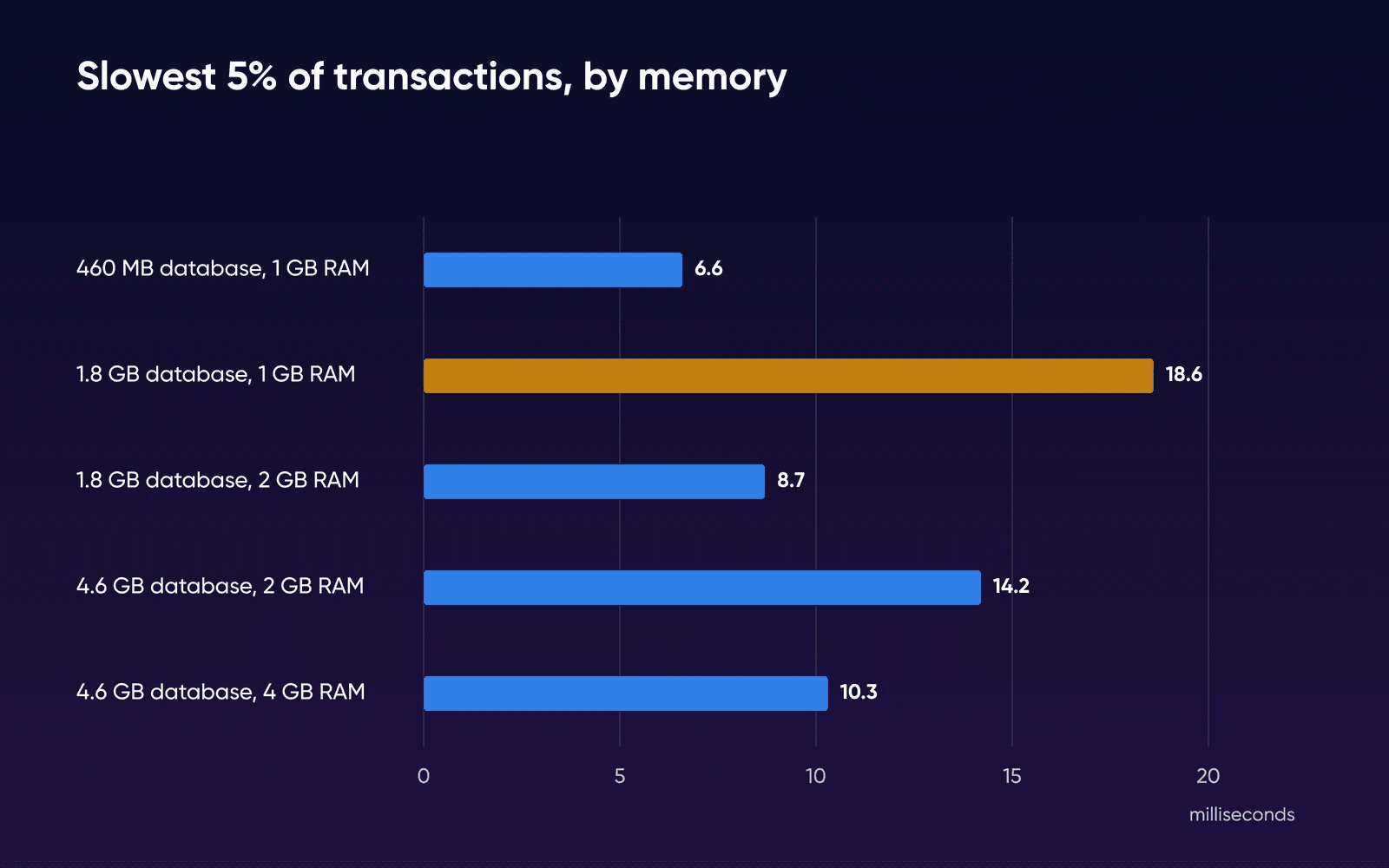
A database under half the plan's RAM stayed fast. Once the data passed the RAM, the slowest transactions slowed down: 18.6 ms for the 1.8 GB database on 1 GB, against 8.7 ms one plan up. At 4.6 GB on 1 GB, MySQL couldn't keep up with the load at all. A limit of 512 MB, close to VPS basic's 500 MB, was too small for MySQL at its stock settings: it used about 470 MB before any query ran, and every run stopped at the limit.
These are our test settings, not DreamHost's. DreamHost sets up MySQL on each plan and doesn't publish its cache size, and you can't change MySQL's server settings on a MySQL VPS. Treat the table as a guide to how much data each size of memory holds comfortably. The full test, with every cache size we tried, is in our guide on how much RAM MySQL needs.
We can't tell you how many visitors each plan handles, because that depends on your queries more than your size. If your busy-hour times creep up again as your data grows, raise the RAM from the panel.
How we tested the memory question
The memory figures were measured by DreamHost on a test VM (arm64), not a DreamHost server. A hard memory limit stood in for each MySQL VPS plan's RAM. We made the run on October 19, 2026 for our RAM sizing guide, and this page reuses it. The VM ran Ubuntu 24.04 under Colima on a Mac, with 2 vCPU and no swap. MySQL 8.4.11 ran from the official Docker image at its default settings, apart from the cache size. sysbench drove a mixed read and write load that favors a busy core of rows, 8 threads at a steady 360 transactions a second, with a 3-minute measured window after a warm-up.
The MySQL VPS page lists MySQL 8.0, and DreamHost's Help Center article Using reserved words in MySQL 8 says that on a VPS you can contact support to request an upgrade to MySQL 8.4. We tested 8.4, so a server still on 8.0 may differ a little.
What we didn't test: DreamHost's own MySQL VPS settings, shared MySQL, Query Monitor timings on a real account, the network between a web server and a MySQL VPS, WordPress or WooCommerce tables, and how long the move takes. Each cell ran once. The diagnosis steps and product details come from the Help Center and product pages in the sources.
Slow database FAQs
Why does my site say "too many connections"?
MySQL shows that error when every connection it allows is already in use. Check first that DB_HOST in your config file matches the hostname your panel shows. If the settings are right and the error keeps coming back, contact support, because the server may be having network trouble. DreamHost doesn't publish connection limits for shared MySQL or MySQL VPS.
Can I host MySQL for free?
Every DreamHost hosting plan comes with a shared MySQL server at no extra cost, and the tuning steps on this page all work there.
How do I move my databases to a MySQL VPS?
Add a MySQL VPS from the panel. The Help Center says DreamHost then moves every database on your account to it at midnight Pacific time. It doesn't say whether you can keep some databases on shared MySQL, so ask support first if that matters. The full steps are in the Help Center.
Can apps outside DreamHost connect to my database?
Not by default. Each MySQL user's Allowable Hosts setting starts as %.dreamhost.com, which blocks connections from outside DreamHost's network. You can allow an outside connection by adding an IP address or a wildcard on a new line.
Will a Managed VPS give my database its own server?
A Managed VPS gives your website its own server, and your databases stay on shared MySQL unless you add a MySQL VPS. It's the right move when PHP is the slow part. When the database is the slow part, the MySQL VPS is the add-on that gives it isolated database resources.
Will moving the database make my site slower?
Not because of the network, since your pages already reach shared MySQL over the network, as the move section explains. Memory is the part to check, so compare your database's size with the plan's RAM before you buy.
Sources
- Query Monitor, WordPress.org plugin directory, Oct 2, 2026. wordpress.org/plugins/query-monitor
- How to use Query Monitor, Query Monitor (John Blackbourn), Oct 2, 2026. querymonitor.com/wordpress-debugging/how-to-use
- Debugging database queries with Query Monitor, Query Monitor (John Blackbourn), Oct 2, 2026. querymonitor.com/wordpress-debugging/database-queries
- Configuration constants, Query Monitor (John Blackbourn), Oct 2, 2026. querymonitor.com/help/configuration-constants
- Viewing your database logs, DreamHost Knowledge Base, Oct 2, 2026. help.dreamhost.com/hc/en-us/articles/360003819912
- MySQL limitations due to shared hosting, DreamHost Knowledge Base, Oct 2, 2026. help.dreamhost.com/hc/en-us/articles/115000263911
- MySQL overview, DreamHost Knowledge Base, Oct 2, 2026. help.dreamhost.com/hc/en-us/articles/215099117
- Troubleshooting site slowness, DreamHost Knowledge Base, Oct 2, 2026. help.dreamhost.com/hc/en-us/articles/215836488
- Viewing CPU, RAM, and Storage usage for Web Hosting, DreamHost Knowledge Base, Oct 2, 2026. help.dreamhost.com/hc/en-us/articles/47035718871444
- Optimizing WordPress databases, DreamHost Knowledge Base, Oct 2, 2026. help.dreamhost.com/hc/en-us/articles/4404267062164
- Error establishing a database connection, DreamHost Knowledge Base, Oct 2, 2026. help.dreamhost.com/hc/en-us/articles/360021570592
- Database FAQs, DreamHost Knowledge Base, Oct 2, 2026. help.dreamhost.com/hc/en-us/articles/215571837
- Optimize a database, DreamHost Knowledge Base, Oct 2, 2026. help.dreamhost.com/hc/en-us/articles/215036388
- Using the Docket Cache plugin, DreamHost Knowledge Base, Oct 2, 2026. help.dreamhost.com/hc/en-us/articles/11013621014676
- MySQL VPS Hosting, DreamHost, Oct 2, 2026. dreamhost.com/hosting/managed-vps/mysql
- Improving Database Performance on VPS, DreamHost Blog, Oct 2, 2026. dreamhost.com/blog/vps-database-optimization
- MySQL VPS overview, DreamHost Knowledge Base, Oct 2, 2026. help.dreamhost.com/hc/en-us/articles/215945917
- Add or delete a MySQL VPS, DreamHost Knowledge Base, Oct 2, 2026. help.dreamhost.com/hc/en-us/articles/215945927
- Creating a MySQL database, DreamHost Knowledge Base, Oct 2, 2026. help.dreamhost.com/hc/en-us/articles/221691727
- Changing your MySQL VPS billing plan, DreamHost Knowledge Base, Oct 2, 2026. help.dreamhost.com/hc/en-us/articles/47277282397076
- Managing MySQL users, allowable hosts, and privileges, DreamHost Knowledge Base, Oct 2, 2026. help.dreamhost.com/hc/en-us/articles/215575787
- EXPLAIN Statement, Oracle, MySQL Reference Manual, Oct 2, 2026. dev.mysql.com/doc/refman/8.0/en/explain.html
- The Slow Query Log, Oracle, MySQL Reference Manual, Oct 2, 2026. dev.mysql.com/doc/refman/8.0/en/slow-query-log.html
- Buffer Pool, Oracle, MySQL Reference Manual, Oct 2, 2026. dev.mysql.com/doc/refman/8.0/en/innodb-buffer-pool.html
- Too many connections, Oracle, MySQL Reference Manual, Oct 2, 2026. dev.mysql.com/doc/refman/8.0/en/too-many-connections.html
- WP_Object_Cache, WordPress Developer Resources, Oct 2, 2026. developer.wordpress.org/reference/classes/wp_object_cache
- Cache, WordPress Advanced Administration, Oct 2, 2026. developer.wordpress.org/advanced-administration/performance/cache
- Why is it not advisable to have the database and web server on the same machine? (answer), Stack Overflow, Oct 2, 2026. stackoverflow.com/a/660242
- Why is it not advisable to have the database and web server on the same machine? (top answer), Stack Overflow, Oct 2, 2026. stackoverflow.com/a/660036
- Website responds very slow using remote database, Server Fault, Oct 2, 2026. serverfault.com/questions/1088677/website-responds-very-slow-using-remote-database
- MySQL official Docker image, Docker Hub, Oct 19, 2026. hub.docker.com/_/mysql
- sysbench, sysbench on GitHub, Oct 19, 2026. github.com/akopytov/sysbench
- InnoDB Startup Options and System Variables, Oracle, MySQL 8.4 Reference Manual, Oct 19, 2026. dev.mysql.com/doc/refman/8.4/en/innodb-parameters.html