On October 19, 2026, we deleted everything on a test Immich server, local Borg repository included. All that was left was the off-site Borg repository and its exported key. A fresh install brought the whole library back from those two.
Running those backups is your job on a DreamHost VPS. DreamHost support is available 24/7 for the hardware, network and connectivity, and you manage the OS, software and configuration. DreamHost's Help Center says that because you fully control a VPS, DreamHost can't access, back up or recover your data on it. Immich makes its own database dump every night at 2:00 AM. But those dumps hold metadata only, never photos or videos. On a DreamHost Immich server, the immich-backup helper dumps the database and prints that you must copy the library directory off the server separately. If you're still moving in from Google Photos, keep the Takeout files until the first backup below has run. If you haven't settled on a photo app yet, start with how Immich compares with PhotoPrism, Ente and Nextcloud.
What the backup has to hold
Immich's docs say it stores file paths and user metadata in the database and doesn't scan the library folder, so a backup needs both from the same night. Albums, shares and edits live in that metadata. If you restore the photos without the database, you get loose files with no albums. If you restore the database without the photos, Immich points at files that aren't there. Sizes below are from the second backup of our test library.
| Part | Back it up? (size in our test) |
|---|---|
| Database dump: albums, people, sharing, edits and where every file is | Yes, first (56.7 MB as plain SQL) |
| upload/ and library/: your original photos and videos, plus any XMP sidecars | Yes (1,075 MB) |
| profile/: account pictures | Yes (none set) |
| thumbs/: thumbnails and previews | Optional, rebuildable (214 MB) |
| encoded-video/: transcoded copies | Optional, rebuildable (empty, since no clip needed it) |
| backups/: Immich's automatic dumps | Comes with the folder (40 MB for two) |
Leaving out the two rebuildable folders saved us 214 MB of a 1.39 GB folder, and the price was a thumbnail rebuild after the restore. Your .env and docker-compose.yml sit outside the upload folder, so copy them off the server once. We restored without ours, from fresh copies and a new database password, but yours will save you looking up the paths and the version.
How we restored a wiped server
The test server (not a DreamHost server) held two accounts, an admin and a family member. Between them they had 401 photos and 4 videos taking 1.06 GB, plus 5 more photos in the trash. We set it up with the things a family would miss if they vanished. Some photos were favorites with descriptions and star ratings, some were archived, and some had edited dates and locations. One album was shared with the second account. A share link had a password and an expiry date.
Each backup followed Immich's Borg script with Borg 1.4.0. It dumped the database into the upload folder, then copied that folder into an encrypted repository off the VM, leaving out thumbnails and transcoded video. After the wipe, we rebuilt the server in this order.
- Install Immich again from its own files
Download fresh copies of
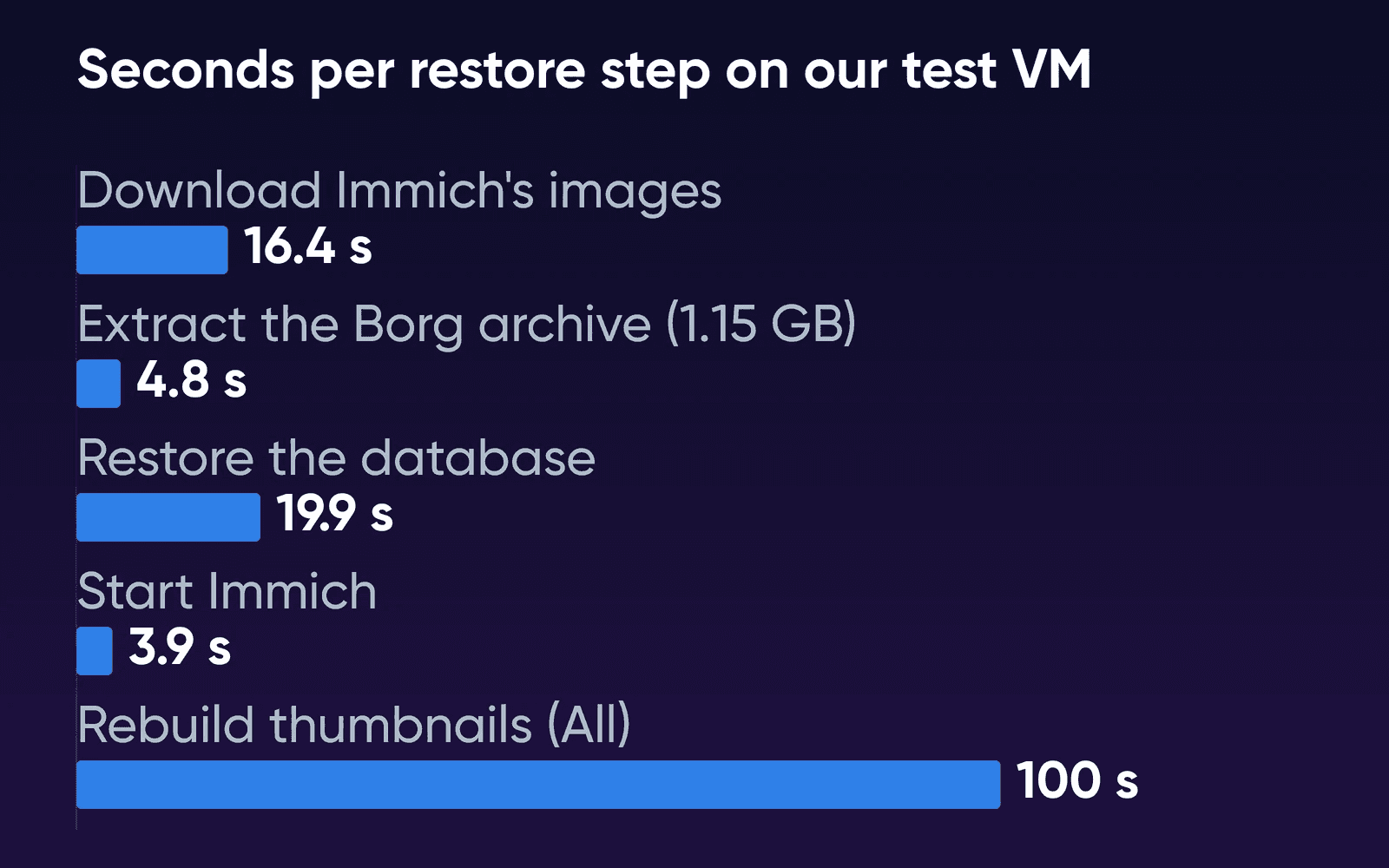
docker-compose.ymlandexample.envfrom Immich's quick start. SetIMMICH_VERSIONin.envto the version you were running, since the defaultv3pulls the newest v3 release. You'll find it in the name of each automatic dump. We also set a different database password from the old server's, anddocker compose pulltook 16.4 seconds on our connection. - Extract the latest archive from the off-site repository
Run
borg extractfor the newest archive and move the folders into the new upload location. Ours, 1.15 GB, came out in 4.8 seconds. If you leftthumbs/andencoded-video/out of your backup, Immich's integrity page says to create an empty.immichfile in each of those folders, because Immich checks for it at start-up. - Restore the database before Immich ever starts
Immich's command-line restore needs a fresh install where the Immich server has never run since its containers were created, so start only Postgres. These are Immich's commands, with the default database name and user from
example.env. Swapgunzip --stdoutforcatwhen the dump is plain SQL, as Immich's script makes it.bashdocker compose create docker start immich_postgres sleep 10 gunzip --stdout "/path/to/backup/dump.sql.gz" \ | sed "s/SELECT pg_catalog.set_config('search_path', '', false);/SELECT pg_catalog.set_config('search_path', 'public, pg_catalog', true);/g" \ | docker exec -i immich_postgres psql --dbname=immich --username=postgres --single-transaction --set ON_ERROR_STOP=onThis step, including the 10-second wait, took 19.9 seconds.
- Start Immich
Run
docker compose up -d. Ours answered in 3.9 seconds, and the old admin password logged in. Counting half a second for making the folder and moving files into place, the restore steps added up to 46 seconds. - Rebuild thumbnails with the All option
The timeline showed no thumbnails, because they weren't in the backup. Immich's integrity page suggests running the thumbnail job for missing items, and we expected that to work. But on our restored server that option queued nothing, since the database still listed every thumbnail path. In Administration, open the job queues and run the thumbnail job with All instead. It rebuilt 810 thumbnails and previews in 100 seconds, about 8 files a second on our 2 vCPU VM. Real phone photos are bigger, so expect a slower rate on a family library.
On a real server, the extract step runs at the speed of the link to your off-site repository, so a big library takes far longer than ours did. We compared the restored server against a snapshot taken before the wipe.
| Check | After the restore |
|---|---|
| Accounts and the admin password | Both accounts back, and the old password logged in |
| Files in the upload folder | All 470 byte-identical by SHA-256: 406 photos (5 of them in the trash), 4 videos and 60 sidecar files |
| Photo and video counts, total size | Same as before |
| Favorites, ratings, descriptions, archive, trash, edited dates and locations, albums, sharing roles and the share link | Same as before |
| Immich's integrity checks | 0 checksum mismatches and 0 untracked files. The 10 missing files were the thumbnails and previews of the 5 trashed photos, which the rebuild skips |
Immich's web restore
You can also restore from a fresh server's welcome screen in Immich v3, and Immich recommends the web route for most people. We tried it on a second wiped install after copying the whole upload folder back, thumbnails and backups/ included, 1.39 GB in all.
The welcome screen offers Getting Started or Restore From Backup. Click the second and Immich restarts into maintenance mode. Our headless test browser sat on Server is restarting
for 2 minutes, so we signed in through the maintenance login link the server prints to its log, which docker logs immich_server shows. A normal browser may well refresh by itself, but we didn't test that. Immich then checked that each folder was readable and writable and listed the dumps it found in backups/ with their date, version and size.
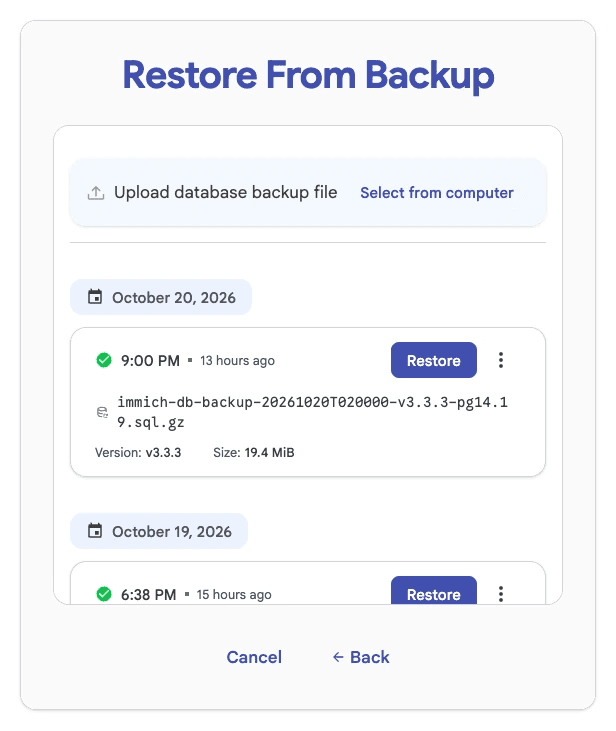
We picked the newest, a dump the restored server had made on its own at 2:00 AM. Immich saved a 9.5 MB restore point of the current database first. The login page came back 20 seconds after we confirmed, and every check in the table above passed again. This time thumbnails showed with no rebuild, because the folder copy held them.
Where the three copies go
Immich's README tells you to always follow a 3-2-1 backup plan for your photos and videos.
On a rented server, the server itself is copy one (it already sits away from your house). Copy two goes on a drive or NAS at home. Copy three goes to an off-site Borg repository. A repository on the server's own disk doesn't count, because it eats your plan's disk and it's gone when the server is. A second DreamHost VPS is off the server, but DreamHost's Help Center says every VPS is hosted in its US East data center in Ashburn, Virginia, so it doesn't count as the off-site copy.
BorgBase, which Immich's script page names for off-site backups, hosts Borg repositories. When we read its plans on October 19, it gave 10 GB free, charged $30 a year for 250 GB or $110 a year for 1 TB, and had no transfer charges. Photos barely compress, so you'll need a repository about the size of your originals. Our second archive went from 1,150 MB to 1,130 MB.
Borg only stores what's changed. Our first run added 852 MB to the off-site repository. After we added 110 photos, the second run added 304.7 MB (the new photos plus the changed database dump). The whole script ran in 8.8 seconds. A plain copy job would send everything again. A sync is no backup either, because a photo deleted on the server disappears from the synced copy too, while Borg keeps older archives.
The first copy off the server is the slow one. Take a 165 GB library, about the most our Google Photos guide puts on Stack 16. That's 1,320 gigabits (165 x 8), so about 44 minutes at an example rate of 500 Mbps. The copy at home comes down at your home download speed. If you ever restore from that home copy, it goes back up at your home upload speed, and on a 20 Mbps upload that's about 18 hours. Bandwidth on Immich VPS Hosting is unmetered, with no overage fees (fair use applies).
Set up the nightly backup
You'll need an SSH login to the server and an empty repository at your off-site service.
- Install Borg
On Debian 13,
sudo apt install borgbackupinstalls Borg 1.4.0, the version we tested, according to Debian's package list. Borg's quick start covers the commands below in more depth. - Let the server log in to the repository without a prompt
Cron can't type a password, so add the server's SSH public key at your off-site service, and save the repository passphrase in a file only root reads.
bashsudo sh -c 'umask 077; printf "%s" "YOUR-PASSPHRASE" > /root/.borg-passphrase' - Create the repository with encryption
Immich's script creates its repositories with
--encryption=none. We turned encryption on for the off-site copy. Borg asks for the passphrase.bashborg init --encryption=repokey-blake2 ssh://USER@HOST/./immich-borg - Export the key and keep it off the server
Keep the key and the passphrase on your own computer or in your password manager, because you can't open the repository without them. In our drill, the exported key and the repository were the only things that outlived the server.
bashborg key export ssh://USER@HOST/./immich-borg immich-borg-key.txt - Save the backup script
This is Immich's script with encryption, one repository, seven daily archives kept, and the
-tdropped from the dump command. With-t, our dump picked up 242,266 carriage returns. The dump still restored without an error, but a job run from cron has no terminal to talk to, so we dropped the flag. Immich's script keeps only weekly and monthly archives, so a photo added and deleted in the same week can drop out of every archive, which is why we added--keep-daily=7. Create thedatabase-backupfolder inside the upload folder once before the first run.bash#!/bin/sh set -eu UPLOAD_LOCATION="/path/to/immich/upload" # UPLOAD_LOCATION from Immich's .env REPO="ssh://USER@HOST/./immich-borg" export BORG_PASSCOMMAND="cat /root/.borg-passphrase" # Database first docker exec immich_postgres pg_dump --clean --if-exists --dbname=immich --username=postgres \ > "$UPLOAD_LOCATION/database-backup/immich-database.sql" # Then the files, without the rebuildable folders borg create "$REPO::{now}" "$UPLOAD_LOCATION" \ --exclude "$UPLOAD_LOCATION/thumbs/" --exclude "$UPLOAD_LOCATION/encoded-video/" # Keep 7 daily, 4 weekly and 3 monthly archives borg prune --keep-daily=7 --keep-weekly=4 --keep-monthly=3 "$REPO" borg compact "$REPO"On a DreamHost Immich server, run
immich-backupin place of thedocker execline and add the dump it writes to theborg createline. We didn't run the helper in our drill, so check its output for where the dump and the library folder are, and pointUPLOAD_LOCATIONthere. - Add the copy at home
Repeat the
create,pruneandcompactlines for a second repository on a home machine, the way Immich's script handles its local and remote copies. The server has to reach that machine over SSH, either through a port forward on your home router or through a private network tunnel between the two. We think the tunnel is the easier of the two, since it doesn't need a fixed home address. - Run it once, then schedule it with cron
Run the script by hand and read its output. Then run
sudo crontab -eand add a line that runs it every night, here at 4 AM, after Immich's own nightly dump.bash0 4 * * * /usr/local/bin/immich-borg.sh >> /var/log/immich-borg.log 2>&1 - Get told when a night fails
Add a last line to the script that calls a check-in URL, so you hear about a night when the backup didn't finish. DreamHost's Uptime Kuma page says its push monitors let your own cron jobs check in. After the first two nights
borg listshould show a new archive for each night, each about the size of your library the first time and much smaller after.
Get one photo back from an older archive
If you haven't turned on Immich's storage template (off by default), your photos in upload/ sit under random names Immich generated. To find one, extract the plain SQL dump from the same archive and search it for the photo's original file name. Its stored path is on the same line. Then pull out that one file.
borg extract "$REPO::ARCHIVE-NAME" path/inside/the/archive/photo.jpgExtracting one original from our first night's archive took 0.5 seconds. Its SHA-256 matched the file from before the backup. Upload it again through the Immich app or web page. We didn't test what a re-uploaded photo keeps, so plan on adding it back to its albums yourself.
Back up before every Immich update
Immich doesn't support downgrading, even within a minor version, so the backup you take before an update is your only way back. DreamHost's Immich page says to run immich-backup for the database before updating. Note the version you're running, too. Immich puts it in the name of each automatic dump, just before the Postgres version, and a restore onto a different version attempts the database migrations automatically.
Every few months, run a test restore. borg check passed on our repository in 1.8 seconds, but only a real restore shows that Immich comes back from it. The test that counts is the restore above on a scratch server, followed by Immich's integrity checks, which v3 runs every night at 3 AM. You'll see missing thumbnails for anything in the trash, which is normal. Then open a shared album and a couple of edited photos and check that they look the way you left them.
How we measured
DreamHost ran the drill on October 19 and 20, 2026, with Immich v3.3.3. The test VM ran Ubuntu 24.04.4 on arm64 with 2 vCPU and 7,922 MB of memory, under Colima on an Apple-silicon Mac. That's not a DreamHost server, and it has half the cores of Stack 16. Immich ran from its own compose file and example.env, changed only for paths, time zone, the pinned version and the database password. Borg 1.4.0 ran in a Debian 13 container. The library was synthetic JPEGs with dates and GPS in their EXIF data plus four short 1080p video clips, in throwaway accounts. Each step ran once.
The run doesn't cover DreamHost's Immich image or its immich-backup helper, a transfer over a real network (the off-site repository was a folder on the same Mac), a library in the hundreds of gigabytes, or a backup from an older Immich version restored onto a newer one. Immich v3.3.4 came out on October 20. Its release notes list faster people queries and a missing translation, nothing about backup or restore. We haven't run the drill on it.
Backing up Immich FAQs
Where are Immich backups stored?
Immich writes its automatic database dumps to the backups folder inside its upload folder, on the same disk as the photos, and keeps the last 14. Everything else lives wherever your backup tool sends it, such as a Borg repository at home or with an off-site service.
Can I back up while Immich is running?
Yes. Immich asks for the database first and the files second when the server keeps running. Its Borg script follows that order by writing the dump into the folder it copies next, so each archive holds a dump that matches its photos.
Should I turn off Immich's automatic dumps once Borg runs?
Immich's script page says you can, to save space, since every Borg archive carries its own dump. We'd leave them on. Two of them took 40 MB in our test, and they're the list Immich's web restore offers you to pick from.
Sources
- Immich VPS Hosting, DreamHost, Oct 22, 2026. dreamhost.com/hosting/vps/immich
- VPS Hosting, DreamHost, Oct 22, 2026. dreamhost.com/hosting/vps
- Cancel a VPS, DreamHost Help Center, Oct 22, 2026. help.dreamhost.com/hc/en-us/articles/50609419977748-Cancel-a-VPS
- VPS overview, DreamHost Help Center, Oct 22, 2026. help.dreamhost.com/hc/en-us/articles/50476238203028-VPS-overview
- Backup and Restore, Immich, Oct 16, 2026. docs.immich.app/administration/backup-and-restore
- Backup Script, Immich, Oct 16, 2026. docs.immich.app/guides/template-backup-script
- System Integrity, Immich, Oct 16, 2026. docs.immich.app/administration/system-integrity
- Upgrading, Immich, Oct 16, 2026. docs.immich.app/install/upgrading
- Post installation steps, Immich, Oct 16, 2026. docs.immich.app/install/post-install
- FAQ, Immich, Oct 16, 2026. docs.immich.app/FAQ
- Quick start, Immich, Oct 16, 2026. docs.immich.app/overview/quick-start
- Requirements, Immich, Oct 16, 2026. docs.immich.app/install/requirements
- Immich README, immich-app/immich on GitHub, Oct 16, 2026. github.com/immich-app/immich
- Release v3.3.4, immich-app/immich on GitHub, Oct 20, 2026. github.com/immich-app/immich/releases/tag/v3.3.4
- Quick Start, BorgBackup, Oct 16, 2026. borgbackup.readthedocs.io/en/stable/quickstart.html
- borgbackup package versions, Debian, Oct 16, 2026. qa.debian.org/madison.php?package=borgbackup&table=debian
- BorgBase plans, BorgBase, Oct 19, 2026. borgbase.com