On October 20, 2026, we started Immich, PhotoPrism, Ente and Nextcloud one at a time on the same test server. We read the memory two minutes after start, with no photos uploaded. Immich used about 1,410 MiB across its four containers. PhotoPrism used about 300 MiB and Ente about 185 MiB. Nextcloud used about 280 MiB in the basic three-container setup from its Docker image's README.
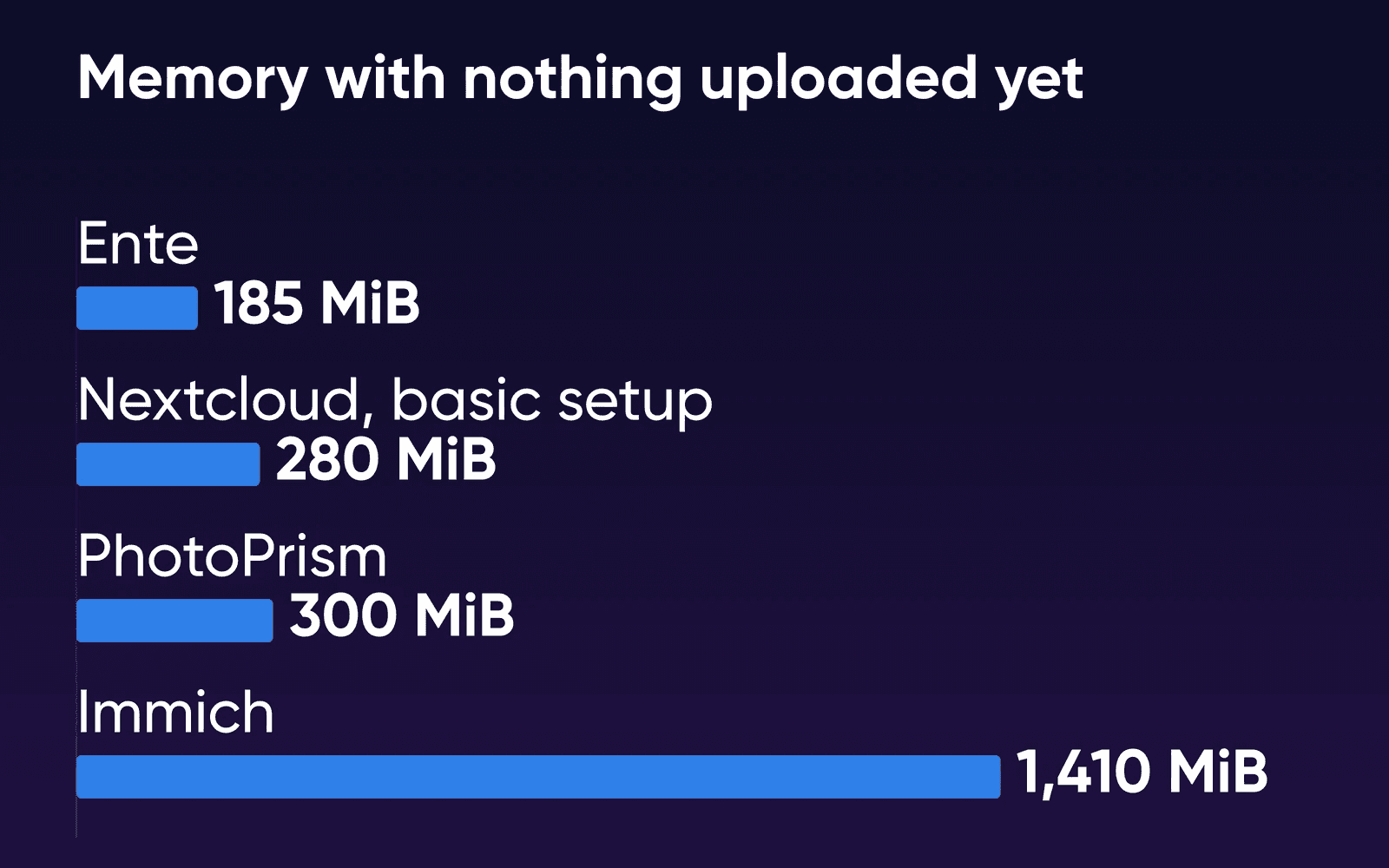
Immich's server held 757 MiB of that and its PostgreSQL database another 452. Its machine-learning container sat at about 200 MiB, with no photos to work on yet. With Immich running, the VM still had 6,092 MiB of its 7,922 MiB available. Face search and the first import would draw on that room, but we didn't measure how much they take. We think Ente's server can stay small partly because it doesn't do that work. Face recognition and search run in Ente's app on each phone or computer, which downloads your originals to index them.
These numbers are for an empty install. Immich, PhotoPrism and Nextcloud's Recognize app run their face and object recognition on the server, and Immich's FAQ says the first backup is the most demanding, because of all the jobs it starts. Our run stopped before that stage, which is why the plan advice here comes from the makers' own requirements.
Memory, disk and cores each app asks for
| Immich | PhotoPrism | Ente | Nextcloud | |
|---|---|---|---|---|
| Containers in the maker's setup | 4 | 2 | 5 | 3 (Docker image's basic setup) |
| Image sizes, added up (our test, arm64) | 3.8 GB | 3.8 GB | 1.35 GB | 2.8 GB |
| Maker's stated minimum | 6 GB RAM, 2 cores (8 GB, 4 cores recommended) | 3 GB RAM, 2 cores, 4 GB swap | 1 GB RAM, 1 core | About 4 GB free for Recognize; 512 MB per PHP process |
| Face and object search runs on | Server CPU | Server CPU | Each phone or computer | Server CPU, with Recognize |
On DreamHost's plans, Stack 8 is the smallest that meets Immich's minimum, with 8 GB of RAM and 2 vCPU. Stack 16 is the first with 4 vCPU, the core count Immich recommends. Its 250 GB of NVMe storage holds a family library of up to about 165 GB. Immich's requirements say thumbnails and transcoded video add 10 to 20% to the library and the database runs 1 to 3 GB. We plan on 1.5 times the originals (250 divided by 1.5) as our own margin for that and for growth, the same rule our guide to moving your Google Photos library in uses. Stack 32's 450 GB disk is for bigger libraries.
What a family gets from each
| Immich | PhotoPrism | Ente | Nextcloud with Memories | |
|---|---|---|---|---|
| Built for | Phone backup for several people | Organizing one large library | Encrypted backup and sharing | Files, calendars and photos together |
| A private library for each person | Yes | No, one library in the free edition | Yes | Yes, each user's own files |
| Phone apps | Official apps, background upload | Web app, plus a WebDAV sync app | Official apps | Nextcloud app uploads; Memories in the browser |
| A shared family album | Shared albums and partner sharing | Albums shared with guests or by link | Shared and collaborative albums | Shared Memories albums |
| Photos encrypted before upload | No | No | Yes, end to end | No |
| Software | Free; optional keys $25 a user or $100 a server | Community free; Essentials €2 a month, Plus from €6, both billed yearly | Free and open source | Free apps from Nextcloud's app store |
| At DreamHost | Immich VPS Hosting, installed | Not offered | Not offered | Not offered |
Choose Immich if
Several people want their phones backed up without thinking about it, with face search and a server that arrives installed.
Choose Nextcloud with Memories if
You also want shared files, calendars and contacts on the same server. You can add Immich next to it later for the photos.
Choose Ente if
You want photos encrypted on each phone before they leave it. You're comfortable setting up a domain and storage yourself.
Immich for most families
Every family member gets a separate Immich login and backs up their own phone. Immich's apps upload when someone opens them and in the background, on Wi-Fi unless you change it, and they skip photos the server already has. Partner sharing lets you share your whole library with another person, who can view and download it. It works one way, so each of you shares with the other. As the admin, you can also give each person a storage quota, so one phone full of videos can't fill the whole disk. Photos already on a drive can stay where they are: Immich's external libraries read a folder on the server and show its photos in the timeline, with each library belonging to one user.
Immich groups faces into people you can name and search for. That work runs on the server's CPU unless you turn on GPU acceleration, which Immich still calls experimental. The models download on first use, then search runs on your server.
I've switched from photoprism to immich. Immich is a much more active project, bugs are fixed, face recognition is an
order of magnitude better
You choose when to update. Immich releases can include breaking changes and database migrations that can't be undone. The update helper on our image pauses to say so before it pulls anything.
Nextcloud with Memories, for photos next to your files
Nextcloud has shipped its Photos app since version 18. Memories, from Nextcloud's app store, adds a timeline sorted by the date each photo was taken. It also puts photos on a map and groups people and objects through Recognize, which does that processing on the Nextcloud server. Memories keeps your photos in ordinary folders, so they're still there if you remove it later. Phones upload through the official Nextcloud app, as the Memories README suggests. For browsing, Memories' web view works in the phone's browser.
If the family already lives in Nextcloud for files, you don't have to pick one app. A Hacker News commenter runs Immich beside Nextcloud, with one Nextcloud login for both.
Nextcloud isn't in DreamHost's app library, so you'd install it yourself on a VPS.
Ente, if encryption comes first
Ente encrypts photos end to end: they're locked on your phone before they upload, so the server stores files only your devices can open. It has apps for iPhone, Android, the web and desktop computers. Face search isn't in the web app. On phones with 4 to 6 GB of RAM and a big library, Ente warns that indexing can slow the app down. A desktop app can do the indexing instead.
Ente's server installs with one quickstart command that starts its five containers, including its own storage service. A few settings come before the first phone upload, per Ente's post-install steps:
- Point the storage address at a name phones can reach
The quickstart points its storage address at the server itself, so only the server can reach it. Ente says phone uploads fail silently until you set an address both the server and the phones can reach, typically a hostname, and it recommends a domain name with a reverse proxy.
- Find the sign-up codes
Without an email server, the codes new accounts need show up in the server's logs.
- Raise each account's storage quota
New accounts start on the free plan's 10 GB, a figure set in Ente's server code. Raise it per person with the Ente CLI before anyone backs up a full phone.
- Point each phone at your server
Tap the app's welcome screen 7 times and enter your server's address. Ente also asks you to save a password-manager entry and a recovery-key backup labeled with that address.
Both Ente's server image and PhotoPrism's come for Intel and AMD processors as well as ARM, so either one installs on a DreamHost VPS. Neither is in DreamHost's app library, so that install is yours to do.
Why PhotoPrism suits one person's archive
PhotoPrism's free edition has no separate libraries for family members. Its Community edition has three account roles: Admin, Guest and Visitor. The User and Viewer roles need a paid Essentials or Plus membership, and even a User can view, edit and delete every picture and album in the one library. It labels photos by what's in them and adds place names, and its features page lists six high-resolution maps for browsing by location. An existing archive goes in by setting its folder as PhotoPrism's originals folder and starting an index.
Phones sync through any WebDAV app. PhotoPrism's sync page recommends PhotoSync, where some transfer options need an upgrade after the free trial. PhotoPrism's setup page asks for RAM in GB to match the number of CPU cores, and its People page says updating faces causes high CPU load for a while.
Keep a copy off the server
How we measured
We ran the test on October 20, 2026, in a virtual machine on an Apple-silicon Mac (Colima): Ubuntu 24.04 on arm64, 2 vCPU and 7,922 MiB of memory. That's not a DreamHost server, and our plans run on x86 AMD EPYC processors. We expect memory to come out close on x86, but timings wouldn't, so we don't report any.
Immich ran v3.3.3 from its release compose file. PhotoPrism ran its published compose file with MariaDB. Ente ran from its quickstart script. Nextcloud ran as the basic setup in its community Docker image's README, version 35 with MariaDB and Redis. We didn't measure Nextcloud's own All-in-One installer. Nextcloud's figure may include the end of its first-start install, because the check that it was up can answer before setup finishes. The only changes were data folders, login settings, a pinned Immich version and Nextcloud's documented auto-install settings.
Each app ran alone on the VM, with its data cleared before the next. Memory is the median of 12 docker stats readings taken 5 seconds apart after a 2-minute settle, with images downloaded beforehand. Immich's server was still settling, and it peaked at 1,153 MiB during the readings. Each app ran once, so there's no spread to report. We stopped before any photos went in, so imports, face grouping, iPhone HEIC files and phone uploads are still untested here.
Family photo server FAQs
Is Immich better than PhotoPrism?
For several people's phones, yes. Immich's free version gives each person a private library and has its own phone apps. PhotoPrism's free edition keeps one library, and other accounts only view what's shared with them. PhotoPrism is a strong choice for one person organizing a large archive.
Will a phone keep backing up if nobody opens the app?
It usually does, within limits the phone sets. Immich uploads when the app opens and periodically in the background, on Wi-Fi by default. On an iPhone the system decides when that background task runs. It runs more often when the app gets opened. Some Android phones' battery settings stop the background worker, so check them on each phone.
Do I have to run a server at all?
Ente runs a hosted service of its own with a free tier, so you could skip the server, and the apps are the same ones you'd point at your own server. If the family is on Google Photos now, our guide to switching from Google Photos to Immich covers moving the library with its dates and albums.
Does face search work on a small server?
Yes, within the makers' requirements. Immich, PhotoPrism and Nextcloud's Recognize app do face work on the server's CPU. Immich asks for at least 2 cores and recommends 4, which is why our pick is Stack 16. Ente does it on each phone or computer instead. We didn't time face grouping in our test.
What happens to our photos if I'm the only one who knows how the server works?
Write down what someone else would need: how to sign in to the server, where the off-server backup lives and how to restore it. Our guide to backing up Immich walks through a full restore, so a second person can practice it once.
Who helps if something on the server breaks?
DreamHost's VPS support is available 24/7 for the hardware, network and connectivity. You manage your applications and software stack, as that page puts it, which here means Immich, its updates and the photo backups.
Sources
- Immich VPS Hosting, DreamHost, Oct 22, 2026. dreamhost.com/hosting/vps/immich
- VPS Hosting, DreamHost, Oct 22, 2026. dreamhost.com/hosting/vps
- VPS overview, DreamHost Help Center, Oct 22, 2026. help.dreamhost.com/hc/en-us/articles/50476238203028-VPS-overview
- Cancel a VPS, DreamHost Help Center, Oct 22, 2026. help.dreamhost.com/hc/en-us/articles/50609419977748-Cancel-a-VPS
- Requirements, Immich, Oct 16, 2026. docs.immich.app/install/requirements
- FAQ, Immich, Oct 20, 2026. docs.immich.app/FAQ
- User management, Immich, Oct 20, 2026. docs.immich.app/administration/user-management
- External libraries, Immich, Oct 20, 2026. docs.immich.app/features/libraries
- Backup and restore, Immich, Oct 20, 2026. docs.immich.app/administration/backup-and-restore
- Immich product keys, Immich, Oct 20, 2026. immich.app/blog/immich-product-keys
- Mobile backup, Immich, Oct 16, 2026. docs.immich.app/features/mobile-backup
- Partner sharing, Immich, Oct 16, 2026. docs.immich.app/features/partner-sharing
- Facial recognition, Immich, Oct 16, 2026. docs.immich.app/features/facial-recognition
- ML hardware acceleration, Immich, Oct 16, 2026. docs.immich.app/features/ml-hardware-acceleration
- Immich releases (v3.3.3), Immich on GitHub, Oct 16, 2026. github.com/immich-app/immich/releases
- Setup, PhotoPrism, Oct 16, 2026. docs.photoprism.app/getting-started
- Account roles, PhotoPrism, Oct 16, 2026. docs.photoprism.app/user-guide/users/roles
- Indexing originals, PhotoPrism, Oct 20, 2026. docs.photoprism.app/user-guide/library/originals
- Mobile devices, PhotoPrism, Oct 16, 2026. docs.photoprism.app/user-guide/sync/mobile-devices
- People, PhotoPrism, Oct 16, 2026. docs.photoprism.app/user-guide/organize/people
- Features, PhotoPrism, Oct 16, 2026. photoprism.app/features
- Pricing & Editions, PhotoPrism, Oct 16, 2026. photoprism.app/editions
- Ente README, Ente on GitHub, Oct 16, 2026. github.com/ente/ente
- Self-hosting quickstart, Ente, Oct 16, 2026. ente.com/help/self-hosting
- Self-hosting requirements, Ente, Oct 16, 2026. ente.com/help/self-hosting/installation/requirements
- Post-installation steps, Ente, Oct 16, 2026. ente.com/help/self-hosting/installation/post-install
- User management, Ente, Oct 16, 2026. ente.com/help/self-hosting/administration/users
- Ente CLI, Ente, Oct 16, 2026. ente.com/help/self-hosting/administration/cli
- Machine learning, Ente, Oct 16, 2026. ente.com/help/photos/features/search-and-discovery/machine-learning
- Storage and plans FAQ, Ente, Oct 16, 2026. ente.com/help/photos/faq/storage-and-plans
- Nextcloud Photos README, Nextcloud on GitHub, Oct 16, 2026. github.com/nextcloud/photos
- Memories, Nextcloud App Store, Oct 16, 2026. apps.nextcloud.com/apps/memories
- Memories README, Memories on GitHub, Oct 16, 2026. github.com/pulsejet/memories
- Memories FAQ, Memories, Oct 16, 2026. memories.gallery/faq
- Recognize README, Nextcloud on GitHub, Oct 16, 2026. github.com/nextcloud/recognize
- System requirements, Nextcloud, Oct 16, 2026. docs.nextcloud.com/server/stable/admin_manual/installation/system_requirements.html
- Nextcloud All-in-One README, Nextcloud on GitHub, Oct 16, 2026. github.com/nextcloud/all-in-one
- Nextcloud Docker image README, Nextcloud community on GitHub, Oct 16, 2026. github.com/nextcloud/docker
- Hacker News comment on switching from PhotoPrism to Immich (December 2025), Hacker News, Oct 16, 2026. news.ycombinator.com/item?id=46172609
- Hacker News comment on running Immich beside Nextcloud (June 2026), Hacker News, Oct 16, 2026. news.ycombinator.com/item?id=48515262