Managed WordPress hosting pricing often follows monthly visits. DreamPress plans are sized by a visitor allowance, and some hosts bill for visits over theirs, so what you pay can depend on how your host counts a visit. Say your analytics showed 50,000 visits last month. A plan that counts one visit per IP address per day, from the server's own log, would put the same month at about 86,000 by our measurement. On a plan that includes 60,000 visits and bills for the rest, that gap is the difference between staying inside it and paying for 26,000 extra.
On DreamPress the gap matters less: the visitor figure on each DreamPress plan is an allowance that helps you size it, and the plan section below quotes what DreamHost says about overages.
What counts as one visit
You'll meet four counters when you compare plans and reports, and each reads the same traffic differently.
| Counter | What it counts | What it leaves out | Where you'll see it |
|---|---|---|---|
| Analytics session | One browser's run of activity, which ends after 30 minutes with nothing happening | Known bots, and anyone whose browser never runs the tracking tag | Google Analytics and other tag-based tools |
| Unique IP per day | Each IP address once per 24-hour period, read from the server log | Repeat visits from the same IP that day. Depending on how it's built, a counter may also drop bots that identify themselves, and error responses | Log-based counters, including some plans' visit meters |
| Page views | Every page the server sends | Images, scripts and style files | Server logs and log tools |
| Requests | Every file the server sends, pages and files alike | Nothing | Total Requests on your DreamHost panel's Traffic page |
Google's session definition lets you change the 30-minute timeout in your tag settings. Counting each IP once per day is one of the rules we tested. If you're comparing a plan that meters visits, check its own documentation for the rule it uses. DreamHost's Help Center says that on your panel's Traffic page, Unique Requests counts repeats of the same request from the same user or IP once.
Why your host and your analytics disagree
Bots are a big part of the gap. On Cloudflare's network, humans made 47% of HTML page requests as of December 2, 2025, and non-AI bots made 44%. AI bots averaged 4.2% over the year. Google Analytics leaves known bots out automatically, using its own research and the IAB's list of crawlers, and you can't switch that off or see how much it removed. The IAB list exists so companies can keep crawlers and monitoring tools out of analytics and billable counts
. It's sold as a paid yearly subscription, so applying the same filter to your own logs means buying a license. A log-based counter can drop the bots that name themselves, but it counts the ones that don't as people. DreamHost's Help Center says the panel's bots tab files monitoring services, uptime checkers, cloud scripts and unannounced crawlers under Other
.
Analytics builds sessions from its tag, so a browser that never runs the tag, for example because a blocker stops it, never shows up there. Every page your server sends that reader still lands in its log.
In general, one person on phone data and office Wi-Fi is two IP addresses in a day, and a whole office behind one connection is one. In our test, moving the share of repeat visits from a new IP between 10% and 60% shifted the log-based count by less than 1%, and moving the share of people behind a shared IP from none to a quarter lowered it by about 4%.
A CDN changes which log sees the visit. DreamHost's Help Center says that with Bunny CDN on, your DreamPress panel's Visitors and Bots tabs show no data, because those requests go through Bunny's servers and never reach the site's access log. So a counter that reads only the site's own server log sees fewer visits as the CDN serves more pages, while one that also counts the CDN's traffic sees them all.
Signed-in members skip the DreamPress page cache, which DreamHost's Help Center says covers logged-out pages, so WordPress has to build their pages rather than serve a cached copy. For a paid membership, see Ghost or WordPress for a paid newsletter, and if pages are slow while traffic is low, check the database first.
The same month, counted five ways
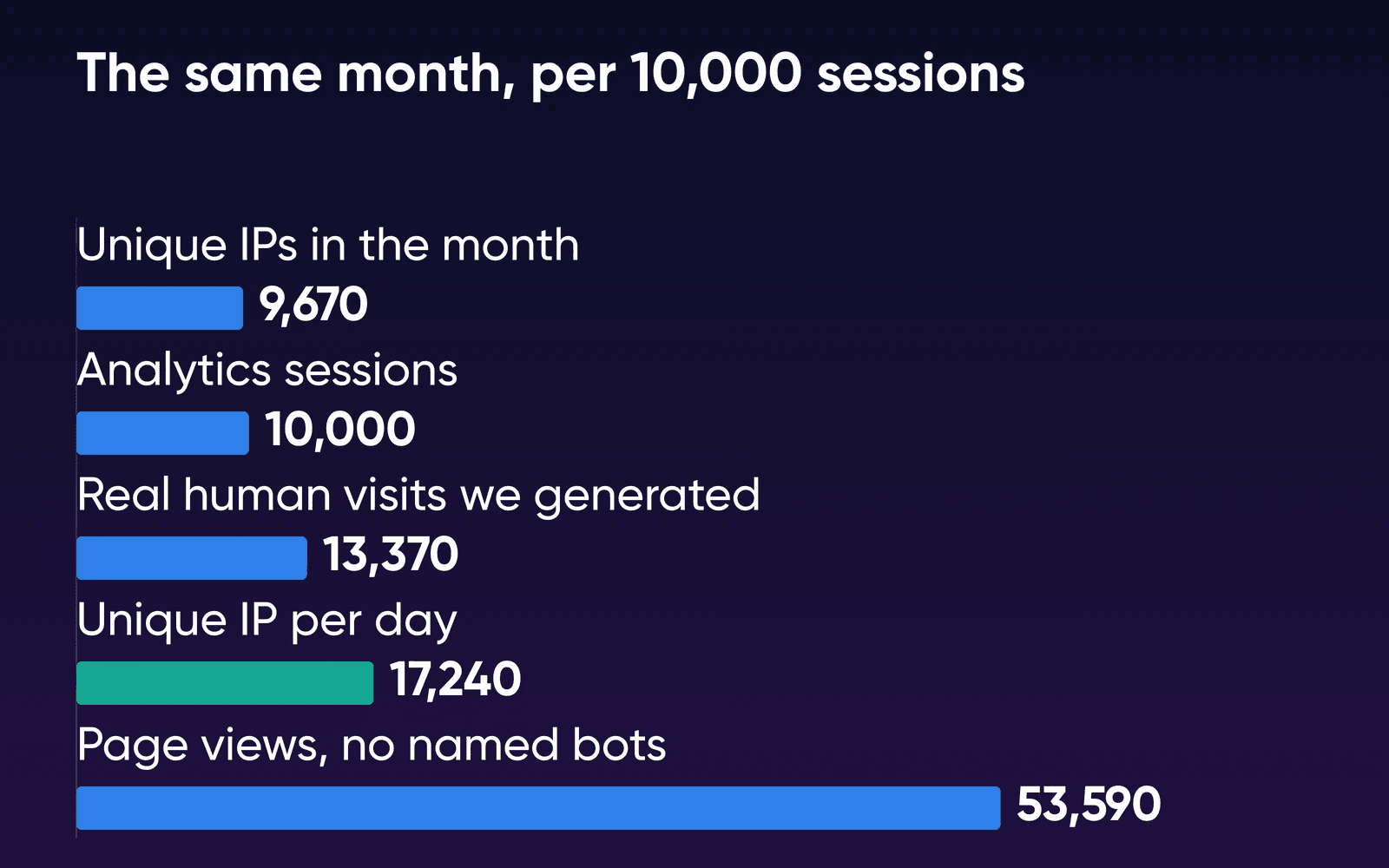
None of the pages we read while researching this guide put these counters side by side on the same traffic, so we built a month and counted it. It's a synthetic log: we generated every visitor, bot and request to stated assumptions, then ran each counting rule over it, nine times at three sizes. Two assumptions drive most of the result: how many people never run the analytics tag, and how much of the traffic is bots. The method and its limits are at the end of the page.
| Counting rule | Per 10,000 analytics sessions | Range across 9 runs |
|---|---|---|
| Analytics sessions (30-minute timeout, tag-running browsers only) | 10,000 | Base |
| For comparison: real human visits we generated | 13,370 | 13,280 to 13,510 |
| Unique IPs in the whole month | 9,670 | 9,570 to 9,870 |
| Unique IP per day, named bots and error responses removed | 17,240 | 17,080 to 17,400 |
| Page views, named bots removed | 53,590 | 52,440 to 54,420 |
| Requests, every file | 1,086,480 | 1,062,320 to 1,104,370 |
Analytics missed about a quarter of the real visits, mostly the 25% of people we set up as never running the tag. The unique-IP-per-day count landed at about 1.7 times the analytics count, mostly because it counts the people analytics never sees plus the bots that don't name themselves. The ratio stayed between 1.72 and 1.73 at all three sizes we ran, from 3,000 to 75,000 simulated people.
The assumptions drive that ratio, so we moved each one on its own and counted again. Our baseline is the middle value in each row. Bots are sized as a share of page requests, so more pages per visit also meant more bot visits.
| Assumption | Log count at each value tried |
|---|---|
| Never run the tag | 10%: 1.43x, 25%: 1.72x, 40%: 2.15x |
| Bot share of pages | 30%: 1.46x, 53%: 1.72x, 65%: 1.98x |
| Pages per visit | 1.5: 1.51x, 3: 1.72x, 6: 2.14x |
| Bots that name themselves | 50%: 1.75x, 70%: 1.72x, 90%: 1.55x |
| Behind a shared IP | 0%: 1.74x, 10%: 1.72x, 25%: 1.67x |
Changing one assumption at a time moved the ratio between about 1.4 and 2.2. A site with several of those at once, such as many tracker-blocking readers and heavy crawling, can sit above that. With a CDN serving 95% of files and 60% of pages from its edge, a count from the site's own server log fell to 1.29 times analytics, and at 90% of pages it fell to 0.74.
What DreamPress counts and charges
DreamHost's Help Center DreamPress FAQ, updated October 17, 2026, says: DreamHost does not limit the number of visitors to your site or have any overages for traffic.
The same answer adds that monthly site traffic is determined by your plan and can affect your options when you upgrade or downgrade, and the Help Center's plan-change article says the plans you can switch to depend on your monthly visitors.
The DreamPress page calls the figures allowances (Monthly visitor allowances help you size your plan
) and asks sites with unusual traffic to contact DreamHost before choosing. The plan cards list unmetered bandwidth, and Bunny Essential CDN is free with 500 GB of CDN traffic a month per site.
DreamHost hasn't published which counter its visitor allowance uses, or how it treats CDN traffic. Until it does, ask support for your site's figure if you're close to a plan line.
How to read your own number
- Take a full month of sessions
In Google Analytics, read sessions for a whole calendar month. Use your busiest recent month, since a yearly average sits below the months that come closest to an allowance.
- Check your panel's Traffic page
DreamHost's Help Center says it reads your site's access log and shows Unique Requests and Total Requests, with bots on their own tab. DreamHost keeps these logs for 7 days by default, and with Bunny CDN on, a Bunny CDN tab shows the traffic instead.
- Work out your own ratio if you can
If you can read your site's access log, count the distinct IP addresses on each day of one week and add them up. Divide that by the same week's analytics sessions, and use your ratio in place of our 1.7.
- Compare with the allowance
Put your analytics number, and that number times your ratio (or 1.7), next to the plan's monthly visitors. If both fit, you've got headroom. If only the first fits, the plan still works on DreamPress, and the next plan up gives you room to grow.
Which DreamPress plan fits your traffic
The DreamPress page asks you to compare site capacity, storage, backups and support allowances side by side, and each plan's monthly visitor figure is one of those allowances. For one site, here's where four traffic levels land. The last column is the same month counted by IP per day, using our measured ratio and its range.
| Your analytics visits a month | DreamPress plan | Counted by IP per day (measured ratio) |
|---|---|---|
| 10,000 | DreamPress 1 (40k), which covers both counts | About 17,000 (14,000 to 22,000) |
| 50,000 | DreamPress 2 (80k), or DreamPress 3 (125k) to cover the log count too | About 86,000 (72,000 to 108,000) |
| 250,000 | DreamPress 10 (350k), or DreamPress 20 (700k) to cover the log count too | About 431,000 (358,000 to 538,000) |
| 1,000,000 | Above DreamPress 20 (700k): ask DreamHost for a custom plan | About 1.7 million (1.4 to 2.2 million) |
Our pick is the plan your analytics number fits, since the DreamPress FAQ quoted above says there are no traffic overages. Your traffic does decide which DreamPress plans you can switch to, and the Help Center says you can change plans from the panel when traffic grows. Take the next plan up when you're adding sites, or when your busiest month already sits near the allowance.
A single 250,000-visit site lands on DreamPress 10, a plan built for up to 10 sites, because the visitor allowance decides it. At 1,000,000 a month you're past the largest published allowance, and DreamHost offers custom managed WordPress plans for that. One million visits averages 23 a minute over a 30-day month. DreamHost's Help Center FAQ bases its traffic estimate on a load test of 50 to 100 uncached visitors a minute on a basic install, about three page views each. Cached pages carry more, and 23 a minute is an average, so your busiest hours run above it.
When you outgrow a plan or move hosts, moving WordPress without downtime covers the switch. Coming from shared hosting, whether you need managed WordPress hosting weighs that step first. If the site has grown past WordPress alone, managed vs unmanaged VPS compares DreamHost's two VPS options.
Here's what each plan costs on the 1-year term, from the DreamPress compare table read October 22, 2026. Pick by sites first, then check the visitor allowance against the table above.
| DreamPress plan | First year, per month | Then, per month | Sites | Monthly visitors |
|---|---|---|---|---|
| DreamPress 1 | $14.99 | $19.99 | 1 | 40k |
| DreamPress 2 | $17.99 | $24.99 | 2 | 80k |
| DreamPress 3 | $20.99 | $28.99 | 3 | 125k |
| DreamPress 5 | $29.99 | $40.99 | 5 | 175k |
| DreamPress 10 | $47.99 | $65.99 | 10 | 350k |
| DreamPress 20 | $77.99 | $107.99 | 20 | 700k |
The full 1-year term plus taxes is charged at checkout, and the plan renews at the then
price after the first year. The DreamPress page also offers monthly and 3-year terms at other prices.
Pricing an overage on a visit-metered plan
This worksheet is for the other plan when you're comparing DreamPress with one that bills by the visit:
- Find the plan's visit rule and rate
Look in its plan documentation for how it counts a visit (for example, one visit per IP address per 24 hours) and the fee for each 1,000 visits over the allowance.
- Estimate what its counter will read
Multiply your analytics visits by 1.7, or by 2.2 or more if your readers block trackers and crawlers hit you hard. If a CDN serves most of your pages and the host counts only its own server log, the multiplier can fall below 1.3.
- Work out the overage
Subtract the plan's allowance, divide by 1,000 and multiply by the rate. At our measured 1.72, 50,000 analytics visits on a plan that includes 60,000 reads about 86,000, which is 26,000 over, or 26 times the rate per 1,000.
- Compare it with the next plan up
Subtract the current plan's price from the next plan's. If the overage from step 3 is bigger than that difference, the next plan costs less that month.
How we measured
DreamHost generated a synthetic WordPress access log for one 30-day month on October 19, 2026, on a laptop with Python, and counted it with the rules in the table above. Nothing ran on a server, and we used no real visitor or customer data. We ran nine baseline months (3,000, 15,000 and 75,000 simulated people, three random seeds each), then changed one assumption at a time at 15,000 people. The unique-IP count used calendar days.
The baseline assumed 1.6 visits per person, 3 pages per visit (the figure DreamHost's load test uses), 25 file requests per page, 35% of repeat visits from a new IP, 10% of people behind a shared IP, 25% who never run the analytics tag, bots at 53% of page requests (100 minus Cloudflare's 47% human share on December 2, 2025; your own site's share will differ) and 70% of bots naming themselves. Every ratio on this page comes from those assumptions, which is why the second table shows what happens when each one changes. It doesn't show DreamPress's own counter or a real site's traffic, and it isn't a speed or load test.
DreamPress visitor allowance FAQs
What happens if my site goes over its DreamPress visitor allowance?
You aren't billed for it, according to DreamHost's DreamPress FAQ, which says DreamHost doesn't limit visitors or charge traffic overages. The same FAQ says your monthly traffic decides which DreamPress plans you can switch to, so traffic above a smaller plan's allowance can rule that plan out when you move down.
Do bots count toward my DreamPress allowance?
The counter behind the allowance isn't published (see the plan section), so ask support for your site's number if you're close to a plan line. DreamHost's Help Center says your panel's Traffic page shows bots on their own tab, split into search engine, AI, social and other bots.
Is a visit the same as a visitor?
No. One person who comes back three times in a month is one visitor and three visits. Each DreamPress plan lists one allowance, labeled Monthly Visits on the plan cards and Monthly Visitors in the compare table.
Do pages served by a CDN count as visits?
That depends on how the host counts. A counter that reads only the site's own server log misses pages the CDN answers, while one that also counts the CDN's traffic sees them. DreamHost's Help Center says the panel's Visitors and Bots tabs show no data once Bunny CDN is on, and how the allowance treats CDN traffic isn't published.
Can I change my DreamPress plan later?
Yes, from the DreamHost panel. DreamHost's Help Center article Changing a DreamPress plan says you can switch between DreamPress plans only, and you can't move from monthly to yearly billing that way. If you move down, its DreamPress plans and pricing article says the unused part of your billing period becomes a credit you can use on another hosting plan.
Sources
- DreamPress Managed WordPress Hosting, DreamHost, Oct 22, 2026. dreamhost.com/wordpress/managed
- Get a Custom WordPress Hosting Plan, DreamHost, Oct 22, 2026. dreamhost.com/wordpress/custom-plans
- DreamPress FAQs (updated Oct 17, 2026), DreamHost Help Center, Oct 22, 2026. help.dreamhost.com/hc/en-us/articles/214581728-DreamPress-FAQs
- Changing a DreamPress plan, DreamHost Help Center, Oct 22, 2026. help.dreamhost.com/hc/en-us/articles/215298577-Changing-a-DreamPress-plan
- DreamPress plans and pricing, DreamHost Help Center, Oct 22, 2026. help.dreamhost.com/hc/en-us/articles/215298557-DreamPress-plans-and-pricing
- Traffic page overview, DreamHost Help Center, Oct 22, 2026. help.dreamhost.com/hc/en-us/articles/33445846061076-Traffic-page-overview
- Viewing visitors on the traffic panel page, DreamHost Help Center, Oct 22, 2026. help.dreamhost.com/hc/en-us/articles/33447604217492-Viewing-visitors-on-the-traffic-panel-page
- Viewing bots on the traffic panel page, DreamHost Help Center, Oct 22, 2026. help.dreamhost.com/hc/en-us/articles/33447779990292-Viewing-bots-on-the-traffic-panel-page
- Managing the DreamPress cache, DreamHost Help Center, Oct 22, 2026. help.dreamhost.com/hc/en-us/articles/215300647-Managing-the-DreamPress-cache
- About Analytics sessions, Google Analytics Help, Oct 19, 2026. support.google.com/analytics/answer/9191807
- Known bot-traffic exclusion, Google Analytics Help, Oct 19, 2026. support.google.com/analytics/answer/9888366
- IAB Tech Lab Spiders and Bots List, IAB Tech Lab, Oct 19, 2026. iabtechlab.com/software/iababc-international-spiders-and-bots-list
- Cloudflare Radar 2025 Year in Review, Cloudflare, Oct 19, 2026. blog.cloudflare.com/radar-2025-year-in-review