Managed vs unmanaged VPS comes down to who runs the server, and at DreamHost the line falls at root access. DreamHost calls its unmanaged VPS self-managed: VPS Hosting gives you full root and a library of one-click app images, and the server's upkeep is yours. The Managed VPS page draws the line itself: For Docker, system-level changes or agents that need full server control, choose self-managed VPS.
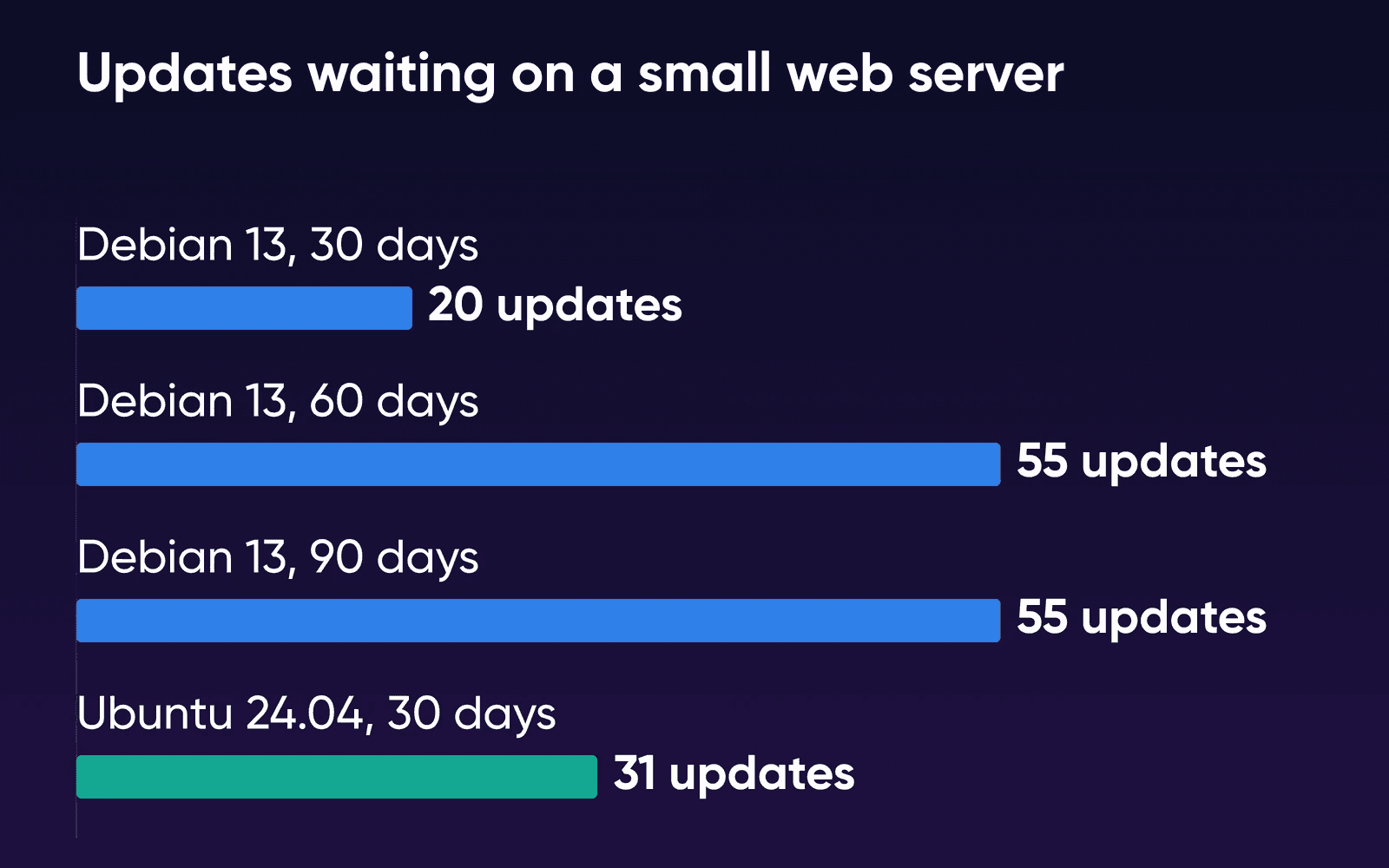
To put a number on that upkeep, DreamHost built a small Debian web server from the package archive as it stood a month earlier and checked it on October 20, 2026. It had 20 updates waiting, PHP among them. Built from the archive of two months earlier, it had 55, with nginx and the system's C library on the list. On Managed VPS, DreamHost applies those. On VPS Hosting, you do. The results and method are further down.
Who does what on each
The Managed VPS page sums up the split: You run the website. We run the server.
The table below follows DreamHost's Managed VPS and VPS pages as they read on October 22, 2026, and the Help Center articles listed under Sources for the cells those pages don't cover.
| Managed VPS | VPS Hosting (self-managed) | |
|---|---|---|
| Server software and OS updates | DreamHost | You |
| Root and sudo | Not included. SSH is included, plus unlimited SFTP users for collaborators | Full root access |
| Operating system | Ubuntu, kept up to date by DreamHost | Ubuntu, Debian, AlmaLinux or Rocky Linux, chosen when you create the server |
| Backups | Daily automated backups by DreamHost, plus a panel account backup you can download with your databases and mailboxes | Yours to set up and copy off the server. There's no panel backup tool |
| Monitoring | Usage alerts, resource graphs, and Auto-Boost, which adds RAM during memory spikes when available | Yours. The Performance and Logs dashboards are Managed VPS features |
| Support | Hosting questions, from our in-house team. Custom development and ongoing website management are separate services | DreamHost support is available 24/7 for the hardware, network and connectivity. You manage the OS, software and configuration |
| Email at your domain | Included | Not included. Add a Professional Email plan |
| Databases | MySQL on separate shared database servers, or Managed MySQL VPS, a separate service with its own resources | On your server. You install the database engine |
| Changing size | Up or down in the panel (down if your data fits the smaller plan) | Up in the panel. Going down means a new server and a manual move |
| Data center | Choose from available data-center locations when you set it up | US East (Ashburn, Virginia) |
| Money-back guarantee | 30 days | None |
On cost, add a Professional Email plan to the VPS side if you want email at your domain, and count your own time for the updates and backups.
Managed VPS covers the server, and your code stays yours to build and fix. The Managed VPS page splits it as We maintain the server; you manage your application,
and its FAQ adds that custom development, design and ongoing website management may need a separate service. If you install your own Node.js version, DreamHost's Help Center says support is unable to assist with custom installations.
On VPS Hosting, the VPS page FAQ says DreamHost guarantees the underlying infrastructure (hardware, network and uptime) and that its support team is available 24/7. DreamHost's Help Center VPS overview adds that you configure and maintain the server, and that a VPS doesn't include server management, automated backups or a 30-day money-back guarantee.
Choose Managed VPS if
Your server runs websites, a store, or a PHP, Node.js or Python app, and you'd rather DreamHost kept the server patched and backed up while you work in the panel and over SSH.
Choose VPS Hosting if
You need root for Docker or system packages, or want an app from the VPS library or your own choice of Linux, and someone on your side will apply updates every month and keep backups off the server.
Choose Managed Dedicated if
You need root access but still want DreamHost to manage the server, or you need more than the largest VPS plan's 8 vCPU and 32 GB of RAM, which the 12-core Enhanced plans pass.
Managed Dedicated is the third path. DreamHost's Help Center says a Dedicated Server gives its admin user full root access through sudo, and the Dedicated page offers it fully managed or self-managed. The same managed vs unmanaged question on a whole server is answered in managed or unmanaged dedicated server, and when a dedicated server is the next step covers the move up. WordPress sites have their own comparison of DreamPress and Managed VPS, and if you haven't settled on a VPS at all, start with whether you need one.
Jobs that need root, and jobs that don't
Root is the server's administrator account, the one that can install system software and change any setting. You'll need it when your project changes the server itself. Websites run without it, and so do Node.js or Python apps installed with the Help Center's NVM and virtualenv steps.
Line up what you'll run against this list. Any No
in the middle column points to VPS Hosting, or to Managed Dedicated if you'd still like DreamHost to run the server.
| What you want to do | Managed VPS (no root) | VPS Hosting (root) |
|---|---|---|
| Host several websites, a store and email | Yes, from the panel | Yes. You set up the web server and domains, and email is a separate Professional Email plan |
| Run a Node.js or Python app | Yes. Install it over SSH, keep it running with linger, and point a Proxy Server in the panel at its port | Yes, any way you like |
| Run scheduled jobs and deploy with Git | Yes, with crontab and Git | Yes |
| Connect an AI coding tool over SSH | Yes, within your account's permissions | Yes, with full server access |
| Run Docker containers | No | Yes, Docker and KVM are supported |
| Install system packages or change core server settings | No. You can install tools in your own user account, such as Node.js through NVM | Yes |
| Launch n8n, Ghost or another one-click app | No | Yes, from the VPS app library |
| Pick your Linux distribution | No, it's Ubuntu | Yes |
App developers should know about the Proxy Server row. The Help Center's Node.js article notes that a Node.js app on Managed VPS can't use ports 80 or 443, and that a Proxy Server set up in the panel passes web traffic to the port your app listens on instead. Its linger article covers keeping the app running. Docker is the firmer limit: its standard install guide runs every command with sudo, and Docker's install script requires root or sudo privileges.
AI coding tools fit on both. The Managed VPS page says a compatible AI coding tool connected over SSH can edit files, deploy updates and investigate logs within your account's permissions. Agents that need full server control belong on a self-managed VPS, per the Managed VPS page.
If you're leaving cPanel and want a control panel on a self-managed server, control panels that work on your own VPS compares the options.
Switching later is a manual move
You can change your mind, but you'll do it by hand. DreamHost's Help Center says the panel can't move content between a VPS and a Managed VPS in either direction, so a switch means copying your sites and data yourself. It also says managed hosting add-ons such as Bunny CDN and the SEO Toolkit can't be added to a VPS. If you're coming from DreamHost shared hosting, the Help Center describes a panel Transfer button on Managed VPS that moves your websites and users while your email keeps working.
Resizing works differently on each, per the Help Center's plan-change articles. A Managed VPS changes plan in the panel, down as well as up if your data fits, with a prorated credit for the old plan's remaining time. A VPS moves up from Stack 4 to Stack 32 with your setup intact, while going down a size means a new server and a manual move.
Managed VPS comes with a 30-day money-back guarantee, and DreamHost's Help Center says VPS Hosting doesn't. Its refunds article adds that when you cancel a yearly VPS plan, you get a prorated credit for the unused time, which you can spend on other DreamHost services.
When something breaks, who fixes it
On a Managed VPS, DreamHost fixes problems with the server itself. On VPS Hosting, the operating system and everything on it are yours to fix, and root lets you change any part of it the moment you find the problem.
A memory spike slows your site
On Managed VPS, Auto-Boost temporarily adds RAM, when available, during memory spikes, and resource graphs and alerts show you the demand. If higher usage continues, the Managed VPS page says to optimize your sites or move to a plan with more capacity. Moving a Managed VPS up in RAM doesn't restart it, per the Help Center's Managed VPS overview. A VPS has no Performance or Logs dashboard in the panel (the VPS overview lists both as managed features), so the digging starts on the server itself. Either one can reboot from the panel, and the Reset a VPS article explains that Restart Server reboots a VPS without erasing any data.
You delete or break files
Managed VPS includes daily automated backups, and you can restore a site's files from a backup on the Manage Websites page, as DreamHost's Help Center restore article explains. Databases restore separately, so also download a panel account backup, which copies your databases and mailboxes. On a VPS you restore from whatever backup you made yourself.
You lose your SSH key
The Help Center's VPS setup article says DreamHost doesn't store the login credentials you set on a VPS, so the fix for a lost key is Reset Server, which rebuilds the server from scratch and replaces everything on it. On Managed VPS, the Help Center has you create each user in the panel, so you regain access there.
Self-managed upkeep, measured
We ran this test on October 20, 2026, on a test VM. No DreamHost server was involved. We set up the same small web server several times, each from its distribution's package archive as it stood 30, 60 or 90 days earlier. The set was nginx, PHP-FPM, MariaDB, Certbot, OpenSSH and a few tools, 233 packages in all, with nothing configured. Then we pointed each one at the live archive and counted the updates waiting.
| Server set up | Updates waiting | Download | Server software in the list |
|---|---|---|---|
| Debian 13, 30 days earlier | 20 | 12.7 MB | PHP 8.4 FPM |
| Debian 13, 60 days earlier | 55 | 38.9 MB | nginx, PHP 8.4 FPM, the C library (libc6) |
| Debian 13, 90 days earlier | 55 | 38.9 MB | nginx, PHP 8.4 FPM, the C library (libc6) |
| Ubuntu 24.04, 30 days earlier | 31 | 18.1 MB | OpenSSH server, PHP 8.3 FPM |
The 60- and 90-day Debian servers waited on the same 55 packages because both archive snapshots predate Debian's 13.7 point release on September 12, and nothing in this set changed between them. So the backlog arrived in a lump with the point release. Applying the Debian updates took 15 to 56 seconds of machine time. We didn't time the human part: reading the list, restarting what needs it, and loading each site afterwards.
The counts leave two things out. Containers have no kernel of their own, so kernel updates, which mean a reboot on a real server, aren't included. And apps you add, such as Docker images or WordPress plugins, bring their own updates on top.
These are the jobs a self-managed server hands you:
- Apply updates every month
On a self-managed VPS, the 20 to 55 updates above are yours to apply. Ubuntu installs unattended-upgrades by default and it applies some updates on its own; on Debian, check that it's installed. Either way, check what it left for you and plan a reboot when a new kernel arrives.
- Check your sites after each round
Our 30-day list already included PHP-FPM. Load each site and your app's main pages after updates go in.
- Back up and copy it off the server
A VPS has no panel backup or moving tool, per the Help Center's migration article. Script a copy of your files and databases to somewhere other than the server, and test a restore now and then.
- Plan the next OS release
Standard updates for Ubuntu 24.04 LTS run to May 2029, and for 26.04 LTS to May 2031, per Ubuntu's release cycle. Moving to a new release is a job you'll schedule and test.
If nobody on your side can take on all four of those jobs, pick Managed VPS. If root is on your list and the upkeep is covered, which Stack plan to start on sizes a VPS by what you'll run on it.
Managed vs unmanaged VPS FAQs
Do I need to know Linux to use a VPS?
Not for everyday work on Managed VPS. You run sites, email and server usage from the DreamHost panel, with no command line needed. On VPS Hosting, you can launch an app from the library without the command line, but the server's software updates after that are yours to run.
How do I keep my own copy of databases and email on Managed VPS?
DreamHost's Help Center says you can back up your account from the Manage Account page in the panel. The backup copies all users, databases and mailboxes in your DreamHost account, and the download stays available for 14 days.
What does DreamHost support cover on each?
On Managed VPS, DreamHost's in-house team helps with hosting questions. Chat may start with AI, and you can ask for a person. On VPS Hosting, DreamHost support is available 24/7 for the hardware, network and connectivity, and you manage the OS, software and configuration. Existing customers reach support through the DreamHost panel.
Sources
- Managed VPS Hosting, DreamHost, Oct 22, 2026. dreamhost.com/hosting/managed-vps
- VPS Hosting, DreamHost, Oct 22, 2026. dreamhost.com/hosting/vps
- LAMP Stack VPS Hosting (FAQ: VPS vs. Managed VPS), DreamHost, Oct 22, 2026. dreamhost.com/hosting/vps/lamp
- VPS overview, DreamHost Help Center, Oct 22, 2026. help.dreamhost.com/hc/en-us/articles/50476238203028-VPS-overview
- Managed VPS overview, DreamHost Help Center, Oct 22, 2026. help.dreamhost.com/hc/en-us/articles/215280058-Managed-VPS-overview
- Configuring and connecting to a VPS, DreamHost Help Center, Oct 22, 2026. help.dreamhost.com/hc/en-us/articles/50476225294740-Configuring-and-connecting-to-a-VPS
- Back up an account in the panel, DreamHost Help Center, Oct 22, 2026. help.dreamhost.com/hc/en-us/articles/215089918-Back-up-an-account-in-the-panel
- Cancel a VPS, DreamHost Help Center, Oct 22, 2026. help.dreamhost.com/hc/en-us/articles/50609419977748-Cancel-a-VPS
- Reset a VPS, DreamHost Help Center, Oct 22, 2026. help.dreamhost.com/hc/en-us/articles/17882962861273-reset-a-vps
- Restart a Managed VPS, DreamHost Help Center, Oct 22, 2026. help.dreamhost.com/hc/en-us/articles/215573127-Restart-a-Managed-VPS
- Installing a custom version of NVM and Node.js, DreamHost Help Center, Oct 22, 2026. help.dreamhost.com/hc/en-us/articles/360029083351-Installing-a-custom-version-of-NVM-and-Node-js
- Using linger with Node.js, DreamHost Help Center, Oct 22, 2026. help.dreamhost.com/hc/en-us/articles/26354404192404-Using-linger-with-Node-js
- Installing and using virtualenv with Python 3, DreamHost Help Center, Oct 22, 2026. help.dreamhost.com/hc/en-us/articles/115000695551-Installing-and-using-virtualenv-with-Python-3
- Creating a user with Shell (SSH) access, DreamHost Help Center, Oct 22, 2026. help.dreamhost.com/hc/en-us/articles/216385837-Creating-a-user-with-Shell-SSH-access
- Migrating between a VPS and a managed hosting plan, DreamHost Help Center, Oct 22, 2026. help.dreamhost.com/hc/en-us/articles/17876957977515-migrating-between-a-vps-and-a-managed-hosting-plan
- Move data from Shared Hosting to a private server, DreamHost Help Center, Oct 22, 2026. help.dreamhost.com/hc/en-us/articles/215280048-Move-data-from-Shared-Hosting-to-a-private-server
- Changing your Managed VPS hosting or billing plan, DreamHost Help Center, Oct 22, 2026. help.dreamhost.com/hc/en-us/articles/360026797892-Changing-your-Managed-VPS-hosting-or-billing-plan
- Upgrade a VPS, DreamHost Help Center, Oct 22, 2026. help.dreamhost.com/hc/en-us/articles/50605427977364-Upgrade-a-VPS
- Refunds and Account Credits, DreamHost Help Center, Oct 22, 2026. help.dreamhost.com/hc/en-us/articles/215206997-Refunds-and-Account-Credits
- Managed Dedicated Server Hosting, DreamHost, Oct 22, 2026. dreamhost.com/hosting/dedicated
- Dedicated server overview, DreamHost Help Center, Oct 22, 2026. help.dreamhost.com/hc/en-us/articles/215279658-Dedicated-server-overview
- Contacting support overview, DreamHost Help Center, Oct 22, 2026. help.dreamhost.com/hc/en-us/articles/218084068-Contacting-support-overview
- Install Docker Engine on Ubuntu, Docker, Oct 19, 2026. docs.docker.com/engine/install/ubuntu
- Automatic updates, Ubuntu Server documentation, Oct 19, 2026. ubuntu.com/server/docs/how-to/software/automatic-updates
- The Ubuntu lifecycle and release cadence, Canonical, Oct 19, 2026. ubuntu.com/about/release-cycle
- How do I restore my website?, DreamHost Help Center, Oct 22, 2026. help.dreamhost.com/hc/en-us/articles/215768257-How-do-I-restore-my-website
- Debian News (13.7 point release), Debian, Oct 21, 2026. debian.org/News