In cPanel, an account is one user's websites, files, domains and email accounts, and cPanel's license counts those accounts. On your own VPS, nothing does that job until you install it. Our test servers (not DreamHost servers) each had 4 GB of memory, the size of our Stack 4 plan, and each panel sat idle, with no sites and no traffic, before we read its memory.
What three free panels held on a 4 GB test server
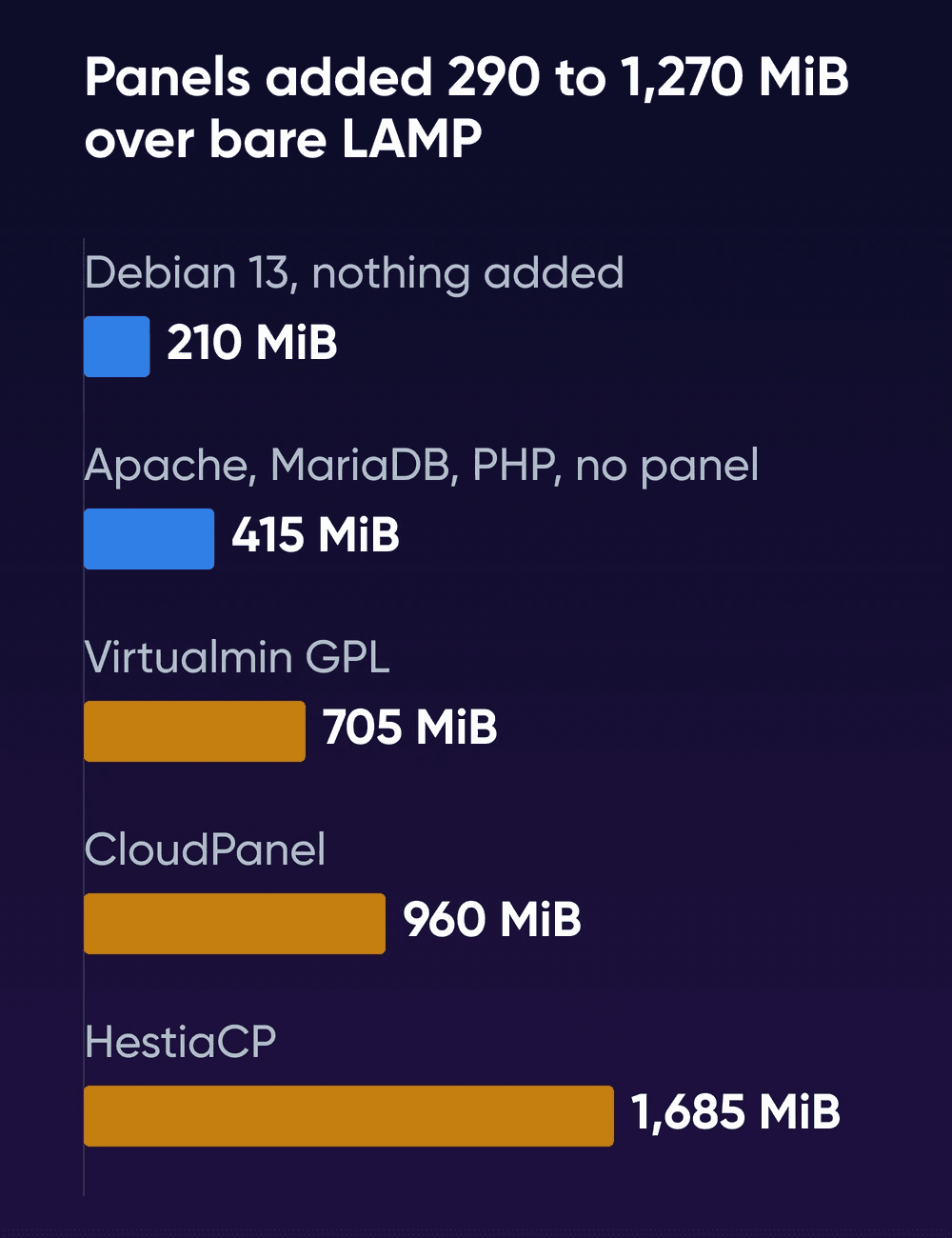
Over bare Apache, MariaDB and PHP, the panels added between 290 MiB (Virtualmin) and 1,270 MiB (HestiaCP).
HestiaCP's default install runs a full mail server with virus and spam filtering. Most of its weight is the filtering. ClamAV's scanning daemon held 981 MiB by itself, more than half the total. SpamAssassin ran three processes of 130 to 139 MiB each. HestiaCP's requirements give 1 GB of memory as the minimum without SpamAssassin and ClamAV, and 4 GB as the recommendation. If you'll keep mail somewhere else, you can leave both out when you install. We didn't measure that lighter install.
CloudPanel doesn't handle email at all. Its memory goes to ten PHP versions, 7.1 through 8.5, each running its own PHP-FPM pool of 44 to 63 MiB, plus 87 MiB for the Varnish cache.
Virtualmin's full install set up mail too. But in our run, ClamAV's scanner and SpamAssassin weren't among the running services. MariaDB was its biggest user at 133 MiB, then the Webmin and Usermin processes at 98 and 90 MiB. With filtering switched on, Virtualmin's low-memory guide says SpamAssassin can easily use 1 GB and ClamAV often needs at least 2 GB.
In the measured table below, the no-panel row is Debian 13's own Apache, MariaDB and PHP 8.4, not DreamHost's LAMP image.
| Setup | Idle memory | Biggest user |
|---|---|---|
| No panel | 415 MiB | MariaDB, 153 MiB |
| Virtualmin GPL | 705 MiB | MariaDB, 133 MiB |
| CloudPanel | 960 MiB | MariaDB, 255 MiB |
| HestiaCP | 1,685 MiB | ClamAV, 981 MiB |
The fresh Debian 13 server used 210 MiB of memory and 663 MiB of disk before anything went on it. Disk in use after install was 1,585 MiB with no panel, 3,144 MiB for HestiaCP, 5,881 MiB for Virtualmin and 6,087 MiB for CloudPanel. Virtualmin added a 3 GB swap file and CloudPanel a 2 GB one. HestiaCP and the no-panel setup added none. The installs took 2 minutes with no panel, 4 for HestiaCP, 7.6 for CloudPanel and 8 for Virtualmin. Virtualmin set up Apache with PHP 8.4, CloudPanel set up Nginx with PHP 7.1 through 8.5, and HestiaCP put Nginx in front of Apache with PHP 8.5.
What each panel does with cPanel backups and mail comes from its own docs:
| Panel | Imports cPanel backups | Email on the server |
|---|---|---|
| Virtualmin GPL | Yes, and Plesk and DirectAdmin backups | Yes |
| CloudPanel | No, you move files and databases | No |
| HestiaCP | Yes; its notes say certificates fail and DKIM isn't updated | Yes |
All three are free, and Virtualmin also sells a Pro version from $7.50 a month. The latest releases when we checked on Oct 19, 2026 were Virtualmin GPL 8.3.0 (Sep 29), CloudPanel 2.5.4 (Jul 1) and HestiaCP 1.10.5 (Sep 14).
Our pick: Virtualmin GPL on a fresh server
Virtualmin GPL is the panel we'd put on a VPS that takes over from cPanel. Its FAQ sends a backup from another panel to the Migrate Virtual Server screen. The migrate-domain command does the same job from the shell. The FAQ also maps cPanel's names onto its own: a cPanel domain is called a Virtual Server, add-on domains are roughly akin to sub-servers, and parked domains may be comparable to aliases. It's also the only one of the three that lists AlmaLinux and Rocky Linux among its supported systems, next to Ubuntu and Debian.
Choose Virtualmin GPL if
You want one free panel for any base image, with a cPanel import built in.
Choose HestiaCP if
You want a full mail server on the box from day one, you'll run Ubuntu or Debian, and you'll import cPanel backups with its own import command.
Choose CloudPanel if
Your sites suit Nginx, your email lives elsewhere, and old and new PHP versions have to run side by side.
Skip the panel if
You're the only one who touches the sites and you're fine working over SSH on the LAMP image.
Choose Managed VPS if
You want the DreamHost panel and email, and you'd rather DreamHost ran the server.
Keep cPanel if
Your clients or a reseller's customers log in to cPanel or WHM themselves.
For client sites in production, start on Stack 8, which the VPS pages label For apps running in production
and which has 8 GB of memory. HestiaCP's default install took about 1.7 GB before a single site went on, more than 40 percent of the test server's memory. By those numbers, Stack 4 fits a few small sites on CloudPanel, on Virtualmin with its mail filters off, or with no panel.
Why a panel needs a clean base image
HestiaCP, CloudPanel, Virtualmin, cPanel and DirectAdmin all ask for a freshly installed OS, or in CloudPanel's words, an empty server. We tested what happens when you skip that. On a test server already running Apache, MariaDB, PHP and a small test site, we ran each installer as published and answered no wherever it asked.
- CloudPanel stopped before changing anything, because a web server and a database were already running.
- Virtualmin asked us to confirm the server was a freshly installed supported OS, then exited when we said no.
- HestiaCP warned that apache2 and mariadb-server were installed and that it was
highly recommended
to remove them. When we said no, it exited withHestia Control Panel should be installed on a clean server.
The test site kept working after all three. DreamHost's LAMP image starts with Apache, MariaDB and PHP already running. So a panel goes on one of the base images instead. Choose the image in the table below for the panel you want.
| Panel | Ubuntu and Debian | AlmaLinux and Rocky |
|---|---|---|
| Virtualmin GPL (free) | Yes | Yes |
| HestiaCP (free) | Yes | No |
| CloudPanel (free) | Yes | No |
| cPanel (paid) | Ubuntu 24.04 only | AlmaLinux only; Rocky Linux support removed |
| Plesk (paid) | Yes; Ubuntu 24.04 and Debian 13 with limitations | AlmaLinux with limitations; Rocky Linux 8 only |
That's each vendor's supported-systems list, read Oct 19, 2026, against the seven images DreamHost's VPS plans offer: Ubuntu 26.04 and 24.04, Debian 13, and AlmaLinux and Rocky Linux 10 and 9. For the differences between the images themselves, see which Linux to run on your VPS.
Do you need a panel at all?
You need a panel mainly when other people log in to it, such as clients who add their own mailboxes or a reseller's customers. If you're the only one who touches the sites, you can run them without one. The LAMP image comes with Apache, MariaDB, PHP and phpMyAdmin and full root access. You host each site as an Apache virtual host and give every client a database of its own. DreamHost's post on how to set up LAMP without a panel walks through the commands. If your PHP app is built on Laravel, our guide to what one Laravel app costs on Laravel Cloud, Forge or your own server covers Forge, which sets up and deploys to a server you rent.
With root, you're the one who runs the OS updates, panel or not. For our guide to a managed or self-managed VPS, which lays out who handles what on each, we set up a small Debian web server from the September 20 package archive. On October 20 it had 20 packages waiting to update, PHP among them. It ran in a container, so the count leaves out kernel updates, which a full server gets as well.
If you'd like a point-and-click panel and don't want to run a server, Managed VPS includes the DreamHost panel. You add a website, connect a domain, turn on SSL and create mailboxes there. DreamHost's Help Center says anyone else who needs access gets a login of their own through Account Privileges, and that the panel runs on separate servers. The Managed VPS page adds that standard MySQL databases run on separate shared database servers. DreamHost handles the server's software updates, monitoring and daily backups. You work over SSH, without root.
What cPanel and Plesk cost now
cPanel licenses count accounts, and websites are unlimited on every plan. Plesk licenses count domains. These are the license prices alone, billed monthly and before VAT, from cPanel's pricing page (read Oct 20, 2026) and Plesk's (read Oct 21, 2026). The server costs extra.
| License | Billed monthly | What it covers |
|---|---|---|
| cPanel Solo | $29.99 a month | 1 account |
| cPanel Admin | $35.99 a month | Up to 5 accounts |
| cPanel Pro | $53.99 a month | Up to 30 accounts |
| cPanel Premier | $69.99 a month | 100 accounts, then $0.49 each |
| Plesk Web Admin | $16.99 a month | Up to 10 domains on a VPS |
| Plesk Web Pro | $29.99 a month | Up to 30 domains on a VPS |
| Plesk Web Host | $62.99 a month | Unlimited domains on a VPS |
Billed annually, cPanel Solo comes to $27.46 a month. That's $329.52 for the year, against $359.88 on monthly billing. DirectAdmin's plans cost $5, $15 and $29 a month.
If you keep cPanel, its supported lists include AlmaLinux 10 and 9 and Ubuntu 24.04. cPanel tests only official AlmaLinux releases and warns that pre-built images may have trouble installing it, so try the install on a fresh server before you move client sites. cPanel's pricing page says a monthly license from the cPanel Store requires the server's public-facing static IP address, so plan on one license per server.
Moving your sites out of cPanel
- Download a full backup of each accountIn cPanel's Backup Wizard, create a full backup and download the file. Virtualmin and HestiaCP both import that file.
- Write down each site's PHP versionSet the same version for each site on the new server before you test it.
- Install the panel on a fresh serverRun the maker's install command on a new base image, before any site goes on.
- Import the backups
Use Virtualmin's migrate-domain tool, or HestiaCP's import command with your backup's file name, as in HestiaCP's own example:
bashv-import-cpanel \ /backup/backup.tar.gz \ yesHestiaCP's importer brings mailboxes across with their messages and passwords, and the
yeson the end rewrites each domain's MX record in HestiaCP's own DNS zone. Virtualmin's migrate-domain page says the import creates a server with the same settings and content as the original. Then check that each database shows up under its user and that no config file still points at an old cPanel folder path. - Reissue certificates and email signingRequest each site's SSL certificate from the new panel and publish fresh DKIM records. HestiaCP's import script notes that importing certificates fails at the moment and that it doesn't update DKIM.
- Test, then switch DNSLower your DNS records' time to live about two days ahead, as Virtualmin's migration guide suggests. Point your computer's hosts file at the new server, check every site and mailbox, then change the DNS records, MX included.
CloudPanel doesn't have an importer: its migration guide copies the files, then dumps and imports the database. CloudPanel runs no mail, so mailboxes and their messages move to wherever you host email, as a separate job. If you're moving to Managed VPS instead, DreamHost's Help Center describes a manual move of files, databases and email. DreamHost's paid Website Migration service moves sites, files and databases to Managed VPS for you.
How we measured
DreamHost ran these tests on October 20, 2026.
- Machine: Lima VMs on an Apple-silicon Mac, arm64, each with 2 vCPU and 4 GB of memory, the size of our Stack 4 plan. Every panel got a fresh VM from the same Debian 13 cloud image.
- Installs: each maker's published command, unchanged, using HestiaCP's documented options for an install without prompts. Install time runs from the installer's start to the panel's login page answering.
- Memory: total minus available, read 12 times 30 seconds apart after 10 idle minutes. We report the median.
- Updates waiting (the run behind our managed or self-managed VPS guide): a Debian 13 container on the same kind of test VM, set up with Nginx, PHP-FPM and MariaDB from the September 20 archive snapshot, then pointed at the live archive on October 20.
This wasn't a DreamHost server or one of DreamHost's images. DreamHost's plans run on AMD EPYC processors. Each panel ran once, idle, without its first-run screens or the reboot HestiaCP's installer asks for. We didn't run cPanel, whose requirements say it doesn't support ARM systems, or the paid Plesk and DirectAdmin. We didn't change HestiaCP's or Virtualmin's install options, or take any installer past a yes
. CyberPanel and aaPanel weren't part of this run, and Webmin came along as the admin tool Virtualmin runs on. Up to four VMs shared the Mac at once, so the install times are rough.
Leaving cPanel FAQs
Is there a free version of cPanel?
No, there isn't. cPanel has a 15-day free trial that needs no credit card. After that, the cheapest license, Solo, covers one account. HestiaCP, CloudPanel and Virtualmin GPL cost nothing to install on your own server.
Does DreamHost use cPanel?
No. DreamHost built its own panel. DreamHost's Help Center says it handles most of the tasks people use cPanel for. On Managed VPS, that panel comes with the plan. A self-managed VPS gives you root, so you can install a free panel that supports your image.
What happens to my email?
DreamHost's Help Center says a VPS doesn't include Professional Email, and the email page lists DreamPress, Managed VPS and Dedicated plans as including it. You can run mail inside HestiaCP or Virtualmin, or keep it off the server with DreamHost Professional Email, with 25 GB of storage per mailbox. Email hosting comes with every Managed VPS plan.
Can I uninstall cPanel later?
cPanel's install guide says it provides no uninstaller and that removing it means reformatting the server. DreamHost's Help Center says a VPS's Reset Server step erases all data on the server and keeps the same IP address.
Sources
- cPanel pricing, cPanel, Oct 20, 2026. cpanel.net/pricing
- cPanel & WHM free trial, cPanel, Oct 19, 2026. cpanel.net/products/trial
- System requirements for AlmaLinux, cPanel, Oct 19, 2026. docs.cpanel.net/installation-guide/system-requirements-almalinux
- System requirements for Ubuntu, cPanel, Oct 19, 2026. docs.cpanel.net/installation-guide/system-requirements-ubuntu
- System requirements for Rocky Linux, cPanel, Oct 19, 2026. docs.cpanel.net/installation-guide/system-requirements-rockylinux
- Installation guide, cPanel, Oct 19, 2026. docs.cpanel.net/installation-guide/install
- Backup Wizard, cPanel, Oct 19, 2026. docs.cpanel.net/cpanel/files/backup-wizard
- Plesk pricing, Plesk, Oct 21, 2026. plesk.com/pricing
- Plesk Obsidian system requirements, Plesk, Oct 19, 2026. docs.plesk.com/release-notes/obsidian/system-requirements
- DirectAdmin pricing, DirectAdmin, Oct 19, 2026. directadmin.com/pricing.php
- Install CloudPanel on other providers, CloudPanel, Oct 19, 2026. cloudpanel.io/docs/v2/getting-started/other
- Automated installation, Virtualmin, Oct 19, 2026. virtualmin.com/docs/installation/automated
- System requirements, DirectAdmin, Oct 19, 2026. docs.directadmin.com/getting-started/installation/system-requirements.html
- Getting started (requirements and supported systems), HestiaCP, Oct 19, 2026. hestiacp.com/docs/introduction/getting-started
- v-import-cpanel (source), HestiaCP, Oct 19, 2026. raw.githubusercontent.com/hestiacp/hestiacp/release/bin/v-import-cpanel
- HestiaCP 1.10.5 release, HestiaCP (GitHub), Oct 19, 2026. github.com/hestiacp/hestiacp/releases/tag/1.10.5
- Requirements, CloudPanel, Oct 19, 2026. cloudpanel.io/docs/v2/requirements
- E-Mail, CloudPanel, Oct 19, 2026. cloudpanel.io/docs/v2/frontend-area/e-mail
- Migrating a PHP site, CloudPanel, Oct 19, 2026. cloudpanel.io/docs/v2/guides/best-practices/migration/php-site
- Changelog, CloudPanel, Oct 19, 2026. cloudpanel.io/docs/v2/changelog
- OS support, Virtualmin, Oct 19, 2026. virtualmin.com/docs/os-support
- migrate-domain, Virtualmin, Oct 19, 2026. virtualmin.com/docs/development/api-programs/migrate-domain
- FAQ, Virtualmin, Oct 19, 2026. virtualmin.com/docs/faq
- Low memory, Virtualmin, Oct 19, 2026. virtualmin.com/docs/system-optimization/low-memory
- Shop (Virtualmin Pro), Virtualmin, Oct 19, 2026. virtualmin.com/shop
- Virtualmin GPL 8.3.0 release, Virtualmin (GitHub), Oct 19, 2026. github.com/virtualmin/virtualmin-gpl/releases/tag/8.3.0
- How to Migrate to a New Server, Virtualmin, Oct 19, 2026. virtualmin.com/docs/backup-and-migration/how-to-migrate-to-a-new-server
- DreamHost control panel overview, DreamHost Help Center, Oct 19, 2026. help.dreamhost.com/hc/en-us/articles/215250658-DreamHost-control-panel-overview
- Where can I find cPanel?, DreamHost Help Center, Oct 19, 2026. help.dreamhost.com/hc/en-us/articles/360020947731-Where-can-I-find-cPanel
- Reset a VPS, DreamHost Help Center, Oct 19, 2026. help.dreamhost.com/hc/en-us/articles/17882962861273-reset-a-vps
- Migrating between a VPS and a managed hosting plan, DreamHost Help Center, Oct 19, 2026. help.dreamhost.com/hc/en-us/articles/17876957977515-migrating-between-a-vps-and-a-managed-hosting-plan
- LAMP Stack VPS Hosting, DreamHost, Oct 19, 2026. dreamhost.com/hosting/vps/lamp
- Managed VPS Hosting, DreamHost, Oct 21, 2026. dreamhost.com/hosting/managed-vps
- Professional Email, DreamHost, Oct 19, 2026. dreamhost.com/products/email
- Website Migration service, DreamHost, Oct 19, 2026. dreamhost.com/pro-services/management/website-transfer