Laravel Cloud bills compute by the second and stops billing compute while your app sleeps. It falls asleep only after a quiet stretch as long as its sleep timeout. Each scheduled task wakes it for that long again, so a task every 5 minutes on a 5-minute timeout never lets the environment sleep. If you schedule something every minute, you're billed as always on, up to Cloud's cap of 28 days per instance a month.
If your app can sleep most of the day, with nothing scheduled more often than its timeout and jobs on a managed queue, Laravel Cloud's Starter plan bills compute only for the time it's awake, plus the plan fee, the queue's operations and the database's storage and backups. Every bill below assumes your app never sleeps. If your app is a set of Docker containers rather than one Laravel app, what an always-on container costs on Fly.io, Cloud Run or Fargate prices the same never-sleeps problem on pay-per-use container platforms.
What one Laravel app used on our test server (not a DreamHost server)
We deployed a fresh Laravel 13 app to a test server, in one container built from Debian 13's own packages. It ran the same three programs the LAMP Stack VPS ships, but they were Debian 13's own Apache, MariaDB and PHP 8.4, not DreamHost's LAMP image. Supervisor kept one queue worker running, and one cron line ran the scheduler. The server had 2 vCPU, the same as Stack 4 and Stack 8.
| What ran | Memory and disk we measured | On a plan |
|---|---|---|
| Whole app at idle (web, database, worker, cron) | 208 MiB, the same at 2 and at 10 minutes | About 5% of Stack 4's 4 GB |
| 20 page requests a second while 1,000 jobs drained | 387 MiB | Under 5% of Stack 8's 8 GB |
| Heaviest step: 400 page requests a second | 572 MiB, the highest reading in the run | About 7% of Stack 8's 8 GB |
| Each queue worker, while draining jobs | About 55 MiB | Three workers fit in under 170 MiB |
| Disk after the tests | 49 MB of app and 241 MB of database | Under 1% of Stack 8's 150 GB |
At 200 requests a second that page's p95 rose to 160 ms, still error-free. The load generator was sharing the same two cores by then, so we'd expect a little better on a server where it isn't. A bare Laravel route with no database call stayed under 17 ms at the 95th percentile up to 400 requests a second. For scale, S3 below assumes 3 million requests a month, which average about 1.2 a second.
Even at that 572 MiB peak, Stack 4's 4 GB would leave about 3 GB free, by our arithmetic. But your production app will carry more code and data than our fresh install, and if you add workers for a busier queue, each takes about 55 MiB. For production, we'd put you on Stack 8, with twice Stack 4's memory.
What the app costs at three sizes
The bills below use Laravel's prices for its US East (Virginia) region. Each one assumes your app answers at any hour and schedules a task every minute, so compute and the database stay awake all month. We subtracted the $5 usage credit that comes with every paid plan. For backups we took the low case, with snapshot storage equal to the data. S1 runs the worker on the app's own 1 GiB instance. Judging by our test server, where the whole app, database included, peaked at 572 MiB, that instance has room for it. S2 and S3 put jobs on a managed queue, which Laravel's docs say replaces a dedicated worker.
| One Laravel app that stays on | Laravel Cloud, per month | LAMP Stack VPS, Stack 8 |
|---|---|---|
| S1. Starter: one Flex 1 GiB instance, 5 GB database, 50 GB out | $26.20 | $13.99/mofor 3 months, then $21.99/mo |
| S2. Growth: Flex 2 GiB, managed queue, 20 GB database, 150 GB out | $69.98 | |
| S3. Growth: two Pro 4 GiB replicas, Valkey cache, 40 GB database, 1 TB out | $243.65 |
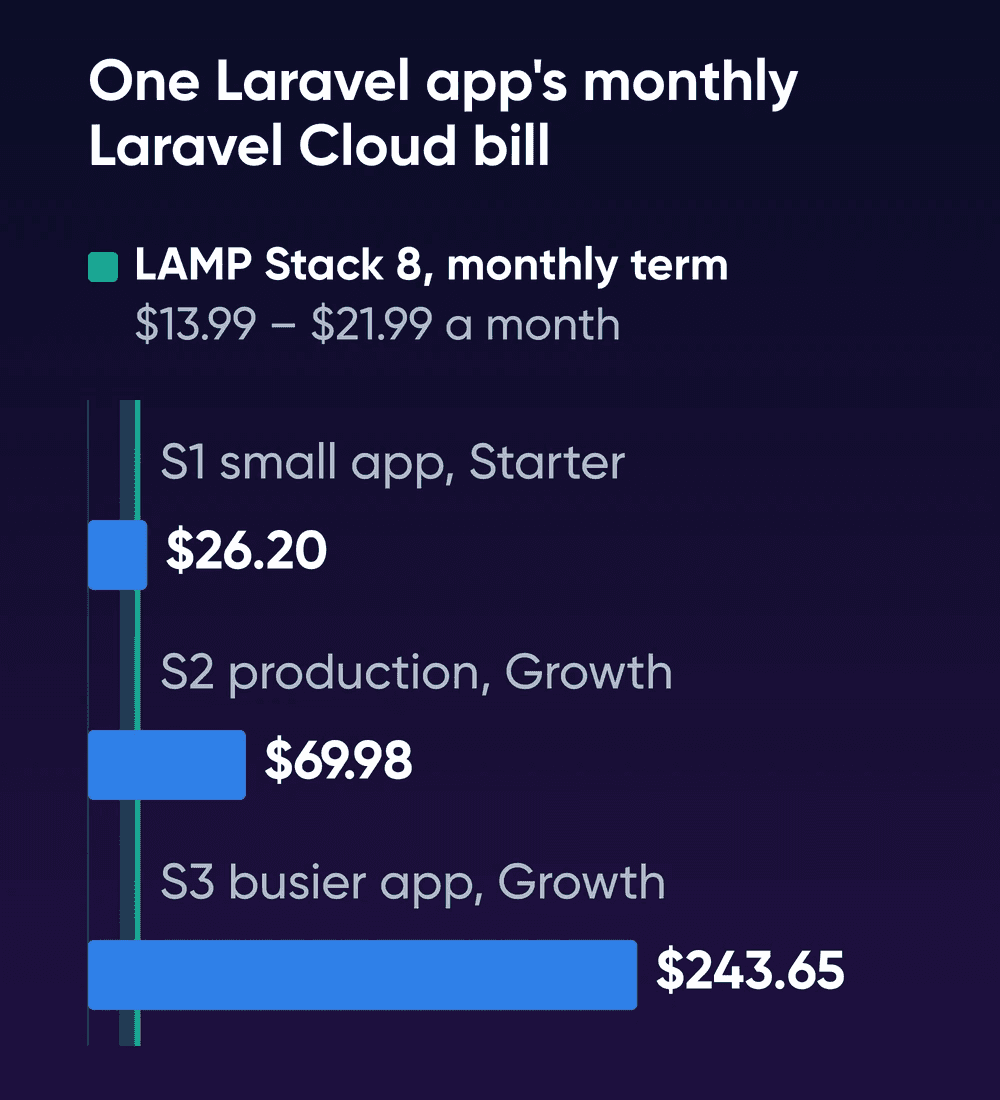
Even the small S1 bill sits above Stack 8's regular monthly price, and the gap widens fast: S2 is over three times it. S3, at about 11 times, pays for two replicas and a cache to serve traffic that averages about 1.2 requests a second, far under the 100 a second our test server handled. You wouldn't add a Valkey cache on the server, because Laravel 13 stores cache, sessions and the queue in the database by default. If you use Forge, add Hobby's $12 a month to the server's price for any of the three.
Laravel's own docs example for a Medium SaaS application
comes out lower, at about $53.90 a month, because it uses US East (Ohio) rates, leaves out the plan fee and lets compute sleep nights and weekends.
| Line on the S1 bill | Laravel Cloud |
|---|---|
| Starter plan | $5.00 |
| App compute, Flex 1 GiB, all month | $12.00 |
| Queue worker | $0, same instance |
| Scheduler | $0, on every plan |
| Laravel MySQL, Flex 1 GiB, all month | $13.20 |
| MySQL storage, 5 GB | $0.50 |
| MySQL backups, 7 days | $0.50, low case |
| Data out, 50 GB | $0, 100 GB included |
| Usage credit | -$5.00 |
| Total | $26.20 |
In S1 and S2 the database costs more than the app instance it serves. Laravel MySQL also keeps billing storage and backups while it sleeps. Backups could reach $3.50 a month if every daily snapshot were full size. Data out is free here because S1's Flex 1 GiB instance includes 100 GB a month. By S3, data out is the largest usage line, because two Pro replicas get only a 200 GB allowance and the other 800 GB cost $80.00. On the LAMP Stack VPS you don't pay for bandwidth by the GB. It's unmetered with no overage fees, under DreamHost's fair use terms.
Forge's fee comes on top of a server
| Forge plan | Monthly | Billed yearly | For one app |
|---|---|---|---|
| Hobby | $12 | $120 a year | One external server, unlimited sites and deploys, community support |
| Growth | $19 | $199 a year | Unlimited servers, standard support |
| Business | $39 | $399 a year | Database backups to storage you set up, server monitoring, team sharing |
Forge can work on a server you already rent through its Custom VPS option. That server must be a fresh Ubuntu 24.04 or 26.04 x64 install with root SSH access. Forge then installs Nginx, PHP, the database and Redis itself. At DreamHost that means an Ubuntu VPS, sold at the same Stack prices as the LAMP Stack VPS. The LAMP image won't do, since it arrives with Apache and MariaDB already running. If you're weighing the two web servers, see Apache or Nginx for PHP.
So on a DreamHost server, Forge costs its fee plus the same Stack price you'd pay to run the app yourself. For that fee, Forge sets up the server, deploys on push and writes the Supervisor and cron entries, which covers most of the steps below.
What you run yourself on the LAMP server
Our test server needed these four steps on top of Apache, MariaDB and PHP, with no control panel. If you'd like a panel on the server anyway, free cPanel alternatives on your own VPS measures what HestiaCP, CloudPanel and Virtualmin cost in memory and disk. The paths assume your app lives in /var/www/app and runs as www-data.
- Install Composer and Supervisor
Both are in Debian 13's own package archive. Skip either one if your server already has it.
bashsudo apt install composer supervisor - Add the queue worker to Supervisor
Save this as
/etc/supervisor/conf.d/laravel-worker.conf. It's Laravel's own example with the path, user and worker count changed for one app. We moved the log to/var/log, because our test server's Supervisor refused to start while the log folder inside the app didn't exist yet.ini[program:laravel-worker] process_name=%(program_name)s_%(process_num)02d command=php /var/www/app/artisan queue:work --sleep=3 --tries=3 --max-time=3600 autostart=true autorestart=true stopasgroup=true killasgroup=true user=www-data numprocs=1 redirect_stderr=true stdout_logfile=/var/log/laravel-worker.log stopwaitsecs=3600Then load it with
sudo supervisorctl reread,sudo supervisorctl updateandsudo supervisorctl start "laravel-worker:*". - Add the scheduler's cron line
Save this line as
/etc/cron.d/laravel. It's Laravel's one cron entry with the path and user filled in.bash* * * * * www-data cd /var/www/app && php artisan schedule:run >> /dev/null 2>&1 - Deploy with a script
Run this from the app folder for each release. In our three runs, everything after the code change took about 1.5 seconds, most of it
composer install. The site sat in maintenance mode for that time. The first deploy of a fresh app took 19 and 29 seconds in our two runs, most of it Composer downloading packages.bashphp artisan down --retry=5 git pull composer install --no-dev \ --optimize-autoloader --no-interaction php artisan migrate --force php artisan optimize php artisan queue:restart php artisan up
| LAMP Stack VPS on its own | Laravel Cloud | Forge on a server | |
|---|---|---|---|
| Deploys | Your script, with a short maintenance window | Git push, and Cloud restarts the workers | Push to deploy with zero downtime on one server |
| Database backups | Yours to set up, for example a nightly database dump to storage you choose | Daily, kept 7 days by default, billed per GB | Business plan only |
| Server updates | You apply them | Laravel runs the platform | Weekly automatic updates through Ubuntu's own updater; PHP and database upgrades are yours |
| Scaling | Move up a plan, as far as Stack 32 | Replicas and autoscaling, up to 10 on Growth | Resize the server or add one |
| Data out | Unmetered, with fair use | An allowance per instance, then $0.10 a GB | Your server's terms |
When each one makes sense
At S1's size, the Laravel Cloud bill comes out a little above Stack 8's regular monthly rate. An app that small also fits Stack 4, which keeps about 3 GB free at our highest reading. The bigger gaps start at S2, where Stack 8 has room for the app to grow.
DreamHost support is available 24/7, and the hardware, network and connectivity are all supported by DreamHost's team. You manage the OS, software and configuration, which here means the app. In our run, Composer, Supervisor and cron were set up once, and each release after that was one script. After that, the monthly chores are applying OS updates and checking that the backups ran.
Choose Laravel Cloud if
Your app can sleep most of the day, or you'd rather pay Laravel to run the platform than apply server updates yourself.
Choose Forge on an Ubuntu VPS if
You want root on your own server and zero-downtime deploys, and you'd rather pay the Hobby fee than write the setup and deploy scripts yourself.
Run it on a LAMP Stack VPS if
The app stays on all month and you're fine owning a deploy script, a Supervisor file, a cron line and the backups.
How we tested the app and read the prices
DreamHost read Laravel Cloud's, Forge's and DreamHost's pricing pages on October 20, 2026, and their docs between October 19 and 21, and ran the test on October 20. We rechecked every DreamHost plan, price and feature on this page against DreamHost's pages on October 22, 2026.
The test server was an arm64 VM with 2 vCPU and 8 GB running Ubuntu 24.04, with the app in one container built from Debian 13 packages. It wasn't a DreamHost server or DreamHost's LAMP image, and DreamHost's VPS plans run on AMD EPYC processors.
The container ran Debian 13's Apache 2.4, PHP 8.4 and MariaDB 11.8 packages, with Laravel 13.38. At idle, MariaDB held 123 MiB, Apache and PHP 123 MiB and the worker 55 MiB; those process figures share memory, so they add up to more than the 208 MiB total.
Each load step ran for one minute. In the timed redeploys, a local code change stood in for git pull. Nothing ran on Laravel Cloud or Forge, so their columns come from published rates. The run doesn't show real traffic, HTTPS, PHP-FPM or a 4 GB server directly.
Laravel hosting cost FAQs
Is Laravel Cloud free?
New Starter subscriptions get their first 31 days free, plus $5 in usage credits. After that, Starter costs $5 a month plus usage, and each paid plan includes $5 of usage credit a month.
What's the difference between Laravel Cloud and Forge?
Laravel Cloud runs your app on Laravel's own platform, so you never set up or update a server. Forge sets up and deploys to a server you rent, and you keep root access and the updates. Laravel's own advice is Forge for full server control or mixed stacks and Cloud for no infrastructure work.
Does Laravel run on MariaDB?
Yes. Laravel 13 supports MariaDB 10.3 and newer, alongside MySQL and PostgreSQL. Our test app ran Laravel 13.38 on MariaDB 11.8, and MariaDB is the database the LAMP Stack VPS ships.
Can I keep Laravel's default SQLite database?
On your own server, yes, because the database file stays on the server's disk. Laravel Cloud doesn't support SQLite in production, since its filesystem resets across deploys, so a Cloud app needs a MySQL or Postgres line on the bill.
Sources
- Laravel Cloud pricing, Laravel, Oct 20, 2026. laravel.com/cloud/pricing
- Plans and pricing, Laravel Cloud docs, Oct 19, 2026. laravel.com/cloud/docs/pricing
- Compute, Laravel Cloud docs, Oct 19, 2026. laravel.com/cloud/docs/compute
- Scheduled tasks, Laravel Cloud docs, Oct 19, 2026. laravel.com/cloud/docs/scheduled-tasks
- Managed queues, Laravel Cloud docs, Oct 19, 2026. laravel.com/cloud/docs/queues
- Workers, Laravel Cloud docs, Oct 19, 2026. laravel.com/cloud/docs/workers
- Laravel MySQL, Laravel Cloud docs, Oct 19, 2026. laravel.com/cloud/docs/resources/databases/laravel-mysql
- Free trial, Laravel Cloud docs, Oct 19, 2026. laravel.com/cloud/docs/free-trial
- SQLite support, Laravel Cloud docs, Oct 19, 2026. laravel.com/cloud/docs/knowledge-base/sqlite
- Forge pricing, Laravel, Oct 20, 2026. laravel.com/forge/pricing
- Server providers, Forge docs, Oct 19, 2026. laravel.com/forge/docs/server-providers
- Server security, Forge docs, Oct 21, 2026. laravel.com/forge/docs/servers/security
- Queues, Forge docs, Oct 21, 2026. laravel.com/forge/docs/sites/queues
- Scheduler, Forge docs, Oct 21, 2026. laravel.com/forge/docs/resources/scheduler
- Laravel Cloud vs Forge, Laravel, Oct 19, 2026. laravel.com/cloud/cloud-vs-forge
- Introduction, Forge docs, Oct 19, 2026. laravel.com/forge/docs/introduction
- Deployments, Forge docs, Oct 19, 2026. laravel.com/forge/docs/sites/deployments
- Database backups, Forge docs, Oct 19, 2026. laravel.com/forge/docs/resources/database-backups
- Queues, Laravel 13.x docs, Oct 19, 2026. laravel.com/framework/docs/13.x/queues
- Task scheduling, Laravel 13.x docs, Oct 19, 2026. laravel.com/framework/docs/13.x/scheduling
- Cache, Laravel 13.x docs, Oct 21, 2026. laravel.com/framework/docs/13.x/cache
- HTTP session, Laravel 13.x docs, Oct 21, 2026. laravel.com/framework/docs/13.x/session
- Database: getting started, Laravel 13.x docs, Oct 19, 2026. laravel.com/framework/docs/13.x/database
- Package versions for Debian 13 (trixie), Debian, Oct 19, 2026. api.ftp-master.debian.org/madison?package=apache2+php8.4+mariadb-server+composer+supervisor&s=trixie&text=on
- LAMP Stack VPS Hosting, DreamHost, Oct 22, 2026. dreamhost.com/hosting/vps/lamp
- Ubuntu VPS Hosting, DreamHost, Oct 22, 2026. dreamhost.com/hosting/vps/ubuntu
- VPS overview, DreamHost Help Center, Oct 22, 2026. help.dreamhost.com/hc/en-us/articles/50476238203028