Docker's example voting app runs as five containers. A Python web app takes the votes and hands them to Redis. A .NET worker moves each vote into Postgres. A Node.js page shows the results as they come in. We ran it on a test VM (not a DreamHost server) to see how much server you'd need for it. Ten minutes after it started, the five containers together used 177 MiB.
All five containers have to stay up, so on Fly.io, Google Cloud Run and AWS Fargate you pay for each of them around the clock. Each platform also bills you for the database, Redis, networking and data out as separate lines. For the bills below, we picked each platform's smallest size that holds what the stack used, so all three price the same workload.
What the stack used on our test VM
The VM was the same size as our Stack 4 plan. We started the stack from Docker's published images, let it settle, then used k6 to send 20 votes and 2 results-page views each second for five minutes. All 6,602 requests got an answer, and 95 percent came back within 7.8 ms.
| Container | Memory, settled / peak | Smallest fit, Fly / Run / Fargate |
|---|---|---|
| Vote (Python web app) | 92 / 95 MiB | 256 MB / 1 vCPU / 0.25 vCPU |
| Results page (Node web app) | 22 / 30 MiB | 256 MB / 1 vCPU / 0.25 vCPU |
| Worker (.NET) | 30 / 36 MiB | 256 MB / 1 vCPU pool / 0.25 vCPU |
| Redis | 6 / 29 MiB | 256 MB / 1 GiB Memorystore / 0.25 vCPU |
| Postgres | 28 / 30 MiB | 1 GB / 0.6 GB / 1 GiB, all managed |
| All five | 177 / 197 MiB in the first run | Priced line by line below |
Settled is the median of 12 docker stats readings after ten minutes, and peak is the highest reading at 20 votes a second. The peaks come from two runs. In the first, on the 4 GB VM, Redis peaked at 6 MiB and all five containers together at 197 MiB. In a repeat on an 8 GB VM, Redis reached 29 MiB, the figure in its row.
No container went above about 105 MiB, even at 200 votes a second, so the smallest size each platform sells still gives each one more than twice its peak memory. The bills below use those smallest sizes, except where Cloud Run's CPU rules ask for more.
CPU barely moved at 20 votes a second. The vote container's median was 4% of one CPU in the repeat run and 9.3% in the first run. A Fly shared vCPU can use 6.25% before it draws on its burst balance, so the vote app would dip into that balance some of the time. We also capped the vote, results, worker and Redis containers at 0.25 vCPU and 512 MiB, the smallest Fargate task, using Linux limits on our second test VM. We didn't cap Postgres, since the bills put it on RDS. In that repeat, the stack's p95 latency was 6.8 ms capped and 8.6 ms uncapped, a gap inside the normal spread between runs. The vote app would probably be the first to hit that cap as traffic grows.
With the stack and Portainer running, the whole VM used 595 MiB and still had 3,309 MiB available. So you'd be fine running this stack on Stack 4, which costs less than Stack 8. We'd still pick Stack 8, which the Docker page labels for apps running in production, because it leaves room for a much busier version of this stack and for a database that grows.
Monthly bills at three sizes
Fly.io is priced in Ashburn, Virginia, Cloud Run in Iowa and AWS in US East (N. Virginia). Each uses its published on-demand rates, read Oct 20, 2026, for a 730-hour month, before tax. Fly.io quotes Machines per 30 days, so their prices are scaled up to 730 hours; Managed Postgres is counted at its listed monthly price.
- Scenario 1: the stack above without the results page, with 1 million requests, 50 GB of data out and a 5 GB database a month.
- Scenario 2: adds the results page as a second web service, with 3 million requests, 150 GB out and a 10 GB database.
- Scenario 3: two copies of each web service, with 10 million requests, 1 TB out and a 20 GB database.
| Your always-on stack | Fly.io, per month | Google Cloud Run, per month | AWS Fargate, per month | Docker VPS Stack 8, any scenario |
|---|---|---|---|---|
| Scenario 1: web app, worker, Redis, Postgres | $47.06 | $83.74 | $70.68 | $13.99/mofor 3 months, then $21.99/mo |
| Scenario 2: two web services, worker, Redis, Postgres | $52.68 | $111.57 | $86.84 | |
| Scenario 3: two copies of each web service, 1 TB out | $76.92 | $248.33 | $194.16 |
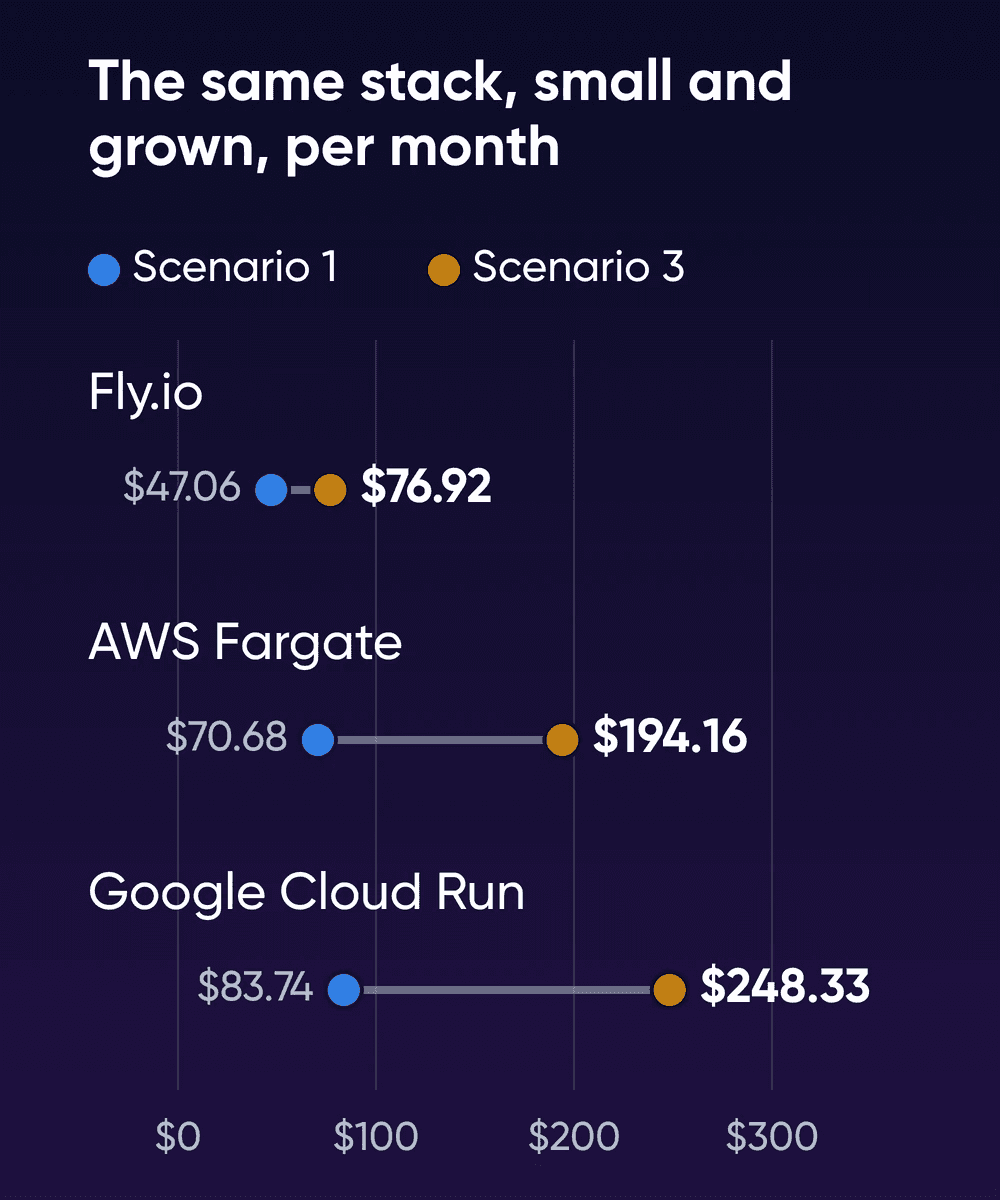
Each platform bill includes a managed database with backups, while on the server you run Postgres and back it up yourself. From scenario 1 to scenario 3, Cloud Run's bill roughly triples and Fargate's nearly does. Fly.io's rises by about 60%.
Where scenario 1's money goes
| Line | Fly.io | Google Cloud Run | AWS Fargate |
|---|---|---|---|
| Web app | $2.22, 256 MB Machine | $12.01, one 1 vCPU minimum instance | $7.21, 0.25 vCPU ARM task |
| Worker | $2.22 | $31.17, worker pool at 1 vCPU | $7.21 |
| Redis | $2.22, 256 MB Machine | $35.77, Memorystore Basic 1 GiB | $7.21, task |
| Postgres | $39.40, Managed Postgres Basic and 5 GB | $9.77, db-f1-micro, 10 GiB SSD and backups | $13.98, db.t4g.micro and 20 GB gp3 |
| Load balancer, IP addresses, TLS | $0, shared IPv4 and free certificates | $0, the run.app address | $35.08, load balancer and 5 IPv4 addresses |
| Requests | Included | $0.40 | Included |
| Data out, 50 GB | $1.00 | $5.47 | $0, inside the free 100 GB |
| Free tier | None for new organizations | -$10.84 | Credits left out; free 100 GB counted above |
| Total (summed before rounding) | $47.06 | $83.74 | $70.68 |
Most of Fly.io's bill is the database. Managed Postgres with its storage comes to $39.40, and $38 of that is the Basic plan. The three Machines cost $6.66 together. Every Managed Postgres plan includes high availability, backups and connection pooling.
On Cloud Run, you'd keep one minimum instance on the web service so requests don't wait for a cold start. It gets 1 vCPU because a service can use less than 1 vCPU only if each instance takes one request at a time. We assumed 100 ms of active time per request, since Cloud Run rounds billed time up to the nearest 100 ms. The worker runs as a worker pool, Google's option for continuous background work, and a worker pool starts at 1 vCPU. We priced it from Google's rate table. Google's own worked example for a 1 vCPU, 512 MiB worker pool, priced in Belgium, comes to $16.83 a month before the free tier. That's lower than Google's rate table gives, so check Google's pricing calculator for yours.
On Google, Redis is the biggest line you'll pay. A Redis container could run as a worker pool, which accepts connections from your VPC on a private IP, but it would also start at a full vCPU, about $31 a month. So we priced Memorystore for Redis, Google's managed Redis, where the smallest Basic instance holds 1 GiB.
On AWS, you'll pay more for networking than for the containers. The three Fargate tasks cost $21.63 together, while the load balancer and IP addresses come to $35.08. We priced the tasks as Linux/ARM; on x86, each one would cost about $9.01 instead of $7.21. An Application Load Balancer bills by the hour and has to use at least two Availability Zones. AWS charges $0.005 an hour, about $3.65 a month, for every public IPv4 address. We counted five addresses: one for each of the three tasks, plus two for the load balancer, one in each Availability Zone.
Data out takes over as traffic grows. At scenario 3's 1 TB a month, it's the biggest single line on Google, at $111.64. On AWS it comes to $81.00 after the free 100 GB. Fly.io charges $0.02 a GB, which makes the terabyte $20.00. On a Docker VPS you don't pay per GB, though fair use applies.
What each price includes
| Fly.io, Cloud Run, Fargate | Docker VPS | |
|---|---|---|
| Database | Managed Postgres with backups. Fly's Basic plan includes high availability. Cloud SQL's shared-core machines have no SLA. | Postgres runs in a container you manage. DreamHost's Help Center says a VPS doesn't include automated backups. |
| Where it runs | The region you pick, such as Ashburn, Iowa or N. Virginia here | DreamHost's Help Center says every VPS is hosted in its US East data center in Ashburn, Virginia. You can move up to Stack 32. |
| CPU | Shared or fractional vCPUs on Fly.io and Fargate | 2 vCPU AMD EPYC on Stack 8 |
| Data out | Billed per GB past any free allowance | Unmetered, with fair use |
| Updates | The platform runs the hosts, and you update your images | DreamHost support is available 24/7 for the hardware, network and connectivity. You manage the OS, software and configuration, including your images. |
| Dashboard | Each platform's console | Portainer CE, installed |
Running Postgres yourself as a Fly.io app lowers Fly.io's bill too, and you take on the same database work you'd have on a server. For a database-only comparison, see what managed Postgres costs on its own. If your always-on app is a single Laravel app, Laravel Cloud and Forge pricing for one app works through that case, scheduler and queue worker included. And if Portainer is more dashboard than you need, we measured Portainer against lighter Docker dashboards on a small server.
Price your own stack
- List the containers that run all month
If a container has to answer at any hour or works through a queue, it'll run all month, so price it as always on. Keep anything that can sleep on a platform that bills by the request: a single small container like that can often run inside Cloud Run's monthly free tier.
- Measure what each container uses
Run this on a machine where the stack's running, once after it settles and again under your normal traffic:
bashdocker stats --no-stream \ --format "table {{.Name}}\t{{.CPUPerc}}\t{{.MemUsage}}"Our stack used 335 MiB two minutes after it started and about half that after ten, so give yours time before you read it.
- Pick the smallest size that holds it
You'll want about 1.5 times each container's highest reading. Then check each platform's minimums in the table above.
- Add the lines outside the containers
Then add the database, Redis, load balancer, IP addresses and data out. In our three scenarios, they're bigger than the compute on every platform. Your last invoice's breakdown by service shows which of them you already pay.
- If you move, back up Postgres before you switch over
A dump from the database container takes one command. Put it in a small script that cron runs every night. For the voting app's database:
bashdocker compose exec -T db \ pg_dump -U postgres -Fc postgres \ > votes-$(date +%F).dumpCopy each dump to storage off the server, and restore one into a spare container now and then to check it works.
Stay on your platform if
Parts of your app scale to zero between requests, you serve users from several regions, or you want someone else running the database's failover and backups.
Trim the bill first if
One line is much bigger than the rest, say a worker pool stuck at its 1 vCPU minimum, and a one-year commitment covers it.
Move to a Docker VPS if
The whole stack runs all month in one region, your data out is growing past the free allowances, and you're ready to run Postgres and its backups.
How we measured
DreamHost ran the test on October 20, 2026, on a Colima VM on an Apple-silicon Mac. It ran Ubuntu 24.04 on aarch64 with Docker 29.5.2. It had 3,904 MiB of usable memory and no swap. The capped run and a repeat of the load test ran on a second VM with the same CPU count and twice the memory, since the extra memory doesn't change what each container uses. k6 sent the load from the same VM, so it shared the CPU with the stack. Under load, docker stats ran every 3 to 5 seconds, so it could miss a spike shorter than that. The 200-votes-a-second step ran on an already warm stack, right after the lighter steps.
DreamHost's VPS plans list AMD EPYC processors, which are x86, while the VM ran arm64. We didn't run anything on Fly.io, Cloud Run or Fargate, so their cold starts and CPU behavior aren't in these numbers. The capped run only imitates a Fargate task, and it leaves out the Service Connect agent, which shares each task's CPU and memory on Fargate. Cloud SQL is priced with 10 GiB of SSD storage, our choice. The bills leave out tax, logging, container registry storage, sign-up credits and paid support plans. They apply Google's free tier to both its services and its worker pools. If Google counts them as one allowance, its bills come out higher. Every platform price was read on October 16 and again on October 20, 2026, with no changes.
Always-on container cost FAQs
Is Fly.io free anymore?
New organizations get no free tier or monthly free allowance on Fly.io. The trial lasts 2 hours of Machine runtime or 7 days, whichever comes first.
Is Google Cloud Run free forever?
It resets monthly, counts across your billing account and comes off as a discount. For request-based services it covers 180,000 vCPU-seconds, 360,000 GiB-seconds and 2 million requests. Google lists a second allowance for worker pools. We applied both, which took $10.84 off scenario 1. If Google counts them as one, that bill is $5.22 higher.
Would a NAT gateway change the Fargate bill?
Yes, it adds to it. If your tasks sit in private subnets behind a NAT gateway, AWS's VPC pricing lists $0.045 an hour for the gateway, about $32.85 a month, plus $0.045 per GB it processes. Our bills give each task a public IPv4 address instead.
Would a one-year commitment close the gap?
It trims compute only: with one reservation block, scenario 1 comes to $45.06 on Fly.io. One-year committed use discounts take Cloud Run to $72.97. A one-year Compute Savings Plan takes Fargate to $66.08, with RDS left on demand. Fly's Managed Postgres, Memorystore's 1 GiB tier and shared-core Cloud SQL get no discount.
Sources
- Fly.io Resource Pricing, Fly.io, read Oct 20, 2026. fly.io/docs/about/pricing
- Managed Postgres, Fly.io, read Oct 20, 2026. fly.io/docs/mpg
- Free trial, Fly.io, read Oct 20, 2026. fly.io/docs/about/free-trial
- CPU performance, Fly.io, read Oct 16, 2026. fly.io/docs/machines/cpu-performance
- Cloud Run pricing, Google Cloud, read Oct 20, 2026. cloud.google.com/run/pricing
- Configure CPU limits for services, Google Cloud, read Oct 16, 2026. cloud.google.com/run/docs/configuring/services/cpu
- Configure CPU limits for worker pools, Google Cloud, read Oct 16, 2026. cloud.google.com/run/docs/configuring/workerpools/cpu
- Deploy worker pools, Google Cloud, read Oct 16, 2026. cloud.google.com/run/docs/deploy-worker-pools
- Cloud SQL pricing, Google Cloud, read Oct 20, 2026. cloud.google.com/sql/pricing
- Memorystore for Redis pricing, Google Cloud, read Oct 20, 2026. cloud.google.com/memorystore/docs/redis/pricing
- Network pricing, Google Cloud, read Oct 20, 2026. cloud.google.com/vpc/network-pricing
- AWS Fargate Pricing, Amazon Web Services, read Oct 20, 2026. aws.amazon.com/fargate/pricing
- AWS Price List API files (ECS, ELB, VPC, RDS, Data Transfer, US East), Amazon Web Services, read Oct 20, 2026. pricing.us-east-1.amazonaws.com/offers/v1.0/aws/index.json
- Compute Savings Plans price list, US East, Amazon Web Services, read Oct 16, 2026. pricing.us-east-1.amazonaws.com/savingsPlan/v1.0/aws/AWSComputeSavingsPlan/current/region_index.json
- Fargate task CPU and memory, Amazon Web Services, read Oct 16, 2026. docs.aws.amazon.com/AmazonECS/latest/developerguide/fargate-tasks-services.html
- Elastic Load Balancing pricing, Amazon Web Services, read Oct 20, 2026. aws.amazon.com/elasticloadbalancing/pricing
- Application Load Balancers, Amazon Web Services, read Oct 16, 2026. docs.aws.amazon.com/elasticloadbalancing/latest/application/application-load-balancers.html
- Amazon VPC pricing, Amazon Web Services, read Oct 20, 2026. aws.amazon.com/vpc/pricing
- Amazon ECS Service Connect, Amazon Web Services, read Oct 16, 2026. docs.aws.amazon.com/AmazonECS/latest/developerguide/service-connect.html
- Amazon RDS DB instance storage, Amazon Web Services, read Oct 16, 2026. docs.aws.amazon.com/AmazonRDS/latest/UserGuide/CHAP_Storage.html
- Amazon EC2 On-Demand Pricing (data transfer), Amazon Web Services, read Oct 20, 2026. aws.amazon.com/ec2/pricing/on-demand
- Example voting app, Docker (GitHub), read Oct 16, 2026. github.com/dockersamples/example-voting-app
- Container runtime contract, Google Cloud, read Oct 16, 2026. cloud.google.com/run/docs/container-contract
- Docker VPS Hosting, DreamHost, read Oct 22, 2026. dreamhost.com/hosting/vps/docker
- VPS overview, DreamHost Help Center, read Oct 22, 2026. help.dreamhost.com/hc/en-us/articles/50476238203028-VPS-overview
- Resource Allocation Policy, DreamHost, read Oct 16, 2026. dreamhost.com/legal/resource-allocation-policy