On our 4 GB test VM (not a DreamHost server), every dashboard we measured left nearly all of the memory for your apps. The heaviest reading came from Komodo on its first start after a fresh install: about 405 MiB, roughly a tenth of the 4 GB. Its later starts read about 150 MiB. Portainer CE, the one that comes installed on our Docker VPS Hosting, was the lightest of the five.
So the choice comes down to how you work: where you keep your compose files, who else logs in, whether you deploy from Git, and what the license asks of your business. A Hacker News commenter runs a second tool next to Portainer for the first of those reasons.
I run it alongside portainer because exactly of the compose.yaml file I want to have control over
What each dashboard used on our test VM
Our Linux test VM had 2 vCPU and 4 GB of memory, the same size as our Stack 4 plan. We installed each dashboard from its maker's own compose file and read its memory once idle and once with three small stacks running beside it (nginx, Redis and PostgreSQL). The full method is at the end of the page.
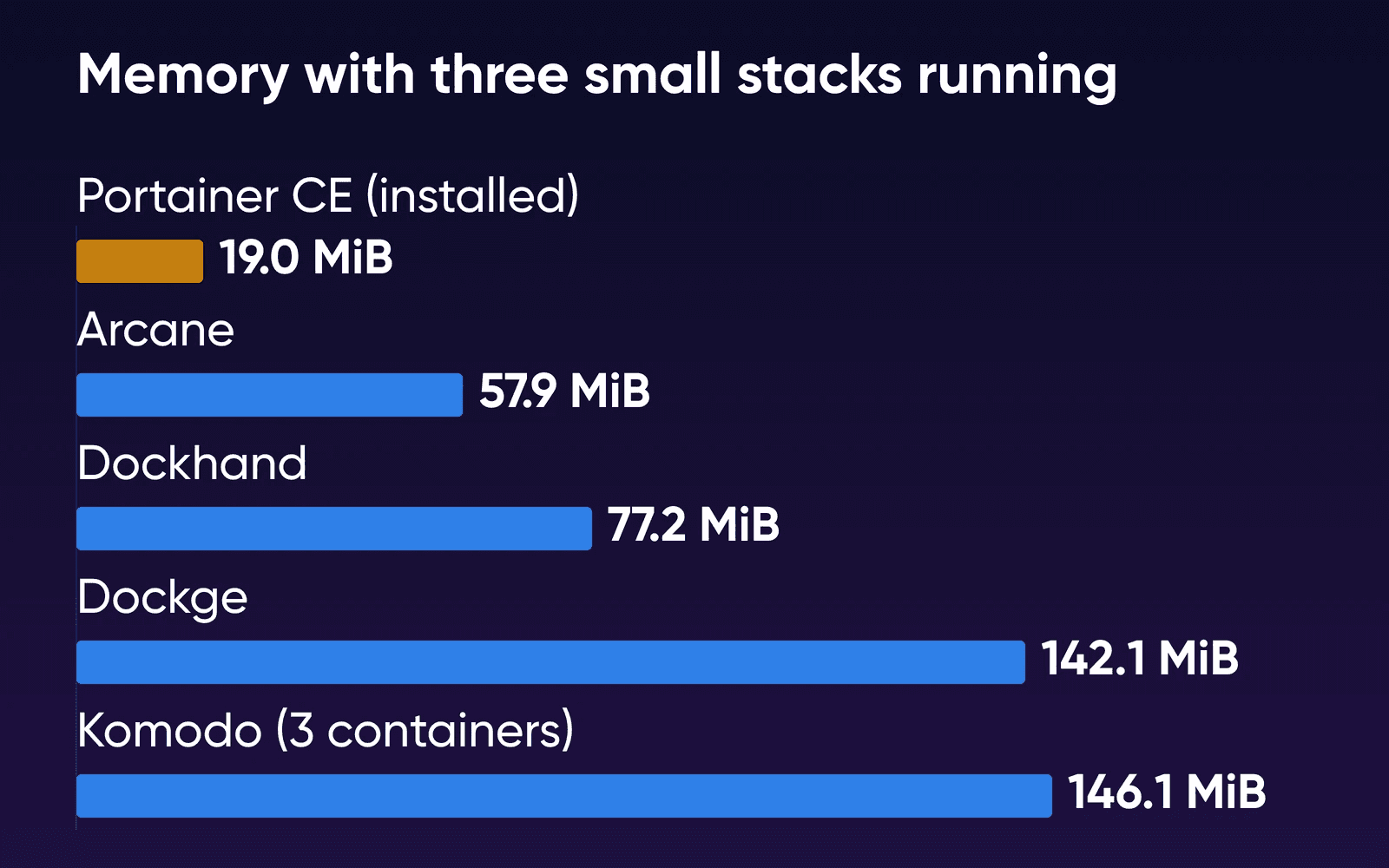
Portainer CE came out lightest, with the least memory on both of its runs and the smallest download. Dockhand and Dockge barely moved between their two runs, staying near 78 and 142 MiB. Dockhand's manual still lists 512 MB as the minimum and recommends 1 GB, and that's the figure to plan around, because our reading comes from a fresh install that isn't doing anything yet.
Komodo and Arcane changed between starts, so we ran them again. Komodo's first start probably overstates what it takes from your apps. It read 405.1 MiB on that start, a fresh install, with MongoDB at 233.7 MiB of that, and about 150 MiB on the starts after it. docker stats subtracts only the inactive part of a container's file cache, so the active part stays in its figure. The VM's own used memory, which leaves cache out, rose only 187 MiB on that start, so some of the reading is likely cache from MongoDB writing its new database. If you're on Stack 8, even Komodo's first start comes to about 5% of the 8 GB.
Arcane settles at roughly 58 to 68 MiB. Two of its first five starts read higher, 125.9 and 138.6 MiB, after the usual 2-minute settle. We gave it two more runs with a 10-minute settle, one on a fresh install and one after a restart, and they read 63.8 and 68.1 MiB. We read the two high figures as Arcane measured before it had settled.
None of them kept the processor busy. Komodo's MongoDB container had the highest median CPU reading, under 2%, and Portainer's rounded to zero.
Jacar's published test from August ran on an arm64 Debian server with the same Docker version. Its 155 MiB for Dockge is close to ours, and its 24 MiB for Portainer is a few MiB higher. Its 208 MiB for Komodo falls between our first start and our later ones. Jacar ran all three at the same time with no stacks and took the median of eight readings over six minutes, so its figures aren't a like-for-like match. Jacar also measured the images unpacked on disk, which is more than the download: 190 MB for Portainer, 1,150 MB for Dockge and 2,900 MB for Komodo with MongoDB.
Side by side
Versions, prices and license terms were checked again on October 21, 2026. The memory and download rows come from our October 16 test, which used each maker's image current that day.
| Portainer CE (installed) | Dockge | Komodo | Dockhand | Arcane | |
|---|---|---|---|---|---|
| What it is | Full Docker UI | Compose files on disk | Git deploys across servers | Docker UI, backups, SSO | Docker UI, one container |
| Containers | 1 | 1 | 3 | 1 | 1 |
| Idle memory | 17.6 MiB | 141.4 MiB | 149.5 MiB | 78.7 MiB | 59.3 to 68.1 MiB |
| With 3 stacks | 19.0 MiB | 142.1 MiB | 146.1 MiB | 77.2 MiB | 57.9 MiB |
| Download, arm64 | 41.3 MB | 258.0 MB | 806.0 MB | 205.6 MB | 56.9 MB |
| First login | Setup token from its logs | Create the admin on first visit | Password in env file | Turn on login in Settings | Change the password at first sign-in |
| Team roles | Business Edition | One admin | Free | Enterprise | Free |
| Deploy from Git | Yes | No | Yes, on push | Yes, webhooks | Yes, Git Sync |
| More servers | Agents | Agents | Periphery agents | Hawser agents | Arcane Agent |
| License | zlib, free | MIT, free | GPL-3.0, free | BSL 1.1, paid for business | BSD 3-Clause, free |
| Latest release | 2.45.3 LTS, Oct 21, 2026 | 1.5.0, Mar 30, 2025 | v2.3.3, Sep 1, 2026 | v1.0.54, Oct 17, 2026 | v2.17.0, Oct 21, 2026 |
Komodo's idle figure comes from a later start, since its first start read 405.1 MiB, and Arcane's range leaves out the two early readings above. Komodo's three containers are MongoDB, Core and Periphery. The download row is what Docker reported on our arm64 VM. On our x86 servers you'd download a little more, per the registry: 44.8 MB for Portainer, 263.5 MB for Dockge, 214.6 MB for Dockhand and about 832 MB for Komodo's three images.
On a stock install, Portainer shows a setup token in its logs and gives you 5 minutes to create the admin. On our Docker image it runs behind Caddy's HTTPS. Portainer CE gives you simple users, and roles need Business Edition, which is free for up to 3 nodes. Dockhand keeps roles for its Enterprise tier.
Portainer CE deploys stacks from a Git repository. Its stack docs describe GitOps updates by polling or webhook, while Portainer's CE vs BE post lists automatic updates as a Business feature. So we checked on our test VM. Through the API of Portainer CE 2.45.2, a stack deployed from Git accepted both a 5-minute polling interval and a webhook, and the webhook address answered when we called it. We didn't push a commit to watch it redeploy.
What each one is good at
Portainer CE covers containers, images, volumes, networks and stacks in one place. On our Docker image, it's already running behind HTTPS. One Komodo user runs Portainer beside Komodo strictly for volume management.
Dockge edits and runs compose stacks, and the files stay in /opt/stacks on your disk, where your plain docker compose commands still work. There's one admin account and no Git deploys.
Komodo is built for deploying across servers. Compose files can come from its UI, from the host or from a Git repo with auto-deploy on push, and it builds images and runs scheduled procedures too. It's GPL-3.0 with no server limit, and roles, single sign-on and an audit trail of who changed what are all free. It brings MongoDB along, or FerretDB on Postgres for systems that can't run current MongoDB. You set the first admin password in its env file before the first start.
Dockhand's free tier includes Git deploys with webhooks, backups (in beta) and OIDC single sign-on. It runs as one container and reaches other servers through Hawser agents.
Arcane runs as a single container under the BSD license, with roles and permissions, Git Sync and agents for other hosts in the free build.
Keep Portainer CE if
You want one free tool for containers, images, volumes and stacks, including stacks deployed from Git, and you like that it's already running with HTTPS. If a teammate needs a role of their own, Business Edition is free for up to 3 nodes.
Add Dockge beside it if
You work in compose files and want them kept as plain files you can edit, keep in Git and run with docker compose. Create its admin account over an SSH tunnel when you first start it.
Choose Komodo, Arcane or Dockhand if
You want builds and deploys on every Git push across several servers (Komodo), free roles past Portainer's 3-node offer (Komodo and Arcane), or free single sign-on (Komodo or Dockhand). Dockhand charges businesses per host.
We left three other tools out of the table. Yacht's own README says it hasn't been updated in a while. Dockpeek gives you quick links to your containers' web pages, logs and image updates. Lazydocker is a terminal UI that runs only while you have it open, so it costs nothing at idle.
Portainer CE or BE, and what Dockhand charges
Four of the five won't cost you anything, whatever you use them for. Portainer CE is open source under the zlib license, Dockge under MIT, Komodo under GPL-3.0 and Arcane under BSD-3-Clause.
Portainer's paid product is Business Edition. It adds role-based access control, a fuller GitOps engine, registry management, audit logs and SSO, and it's free for up to 3 nodes, one license per organization. Portainer counts any machine that runs the Portainer Server, or is managed by one, as a node, so a single VPS uses one of the three. Past that, Home & Student covers 15 nodes for $155 a year for personal use, and Starter begins at $1,045 a year for 5 nodes. On one server, you don't need Business Edition unless someone else needs a login with limits.
Read Dockhand's license closely. It's the Business Source License 1.1, which isn't an open-source license. Personal use, non-profits, schools, a self-employed person running servers nobody else works on, and anyone's development or testing are all free. If your business runs it in production, you pay per host. Each version becomes Apache 2.0 four years after its release.
How to add a second dashboard
The setup post covers how to install Docker and Portainer on a VPS. For anything you add beside Portainer, go in this order.
- Update the server and Portainer first
Update Portainer to the latest release first, 2.45.3 LTS as of October 22, 2026, and run your system updates too.
- Start the new dashboard on localhost only
Start from the maker's compose file, but change its port line so the dashboard only listens on the server itself. For Dockge that line becomes:
yamlports: - "127.0.0.1:5001:5001"For Komodo, set the admin password and keys in its env file before the first
docker compose up -d. - Open an SSH tunnel and set the login
From your own computer, forward the dashboard's port: 5001 for Dockge, 3000 for Dockhand, 3552 for Arcane or 9120 for Komodo. For Dockge, run this and open
http://localhost:5001in a browser:bashssh -L 5001:localhost:5001 you@your-server-ipThen set the login before anything else. In Dockge, create the admin account. In Dockhand, turn on login under Settings, in the Authentication section. Arcane asks you to set a new password the first time you sign in.
- Give it a domain through Caddy if you want it on the web
Caddy already serves Portainer over HTTPS on our Docker image. Add a site for the new dashboard to Caddy's configuration, pointing at the local port, so the dashboard keeps listening on the server itself.
- Decide whether Portainer stays
Dockge's README says it won't manage an existing stack until its file sits at
/opt/stacks/<name>/compose.yaml, so copy each stack's compose file out of Portainer's web editor into that folder before you stop Portainer. Portainer keeps environment variables you set in its UI apart from the compose file, so copy those into a.envfile beside it. We didn't test whether Komodo, Arcane or Dockhand pick up stacks another tool started, so check that on a spare stack first. Portainer used under 20 MiB on our test VM, so you can leave it running.
DreamHost support is available 24/7 for the hardware, network and connectivity. You manage the OS, software and configuration, including updates for any dashboard you add.
How we measured
DreamHost ran the test on October 16, 2026. The test VM ran Ubuntu 24.04.4 LTS through Colima, using Apple's virtualization on an Apple-silicon Mac: aarch64, 2 vCPU, 4 GB of memory and Docker 29.5.2. Each dashboard started from its maker's compose file with only the passwords and keys filled in that the makers tell you to set, and we took it down before the next one started. Images were pulled first, so download speed didn't count. Each number is the median of 12 docker stats samples taken 5 seconds apart after a 2-minute settle (10 minutes for Arcane's last two runs). We used the MEM USAGE
figure and added up each dashboard's own containers, leaving out everything else on the VM. The three test stacks ran from /opt/stacks, started with plain docker compose, and aren't counted in any dashboard's number. Every dashboard's web page answered within 5 seconds of the start command, and Komodo's first start was the slowest at 4.7 seconds.
The figures won't match your server exactly, since our servers run x86 AMD EPYC processors and the VM is arm64. Each tool's first start was a fresh install, and later starts kept their data volumes. Nobody logged in, and there was no history or Git repository yet. Your own use adds to that. Portainer clones Git repositories into its data volume, and Komodo keeps its last 14 database backups by default. We sampled memory and CPU only after two minutes idle with no browser tab open, so start-up peaks and the work a dashboard does while you watch it aren't in these numbers. We also didn't run two dashboards at once or check whether one picks up stacks another one started. Portainer, Dockge and Dockhand were measured on two starts each, Komodo on three and Arcane on seven.
Docker dashboard FAQs
Is Dockge dead?
It hasn't shipped a release since March 30, 2025, when 1.5.0 came out. Nightly images are still built, and a pull request adding user accounts opened on October 15, 2026. Watch its releases page for a new version.
Can I run two dashboards on one server?
Each one talks to the same Docker engine through the Docker socket, so two can run together. Portainer and Dockge come to about 159 MiB if you add their separate idle readings from our test VM. We didn't run both at once. Dockge manages only stacks whose compose files sit in its stacks folder, /opt/stacks by default.
Do I need a dashboard at all?
Docker and Compose work from the command line over SSH, and our Docker VPS lets you manage containers either way. A dashboard helps when you want logs, restarts and image updates a click away, or when someone who doesn't use a terminal needs to check on things.
Which plan do I need for Docker and a dashboard?
Size for your apps, since every dashboard here left nearly all of our 4 GB test VM free. Which VPS plan do I need? adds up the rest.
Sources
- Docker VPS Hosting, DreamHost, read Oct 21, 2026. dreamhost.com/hosting/vps/docker
- Komodo vs Portainer vs Dockge in 2026, Jacar, published Aug 31, 2026, read Oct 16, 2026. jacar.es/en/komodo-vs-portainer-vs-dockge-comparison
- Install Portainer CE with Docker on Linux, Portainer docs, read Oct 16, 2026. docs.portainer.io/start/install-ce/server/docker/linux
- Setup token, Portainer docs, read Oct 16, 2026. docs.portainer.io/faqs/installing/setup-token
- Add a new stack, Portainer docs, read Oct 16, 2026. docs.portainer.io/user/docker/stacks/add
- Requirements and prerequisites, Portainer docs, read Oct 16, 2026. docs.portainer.io/start/requirements-and-prerequisites
- Portainer CE vs Portainer BE: which should you install?, Portainer, read Oct 16, 2026. portainer.io/blog/portainer-community-edition-ce-vs-portainer-business-edition-be-which-should-you-install
- Pricing, Portainer, read Oct 21, 2026. portainer.io/pricing
- Get 3 nodes free, Portainer, read Oct 21, 2026. portainer.io/take-3
- Home & Student, Portainer, read Oct 21, 2026. portainer.io/homeandstudent
- Portainer releases, Portainer (GitHub), read Oct 21, 2026. github.com/portainer/portainer/releases
- Dockge README, Dockge (GitHub), read Oct 16, 2026. github.com/louislam/dockge
- Dockge releases, Dockge (GitHub), read Oct 21, 2026. github.com/louislam/dockge/releases
- Dockge image tags, Docker Hub, read Oct 16, 2026. hub.docker.com/r/louislam/dockge/tags
- Dockge setup page (Setup.vue), Dockge (GitHub), read Oct 16, 2026. github.com/louislam/dockge/blob/master/frontend/src/pages/Setup.vue
- Add user accounts and resource quotas (pull request #1006), Dockge (GitHub), read Oct 16, 2026. github.com/louislam/dockge/pull/1006
- What is Komodo?, Komodo docs, read Oct 16, 2026. komo.do/docs/intro
- Setup Komodo Core, Komodo docs, read Oct 16, 2026. komo.do/docs/setup
- MongoDB setup, Komodo docs, read Oct 16, 2026. komo.do/docs/setup/mongo
- compose.env, Komodo (GitHub), read Oct 16, 2026. github.com/moghtech/komodo/blob/main/compose/compose.env
- Komodo releases, Komodo (GitHub), read Oct 21, 2026. github.com/moghtech/komodo/releases
- Komodo issue #1054, GitHub, read Oct 16, 2026. github.com/moghtech/komodo/issues/1054
- Dockhand: features and pricing, Dockhand, read Oct 21, 2026. dockhand.pro
- Dockhand manual, Dockhand, read Oct 16, 2026. dockhand.pro/manual
- Dockhand license, Dockhand (GitHub), read Oct 21, 2026. github.com/Finsys/dockhand/blob/main/LICENSE.txt
- Dockhand releases, Dockhand (GitHub), read Oct 21, 2026. github.com/Finsys/dockhand/releases
- Installation, Arcane docs, read Oct 16, 2026. getarcane.app/docs/get-started/installation
- Git Sync, Arcane docs, read Oct 16, 2026. getarcane.app/docs/docker/git-sync.html
- Remote Environments, Arcane docs, read Oct 16, 2026. getarcane.app/docs/remote/environments.html
- Roles & Permissions, Arcane docs, read Oct 16, 2026. getarcane.app/docs/access/roles
- Arcane repository and releases, Arcane (GitHub), read Oct 21, 2026. github.com/getarcaneapp/arcane/releases
- docker container stats, Docker docs, read Oct 16, 2026. docs.docker.com/reference/cli/docker/container/stats
- Hacker News comment on Dockge and Portainer, Hacker News, posted Apr 2, 2025, read Oct 16, 2026. news.ycombinator.com/item?id=43559147
- Yacht README, Yacht (GitHub), read Oct 16, 2026. github.com/SelfhostedPro/Yacht
- Dockpeek README, Dockpeek (GitHub), read Oct 16, 2026. github.com/dockpeek/dockpeek
- Lazydocker README, Lazydocker (GitHub), read Oct 16, 2026. github.com/jesseduffield/lazydocker