Many small business owners start the same way when they set out to build a website — they choose a site builder and pick a template.
But that’s like choosing kitchen cabinets before you’ve drawn the floor plan!
Before you start picking out design elements, you need to think about strategy. Otherwise, you risk ending up with a website that looks very nice but says very little, and fails at its actual job, which is helping people decide to contact your business. It has to reassure skeptics, answer practical questions, show proof that you’re good at what you do, and make the next step obvious for visitors.
That doesn’t all happen by accident. It happens when you build your website around a strategy.
Start by answering these three questions:
- What does your site need to do?
- Who is your site for?
- Why should people hire your business over your competition?
Your answers to those questions will help you build the foundation for your business’s digital strategy, which is anchored by your website. This guide walks you through how to create a service business website that generates leads, starting with the strategy that makes every later decision easy.
Step 1: Decide what your service website needs to do (goals and lead-generation conversion points)
What’s your website’s goal?
Hint: It’s not “look professional.” That’s a quality, not a goal.
Your goal is to attract and generate what’s called qualified leads: people who are interested in and ready to hire a service business like yours, and convinced enough by your website to reach out to you to start that process.
For most service businesses, the website’s core job is lead generation. That means you need to convince visitors to take an action (a lead-gen conversion point) such as:
- Calling you
- Submitting a form with enough information to tell you whether they’re a qualified lead
- Booking a consultation through an online scheduling tool
- Requesting a quote by providing information about the scope of their project
Every page on your website should move visitors toward your desired action. This doesn’t mean being aggressive—nobody wants to be ambushed by a pop-up ad before they’ve even read a sentence. Instead, be deliberate.
So before you start building your website, start with your goals. What do you want visitors to do? Write down the action you want them to take.
No, really: stop reading here and physically write it down, because every decision you make from this point forward, from layout to content, imagery, and navigation, should be evaluated against whether it helps or hinders your goal.
Step 2: Map your client’s decision journey
Your potential clients will almost never land on your site and immediately book a consultation. They go through a process, and your website is likely only part of it.
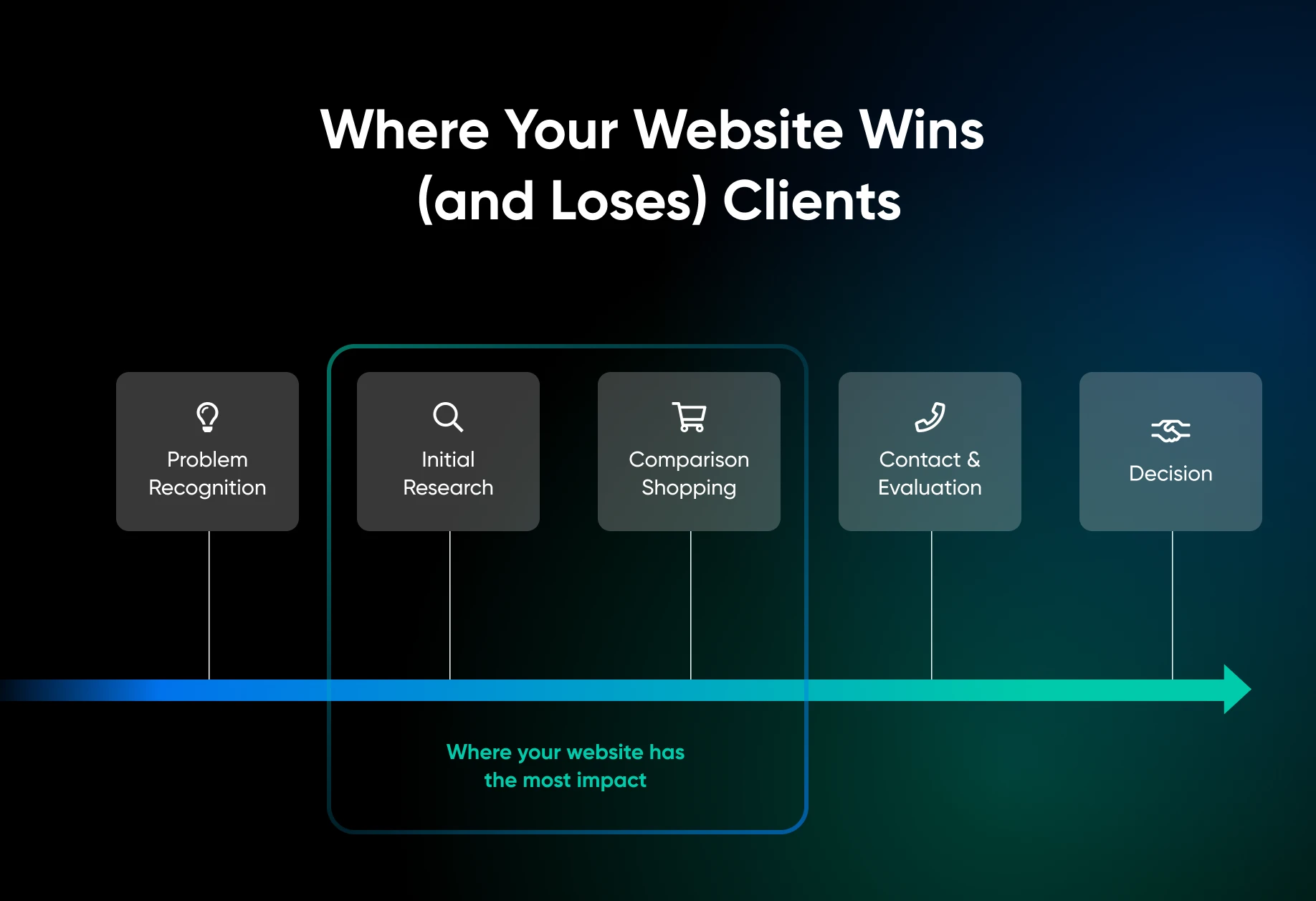
Here’s what a typical decision journey might look like, and where your website does the heavy lifting:
- Problem recognition: “My backyard is a disaster,” or “The office HVAC keeps breaking down.” At this stage, they know they need help but haven’t started looking yet.
- Initial research: They search Google, ask friends, and check neighborhood Facebook groups. At this stage, they’re gathering names, not making decisions.
- Comparison shopping: Now they’re visiting websites, reading reviews, and looking at project photos. At this stage, your business either makes the cut or gets eliminated.
- Contact and evaluation: They reach out to their top choices. Respond quickly and professionally here, and publish a short “what happens next” process on your site (inquiry, a quick fit call, a proposal, then a start date) so prospects know exactly what they’re signing up for before they reach out.
- Decision: They choose based on a combination of trust, price, availability, and often, gut feeling.
Your website matters the most in stages two and three, when visitors are forming impressions, sizing you up against competitors, and deciding whether you’re worth a follow-up. Build your site with those stages in mind. Everything else is logistics.
Step 3: Analyze your competitors
Before you start, spend 30 minutes looking at your top five competitors. Instead of copying them, analyze what a potential client sees on either side of your site when they’re comparison shopping. What do they see? Where are the gaps? An AI assistant can speed this up: paste each competitor’s homepage copy into a chatbot and ask it to summarize their positioning, then sharpen your own pitch against what comes back.
How To Do a Competitive Gap Analysis
Use the instructions and table below to complete your own analysis of your competitors’ websites.
- Search Google for the services you offer in your area (e.g., “landscaping in Phoenix”).
- Open the sites for the top five results.
- For each one, rate these areas on a scale from 1 to 5:
| Factor | What To Look For | Rating |
| First impression | What’s the first thing you see? Does it have professional photos or stock images? Are services described using clear language or vague corporate speak? | |
| Trust signals | Do they show reviews? Do they have any certifications? How many years have they been in business? | |
| Contact information | How many clicks does it take to find their contact information? Is it available on every page? Can you schedule online? | |
| Mobile optimization | Is the site usable on your phone? Is it fast? |
Note the weakest areas across all your competitors. These are your biggest opportunities to stand out.
Step 4: Write your unique value proposition
Your unique value proposition (UVP) is the reason a client should hire you over every other option. “Quality work” doesn’t cut it; every business says that.
A strong UVP needs to be both specific and provable.
Here are some examples:
| Weak UVP | Strong UVP |
| “Quality landscaping services for you.” | “10 years designing outdoor living spaces for homes in the Phoenix metro, with a portfolio to prove it.” |
| “We treat you like family.” | “Same-day response to every inquiry, and a dedicated project manager for all jobs.” |
| “Fully licensed and insured.” | “ROC-licensed, A+ BBB rated, with 200+ verified Google reviews.” |
The pattern is consistent: specifics and proof. Every strong UVP has both.
Once you have a UVP that’s specific and provable, it belongs on your homepage above the fold, which means visitors can see it without scrolling down. It should also be echoed throughout the other pages on your site.
What if you’re brand new and have no proof yet?
Every example above leans on reviews and portfolios. So what do you do with zero clients? Borrow proof from everywhere else:
- Credentials: License numbers, insurance details, and any training or certifications, spelled out rather than summarized as “fully licensed.”
- A concrete guarantee: “If you’re not happy with the finished work, we’ll make it right at no charge” carries weight when reviews can’t.
- A documented process: Show exactly how a project runs from inquiry to completion. Organization signals professionalism.
- You, personally: A real photo, your background, and your years of hands-on experience, even if the business itself is new.
- Honest positioning: “New business, 15 years in the trade” is a legitimate pitch, and you can offer your first clients a discount in exchange for an honest review to start building social proof.
Step 5: Turn your strategy into pages
Four core pages do the work for most service businesses. Each one has a single job, tied to a stage of the decision journey you mapped in step 2.
Homepage
Its job is to survive comparison shopping. Put your UVP above the fold, add one clear call to action (call, book, or request a quote), and use real photos of your work or your team instead of stock images. A visitor should know what you do, where you do it, and what to do next without scrolling.
Services page
Its job is to answer “can this business solve my problem?” Give each major service its own section (or its own page) that describes the outcome, the process, and what’s included, and end each with the same call to action. Our guide to writing a services page that converts goes deeper.
About page
Its job is trust. Show who actually does the work: names, faces, credentials, and years in the trade. Comparison shoppers are deciding whether to let you into their home or business, and an about page with real humans on it answers a question the homepage can’t.
Contact page
Its job is to make the next step effortless. Include your phone number, a short form with one or two scope questions so you can qualify leads, and online booking if you offer it. Then repeat your phone number and a contact link in the header or footer of every page, so nobody has to hunt for them.
Step 6: Make your site easy to find
The decision journey starts with a search, so your strategy only pays off if your site shows up and works when people arrive. You don’t need a full SEO campaign on day one, just the basics:
- Local keywords: Name your service and your area in page titles and headings. “Landscape design in Phoenix” beats “Welcome to our website,” and every page should have one clear H1 that says what the page is about.
- Mobile and speed: Most prospects will open your site on a phone. Google’s page experience guidance says its core ranking systems “look to reward content that provides a good page experience,” and its self-assessment starts with good Core Web Vitals and content that displays well on mobile devices.
- Internal links: Link every service description to your contact or booking page, so the path from “they can fix this” to “get a quote” is one click.
- Trust signals near your calls to action: Place reviews, certifications, and license numbers next to your CTAs instead of burying them on a separate page. These are the same trust signals you rated competitors on in step 3.
Step 7: Measure whether your site generates leads
Decide what counts as a lead (a phone call, a form submission, a booked consultation) and track each one. Most form and booking tools count submissions for you, and phone links can be tracked as clicks. Review the numbers monthly: a page that attracts visits but produces no inquiries usually needs a stronger call to action, clearer proof, or a more specific UVP, and now you know exactly which lever to pull.
Build the Plan Before You Build the Pages
Planning and building a service business website gets a lot easier when you think of it as what it actually is: a decision-making tool for your customers.
Think of your homepage as more than a welcome mat, and your services page as more than a list. Every part of your website needs to help customers decide they trust you enough to reach out.
Once you know what you want visitors to do, what they need to believe, and what proof will move them — every layout decision, every image choice, every headline becomes obvious. Strategy first. Everything else follows. When you’re ready to build, DreamHost Remixer turns your plan into a live site — describe what you want in plain words, and it builds the pages for you.
FAQs about service business websites
What’s the best website builder for a service-based business?
The best builder is whichever gets a lead-generating site live fastest: UVP above the fold, a contact or booking form, and mobile-friendly pages. DreamHost Remixer builds a site from a plain-language description, so the strategy work in this guide translates directly into pages.
How do I match my website theme to my business?
Choose the theme after the strategy. Pick one with room for a UVP above the fold, prominent contact buttons, and gallery or review sections if your proof is visual. Then match colors and fonts to how clients should feel about your business: practical, premium, or friendly.
Do I need a custom website for my service business?
Usually not at the start. A well-planned four-page site built with a template or an AI builder can generate leads just as well. Consider custom development once you need features templates can’t handle, like client portals or complex booking rules.
How do I get leads from my service website?
Give every page one job and one call to action: call, book, or request a quote. Put your UVP and a contact option above the fold, place proof near each call to action, and target “your service + your city” searches in your titles and headings.

Stop Losing the Comparison Round
69% of consumers say a local business needs a website to be credible — and a business website delivers a 41% trust lift, the strongest credibility signal outside of online reviews. This 38-page playbook gives service business owners the strategy, pages, trust signals, lead generation, platform, and mobile performance blueprint to win the comparison round.
Get the eBook