
Every business could use more customers. But that means more marketing work.
Do you really have the time to post on social media, write thought leadership, manage paid campaigns, and organize a flash mob at your local industry expo?
Possibly. But you’ll probably need to use marketing automation.
Automation is not delegating everything to robots. It’s more like hiring a very literal assistant: the welcome email you’d send anyway goes out at 2 a.m. without you, but you still decide what it says.
Sounds great! Time to sign up for 10 subscriptions! Actually, no…
The marketers who see the greatest benefits from automation tend to build a rock-solid strategy before taking action.
In this quickstart guide, we’ll show you how to follow suit — from identifying the best areas to automate, to choosing your tools.
Let’s dive in!
What is a marketing automation strategy?
A marketing automation strategy is your plan for which marketing tasks to automate, which to keep human, which tools to use, and how you’ll measure the results. It ties automation to specific business goals — more leads, better conversions, less busywork — so the software serves the plan instead of replacing it.
Companies that see the best outcomes from marketing automation tend to have a strategy in place. They think carefully about what can be automated, and just as importantly, what can’t or shouldn’t be automated.
They also know what they want to achieve, which tools will help them hit those goals, and how to measure their progress.
So what shouldn’t you automate? Anything where a template would show. Keep humans on:
- Replies to complaints and negative reviews: An automated apology reads exactly like what it is.
- First-touch relationship outreach: Partnership pitches, PR, and high-value prospects deserve a personal message.
- Crisis communications: A cheery scheduled post landing at the wrong moment can do real damage.
- Final sign-off on anything reputation-sensitive: Let the tools draft; let a human hit publish.
Working through the same mental process puts you in a strong position to succeed with your own marketing automation efforts.
Let’s do it together, step by step.
What are you trying to achieve with marketing automation?
There are many potential benefits to marketing automation. The question is, which of them matter to you?
Are you more interested in:
- Saving time on tasks and reducing your workload?
- Offloading all the boring stuff?
- Squeezing more out of your existing budget?
- Adding new tactics and channels to your toolkit?
- Generating more total leads?
- Improving the quality of those leads?
- Making more conversions?
- Experimenting like a mad scientist?
These are all totally valid, by the way.
It’s just important to know what you’re trying to achieve, because that should guide your approach to automation — and help you recognize whether your efforts are actually paying off.
What kinds of marketing can you automate?
Automation works best on repetitive tasks that follow the same patterns every time. You can find work like this in every marketing campaign.
Struggling to identify them? Focus your attention on these areas:
- Task and team management
- Publishing content
- Scoring and sorting leads
- Reporting and analytics
Of course, some types of marketing involve more repetition than others. For example:
- Email marketing involves sending messages, in bulk, over and over again.
- Social media marketing is about posting every day, often with the same content recycled across multiple platforms.
- Paid campaigns frequently involve making regular tweaks to bidding and budget.
In this guide, we’re focusing on the marketing types where automation is likely to have the biggest impact, including email, social media, SMS, paid advertising, and optimization campaigns.
So, back to your strategy. Try this little brainteaser:
Which parts of your marketing machine involve the most boring, repetitive tasks?
The answer should help you prioritize which areas to automate first, and identify where you’re less likely to see good results.
Which channels, strategies, and tactics are easiest to automate?
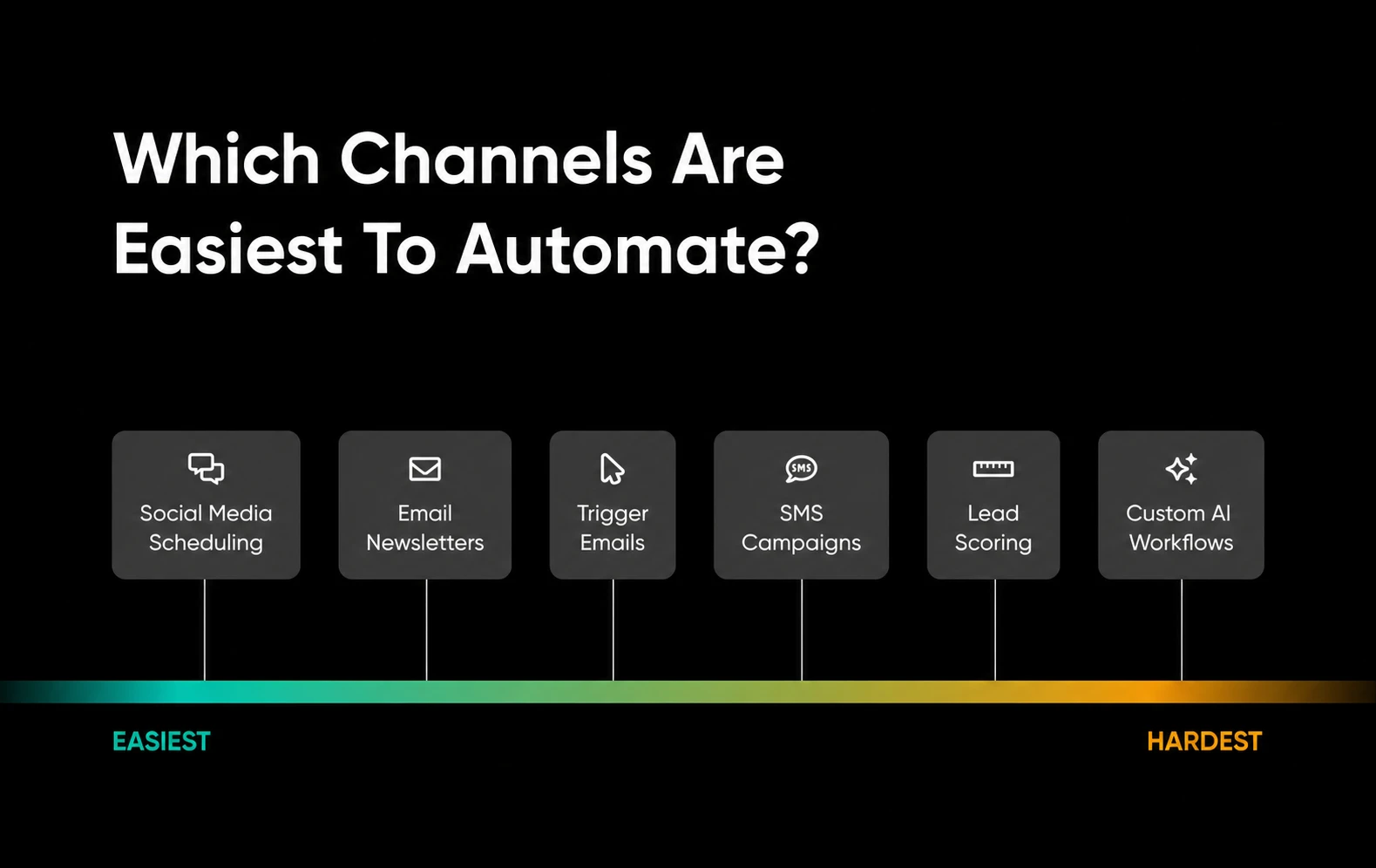
Of course, there’s time and technical skill to consider. Just because you dearly want to automate a workflow doesn’t mean it will be easy.
Luckily, there’s plenty of low-hanging fruit.
- Social media management is the most obvious entry point: Instead of posting everything by hand, you can use dedicated tools to create and queue a month’s worth of content in advance. This also allows you to publish when your audience is most active on each platform and to monitor incoming replies.
- Another easy option is email marketing: Per Ascend2’s “The State of Email and Automation in 2024” report (May 2024), 84% of marketing campaigns are automated to some extent.
- Automating lead scoring and audience segmentation takes a little more work: But it’s nothing too drastic. These automations can also save you SO much time in the long run.
Email platforms like MailerLite and Mailchimp have built-in automations that send targeted messages automatically. Outreach templates might seem basic, but that’s another form of automation, too.
It helps to know that automations fire in one of two ways: event-triggered (a subscriber joins your list, abandons a cart, or hits a loyalty milestone) or scheduled (a newsletter that goes out every Tuesday at 9 a.m.). Event-triggered automations respond to what a person does; scheduled ones simply run on the calendar.
To make that concrete, here are three beginner workflows that can repay their setup time through repetition:
- Welcome sequence: Trigger: someone joins your email list. Action: send a welcome email right away, then 2 follow-ups over the next week introducing your best content or offer. Goal: turn new subscribers into engaged prospects while your business is still fresh in their minds.
- Abandoned-cart recovery: Trigger: a shopper adds items to their cart but doesn’t check out. Action: send a reminder a few hours later, and a second nudge a day or two after that. Goal: recover revenue that would otherwise walk away.
- Post-purchase follow-up: Trigger: a completed order. Action: send a thank-you message, then a review request or related product suggestion a week or two later. Goal: repeat purchases and social proof, with very little per-customer work.
Build each of these once, then check in now and then to make sure it still fires. That’s the workload math working in your favor.
Which tools do you need to automate effectively?
Would you take “it depends” as an answer?
No, seriously. Your choice of automation tools depends on the channels you’re targeting, how technical you want to be, and what your budget will stretch to.
That said, there are some standout tools in each department:
- Zapier and Make for building connected workflows: Both platforms allow you to connect the apps you already use and create automated workflows, complete with AI.
- Mailchimp, MailerLite, and Klaviyo for email marketing: Mailchimp covers email, SMS, analytics, and automation, but its breadth can mean more complexity than a simpler email-first tool. MailerLite is a little more user-friendly. Klaviyo lets you build powerful automations based on user behavior.
- EZ Texting, SimpleTexting, and Klaviyo for SMS marketing: EZ Texting lets you build automated campaigns. SimpleTexting lets you compose messages faster with AI, while Klaviyo can build workflows for you.
- SocialBee, Buffer, and Sendible for social media posting: SocialBee has AI features for planning and creating content for multiple channels. Buffer is mainly a scheduling tool, and it’s super easy to use. Sendible is great for recycling content.
- Google Analytics, Whatagraph, and Supermetrics for analytics: Google Analytics is great for website metrics. Whatagraph lets you build automated reports, and Supermetrics turns your marketing data into dashboards and reports that update from live data.
You probably won’t need half of these apps. Maybe not even a quarter. But it’s nice to have options, right?
Just remember: only choose tools that help you achieve your automation goals. It’s way too easy to sign up for 10 subscriptions and barely use any of them.
Does marketing automation actually reduce your workload?
Honest answer: not on day one. Every automation carries a setup cost — choosing the tool, building the workflow, writing the messages, and testing that everything actually fires. Budget a few hours per workflow, and more if integrations are involved.
The payback comes from repetition. A welcome sequence you build once can replace hundreds of manual sends over the following year. A social media queue turns a daily chore into a monthly planning session.
And where does automation add work? Tools you signed up for but never configured, integrations that break silently, and reports nobody reads. That’s why the plan below matters more than the software: it keeps you building only the automations that earn their keep.
How to build your marketing automation strategy: The 5-step plan
Okay, let’s condense everything we’ve talked about into an actionable plan.
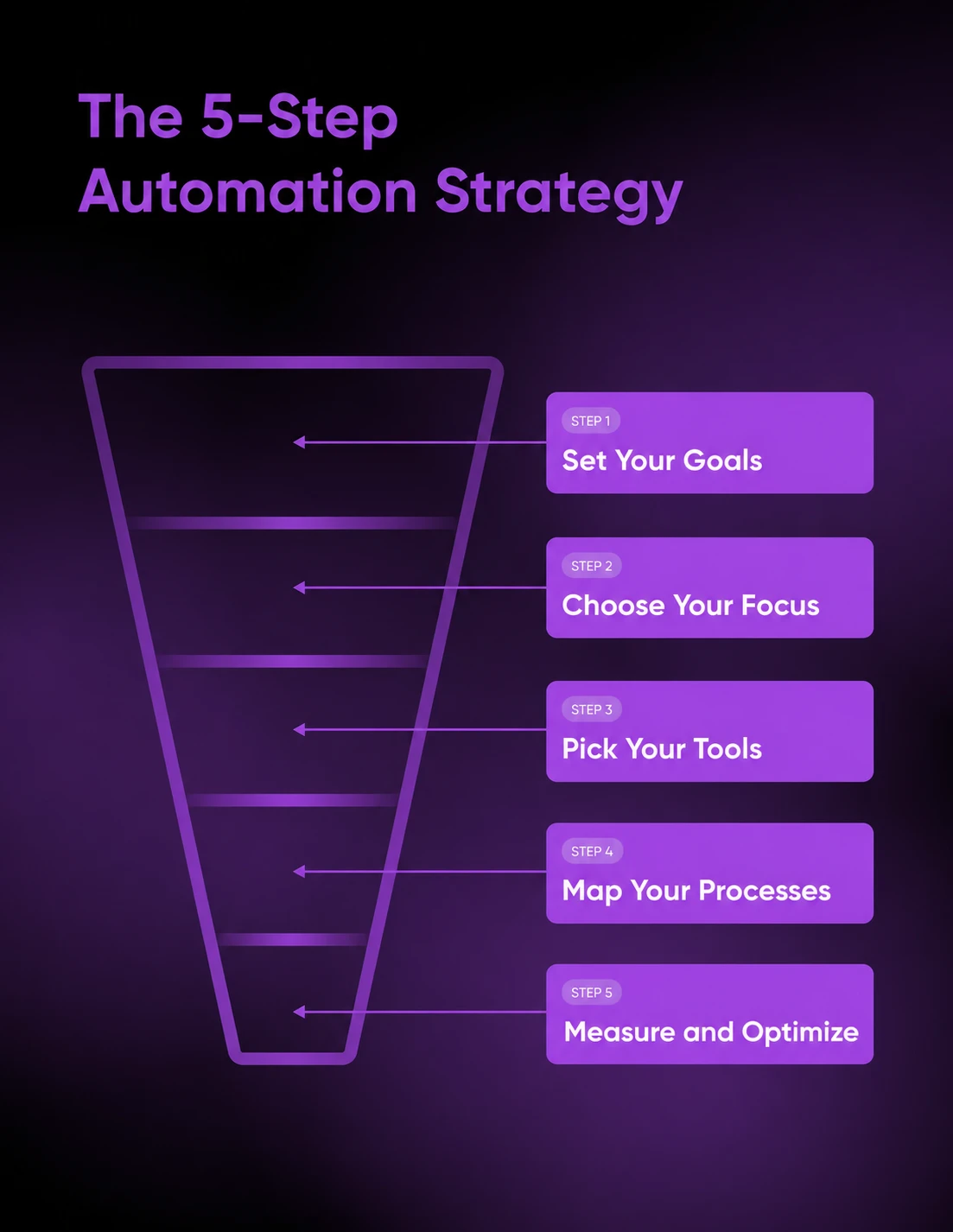
Step 1: Decide on your goals
Start with the outcome. In an ideal world, what would you like to achieve with your adventures in marketing automation?
Make sure your goals are specific, measurable, and likely to actually improve your business/workday/life in some way.
Step 2: Choose your focus
Look at your freshly minted goal(s) and consider which type of marketing — or which individual tactics — are likely to move you toward that outcome.
This one can be tricky because it’s not always obvious which automations are going to work best for driving additional leads or improving conversion rates.
But you can make the choice easier by focusing on your current strengths. For example, if you generate a lot of business through email marketing, it would be worth doubling down on it.
Part of choosing a focus is knowing who you’re automating for. Sketch your main audience segments (even a simple split like “new subscribers” versus “repeat customers” works) and note what message each group actually needs. Every automation you build should be aimed at one of those segments, not at “everyone.”
A quick rule of thumb: B2B businesses usually get the most from automating lead nurturing across a longer sales cycle, while B2C businesses tend to win on volume plays like cart recovery and conversion-focused campaigns.
If you really want to shortcut the decision-making process, just choose individual tactics and strategies that already work for others and align with your goals.
Step 3: Pick your tools
If you’ve really nailed the first two steps, this one should be fairly easy.
In most cases, specialized tools are the way to go. Custom workflows look cool on social media, but they take time and skill to build. Don’t bother; let someone else figure out the complicated stuff.
If possible, try to find a platform that can handle all your automation ideas within a specific field. Unless your name is MrBeast, one social media app should be enough. The same goes for every other category.
Can’t find what you need? That’s when you turn to tools like Zapier and Make.
Step 4: Map out your processes
Whether you’re trying to automate an existing workflow or you’re starting from scratch, it’s important to think about how your automation will work.
Break it down into individual steps, as if you were teaching a work-experience kid. This type of instruction is exactly what AI tools need to perform well, and it will help you create your own automations.
Then map the customer journey, not just your own workflow. List the touchpoints where a person hears from you (first visit, signup, first purchase) and place each automation at the moment it matters most, like a welcome email at signup or a reminder after an abandoned cart.
Step 5: Measure and optimize
Remember those goals from step 1? Assign each one a metric or two (leads generated, conversion rate, unsubscribes, hours saved) and review the numbers on a regular schedule, whether that’s weekly or monthly.
Then treat every workflow as a draft. A/B test subject lines and send times, prune automations that aren’t earning their keep, and reinvest that time in the ones that are. Instead of treating your strategy as a one-and-done checklist, treat it as an ongoing loop.
Marketing automation strategy FAQs
How do you plan marketing automation?
Follow five steps: define measurable goals, choose which marketing channels to focus on, pick tools that match those channels, map your processes and customer journey, then measure results and optimize. Planning before purchasing keeps you from paying for software you never use.
Do marketing automation platforms actually reduce workload?
Yes, but not immediately. Every workflow costs setup time before it saves any. The payback comes from repetition: a sequence you build once can replace hundreds of manual sends. Unused subscriptions and broken integrations are how automation adds work instead.
What marketing tasks should not be automated?
Keep humans on replies to complaints, first-touch outreach to high-value prospects, crisis communications, and final approval of anything reputation-sensitive. Automation works best for repetitive, predictable tasks. Save the judgment calls—where a canned response might hurt trust—for real people.
Which marketing channel is easiest to automate first?
Social media scheduling and email marketing are the easiest entry points. Scheduling tools let you queue a month of posts in advance, and email platforms like MailerLite and Mailchimp include built-in automations, so you can launch your first workflow without technical skills.
How do you measure whether marketing automation is working?
Tie each automation to the goal it serves, then track one or two metrics per goal, such as leads generated, conversion rate, or hours saved. Review them on a set schedule, A/B test what underperforms, and cut underperforming workflows.
Ready to put this show on the road?
Clear direction is the secret to successful marketing automation. Your strategy should help you focus on the areas where you’ll see the biggest returns — in terms of money, time, and effort.
Just remember the key steps:
- Define your goals
- Choose your focus
- Pick your tools
- Map your processes
- Measure and optimize
Once you’re ready to implement the plan, be sure to take us along for the ride. Our blog is full of useful guides on AI and automation, including:
- AI Productivity Tools That Pull Their Weight (and Earn Their Keep)
- We Tested 25 Popular Claude Prompt Techniques: These 5 Actually Work
- We Tested 5 of the Hottest AI Video Generators, These Were Our Results
DreamHost customers also get free access to useful AI tools, including the Business Advisor assistant for marketing and SEO guidance and the Content Builder for drafting on-brand copy. And if your website needs an upgrade before the leads arrive, Remixer, DreamHost’s agentic AI website and app builder, is free to try for 30 days with no credit card required.
Start your free 30-day Remixer trial and see what it builds for you.

Stop Doing Marketing By Hand.
91% of marketers say automation helps them hit their goals. This 49-page ebook gives small business owners playbooks for email, SMS, social, paid ads, and analytics — running themselves while you focus on the work that actually moves the needle.
Get The Playbook