SEO for a small business website just doesn’t work the way it used to.
Search engines are no longer spitting out simple pages of blue links. Instead, they’re pulling in AI-optimized content from across the web to answer questions directly, and prioritizing pages with niche and local expertise.
For small businesses, this levels the playing field. But that only matters if you’re able to play the game.
Crack open the most up-to-date SEO playbook today with our practical guide to all things SEO for small business websites in 2026 — built for small and/or local businesses hurtling into the AI era.
How Do I Boost SEO for My Small Business Website in 2026? (5 Tricks)
Achieving great SEO in 2026 is still, fortunately, very much about making your website genuinely helpful, fast, and pleasant to use for people and machines.
Most of what matters in this category falls under on-page SEO, which encapsulates all the things you control on your website. Content is the feature with the largest impact in this bucket, but things like site speed and mobile readiness are also important.
In this section, we’ll answer your questions about the most critical on-page SEO elements you can optimize — with very few tech chops required, thankfully — to build trust and traffic in 2026.
What Are the Steps to Identifying the Best SEO Keywords?
Keyword research is the process of figuring out what your potential customers type into search engines when they’re looking for products or services like yours.
- You start this process with tools that provide real search data: Google Keyword Planner is probably the most popular, because it’s free and shows approximate search volume directly from Google.
- Google itself is also a valuable research tool: Autocomplete suggestions and the “People also ask” section reveal how real users phrase their searches. Other tools like Semrush or Ahrefs offer deeper insights into competition and ranking difficulty, for a fee.
Once you have a list of broad keywords related to your industry, the next step is to narrow them down and map them to your website pages based on relevance, competition, and intent.
For example, a business importing fresh pasta from Italy to resell to individuals in the U.S. may want to target searches like “where to buy fresh pasta” first and foremost, as this shows that the intent is to make a purchase imminently. This kind of phrase should be used on key conversion pages.
Searches such as “recipes for fresh pasta” might also be a good target, but where you use this phrase within your content will be different (think recipes section of the website), and set you up for more of a long play.
Keep in mind that longer and more specific keyword phrases — AKA long-tail keywords — tend to have a little less traffic but that means they can be easier to rank for with higher chances of converting. Where a phrase like “fresh pasta from Italy” or “buy fresh pasta online” might get less clicks, you can be more certain they’re looking for exactly what you offer.
How Can I Implement SEO Keywords on My Site?
Injecting keywords into long-form content, headers, title tags, and meta descriptions will make a huge impact when it comes to refreshing SEO for your small business website.
Here’s how to do it right.
Keywords in Long-Form Content
In-depth content has been found to rank higher in search engines results compared to less comprehensive pieces.
Since highly-quality content like this is typically longer, it naturally has more space for including useful information for readers — plus more opportunities for working in your keyword phrases!
Of course, short content can still rank. Still, longer, more comprehensive content often has an advantage because, aside from its increased usefulness, it’s also better at positioning your site as a relevant, fresh authority on the topic at hand.
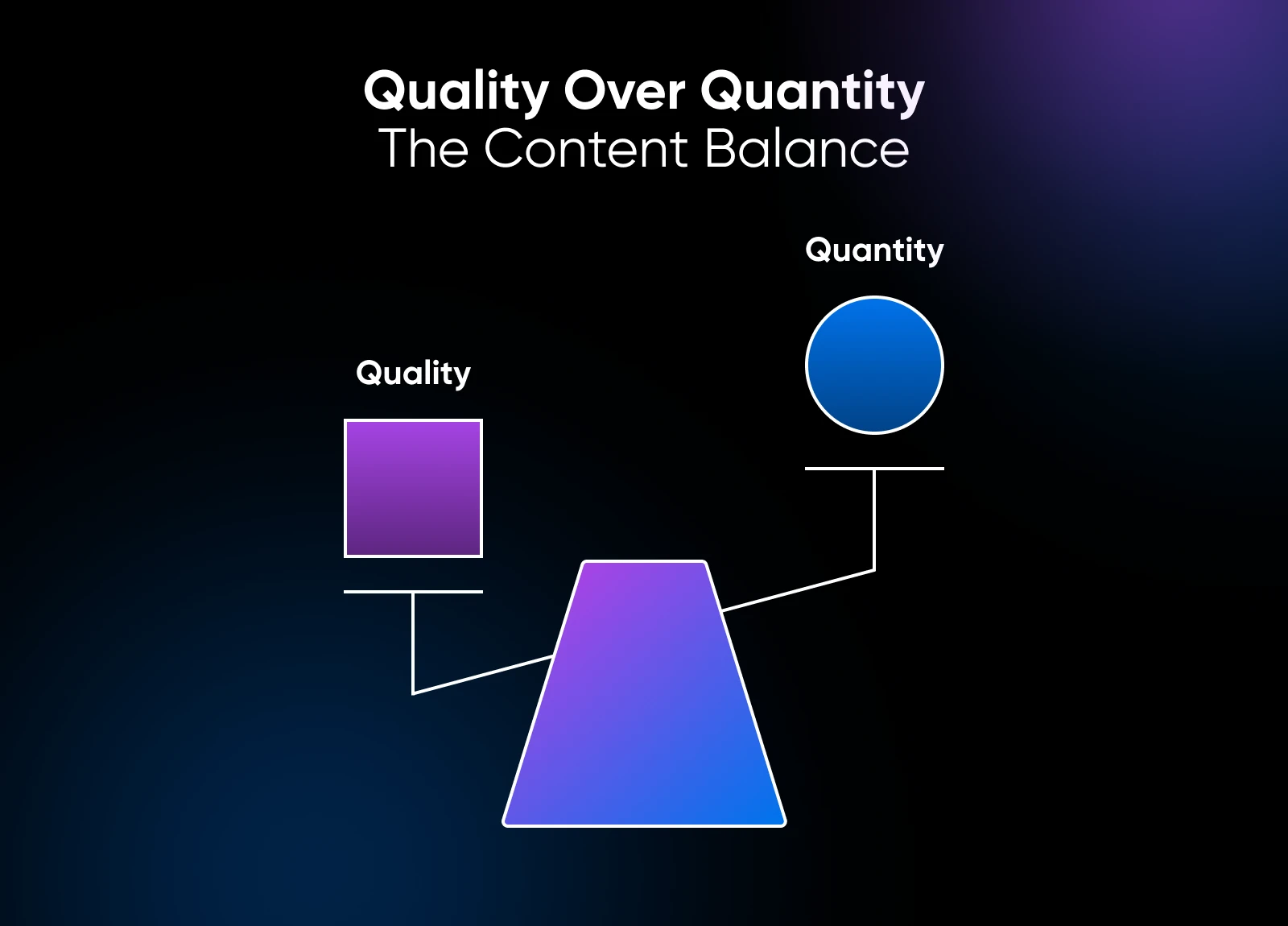
So when you’re planning content, aim to create the best possible resource on a topic. Later we’ll show you how to stretch that effort even further with content multiplication.
Keyword-Optimized Content Headers
Each page on your website should have just one single H1 heading, this is usually the title of the page. Subsections should use H2, H3, and so on to break content into logical chunks.
Well-written headings are descriptive and accurate. They make content easy to scan and help AI-powered search systems extract specific content from your page.
💡Pro tip: Always avoid cramming keywords into content unnaturally. Search engines are hip to that trick, and may actually penalize you for this and other “black hat” (AKA shady) activities.
Keywords in Title Tags
A title tag for a website page is the clickable headline that appears in search results. It both helps search engines understand what a page is about and influences whether users click.
For a powerful title tag, include your primary page keyword naturally, keep it under 60 characters, and keep it clear and engaging. Vague titles that don’t describe your pages aren’t doing you any favors in the modern SEO landscape.
How to Use Keywords in Meta Descriptions
A meta description is a short summary shown below the title tag in search results. While it’s not thought to affect rankings directly, it does help searchers decide if they’re going to visit your site or not (in other words, important!).
Meta descriptions should be 150 to 160 characters, include the most important keyword for that page while still being helpful and relevant, and have a clear call to action (CTA).
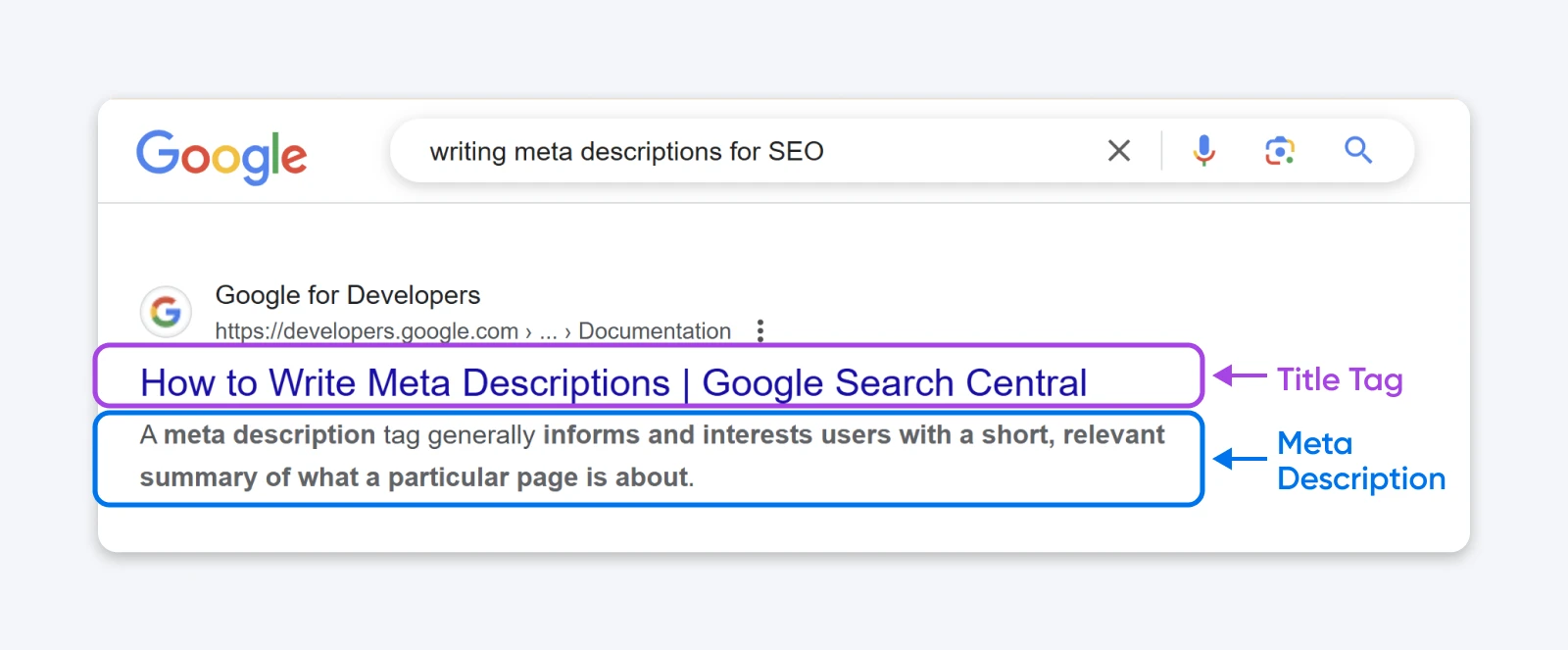
Page titles, title tags, and meta descriptions should all be easy to edit within your website builder. If you aren’t sure where to find them, try a quick Google search or contact whoever helped you set up your site originally.
Can I Multiply the Impact of My Existing Content?
Yes — in fact, you should take advantage of content multiplication: the practice of repurposing high-quality pieces of content for multiple formats and platforms.
Transforming a single blog post into a TikTok script, LinkedIn carousel, newsletter entry, or even fodder for the next heated discussion on your favorite message board (who doesn’t love a good Reddit fight debate?) is one of the best ways to stretch your SEO budget and make the most of your time.
All you need to pull this off is a really solid, long-form piece of content and a little time to adapt it to match how people consume information on all your key channels.
How Do I Make Sure My Website Is Performing at Max Speed?
Page load time is a confirmed factor that search engines use when ranking websites.
While there are possibly hundreds of ways to improve site performance, here are some impactful yet approachable areas to focus on first:
- Compress images (the larger the file, the slower the load).
- Choose a design, or theme if you’re on WordPress that’s lightweight and maximized for performance.
- Fix broken links, missing files, and other clutter that slow down people and search engines.
- Engage a web host that prioritizes fast load times and reliable performance.
Should I Check if My Site Is Mobile Friendly?
Since most searches now happen on mobile devices, website mobile optimization is foundational.

Google Lighthouse is a free tool you can use to audit your small business website performance, accessibility, SEO, and more on mobile.
Here’s how to access it:
- Open Google Chrome, and make sure you’re updated to the latest version.
- Open an incognito tab (Google recommends running this test while in incognito mode).
- Navigate to the website you want to check, right-click on the page, and select Inspect to open DevTools.
- Click on the “Lighthouse” tab at the top of the screen.
- Choose Mobile to evaluate mobile performance specifically. We recommend keeping all categories checked (“Performance,” “Accessibility,” etc.).
- Click Analyze page load. This process may take as long as a minute.
Now, just follow the recommendations provided in order of importance to improve your site’s mobile performance!
Can I Use Local SEO To Gain an Edge as a Small Business? (6 Strategies)
You can, and you should. Small businesses actually have several advantages against larger competitors when it comes to local SEO.
- A small business can be more agile than larger brands, tailoring content quickly based on real customer feedback and local trends.
- You also have the ability to develop deep, location-specific expertise and build authentic, one-on-one customer relationships.
- These advantages, in turn, make for better customer reviews and help build a cycle of return business.
But how do you get in front of your ideal local audience in the first place? Let’s cover the basics.
What Makes Local SEO Different From General SEO?
Local SEO is focused on using location- and intent-specific keywords and content so search engines understand where you are and deliver your website to the right consumers.
The general kind of website SEO that we discussed earlier is all about maximizing your website’s authority so it becomes highly visible in search results, which can be national or even global.
Local search results on Google also often include a Map Pack:a set of business listings at the top of the results page that align with the search terms and list business contact info, reviews, and more.
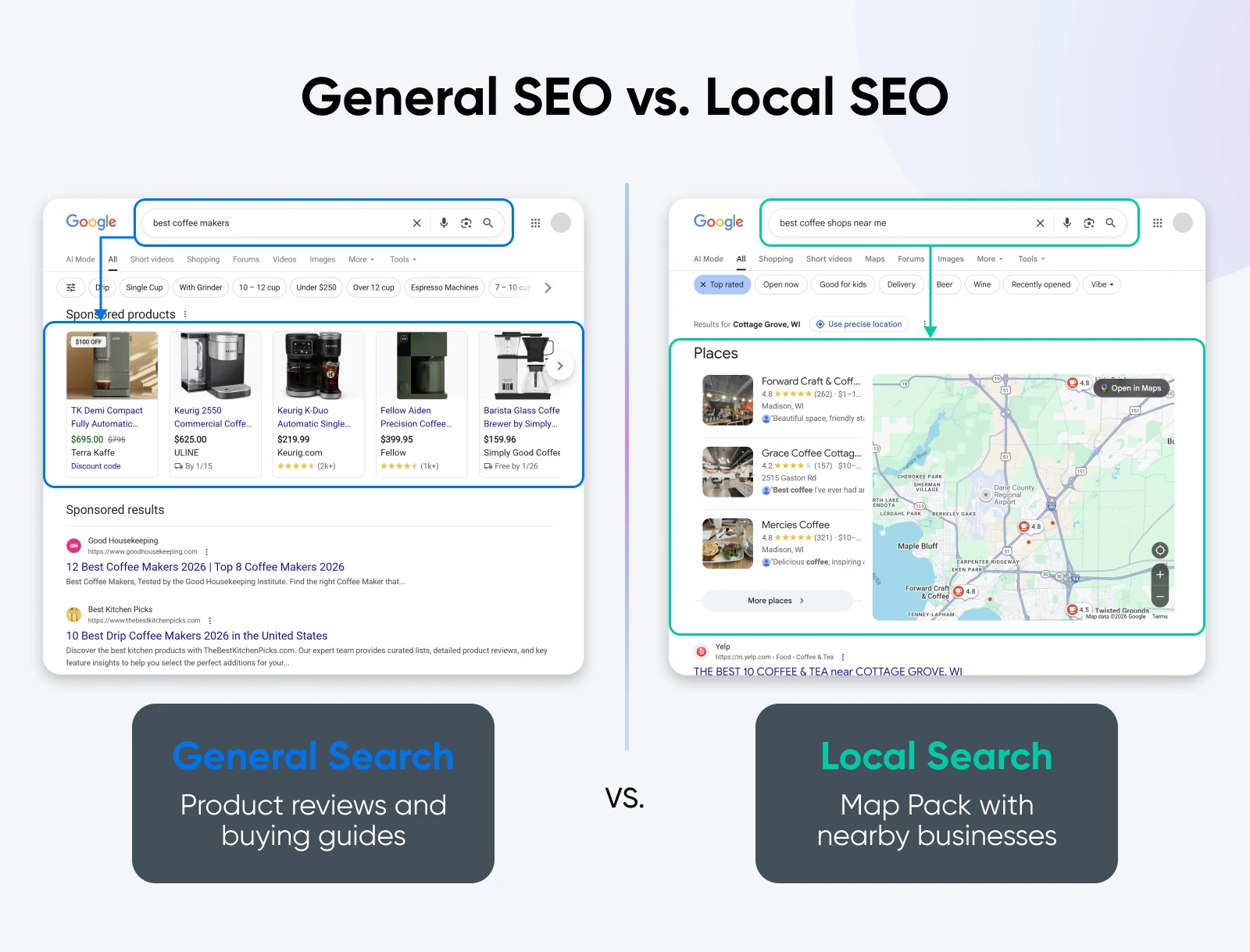
Optimizing your content and Google Business Profile (GBP) will help you rank well in local search results as well as this group of business listings, which is why we’ll explore how to accomplish both of those tasks in this section.
Should I Create Location-Specific Content?
Yes; businesses that optimize for location-based keywords are far more likely to appear in local search results, as they better align with the intent of the search.
So instead of optimizing for phrases like “best organic ice cream,” a phrase like “best organic ice cream Boulder, Colorado” will signal where you operate and help search engines serve your site to people who are much more likely to stop by.
Keeping this in mind, from here you’ll follow the same steps as you would in general SEO to research, narrow down, and apply your best local SEO phrases.
Here’s a quick refresher of the steps:
- Start with Google Keyword Planner (free) to find the search volume and demand of keyword phrases, layering in advanced paid tools if needed (such as Semrush or Ahrefs).
- Prioritize the phrases that best align with the actions you want people to take, then map them to the right pages (high-intent terms are best for conversion-focused service or product pages, informational for more passive, longer-play pages like your blog).
- Target long-tail keywords when possible, as more specific phrases are easier to rank for and convert better.
- Add keywords naturally to long-form content, headers, title tags, and meta descriptions. Avoid keyword stuffing.
Bonus Local Content Strategy: Backlinking
Backlinks (links from other websites to yours) are especially valuable in the world of local SEO. Links from other authoritative local sites tell search engines your business is relevant and trusted in your area.
- An easy way to get your link building efforts off the ground is to look for opportunities to trade website links with your local partners, suppliers, related businesses, organizations you’re a part of, etc.
- Even easier is to add your business website to local directories!
- You can also earn links by creating local-focused content (city guides, event roundups, interviews) and sponsoring local events and charities, which often include website mentions.
As you can tell, links take time to build to a tipping point, but they really can significantly strengthen local SEO.
How Can I Optimize My Google Business Profile for Maximum Visibility?
Your GBP is one of the most important tools in local SEO, and it’s free and relatively easy to set up.
Perhaps the most important thing about having an accurate GBP is that it shows up in Google Search and Google Maps, giving customers immediate access to your business details, so they can instantly choose to shop with you over a competitor.
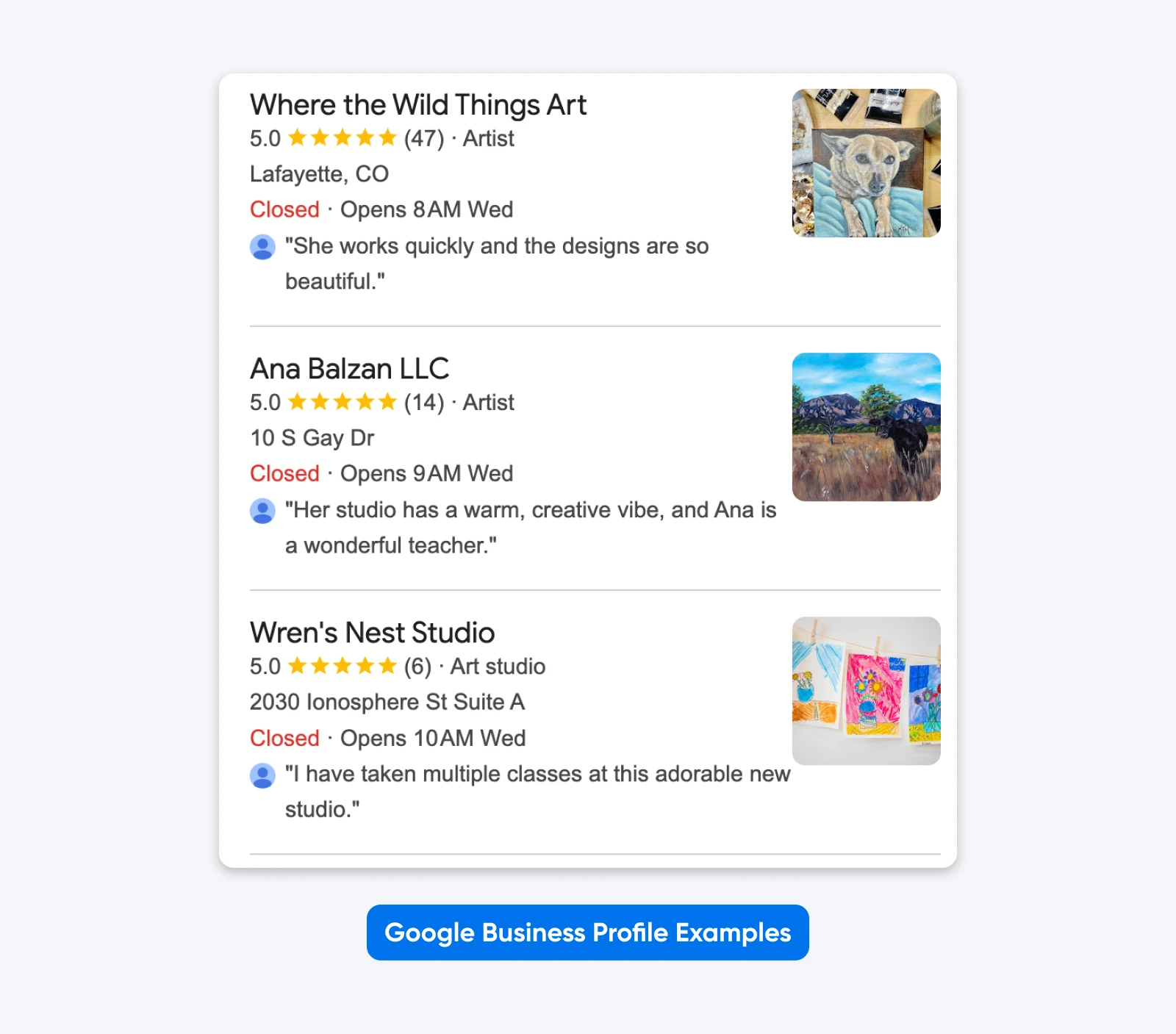
Once verifying you’re the rightful owner of your GBP, fill out every field you can: business name, address, phone number (if you have one), hours, website, services, photos, etc.
Use all available attributes and categories that apply to your business. This not only helps search engines categorize your business, but also improves click-through rates when customers see your profile in search results.
It doesn’t stop there! For the best outcome, continually keep your profile updated with posts about promotions, events, or new services, and respond to customer questions and reviews as needed.
What About Apple Maps for Local Business?
Google, Apple, and Bing Maps are where local searches start about 20% of the time!
While Google Maps is the front runner, 5% of Millennials do show a penchant for going to Apple Maps first in a local search, so it shouldn’t be ignored if local SEO is a massive element of your marketing strategy. In addition, optimizing for Apple Maps helps you reach users who rely on Apple’s default mapping, voice (Siri), and payment (Apple Wallet) tools when using an iPhone.
- Claim and manage your business listing on Apple Maps through Apple Business Connect.
- Complete your business details, categories, photos, and hours.
- Apple also allows in-listing announcements and offers, which may help increase engagement.
👉For more guidance, review Apple’s user guide to Business Connect.
Why Are Google Reviews Essential — and How Do I Keep Up?
Google has confirmed that the quantity and quality of Google Reviews impacts how well businesses do when it’s ranking results.
So, how do you get them?
First of all, providing really awesome offerings is the only way to ensure any review you get is going to be great.
That said, sometimes folks need a little nudge.
It’s OK to ask for reviews after positive interactions with customers. Send links via email to make it easy, offer incentives like freebies, and follow up a few times to help ensure you get a response.
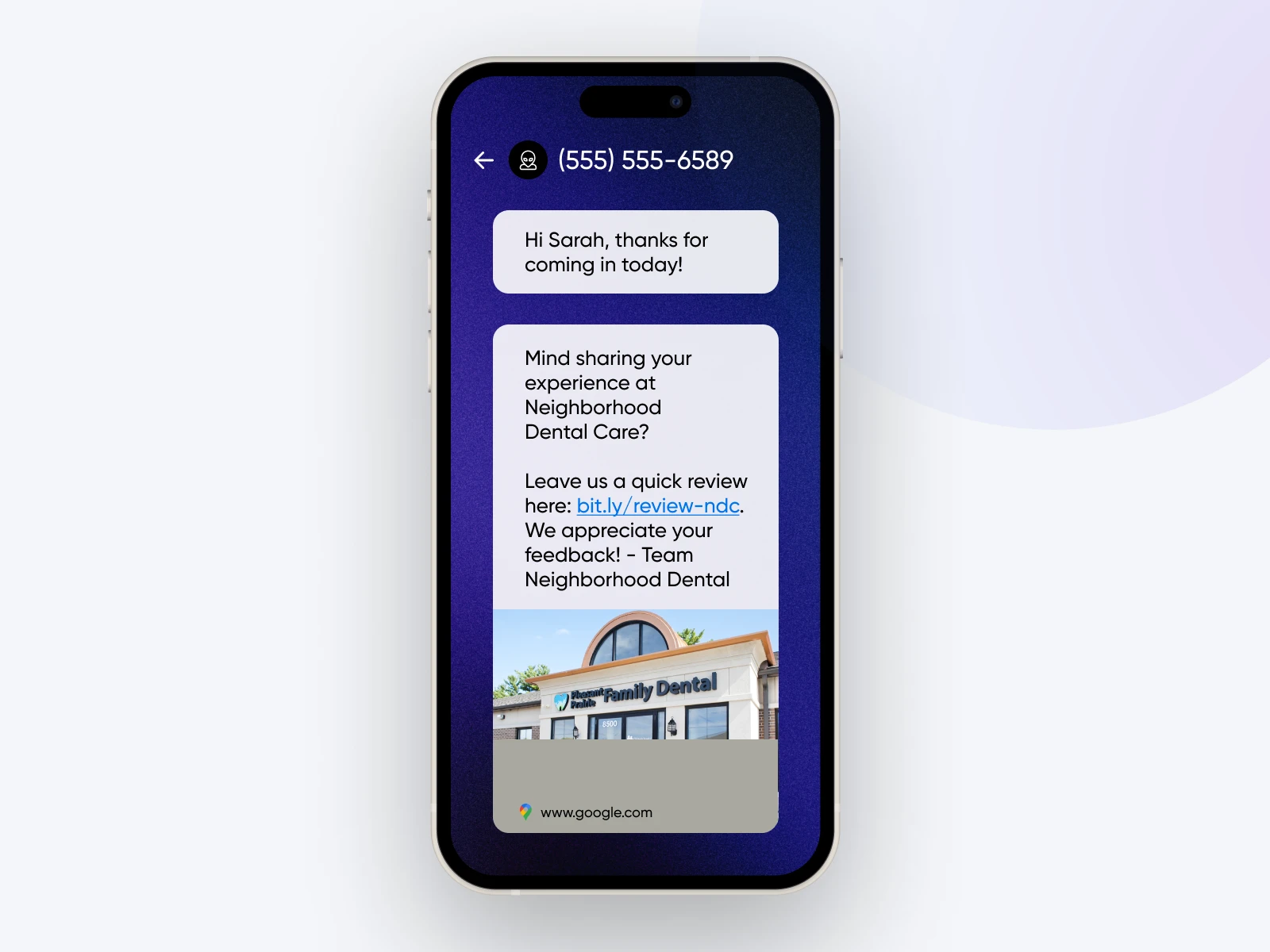
As you build up this base of Google Reviews, it’s critical to respond to reviews when they’re especially good or especially bad.
There are tools on the market, like BrightLocal and Moz Local, to help monitor and respond to reviews. Moz in particular helps small businesses manage their listings and reviews across search engines and directories, and shows local ranking performance.
How Can I Optimize Yelp Reviews (and Other Directories)?
If you want to cash in on all the eyeballs review sites/local directories are capturing, be sure to claim your listings, verify all your contact and service details, categorize your business accurately, and upload quality photos.
And always address negative reviews as needed.
Yelp and other review sites/local directories are chock full of content and get tons of traffic. In other words, they often rank highly in search results. Meaning that if you have time, managing the information and reviews they contain can be powerful for your business’s local SEO.
While we should note that Yelp discourages direct review requests, great service, paired with gentle reminders, should naturally lead to more reviews.
👉 For specifics on updating and upgrading your Yelp listing specifically, this guide from BrightLocal is a great starting point.
When Do Local Service Ads Make Sense?
Local Service Ads (LSAs) are paid ads on Google for local, service-based businesses. LSAs may be right for your business if you’re breaking into a new market and/or want to fill up your schedule quickly.
LSAs appear above both traditional ads and organic listings, making them pretty visible for your ideal audience. You only pay when someone contacts you, making them decently cost-effective leads.
Set up is pretty straightforward — After verifying your business through Google, you can determine your budget, lead types, and more.
According to one marketing expert, if you’ve already got a great Google Business Profile and set of reviews, the time to get into LSAs is as soon as possible — prices are going up!
Comment
byu/kingice350 from discussion
insweatystartup
Should I Upgrade My SEO Efforts To Reflect the Age of AI? (3 Tactics)
Instead of clicking through blue links, users increasingly interact with AI search results — or directly within AI chat tools like ChatGPT and Gemini. When traditional rankings alone no longer define visibility, you can’t ignore AI when it comes to SEO for small business websites in 2026.
Learn how to stay competitive with focused, practical tactics.
How Has AI Changed SEO for Small Businesses?
Even if your site ranks well, users may never click through if an AI summary or chatbot answers their question first.
In an age where click-through rates can drop even while traditional SEO rankings stay the same, rankings are starting to mean less on their own.
But don’t get discouraged just yet — SEO still matters. After all, pages that load in under two seconds are cited by AI up to 40% more often, content updated within the last 30 days is cited 3x more often than older content, and headings are critical to AI.
These are all components of traditional SEO.
For small businesses, traditional website SEO is still foundational, but it’s also time to add newer concepts like AI citations and GEO to the marketing mix.
How Do I Structure Content To Get Cited in AI Search Results?
AI citation readiness comes down to three areas: site crawlability, content structure, and consumer trust.
- First, your site must be easy for AI to crawl: This calls for fast load times, mobile-friendly design, and clean HTML. Tools like Google’s PageSpeed Insights or Lighthouse which we mentioned earlier can help identify issues. Adding basic schema markup is also a great way to make your site more consumable.
- Next, content should be structured for extraction: Use question-based headings followed by clear, direct answers. Lists, tables, and concise summaries help AI pull accurate information. Original insights and data are especially valuable because they can’t be copied from elsewhere.
- Finally, trust is paramount: Fresh content is cited more often, but so are pages with strong backlinks and clear authorship. Together, these signals support Google’s E-E-A-T (Experience, Expertise, Authoritativeness, and Trustworthiness) ranking system for content, increasing the chances your site is used as a source.
What Is GEO and How Do I Use It on My Site?
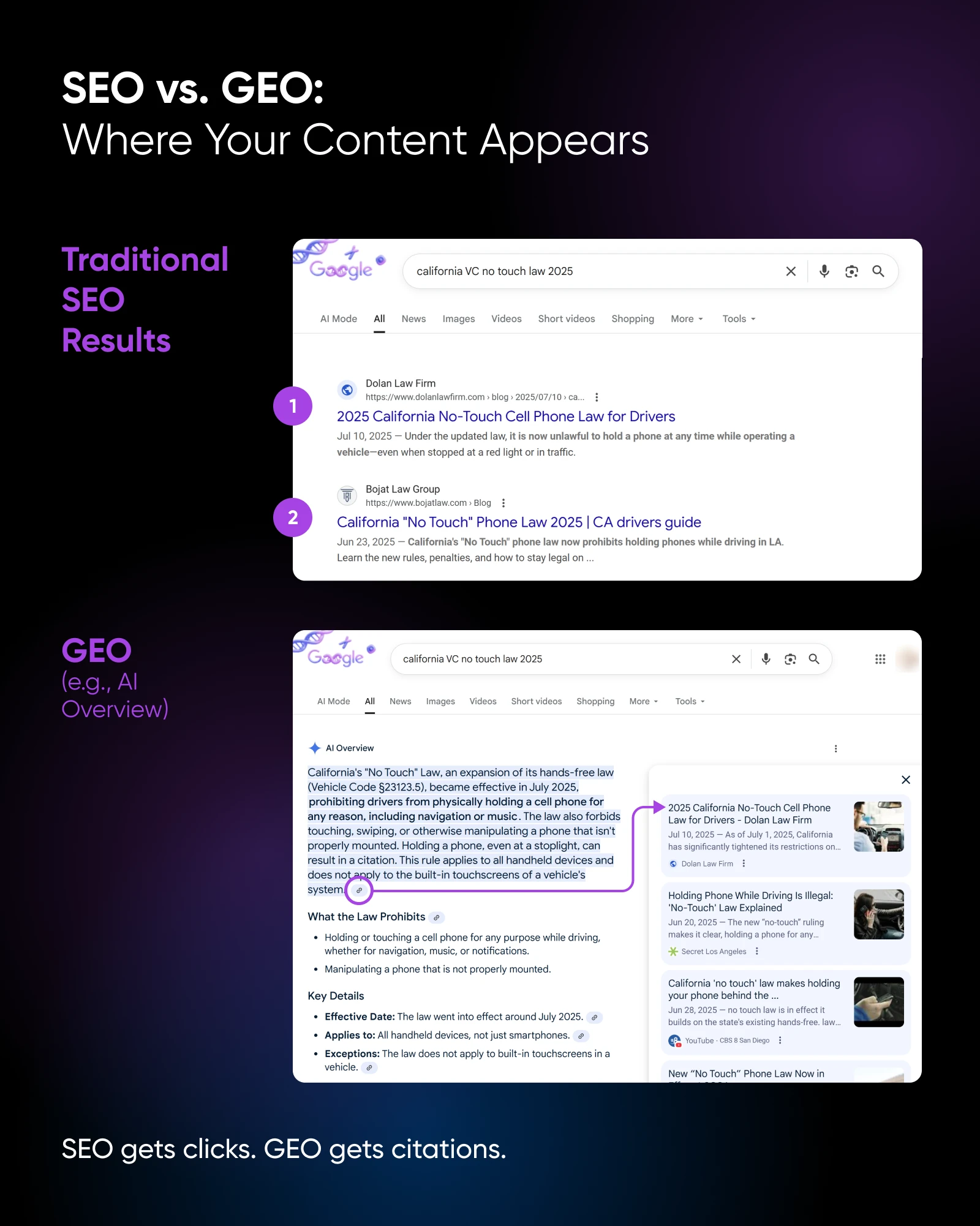
Generative engine optimization (GEO) is a counterpart to SEO, focusing on getting your content included in AI-generated answers.
GEO shifts emphasis from keywords alone to entities: your business, services, location, and expertise. And it’s your job to make these obvious through consistent site copy and schema markup.
Also, as we touched on just above, structuring content around common customer questions, keeping it current, and building authority through backlinks and brand mentions are all core to creating great GEO.
💡Pro tip: GEO is a pretty large and brand-new topic for most of our readers. To learn more about the concept and how to make the most of it for a small business website, check out our guide to Generative Engine Optimization (GEO) for Mere Mortals.
But if you just want to dive in head first right now, here are some manageable first steps:
- Clearly define who you are, what you do, and where you operate within your website copy.
- Use headings structured as questions and direct answers.
- Keep content fresh and accurate.
- Build mentions and links from reputable sites.
- Track how AI visibility is going with tools like Ahrefs Brand Radar or Gumshoe.ai.
Remember, GEO doesn’t replace SEO, it builds on it. It’s just that, now, you’re optimizing for visibility inside AI tools and answers, not just search results pages.
Win Long Term With This Blueprint to SEO for Your Small Business Website
SEO in 2026 isn’t about chasing algorithms or gaming rankings, it’s about building a website that’s genuinely useful, fast, and easy for both people and AI to understand. Small businesses that focus on modern SEO practices, local relevance, and AI fundamentals in 2026 will set themselves up to win long term.
The age of AI isn’t really a threat if you’re prepared — it may just be an opportunity to stand out while larger, or slower, competitors struggle to adapt.

Get More Visitors, Grow Your Business
The best-designed site is worthless if no one can find it. Leverage proven online marketing strategies and techniques to help more of your target audience find you.
See More8 Critical FAQs About SEO for Small Businesses Websites
1. Is SEO still worth it for small businesses in 2026?
Yes. SEO is still one of the most cost-effective ways to drive visibility, leads, and traffic. While AI-powered search has changed how results are delivered, strong SEO is now the foundation for both traditional rankings and AI-generated answers.
2. How long does SEO take to work for a small business?
Most small businesses see early improvements within three to six months, with more consistent results after six to twelve months. Local SEO efforts, like optimizing a Google Business Profile, often show results faster than national campaigns.
3. Do small businesses need to worry about AI search tools like ChatGPT?
Yes. AI tools increasingly answer questions directly instead of sending users to websites. Optimizing content for clarity, speed, freshness, and structure improves your chances of being cited or recommended by AI systems.
4. Is local SEO more important than traditional SEO for local small businesses?
In most cases, yes. If you serve a specific area, local SEO drives higher-intent traffic and real-world actions like calls, visits, and bookings. Traditional SEO still matters, but local optimization delivers faster, more measurable ROI.
5. Do I need to hire an SEO agency to compete?
No. Small businesses can make meaningful progress by focusing on fundamentals: keyword research, content quality, site speed, mobile friendliness, and local optimization.
Agencies can help scale efforts, but they aren’t required to see results.
6. What SEO metrics actually matter for small businesses?
Focus on organic traffic, search impressions, local visibility, engagement metrics, site speed, and reviews.
Rankings alone don’t tell the full story anymore; visibility and usefulness matter more.
7. Is GEO replacing SEO?
No. GEO builds on SEO — traditional SEO ensures your site is discoverable and trustworthy, while GEO increases the chances your content is used inside AI-generated answers.
8. What’s the biggest SEO mistake small businesses make?
Trying to do everything at once.
The most successful small businesses focus on a few high-impact actions — local SEO, valuable content, site speed, etc. — then build from there.