Oh, Google Drive.
Keeper of lost documents and forgotten drafts.
Charger of $14 per person per month.
What fresh new horrors await inside thine hallowed (and hollow) folders?
Wait… what’s that?
A spreadsheet called “Untitled spreadsheet (7)” that contains, against all odds, the company’s actual Q4 budget?
Hmm. Okay, maybe it’s time to clean things up.
Next time you find yourself eyeing that Google Drive bill you’ve been ignoring, here’s a better idea.
Cue: Self-hosted Nextcloud.
Nextcloud is free software that runs the same kind of file-sync-and-share format on a server you own, with no curator, no ad-relevance scanning, and no per-seat charge.
Here’s how to get it running, what it actually costs, and whether the tradeoff is worth it for your team.
Why Run Nextcloud Instead of Using Google Drive?
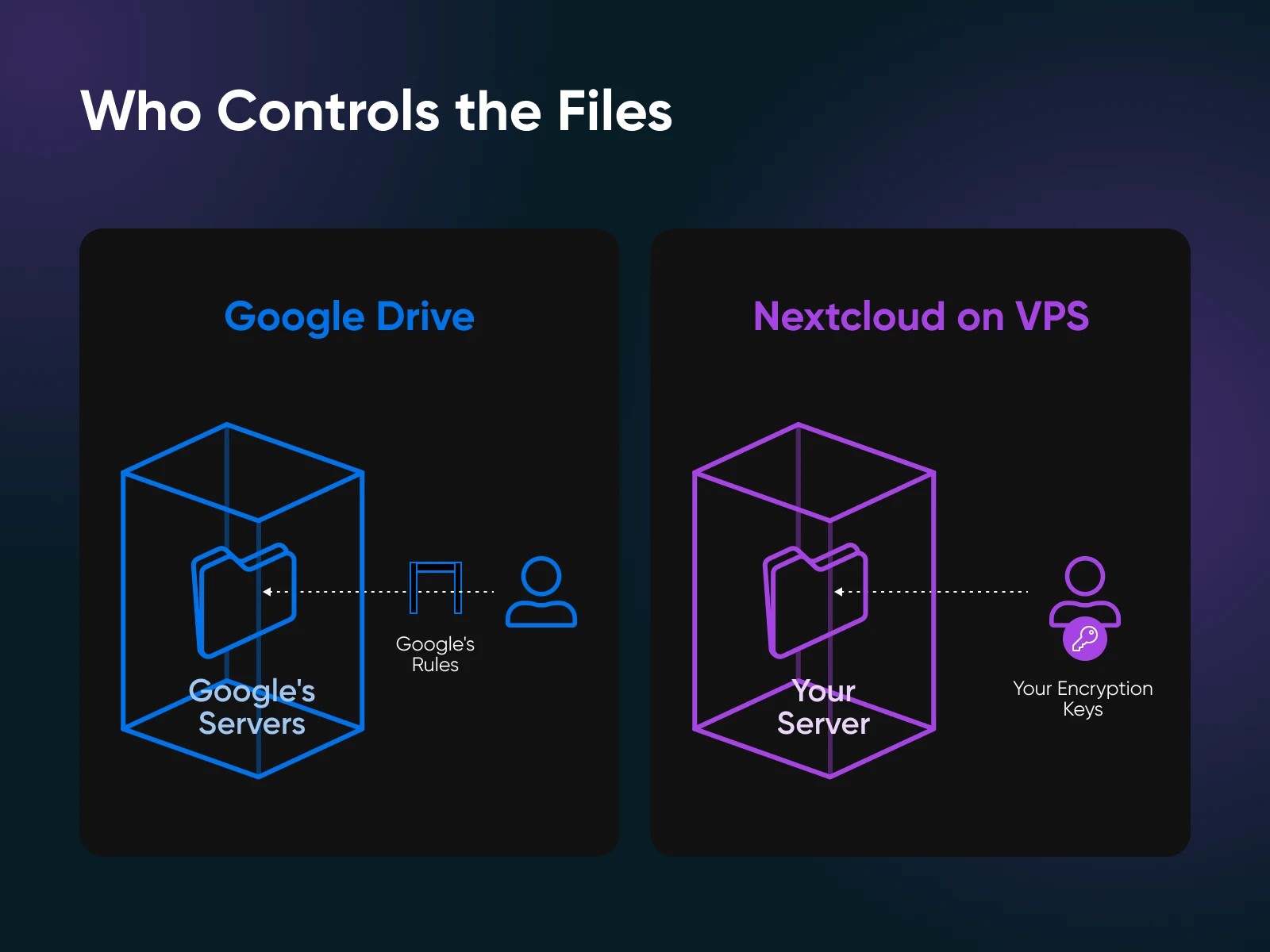
The short answer: your files, your server, your rules.
Google Drive stores your data on its own infrastructure and scans it against policy compliance. If served with a legal warrant, Google hands your files over, often without notifying you first.
But self-hosted Nextcloud stores your files on a server you control, in whatever jurisdiction you choose, with the encryption keys in your hands.
For a lot of small teams, that’s reason enough. For those handling regulated data — medical records, legal files, anything touching GDPR or HIPAA — it’s less of a preference and more of a requirement.
The other reason is cost, which we’ll get into more in the next section. But the short version is that Google Workspace charges per user per month. Nextcloud doesn’t.
Where Google still wins: real-time co-authoring in Google Docs is more polished than Nextcloud’s Office integrations, and Google Meet beats Nextcloud Talk on video call quality at scale. If those are your team’s core workloads, that’s worth factoring in.
But if you mostly need file sync, shared calendars, contacts, and chat, Nextcloud covers all of it, on infrastructure you own.
Can You Run Nextcloud on a VPS?
Yes, and it’s the most common way people do it.
A virtual private server (VPS) lands in the useful middle ground in deployment options.
It’s more reliable than a NAS device in your basement (which depends on residential power and your willingness to debug a stuck disk at 11 p.m.). It’s cheaper than enterprise-managed Nextcloud, which starts at four figures a year. And it’s more private than Google Workspace, since you control the keys and you pick the legal jurisdiction.
That said, a VPS isn’t always the right fit. Above roughly 50 active users, a dedicated server makes more sense. If you only need access on the home network and never sync to phones outside it, NAS is the simpler answer.
| Deployment | Best For | Trade-Off |
|---|---|---|
| VPS | 1–50 users, remote sync, predictable cost | You manage the OS and updates |
| NAS at home | LAN-only access, household photo libraries | Residential uptime, no static IP |
| Dedicated server | 50+ active users, heavy Talk/Office use | Multi-hundred-dollar monthly cost |
| Managed Nextcloud | Teams that want zero ops | Per-user pricing eats the savings |
For most readers comparing self-hosting options, a VPS plus the official All-in-One Docker image is the right answer. And that’s what we cover in the rest of this guide.
What Does It Cost to Self-Host Nextcloud Compared to Google Workspace?
Nextcloud’s software is free. You pay only for the server it runs on, and that changes the math pretty quickly once you have more than a handful of users.
Google Workspace charges per user per month. Most teams land on the Business Standard plan at $14 per user per month on an annual commitment, which includes 2 TB of pooled storage per license and most of the collaboration features. Self-hosted Nextcloud runs on a flat fee from a VPS provider regardless of how many users you add.
Here’s how that typically plays out:
| Team Size | Workspace Standard ($14/user/mo) | Self-Hosted Nextcloud (flat VPS fee) |
|---|---|---|
| 1–2 users | $168–336/year | ~$84–144/year (Stack 4 baseline) |
| 5 users | $840/year | ~$360/year (Stack 8) |
| 10 users | $1,680/year | ~$360/year |
| 20 users | $3,360/year | ~$700/year (Stack 16 territory) |
| 50 users | $8,400/year | ~$700/year |
Five Workspace seats at $14 a month run $840 a year. A Stack 8 VPS runs roughly $360. The difference at 20 users is over $2,500 — enough for a round-trip flight to somewhere with a beach, or about six months of decent coffee.
Two important caveats before you get too excited:
- Nextcloud isn’t truly free if you count your time. Budget two to four hours a month for updates and monitoring. At any reasonable hourly rate, that erases the cost advantage at one or two users.
- The comparison only works if Nextcloud meets your team’s needs. For most file sync, calendar, contacts, and chat workloads, it does. But it’s not a perfect Google Workspace replacement, so don’t pretend the apps are identical.
What Server Specs Does Nextcloud Need?
The honest minimum for a real team is 8 GB of RAM. You can get Nextcloud running on 2 GB, but that’s a testing environment, not a production one.
The official numbers from Nextcloud’s system requirements are conservative: 128 MB minimum and 512 MB recommended per process. The Nextcloud All-in-One README gives three tiers for the Docker stack:
- Bare minimum: 2 GB RAM, dual-core CPU, 40 GB storage to bring AIO up with optional containers enabled.
- Recommended: 4 GB RAM for the base stack without optional services. Add Nextcloud Office (Collabora) or Talk, and you’ll want 6–8 GB — Collabora alone idles at 1–2 GB before anyone opens a document.
- Everything enabled: 5 GB RAM and a quad-core CPU is the AIO floor when Office, Talk, ClamAV, Whiteboard, and the rest are all turned on — but in practice, expect to need 8 GB or more once real users are on the box. The Nextcloud team suggests at least 1 GB of headroom over whichever minimum applies.
Those are floors, not targets. Here’s how it lands once you put real users on the box.
| Use Case | Practical RAM | DreamHost Plan |
|---|---|---|
| 1–2 users, files only | 4 GB | Stack 4 |
| 3–10 users, files + Office | 8 GB | Stack 8 (recommended) |
| 10–50 users, Talk video at scale | 16 GB+ | Stack 16 |
Storage matters just as much as RAM once you have more than one user. Plan for 5–20 GB per active user — more if people are storing photos or Talk recordings, less if it’s document only. Whatever you estimate, double it for the first six months. Nextcloud’s versioning and deleted-file retention quietly consume more disk than you’d expect.
Disk speed also factors in. Nextcloud is, at its heart, a file-sync app. Every sync client opens hundreds of small connections to read and write metadata, and NVMe runs roughly 5 to 10 times faster than a spinning disk on those operations. That’s the difference between Nextcloud feeling snappy and Nextcloud feeling like a slightly haunted mid-2000s file share.
DreamHost, a web hosting provider, ships NVMe storage as standard across every Self-Managed VPS tier, which is why Stack 8 is our recommended baseline.
How Do You Install Nextcloud on a VPS?
There are three ways to install Nextcloud on a VPS: the official All-in-One Docker image, manual Docker Compose, or a bare-metal LAMP stack. For most people, the answer is the first one. The vast majority of self-hosters should start with the All-in-One Docker image and never look back.
Each path assumes a fresh Ubuntu 24.04 LTS VPS with root access and a domain pointed at it.
The Fastest Path: Nextcloud All-in-One Docker
Nextcloud All-in-One is the official install path, maintained by the Nextcloud team. It runs every service — server, database, Redis, Office, Talk, backup, and reverse proxy — as managed containers, coordinated by a single master container that handles upgrades, backups, and SSL automatically.
The whole install is one command:
sudo docker run -d
--init
--name nextcloud-aio-mastercontainer
--restart always
--publish 80:80
--publish 8080:8080
--publish 8443:8443
--volume nextcloud_aio_mastercontainer:/mnt/docker-aio-config
--volume /var/run/docker.sock:/var/run/docker.sock:ro
ghcr.io/nextcloud-releases/all-in-one:latest
After that, a web setup wizard walks you through the rest at port 8080. Setup takes about an hour for someone comfortable on a Linux command line.
For full instructions, check out the Nextcloud AIO README.
The Flexible Path: Docker Compose
Docker Compose is the right call if you already run other containerized services on the host and want Nextcloud to fit alongside them. You write a docker-compose.yml listing every service (Nextcloud, MariaDB, Redis, and optionally Collabora or OnlyOffice), and then bring the stack up with:
docker compose up -dThe trade-off is that you maintain version pins, networking, and the reverse proxy yourself. If you’re not sure why you’d want Compose over All-in-One, you don’t. Sample Compose files live in the Docker community repository.
The Traditional Path: Apache + MariaDB + PHP
Bare-metal LAMP is the original install path. Apache or nginx, MariaDB, PHP, and the Nextcloud tarball, no containers. It’s heavier on maintenance because every component upgrades on its own schedule. Pick this option only if you specifically need to avoid Docker.
Start with:
sudo apt install apache2 mariadb-server libapache2-mod-php php-
{cli,gd,mysql,curl,xml,zip,intl,mbstring,bz2,imagick,bcmath,gmp}
From there, create the database, drop the Nextcloud tarball into /var/www/, and run the web installer. The full procedure lives in the Nextcloud installation manual. (All-in-One exists for a reason.)
How Do You Keep a Self-Hosted Nextcloud Running?
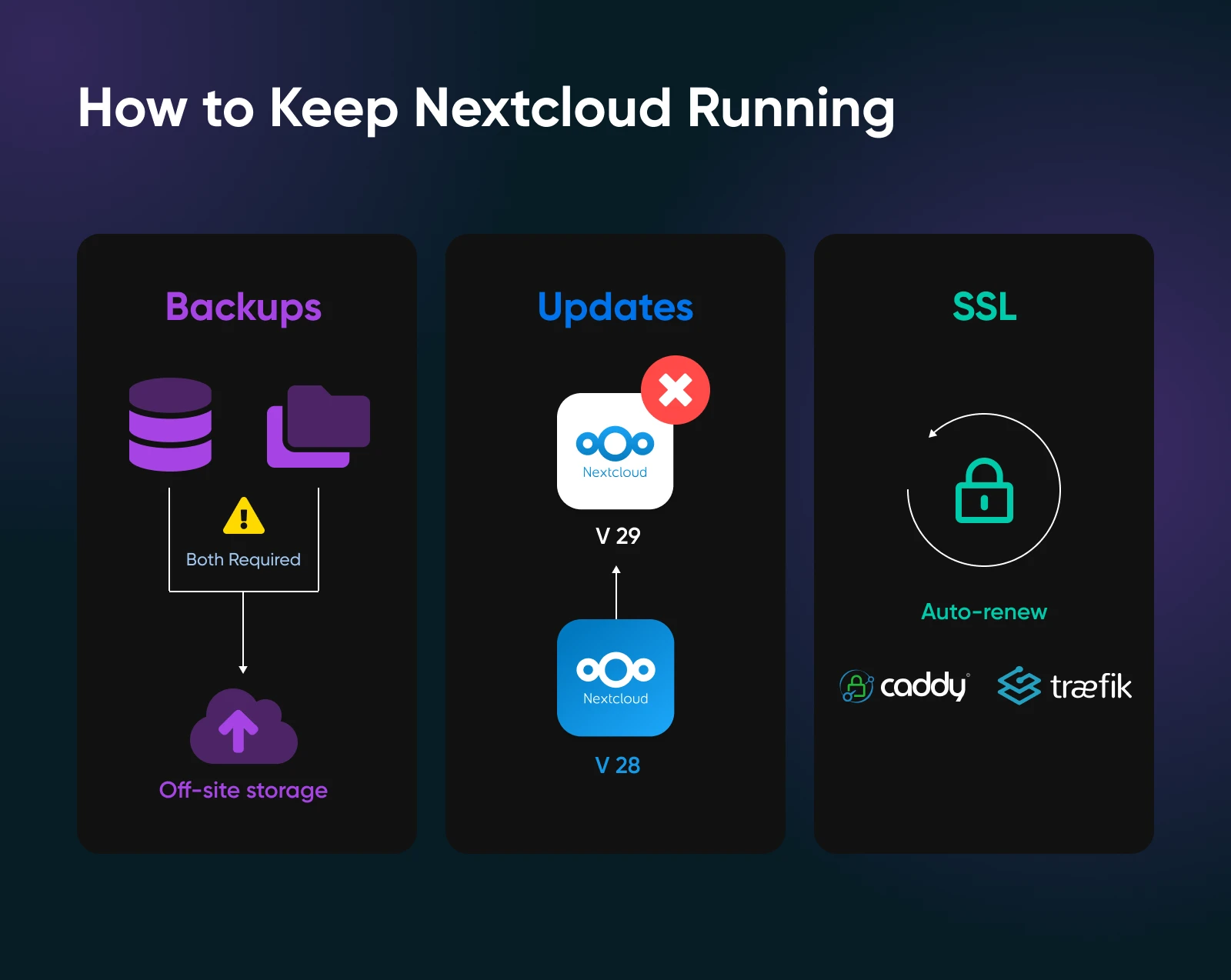
Three jobs you can’t skip are backups, version updates, and SSL certificate renewal.
Everything else is mostly keeping an eye on disk usage and occasionally killing a stuck cron job.
Backups need to capture both the data directory and the database. Restoring one without the other gives you a directory full of files that Nextcloud can’t index.
All-in-One has a built-in backup container that handles this for you. For a manual install, you run rsync for files and mysqldump or pg_dump for the database in a cron job, then ship the output off the VPS. DreamObjects is one S3-compatible target if you’d rather keep the backup with the same provider.
Updates are where most Nextcloud installations break. Major version upgrades — like Hub 25 Autumn to Hub 26 Winter — can leave third-party apps incompatible for days while maintainers ship new versions.
All-in-One handles this more gracefully than manual installs because it pins compatible versions across containers and waits for the ecosystem to catch up. The Nextcloud forums are full of bare-metal installs broken by a version mismatch.
SSL renewal is mostly automatic on All-in-One or any reverse proxy with Let’s Encrypt. Caddy, Traefik, and Nginx Proxy Manager all renew on their own. Bare-metal LAMP needs certbot set up correctly the first time, after which it usually behaves.
One other thing to remember is that disk space is the boring villain of self-hosting. Nextcloud’s defaults retain deleted files for 30 days and keep version history on every edit. Talk recordings, uploaded photos, and shared file caches all eat space.
It’s not uncommon for an admin panel to sit at 99% disk for two weeks before anyone notices sync has quietly stopped working. Set retention policies in the admin panel and configure alerts before you hit 90%, not after.
Is It Time to Take the Leap?
At the end of the day, Google Drive is a pretty expensive way to lug around every file you’ve ever touched over the last 20 years.
And when you factor in the costs of control and privacy, the case for self-hosting gets harder to ignore.
Nextcloud takes about an hour to install and a few hours a year to maintain, with zero per-seat fees. The trade-off is that you become the curator. You decide what stays, what gets deleted, what gets backed up, and which jurisdiction the data lives in.
For a lot of teams, that’s not a burden. That’s the whole point.

Own Your Entire Stack. Apps, AI, Databases, and More.
Keep every credential and conversation on a server you control, with NVMe speed and unmetered bandwidth built in.
Explore VPS Hosting PlansFrequently Asked Questions About Nextcloud on a VPS
Can you run Nextcloud on a $5/month VPS?
You can run Nextcloud on a $5 VPS, but the experience is rough above one or two users. A $5 plan typically gives you 1 GB of RAM and a single CPU core, which hits swap quickly under any sync load. The Nextcloud All-in-One image needs 2 GB of RAM as a floor, so the cheapest tier locks you out of the recommended install path entirely. For a household with two devices, 4 GB is the honest minimum, and a DreamHost Stack 4 plan covers that comfortably.
How much storage does Nextcloud need per user?
Plan for 5 to 20 GB of storage per active Nextcloud user. Document-only use stays at the low end. Photos and Talk recordings push the high end up fast. A household with two phones syncing photo libraries can fill 100 GB in a year.
Double your initial guess for the first six months, since Nextcloud’s default versioning and 30-day deleted-file retention quietly consume disk you didn’t budget for.
Is Nextcloud free?
Yes, Nextcloud Server is free and open-source under the AGPLv3 license. Nextcloud GmbH, the company behind the project, sells Enterprise support contracts to large organizations, but everything an individual or small team needs is free: the server software, the All-in-One image, the desktop and mobile clients, and every official app. No per-user fee, no feature paywall, no time-limited trial.
Do you need Docker to run Nextcloud?
No, you don’t need Docker to run Nextcloud, but for most self-hosters, Docker (specifically the All-in-One image) is the easiest install path. Bare-metal LAMP works and is officially supported. Docker is just less fragile to maintain because the All-in-One master container pins compatible versions across the database, PHP runtime, Redis, and the Nextcloud server itself.
Is a VPS or a NAS better for Nextcloud?
A VPS is better when you need reliable remote access, and a NAS is better when files only need to live on the home network. NAS uptime depends on residential power, residential internet, and your willingness to debug a stuck disk at any hour. A VPS gives you a static IP, a real SLA, and a server in a data center with redundant power. The trade-off is a monthly fee instead of a one-time hardware purchase.
DreamHost’s Self-Managed VPS Stack 8 is a common choice for households or small teams that have outgrown a NAS.
How do you back up a self-hosted Nextcloud?
Back up the data directory and the database together. Both are required to restore a working Nextcloud. The data directory holds the files, while the database holds the user accounts, share links, version history, and metadata.
The standard approach is rsync for files and mysqldump or pg_dump for the database, written into a nightly cron job that ships both off the VPS to S3-compatible storage like DreamObjects or Backblaze B2. Nextcloud All-in-One has a built-in backup container that handles this on a fresh install.
