WordPress 7.1 is scheduled for release on August 19, 2026 — the final day of WordCamp US in Phoenix.
DreamHost hosts over 1.5 million websites worldwide, many of them on WordPress hosting — so when a major release is on the horizon, we dig in early. Here’s what’s worth your attention in 7.1.
WordPress 7.0 “Armstrong” was a landmark release: the first provider-agnostic AI Client and a top-to-bottom admin redesign, building on the Notes async-collaboration feature that arrived in WordPress 6.9. But a few headline items didn’t make the cut — most notably real-time collaboration and client-side media processing.
WordPress 7.1 is the second major release of 2026, and it’s a “finish what we started” release: ship the styling and media features that got punted from 7.0, polish the admin experience, and add two genuinely new blocks. The bigger AI and collaboration follow-ups slipped again — more on that below.
Below is what’s confirmed in WordPress 7.1, what got cut this cycle, and whether you should update on day one.
A note on timing: This preview originally tracked a moving target, but the target has stopped moving. Feature freeze hit with Beta 1 on July 15, and Release Candidate 1 shipped August 5 alongside the official Field Guide. From here to release day it’s bug fixes only — what follows is confirmed, not predicted.
WordPress 7.1 release date and timeline
WordPress 7.1 is scheduled for release on August 19, 2026, the final day of WordCamp US in Phoenix. The cycle picked up an extra beta along the way (folded into the unplanned 7.0.2 release), so the official schedule now runs through four betas and three release candidates:
| Date | Milestone |
| March 27, 2026 | Alpha begins; trunk opens |
| July 15, 2026 | Beta 1 — feature freeze, testing starts |
| July 17, 2026 | Beta 2 (released early alongside 7.0.2) |
| July 22, 2026 | Beta 3 |
| July 29, 2026 | Beta 4 |
| August 5, 2026 | Release Candidate 1; Field Guide published |
| August 6, 2026 | Release Candidate 2 |
| August 12, 2026 | Release Candidate 3 |
| August 18, 2026 | Dry run + 24-hour code freeze |
| August 19, 2026 | Official release |
Release Squad: Anne McCarthy (Release Lead), with Aki Hamano and Joe Dolson as Tech Leads.
WordPress 7.1 features: what’s confirmed
Everything here is confirmed for the release, checked against the WordPress 7.1 Field Guide and the Release Candidate announcements.
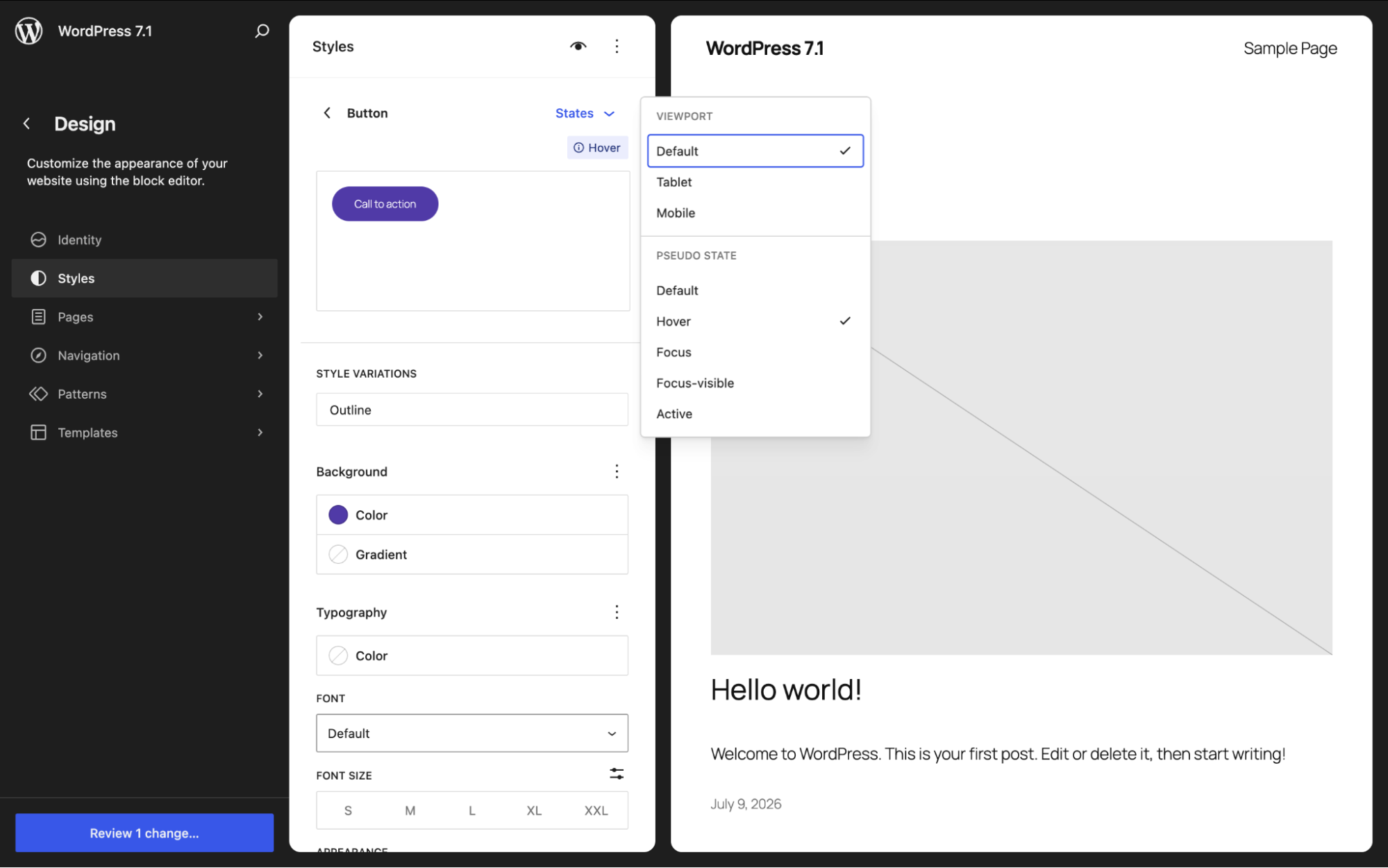
1. Interactive States Styling (hover, focus, active): No CSS required
This is the feature to lead with. WordPress 7.1 introduces pseudo-state styling for both Global Styles and individual blocks. You can style how a block looks on :hover, :focus, and :active (like a button that changes color when you mouse over it, or a link that shifts on focus) all from the interface, without touching CSS.
What this means for you: Interactive design that used to require custom CSS (or a page builder) now lives in the native editor. A single block can carry its own hover styles without changing every other instance of that block on the site.
| Heads up: Not every block exposes these state controls at the block level yet — coverage is still expanding block by block, so preview the blocks you rely on before building a design around them. |
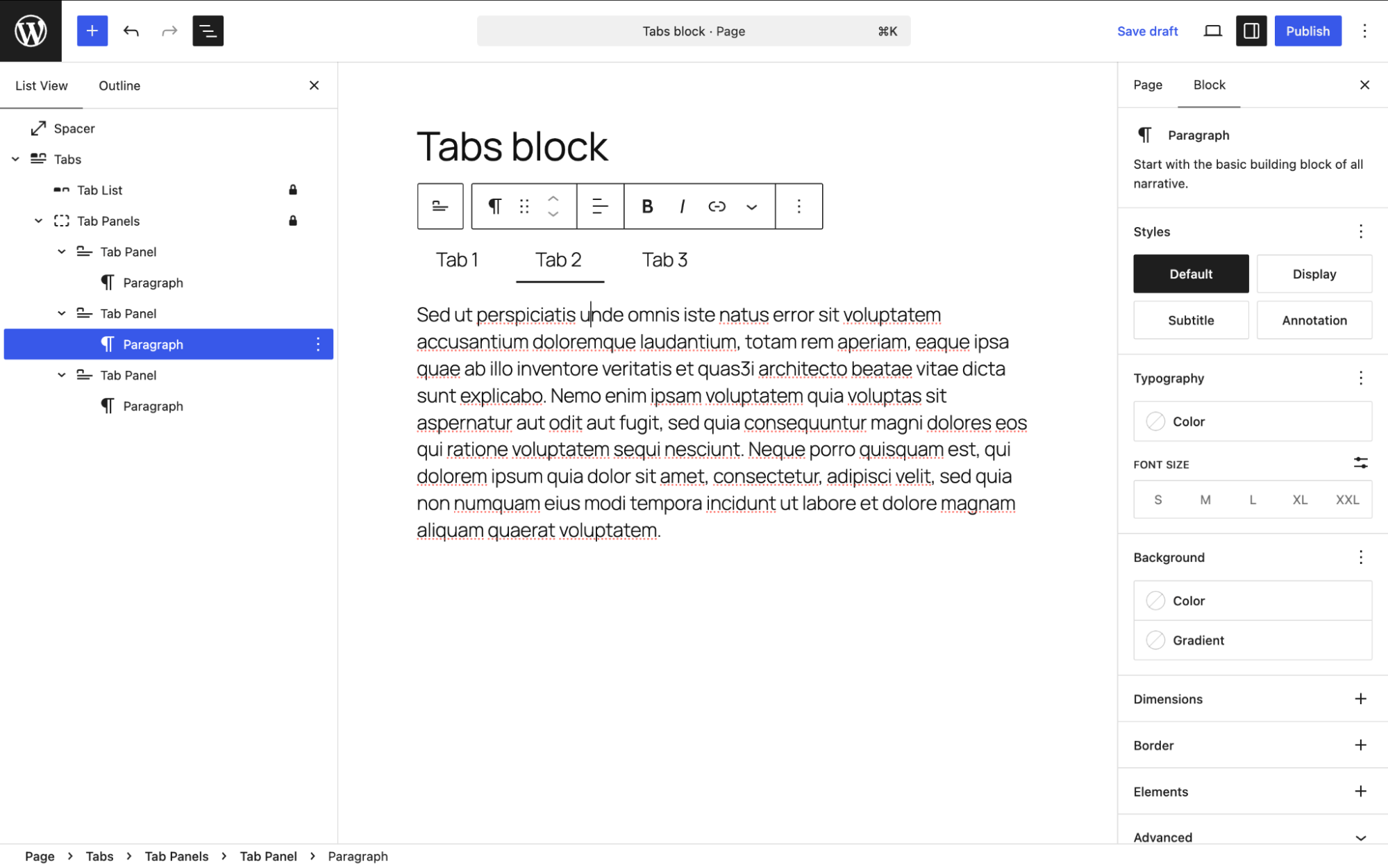
2. Two new core blocks: Tabs and Playlist
- Tabs block — the most mature of the pair. It’s been through several rounds of refactoring in recent Gutenberg releases, with a Tabs Menu and refined inner-block structure. Long-requested; finally here.
- Playlist block — an audio playlist block, with waveform visualization.
The planned Table of Contents block didn’t make it; in development since 2022, it was punted to WordPress 7.2 at Beta 1.
What this means for you: Native tabs and audio playlists without a plugin. Two fewer reasons to reach for a page builder.
3. Responsive and Inherited Styling
Alongside interactive states, 7.1 is pushing on responsive styling (adjusting styles per screen size), plus better visibility into inherited styles (seeing where a block’s styling actually comes from) and customizable viewport breakpoints.
4. AI Client and Connectors: a smaller step than planned
7.0 shipped the AI foundation, but the planned second iteration mostly didn’t happen: most of the proposed AI features were punted from 7.1. What did land:
- Connectors gains username and app-password authentication, moving beyond plain API keys.
5. AI Guidelines: declined for 7.1
A proposed Guidelines system (a persistent, structured place to define editorial rules, content standards, and brand voice for both human editors and AI tools) was headed for 7.1, but the merge proposal (built on a new wp_knowledge custom post type) was declined by project leadership on July 14, 2026, five days before Beta 1, on the grounds that AI features need real-world adoption before landing in core.
What this means for you: Guidelines lives on as a Gutenberg plugin experiment and may be re-proposed for a future release. You won’t find it in 7.1.
6. Admin and Site Editor Polish
The 7.1 admin polish is about reducing the number of times you think “why doesn’t this just work?” Four changes worth knowing:
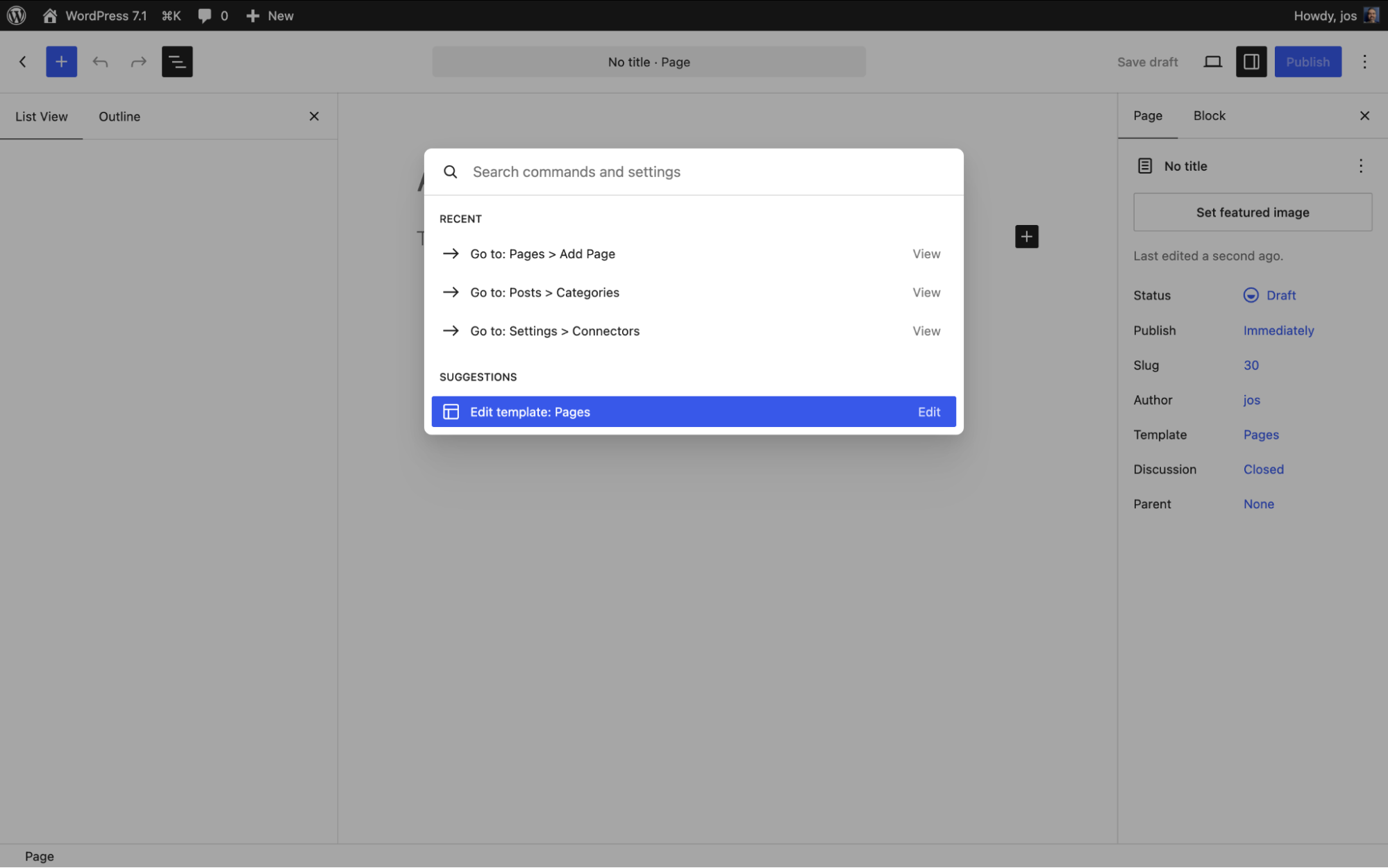
- Reorganized command palette (Cmd/Ctrl+K) — with recent and suggested commands.
- Persistent admin bar across editors — an “omnibar.”
- Shareable Revisions — share a link to a specific revision for faster editorial back-and-forth.
- Design-system theming groundwork — you won’t notice much yet, but it’s the plumbing that will power admin color schemes in the Site Editor.
7. Async Collaboration: Notes Leveled Up
Building on the Notes feature introduced in WordPress 6.9, 7.1 adds rich text formatting (bold, italic, code, links, and emoji), @mentions with email notifications, inline notes on text selections, and multiple threads per block — asynchronous feedback that’s much closer to what you’d recognize from Google Docs. The suggestion mode and emoji reactions floated on the roadmap didn’t make it.
8. Under the Hood (for Developers)
- Abilities API expansion.
- Icons API — register custom icons and icon collections in core.
- Block Bindings for list items and inner blocks.
- Enforced iframed editor for block-based themes — custom blocks still on Block API v2 or lower need updating to v3.
- Speculative loading refinements when object/page caching is detected, plus defaults configurable via environment variables and constants.
Two developer items were pulled late in the cycle: the React 19 upgrade was deferred beyond 7.1 (the release stays on React 18.3, with React 19 continuing as a Gutenberg plugin experiment), and Unicode support in email addresses was dropped at Beta 3 over security concerns.
Deferred from 7.0: one made it, one didn’t
Two headline items were cut from 7.0. Their fates split in 7.1.
Client-side media processing: confirmed
Punted from 7.0, confirmed in 7.1. Images are processed in the browser before upload — HEIC and Ultra HDR conversion, GIF-to-video, and more resilient uploads with a progress indicator and automatic retries if your connection drops. A new media editor modal replaces the old inline cropper, bringing free-form cropping, rotation, and metadata editing together in one workflow.
Real-time collaboration: punted again
The big one didn’t make it. Real-time (Google-Docs-style simultaneous) editing was pulled from 7.0 over stability concerns, and in July 2026 the release lead confirmed it was punted from 7.1 entirely, including the underlying primitives. The Field Guide lists it under “What changes didn’t make the 7.1 release.” The async Notes improvements above are what collaboration looks like in 7.1; live co-editing waits for a future release.
What didn’t make it into WordPress 7.1
The honest cut list, straight from the Field Guide and the release team’s scope calls:
- Table of Contents block — in development since 2022, punted to WordPress 7.2 at Beta 1.
- Real-time collaboration — see above; punted entirely, including primitives.
- Guidelines / wp_knowledge — the merge proposal was declined before Beta 1; the feature continues as a Gutenberg plugin experiment.
- “On This Day” dashboard widget — punted to 7.2 pending more design input.
- React 19 — deferred beyond 7.1; the release stays on React 18.3.
- Unicode email addresses — dropped at Beta 3 over security concerns.
Still on the community wishlist for future releases: deeper responsive design controls (per-breakpoint everything, not just a subset of properties) and interactive-state styling on every block consistently.
What Happened to Hiding the Classic Block?
Quick clarification, because it flip-flopped: an earlier plan to hide the Classic block from the inserter in 7.1 was reversed. The core/freeform (Classic) block stays visible, the deprecation notice was removed, and the related filter never shipped in a stable release. The reasoning: “The Classic block should become obsolete by choice, not by force.” Instead, effort is going into a better “Convert to Blocks” experience and closing the gaps (tables, inline formatting, HTML preservation) that keep people on Classic in the first place.
The Bottom Line
WordPress 7.1 isn’t a reinvention — it’s a sharpening. Styling finally reaches into interactive and responsive states without code, media processing moves to the browser, two long-awaited blocks arrive, and Notes grows into a genuinely useful feedback tool. The bigger AI and collaboration ambitions wait for another cycle.
Should you update on release day?
For most sites, yes — after a test run. The change with the most compatibility teeth is the enforced iframed editor: custom blocks still on Block API v2 or lower need updating to v3. Clone your site to staging, run the update there, and click through the editor, your key plugins, and any custom blocks before touching production. If you rely on heavily customized blocks and can’t test right away, waiting for the first minor release costs you nothing.
If 7.0 laid the groundwork, 7.1 is where a lot of it becomes something you’ll actually click, style, and ship — starting August 19. Build accordingly.
WordPress 7.1 FAQ
When will WordPress 7.1 be released?
WordPress 7.1 is scheduled for release on August 19, 2026, the final day of WordCamp US in Phoenix. Release Candidate 1 shipped August 5, 2026, so the feature set is final.
What are the biggest new features in WordPress 7.1?
Interactive state styling (hover, focus, active) and responsive styling without custom CSS, client-side media processing with a new media editor modal, two new blocks (Tabs and Playlist), and upgraded Notes with @mentions and inline notes.
What new blocks does WordPress 7.1 add?
Two: the Tabs block and the Playlist block (with waveform visualization). The Table of Contents block was punted to WordPress 7.2.
Will real-time collaboration ship in WordPress 7.1?
No. Real-time collaboration was punted from WordPress 7.1 entirely, including its underlying primitives. Asynchronous Notes improvements — @mentions, inline notes, rich text — are the release’s collaboration story.
Is it safe to update to WordPress 7.1 on day one?
Usually, but test on staging first. The enforced iframed editor can break custom blocks still on Block API v2 or lower, so update a staging copy and check your editor and plugins before production.

Unbeatable WordPress Hosting
Reliable, lightning-fast hosting solutions specifically optimized for WordPress.
See More