In 1991, Richard Gabriel wrote “worse is better,” an essay that described the idea that simple, shippable systems often win because they create room for everyone else to build the useful parts.
WordPress 6.9 feels like that kind of release — it ships features that are invisible to the end user, but completely change what developers can create for WordPress websites.
So, let’s answer a few practical questions that concern you, a small business owner, first.
What Specific Features Were Added in the WordPress 6.9 Update?
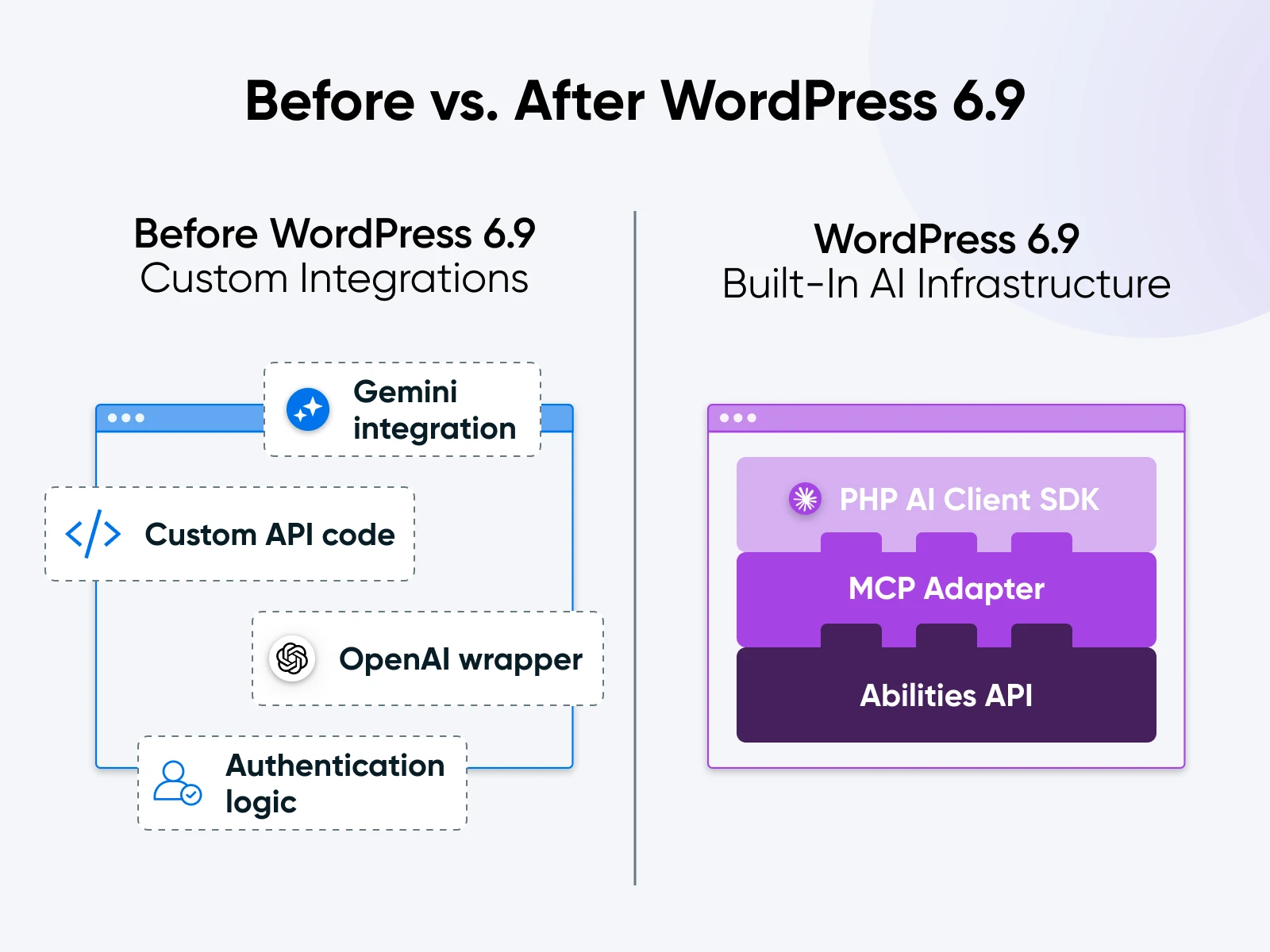
WordPress 6.9 adds three technical components that function as the connectors for future applications. Business owners generally do not need to interact with these directly, but it’s good information to have.
- The Abilities API acts as the central registry: It functions like a restaurant menu for the website. A developer registers a specific task, such as “publish a post” or “retrieve sales data,” and defines exactly what information that task requires. When an AI agent connects to the site, it reads this menu to understand what actions it is allowed to perform. This replaces the old method of agents guessing how to interact with the site or developers writing custom code for every single interaction.
- The Model Context Protocol (MCP) was first introduced by Anthropic as an open standard to allow AI to communicate with tools: With the WordPress MCP adapter, you can connect Claude Desktop or ChatGPT to connect to local applications. The WordPress adapter fetches the items from the Abilities API registry and presents them to these AI clients. A user can connect their local AI assistant to their WordPress site, and the assistant will instantly know how to manage content because the adapter translates the site’s capabilities into a format the model understands.
- The PHP AI Client SDK simplifies the connection to external services: It provides a standardized way for code to send requests to AI providers. Instead of a plugin author writing complex functions to handle authentication and data formatting for Google Gemini or OpenAI, they call this standardized kit. It handles the technical negotiation with the AI provider and returns the answer in a predictable format.
The AI website builder that turns conversation into designer-level sites. Free with hosting.
Start Free Trial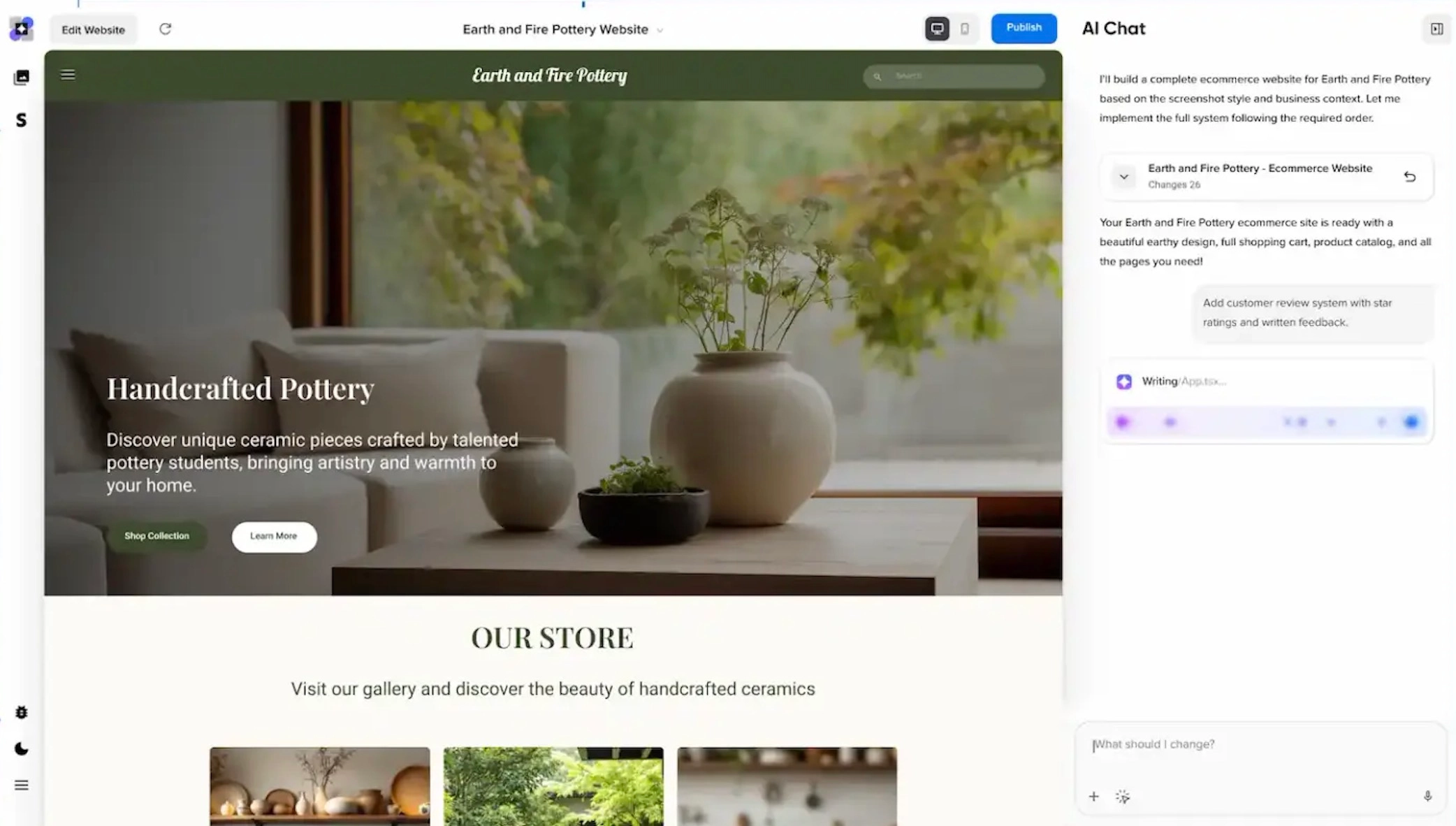
Which Official Tools Use the WordPress 6.9 Infrastructure Today?
Even though we’re early in the cycle, there are several workflows that run smoothly on WordPress 6.9 right now. The core team and Automattic rolled out this initial batch to show everyone how things should work.
1. WordPress MCP Adapter
This adapter acts as the main link between WordPress and external AI agents. You won’t find many features here since the plugin functions strictly as a connector. Capabilities get exposed to apps like Claude Desktop so developers can hook up local environments to live sites securely.
Features:
- Opens up the entire Abilities API registry for outside MCP clients.
- Manages secure authentication handshakes connecting local LLMs with your server.
- Gives you granular control over permissions to lock down agent access where needed.
Use cases:
- Local debugging: Connect Claude Desktop to parse error logs and suggest fixes without needing SSH access.
- Scaffolding code: Have an agent scan your active “theme.json” file to build block patterns that match site design tokens.
- Database inspection: Ask natural language questions about the database schema to figure out complex table relationships.
2. Jetpack
Automattic updated Jetpack to run on the fresh AI Client SDK. The new code runs writing and proofreading tools right inside the block editor. Using shared infrastructure helps manage authentication or model switching much better than before.
If you need AI features without messing around with API keys, this is the best integrated choice.
Features:
- Puts context-aware edit options right into the Gutenberg toolbar.
- Routes requests through the PHP AI Client SDK to find the most efficient model.
- Handles automated translation or tone adjustments while you stay in the editor.
Use cases:
- Inline editing: Highlight a paragraph to let the assistant shorten text or switch from passive voice.
- Draft generation: Create a full page layout just by typing a prompt describing your product.
- Language localization: Translate posts into Spanish or French automatically while keeping block formatting intact.
3. WooCommerce
This e-commerce platform started adding the Abilities API into its product management flow. Recent updates register specific capabilities, like updating stock status or tweaking attributes in the global registry. External agents can now manage catalogs using standard commands instead of needing custom tools built from scratch.
Features:
- Logs CRUD (Create, Read, Update, Delete) operations for products inside the Abilities API.
- Opens up taxonomy management so AI agents handle categories or tags.
- Keeps strict permission checks active to stop unauthorized pricing tweaks.
Use cases:
- Inventory management: Tell an agent to mark winter coats as out of stock and watch the bulk update happen.
- Attribute cleanup: Scan your catalog to fix messy size attributes like unifying “S” and “sm” into “Small.”
- Sales analysis: Query order data to spot which items had the highest return rates last quarter.
What Are 6 Specific Use Cases for This Technology Right Now?
There is quite a bit you can already achieve with the updates in WordPress 6.9. Here are a few use cases that rely on the capabilities of the Abilities API and the MCP connection to solve problems that manual labor previously handled (and struggled).
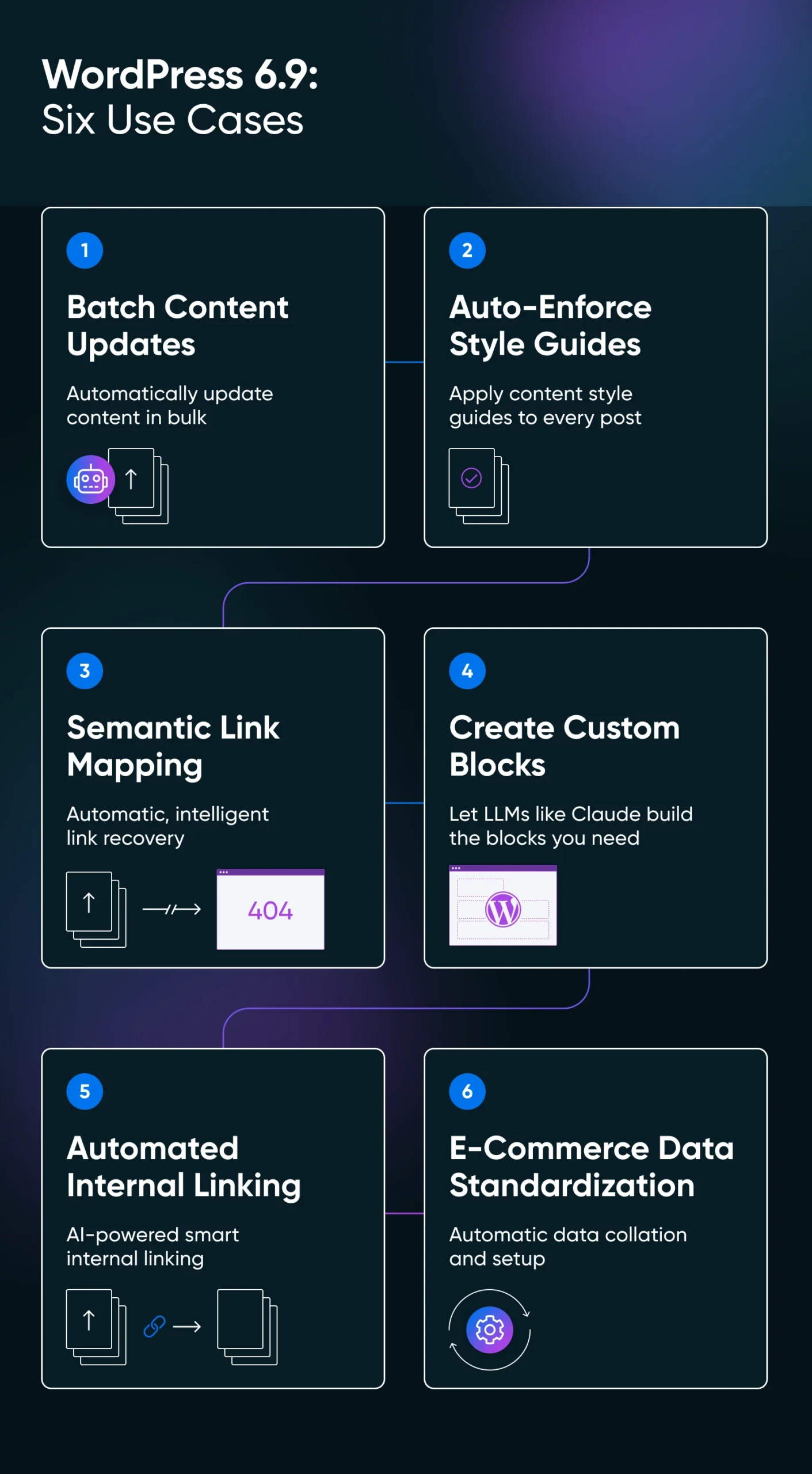
1. Batch Content Updates
If you have a long-standing blog with thousands of posts, it’s very likely that the older posts are outdated. We know it because we have thousands of posts, and WordPress knows it because they power 43% of the websites on the internet.
The WordPress MCP can help solve the outdated content problem by connecting your Claude Desktop to your WordPress blog and help you update tens or even hundreds of posts in one go.
💡Solution: Once connected, you can issue a single natural language command like: “Find all posts published before 2023 that are missing an excerpt. For each one, read the content, generate a two-sentence summary, and save it to the excerpt field.”
🔧Technicals: The agent requests the posts using the “get_posts” ability, processes the text locally to generate the summary, and sends the update command back through the secure “update_post” ability. The entire process treats content updates as structured data operations.
2. Auto-Apply Content Style Guides
A grammatically perfect draft can still violate your brand’s style guide. Writers might use passive voice throughout, accidentally write “utilize” when you prefer “use,” or capitalize product names inconsistently. The grammar tools can catch typos but miss the nuance of brand voice, which means a human editor needs to read every line to catch stylistic drift.
The Abilities API lets you embed style rules directly into the editorial process. Configure an AI agent with your brand’s full style guide and give it the ability to review content before publication.
💡Solution: When a writer saves a draft, the agent triggers a content analysis workflow that checks text against specific rules like “Never use the word ‘leverage'” or “Always bold product names.”
🔧Technicals: The agent uses the WordPress Comments API to leave specific annotations at the block level. Writers open the editor to find constructive notes in the sidebar, similar to how a senior editor would review the document.
3. Fix Broken Links With Semantic Mapping
Regex patterns handle predictable URL redirects well, but they fail when slug structures change significantly. For instance, if “/blog/2018/summer-tips” needs to redirect to “/guides/seasonal-maintenance,” a pattern matcher will never make that connection.
Here, a site manager would end up manually mapping thousands of 404 errors in spreadsheets after migrations or URL structure changes.
AI agents can use semantic understanding to match broken URLs with live content. You can implement custom agents using the WordPress MCP to analyze the meaning behind the old URL and find the closest topical match on your current site.
💡Solution: The site manager uploads a CSV of 404 errors and instructs the agent to “Match these broken links to the most relevant live page currently on the site.”
🔧Technicals: The agent scans your sitemap to understand available content, analyzes the intent behind each broken URL, and generates a redirection map based on topic relevance.
4. Create Custom Block Pattern
Developers who want to create custom Gutenberg block patterns need to remember exact syntax for columns, buttons, and typography settings; plus specific JSON attributes and HTML comments in precise formats. Most end up copying code from another site and manually tweaking CSS classes, which creates an inconsistent design across the site.
MCP integration gives AI coding assistants access to your site’s theme configuration. The agent reads your theme.json file to understand your exact color palette, spacing variables, and font sizes.
💡Solution: A developer asks the agent to “Create a pricing table pattern that uses our primary brand color for the header and matches our default button styles.”
🔧Technicals: The agent retrieves exact color variables (like var(–wp–preset–color–primary)) and spacing presets from your theme configuration. It generates block markup using these valid site-specific variables. The resulting pattern drops directly into the editor and inherits your design settings perfectly.
5. Automated Internal Linking
Writers focus on finishing the article in front of them and forget to link back to older, relevant content. The manual workflow requires searching your site for keywords, copying URLs, and pasting them into new text. This creates enough friction that most internal linking opportunities get missed entirely.
An AI agent scans your site’s entire content corpus to find these connections based on conceptual relationships between articles.
💡Solution: The editor instructs the agent to “Scan the new article about ‘Email Marketing’ and find phrases that should link to our existing guides on ‘Newsletters’ and ‘Open Rates’.”
🔧Technicals: The agent retrieves specific URLs for target guides, reads the new article, and identifies semantic matches. It recognizes that “improving engagement” is a relevant anchor for the “Open Rates” guide even when keywords don’t match exactly. The agent inserts HTML links and presents the revised HTML for approval.
6. E-commerce Product Data Standardization
Years of operation create messy product data. One shirt lists “Material: 100% Cotton,” another says “Fabric: Cotton,” a third says “Material: Pure Cotton.” This fragmentation breaks filtering systems on shop pages. Customers can’t view all cotton shirts with a single click because the taxonomy is inconsistent.
AI agents normalize this data by inspecting product details and standardizing taxonomy terms across your entire catalog.
💡Solution: The store manager grants the agent access to the WooCommerce product list and issues a command: “Standardize the ‘Material’ attribute for all T-shirts to a strict set of values: Cotton, Polyester, or Blend.”
🔧Technicals: The agent iterates through products and reads descriptions. It can even process product images if the text is vague. The agent determines correct material classification and uses the “update_product_term” ability to assign standardized taxonomy terms.
How Do You Actually Use the Features From This Update?
WordPress 6.9 includes the Abilities API in core, so there’s nothing to do here. But you need a little setup to get the MCP server running. Here are the quick steps.
NOTE: We use Claude here to show the new WordPress features. But you can connect the WordPress MCP with ChatGPT, Gemini, and any other AI agent that supports custom MCP adapters.
Step 1: Install the MCP Adapter
The mcp-adapter plugin isn’t in the WordPress.org repository yet. You can install it via WP-CLI:
wp plugin install mcp-adapter --activateOr download the latest release from the WordPress MCP Adapter GitHub repository and upload it through your WordPress admin.
Step 2: Grab the Authentication Token
Once the MCP adapter plugin is installed, go to plugin settings and then enable MCP functionality, Create Tools, and Update Tools. Then, go to the “Authentication Tokens” tab and grab a token.
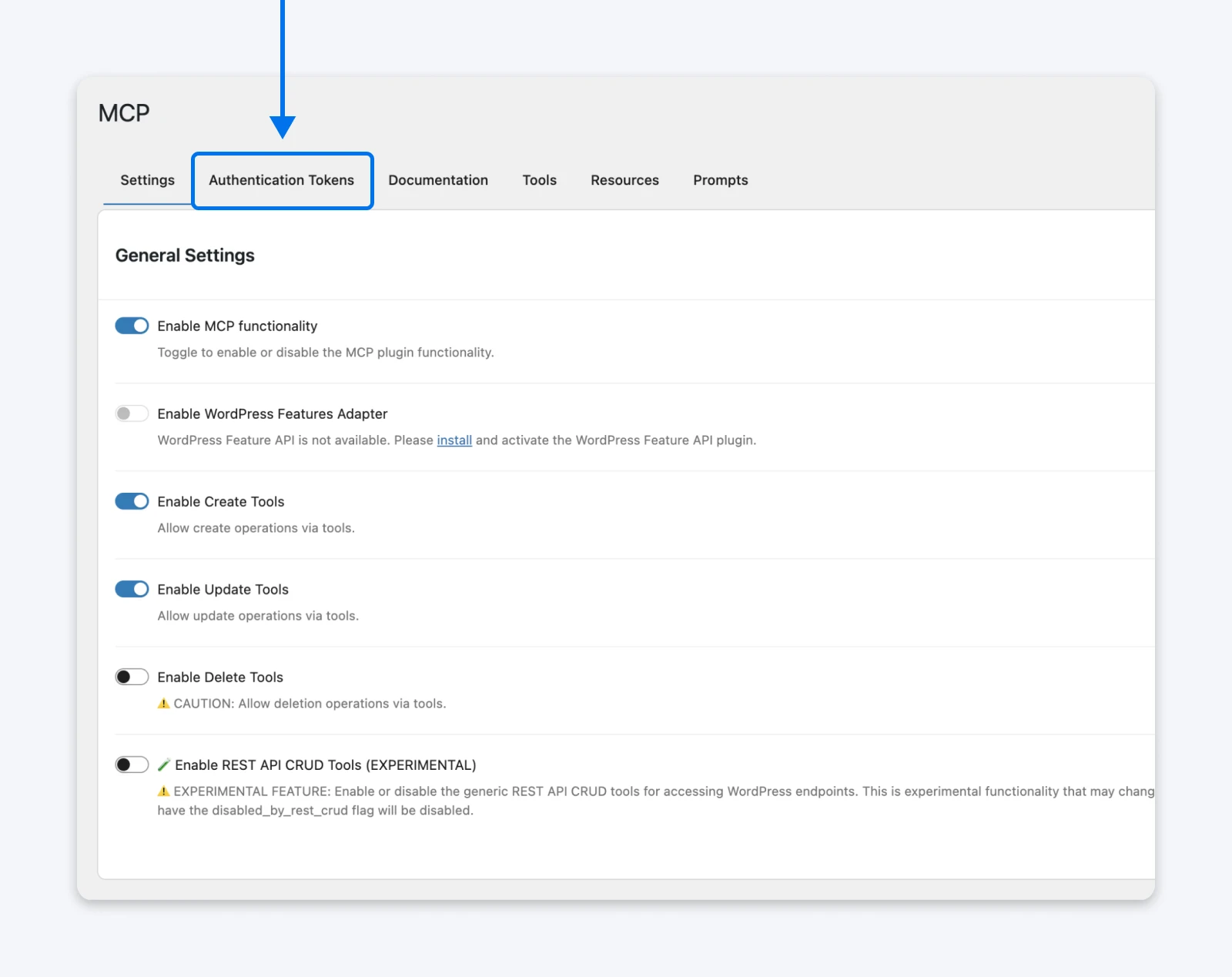
☝️Note: We do not recommend enabling delete tools right now as that’d mean you’re handing over complete permissions to delete content pieces to an AI agent that can sometimes hallucinate things, even instructions.
Step 3: Configure the MCP Server
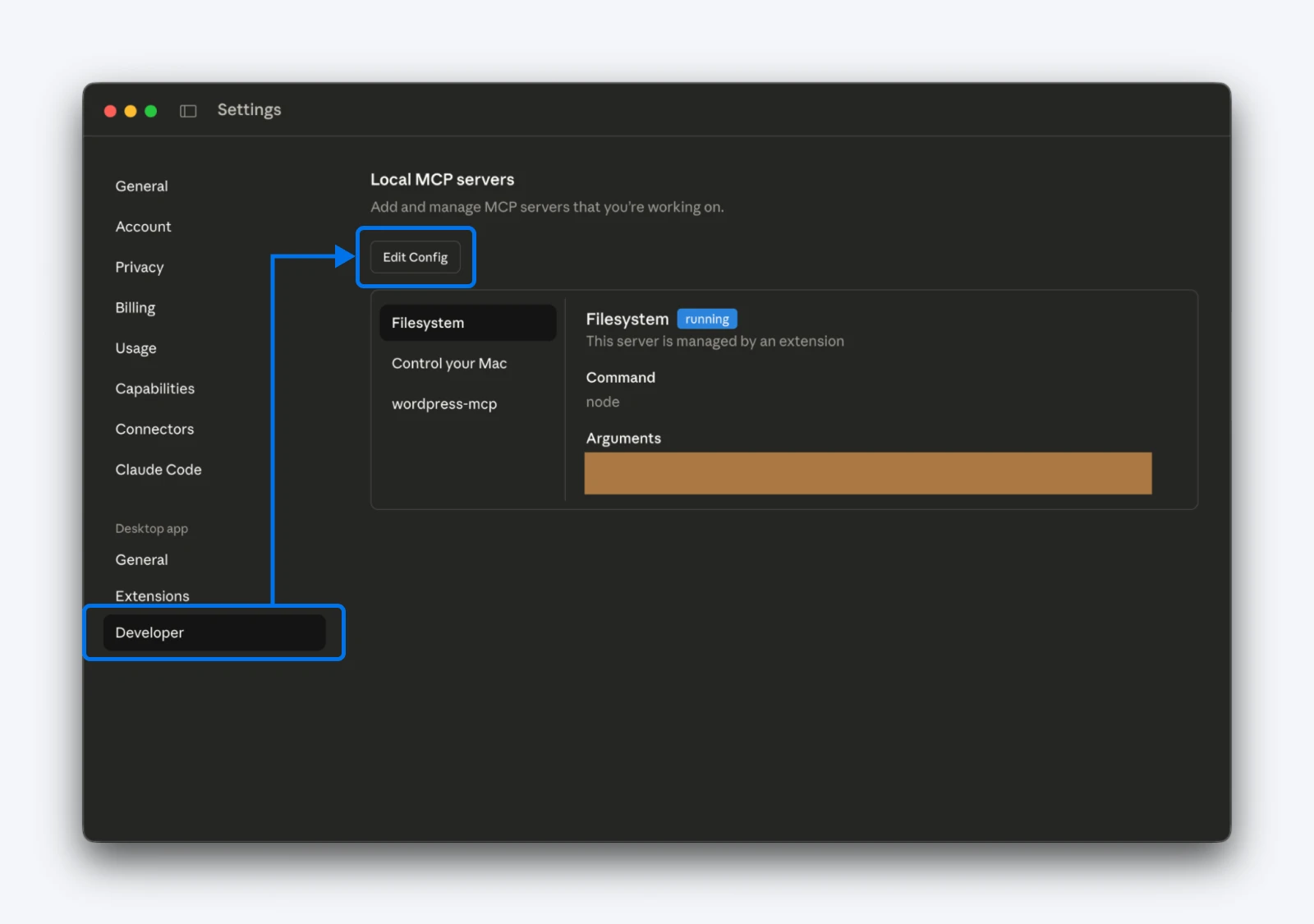
Go to Claude Desktop (or any other AI agent of your choice) settings > Developer > Edit Config. This will open up the config folder so you can add the below snippet to your “claude_desktop_config.json” on macOS:
{
  "mcpServers": {
    "WordPress-site": {
      "command": "npx",
      "args": ["-y", "@automattic/mcp-WordPress-remote@latest"],
      "env": {
        "WP_API_URL": "https://yoursite.com/wp-json/mcp/mcp-adapter-default-server",
        "WP_API_USERNAME": "your-username",
        "WP_API_PASSWORD": "your-application-password"
      }
    }
  }
}
Replace the placeholder values with your actual credentials and restart Claude Desktop.
Should You Handle This Yourself?
If you’re comfortable editing JSON files and using command-line tools, this takes about 15 minutes. If you’ve never opened a terminal, hand this to your developer. There’s no easy way for now. If you still want to learn, we recommend setting up a staging site.
Is It Secure to Let Third-Party Tools Access Your Website?
Handing permissions to an AI agent sounds risky, but WordPress 6.9’s infrastructure includes several safeguards that keep your site protected.
- The MCP adapter is an official WordPress project: The WordPress core team built the MCP adapter as part of the WordPress AI Building Blocks initiative. It’s not a third-party hack or experimental plugin. The adapter follows WordPress security standards and undergoes the same review process as other core features.
- AI agents can’t access your entire site: An AI agent can only perform actions that have been registered and marked as public. Everything else remains inaccessible.
- Authentication Tokens are revocable instantly: If you suspect a security issue or simply want to disconnect an AI client, open your WordPress user profile and click Revoke next to the authentication token. Access revokes immediately; the AI agent loses all permissions without requiring you to change your main WordPress password or update other connected services.
- Activity logging shows exactly what happened: Security plugins like WP Cerber and Solid Security log every REST API request made with Application Passwords or authentication tokens. You can see which abilities were called, when they executed, and whether permission checks passed or failed.
- Most destructive actions require explicit opt-in: Critical operations like deleting posts or modifying user accounts aren’t exposed through MCP by default. A plugin developer must intentionally mark these abilities for use. WooCommerce’s implementation exposes product catalog management but keeps financial operations restricted behind additional permission layers.
- Two-factor authentication still protects your admin login: Application Passwords work specifically for API access. They can’t be used to log into your WordPress admin dashboard. Your 2FA setup remains active and continues protecting your interactive login sessions.
Where This Leaves You
WordPress 6.9 ships three technical components that turn your site from a passive content repository into an active participant in its own management.
- The Abilities API creates a registry of what your site can do.
- The MCP adapter translates that registry for AI agents.
- And the PHP AI Client SDK handles authentication with AI providers.
Together, they let you execute workflows that previously required hours of manual work: batch updating thousands of posts, normalizing messy WooCommerce attributes, building semantic redirect maps, and creating internal linking structures based on conceptual relationships rather than keyword matches.
The infrastructure exists today and works reliably, but the setup requires solid hosting infrastructure as you’d now be processing hundreds of updates instead of one at a time.
DreamHost’s managed WordPress hosting is designed to handle heavy loads effortlessly. It offers automatic updates, free SSL certificates (required for Application Passwords), unrestricted REST API access, and staging environments where you can test MCP workflows before production deployment.

Unbeatable WordPress Hosting
Reliable, lightning-fast hosting solutions specifically optimized for WordPress.
See More