
Picking a domain name for your website, much like choosing a name for your child, is a big decision.
Okay, maybe not quite that important. But it’s still something you want to get right.
It’s how people will find, remember, and judge your site for years — and how are you supposed to decide between the 50 options ChatGPT just served up?
This guide walks through the whole process in five steps: brainstorming (with AI prompts that actually work), shortlisting, researching, deciding, and registering.
Why Does Your Domain Name Matter?
Your domain name is the virtual address of your website. Look at the address bar of your browser; you can see our domain name (“dreamhost.com”) right there.
But your domain is more than an address — it’s your digital brand, and it’s how people will remember your site.
When you think of online shopping, you know to type in “amazon.com.” Want to watch a movie? Go to “netflix.com.”
Of course, we often use Google(.com) to find these sites, but we know we’ve arrived on the right page by looking at the domain name.
And what about sites we’re not familiar with? Well, in these cases, we might look at domain names to decide which pages are worth visiting.
Which site are you more likely to visit for information about self-hosting: “dreamhost.com” or “example.com”? We fancy our chances on that one.
In short: your domain name shapes first impressions, memorability, and trust.
The AI website builder that turns conversation into designer-level sites. Free with hosting.
Start Free Trial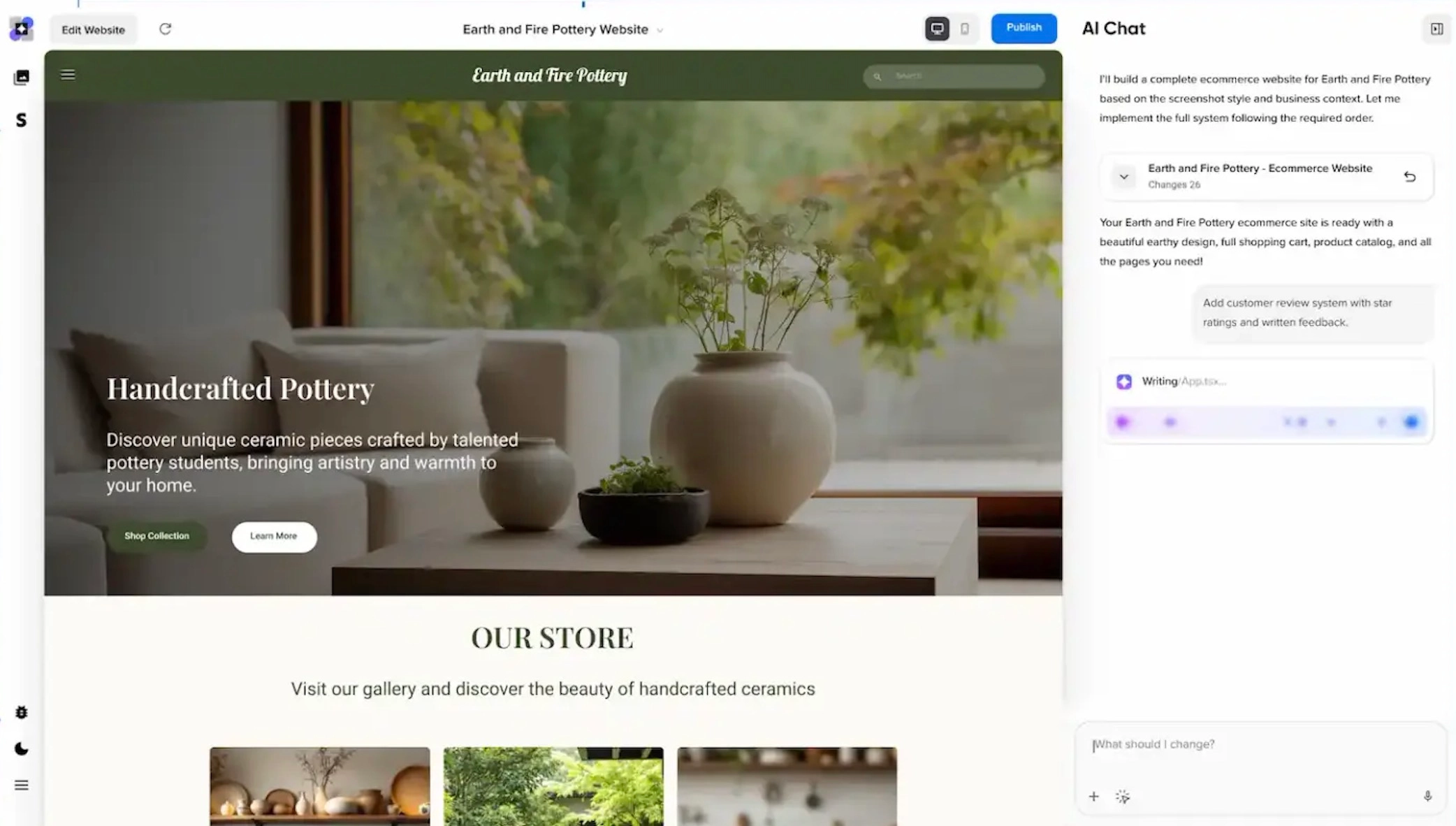
What Does a Good Domain Name Look Like?
Good question. Most effective domain names share these characteristics:
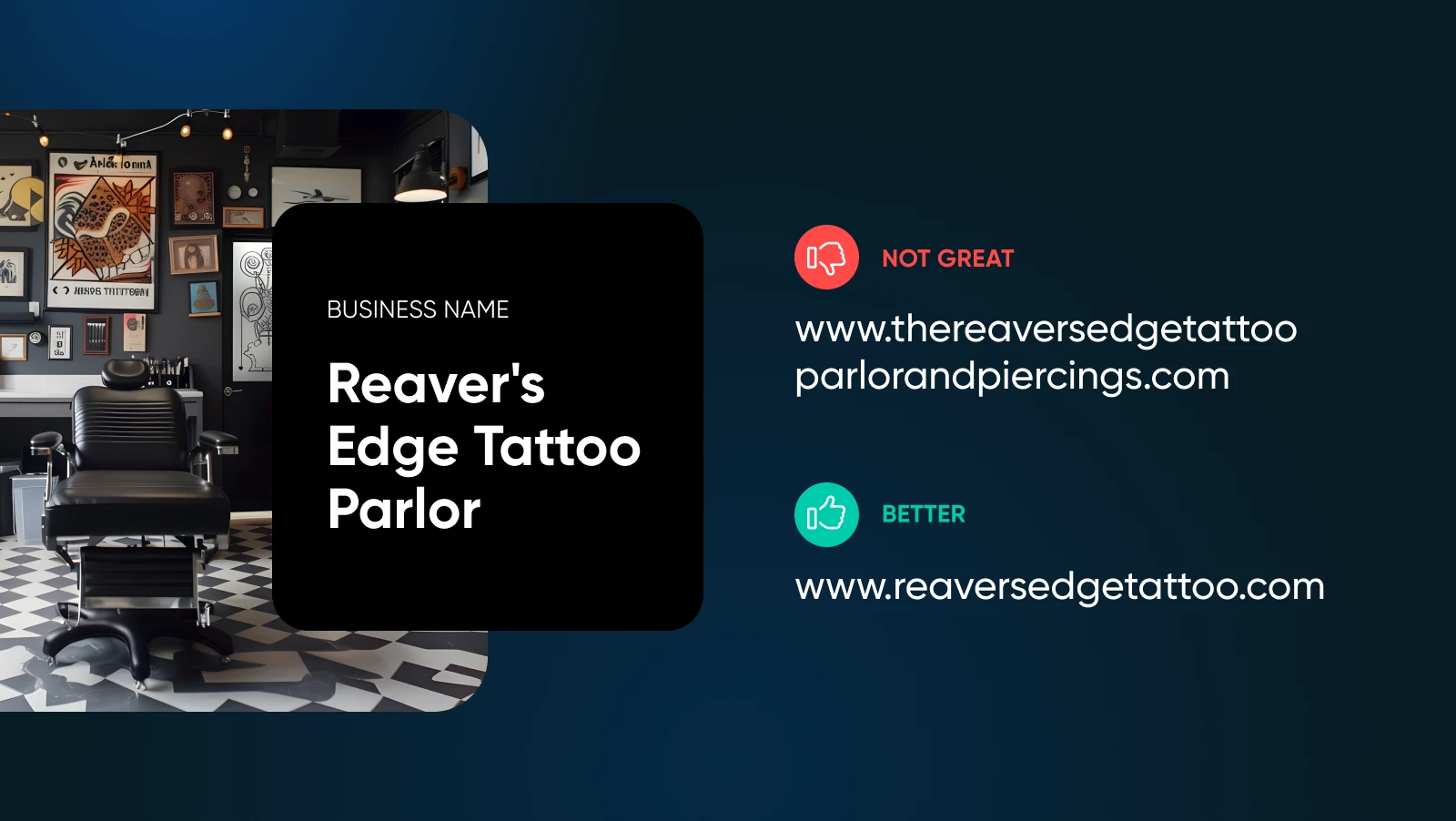
- They’re short: Most of the world’s most popular sites have domain names that contain one or two words. Why? Because they’re easier to remember.
- They’re unique: When you’re trying to be memorable, choosing an unusual domain name can really help. Anyone who stumbles upon the search engine “duckduckgo.com” won’t forget it in a hurry.
- They’re easy to pronounce: If someone asks where they can find your site, you don’t want to sound like a spelling bee contestant. People tend to recall names they can speak aloud without getting tongue tied.
- They’re relevant (sometimes): Your domain name doesn’t have to reference the main topic of your site or brand — but slipping in a hint can definitely help with building your audience from scratch.
This is not a comprehensive checklist, of course. When you’re deciding on your domain, there’s actually a lot to think about. Best get started!
How To Choose Your New Domain Name
The process of choosing a domain name for your site has five main steps:
- Brainstorming ideas
- Shortlisting the best options
- Researching the standouts
- Choosing your favorite
- Registering your domain
Let’s work through them together, one by one.
1. Brainstorming: How To Come Up With Domain Name Ideas
Coming up with the perfect domain name right off the dome is almost impossible.
So, we recommend generating a nice long list of potential names. Go crazy. Turn your filter off. It’s all about giving yourself options to play with.
Here are some tips on how to get things going:
Tip #1: Start With Your Brand
Your domain name should ideally match or closely relate to your business name*. For example, Kylie Jenner’s cosmetics brand uses “kyliecosmetics.com” — straightforward and instantly recognizable.
*Psst: Haven’t settled on a business name (or business) yet? No problem. We have a guide for that.
Tip #2: Leverage AI Tools for Brainstorming
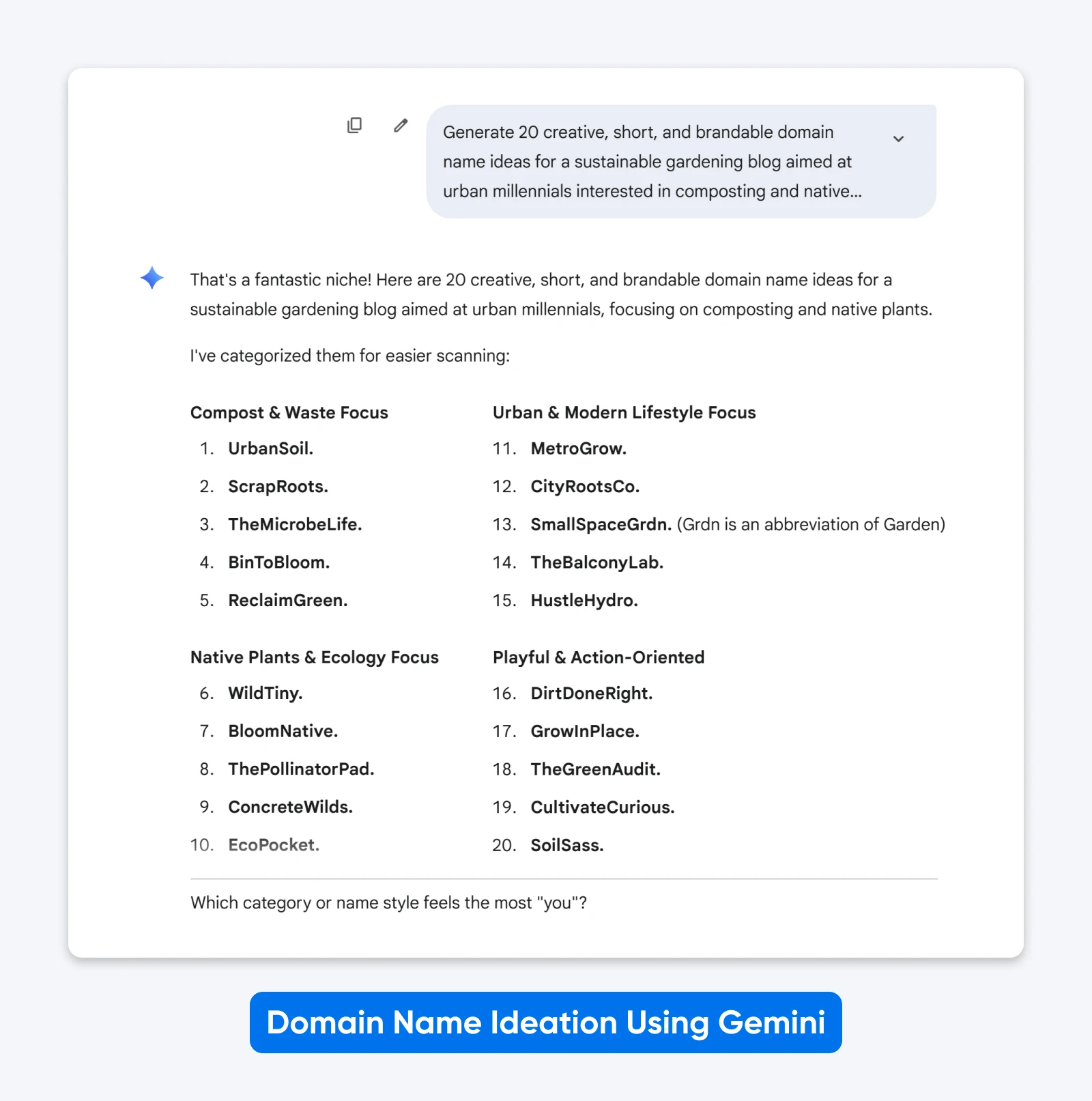
Popular AI tools like ChatGPT, Claude, and Gemini can be useful for getting the idea juices flowing. Prompt them with your business idea, target audience, keywords, and desired tone.
For example:
Generate 20 creative, short, and brandable domain name ideas for a sustainable gardening blog aimed at urban millennials interested in composting and native plants.
Tip #3: Incorporate Keywords
Including relevant keywords in your domain helps search engines understand what your site is about. This can improve your discoverability, especially when you’re just starting out.
If you sell apparel, for example, the term “clothing” could work in your domain name:
- Sunday + clothing = sundayclothing.com
- Diane’s + candles = dianescandles.com or candlesbydiane.com
- Cosmik + masks = cosmikmasks.com
Use SEO tools like Google Keyword Planner to see what people are searching for, and weave those terms naturally into your domain ideas.
Tip #4: Use simple patterns.
Keep it short and snappy — aim for one or two words maximum. You can invent new words (like Google or Spotify) or combine existing short words in unexpected ways (like Facebook or Snapchat). Avoid long compound phrases that are hard to remember or spell.
Tip #5: Evoke the Right Feeling
Consider the emotional response you want to trigger. Do you want visitors to trust your site? Words like “shield,” “vault,” or “fortress” convey security. Want to stir up excitement? Try “blaze,” “dash,” or “spark.” Looking to spark curiosity? Consider “enigma,” “quest,” or “atlas.”
The right emotional tone helps your domain stick in people’s minds.
What Are the Best AI Tools for Coming Up With Domain Names?
All the major players in AI — ChatGPT, Claude, Gemini, Perplexity — are easy options. Each has slightly different creative tendencies, so trying multiple tools can give you more diverse ideas.
We covered basic prompting in Tip #2 above. But if you want to get more strategic with your AI brainstorming, here are some advanced prompt formats:
For ultra-short domains:
Generate 20 domain names combining [keyword1] and [keyword2] that are under 12 characters.
For future-proofing:
Create domain names for a business that might expand from [current service] to [future services].
For invented brandable words:
Suggest memorable invented words that sound trustworthy for a [industry] company.
For when your first choice is taken:
What are short, brandable alternatives to [unavailable domain]?
Aim to make a list of at least 15–20 ideas. Don’t be afraid to go higher; you’re just giving yourself more options to play with in stage two.
AI is just the starting point. The real work comes in the evaluation phase — which is exactly what we’re covering next.
2. Shortlisting: Picking the Best of the Bunch
Next, it’s time to embrace your inner Simon Cowell. You need to whittle down the field, until only the shining stars remain.
Start by discarding anything that’s long, clunky, or difficult to pronounce. Get rid of anything with hyphens, numbers, and doubled letters — they just make things confusing. And you can toss anything you simply don’t like.
Next, it’s time to rank the serious contenders. You can either do this yourself or with the help of AI.
Give each domain on your list a score of 1–5 for these criteria:
- Memorability: Would you remember it after hearing it once?
- Spelling: Could the average person spell it correctly without help?
- Length: Is it truly short and snappy?
- Brandability: Does it sound professional and unique?
- Flexibility: Could you still use this domain if you changed what you offer?
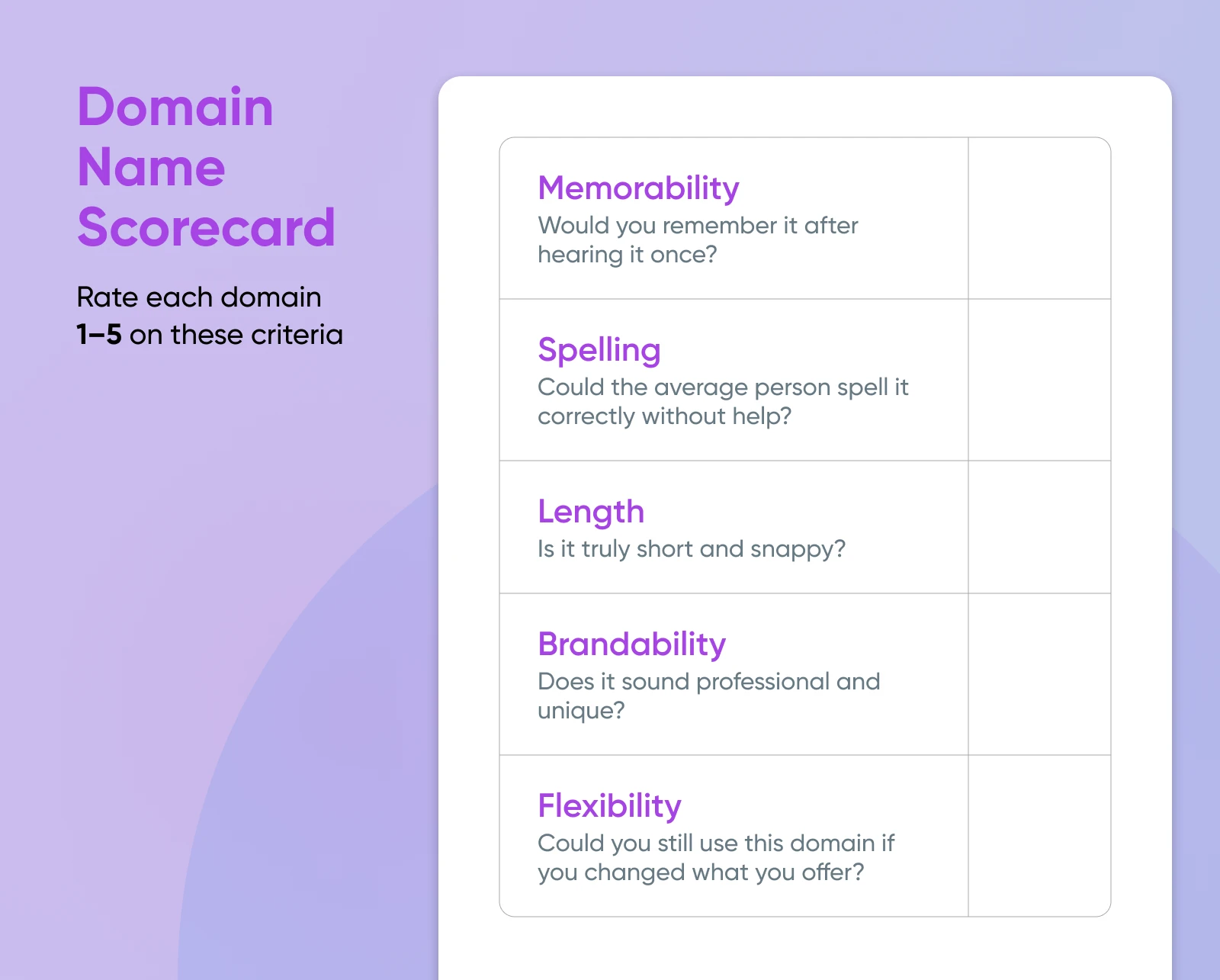
Higher scoring domains should make it onto your shortlist. For example, a domain scoring 4+ across all categories (like “swiftship.com” at 23/25) is a keeper, while one scoring 2s and 3s (like “quick-shipping-solutions.com” at 12/25) should be cut.
Using AI To Rank Domain Name Ideas
If that all sounds like too much bother, just get ChatGPT or your favorite AI app to do the scoring for you.
Look, here’s a ready-made prompt:
Score these 10 domain candidates (1–5 each): memorability, spelling, length, brandability, flexibility.
Rank the domains by total score, and explain the top 3 trade-offs in two sentences each.
Note any concerns that require manual verification (trademark conflicts, domain history).
[PASTE DOMAINS LIST HERE]
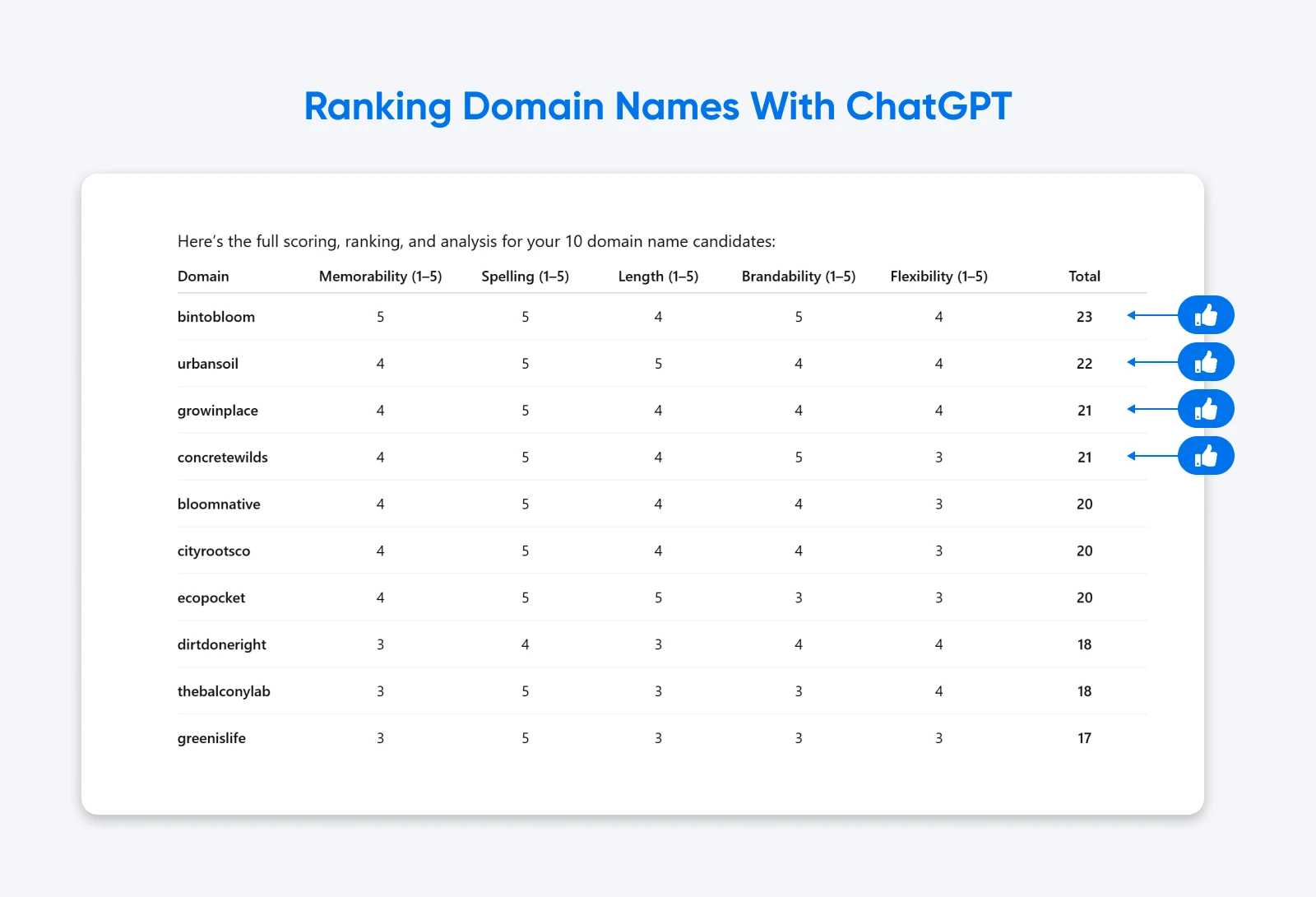
That should do the trick.
Check Domain Name Availability
Finally, you need to see which domain names are actually available. For this, head over to our Domain Search tool.
Simply paste in the remaining domains on your shortlist, and see which ones are up for grabs.
Make a note of which TLDs (top-level domains — the part after the dot, like “.com” or “.org”) are available for each name.
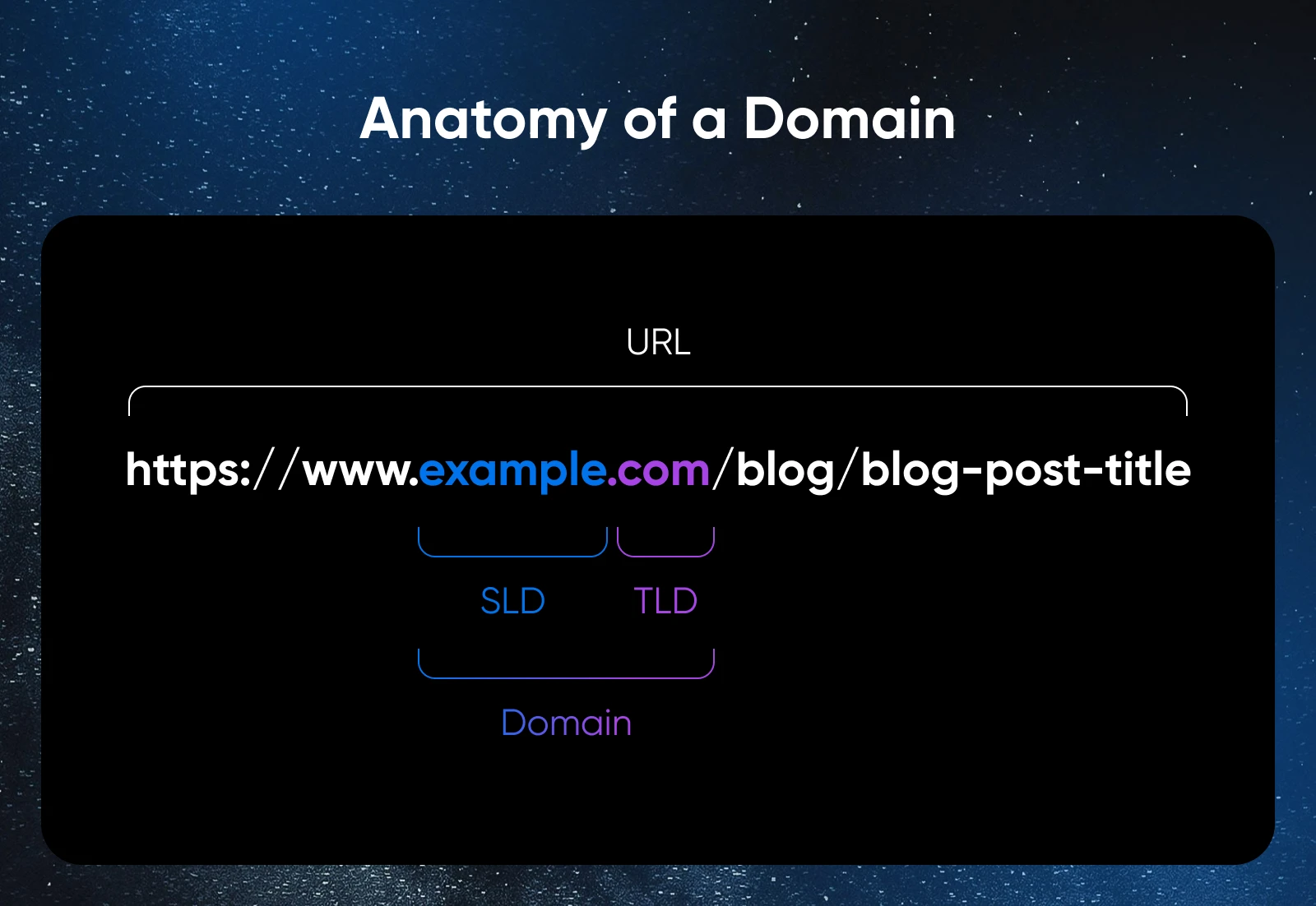
Ideally, we’re aiming for a .com. Why? Because that’s basically the default choice of the internet: 43.6% of all websites use .com, per W3Techs (July 2026), and users trust it.
Popular alternatives include:
- .co: As used by the dating app Hinge.
- .org: Associated with non-profits (though anyone can register one).
Or, the standard extension in your location (e.g., “.jp” in Japan).
🤓Want to learn more? We’ve actually got a whole blog post dedicated to the process of choosing the right domain extension.
It’s also worth tracking how many different TLDs are already taken for each domain name on your list. A higher number means there are more sites with very similar names — which could be confusing for your visitors. This particularly applies if someone else owns the .com version.
3. Researching: Domain Name Checks You Need To Run
Unfortunately, not every domain name has had “one careful owner.” Before you settle on your preferred domain, it’s worth running some background checks.
Domain History Check
To find out the full history, head over to Whoxy and put in a domain name. This platform keeps a record of all current and past owners. This should give you an idea if your preferred domain has had a shady past.
You can also run a WHOIS lookup at WHOIS.com to see current registration details, including when the domain was registered and when it expires.
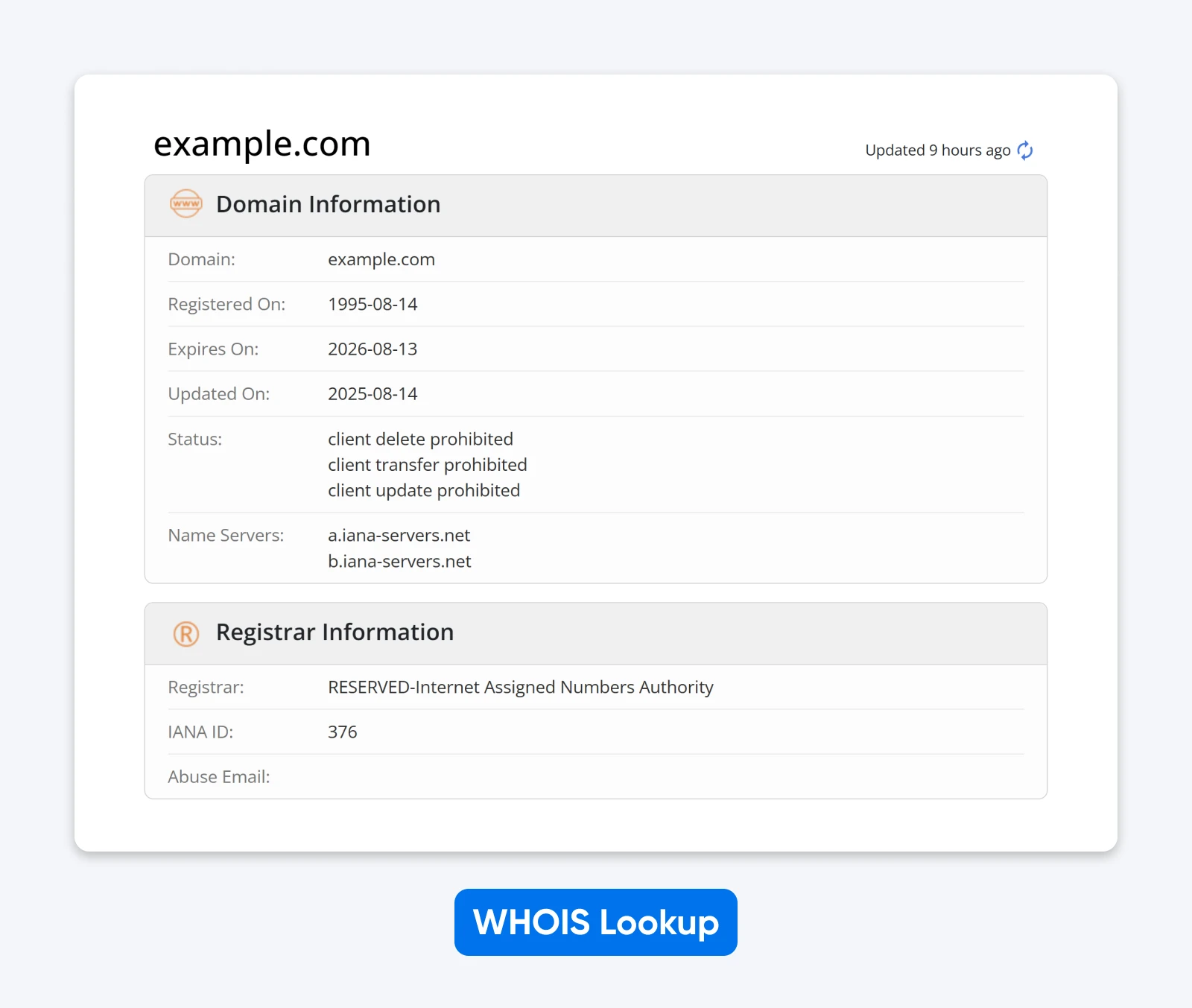
To confirm your findings, type in the same domain to Wayback Machine or Archive.today. These sites keep snapshot records of millions of sites over time, providing a glimpse of the digital past.

Trademark Check
Can you use a domain name that matches an existing trademark? Yes. Is it a terrible idea? Also yes.
If a trademark exists, there’s a good chance you’ll end up competing with another brand. And that brand could try to claim your domain name through ICANN’s dispute-resolution process (the UDRP).
You don’t need that headache. So, run your favorite domain ideas through:
- USPTO.gov (U.S. trademarks)
- EUIPO (European trademarks)
- WIPO Global Brand Database
- Country-specific databases for your target markets
- Google search: “trademark + [your domain idea]”
No matches? Great, on to the next.
Linguistic and Cultural Checks
Did you know that the word “kiss” means “pee” in Swedish? This is why you should check whether your domains have a different meaning outside your own language or culture.
AI can help again, here. Open ChatGPT or Claude and use this prompt:
Please analyze the domain name [EXAMPLE.COM] for:
– Pronunciation in the top 5 languages
– Any cultural sensitivities
– Similar-sounding words with different meanings
– Potential misunderstandings in global markets
Based on your analysis, give the domain an overall score (1–5) for global safety.
If anything too embarrassing comes up, get rid of it.
“I suggest checking carefully to ensure there are no hidden contexts or unintended double meanings. For example, while ‘nova’ means ‘new,’ in Spanish, the phrase “no va” is pronounced the same way and translates to ‘no go.’” — Stefanus Hadi, Ph.D., our Product Research Manager at DreamHost
Competition and Market Checks
Just because you’re not directly infringing on a trademark doesn’t mean you’re out of the woods. You need to take a peek at the competition.
Here’s your final round of checks:
- Search for similar sites: Put your shortlisted domains into Google and see if there are any major websites that pop up with similar names.
- Check for SEO competition: Put your shortlisted domains into Google and see what already ranks for those terms. Then use tools like Ahrefs or Moz to compare the domain rating and backlink strength of any competing sites with similar names. If established sites already dominate that space, it could make it harder for you to stand out in search results.
- Take a look at social media: If you’re building a digital brand from scratch, you’re likely to want matching social media accounts at some point. Namechk lets you quickly search across all major platforms to see if those handles are available.
Remove any domains from your shortlist that seem to be hotly contested!
4. Choosing: How To Make a Final Decision on Your Domain
So, which domain are you rolling with? With so many factors to think about, the final decision isn’t easy.
To narrow it down, use our decision matrix (you can make a copy of our template). Or, simply open up a spreadsheet, and put your shortlist of domains in the first column.
Then, for each domain, fill out the scores we generated earlier, plus the global-safety score from your Step 3 linguistic check:
- Memorability
- Spelling
- Length
- Brandability
- Flexibility
- Global safety
Add up the totals, and then see which domains come out on top.
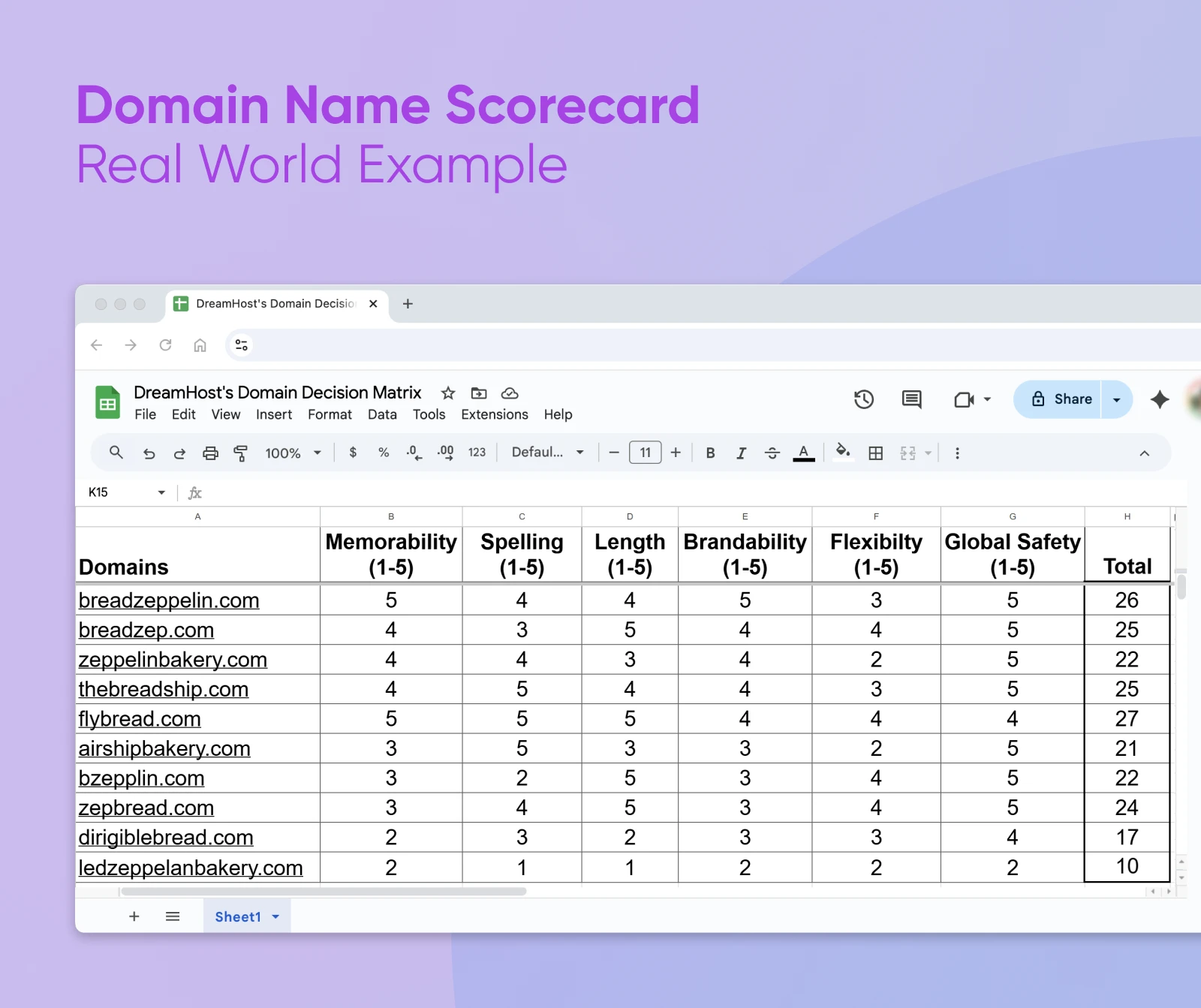
Like what you see? Well, this isn’t a purely scientific process. Numbers aren’t everything. You have some scope to go with your gut.
📚Learn more: Check out our guide to assessing the value of any domain name — loads of additional info there.
Try getting your friends involved. Collect their feedback on the top 2–3 domain ideas — which do they like? It’s basically a focus group with more in-jokes.
And remember: there’s no “right” answer. If your chosen domain has passed the checks above, it should be a pretty solid choice!
5. Registering: How To Set Up Your New Domain
You’ve done it! Well, nearly. The last step is actually to claim that awesome domain name as your own.
To do that, you’ll need to register your domain with a registrar — an accredited company that handles all the digital paperwork.
We recommend looking for a registrar that offers good prices, reliable DNS, and rock-solid account security.
👀Hint: We do all of that. DreamHost is an ICANN-accredited registrar and has been helping customers register domains since 1997.
Plus, we make it super easy to hook up that shiny new domain to your website.
How To Protect Your Domain
To ensure no one will step on your toes in the future, it’s a good idea to register your new domain for several years.
We would also recommend claiming several popular TLDs, and turning on auto-renew so that you can’t accidentally let your domain expire.
“It’s wise to secure multiple TLDs and check how many extensions have already been registered worldwide using dotDB.” — Stefanus Hadi, Ph.D., Product Research Manager at DreamHost
Frequently Asked Questions
Should I use hyphens or numbers in my domain name?
No. Hyphens and numbers make domains harder to remember, spell, and share out loud: nobody knows if it’s “best-bakery.com” or “bestbakery.com,” “4you.com” or “foryou.com.” Skip the confusion and stick with simple letter combinations.
How long should my domain name be?
Aim for one or two short words, ideally under about 15 characters — short enough to remember and type, long enough to mean something (think Amazon, Netflix, or Shopify). If your ideal domain is taken, try invented words or creative combinations rather than tacking on extra words.
What is in a domain name?
A domain name has two parts: the name you register (like “dreamhost”) and the top-level domain, or TLD (like “.com”). Some domains add subdomains, like “blog.dreamhost.com.” Some TLDs hint at the organization type — .org for non-profits, country codes for regions — but most signal nothing at all.
Can I buy a domain name permanently?
Not exactly. You can’t buy a domain forever, but you can register it for up to 10 years at a time and set it to auto-renew indefinitely. As long as you keep renewing — and most registrars, including DreamHost, make that automatic — the domain stays yours.
Can I change my domain name later if I don’t like it?
Yes, but it’s complicated and costly. Changing domains means updating all your marketing materials, losing built-up SEO value, redirecting old URLs, and potentially confusing existing customers. Some businesses successfully rebrand, but it’s far better to choose wisely upfront. That’s exactly why this guide exists — to help you avoid expensive do-overs down the road.
What if my perfect domain name is already taken?
Check whether alternative TLDs are available (.co, .io, .shop), try slight variations — a short add-on like “get,” a different word order, or an invented word — or run the AI prompts above for fresh alternatives. Just avoid anything confusingly similar to an established brand; that invites legal trouble.
Building Your New Online Brand
Choosing a domain name is a process that requires patience. A lot of patience. All that brainstorming, scoring, and researching can feel like a waste of precious life.
But the reality is, your choice really matters. And by investing time and effort now, you can set your website up for success and avoid a whole world of headaches down the road.
Just remember:
- Make it short and memorable.
- Choose something that you can adapt.
- Steer clear of historic, cultural, or trademark conflicts.
- Get input from other humans.
- Protect your domain with multiple TLDs.
Got it? Now, go out and find the domain of your dreams!

We’ll Build You a Custom Website – 100% Free
Our professional designers create your custom 4-page website from scratch. Mobile-responsive, SEO-ready, and includes free domain registration. No design skills needed – just sign up for annual hosting and we handle everything.
Claim Offer