The Small Business Website Credibility Playbook
Practical tactics to make your website look as credible as the big players — no agency, no redesign budget required.
Get the Free Playbook
Instant PDF download. No strings attached.
A Credible Website Is Your Best Salesperson
Businesses with websites are perceived as 41% more trustworthy than those without, and 70% of consumers say they're more likely to do business with a company that has one.
- Four proven tactics to look as credible as the big players
- DIY photography tips for headshots, products, and services
- Page-by-page blueprints for Services, About, Contact & FAQ
- The one-month sprint to building website credibility
60% of consumers say an outdated-looking website negatively affects their perception of a business's quality or trustworthiness.
And 45% say businesses without a website feel less "real." First impressions happen in under 50 milliseconds — before a single word is read.
Why Website Credibility Can't Wait
Who Should Care About Boosting Website Credibility?
As a small business owner, chances are your website isn't converting visitors into leads or customers as well as it could be.
We know it's difficult to find the time to keep your website aligned with the latest consumer trends. And this, in turn, can make it come across as outdated, unsecure and untrustworthy, and overall less legitimate than those your larger challengers boast.
We can't create more time for you out of thin air, but we can help you efficiently and effectively upgrade your site.
You run a small business
And your website isn't converting visitors into leads or customers as well as it should.
You know your site looks dated
But haven't had the time or budget to do anything about it.
You want real tactics
Not vague advice — practical steps you can implement this week, without hiring an agency.
Four Tactics. Forty-Two Pages. Zero Guesswork.
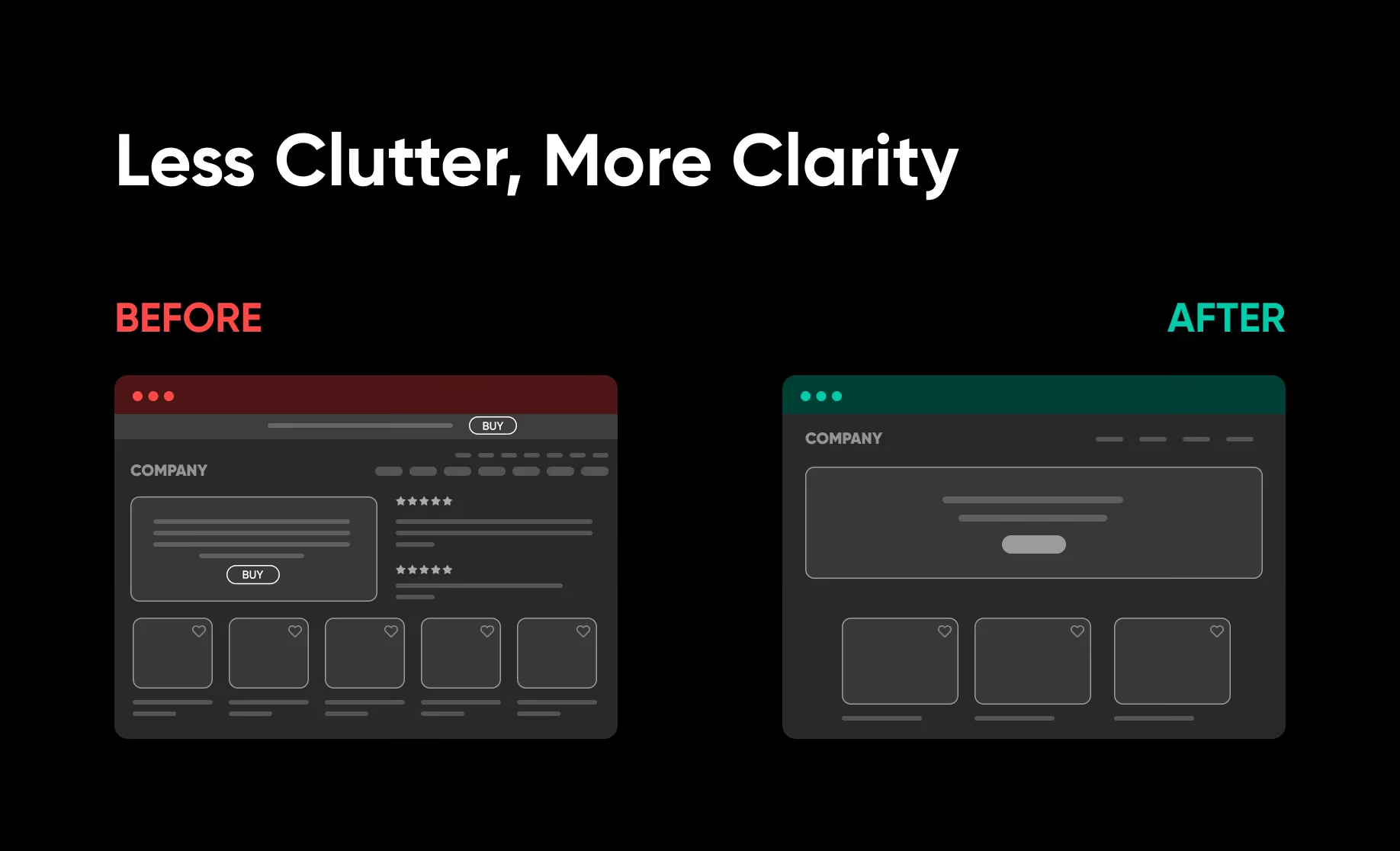
Create Visual Credibility
Visitors judge your site in 50 milliseconds. The visual signals your site sends — layout, photography, whitespace, consistency — are the first credibility test you face.
- Five design fixes that modernize any layout instantly (clutter, typography, nav, sliders, footers)
- DIY photography techniques for headshots, products, and services — no professional required
- How to optimize your site for mobile: speed, tap targets, simplified navigation
- Consistent branding in 6 steps: logo, color palette, typography, imagery, and CTAs
Build 4 Trust-Instilling Pages
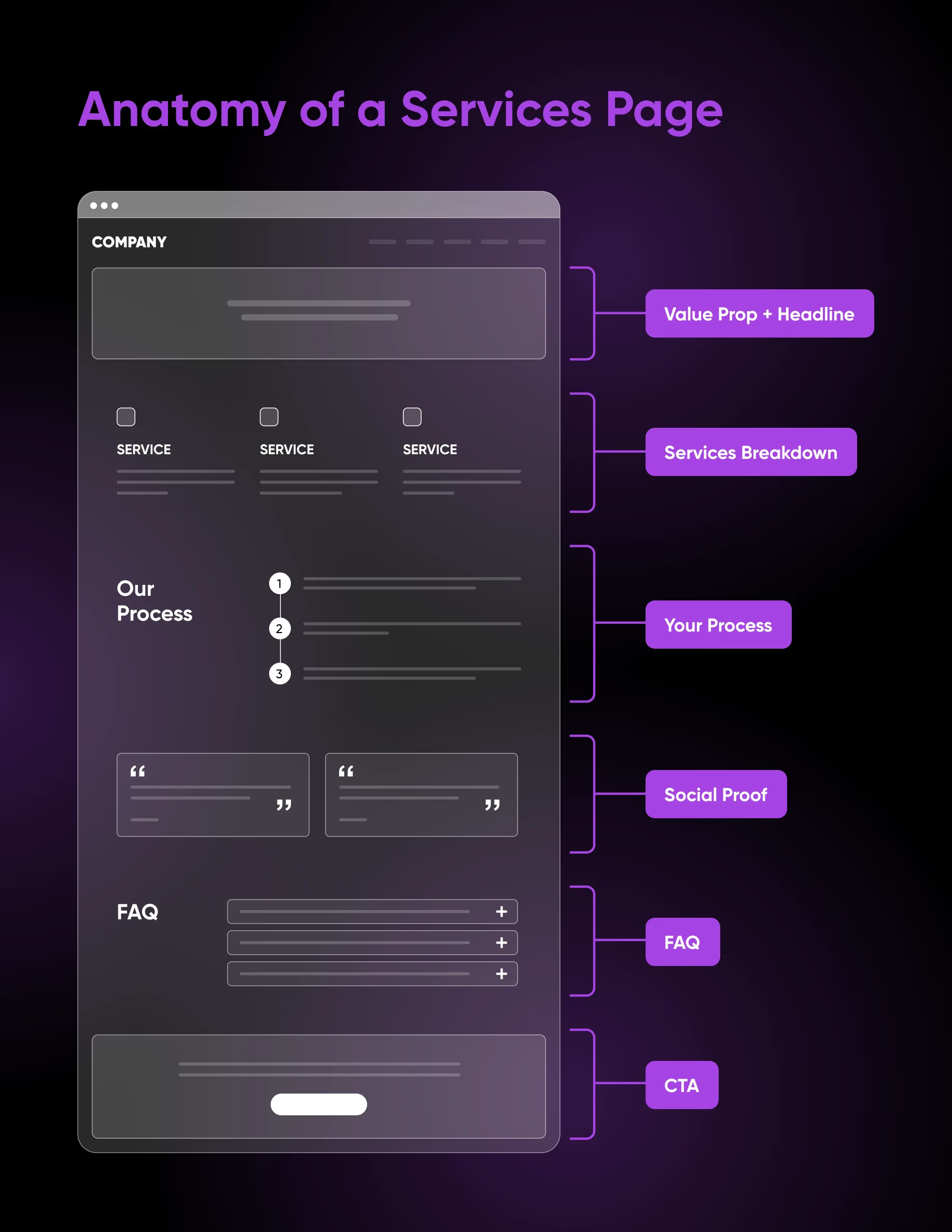
Most small business websites are missing the pages that do the most trust-building work. An About page that reads like a resume. A Contact page with just an email link. These gaps cost conversions.
- Services page blueprint: value prop, process breakdown, trust signals, and CTAs that reduce friction
- About page framework: origin story, mission statement, and team bios that humanize your brand
- Contact page essentials: response time expectations, direct info, and a frictionless form
- FAQ page strategy: how to identify real consumer questions and use them to boost SEO
Invest in Powerful Social Proof
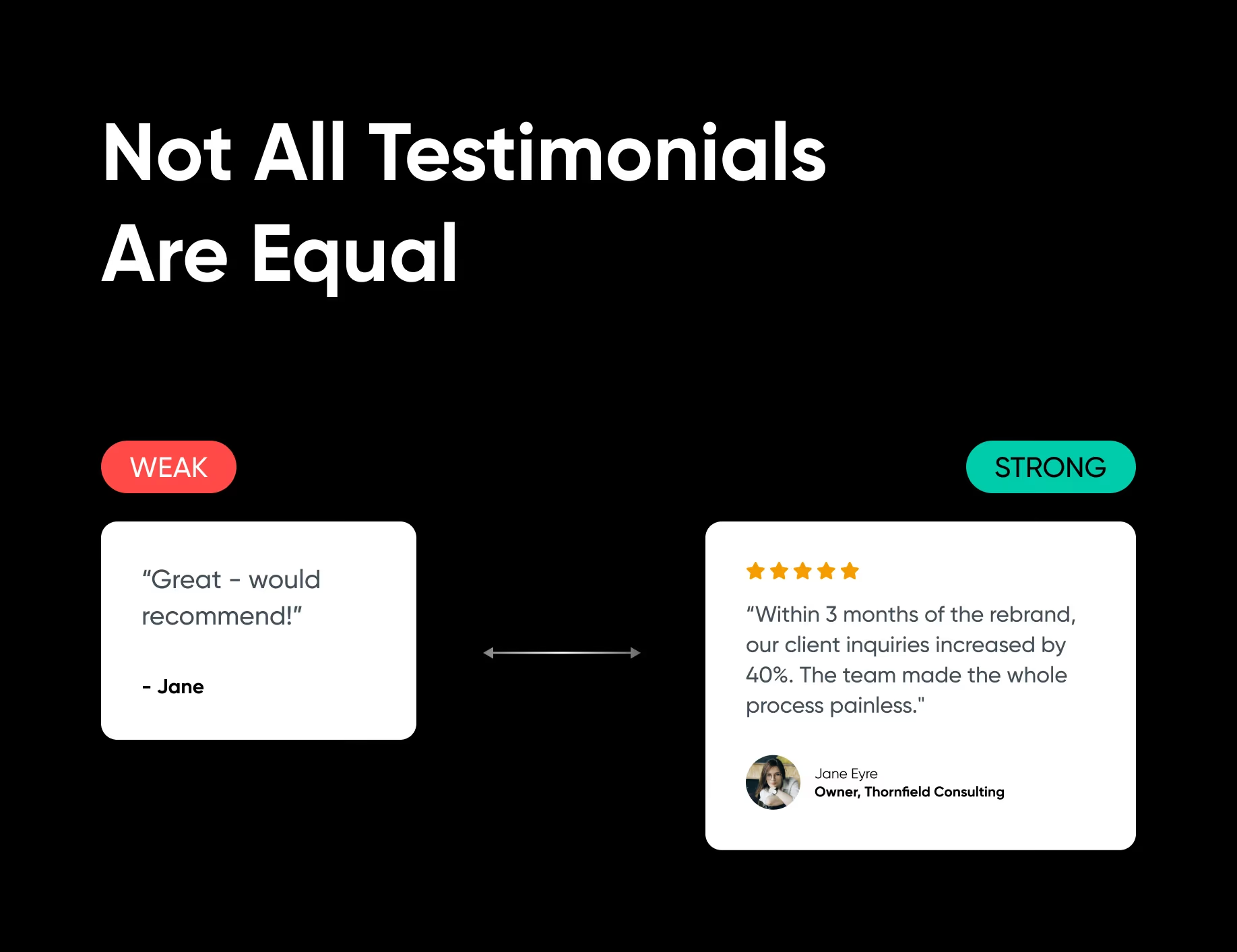
Credibility isn't just visual — it's what others say about you. Testimonials, reviews, and case studies are the fastest path to trust, but most businesses collect and display them wrong.
- How and when to ask for testimonials — timing is critical to getting specific, persuasive quotes
- Text vs. video: over 80% of consumers say video convinced them to buy a product or service
- The Situation > Solution > Result framework for building case studies from scratch
- Where to place proof elements on your site for maximum impact at conversion points
Send Strong Technical Trust Signals
Behind every credible website are technical foundations visitors can't see — but their browsers can. Over 51% of consumers say a secure HTTPS website is a key trust signal.
- Set up a professional email domain — free @gmail addresses quietly undermine credibility
- SSL certificate setup: what it is, how to enable it, and how to confirm it's working
- How to draft a privacy policy that signals legitimacy and satisfies legal requirements
- Site speed, caching, and broken link fixes — and the tools to test and monitor them
The One-Month Sprint to Website Credibility
Credibility is built incrementally. Follow this four-week calendar to check off every tactic in the best order to create momentum and visible progress.
Week 1
Technical Foundation
- Update website copyright date
- Add SSL (if needed)
- Fix broken links
- Add / update your headshot
Week 2
Social Proof
- Request 3–5 testimonials
- Create your first case study
- Add client logos or social proof to site
- Add social proof to another page
Week 3
Essential Pages
- Rewrite Services page
- Refresh About page
- Add or improve your FAQ page
- Tidy up your Contact page
Week 4
Polish & Performance
- Optimize website speed
- Set up business email
- Finalize branding
- Enhance mobile experience
42 pages. 4 tactics. Zero guesswork.
Everything you need to make your small business website convert like the big players.