Financial Automation for Small Business
You didn't start your business to chase overdue invoices or rebuild last quarter's expenses from a shoebox of receipts. This playbook shows you how to automate the repetitive financial work, from expense tracking to cash flow forecasting, so you can get back to the work only you can do.
Get the Free eBook
Instant PDF download. No strings attached.
Every Hour on Manual Finances Is an Hour You're Not Growing.
Manual processes break at scale. What worked when you were a solo operator becomes a liability once you have employees, multiple projects, and bigger clients expecting professional systems. A financial automation strategy eliminates the repetitive, low-value work, data entry, payment reminders, receipt logging, so you can focus on growth and client relationships. This guide walks you through building that system one piece at a time.
- Building a DIY automation strategy: find your biggest pain point and automate it first
- Expense tracking and categorization: real-time capture through bank feeds and receipt scanning
- Payment processing automation: get paid faster with recurring invoices and automated reminders
- Cash flow forecasting and management: a rolling 90-day view of money in and money out
- Tax preparation automation: category rules, receipt capture, and the deductions most owners miss
- Financial reporting and analysis: the core reports and what each one tells you
- A step-by-step implementation roadmap, plus a tool list for every category
75% of small firms name rising costs as their top financial challenge.
More than half also point to operating expenses (56%) or uneven cash flow (51%). These are exactly the pressures that get easier to manage when you can see them coming.
The Numbers Behind the Pressure
Who Should Read This eBook?
Somewhere in your inbox there's a client who's three weeks late on a major invoice. Again. And in the back of your mind, you're wondering whether this month's payroll will be as smooth as you told your team it would be. If that sounds familiar, this guide is for you.
It's written for established small businesses that have outgrown spreadsheets, paper receipts, and a pile of disconnected tools that don't talk to each other. The systems that got you here will not get you where you want to go.
You'll get the frameworks, the tool recommendations, and a step-by-step plan to automate your finances, whether you're a solo operator scaling up or already managing a small team.
You're buried in manual data entry
Entering transactions, logging receipts, and updating spreadsheets by hand instead of automating it once.
Late payments are choking your cash flow
Chasing overdue invoices through emails and phone calls, never quite sure if next month is covered.
Tax season is a yearly scramble
Digging through emails and receipts in April for deductions that should have been captured all year.
A Look Inside the Playbook
Build Your Automation Strategy
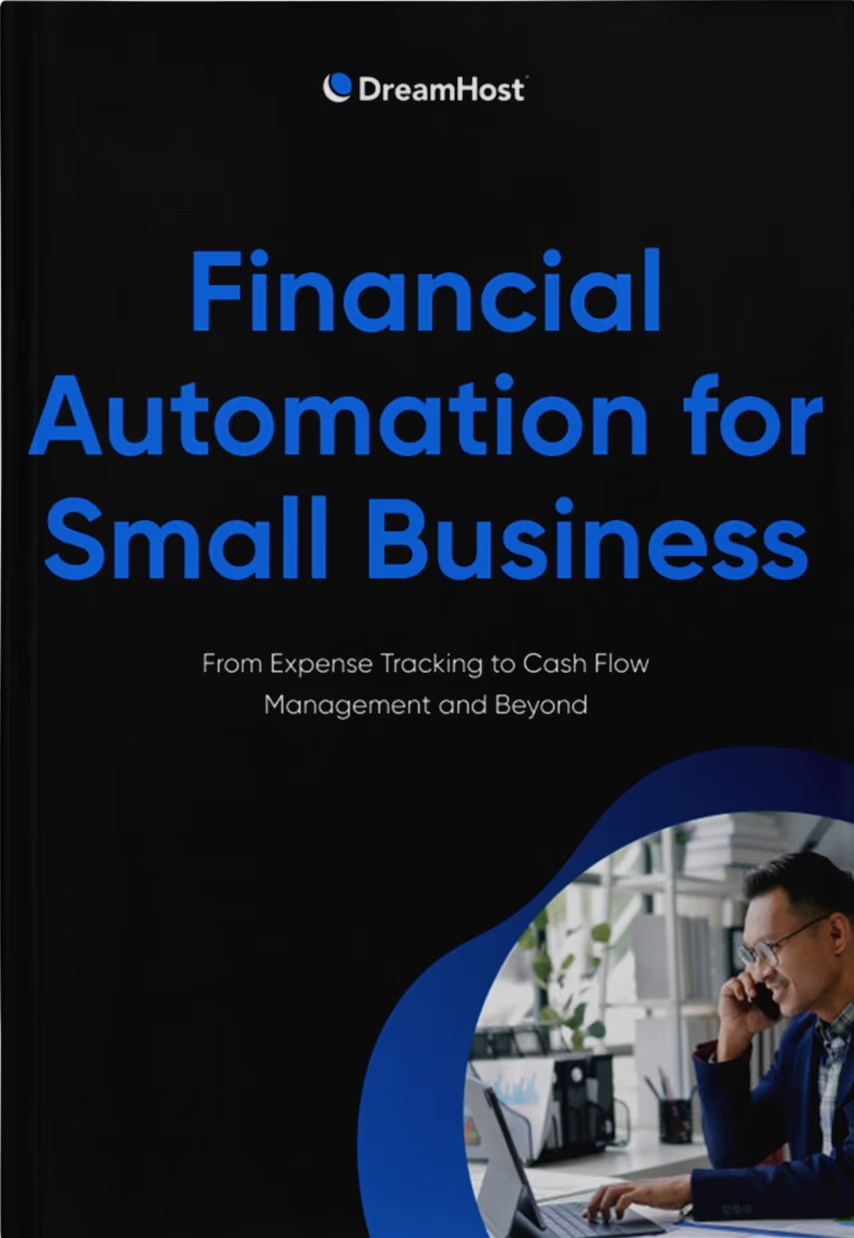
Most businesses get the fastest return by automating invoicing first, then connecting other tools once that foundation is solid. Pick one central accounting platform, like QuickBooks Online or Xero, and make everything else integrate with it.
- Start with the system that fixes your biggest pain point
- Document your current processes before you automate anything
- Choose one anchor platform and connect everything to it
- Run one workflow alone for 30 days before expanding
Expense Tracking and Categorization
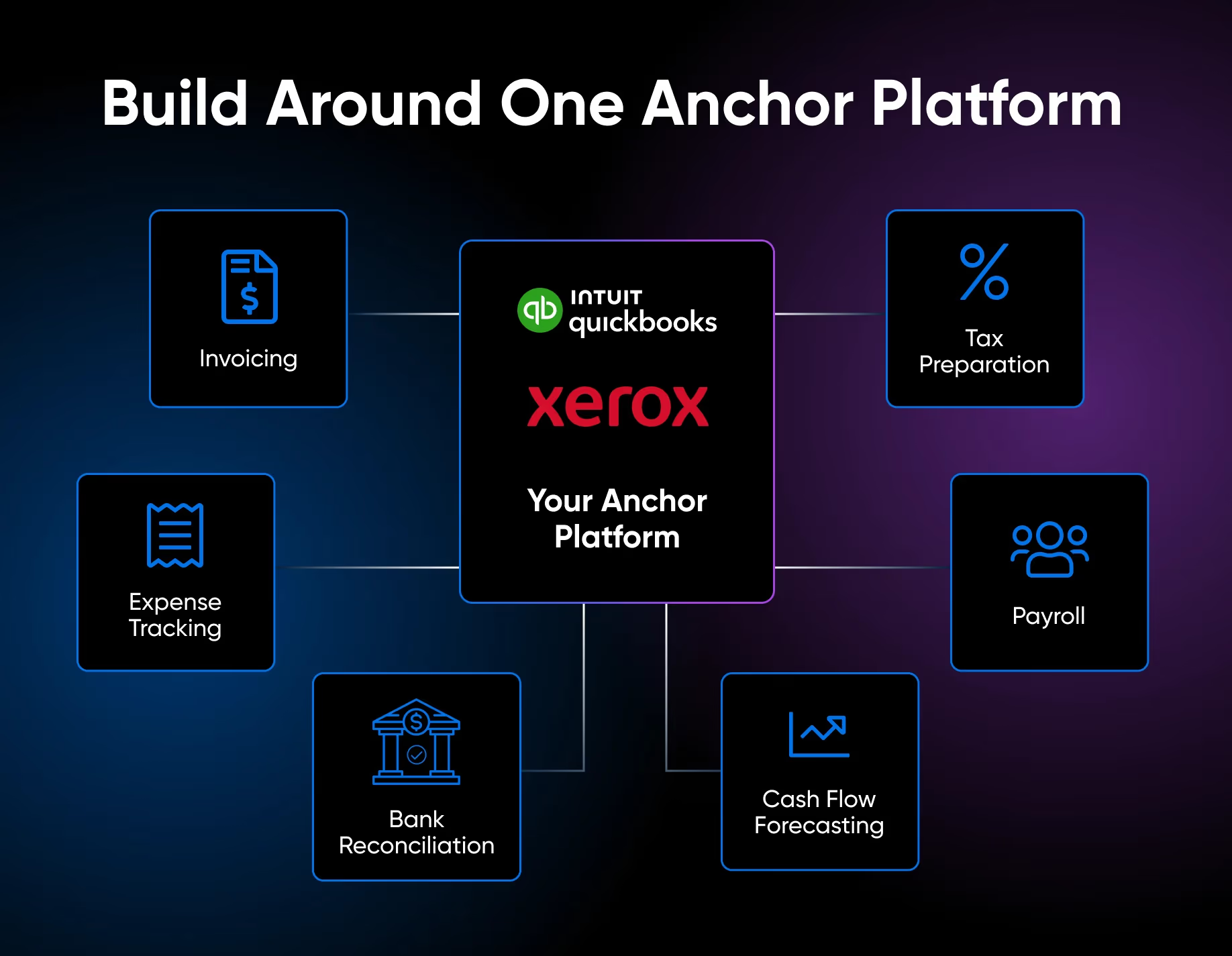
Automated expense tracking captures and categorizes purchases in real time through bank feeds, receipt scanning, and accounting integrations, instead of manual entry. Consistent categories make reporting, forecasting, and tax prep dramatically easier.
- Link bank accounts, cards, processors, and accounting into one connected system
- Use receipt scanning with OCR to create searchable digital records
- Set up approval workflows for employee and contractor reimbursements
- Organize spending into clear, consistent categories
Payment Processing Automation
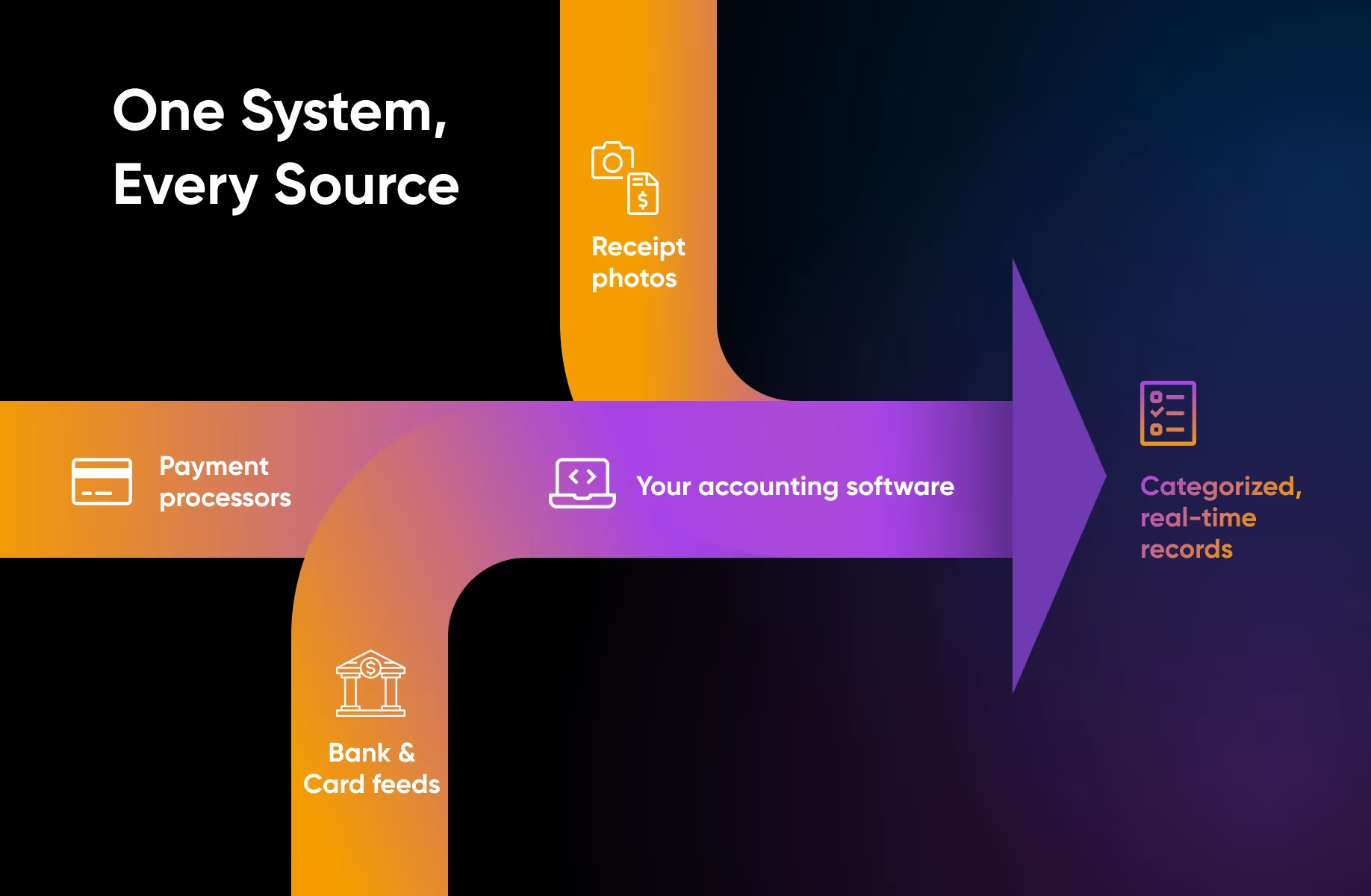
Match your payment processor to your sales volume, then connect it to your website and accounting software so every transaction records itself automatically. Square suits businesses under $10K a month, Stripe is a standout for online-first, and Stax pays off above roughly $50K a month.
- Pick a processor sized to your monthly volume
- Put checkout on your own domain so customers never feel bounced elsewhere
- Sync payments to accounting so transactions categorize themselves
- Turn on recurring invoices and automated payment reminders
Cash Flow Forecasting and Management
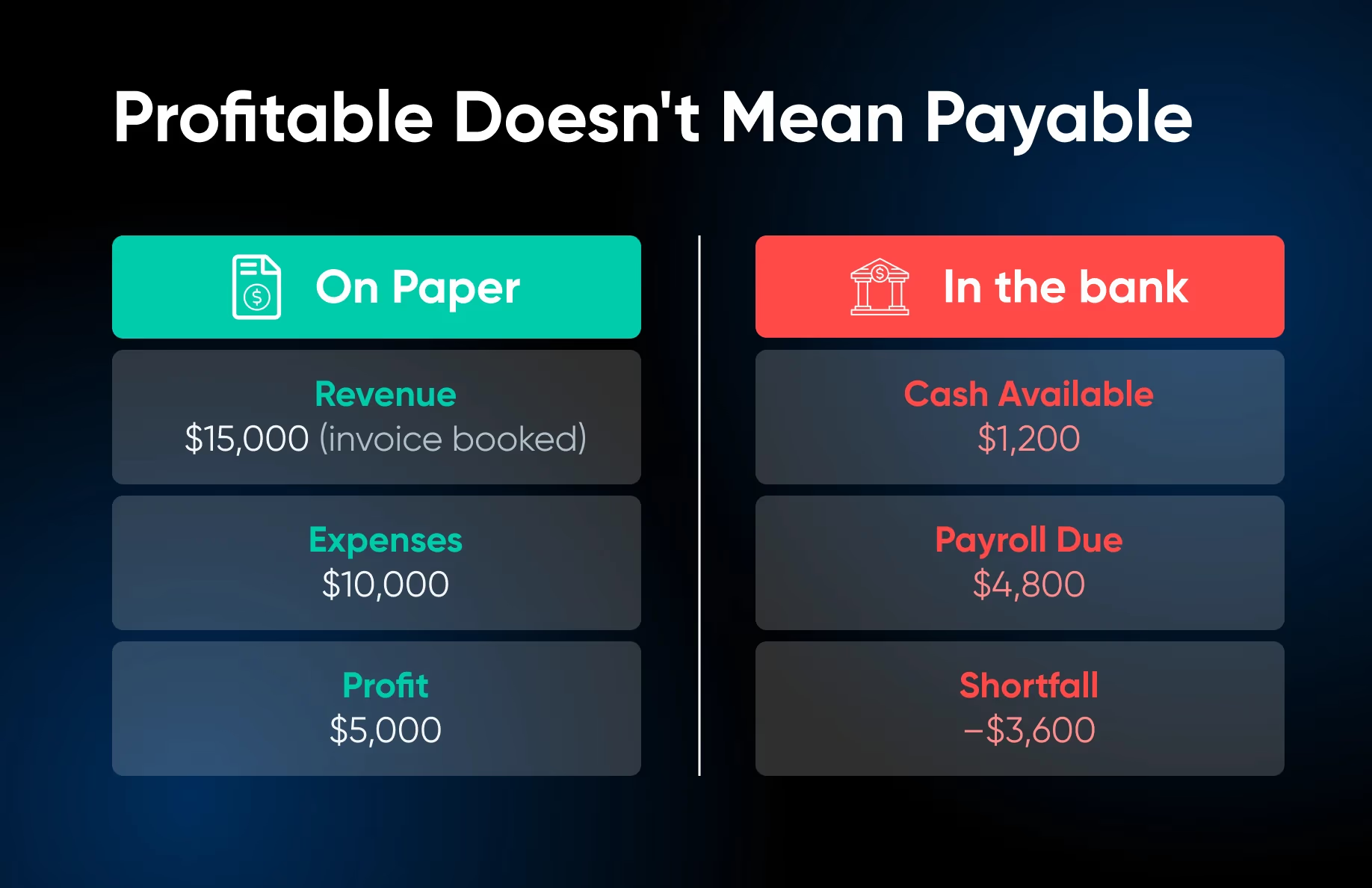
You can be profitable on paper and still be unable to make payroll. Cash flow is what's actually in your bank account right now. A rolling 90-day forecast shows money in, money out, and your running balance so you're never caught off guard.
- Build a rolling 90-day forecast of inflows, outflows, and balance
- Set a minimum cash reserve you never drop below
- Plan around lean weeks before they arrive
- Color-code your balance as an early-warning system
Financial Reporting and Analysis
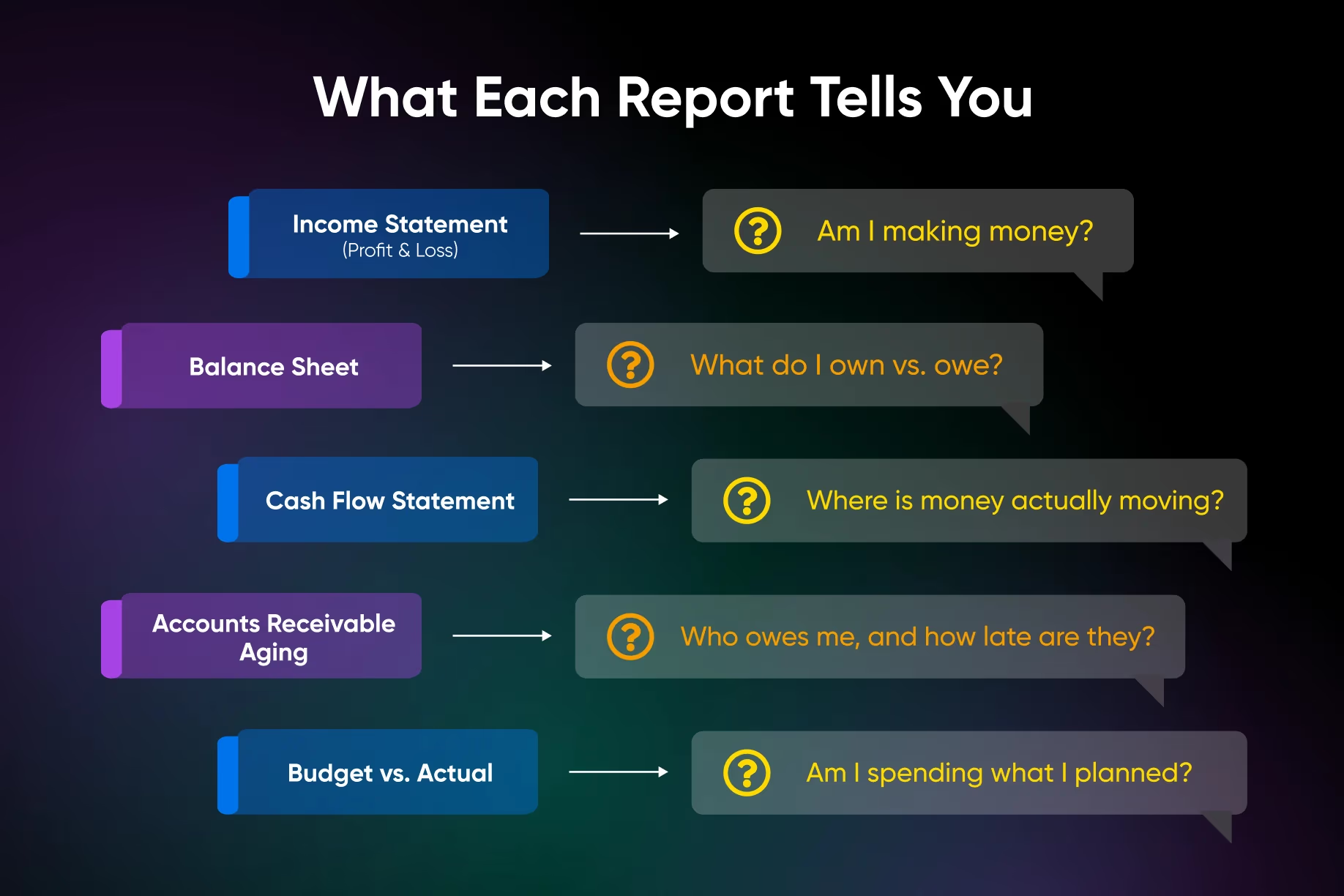
Reporting tells you what happened, analysis tells you what to do about it. Once your accounts are connected, your accounting software generates the core reports automatically. Your real job is keeping the data clean and knowing how to read them.
- Know the core reports: P&L, balance sheet, cash flow, A/R aging, and budget vs. actual
- Track four or five metrics that actually move your business
- Reconcile monthly, the single most important habit for accuracy
- End every report review by taking at least one action
The Financial Automation Roadmap
Build your automation stack the way you'd build any structure that needs to last: one solid component at a time. Use this as a starting point, not a rigid checklist.
Phase 1
Build the Foundation
- Separate business and personal finances
- Open a dedicated business account and card before connecting anything
- Document your current processes so you are not automating a broken workflow
Phase 2
Choose Your Anchor Platform
- Pick one central accounting tool, like QuickBooks Online or Xero
- Make everything else integrate with this system
- Check the automation features your software may already have turned off
Phase 3
Automate One Workflow First
- Start with your biggest pain point, usually invoicing
- Set up automated invoicing with scheduled payment reminders
- Run it alone for 30 days before expanding
Phase 4
Connect Tools and Set a Cadence
- Layer in payment processing, expense tracking, forecasting, tax, and reporting
- Schedule a monthly 30-minute dashboard review
- Reconcile every account monthly to keep your reports trustworthy
48 pages. Six chapters. One connected system that runs in the background.
Separate your finances, pick one anchor platform, automate your biggest pain point first, then layer in the rest. Get paid faster, look more professional, survive tax season, and trade the anxiety of flying blind for real visibility into your numbers.