
Renting an entire server for one website sounds like overkill, until the day a traffic spike takes your shared plan down.
Dedicated server hosting means renting an entire physical server that’s reserved for one customer’s websites and applications. You don’t share CPU, RAM, or bandwidth with anyone else, and you get root-level control over the whole machine. The trade-off: exclusive resources and control in exchange for substantially higher cost and more management responsibility.
Choosing the right type of web hosting is one of the most important considerations for your website. Shared hosting limits your control, and while a VPS with root access gives you full software control, you’re still sharing physical hardware. Neither setup is always the best option for websites that expect consistently high levels of traffic.
Fortunately, dedicated hosting boasts several important advantages over shared hosting since your site has room to roam on its own physical (dedicated) server. This means that you can expect speedy, reliable performance. Plus, you get more control over your server configuration, enabling you to create a highly customized, highly secure environment.
In this post, we’ll look closely at dedicated server hosting: its pros and cons, how it differs from a cloud “dedicated host,” and what to look for before you buy. Let’s jump right in!
What is dedicated server hosting?
Dedicated server hosting is a type of web hosting where an entire physical server is reserved exclusively for one customer’s websites and applications. This setup contrasts with other hosting solutions like VPS and shared hosting that require you to share resources with other websites on the server:
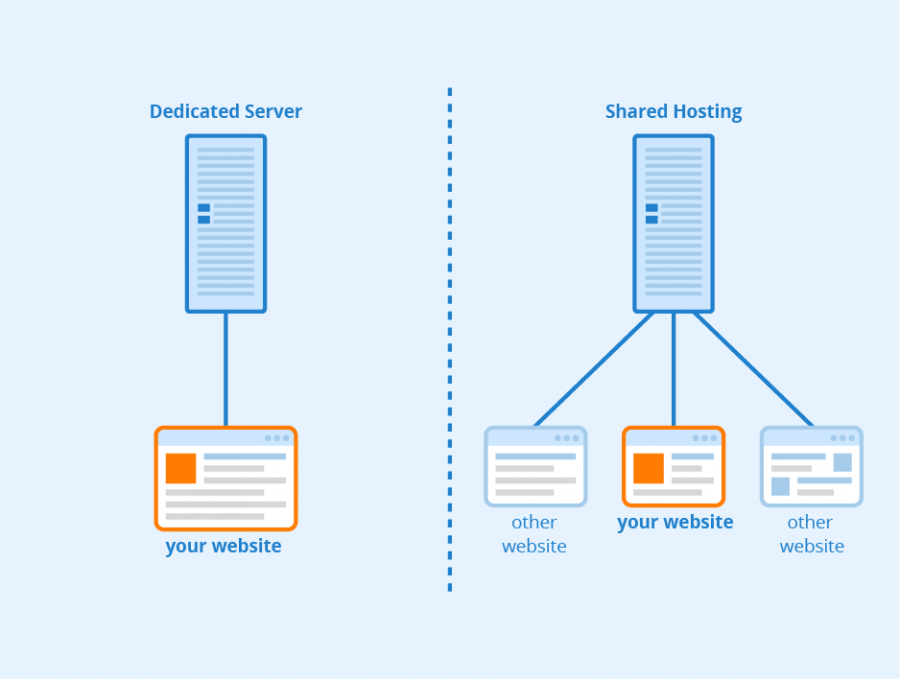
Image Credit: Seobility
Since the server hosts only your website, it can deliver your web pages much faster than one that has to process requests for multiple websites. Plus, you will be free to configure your server exactly how you want it.
Better yet, you can create a more stable, secure environment for your website since you have your own server. There’s less risk of downtime and cross-site infection since your site is the only one hosted on that hardware.
Also, because you have plenty of resources at your disposal, your server is in a better position to handle even the sharpest traffic spikes. This means that dedicated hosting is an excellent option for large websites or businesses that want to scale up.
Dedicated server vs. dedicated host: What’s the difference?
A dedicated server is a physical machine you rent from a hosting provider to run your websites and applications directly. A cloud “dedicated host” is single-tenant hardware inside a public cloud: you pay for an entire physical server, then run your own virtual machines on top of it.
The two terms often get used interchangeably, but they serve different buyers. Cloud dedicated hosts, such as Amazon EC2 Dedicated Hosts, mainly suit organizations that need single-tenant hardware for compliance reasons or want to bring existing per-socket or per-core software licenses to the cloud. A traditional dedicated server suits anyone who wants maximum performance and full control of one machine at a predictable monthly price. If you’re comparing plans to host a website, the traditional dedicated server (the subject of this guide) is what you’re shopping for.
When to consider dedicated hosting
Now that you know more about dedicated hosting, let’s consider whether it could be a good match for your website.
You have a large, high-traffic website
Dedicated hosting is an excellent choice for large websites. The server is fully equipped to handle many simultaneous requests, such as those from high-traffic websites or large e-commerce stores. This way, you get consistently speedy site performance.
How do you know your site qualifies? A few signals suggest it’s time to move up from shared or VPS hosting:
- Your VPS sits at or near its RAM or CPU ceiling for hours at a time, not just during short spikes.
- Pages slow down or requests get throttled during traffic surges, even after caching and optimization.
- You’ve already upgraded to your host’s largest VPS tier and still hit resource limits.
- Heavy jobs like large databases, media processing, or busy ecommerce checkouts compete with everyday page loads.
With alternatives such as shared hosting, other websites on the server can compete with your site for bandwidth, causing pages to load slowly during periods of particularly heavy traffic. With dedicated hosting, your bandwidth is your own, and you can expect reliable, fast response times for your applications operating in real time.
Your focus is on security
When you’re the only one with access to your server, you have full control to deal with online threats and attacks. This factor is crucial if your website handles sensitive user data like payment details or personal information that can be the target of hacking attempts. Compliance can be a deciding factor too: some regulatory frameworks and corporate security policies effectively require single-tenant infrastructure, making a dedicated server the compliant choice rather than merely the safer one. If you handle cardholder data or health records, check whether standards like PCI DSS or HIPAA push you toward isolated hardware.
Conversely, on a shared server, if one website is the victim of a targeted attack, your site can also suffer the consequences. When sites are on the same server without proper barriers, it’s easy for one website’s vulnerabilities to spread across to yours. Since dedicated hosting provides an isolated server, you are effectively quarantined from anyone else.
You can stretch your budget
While there are many benefits of dedicated hosting, the perks come at an additional cost. It’s nearly always more expensive than other options like shared hosting or VPS. Therefore, if you’re on a tight budget, you may not be able to afford a dedicated server.
That said, dedicated hosting earns its cost when your workload actually uses the exclusive resources: sustained high traffic, hardware isolation for security or compliance, or applications that need consistent performance under load. If your site isn’t pushing those limits, a VPS or another cheaper option will usually be the smarter buy.
You want experienced management options
Dedicated hosting is a great choice if you’d rather focus on growing your business and don’t want to spend time monitoring how well your server is performing. You can rest assured that your hardware is functioning at full capacity. A managed plan can include constant monitoring and around-the-clock support, but check exactly which maintenance tasks the host handles before you buy. DreamHost, for example, keeps dedicated servers under constant monitoring by an in-house team, with expert support available 24/7.
You’re anticipating major growth
If you’re expecting a period of growth, it can be a good idea to start out with the hosting you will need rather than a plan that’s just sufficient for the time being. This way, you can avoid the hassle of having to migrate servers at a later date.
Then, everything is already in place when growth occurs. While other hosting options enable you to scale up, there can be upper limits to the amount of resources you can access. Plus, this transition can involve a sharp price increase.
The advantages of using dedicated hosting
Before you decide whether dedicated hosting is right for you, let’s take a look at some key benefits of using it:
Security
You can manage your own security and software updates. Plus, there’s no risk of sharing a server with malicious or infected websites.
Traffic
Since you have plenty of resources at your disposal, the server can handle traffic spikes while maintaining smooth performance.
Performance
Resources are abundant, so performance is speedy. This is important: per Google/SOASTA research (2017), the probability of a mobile visitor bouncing increases 32% as page load time goes from one second to three seconds.
Customization
You’ll have complete control over your server and hosting environment. Therefore, you can configure it exactly how you like.
Root access
This feature gives you control over all ports. Plus, it enables you to access any file on the server, modify any file, and install/delete server-wide applications.
Overall, dedicated hosting is an excellent option if you want more control over your server. This hosting solution can boost speeds, tighten security, and provide full access to ports and files.
The drawbacks of dedicated hosting
While there are many benefits to using dedicated hosting, it’s also important to be aware of its limitations:
Cost
Dedicated hosting is one of the most expensive options, especially when compared to shared hosting: dedicated servers typically run from roughly $100 to several hundred dollars per month, depending on the hardware and whether the plan is managed. You can find current DreamHost configurations on the dedicated hosting page. If you don’t think you’ll use all the resources, you’ll probably be able to find a more cost-effective solution.
Responsibility
While hosts can provide guidance, you’re typically the one responsible for the security and maintenance of your site. Therefore, an unmanaged dedicated server isn’t the greatest option if you don’t have the time or expertise to set up and maintain a server.
Resource types
Dedicated hosting may not always be suitable (or may just be overkill) depending on the type of resources that your site needs. For instance, dedicated hosting is beneficial for serving large media files, running many scripts, and accommodating high levels of web traffic.
If you decide that dedicated hosting isn’t suitable for your website, you might consider other solutions. VPS hosting offers full root-level customization and resource isolation at a fraction of the cost — you just share the underlying physical hardware. Every DreamHost VPS Hosting plan includes full root access.
What to look for when buying a dedicated server
Before buying a dedicated server, compare nine factors: server type, CPU cores, RAM, storage and RAID, bandwidth, the uptime guarantee, security and support, whether the plan is managed or unmanaged, and the pricing structure. Every host will offer different options to customize your server, so here’s how to judge each factor.
Server type
You can use dedicated servers for emails, websites, and gaming. Increasingly, they’re also used to self-host AI applications and other workloads that need consistent, dedicated compute. Additionally, you can find standard servers for small to medium-sized businesses or choose an enterprise solution.
The number of cores
A Central Processing Unit (CPU) that offers multiple cores enables you to run multiple processes simultaneously. Therefore, the server delivers excellent performance even with the demands of powerful applications.
Random access memory (RAM)
RAM determines how your site functions. The amount you’ll need depends on various factors, such as how many transactions you process, how much traffic you have, and how many applications you run.
Storage and RAID
Since additional storage is a perk of dedicated hosting, you’ll want to verify that the server suits your requirements. At DreamHost, you can configure a dedicated server with 480 GB, 960 GB, or up to 1920 GB of SSD storage. With mirrored SSDs in RAID 1, the server can keep operating if one drive fails, reducing the risk of downtime while the failed drive is replaced.
Storage isn’t the only hardware that can fail, though. Before you buy, check what the host guarantees when a component dies: who monitors the server, how failed parts get replaced, and whether an uptime SLA backs it all up. And remember that RAID protects against a dead drive, not an accidental deletion — on most dedicated plans, backing up your site is still your job.
Bandwidth and network
Check how much traffic the plan includes and what happens when you exceed it, since many hosts meter transfer and bill for overages. DreamHost dedicated plans come with uncapped bandwidth, so there are no limits on the amount of traffic your site or app can receive (normal fair-use terms apply).
Uptime guarantee
Look for a specific uptime commitment in writing, plus what the host does when it misses that mark. DreamHost backs every dedicated plan with a 100% network uptime guarantee, made possible by multiple datacenter locations, redundant cooling, emergency generators, and constant monitoring.
Security and support
At a minimum, expect DDoS protection and around-the-clock monitoring — a dedicated server is a bigger target than a shared account, and you don’t want to discover an attack the next morning. DreamHost dedicated servers include 24×7 DDoS protection and constant monitoring by an in-house team, with expert support available 24/7, 365.
Managed vs. unmanaged hosting
You’ll also need to decide whether you want to opt for managed or unmanaged hosting. With managed hosting, your host will take care of the technical aspects of maintaining your server, such as monitoring for security risks and keeping the hardware healthy.
At DreamHost, we provide managed dedicated server hosting. This plan is the ideal gateway to dedicated hosting. You can still benefit from having your own server with root access, greater memory, faster speeds, and 100% uptime:
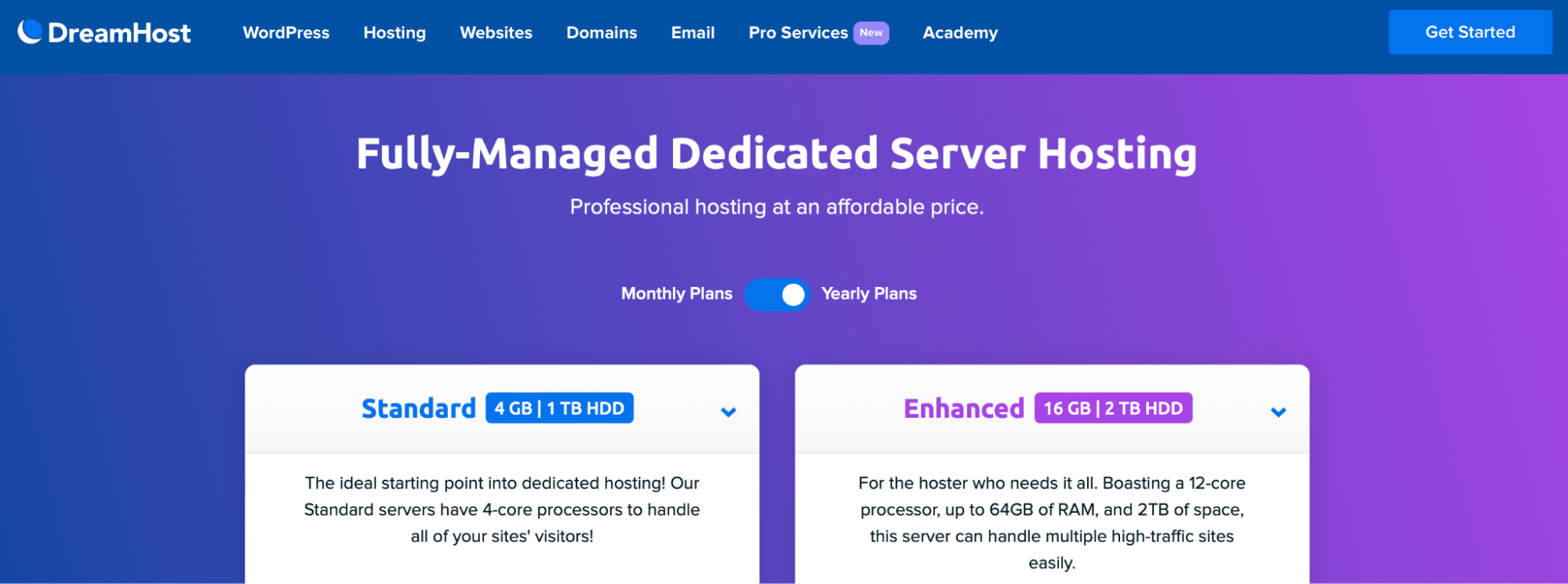
Furthermore, with a managed solution, you can rest easy with DDoS protection, constant monitoring, and 24/7 support.
By contrast, unmanaged hosting providers require that you handle monitoring and maintenance tasks yourself. This often includes administrative work, backups, and security. As a result, unmanaged hosting is best suited for users with advanced knowledge and time to spend on website maintenance.
Pricing structure
Finally, look past the sticker price. Check what’s actually bundled into the plan (management, monitoring, DDoS protection), what the renewal rate is after any promotional term, and whether upgrades require a migration. You’ll find current DreamHost dedicated server configurations and pricing on the dedicated hosting page.
Is dedicated hosting worth it?
Yes — dedicated hosting is worth it if your site has outgrown shared or VPS resources, handles sensitive data, or can’t afford slowdowns during traffic spikes. If you’re not pushing those limits yet, a VPS will serve you well for less. But for a growing site, dedicated server hosting delivers smooth, stable performance, and you can configure your server exactly how you want it.
While dedicated hosting costs can be a little higher, having access to your own server can reduce security vulnerabilities and help your site better handle sharp traffic spikes. Unlike shared hosting plans, dedicated servers give you root access and full control over your server files. (Unmanaged VPS plans, including DreamHost VPS Hosting, also offer full root access — a dedicated server adds exclusive physical hardware on top.)
If you lack the technical expertise or simply aren’t ready for the work involved in running your own server, managed dedicated hosting is a great option. You can enjoy plenty of storage space, DDoS protection, and full administrative access at DreamHost. What’s more, you can count on DreamHost’s team of experts for 24/7 monitoring, DDoS protection, and support. Check out our plans today!
Dedicated server hosting FAQs
What is a dedicated host server?
A dedicated host server is a physical server reserved for a single customer. In traditional web hosting, it’s a dedicated server you rent to run websites directly. In cloud computing, a “dedicated host” is single-tenant hardware you run your own virtual machines on, billed per host.
Is dedicated hosting worth it?
Dedicated hosting is worth it for high-traffic websites, resource-heavy applications, and businesses with strict security or compliance requirements. If your site runs comfortably on shared or VPS hosting, it’s probably overkill: the higher cost only pays off when you actually use the exclusive resources.
What’s the difference between managed and unmanaged dedicated servers?
With a managed dedicated server, the host handles server maintenance, monitoring, and security so you can focus on your website. With an unmanaged server, those tasks fall to you. Managed plans cost more; unmanaged plans demand real server-administration skills and time.
When should I upgrade from VPS to a dedicated server?
Upgrade when your VPS consistently runs near its CPU or RAM limits, slows down during traffic spikes despite optimization, or when you’ve reached the largest VPS tier your host offers. A dedicated server removes the shared-hardware ceiling entirely.
How much does a dedicated server cost?
Dedicated servers typically run from roughly $100 to several hundred dollars per month, depending on hardware and whether the plan is managed. Check DreamHost’s dedicated hosting page for current plans and pricing.

Get DreamHost’s Most Powerful Hosting
Our dedicated hosting plans are the ideal solution for high-traffic sites that require fast speeds and consistent uptime.
See Plans