UptimeRobot pricing starts at free, but a free monitor checks your site every 5 minutes, so an outage can run that long before anyone hears about it. Getting the check down to once a minute is where the three bills split apart.
What 1-minute checks cost at four sizes
Every bill below is our arithmetic on the three pricing pages, read as a US visitor on Oct 15, 2026. Each monitor runs an HTTP, keyword or port check once a minute. One person uses the account, it's billed monthly in US dollars before tax, and each row takes the cheapest tier that fits the monitor count, even when a bigger tier has features you might want. We've assumed alerts go by email, app or Slack and left out text and phone alerts, which each service prices its own way. UptimeRobot shows other currencies to visitors outside the US and warns against converting them one for one, so check your own price if that's you.
| Monitors at 1-minute checks | UptimeRobot | Pingdom | Better Stack | Stack 4, Uptime Kuma preinstalled |
|---|---|---|---|---|
| 10 monitors | $13.00 | $18.00 | $34.00 | $8.99/mofor 3 months, then $15.99/mo |
| 25 monitors | $28.00 | $40.00 | $59.00 | |
| 60 monitors | $46.00 | $149.00 | $59.00 | |
| 250 monitors | $228.00 | $422.00 | $159.00 |
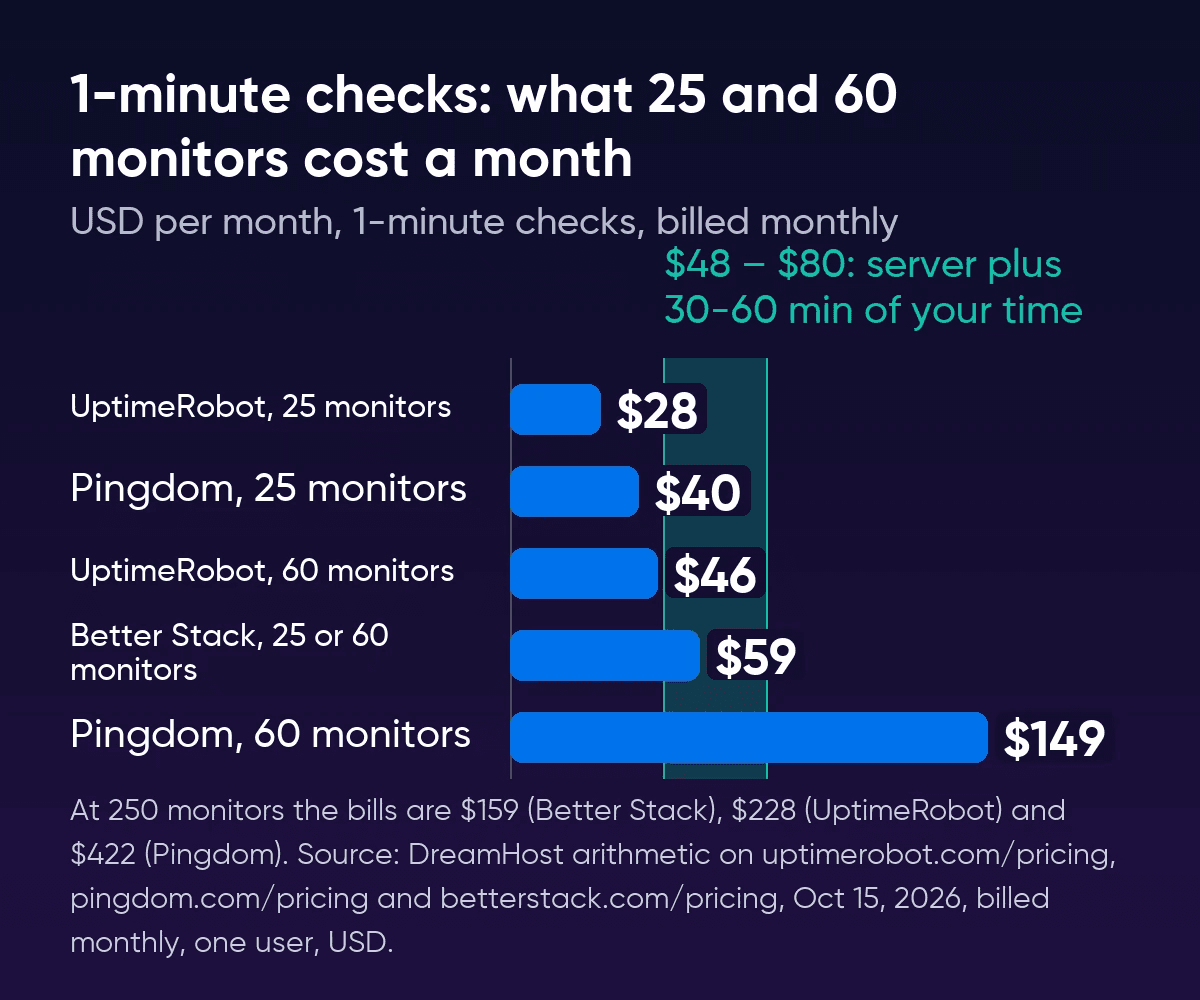
Most of the gaps come from where each tier stops. UptimeRobot's Solo plan tops out at 50 monitors, so monitor 51 moves you to Team at $46, and Scale comes in 200 or 500 monitors with nothing in between. Pingdom's steps are steeper: its 50-check tier costs $78 and the next one up, 100 checks, costs $149. The tiers also jump from 200 checks to 300.
Better Stack grows in smaller steps. Its free plan checks every 3 minutes, so 1-minute checks start with a $34 responder license. The paid account includes 10 monitors and each extra 50 adds $25, which is why Better Stack is the dearest of the three at 10 monitors and the cheapest at 250. Our 60-monitor row fills its first block exactly, so monitor 61 adds another and takes the bill to $84.
Yearly billing lowers every row. UptimeRobot Team, for one, drops from $46 to $39 a month.
| Paid yearly, 1-minute checks | UptimeRobot | Pingdom | Better Stack |
|---|---|---|---|
| 10 monitors | $12.00 | $16.50 | $29.00 |
| 25 monitors | $24.00 | $36.33 | $50.00 |
| 60 monitors | $39.00 | $136.42 | $50.00 |
| 250 monitors | $192.00 | $386.17 | $134.00 |
What the free plans give you
Better Stack's free plan checks more often than UptimeRobot's, but its pricing page labels it for personal projects.
| UptimeRobot Free | Better Stack Free | Pingdom | |
|---|---|---|---|
| Monitors | 50 | 10 | No free plan |
| Check interval | 5 minutes | 3 minutes | 1 minute on every paid tier |
| Business use | Allowed | Labeled for personal projects | No free plan |
| Alerts | Email, mobile app and 5 integrations, no Slack or webhooks | Slack and email | Email and SMS on paid tiers |
| Status pages | 1, on an UptimeRobot address | 1 | Included on paid tiers |
| Next step up | Solo, $13 for 10 monitors at 1 minute | Responder license, $34 | 30-day free trial |
UptimeRobot Free also leaves out SSL and domain expiry checks, heartbeat checks for cron jobs and maintenance windows, and it keeps only 3 months of logs, against 12 months on Solo and 24 on Team. Slack alerts start on Solo. Webhooks, Zapier and PagerDuty start on Team. An agency can't get around the 50-monitor limit by opening several free accounts either, because UptimeRobot's fair use policy rules out running accounts together to get past one account's limits. Uptime Kuma on your own server includes certificate expiry warnings.
When more than one person needs a login
Say three people at an agency each need their own login and alerts for 60 monitors. UptimeRobot Team includes 3 login seats, so that bill stays at $46, and Pingdom doesn't limit users on any tier, so it stays at $149. Better Stack charges $34 for each responder, so three responders plus one block of monitors come to $127. People who aren't on call join free, which keeps a team with one person on call at $59. At 250 monitors Better Stack's lead almost disappears. Three responders there cost $227, a dollar under UptimeRobot Scale with its 5 login seats.
Uptime Kuma has one login for the whole server, and since separate user accounts are still an open request on the project, a team shares it. If separate logins matter to your team, read our guide to Uptime Kuma as an UptimeRobot alternative before you switch.
What the server price leaves out
The server line in the bill table stays the same at 10 monitors or 250, since Uptime Kuma charges nothing per monitor or per status page and checks as often as every 20 seconds at no extra cost. Bandwidth isn't metered either, and updates and backups are yours to run.
A monitor is light on the server, so the plan size doesn't move the bill. In our own test on a 2 vCPU, 4 GB test machine (not a DreamHost server), 200 monitors checking every 60 seconds used about 240 MiB of memory, and the install took a 2.5 GB image and a 5 MB data folder after 15 minutes. We didn't measure months of history, which is the part that keeps growing.
- Your time goes on updates and on checking your backup. Debian patches itself in the background. The Uptime Kuma container doesn't update itself, and the project put out 20 stable version 2 releases between October 2025 and October 2026, often several in the same week. You run
uptime-kuma-backupand thenuptime-kuma-update, which stays inside version 2 so an update can't jump a major version without you. We've assumed half an hour to an hour a month for all of it. That's our estimate, so swap in your own. - A copy of your history belongs somewhere else. Every check and alert sits in one SQLite database on the server, and
uptime-kuma-backupwrites its archive to the same disk, so a lost server takes the archive with it. - An outside check on the monitor tells you when Uptime Kuma itself goes down. Point one free external check at it, on UptimeRobot's free plan for example, and run Uptime Kuma on a different server from the sites it watches. Our guide to Uptime Kuma's requirements and where to run it covers the setup.
- Checks from more than one place aren't built in. Uptime Kuma checks only from the server it runs on, and probing from several locations is still an open request on the project.
DreamHost support is available 24/7 for the hardware, network and connectivity. Your monitors and their settings are yours to manage.
Where the server starts paying off
The Bureau of Labor Statistics puts 2025 median pay for software developers, QA analysts and testers at $64.44 an hour, which makes half an hour to an hour of upkeep worth $32.22 to $64.44 a month. Added to the server's renewal price, that's the band in the chart, about $48 to $80 a month. If you bill your own time at a higher rate, your band is the server's renewal price plus your monthly hours times that rate. On yearly billing the server's 1-year term renews for less per month, so the band to set against the yearly table is about $44 to $76.
| Against the server plus your time | Bills on this page |
|---|---|
| Below the band | UptimeRobot at every size up to 100 monitors, Pingdom at 10 and 25 monitors, Better Stack at 10 |
| Inside the band | Better Stack at 25 or 60 monitors ($59) |
| Above the band | Pingdom from 51 monitors ($149), Better Stack from 61 monitors ($84) or with three people on call ($127), and every 250-monitor bill ($159 to $422) |
At two hours a month the band's top moves to about $145, and Pingdom at 60 monitors and all three 250-monitor bills still clear it.
The server fits two kinds of team best. One watches more than 100 endpoints: monitor 101 moves an UptimeRobot account to Scale at $98, above the band, while the server's price stays put. The other already runs a server for other tools, separate from the sites it watches. There the server line is already paid and only the upkeep counts, since 200 monitors used about 240 MiB of memory in our test. For a fleet under 100 monitors with nothing else to run, UptimeRobot Team stays below the band, though your own server checks every 20 seconds against Team's 30 and keeps history for as long as you set.
Staying, paying or running your own
Stay on UptimeRobot Free if
The free plan's interval and monitor count cover you, and you can do without Slack alerts. A free monitor also makes a good outside check on a server of your own.
Pay UptimeRobot if
You need 1-minute checks or separate logins for up to three people at a size where Team stays under the band above, and nobody on your team wants to look after a server.
Run Uptime Kuma on your own server if
You watch more than 100 endpoints, already run a server for other apps, or want checks faster than Team's 30 seconds without moving to Scale, and someone on your team can give it up to an hour a month for updates and an off-server backup copy.
Uptime monitoring pricing FAQs
Is UptimeRobot free for business use?
Its terms, last updated May 26, 2026, allow business and commercial use on every plan, though they bar reselling its status pages or alerts as a monitoring service of your own.
Which of these include text and phone alerts?
Better Stack's $34 responder license includes unlimited phone-call and SMS alerts. The Pingdom tiers we priced include 50 to 500 SMS alerts. UptimeRobot's paid plans include a few credits (30 on Team), and more cost $15 per 100, bought once. Uptime Kuma sends texts through an SMS provider you connect, such as Twilio or ClickSend.
Does Pingdom have a free plan?
No. It offers a 30-day free trial, and after that you're on a paid tier. Each tier checks as often as once a minute, so the price follows the number of checks rather than the interval.
Sources
- Plans & Pricing, UptimeRobot, Oct 15, 2026. uptimerobot.com/pricing
- UptimeRobot Pricing (machine-readable), UptimeRobot, Oct 15, 2026. uptimerobot.com/pricing.md
- Terms of Service, UptimeRobot, Oct 15, 2026. uptimerobot.com/terms
- Fair Use Policy, UptimeRobot, Oct 9, 2026. uptimerobot.com/terms-fair-use
- Advanced uptime monitor only for private use?, MainWP Community, Oct 9, 2026. community.mainwp.com/t/advanced-uptime-monitor-only-for-private-use/9866
- Pricing, Pingdom, Oct 15, 2026. pingdom.com/pricing
- Uptime Monitoring, Pingdom, Oct 9, 2026. pingdom.com/product/uptime-monitoring
- Create an uptime check, SolarWinds Pingdom documentation, Oct 9, 2026. documentation.solarwinds.com/en/success_center/pingdom/content/gsg/create-check.htm
- Pricing, Better Stack, Oct 15, 2026. betterstack.com/pricing
- Uptime monitoring, Better Stack, Oct 15, 2026. betterstack.com/uptime
- Uptime Kuma README, Uptime Kuma project, GitHub, Oct 9, 2026. github.com/louislam/uptime-kuma
- Releases, Uptime Kuma project, GitHub, Oct 15, 2026. github.com/louislam/uptime-kuma/releases
- Notification providers (source code), Uptime Kuma project, GitHub, Oct 15, 2026. github.com/louislam/uptime-kuma/blob/master/src/components/notifications/index.js
- Allow basic User management without permissions (issue #128), Uptime Kuma project, GitHub, Oct 15, 2026. github.com/louislam/uptime-kuma/issues/128
- Software Developers, Quality Assurance Analysts, and Testers (Occupational Outlook Handbook), US Bureau of Labor Statistics, Oct 9, 2026. bls.gov/ooh/computer-and-information-technology/software-developers.htm