Supabase's self-hosted Docker setup, release v0.8.3 from October 16, 2026, starts 11 containers. One of them is PostgreSQL 17. The other ten are a gateway, sign-in, a REST API, file storage, image resizing, live updates, server functions, a connection pooler, a database admin API and the Studio dashboard. On an x86 server, the 11 images come to about 2.15 GB to download, our sum of Docker Hub's x86 sizes for the image tags in the compose file. The official PostgreSQL 17 image is about 161 MB.
Supabase's API docs describe two ways to use it: you can call its APIs directly from the browser (two-tier architecture), or as a complement to your own API server (three-tier architecture).
If a browser or phone app talks to your database, those ten services are the backend you'd otherwise write. If a server of your own sits in the middle, PostgreSQL is the part your app uses.
What Supabase adds on top of PostgreSQL
For each job below, the middle column names the Supabase service that does it, taken from Supabase's architecture page and its self-hosted README at v0.8.3.
| Job | Supabase gives you | With plain PostgreSQL |
|---|---|---|
| Sign-up, sign-in and access tokens | Auth (GoTrue), a JWT-based API for users and tokens that works with row level security | Your framework's sign-in, or an auth library or service you add |
| An API your front end calls | A REST API that PostgREST builds from your tables | Endpoints you write in your backend, or PostgREST run on its own |
| Rules for which rows each user reads or changes | Row level security policies, which the REST API works with | The same row level security, built into PostgreSQL, or checks in your app's code |
| File uploads and image resizing | Storage, a file API with Postgres handling permissions, plus imgproxy for images | Disk or object storage, plus your own upload and resize code |
| Live updates in the browser | Realtime, a WebSocket service that streams database changes | LISTEN and NOTIFY reach database clients, and a browser needs a WebSocket server you add |
| A web dashboard | Studio, with a dashboard login | psql, or a web admin page such as Adminer, which the official image's example compose file includes |
| Server-side functions | Edge Functions, in the Edge Runtime container | Your app server |
| Connection pooling | Supavisor | A pooler you add when you need one |
| Sign-up and password-reset emails | Your own SMTP server | Your own SMTP server |
| Backups and updates | You run both, on Supabase's release schedule | You run updates, and you keep your own dumps somewhere other than the server |
Our pick for a common case: a Next.js, React or mobile app with no server code yet gets the most from Supabase. Without it, all of that is code you'd write before launch. A team that already has a Rails, Django or Express backend gets little from the extra ten services.
Choose Supabase if
Your web or mobile front end talks to the database directly, and you want sign-in, an automatic API, file storage and live updates working on day one. You'll run and update ten more services than PostgreSQL alone.
Choose plain PostgreSQL if
Your app already has a backend, in Rails, Django, Laravel, Express or similar, that handles users, files and the API. You'll run one database container and add other pieces only when you need them.
Start on Supabase and trim it
Supabase's Docker guide lets you remove Realtime, Storage, imgproxy or the Edge Runtime from the compose file. Keep the pieces your app calls and drop the rest to lower what the server needs.
DreamHost sells both as servers with the software already installed, Supabase VPS Hosting and PostgreSQL VPS Hosting, on the same Stack plans at the same prices. If you're on Supabase Cloud now and wondering whether a server would cost less, start with what Supabase Cloud costs as you grow. If you're weighing a managed PostgreSQL service against plain PostgreSQL on a server, read what managed Postgres costs next to one server.
What worked on day one
We tried each job on Supabase right after install, with no code of our own beyond test scripts, and all seven worked.
- Sign a user in and get a token. We created the user through the admin API, since the default setup has no mail server for confirmation emails.
- Read and write a table over HTTP under a row level security policy. The signed-in user saw their 1 row, and a request with no signed-in user got 0 rows.
- Upload a file and download the same bytes. We used a private bucket, and the download matched byte for byte.
- Resize an image. The imgproxy service turned an 800x600 PNG into one 200 pixels wide.
- Call a server function. The bundled hello function answered.
- Get an event when a row is added. A supabase-js client got the new row 283 ms after the insert.
- Open a web dashboard. Studio asked for its login first.
On plain PostgreSQL 17 we ran the two jobs the database does by itself. The same row level security policy worked in SQL, and LISTEN and NOTIFY carried an event between two SQL sessions. The rest need software beyond the database: an HTTP API, sign-in, file storage, server functions, a browser connection for live updates and a dashboard.
Realtime tripped up our first run: the supabase-js client reported that it had subscribed after 35 ms, and the row we inserted right after that never arrived. On the rerun we logged the channel's system events: the client said subscribed
at 32 ms, and Realtime's own Subscribed to PostgreSQL
message came about 2.4 seconds later. If your app writes a row right after it subscribes, listen for the channel's system event and wait for that message before you insert.
What each one asks of your server
Supabase publishes sizes for its stack. PostgreSQL doesn't, so our measurements fill the gap. In the table, Supabase means the self-hosted v0.8.3 setup and PostgreSQL means plain PostgreSQL 17.
| Supabase | PostgreSQL | |
|---|---|---|
| Containers | 11, or 13 with Logs & Analytics | 1 |
| Download, x86 | About 2.15 GB | About 161 MB |
| Maker's stated size | Minimum 4 GB RAM, 2 cores, 40 GB SSD. Recommended 8 GB+, 4+ cores, 80 GB+ | None published |
| PostgreSQL version | 17.6, Supabase's own image | 17.11, newest 17.x |
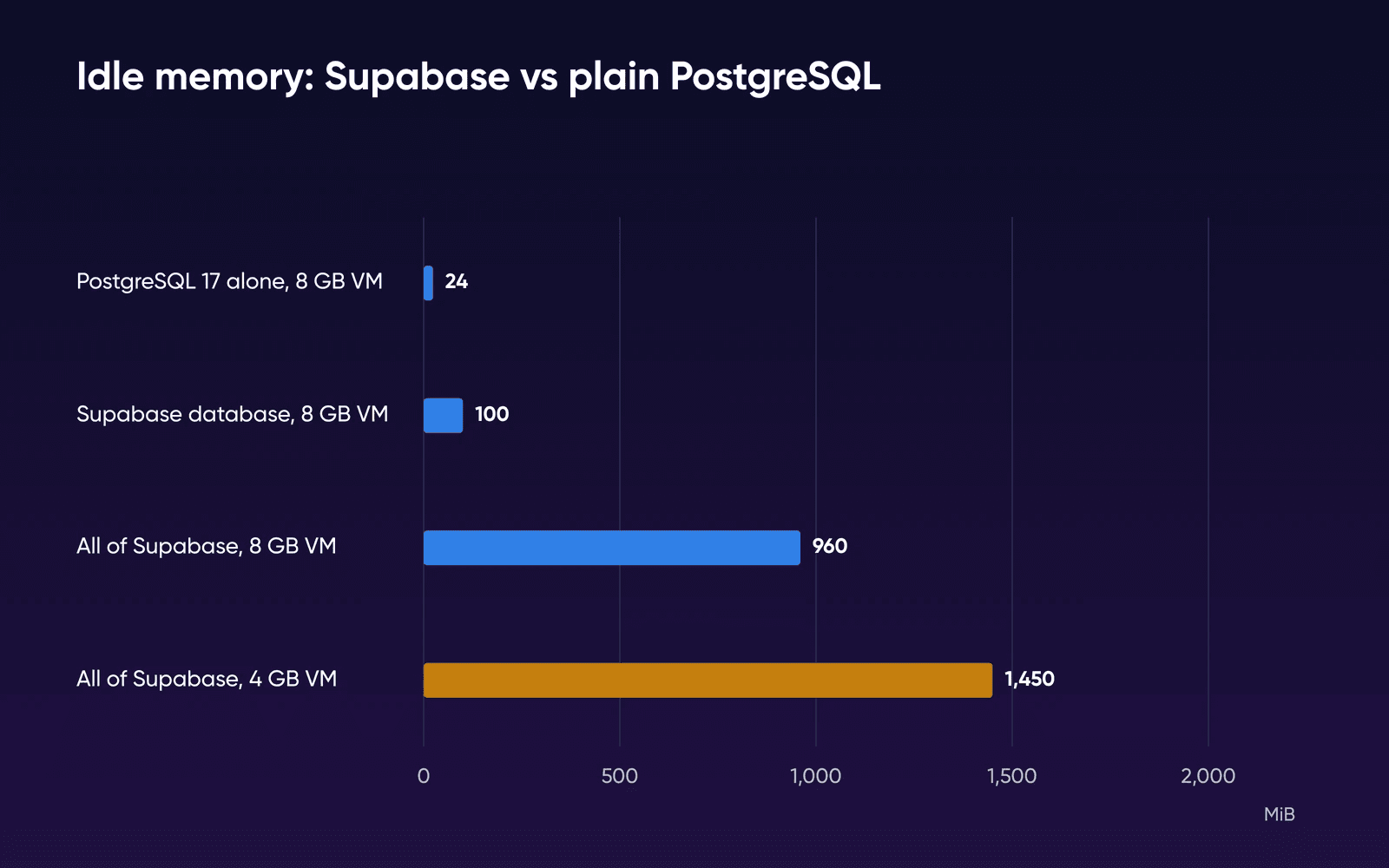
| Idle memory, 8 GB VM | About 960 MiB | About 24 MiB |
| Idle memory, 4 GB VM | About 1,450 MiB, all 11 containers up, no swap used | Not run |
| Biggest users, 8 GB VM | Studio 207 MiB, Realtime 184 MiB, Supavisor 164 MiB, the database 100 MiB | The one container |
| Idle CPU | About 1.7% | 0% |
| Images on disk, arm64 | About 9.7 GB | About 670 MB |
| First query after start | About 17 s, all healthy at about 22 s | About 2 s |
| Extensions ready to enable | 78, pgvector included | 45 in Docker's image, no pgvector. On our server, add it with full root |
| New releases | A stable snapshot about once a month | 17.x minor releases, supported to Nov 8, 2029 |
The rows from idle memory down to extensions are our own measurements, from October 19 (8 GB VM) and October 20, 2026 (4 GB VM), described under how we measured. Times are with images already downloaded. Counts come from Supabase's compose file at tag self-hosted/v0.8.3, download sizes from Docker Hub's tag data, and requirements from each maker's docs, all read October 16, 2026.
Logs & Analytics are off in Supabase's default setup to reduce the memory footprint, and you turn them on with an override file that adds Logflare and Vector and raises what the stack needs.
Stack 4 meets Supabase's minimum. Stack 8 adds the recommended RAM and disk but keeps 2 vCPU. Stack 16 is the smallest plan that meets all of Supabase's recommended figures, with 4 vCPU, 16 GB of RAM and 250 GB of NVMe storage on the Supabase VPS page, so it's our pick for production, and Stack 8 suits a small app or a staging copy.
Our 4 GB run shows the default stack fits on Stack 4 at idle. All 11 containers kept running without a restart, and their memory settled at a little over a third of the VM's 3,904 MiB. The images took about 9.7 GB of disk, well inside Stack 4's 75 GB.
The same stack used about half again as much memory on the 4 GB VM as on the 8 GB one. Studio, Realtime and the pooler rose by 16 to 22%, and five small services rose two to seven times, imgproxy from about 13 MiB to 94 MiB. We ran each once and can't explain the gap, so we'd plan on 1 to 1.5 GB for Supabase at idle and size for your app's traffic on top of that.
For PostgreSQL on its own, we'd put a production database on Stack 8, the plan the PostgreSQL VPS page labels For apps running in production.
Stack 4, labeled For lightweight apps and solo projects,
is enough to start. The page says moving from Stack 4 to Stack 32 is straightforward, and your environment moves with you. To size the server for anything else you'll run on it, see which VPS plan you need.
What plain PostgreSQL leaves to you
Your backend handles those jobs, and Rails and Django ship much of that. Rails comes with an authentication generator, Active Storage handles uploads and image variants, and Action Cable gives the browser WebSockets. Django has a built-in user authentication system, and Channels adds WebSockets. An Express app adds these as libraries, for example Socket.IO for a live two-way connection between the browser and your server.
PostgreSQL itself covers part of the list. Its row security policies limit, for each user, which rows a query returns or changes, and Supabase's access rules are those same policies. LISTEN and NOTIFY send an event to every database session that's listening, so a worker in your backend can react to new rows. A browser doesn't open database sessions, so live updates in the browser go through a WebSocket server of your own, such as Action Cable, Channels or Socket.IO. Extensions such as pgvector and PostGIS install on our PostgreSQL server with full root.
If the automatic API is the piece you'd miss, you can run PostgREST by itself. It's the web server behind Supabase's REST API, and its README says it serves a fully RESTful API from any existing PostgreSQL database.
Running self-hosted Supabase day to day
Supabase's self-hosting page lists what you take on when you run it: server upkeep, keeping the OS and services updated, Postgres maintenance, high availability, and backups and recovery.
- HTTPS. Supabase's own Docker setup answers over plain HTTP, which is fine on a test box. For production use, Supabase's proxy guide puts Caddy or Nginx with Let's Encrypt in front of the gateway.
- Email. Supabase's default Docker settings turn on email sign-up with confirmation and point mail at a container that exists only in Supabase's development file. Add your own SMTP server before real users sign up, or confirmation and password-reset emails won't go out.
- Updates. Supabase's Docker guide says it publishes a stable snapshot about once a month. Its update script merges the new release's settings into yours. Then you pull the new images and recreate the containers. Back up before you run it.
- Projects. One install runs one project. Self-hosted Studio can't hold several organizations or projects, so a second app gets its own install.
The self-hosting walkthrough has the setup steps, and Supabase's Docker guide is the reference for each setting.
How we measured
DreamHost ran both stacks on October 19, 2026, on a local test VM with 2 vCPU and 7,922 MiB of memory: Ubuntu 24.04.4 on arm64, under Colima on an Apple-silicon Mac. Our plans run on x86 AMD EPYC processors, so this wasn't a DreamHost server, and image sizes differ by processor, which is why the table also gives the x86 download.
Supabase ran from its v0.8.3 Docker folder as published, with secrets from its own key scripts. PostgreSQL ran from Docker Hub's example compose file, pinned to postgres:17.11, with its Adminer service removed. Each memory figure is the middle value of 12 docker stats readings, one every 5 seconds, starting 10 minutes after start. Images were downloaded before we timed the starts.
On October 20 we ran Supabase again on a second VM sized like Stack 4, with 2 vCPU, 3,904 MiB of memory and no swap, on the same Ubuntu and Docker versions. It used a fresh copy of the same v0.8.3 folder, new secrets and the same 12 readings after 10 minutes. A small unrelated test app, about 180 MiB, was also running on that VM. It isn't counted in any Supabase figure we quote.
We ran each setup once, so there's no spread to report. The runs cover an idle stack and what works out of the box. They don't cover an app under load or a week of running, and we didn't try Logs & Analytics turned on.
Supabase or plain PostgreSQL FAQs
Is Supabase basically Postgres?
Yes, every Supabase project gets a full PostgreSQL database that you can use with full privileges, and Auth, Storage, Realtime and Edge Functions are built on top of it. In the self-hosted setup, PostgreSQL is one of the 11 containers.
Can I start on one and switch to the other later?
Yes: your tables are ordinary PostgreSQL, and Supabase's architecture page says it sticks to standard formats such as Postgres dump files and CSV so you can migrate in and out. Supabase Auth keeps each user in its Auth schema, and in our reading any policy that calls auth.uid() will need another way to know the user.
Can I run only part of Supabase?
Supabase's Docker guide says you can remove Realtime, Storage, imgproxy or the Edge Runtime from the compose file to lower what the stack needs. Take out only what your app won't call, because each one has its own block and dependencies to restore if you want it back.
Will self-hosted Supabase run on 4 GB of memory?
At idle, yes, in our test. On a 4 GB, 2-core VM sized like Stack 4, all 11 containers started, none was restarted, and Studio loaded, with no swap in use (the chart above shows the memory). We didn't put traffic on it, and Supabase recommends 8 GB and 4 cores.
What are the downsides of self-hosted Supabase?
In Supabase's own Docker setup, you run and update 11 containers where PostgreSQL is one, the whole stack takes longer to start, and you add your own SMTP server and HTTPS. One install runs one project.
Where does Neon fit?
Neon's pricing page describes it as a hosted Postgres platform from Databricks, so it belongs in the same comparison as Supabase Cloud. For that side, see what Supabase Cloud costs as you grow.
Who helps when something on the server breaks?
DreamHost support is available 24/7 for the hardware, network and connectivity. You manage the OS, software and configuration, as the Supabase VPS page explains. For Supabase itself, Supabase's self-hosting page says self-hosted Supabase is community-supported.
Sources
- Supabase VPS Hosting, DreamHost, Oct 21, 2026. dreamhost.com/hosting/vps/supabase
- PostgreSQL VPS Hosting, DreamHost, Oct 21, 2026. dreamhost.com/hosting/vps/postgresql
- Self-Hosting with Docker, Supabase, Oct 16, 2026. supabase.com/docs/guides/self-hosting/docker
- Self-Hosting, Supabase, Oct 16, 2026. supabase.com/docs/guides/self-hosting
- Architecture, Supabase, Oct 16, 2026. supabase.com/docs/guides/getting-started/architecture
- Data REST API, Supabase, Oct 16, 2026. supabase.com/docs/guides/api
- Database, Supabase, Oct 16, 2026. supabase.com/docs/guides/database/overview
- Auth, Supabase, Oct 16, 2026. supabase.com/docs/guides/auth
- Users, Supabase, Oct 21, 2026. supabase.com/docs/guides/auth/users
- Row Level Security, Supabase, Oct 16, 2026. supabase.com/docs/guides/database/postgres/row-level-security
- Update your self-hosted deployment, Supabase, Oct 16, 2026. supabase.com/docs/guides/self-hosting/updating
- Self-hosted proxy with HTTPS, Supabase, Oct 16, 2026. supabase.com/docs/guides/self-hosting/self-hosted-proxy-https
- Migrate from Postgres to Supabase, Supabase, Oct 16, 2026. supabase.com/docs/guides/platform/migrating-to-supabase/postgres
- Self-hosted Supabase with Docker: README, CHANGELOG, compose file and versions (tag self-hosted/v0.8.3), Supabase on GitHub, Oct 16, 2026. github.com/supabase/supabase/tree/self-hosted/v0.8.3/docker
- postgres (Docker Official Image), Docker Hub, Oct 16, 2026. hub.docker.com/_/postgres
- Versioning Policy, PostgreSQL Global Development Group, Oct 16, 2026. postgresql.org/support/versioning
- Row Security Policies (PostgreSQL 17 documentation), PostgreSQL Global Development Group, Oct 16, 2026. postgresql.org/docs/17/ddl-rowsecurity.html
- NOTIFY (PostgreSQL 17 documentation), PostgreSQL Global Development Group, Oct 16, 2026. postgresql.org/docs/17/sql-notify.html
- PostgREST README, PostgREST on GitHub, Oct 21, 2026. github.com/PostgREST/postgrest
- Neon pricing, Neon, Oct 16, 2026. neon.com/pricing
- Securing Rails Applications (authentication generator), Ruby on Rails Guides, Oct 20, 2026. guides.rubyonrails.org/security.html
- Active Storage Overview, Ruby on Rails Guides, Oct 20, 2026. guides.rubyonrails.org/active_storage_overview.html
- Action Cable Overview, Ruby on Rails Guides, Oct 20, 2026. guides.rubyonrails.org/action_cable_overview.html
- User authentication in Django, Django, Oct 20, 2026. docs.djangoproject.com/en/5.2/topics/auth
- Django Channels, Django Channels, Oct 20, 2026. channels.readthedocs.io/en/latest
- Socket.IO introduction, Socket.IO, Oct 20, 2026. socket.io/docs/v4
- Supabase images (tag data), Docker Hub, Oct 16, 2026. hub.docker.com/u/supabase