While your project fits on one Micro instance and stays inside the included quotas, the compute credit makes the plan fee the whole invoice. A staging project, a bigger instance and traffic past the included quotas each add their own line. In our largest example, the monthly active user fee was the biggest single line, because it keeps climbing past Pro's 100,000-user allowance.
What you pay for on Supabase Pro
Past the included quotas, users, egress, disk, files and function calls each bill at their own rate, according to Supabase's pricing page.
Supabase's billing docs add four rules that raise the bill once your app grows:
- The compute credit only pays for compute. You get $10 a month, per Supabase's compute docs. That's enough for one Micro instance, and none of it goes to egress, users or disk.
- Every project gets its own compute instance, so a staging copy of production adds a second compute line that the one credit can't cover.
- Disk is billed on the size Supabase gives you. Its database size docs say the disk grows by 50% each time your database reaches 90% of it, so a 20 GB database ends up on a 27 GB disk. You pay for the 27, minus the 8 GB Pro includes.
- Pro includes 8 GB of disk per project, and every GB above that costs $0.125 a month.
To price your own month, open the usage page and add these up in order:
- Start with $25 for the plan.
- Add each project's compute at Supabase's rounded monthly prices ($10 Micro, $15 Small, $60 Medium, $110 Large), then subtract the $10 credit once. Compute bills by the hour. A project that ran part of the month costs less.
- Add $0.00325 for each monthly active user past 100,000. That's $32.50 for every 10,000.
- Add $0.09 for each GB of egress past 250 GB, plus $0.03 for each GB of cached egress past its own 250 GB.
- Add $0.125 for each GB of disk past 8 GB in each project, using the disk size shown for the project.
- Add $0.0213 for each GB of files past 100 GB, and $2 for each million Edge Function calls past 2 million.
- Add $2.50 for each million Realtime messages past 5 million, and $10 for each 1,000 peak connections past 500.
- Add any add-ons you've turned on, such as $100 a month for 7 days of point-in-time recovery.
Why projects leave the Free plan
Free covers up to 2 active projects, each with 50,000 monthly active users, a 500 MB database, 5 GB of egress and 1 GB of file storage, according to Supabase's pricing page. If your project went to sleep after a quiet week, you've met one of Free's limits: a Free project pauses after a week with no activity, and its database goes read-only once it passes 500 MB. There's no automatic backup either, so Supabase tells Free users to export their own data with the CLI and keep copies somewhere else.
Paid projects don't pause for inactivity, and Pro keeps daily backups for seven days.
How the spend cap works on a growing app
Say your egress crosses 250 GB on the 20th of the month. The spend cap is on by default on Pro, so from the 20th until the next billing cycle, egress past 250 GB is blocked. The same goes for each covered item past its quota, according to Supabase's docs on how the spend cap works.
With the cap on, a Pro disk also stops growing at 8 GB. The spend cap can't set a budget or an alert for one line item, and you can't turn it on for some lines and off for others.
Three app sizes, priced line by line
Each example uses Supabase Pro on the monthly plan, in US dollars before tax, with Supabase's rounded monthly compute prices. The usage is our assumption, so swap in your own figures:
- Uncached egress grows at about 10 MB per user a month, our round figure for a light app; your usage page shows your own. The busier app also serves 500 GB from Supabase's cache.
- Disk sizes are our estimate from Supabase's growth rule: 8 GB to start, then half again each time the database reaches 90% of the disk. Supabase may round.
- The two bigger apps run a staging project on Micro compute. The side project doesn't.
- Point-in-time recovery (PITR) is priced as an extra, at $100 a month for seven days of history, and it needs at least Small compute.
A side project that just left Free
Say you have 5,000 users, a 2 GB database, 50 GB of egress and 5 GB of uploaded files, which leaves every meter well inside its Pro quota, and the compute credit cancels out the Micro instance.
| Line item | Usage | Cost |
|---|---|---|
| Pro plan | First project included | $25.00 |
| Micro compute (production) | Full month | $10.00 |
| Compute credit | Covers one Micro | -$10.00 |
| Disk | 2 GB database on the included 8 GB | $0.00 |
| Monthly active users | 5,000 of 100,000 included | $0.00 |
| Egress | 50 GB of 250 GB included | $0.00 |
| File storage | 5 GB of 100 GB included | $0.00 |
| Total | All lines | $25.00 |
| With 7-day PITR | Micro becomes Small ($15), plus $100 | $130.00 |
You don't need to turn the spend cap off. Point-in-time recovery raises the bill, because it brings its own fee and moves you off the Micro instance the credit pays for.
A growing SaaS with 40,000 users
This example adds a staging project, so nobody tries a schema change on production first. It has 40,000 monthly users, a 20 GB database, 400 GB of egress, 60 GB of files and a million Edge Function calls.
| Line item | Usage | Cost |
|---|---|---|
| Pro plan | First project included | $25.00 |
| Small compute (production) | Full month | $15.00 |
| Micro compute (staging) | Full month | $10.00 |
| Compute credit | Covers one Micro | -$10.00 |
| Disk | 20 GB database on a 27 GB disk: 19 GB over x $0.125 | $2.38 |
| Monthly active users | 40,000 of 100,000 included | $0.00 |
| Egress | 400 GB: 150 GB over x $0.09 | $13.50 |
| File storage | 60 GB of 100 GB included | $0.00 |
| Edge Function calls | 1 million of 2 million included | $0.00 |
| Total | All lines | $55.88 |
| With 7-day PITR | Plus $100 | $155.88 |
Of what's new since the side project, about half comes from staging and a bigger production instance and the rest from disk and egress overage. The overage is also why it's the first bill that forces the spend cap off.
A busier app with 200,000 users
At 200,000 users, you're past the Pro quota on almost every line that scales with people. This example assumes 2 TB of regular egress plus 500 GB served from Supabase's cache, which has its own quota and a lower rate. We've assumed production runs on Large compute, with 2 dedicated vCPUs and 8 GB of RAM.
| Line item | Usage | Cost |
|---|---|---|
| Pro plan | First project included | $25.00 |
| Large compute (production) | Full month | $110.00 |
| Micro compute (staging) | Full month | $10.00 |
| Compute credit | Covers one Micro | -$10.00 |
| Monthly active users | 200,000: 100,000 over x $0.00325 | $325.00 |
| Disk | 60 GB database on about a 91 GB disk: about 83 GB over x $0.125 | $10.39 |
| Egress | 2,000 GB: 1,750 GB over x $0.09 | $157.50 |
| Cached egress | 500 GB: 250 GB over x $0.03 | $7.50 |
| File storage | 120 GB: 20 GB over x $0.0213 | $0.43 |
| Edge Function calls | 3 million: 1 million over x $2 | $2.00 |
| Realtime messages | 4 million of 5 million included, under 500 peak connections | $0.00 |
| Total | All lines | $637.82 |
| With 7-day PITR | Plus $100 | $737.82 |
A smaller instance wouldn't dent this bill much, since compute is less than a fifth of the total after the credit. The user fee keeps climbing with each new active user past 100,000.
Supabase next to one server
The table puts the three Supabase bills beside one self-managed server with Supabase preinstalled. The server has no per-user fee, and bandwidth on every plan is unmetered (fair use applies), so there's no data transfer line to watch. Its price changes when the introductory price ends after 3 months, or if you outgrow the plan and move up.
| App size | Supabase Pro | Supabase Pro + 7-day PITR | Stack 16, Supabase preinstalled |
|---|---|---|---|
| Side project, 5,000 users | $25.00 | $130.00 | $22.99/mofor 3 months, then $34.99/mo |
| Growing SaaS, 40,000 users | $55.88 | $155.88 | |
| Busier app, 200,000 users | $637.82 | $737.82 |
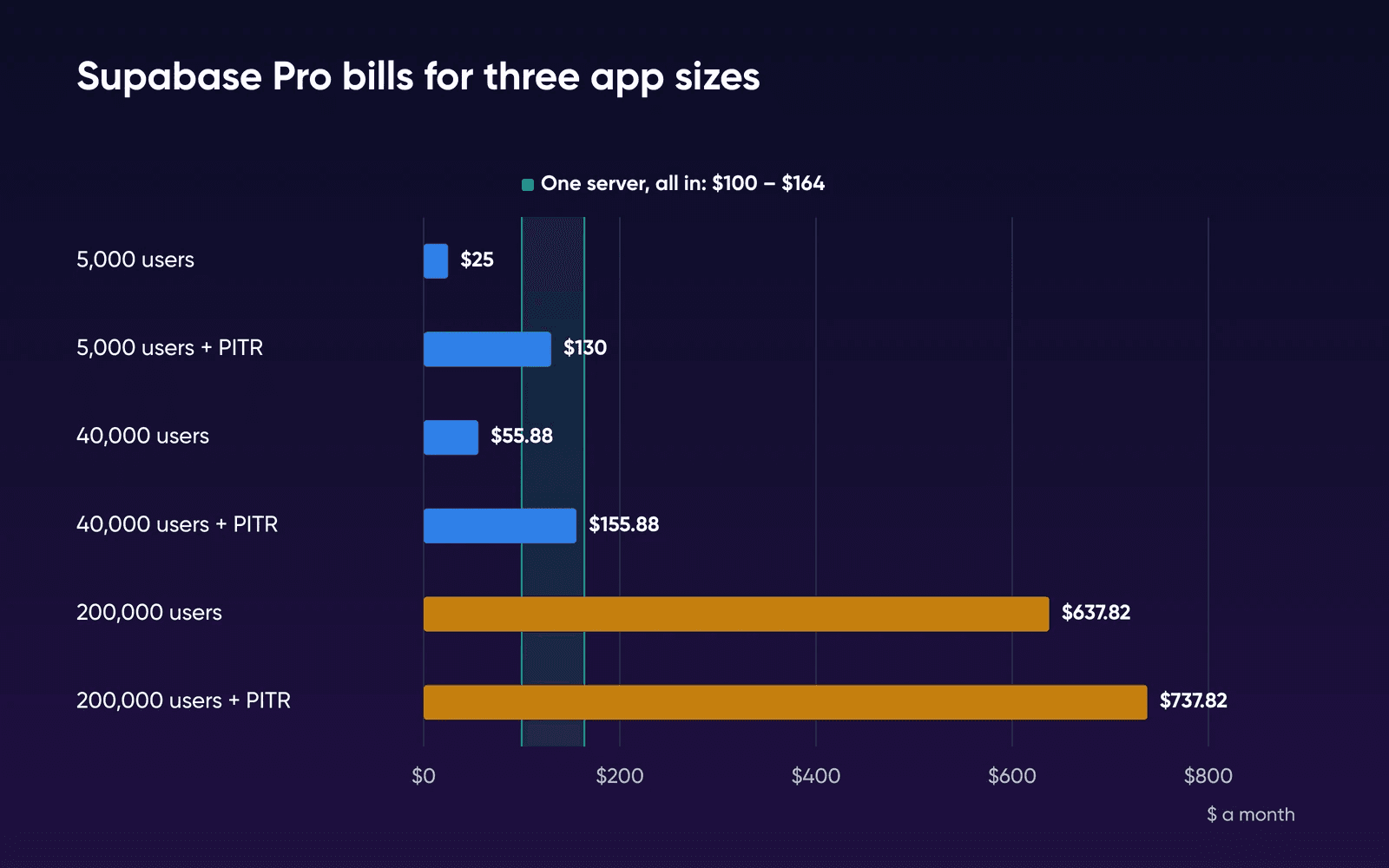
The server column shows the introductory price and the price it renews at. We use the renewal price for every crossover figure in this guide, and even before you count any of your time, the growing SaaS already pays Supabase more than that. Stack 16 is the plan in the table because it's the smallest of our plans that meets all of Supabase's recommended self-hosting requirements. Stack 8 has the RAM and disk, but its 2 vCPU only reach Supabase's minimum, and Stack 16's 4 vCPU line up with the 4 cores Supabase recommends:
| RAM | CPU | Disk | |
|---|---|---|---|
| Supabase's minimum | 4 GB | 2 cores | 40 GB SSD |
| Supabase's recommended | 8 GB or more | 4 cores or more | 80 GB SSD or more |
| Stack 8 | 8 GB | 2 vCPU | 150 GB NVMe |
| Stack 16 | 16 GB | 4 vCPU | 250 GB NVMe |
Supabase calls its minimum suitable for development and small to medium production apps, which is where Stack 8 fits.
What the stack holds before your users arrive
The price comparison only holds if the stack fits on the plan, so we ran Supabase's own self-hosted Docker setup, release v0.8.3, on two test machines and read its memory once it had settled. Both had 2 vCPU. One had 8 GB of memory and the other 4 GB, the size of Supabase's minimum and of Stack 4.
| What we checked | 8 GB test VM, Oct 19 | 4 GB test VM, Oct 20 |
|---|---|---|
| Containers running | All 11 | All 11, none restarted |
| Memory 10 minutes after start, no traffic | About 960 MiB | About 1,450 MiB, no swap used |
| Time to the first database query | About 17 s | About 18 s |
| Day-one features | Studio, sign-in, the REST API under a row security rule, file storage, image resizing, an Edge Function and Realtime all worked | Studio loaded. The rest wasn't rerun |
The images for those 11 containers took about 9.7 GB of disk. The stack's own memory is a small part of Stack 16's 16 GB, so nearly all of it is left for your database's cache and your users. The 4 GB run shows it also starts and idles on a test machine the size of our smallest plan. Neither run had traffic, so neither tells you how many users a plan carries. The plan pick still rests on Supabase's recommended 4 cores, and the load test in the steps further down is how you check it for your app.
On Cloud, the busier app's Large compute instance has 8 GB of RAM. On your server, Postgres shares the 16 GB with Auth, Storage, Realtime and the rest of the stack.
What the server price leaves out
The plan price buys a server with the Supabase stack running on it, and Supabase's self-hosting page lists what doesn't come along with it. Branching, managed backups, PITR, advanced metrics, analytics and vector buckets, ETL and the management API are all Cloud-only.
What one server gives you
- You pay one monthly price that doesn't grow with users or egress.
- Bandwidth is unmetered, with fair use applying.
- Supabase comes preinstalled, with PostgreSQL, Auth, Storage and Realtime running together.
- You can move up from Stack 4 to Stack 32 as the project grows.
What you give up
- You don't get managed backups or point-in-time recovery.
- Each Supabase stack runs one project, and there's no branching.
- Help with Supabase itself comes from the community, while our team supports the hardware, network and connectivity.
- OS and Supabase updates, Postgres upkeep and monitoring are yours to run.
The bill table also leaves out email and backup storage. Supabase's Docker self-hosting guide says you'll need a production-ready SMTP server to send sign-up and password emails, so plan on a transactional email service. Your backups belong somewhere other than the server itself, such as S3-compatible storage. On the server side, you'll pay for both on top of the plan. We haven't priced them, because they depend on your email volume, how much you store and how long you keep backups.
The busier app's 60 GB database and 120 GB of files fit on 250 GB of disk, though with less room than it looks, because the operating system, Docker images (about 9.7 GB for Supabase's in our run), logs and a restore in progress all take space too. Store backups elsewhere and set an alert on free disk space when you set up the server.
Staging is left out of the server side as well, because self-hosted Supabase runs one project per stack, so a staging copy means a second stack, either on the same server or on a second one. We haven't tested two stacks on one server. Drop staging from the Cloud side to match, and the SaaS bill falls by $10 to $45.88 and the busier app's to $627.82. Even without staging, the SaaS stays below the crossover you'll see in the next section, and the busier app stays well past it.
Where the server wins once your time counts
Routine upkeep on your own server means OS updates, new Docker images, a look at the logs and a check that last night's backup ran, and all of it comes to one to two hours a month, by the estimate in our guide on how to self-host Supabase, and what you give up. The 2025 US median wage for software developers, QA analysts and testers is $64.44 an hour, according to the Bureau of Labor Statistics, which puts those hours at $64.44 to $128.88 a month.
Add those hours to the server's renewal price from the table above. Here's the Supabase bill at which the server plus upkeep starts to cost less. The example months are our own guesses at when each amount of upkeep happens:
| Your upkeep a month | Example month | Supabase bill where the server wins |
|---|---|---|
| One hour | A routine month | About $100 |
| Two hours | A routine month, at the high end | About $164 |
| Four hours | A rough first few months | About $293 |
| Eight hours | A month with a major upgrade | About $550 |
The busier app's bill passes even the eight-hour line. Each hour moves the line by what your hour is worth, so if yours is worth $100, the one-hour line moves to about $135. Add backup storage, an email service and a one-time migration to the server side too.
With PITR, the growing SaaS's $155.88 bill sits inside the one-to-two-hour range of about $100 to $164, but a self-hosted server doesn't include managed point-in-time recovery. You'd build and run that recovery yourself. You'd also give up the seven days of daily backups Cloud Pro keeps for you. If recovery is the reason you pay for PITR, stay, or budget the time to build and test your own backups before you move. The busier app pays Supabase several hundred dollars a month more than the server and two hours of your time combined, but that saving holds only if one server carries your load, so load-test before you count on it.
If your app only uses the database, the guide on what managed Postgres alone costs next to one server prices that case. If you're still deciding whether you need the full Supabase stack at all, our guide on whether to run Supabase or plain PostgreSQL compares the two on one server.
Before you move production
In Supabase's GitHub discussion on self-hosting, one developer described the worry this way:
at some point I might be forced to switch to a self-hosted version of Supabase because of the cost. I already gave the
self-hosted version a try by using Coolify and I managed to get it up and running but I wasn't confident enough to use
it for production.
Do these in order, on a copy of your data, while the Cloud project's still serving users:
- Restore a recent backup on the server
Back up the database with the Supabase CLI and restore it on the server, using the dump steps in Supabase's backup and restore guide. Time the restore, because that's the database part of your recovery time if the server fails, and rehearse a full rebuild once too.
- Move the parts outside the database
Auth users, Storage files and Edge Functions each have their own migration path, so check each one. Then sign up a test user and make sure the email arrives through your SMTP server.
- Load it like production
Run your heaviest queries and open as many Realtime connections as your usage page shows at peak. Watch memory while you do.
- Set up backups that leave the server
Send nightly backups off the server, for example to S3-compatible storage. Then restore one.
- Plan the cutover and the way back
Pick a quiet hour. Keep the Cloud project until the server has run a full billing cycle, and write down how you'd switch back.
Staying or moving
Count your own hours before you commit. Time the restore and the load test above to see what migration costs you, then log your upkeep for the first month to replace our one-to-two-hour estimate in the crossover.
Stay on Supabase Cloud if
Your last three invoices sit below the crossover row that matches your upkeep hours, or a restore you'd have to build yourself would take longer than you can be down.
Move to your own server if
The user fee and egress lines grew faster than the rest of your invoice over the last three months, and the restore and load test above passed on the server.
How we priced and tested this
The Cloud bills are DreamHost's arithmetic on Supabase's price list and billing docs, read September 28, 2026. We read the price list again on October 21 and every rate in the tables was unchanged. The usage in each example is our assumption, and we didn't open a Supabase Cloud account to test it.
The server figures were measured by DreamHost on a test VM (arm64), not a DreamHost server. The runs were made for our guide on Supabase or plain PostgreSQL, and this page reuses them. They ran on a Mac under Colima with Ubuntu 24.04 and 2 vCPU: 8 GB of memory on October 19, 2026 and 4 GB on October 20. Supabase's v0.8.3 Docker folder ran as published. Each memory figure is the middle of 12 docker stats readings, 5 seconds apart, taken 10 minutes after start. Our plans run on x86 AMD EPYC processors, so image sizes on your server will differ.
What we didn't test: any traffic or load, a week of running, 4 vCPU, the Logs & Analytics add-on, a restore, and two Supabase stacks on one server. Each setup ran once.
Supabase pricing FAQs
How much is Supabase per month?
Pro starts at $25 a month, billed monthly, because Supabase's billing FAQ says there's no official annual plan. It includes a $10 compute credit for one Micro instance. Bigger compute, extra projects and usage past the quotas come on top, as the three example bills below show.
How long can I use Supabase for free?
Supabase sets no time limit on Free. A Free project pauses after a week without activity, and its database goes read-only once it passes 500 MB, as the section on why projects leave Free explains.
How many projects can I have on the Supabase Free plan?
Supabase's pricing page lists a limit of 2 active projects on Free. On Pro, the first project is included and each extra project adds its own compute line, from $10 a month for Micro.
Does the spend cap stop a big bill?
It stops metered usage from growing the bill: Supabase blocks each covered item past its quota until the next cycle, and your users hit that limit. Compute, point-in-time recovery and several add-ons bill in full either way.
What do I lose if I self-host Supabase?
You lose managed backups, managed point-in-time recovery, branching, more than one project per Studio, and official support, since Supabase's self-hosted version is community-supported. The setup and the workarounds are in our guide on how to self-host Supabase, and what you give up.
Can I move my Supabase Cloud project to my own server?
Yes. Supabase's backup and restore guide covers dumping a database with the Supabase CLI to move it between projects, and you restore the same dump into the Postgres on your server. Auth users, files and Edge Functions each move separately. Our self-host guide estimates a few hours for a small project, longer with many custom functions or extensions.
Sources
- Pricing & Fees, Supabase, Oct 21, 2026. supabase.com/pricing
- About billing on Supabase, Supabase, Sep 28, 2026. supabase.com/docs/guides/platform/billing-on-supabase
- Manage Compute usage, Supabase, Sep 28, 2026. supabase.com/docs/guides/platform/manage-your-usage/compute
- Manage Egress usage, Supabase, Sep 28, 2026. supabase.com/docs/guides/platform/manage-your-usage/egress
- Manage Disk size usage, Supabase, Sep 28, 2026. supabase.com/docs/guides/platform/manage-your-usage/disk-size
- Manage Monthly Active Users usage, Supabase, Sep 28, 2026. supabase.com/docs/guides/platform/manage-your-usage/monthly-active-users
- Manage Point-in-Time Recovery usage, Supabase, Sep 28, 2026. supabase.com/docs/guides/platform/manage-your-usage/point-in-time-recovery
- Control your costs, Supabase, Sep 28, 2026. supabase.com/docs/guides/platform/cost-control
- Billing FAQ, Supabase, Sep 28, 2026. supabase.com/docs/guides/platform/billing-faq
- Database Size, Supabase, Sep 28, 2026. supabase.com/docs/guides/platform/database-size
- Database Backups, Supabase, Sep 28, 2026. supabase.com/docs/guides/platform/backups
- Upgrading, Supabase, Sep 28, 2026. supabase.com/docs/guides/platform/upgrading
- Self-Hosting, Supabase, Sep 28, 2026. supabase.com/docs/guides/self-hosting
- Self-Hosting with Docker, Supabase, Sep 28, 2026. supabase.com/docs/guides/self-hosting/docker
- Migrating within Supabase, Supabase, Sep 28, 2026. supabase.com/docs/guides/platform/migrating-within-supabase/backup-restore
- Share your self-hosting experience (discussion 39820), Supabase on GitHub, Sep 28, 2026. github.com/orgs/supabase/discussions/39820
- Software Developers, Quality Assurance Analysts, and Testers (Occupational Outlook Handbook), US Bureau of Labor Statistics, Sep 28, 2026. bls.gov/ooh/computer-and-information-technology/software-developers.htm
- Self-hosted Supabase v0.8.3 Docker folder, Supabase on GitHub, Oct 16, 2026. github.com/supabase/supabase/tree/self-hosted/v0.8.3/docker