In 2015 a parent on Hacker News asked a hosting company whether its 1 GB plan left the whole gigabyte for Minecraft, or whether the operating system took some of it. They wanted a server for their kids and the kids' friends, and as they put it, a Minecraft server needs 1 GB to itself.
On a 16 GB Pelican Panel server the answer's still no. About 2 GB goes to the system and the panel before your world loads, and Java needs memory beyond the number you give it.
The requirements on this page come from the people who make the software: the Minecraft Wiki, Paper, the modpack makers' own server files and Pelican's source code. The 2 GB reserve and the room each plan leaves are figures we've estimated ourselves. We also ran Minecraft on our own test machine (not a DreamHost server) to see what a memory setting takes, further down. Start from the table and check your memory once your group is playing.
Memory by what your group runs
Find the row that matches what your group plays. Each plan in the right column keeps about 2 GB for Debian, the panel, Docker and Wings. Wings is the Pelican service that runs each game server in its own container. Pelican doesn't publish a figure, so that 2 GB is our planning number. Wings then lets each server's container use 5 to 15% more than the memory you type, with the larger share going to servers of 4 GB or less.
After both, you've got room for about 1.7 GB of game servers on Stack 4, 5.7 GB on Stack 8, 13.3 GB on Stack 16 and 28.6 GB on Stack 32.
| What your group runs | What its makers say it needs | Plan that fits |
|---|---|---|
| Vanilla, 1 to 4 players, new world | 1 GB for the server (Minecraft Wiki) | Stack 4 |
| Vanilla, 5 to 10 or more players | 2 GB, or 4 GB for 10 or more players (Minecraft Wiki, new world, server only) | Stack 8 |
| Vanilla, 15 to 20 or more players | 5 GB for 15 to 20 players, 6 GB for 20 or more (Minecraft Wiki's table for Linux servers) | Stack 8 at 5 GB, Stack 16 at 6 GB |
| Lighter modpack (FTB OceanBlock 2, FTB Presents Direwolf20 1.21) | 4 GB minimum, 6 GB recommended (Feed The Beast) | Stack 8 at the minimum, Stack 16 for the recommendation |
| Paper or Purpur with plugins, any group size | At least 6 to 10 GB no matter how few players(Paper), plus 1 to 1.5 GB for Java itself | Stack 16 (Stack 8 leaves about 5.7 GB) |
| Current big modpack (FTB StoneBlock 4, FTB Skies 2, FTB Evolution 2) | 6 GB minimum, 8 GB recommended (Feed The Beast) | Stack 16 |
| All the Mods 10 | Its server files start Java at 4 GB and let it grow to 8 GB (All the Mods team), plus 1 to 1.5 GB for Java itself (Paper) | Stack 16 |
| A Paper world beside a vanilla world, or one big world with farms and redstone | A big world can more than double the requirements (Minecraft Wiki) | Stack 16 (4 vCPU) |
| Minecraft plus Palworld on one server | Palworld alone: 16 GB and 4 or more cores, Recommended for larger than 32GB(Pocketpair) | Stack 32 at Palworld's 16 GB |
The Wiki is the only source that ties memory to a player count. It does that only for vanilla on a new world at the default view distance. Its main table is headed since 1.11.2
, a version from years ago, so treat Stack 4 as a starting plan for a small new world. Its table for Linux servers goes further, up to 6 GB for 20 or more players. Paper and the modpack makers size by the software, so your headcount doesn't change their figure. There's no maker's figure for vanilla with a handful of mods, so plan against the lighter-modpack row and its 4 GB minimum.
Stack 8 is the lighter option for Paper. It leaves about 5.7 GB, under Paper's 6 GB low end before Java takes its share. Paper's getting-started page starts its example server with 4 GB. A small group on one Paper world can start on Stack 8 and move up when memory runs short. If you run Purpur, it's a drop-in replacement for Paper, and Paper's figure covers it too.
| Plan | vCPU | RAM | NVMe storage | What the Pelican page calls it |
|---|---|---|---|---|
| Stack 4 | 2 | 4 GB | 75 GB | For lightweight apps and solo projects |
| Stack 8 | 2 | 8 GB | 150 GB | For apps running in production |
| Stack 16 | 4 | 16 GB | 250 GB | For demanding workloads and multiple services |
| Stack 32 | 8 | 32 GB | 450 GB | For high-traffic platforms and data-intensive apps |
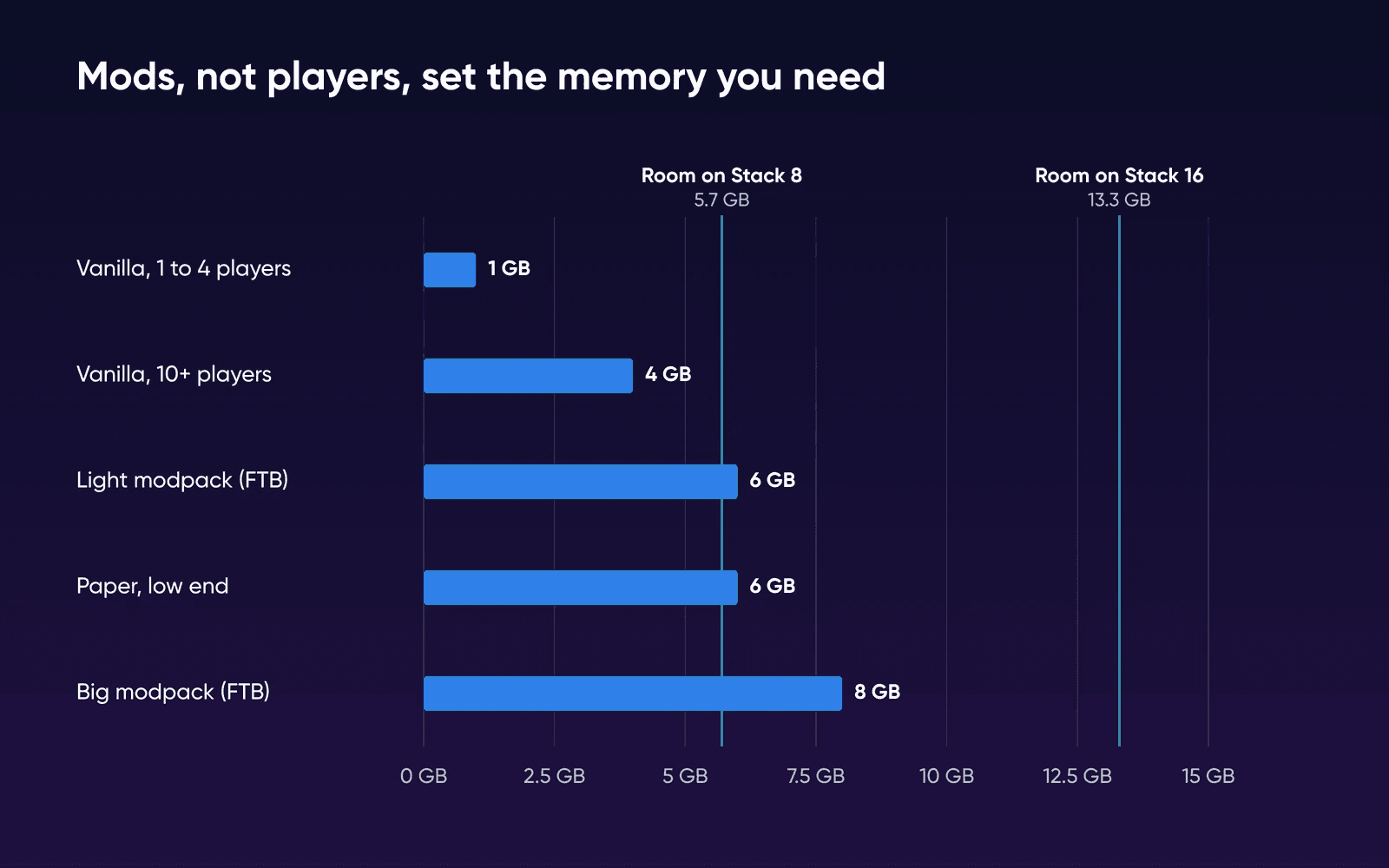
Why mods matter more than players
The Wiki's table assumes a fresh world. Its own footnote says a big world with redstone machinery, farms and grinders can easily more than double the requirements.
If you and your group have built on the same world for a year, plan above the table.
All the Mods 10's server pack is one of the biggest around, and its start script still cuts view and simulation distance below the game's default of 10. The Minecraft Wiki suggests lowering view distance when players lag. On your own server, start at the defaults and drop toward the pack's settings if memory or the tick rate runs short.
I set up a Minecraft server for some friends a few weeks ago, and I learned firsthand how huge of a performance
improvement one can get by dropping the render distance.
Newer packs ask for more memory than older ones. Eight of the ten packs on FTB's popular-installs list, all built for older Minecraft versions, ask for a 4 GB minimum and 6 GB recommended. Its packs for Minecraft 1.21 and later mostly list 6 GB and 8 GB. FTB lists a minimum and a recommended figure per pack without saying whether they're for the server or your own computer. All the Mods 10's server files, by contrast, set Java's limit on the server itself.
Researchers at Vrije Universiteit Amsterdam measured where the lag comes from. The Meterstick study ran vanilla, Forge and Paper on Minecraft 1.16 worlds. Its cloud machines had 2 vCPU and 8 GB of memory, the same shape as Stack 8, and Java was limited to 4 GB.
The world mattered more than the headcount. Farms and TNT made the game far less steady than 25 emulated players did, and entities took up most of each busy tick. In that study, Paper was generally steadier than vanilla and Forge. Delays peaked at 20.7 times the average, and the worst ones came right after a player connected.
What Pelican does with the memory you type
When you create a server in Pelican, you type a memory figure for it. Wings adds 15% to that figure for servers up to 2 GB, 10% up to 4 GB, and 5% above 4 GB. It uses the total as the container's hard limit. Wings' source code says the extra is there because Java doesn't always stay under its limit.
Pelican's community eggs for Paper and vanilla Minecraft start Java with -XX:MaxRAMPercentage=95.0. That lets the heap grow to 95% of the container's limit, so by our arithmetic the two settings nearly cancel out. Type 6144 MB and the heap can reach about 6129 MB, which leaves about 322 MB for everything else Java does.
Paper's memory advice wants 1,000 to 1,500 MB of that room. Its example: on 8 GB, use 6500 MB for the heap.
To keep a 6 GB heap and give Java that room, raise the memory you type and lower the 95 in your server's startup command. Type 7,000 MB and set it to 85, and about 1,100 MB stays outside a heap of about 6,248 MB.
| You type | Heap setting | Container limit | Heap can reach | Left for Java |
|---|---|---|---|---|
| 6144 MB | 95% (the egg's default) | 6451 MB | About 6129 MB | About 322 MB |
| 7,000 MB | 85% | 7,350 MB | About 6,248 MB | About 1,100 MB |
That's our reading of Pelican's code and Paper's docs, so watch your memory after the change. This room comes out of each server's own figure, and the plan's 2 GB reserve stays as it is.
On Stack 16, that Paper world and a 4 GB vanilla world take about 11.6 GB of containers, inside the 14 GB left after the reserve. Two Paper worlds set up the same way would need about 14.4 GB, so they'd only fit if you type less for each.
What a memory setting took on our test machine
We ran Minecraft on Oct 22, 2026, on two of our own test machines (not DreamHost servers) with 2 vCPU (arm64), one with 4 GB and one with 8 GB. The servers were vanilla 26.1 and Paper 26.1.2, from itzg's minecraft-server Docker image, a widely used community image, instead of Pelican's egg, and test players (bots) that spread out across the world.
| On our test machine | Vanilla, 2 GB, default flags | Vanilla, 4 GB, Aikar's flags | Paper, 6 GB, Aikar's flags |
|---|---|---|---|
| Machine | 2 vCPU, 4 GB | 2 vCPU, 8 GB | 2 vCPU, 8 GB |
| Memory with nobody online | 1,057 MiB | 4,404 MiB | 6,631 MiB |
| Memory with test players | 2,348 MiB with 4 players | 4,509 MiB with 8 players | Not measured with a group |
| Machine memory left with players on | 1,150 MB of 3,904 | 2,972 MB of 7,922 | 784 MB of 7,922, with 1 player |
| Ticks over the 50 ms target | Some: 1 in 20 took 58 ms or more | Rare: average tick 0.9 ms | Not measured with a group |
With default flags, the 2 GB vanilla server started near 1 GB. Once four players spread out, it grew past its setting by about 300 MB, and it kept that memory after they left. With Aikar's flags, which many hosts use, the server claimed its whole setting the moment it started, whether or not anyone was online.
Either way, plan on the setting plus about 300 to 500 MB for Java. That's less than the 1,000 to 1,500 MB Paper advises, but our test was short and light, so we keep Paper's figure in the table above. Our bots ran into new terrain and built nothing, so a group with farms and redstone will look different. The Paper run had only one player online, because Paper's connection throttle turned the others away, so we use it for memory only. It still shows why Stack 8 is tight for Paper: a 6 GB setting left under 1 GB free on an 8 GB machine, before any panel.
RAM or CPU: read the symptom
Minecraft runs its world in ticks, 20 a second, or one every 50 milliseconds. When your server can't finish a tick in time, the tick rate drops and everything slows down. The Wiki says the world still ticks largely on one main thread. The server uses about three cores at most, so a fast core matters more than many of them.
When memory runs short, Paper's docs warn, the server can run out of memory or get killed by the system's out-of-memory killer. Lag while plenty of memory sits free points to the CPU instead. On Paper, the bundled spark profiler shows what's taking each tick. Run /spark profiler start --timeout 600 while the lag is happening, and it'll return a report link after 10 minutes. From the server's shell, two Linux commands cover memory and load:
free -h
uptime
The available
column in free -h is how much memory new programs can still use without swapping. uptime ends with the load average over 1, 5 and 15 minutes. That figure isn't divided by the number of CPUs, so you'll compare it to your plan yourself. A 15-minute load near 2 on Stack 8 means both vCPU are busy. On Stack 16 the same load uses half of its 4. A load near 1 with lag can still be one busy main thread, which a spark report will show.
When you outgrow the plan
Moving up is a plan change in the panel, and your server comes with you. The Help Center walks through how to upgrade in the panel. You can also add game capacity on a second server with the Additional Wings Node template. It doesn't have a panel or login of its own.
Your worlds live on the server's root disk, and backups are yours to run. If you're still choosing between your own server, a game host and Realms, see how much a Minecraft server costs for a group. For the panel itself, read Pelican vs Pterodactyl. The plan guide covers sizing other apps on a VPS.
Choose Stack 4 if
a few friends play vanilla on a new world.
Choose Stack 8 if
a bigger group plays vanilla, or you run one Paper world a little under Paper's advice or a lighter modpack at its minimum.
Choose Stack 16 if
you run Paper with plugins, a big modpack such as All the Mods 10, a second world beside the first, or one world full of farms.
Minecraft server RAM FAQs
Is 4 GB enough for a Minecraft server?
A 4 GB plan fits a vanilla world for up to four players. Stack 4 leaves about 1.7 GB for the game. As memory for the server alone, 4 GB covers vanilla for 10 or more players on a new world, by the Minecraft Wiki. It's short for Paper and current big modpacks, which ask for 6 GB or more.
How much RAM does a 20 person Minecraft server need?
About 5 GB for vanilla on a new world, by the Minecraft Wiki's table for Linux servers. It lists 5 GB for 15 to 20 players and 6 GB for 20 or more. Stack 8 holds 5 GB. At 6 GB, or with Paper or a modpack, plan on Stack 16, where the 4 vCPU help too.
Is 8 GB too much for Minecraft?
It isn't too much for Paper or a modpack. All the Mods 10 lets Java grow to 8 GB, and Paper's docs say more memory brings diminishing returns past a point, and that 32 GB for one server will only waste your money.
Does Pelican Panel use RAM too?
On our test machine, a fresh Pelican panel used about 200 MiB at rest, with no games running. Pelican doesn't publish a figure, and Debian, Docker and Wings share the server too, so the reserve in our sizing covers all of them.
Can I run Minecraft and Palworld on one server?
On Stack 32 it fits at Palworld's listed figure. Palworld's requirements list 16 GB and 4 or more cores and warn that 8 GB risks out-of-memory crashes. That 16 GB beside a Paper world typed at 7,000 MB needs about 26 GB with the reserve and Wings' share. A 32 GB Palworld wouldn't fit beside Minecraft.
Where do DreamHost VPS servers run?
DreamHost's Help Center says every VPS is hosted in its US East data center in Ashburn, Virginia. That matters if some of your players live far from there.
Sources
- Server/Requirements, Minecraft Wiki, Oct 15, 2026. minecraft.wiki/w/Server/Requirements
- Server/Requirements/Dedicated, Minecraft Wiki, Oct 15, 2026. minecraft.wiki/w/Server/Requirements/Dedicated
- Tick, Minecraft Wiki, Oct 9, 2026. minecraft.wiki/w/Tick
- Server.properties, Minecraft Wiki, Oct 9, 2026. minecraft.wiki/w/Server.properties
- Aikar's flags, PaperMC docs, Oct 15, 2026. docs.papermc.io/paper/aikars-flags
- Getting started, PaperMC docs, Oct 15, 2026. docs.papermc.io/paper/getting-started
- Profiling, PaperMC docs, Oct 15, 2026. docs.papermc.io/paper/profiling
- Purpur docs, PurpurMC, Oct 15, 2026. purpurmc.org/docs/purpur
- All the Mods 10 (server files, release 8.2), All the Mods team on CurseForge, Oct 15, 2026. curseforge.com/minecraft/modpacks/all-the-mods-10
- FTB StoneBlock 4, Feed The Beast, Oct 15, 2026. feed-the-beast.com/modpacks/130
- FTB Skies 2, Feed The Beast, Oct 15, 2026. feed-the-beast.com/modpacks/129
- FTB Evolution 2, Feed The Beast, Oct 15, 2026. feed-the-beast.com/modpacks/135
- FTB OceanBlock 2, Feed The Beast, Oct 15, 2026. feed-the-beast.com/modpacks/128
- Most-installed modpacks (public API), Feed The Beast, Oct 15, 2026. api.feed-the-beast.com/v1/modpacks/public/modpack/popular/installs/FTB/10
- Wings memory overhead (config_docker.go), Pelican on GitHub, Oct 15, 2026. github.com/pelican/wings/blob/main/config/config_docker.go
- Wings container limits (environment/settings.go), Pelican on GitHub, Oct 15, 2026. github.com/pelican/wings/blob/main/environment/settings.go
- Paper egg (egg-paper.yaml), pelican-eggs on GitHub, Oct 15, 2026. github.com/pelican-eggs/minecraft/blob/main/java/paper/egg-paper.yaml
- Meterstick: Benchmarking Performance Variability in Cloud and Self-hosted Minecraft-like Games (ICPE 2023), Eickhoff, Donkervliet and Iosup, Vrije Universiteit Amsterdam, Oct 9, 2026. arxiv.org/abs/2112.06963
- Requirements, Palworld docs (Pocketpair), Oct 15, 2026. docs.palworldgame.com/getting-started/requirements
- free(1), Linux man-pages, Oct 9, 2026. man7.org/linux/man-pages/man1/free.1.html
- uptime(1), Linux man-pages, Oct 9, 2026. man7.org/linux/man-pages/man1/uptime.1.html
- Comment on a 1 GB plan for a kids' Minecraft server (2015), Hacker News, Oct 9, 2026. news.ycombinator.com/item?id=9044342
- Comment on render distance on a friends' server (2020), Hacker News, Oct 9, 2026. news.ycombinator.com/item?id=22939082
- Upgrade a VPS, DreamHost Help Center, Oct 15, 2026. help.dreamhost.com/hc/en-us/articles/50605427977364-Upgrade-a-VPS
- VPS overview, DreamHost Help Center, Oct 15, 2026. help.dreamhost.com/hc/en-us/articles/50476238203028-VPS-overview
- Pelican Panel VPS Hosting, DreamHost, Oct 15, 2026. dreamhost.com/hosting/vps/pelican