The week you hire a sixth developer, the private top-level group holding your code on GitLab.com Free goes past five users. GitLab's free user limit docs say the group then goes read-only. On GitHub Free for organizations the new hire gets in without trouble, since collaborators are unlimited, but you'll run into a different limit the first time you want to lock down main. GitHub Free's private repos can't use protected branches or code owners.
The paid plans you'd compare next are GitHub Team, listed at $4 per user/month for the first 12 months,
and GitLab Premium, at $29 per user/month billed annually. There's also an option with no license fee at all, GitLab Community Edition. CE runs on servers you control, one for GitLab and one for the runner that does your CI jobs, and the table below gives it a column of its own.
How the plans compare on a private repo
Every row below assumes a private team repo. The plan facts come from each vendor's own pricing page or docs.
| GitHub (Free / Team) | GitLab.com (Free / Premium) | GitLab CE on your own server | |
|---|---|---|---|
| List price | Free: $0. Team: $4 per user/month for the first 12 months | Free: $0. Premium: $29 per user/month, billed annually | You pay for a GitLab server and a runner server; CE has no license fee |
| Users on the free plan | Unlimited collaborators | 5 per private top-level group; read-only above that | The five-user limit doesn't apply to Self-Managed |
| Required reviews before merge | Team | Premium | Needs conversion to EE and a Premium license. CE approvals are optional |
| Code owners | Team | Premium | Needs conversion to EE and a Premium license |
| Protected branches | Team (Free has them on public repos only) | Free | Included in the free tier |
| Production deploy controls | Required reviewers: Enterprise, for private repos | Protected environments, with deploy rights and approvers: Premium | Needs conversion to EE and a Premium license |
| Included CI | 2,000 / 3,000 minutes a month; your own runners are free | 400 / 10,000 compute minutes a month | The quota is off by default, so your runner server's CPU and RAM set the limit |
| Included storage | Packages and Actions artifacts, shared: 500 MB / 2 GB | Git repository and LFS, per project: 10 GiB / 500 GiB | Your GitLab server's disk |
| Who runs the servers and updates | GitHub | GitLab | You |
| Self-hosted version | Enterprise Server, on the Enterprise plan | Self-Managed, with the same Free and Premium tiers | Yes, CE is the Self-Managed Free tier |
Plans and prices as listed on github.com/pricing and about.gitlab.com/pricing on September 28, 2026, and unchanged when we read both again on October 21. GitHub's page doesn't say what Team costs after the first 12 months. The storage row isn't like for like. GitHub's allowance covers packages and Actions artifacts, and GitLab's covers Git repository and LFS storage in each project.
If your team wants someone to sign off before a deploy reaches production, read the deploy row before the price row. On GitHub Free, Pro and Team, required reviewers for deployment environments only work on public repos, which puts that gate a tier above a required merge review for anyone with private code. GitLab puts both in Premium, where protected environments set who can deploy and who must approve. If your code is public, most of these gaps close on GitHub: protected branches and deployment reviewers both work on public repos without a paid plan.
Which one fits your team
Choose GitHub Team if
Your code and Actions workflows are already on GitHub, and the missing piece is a required review with code owners on private repos.
Choose GitLab.com if
You don't want to run a server. Free covers a group of up to five; after that, or as soon as you need enforced approvals, you're on Premium.
Choose GitLab CE on your own server if
Seat fees are what's stopping you, your leads can work with approvals that don't block a merge, and one of them is willing to own updates and backups on two servers, GitLab and its runner.
In our view, GitHub is hardest to leave when your pipelines lean on Actions, since moving means adapting the Marketplace workflows you borrow to GitLab CI.
What GitLab CE leaves out, and what it keeps
In CE, one of your leads can merge a request nobody's reviewed, and GitLab won't stop it. Approvals in the free tier, which is the feature set CE runs, "are optional and don't prevent merging without approval". Everything in the What needs Premium
list below is badged Premium in GitLab's docs.
What CE keeps
- Protected branches let you choose which roles can merge
- CI/CD pipelines run on runners you host
- The container registry is included
- Basic issue boards are included
- Static application security testing (SAST) is included
What needs Premium
- Required approvals and approval rules
- Code owners, and code-owner approval on protected branches
- Protected environments for production deploys
- Push rules
- Merge trains
- Epics
Whether a review happens first is still up to your Maintainers. If a customer contract or a compliance review says no change ships without a second approval, CE can't enforce that, and Premium's approval rules can.
You won't have to migrate to get them. GitLab's conversion docs have you install the Enterprise Edition (EE) package on top of CE, then add a license. Until you add it, EE runs the same Free features at no cost. Premium's features turn on when you activate a paid license.
What running it yourself takes
One CE admin on the GitLab Forum, running an instance with about 40 registered users, about five of them active, handles the routine every Monday:
We take a backup and update every Monday morning, so we're generally running the latest and greatest version, and have
had no update/upgrade issues since around the 15->16 update.
Your plan needs a little more:
- Applying GitLab updates on a schedule you keep, at a quiet hour. After a cold start, our test instance took about 2 minutes before its sign-in page answered
- Backing up to somewhere other than the server, and restoring a copy now and then to prove it works. GitLab's backup leaves out
gitlab.rbandgitlab-secrets.json, and its backup docs say to copy both yourself - Updating GitLab Runner on its own server, too
- Naming a second person who can do all of it when the first is away
Here's what a year of seats comes to at list price, before you count anything for servers:
| Team size | GitLab Premium, a year | GitHub Team, first year |
|---|---|---|
| 5 people | $1,740 | $240 |
| 10 people | $3,480 | $480 |
| 25 people | $8,700 | $1,200 |
That's $29 and $4 per user a month, times 12. Our guide on GitLab and GitHub per-user costs next to one GitLab CE server prices the full bill, servers included. At the 2025 US median wage for software developers, QA analysts and testers of $64.44 an hour, from the Bureau of Labor Statistics, 10 Premium seats cost about as much as 54 hours of a developer's time a year, and 10 GitHub Team seats about 7 hours.
To weigh those hours against seat fees for your own team, take a year of Premium seats, subtract what the two servers cost, and divide by your own hourly cost. That's how many hours of upkeep a year you could spend before CE costs more than Premium. This weighs cost only, since CE doesn't enforce approvals the way Premium does. If GitHub Team is your other option, run the same math at its $4 seat price. At that price, seat fees take much longer to add up to the cost of two servers and their upkeep.
On DreamHost's GitLab VPS, DreamHost supports the hardware, network and connectivity 24/7, and the product page says you handle software updates and configuration yourself. Backups are yours too, as the list above says.
How much server GitLab needs
GitLab's requirements page sets 8 vCPU and 16 GB of memory as the baseline for a single-node install. DreamHost's GitLab VPS plans include Stack 16 (4 vCPU, 16 GB) and Stack 32 (8 vCPU, 32 GB). Stack 32 is the first plan that meets that baseline. Stack 16 matches the 16 GB but has half the 8 vCPU, so it sits below the baseline, and the smaller plans sit further below it. GitLab's memory-constrained guide goes much lower, for up to five developers. Neither page names a team of 10 or 20.
Those numbers are for GitLab itself. CI jobs belong somewhere else: GitLab's runner install page says to install GitLab Runner on a machine separate from the machine that hosts your GitLab instance. GitLab doesn't publish a size for that machine. Its runner requirements page says it depends on how much CPU and memory your jobs use, how many run at once, and how many people work in parallel. Our own estimate puts it on Stack 8, which has 2 vCPU and 8 GB, the same as GitLab.com's default hosted runner.
| CPU | Memory | Storage | |
|---|---|---|---|
| GitLab baseline | 8 vCPU | 16 GB, or at least 8 GB when memory is tight | 40 GB for the application, plus repositories; SSD recommended |
| GitLab low-memory, up to 5 developers | 1 AMD64 core | 2 GB plus 1 GB swap | 20 GB |
| Stack 16 | 4 vCPU | 16 GB | 250 GB NVMe |
| Stack 32 | 8 vCPU | 32 GB | 450 GB NVMe |
| Stack 8, our estimate for the runner | 2 vCPU | 8 GB | 150 GB NVMe |
GitLab requirements pages read September 28, 2026, and runner pages October 20, 2026. Stack specs come from the DreamHost GitLab VPS page.
GitLab's docs don't say where 4 vCPU runs out for a team your size, and we haven't measured it either, so the test below runs GitLab on Stack 16 and watches it while pipelines run. When jobs queue during the test, check the runner's concurrency setting and the CPU use on both servers before you blame a plan. A GitLab server whose CPU sits near full while pipelines run is the sign you've found the gap, and Stack 32 meets both of the requirements page's baseline numbers. Disk grows with your repositories, container images and CI artifacts, so check the used space at the end of the trial and project it forward.
What GitLab CE used on our test VM
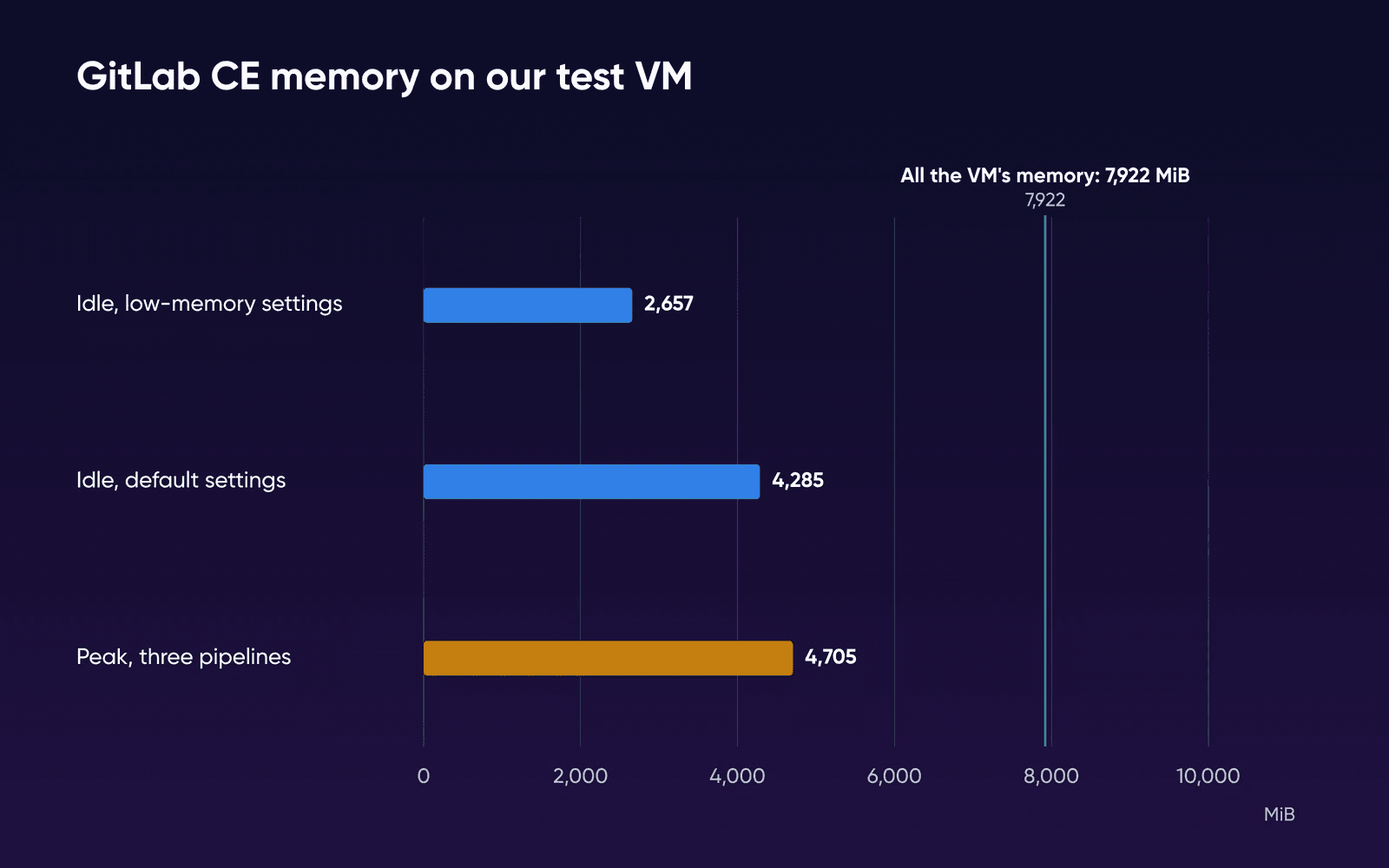
GitLab's sizing pages give a baseline for real use and a low-memory floor, but no reading of what an empty install actually uses. So we ran the official GitLab CE 19.5.0 image on a test VM with 2 vCPU and 8 GB, about the size of the runner server above, and read its memory 10 minutes after it settled. Then we ran three pipelines from a small Node.js project, with GitLab Runner on the same VM.
| What we checked | Result | What it means for your servers |
|---|---|---|
| Three pipelines, runner on the same VM | GitLab peaked at about 4,705 MiB. In one reading the job used 137% CPU while GitLab used 79% | More than 2 vCPU could give at once, which is why the runner gets its own server |
| Sign-in page while the pipelines ran | Typically 0.17 s, slowest 1.30 s | The web app stayed usable for one small project |
| Job minutes per push, small Node.js project | 0.28 to 0.80 minutes | GitLab.com Free's 400 minutes would cover 500 or more such pushes. Your own suite will differ, so read your CI usage page |
In CPU figures, 100% is one vCPU, so the job and GitLab together needed more than the VM's two. These runs had no users and one small project, so they can't give you a team size. They do put GitLab's idle memory at about 4,285 MiB with default settings and about 2,657 MiB with the low-memory ones, about a quarter of Stack 16's 16 GB or less, which leaves the 4 vCPU as the figure to watch. So during the trial, watch CPU on both servers while your own pipelines run.
How to try CE for one sprint
Mirror your code to the test server and leave the original where it is, so if the test doesn't work out, there's nothing to move back.
- Copy one real repository
Pick a repo with a working pipeline and its real history, so the test carries your actual size and build times. GitLab's GitHub importer brings the repo, issues and pull requests across.
- Set the merge rule
Protect
mainwith Allowed to merge set to Maintainers and Allowed to push and merge set to No one. Then see whether your leads are comfortable with approvals GitLab won't enforce. - Run a normal week of CI
Register a runner on a second server, a Stack 8, and run your usual pipelines. If they're GitHub Actions workflows, rewrite them for GitLab CI first and count those hours in the test. Note how long jobs wait while people are using the web app.
- Test a restore and an update
Restore a backup, plus your copies of
gitlab.rbandgitlab-secrets.json, to a spare, throwaway server, then apply a GitLab update. Note how long each took and anything you had to fix by hand. We didn't time an update on our test VM, so this step is where your upkeep figure comes from.
Before the sprint starts, write down your pass mark: how long a build may wait, and how many hours a month of upkeep you'll accept.
How we tested GitLab CE
The GitLab figures on this page were measured by DreamHost on a test VM (arm64), not a DreamHost server, on October 20, 2026. That's the same run behind our guide on GitLab and GitHub per-user costs, which has the full setup and the idle readings in more detail. Our plans use x86 AMD EPYC processors, so expect small differences on a real server. In short: the official CE 19.5.0 image on a 2 vCPU machine with 8 GB of memory (7,922 MiB as Linux reports it), once at default settings and once at GitLab's memory-constrained settings. For the pipelines, GitLab Runner sat on the same machine and ran the open-source Express project's test and build jobs three times, while we read memory and CPU every 3 seconds.
What we didn't test: a real team's load, a large repository, several pipelines at once, a runner on a second server, Stack 16's 4 vCPU or Stack 32's 8, and an update's downtime. Each setting ran once. Plan facts and prices come from GitHub's and GitLab's own pages on the dates in the sources.
GitLab or GitHub FAQs
Is GitLab CE free for a team of 20?
There's no license fee, and GitLab's five-user limit doesn't apply to CE. Most of its code is released under the MIT Expat license, while the ee/ directory has its own license. The costs are the servers and the hours of upkeep covered in the section on running it yourself.
Can we stay on GitLab.com Free by splitting the team into more groups?
You can, up to a point. The five-user limit applies to each private top-level group, so every group still holds only five users, and Free accounts created after January 27, 2026 can own three top-level groups.
Can GitHub be self-hosted?
It can, on the Enterprise plan. GitHub's pricing page lists Enterprise Server, self-hosted GitHub for on-prem appliances or self-managed cloud tenants, as that plan's self-hosted deployment option. On Sep 28, 2026, the Enterprise plan started at $21 per user/month for the first 12 months.
Is GitHub Actions free on our own runners?
GitHub's Actions billing docs still said usage is free on self-hosted runners when we read them again on October 21, 2026. A team on GitHub Team can send its builds to its own machine and keep the 3,000 included minutes for everything else.
Sources
- Pricing, GitHub, Sep 28, 2026. github.com/pricing
- GitHub's plans, GitHub Docs, Sep 28, 2026. docs.github.com/en/get-started/learning-about-github/githubs-plans
- About protected branches, GitHub Docs, Sep 28, 2026. docs.github.com/en/repositories/configuring-branches-and-merges-in-your-repository/managing-protected-branches/about-protected-branches
- About code owners, GitHub Docs, Sep 28, 2026. docs.github.com/en/repositories/managing-your-repositorys-settings-and-features/customizing-your-repository/about-code-owners
- Deployments and environments, GitHub Docs, Sep 28, 2026. docs.github.com/en/actions/reference/workflows-and-actions/deployments-and-environments
- GitHub Actions billing, GitHub Docs, Sep 28, 2026. docs.github.com/en/billing/concepts/product-billing/github-actions
- Pricing, GitLab, Sep 28, 2026. about.gitlab.com/pricing
- Free tier user and group limits, GitLab Docs, Sep 28, 2026. docs.gitlab.com/user/free_user_limit
- Merge request approvals, GitLab Docs, Sep 28, 2026. docs.gitlab.com/user/project/merge_requests/approvals
- Code Owners, GitLab Docs, Sep 28, 2026. docs.gitlab.com/user/project/codeowners
- Protected branches, GitLab Docs, Sep 28, 2026. docs.gitlab.com/user/project/repository/branches/protected
- Protected environments, GitLab Docs, Sep 28, 2026. docs.gitlab.com/ci/environments/protected_environments
- Compute minutes, GitLab Docs, Sep 28, 2026. docs.gitlab.com/ci/pipelines/compute_minutes
- Installation requirements, GitLab Docs, Sep 28, 2026. docs.gitlab.com/install/requirements
- Running GitLab in a memory-constrained environment, GitLab Docs, Sep 28, 2026. docs.gitlab.com/omnibus/settings/memory_constrained_envs
- Convert a Linux package CE instance to EE, GitLab Docs, Sep 28, 2026. docs.gitlab.com/update/convert_to_ee/package
- Activate GitLab EE with a license, GitLab Docs, Sep 28, 2026. docs.gitlab.com/administration/license
- Tell me about your experience with self-managed GitLab, GitLab Forum, Sep 28, 2026. forum.gitlab.com/t/tell-me-about-your-experience-with-self-managed-gitlab/120200
- LICENSE, GitLab, Sep 29, 2026. gitlab.com/gitlab-org/gitlab/-/blob/master/LICENSE
- Storage usage quotas, GitLab Docs, Sep 29, 2026. docs.gitlab.com/user/storage_usage_quotas
- Import your project from GitHub to GitLab, GitLab Docs, Sep 29, 2026. docs.gitlab.com/user/project/import/github
- Install GitLab Runner, GitLab Docs, Oct 20, 2026. docs.gitlab.com/runner/install
- System requirements and supported platforms, GitLab Docs, Oct 20, 2026. docs.gitlab.com/runner/install/requirements
- Hosted runners on Linux, GitLab Docs, Oct 20, 2026. docs.gitlab.com/ci/runners/hosted_runners/linux
- Back up GitLab, GitLab Docs, Oct 20, 2026. docs.gitlab.com/administration/backup_restore/backup_gitlab
- GitLab CE Docker image (gitlab/gitlab-ce), Docker Hub, Oct 20, 2026. hub.docker.com/r/gitlab/gitlab-ce
- Software Developers, Quality Assurance Analysts, and Testers (Occupational Outlook Handbook), US Bureau of Labor Statistics, Sep 28, 2026. bls.gov/ooh/computer-and-information-technology/software-developers.htm