A private group on GitLab.com Free goes read-only once it has more than five users. From there, everyone you add costs a seat. GitHub bills every organization member and every outside collaborator on a private repo, each counted once. For a 40-person team using 500 CI minutes each a month, GitLab Premium comes to $15,120 a year.
At five people or fewer, GitHub Team or GitLab.com Free costs about the same as GitLab CE on servers of your own, or less. The rest of this page is for the team past that point. If you're still picking a platform, our guide on choosing GitLab or GitHub for a small team compares the two feature by feature.
What a seat costs on each plan
These are list prices in US dollars before tax, read October 20, 2026 on GitHub's pricing page and GitLab's pricing page.
| GitHub Team | GitHub Enterprise | GitLab Premium | |
|---|---|---|---|
| Per user, per month | $4 | From $21 | $29 |
| How it's billed | For the first 12 months | For the first 12 months | Billed annually |
| Who takes a seat | Every member and outside collaborator | Every member and outside collaborator | Every billable user, Guests included |
| CI minutes a month, shared | 3,000 per account | 50,000 per account | 10,000 per top-level group |
GitLab bills growth in two ways. Seats you buy partway through the term are prorated to its end. People you add beyond the seats you bought are different: without quarterly reconciliation, GitLab charges them as an annual true-up for the full term. Guests count too. On Premium a user with the Guest role takes a seat, though on Ultimate they don't. GitLab doesn't list a price for Ultimate, so it isn't in these tables.
The monthly bill at 15, 40 and 100 people
Seats aren't the whole bill. Both vendors meter CI by the minute past an allowance, and that allowance belongs to the whole account or top-level group, so it doesn't grow when you add people. To put minutes in the bill, we assumed 500 Linux CI minutes per person a month on each platform's default hosted runner. Swap in your own number from your usage page. Our test pipeline for the Express web framework (install, test, package) used 0.80 job minutes on a cold cache and about 0.3 after that, but a project with a longer test suite will probably use many times that per push.
Past the allowance, GitHub charges $0.006 a minute on its Linux 2-core runner, and Windows and macOS minutes cost more ($0.010 and $0.062), so price those builds on a line of their own. GitLab sells extra minutes at $10 per 1,000, as a one-time purchase that rolls over if you don't use it, and its default small runner counts each minute once.
| Team size and CI minutes a month | GitHub Team | GitHub Enterprise | GitLab Premium | GitLab server, Stack 32 (runners extra) |
|---|---|---|---|---|
| 15 people, 7,500 CI minutes | $87.00 | $315.00 | $435.00 | $45.99/mofor 3 months, then $59.99/mo |
| 40 people, 20,000 CI minutes | $262.00 | $840.00 | $1,260.00 | |
| 100 people, 50,000 CI minutes | $682.00 | $2,100.00 | $3,300.00 |
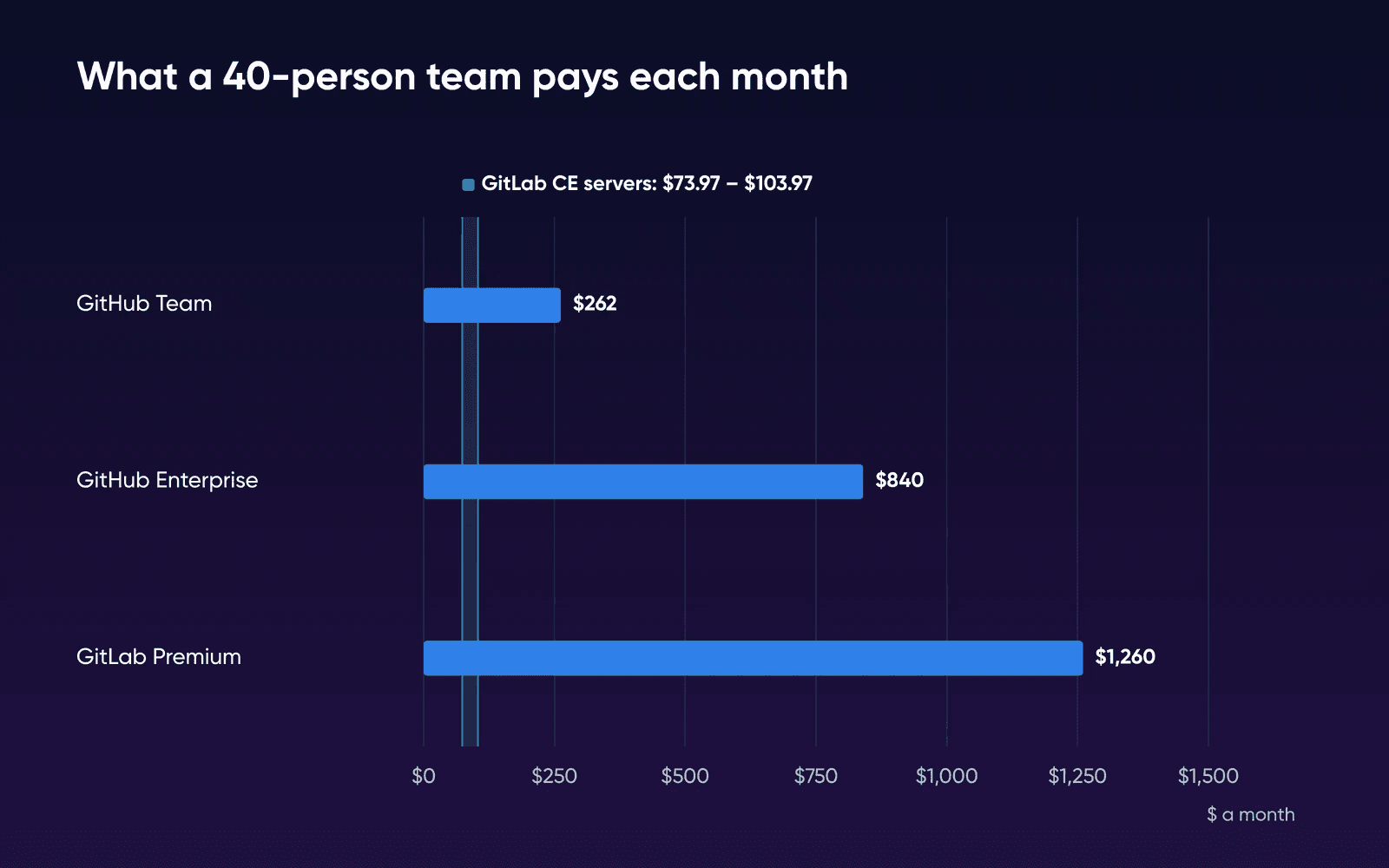
On GitLab Premium and GitHub Enterprise, seats are nearly the whole bill. GitHub Team is the exception, because its 3,000 included minutes run out early.
| Line | GitHub Team | GitHub Enterprise | GitLab Premium |
|---|---|---|---|
| 15 people: seats | $60.00 (15 x $4) | $315.00 (15 x $21) | $435.00 (15 x $29) |
| 15 people: CI | $27.00 (4,500 minutes over x $0.006) | $0 (inside 50,000) | $0 (inside 10,000) |
| 40 people: seats | $160.00 | $840.00 | $1,160.00 |
| 40 people: CI | $102.00 (17,000 minutes over) | $0 | $100.00 (10 packs of 1,000) |
| 100 people: seats | $400.00 | $2,100.00 | $2,900.00 |
| 100 people: CI | $282.00 (47,000 minutes over) | $0 (exactly 50,000) | $400.00 (40 packs) |
| A year at 40 people | $3,144.00 | $10,080.00 | $15,120.00 |
What self-hosted GitLab CE costs instead
GitLab CE has no license fee and no user cap, so the seat column disappears. You pay for hardware instead: one server for GitLab, and at least one more for the runner that does your CI jobs.
The GitLab server
GitLab's installation requirements set 8 vCPU and 16 GB of memory as the baseline for a single-node install. Its smallest reference architecture uses that same single node for up to 1,000 users, counting people and automation together, and GitLab generally recommends a standalone setup without high availability, with backups, up to 2,000 users. Stack 32, with 8 vCPU and 32 GB, is the first GitLab VPS Hosting plan that meets that baseline, so one Stack 32 covers every row in the table.
A team of about 15 that wants to try CE for a sprint can start on Stack 16 with a Stack 8 runner beside it. Stack 16 has the 16 GB and half the cores (4 vCPU), which puts it below GitLab's stated baseline. That's fine for a short trial.
We ran GitLab CE 19.5 on a small test VM (not a DreamHost server) to see what it holds before your team arrives. Idle use isn't a team-size figure, so the plan pick still rests on GitLab's own sizing.
| What ran | Measured on our test VM | What it means for the plan |
|---|---|---|
| GitLab CE 19.5, default settings, idle | About 4,285 MiB of memory, 10% CPU | A small share of Stack 32's 32 GB |
| GitLab CE 19.5, memory-constrained settings, idle | About 2,657 MiB, 2% CPU | GitLab's low-memory route, written for up to 5 developers |
| Three small pipelines, runner on the same VM | GitLab peaked at 4,705 MiB and 179% CPU, the job at 137% CPU | GitLab and the builds want the same cores |
| Disk after install and the pipelines | 5.99 GB image, 479 MB of data | Grows with repos, images and artifacts |
The memory-constrained row uses GitLab's low-memory settings, which are meant for very small teams.
The runner servers
GitLab's runner install page says to install GitLab Runner on a machine separate from the one that hosts GitLab. Our test run shows what sharing costs. With the runner on the same 2 vCPU machine, one reading caught a small Node.js job at 137% CPU while GitLab used 79%, more than the two cores could give at once.
GitLab doesn't publish a hardware size for that machine, so we matched the runner the bill's minutes were priced on. GitHub's default Linux runner for private repos has 2 CPUs and 8 GB. GitLab.com's default small runner has 2 vCPUs and 8 GB too. So one Stack 8, with the same 2 vCPU and 8 GB, running one job at a time stands in for one hosted runner.
How many you need depends on CI. We assumed a runner stays busy at most 8 hours a day on 22 workdays, which is 10,560 job minutes a month. That gives one Stack 8 at 15 people, two at 40 and five at 100, the fewest that could get through each row's minutes in the working day. At 40 and 100 people they'd be busy 95% of that time, so we'd expect jobs to wait at the busiest hours. Watch the queue for the first month and add a runner when the wait bothers people. A Stack 32 runner can take about four 2 vCPU jobs at once, a little under 8 GB each, for less per job than four Stack 8 servers.
At the regular monthly rates, every GitHub Enterprise and GitLab Premium row costs at least 3.8 times as much as the GitLab server and its runner servers together. GitHub Team with hosted minutes costs about 2.5 times as much at 40 people and 4 times as much at 100. At 15 people, GitHub Team and CE's two servers cost about the same.
If you stay and run your own runner
GitHub doesn't charge for Actions on self-hosted runners. GitLab.com measures compute minutes on its instance runners, and your own runners keep working after you reach your limit. Send your jobs to your own machine and the CI line drops to $0 on all three plans, while the seat lines in the table above stay as they are.
Those are the same runner servers CE would need, so they cost the same either way. That leaves seats against one GitLab server. Seats alone pass Stack 32's regular monthly price at 3 people on GitLab Premium or GitHub Enterprise, and at 15 on GitHub Team. So at 15 people, GitHub Team with your own runner costs about what CE costs, and each person after that adds $4 a month in seats.
What CE leaves out next to Premium
Part of what the seat price buys is features CE doesn't have. In GitLab's free tier, which is the feature set CE runs, merge request approvals are optional and don't block a merge. If an auditor needs every change held until a second person approves it, you'll need Premium. Our GitLab or GitHub comparison lists what else moves to Premium.
| GitHub Team or Enterprise | GitLab Premium | GitLab CE on your servers | |
|---|---|---|---|
| Per-user fee | Every member and outside collaborator | Every billable user, Guests included | None |
| CI minutes | An allowance, then per minute | An allowance, then sold in packs | No meter, your runner servers set the limit |
| Required reviews before merge | Yes, on private repos | Yes | Optional |
| Who runs servers and updates | GitHub | GitLab | You |
| Backups | Run by GitHub | Run by GitLab | Yours |
On GitLab VPS Hosting, DreamHost support is available 24/7 for the hardware, network and connectivity. You manage the OS, software and configuration. DreamHost's Help Center says server management and automated backups aren't included with a VPS, so the backup line in the table above is yours to run.
The hours you take on
GitLab ships a monthly release on the third Thursday and patch releases twice a month. By our count, a team that keeps current applies about three updates a month, with a backup before each one. On our test instance, with one project and a few pipelines, gitlab-backup create took 26 seconds. Yours will grow with your repositories. But the backup leaves out gitlab.rb and gitlab-secrets.json, and GitLab's backup docs say to back up both yourself. We didn't time an update, so price that part from your own test.
CE saves money only while your upkeep costs less than the gap between the vendor bill and the servers. At 40 people the servers take under a tenth of the Premium bill, which leaves more than 90% of $1,260 a month to pay for the hours. Against GitHub Team they take about 40% of $262 at 40 people and almost all of $87 at 15.
- Count every seat
List members, outside collaborators and, on GitLab Premium, Guests. That number times your seat price is the first line.
- Read last month's CI minutes
Take the total from your usage page and subtract your plan's allowance. Price what's left at your platform's rate.
- Count the runner servers CE would need
Divide your monthly CI minutes by 10,560 and round up. Add one Stack 32 for GitLab itself.
- Price your upkeep
Time one backup and one update on a test server, multiply by three updates a month, and multiply that by your hourly cost.
Which bill to pick
Stay on GitHub Team if
You're at about 15 people or fewer and you need required reviews on private repos. Move CI to your own runner when the minutes line grows.
Keep GitLab Premium if
You need approvals GitLab enforces before a merge, and nobody on the team wants to run servers.
Run GitLab CE if
Seats are your biggest line, approvals that don't block a merge are workable, and someone can own the updates and off-server backups.
How we priced and measured this
DreamHost read GitHub's, GitLab's and DreamHost's pricing pages on October 20, 2026, and re-checked its own GitLab VPS Hosting page and Help Center on October 22. Tax, storage overages, AI credits, larger runners and GitHub's renewal price aren't in the totals. The runner count is our estimate from a working-hours ceiling. Server prices come from the GitLab VPS Hosting page on the monthly term.
The measurements come from the official GitLab CE 19.5.0 image, which DreamHost ran on October 20, 2026, on a 2 vCPU, 8 GB arm64 test VM with Ubuntu 24.04. That VM isn't a DreamHost server, and it's far smaller than Stack 32. Memory is the median of 12 readings taken after a 10-minute settle. The first sign-in page answered about 120 seconds after a cold start. The run doesn't show a real team's load, a large repository, update downtime or a runner on a second machine.
GitLab and GitHub pricing FAQs
Is GitLab free if you host it yourself?
Yes, the software is free: GitLab Self-Managed Free, the tier CE gives you, costs $0 per user. You bring the servers, the storage and the runners, and the time to keep them updated.
How much does self-hosting GitLab cost per month?
Plan on one Stack 32 for GitLab and one Stack 8 runner server for about every 10,560 CI minutes a month: one runner at 15 people, two at 40 and five at 100, at 500 minutes each. At 40 people that set costs about a twelfth of GitLab Premium at the regular monthly rates. Your upkeep hours come on top.
What happens on GitLab.com Free when we pass five users?
A private top-level group with more than five users goes read-only. Free accounts created after January 27, 2026 can own three top-level groups, and each one is still capped at five.
Sources
- Pricing, GitHub, Oct 20, 2026. github.com/pricing
- GitHub Actions billing, GitHub Docs, Oct 20, 2026. docs.github.com/en/billing/concepts/product-billing/github-actions
- Actions runner pricing, GitHub Docs, Oct 20, 2026. docs.github.com/en/billing/reference/actions-runner-pricing
- GitHub-hosted runners reference, GitHub Docs, Oct 20, 2026. docs.github.com/en/actions/reference/runners/github-hosted-runners
- GitHub license users, GitHub Docs, Oct 19, 2026. docs.github.com/en/billing/reference/github-license-users
- Pricing, GitLab, Oct 20, 2026. about.gitlab.com/pricing
- Compute minutes, GitLab Docs, Oct 20, 2026. docs.gitlab.com/ci/pipelines/compute_minutes
- Hosted runners on Linux, GitLab Docs, Oct 20, 2026. docs.gitlab.com/ci/runners/hosted_runners/linux
- Free tier user and group limits, GitLab Docs, Oct 19, 2026. docs.gitlab.com/user/free_user_limit
- Manage seats, GitLab Docs, Oct 19, 2026. docs.gitlab.com/subscriptions/manage_seats
- Installation requirements, GitLab Docs, Oct 19, 2026. docs.gitlab.com/install/requirements
- Reference architecture: up to 20 RPS or 1,000 users, GitLab Docs, Oct 19, 2026. docs.gitlab.com/administration/reference_architectures/1k_users
- Reference architectures, GitLab Docs, Oct 19, 2026. docs.gitlab.com/administration/reference_architectures
- Running GitLab in a memory-constrained environment, GitLab Docs, Oct 19, 2026. docs.gitlab.com/omnibus/settings/memory_constrained_envs
- Back up GitLab, GitLab Docs, Oct 20, 2026. docs.gitlab.com/administration/backup_restore/backup_gitlab
- Install GitLab Runner, GitLab Docs, Oct 20, 2026. docs.gitlab.com/runner/install
- Merge request approvals, GitLab Docs, Oct 19, 2026. docs.gitlab.com/user/project/merge_requests/approvals
- GitLab release and maintenance policy, GitLab Docs, Oct 19, 2026. docs.gitlab.com/policy/maintenance
- GitLab VPS Hosting, DreamHost, Oct 22, 2026. dreamhost.com/hosting/vps/gitlab
- VPS overview, DreamHost Help Center, Oct 22, 2026. help.dreamhost.com/hc/en-us/articles/50476238203028