When you compare cloud vs dedicated server cost for a steady app, AWS data transfer out, the egress line, decides most of the bill. An app server on AWS that sends 2 TB a month to the internet pays $171.00 for that traffic. Its m7i.xlarge instance, with 4 vCPU and 16 GiB of memory, costs $108.12 a month on a 1-year Savings Plan. The traffic line is about $63 bigger than the instance line, and a Savings Plan doesn't discount it.
DreamHost priced that server and two other steady setups on October 19, 2026, from AWS's public price lists for US East (N. Virginia). They're estimates for the setups described here, and your own instance types, region and traffic will move them.
Three steady AWS bills, priced
Steady means the same instances run all month and nothing scales out. All three run in about 16 GB of memory and under 480 GB of disk, the size of a Dedicated Standard server, so each row sits beside the same plan.
| Workload | AWS on demand | AWS, 1-year Savings Plan | Dedicated Standard (6 cores, 16 GB) |
|---|---|---|---|
| One app server, 2 TB out | $348.07 | $309.02 | $119.99/mofirst year, then $165/mo |
| App + database on two servers, 5 TB out | $666.42 | $627.38 | |
| Media site, 20 TB out, no CDN | $1,935.52 | $1,896.47 |
On the DreamHost side, the Dedicated Standard column shows the yearly-term price, with the full year charged at checkout and no charge for data out.
Each AWS bill counts the instances, gp3 disks at $0.08 per GB-month, snapshots at $0.05 per GB-month and one public IPv4 address at $3.65 a month, then data out. We assumed the snapshots hold half the disk, about the data on a half-full volume, since EBS charges snapshots for the data stored and saves only the blocks that changed since the last one. The two-server setup adds a NAT gateway so the database server can reach the internet for updates, at $37.85 a month with its Elastic IP address. We've left out tax, an AWS support plan and sign-up credits, and there's no load-balancing service in any of them.
Here's how we set up the AWS side, and where it could cost less:
- The Intel m7i costs less than AWS's AMD m7a at the same size ($0.2016 an hour on demand against $0.23184).
- The app and database talk inside one Availability Zone, where AWS doesn't charge for it. Split across two zones, the same traffic would cost $0.01 per GB in each direction.
- Each bill gets the free 100 GB of data out, as if it's the only workload in its AWS account.
- The Savings Plan column is the 1-year, no-upfront Compute Savings Plan. An EC2 Instance Savings Plan ties you to one instance family and costs less, $97.35 a month for the m7i.xlarge against $108.12, and a 3-year term cuts the instance line further. None of them touch data out, since Savings Plans apply to compute usage.
- An m7g.xlarge on a 1-year EC2 Instance Savings Plan is $0.108 an hour, which takes about $29 off each bill if your software runs on AWS's Graviton3 processors.
The AWS instances also have fewer cores. On EC2, each vCPU is one thread of a core, so 4 vCPU is 2 cores, against the 6-core CPU in Dedicated Standard. We matched the two on memory, which favors AWS. A c7i.2xlarge gets closer on CPU, with 8 vCPU (4 cores) and 16 GiB, and it costs $188.33 a month for compute alone on the Compute Savings Plan.
Data out is most of each bill
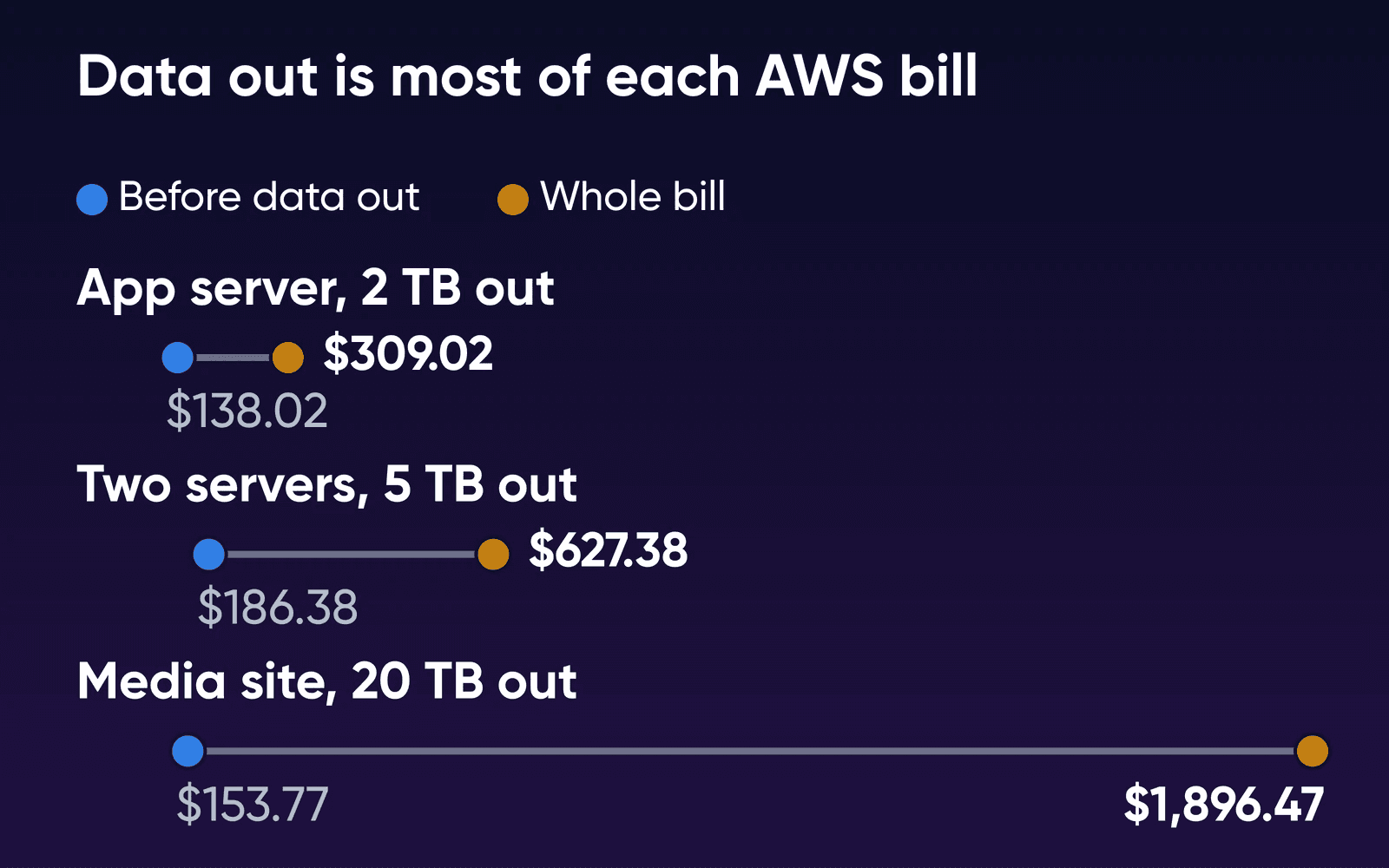
Before any traffic, the three bills run $138.02, $186.38 and $153.77 a month, within $50 of each other. Data out then makes up 55%, 70% and 92% of the Savings Plan totals.
To find your own line, look in Cost Explorer for the usage type DataTransfer-Out-Bytes, which is data out to the internet from US East (other regions add a prefix, such as USE2-). Average the last three months. After the free 100 GB, AWS charges:
- $81 for 1 TB
- $171 for 2 TB
- $441 for 5 TB
- $891 for 10 TB
- $1,742.70 for 20 TB
The 20 TB figure is 10,240 GB at $0.09 and 9,660 GB at $0.085, because AWS counts its first 10 TB tier as 10,240 GB. The Dedicated page gives the same volume as its example, about $1,750 a month in AWS egress with compute excluded. At 2 TB, data out alone ($171) passes the Standard plan's yearly-term renewal ($165/mo) as well as its first-year price, so the 2 TB point holds after the first year.
Here's every line of the two-server bill on the Savings Plan. On demand, the two instances cost $147.17 and the total is $666.42. The 30 GB through the NAT gateway, for OS updates and calls to outside APIs, is our assumption.
| Two servers, 5 TB out | 1-year Savings Plan | AWS's rate |
|---|---|---|
| 2 x m7i.large (2 vCPU, 8 GiB each) | $108.13 | $0.07406 an hour each |
| EBS gp3 disks, 350 GB | $28.00 | $0.08 per GB-month |
| Snapshots, 175 GB | $8.75 | $0.05 per GB-month |
| Public IPv4 address, app server | $3.65 | $0.005 an hour |
| NAT gateway, 730 hours | $32.85 | $0.045 an hour |
| NAT gateway, 30 GB processed | $1.35 | $0.045 per GB |
| Elastic IP for the NAT gateway | $3.65 | $0.005 an hour |
| Data out, 5,000 GB | $441.00 | 100 GB free, then $0.09 per GB |
| Total | $627.38 |
Where CloudFront plans fit
AWS now sells CloudFront flat-rate plans per distribution: Free, Pro at $15, Business at $200 and Premium at $1,000 a month. Each paid plan includes 50 TB of data transfer, and none of them bill overages. The request allowance differs: 10 million a month on Pro, 125 million on Business and 500 million on Premium. If you stay well over the allowance for months, AWS may adjust how your traffic is delivered. Transfer from an AWS origin to CloudFront is free on these plans. Free and Pro carry no uptime SLA, while Business and Premium do.
With the same 50 TB on every paid plan, the request count picks the plan. If our 2 TB app server averages about 100 KB a response (our assumption), it answers 20 million requests a month. That's past Pro's 10 million, so it needs Business at $200, and its bill rises to $338.02 from $309.02 sent direct. Pay-as-you-go CloudFront suits it better. It's $0.085 per GB from US edges plus $0.01 per 10,000 HTTPS requests, and AWS announced in 2021 that the first 1 TB and 10 million requests a month are free. That brings the same bill to $233.02.
If nearly all your data out is large cacheable files that fit a $15 Pro plan, the transfer line on the AWS bill shrinks to that plan's price and the two bills land close.
What one server doesn't do
A dedicated server is one machine in one data center. It keeps your data on two mirrored drives (RAID 1), so one drive failure won't stop it, and it sits on a redundant fiber network where another path takes over if one goes down. It doesn't spread across zones or add capacity on its own.
| On AWS | On one Dedicated Server | |
|---|---|---|
| Uptime commitment | 99.99% for the region when instances run in two or more Availability Zones, 99.5% for a single instance | One server in one data center, with RAID 1 storage and a redundant fiber network |
| Growing with traffic | EC2 Auto Scaling launches and terminates instances as demand rises and falls, and replaces impaired ones | You size the server for your peak and change plans from the panel |
| Billing | By the hour, or a 1- or 3-year commitment on a Savings Plan | Monthly or yearly, with the full yearly term charged at checkout |
| Where it runs | Regions around the world | US East and West |
| Managed services (S3, SQS, RDS) | Part of the same account | You run a replacement on the server, or keep the service on AWS |
The AWS uptime figures are from its Compute SLA, and the scaling row is how the EC2 Auto Scaling docs describe it. Steady, as defined above, means the peak sits close to the average, so by our reasoning sizing for it costs little, and DreamHost's Help Center says you can change your Dedicated Server plan from the panel if it grows. If you keep a media library in S3, its data out still counts toward the same AWS transfer tiers.
Move it to one server if
The app runs the same instances all month, fits in 16 GB to 128 GB of memory, and sends terabytes to the internet every month.
Stay on AWS if
It scales up and down through the day, has to keep running when an Availability Zone goes down, or leans on managed AWS services you'd have to rebuild.
Try CloudFront first if
Most of your data out is large cacheable files that fit a flat-rate plan's request allowance. Then compare the two bills again.
Before you move
On EC2, AWS runs the hardware and the host, and the operating system on your instance and its updates are yours. A DreamHost Dedicated Server comes fully managed from day one, with DreamHost running the operating system and its updates, or you can run it yourself. On the managed setting, the routine admin time a self-run server takes (OS updates, the core server stack) moves to DreamHost; managed or unmanaged dedicated server lists what each setting leaves to you. If you're not sure a whole server is the right size, start with whether you've outgrown your VPS, or compare plans in which dedicated server to pick.
There are no EBS snapshots on a Dedicated Server; DreamHost's Help Center shows how to restore site files over SSH, and you'll want your own copy of the databases and files off the server too. Dedicated Server payments are nonrefundable under the Terms of Service, and the Help Center says a new server can take up to three business days to set up. Refund credits and backups on each setting are covered in managed or unmanaged dedicated server.
Before the last big copy, ask AWS Customer Support about the move itself. AWS's pricing page says it waives data transfer out for eligible customers who take all their data off AWS, or off one AWS service, so the final transfer may cost nothing.
AWS bill vs dedicated server FAQs
Does a Savings Plan cover data transfer?
No, a Savings Plan only lowers the hourly rate on compute you commit to for one or three years: EC2 instances, plus Fargate and Lambda on a Compute Savings Plan. The Savings Plans FAQ lists compute as what the plans apply to, so data out, EBS disks and snapshots bill at their usual rates.
Is the 100 GB of free data out per region?
No, AWS's on-demand pricing page gives 100 GB a month for the whole AWS account, counted across all services and regions. AWS also adds up your data out from EC2, S3 and its other services when it applies the price tiers, so two apps in two regions share one allowance.
Is bandwidth on a DreamHost Dedicated Server unmetered?
Yes, the Dedicated page lists unmetered bandwidth with no overages, and the Help Center says bandwidth is unmetered on all DreamHost hosting plans except cloud services. The page doesn't list a network port speed, so if you'll send 20 TB or more a month, ask support what your server's port carries.
What if my database is on Amazon RDS?
The bills on this page keep the database on a server you run, either on the app server or on its own instance. If yours is on RDS, the RDS bill beside a private MySQL server prices that part line by line.
Sources
- AWS Price List API: Amazon EC2, US East (N. Virginia), publication Oct 15, 2026, Amazon Web Services, read Oct 19, 2026. pricing.us-east-1.amazonaws.com/offers/v1.0/aws/AmazonEC2/current/us-east-1/index.json
- AWS Price List API: Compute and EC2 Instance Savings Plans, US East (N. Virginia), publication Oct 13, 2026, Amazon Web Services, read Oct 19, 2026. pricing.us-east-1.amazonaws.com/savingsPlan/v1.0/aws/AWSComputeSavingsPlan/20261013035015/us-east-1/index.json
- AWS Price List API index (data transfer, VPC, CloudFront), Amazon Web Services, read Oct 19, 2026. pricing.us-east-1.amazonaws.com/offers/v1.0/aws/index.json
- Amazon EC2 On-Demand pricing (data transfer), Amazon Web Services, read Oct 19, 2026. aws.amazon.com/ec2/pricing/on-demand
- Understanding data transfer charges, Amazon Web Services, read Oct 21, 2026. docs.aws.amazon.com/cur/latest/userguide/cur-data-transfers-charges.html
- Amazon EBS pricing, Amazon Web Services, read Oct 19, 2026. aws.amazon.com/ebs/pricing
- Amazon EBS snapshots, Amazon Web Services, read Oct 19, 2026. docs.aws.amazon.com/ebs/latest/userguide/ebs-snapshots.html
- Amazon VPC pricing, Amazon Web Services, read Oct 19, 2026. aws.amazon.com/vpc/pricing
- NAT gateway pricing, Amazon Web Services, read Oct 19, 2026. docs.aws.amazon.com/vpc/latest/userguide/nat-gateway-pricing.html
- Savings Plans FAQs, Amazon Web Services, read Oct 19, 2026. aws.amazon.com/savingsplans/faqs
- CPU options for Amazon EC2 instances, Amazon Web Services, read Oct 19, 2026. docs.aws.amazon.com/AWSEC2/latest/UserGuide/instance-optimize-cpu.html
- Overview of data transfer costs for common architectures, AWS Architecture Blog, read Oct 19, 2026. aws.amazon.com/blogs/architecture/overview-of-data-transfer-costs-for-common-architectures
- Amazon CloudFront pricing, Amazon Web Services, read Oct 19, 2026. aws.amazon.com/cloudfront/pricing
- CloudFront flat-rate pricing plans, Amazon Web Services, read Oct 19, 2026. docs.aws.amazon.com/AmazonCloudFront/latest/DeveloperGuide/flat-rate-pricing-plan.html
- Amazon Compute Service Level Agreement, Amazon Web Services, read Oct 19, 2026. aws.amazon.com/compute/sla
- What is Amazon EC2 Auto Scaling?, Amazon Web Services, read Oct 19, 2026. docs.aws.amazon.com/autoscaling/ec2/userguide/what-is-amazon-ec2-auto-scaling.html
- Managed Dedicated Server Hosting, DreamHost, read Oct 22, 2026. dreamhost.com/hosting/dedicated
- What types of hosting plans are available?, DreamHost Help Center, read Oct 22, 2026. help.dreamhost.com/hc/en-us/articles/215560437-What-types-of-hosting-plans-are-available
- Changing your Dedicated Server hosting or billing plan, DreamHost Help Center, read Oct 22, 2026. help.dreamhost.com/hc/en-us/articles/47277263471892-Changing-your-Dedicated-Server-hosting-or-billing-plan
- Backup or restore your Dedicated site files, DreamHost Help Center, read Oct 22, 2026. help.dreamhost.com/hc/en-us/articles/217906467-Backup-or-restore-your-Dedicated-site-files
- Add a Dedicated server, DreamHost Help Center, read Oct 22, 2026. help.dreamhost.com/hc/en-us/articles/215945457-Add-a-Dedicated-server
- Refunds and Account Credits, DreamHost Help Center, read Oct 22, 2026. help.dreamhost.com/hc/en-us/articles/215206997-Refunds-and-Account-Credits
- Terms of Service, DreamHost, read Oct 22, 2026. dreamhost.com/legal/terms-of-service
- AWS Free Tier data transfer expansion (Nov 2021), AWS News Blog, read Oct 19, 2026. aws.amazon.com/blogs/aws/aws-free-tier-data-transfer-expansion-100-gb-from-regions-and-1-tb-from-amazon-cloudfront-per-month
- Shared Responsibility Model, Amazon Web Services, read Oct 19, 2026. aws.amazon.com/compliance/shared-responsibility-model