Websites
List every site with its type, hosting plan, and PHP version, or read one site in full.
Ask: Which of my sites are still on PHP 8.1?
DreamHost APINew!
The DreamHost API covers DNS, websites, logs, traffic, performance scans, and servers. Each key does only what you allow. Included with every plan.
Already a customer? Create a key in your panel.
# Which sites are still on PHP 8.1? curl https://api.dreamhost.com/v1/websites \ -H "Authorization: Bearer $DREAMHOST_API_KEY"
# 200 OK { "data": [ { "domain": "example.com", "type": "hosted", "hosting": { "type": "dreampress" }, "application": { "type": "wordpress" }, "runtime": { "phpVersion": "8.1" } } ], "meta": { "limit": 20, "offset": 0, "total": 12 } }
Which of my sites are still on PHP 8.1?
Called GET /v1/websites. 3 of 12 sites run PHP 8.1: shop.example.com, blog.example.com, staging.example.com. Want the error log for any of them?
shop.example.com, last 24 hours.
Called GET /v1/websites/shop.example.com/logs/error. 3 warnings, no fatal errors, all from one plugin. Nothing is down.
What you can do
Each Ask is a prompt for your AI coding tool. It reads the DreamHost API spec and makes the call for you.
List every site with its type, hosting plan, and PHP version, or read one site in full.
Ask: Which of my sites are still on PHP 8.1?
List, add, update, and delete records, up to 38 in one request. Records DreamHost manages stay protected.
Ask: Add an A record for staging.example.com.
Read the last 7 days of access and error logs per site. Filter by status class or severity.
Ask: Why did example.com throw 500s overnight?
See visitors, bots, browsers, devices, pages, and locations per site for the last day or week. Totals go back a month.
Ask: Which client sites lost traffic this week?
Run a Lighthouse performance scan on any hosted site and read the scores and reports, desktop and mobile.
Ask: Scan example.com and tell me what to fix first.
List servers and read CPU, memory, and disk for up to 14 days. Restart Managed VPS, VPS, and Dedicated, or power cycle Dedicated.
Ask: Restart my server and show me the last day of memory.
See every SFTP and shell user on your managed servers, with their type, shell, home directory, and connection details.
Ask: Which users on my servers still have shell access?
List your announcement lists and subscribers, invite or remove subscribers, and send an announcement.
Ask: Invite the three new clients to the newsletter list.
Register and transfer domains, and manage the ones you own.
Manage mailboxes and email settings, and change MX records.
See your services and charges, and make purchases.
Built for how you work
For a developer with CI and a few sites.
Permissions
For an agency running dozens of client sites.
Permissions
For a Dedicated customer with monitoring.
Permissions
Works with the tools you already use
Your AI builds the site, then sends you to the control panel to finish. Hand it the spec and a key instead, and it does the hosting work too.
Store the key as an environment variable, point your tool at the docs, and ask in your own words. Anything the key does not allow comes back as a refusal that names the missing permission.
# .env in your project DREAMHOST_API_KEY=... # a read-only key to start # In your AI tool > The DreamHost API docs are at developers.dreamhost.com. > Use the key in DREAMHOST_API_KEY. List my sites and their PHP versions.
A direct connector for chat assistants. Connect once, then ask, even from the apps that cannot run code.
Permissions
At many hosts, one token inherits everything your login can do. Here you set each DreamHost API key to Full Access, Read-Only, or No Access per scope, so the agent that reads logs cannot touch DNS.
Name it for the tool that will use it: one for the deploy pipeline, one for the monitor, one for your assistant.
Scope by scope: Full Access, Read-Only, or No Access. A key can read logs and never touch DNS.
Scripts call api.dreamhost.com directly. AI coding tools read the spec and work out the calls. Slow actions return a task you can check on until it finishes.
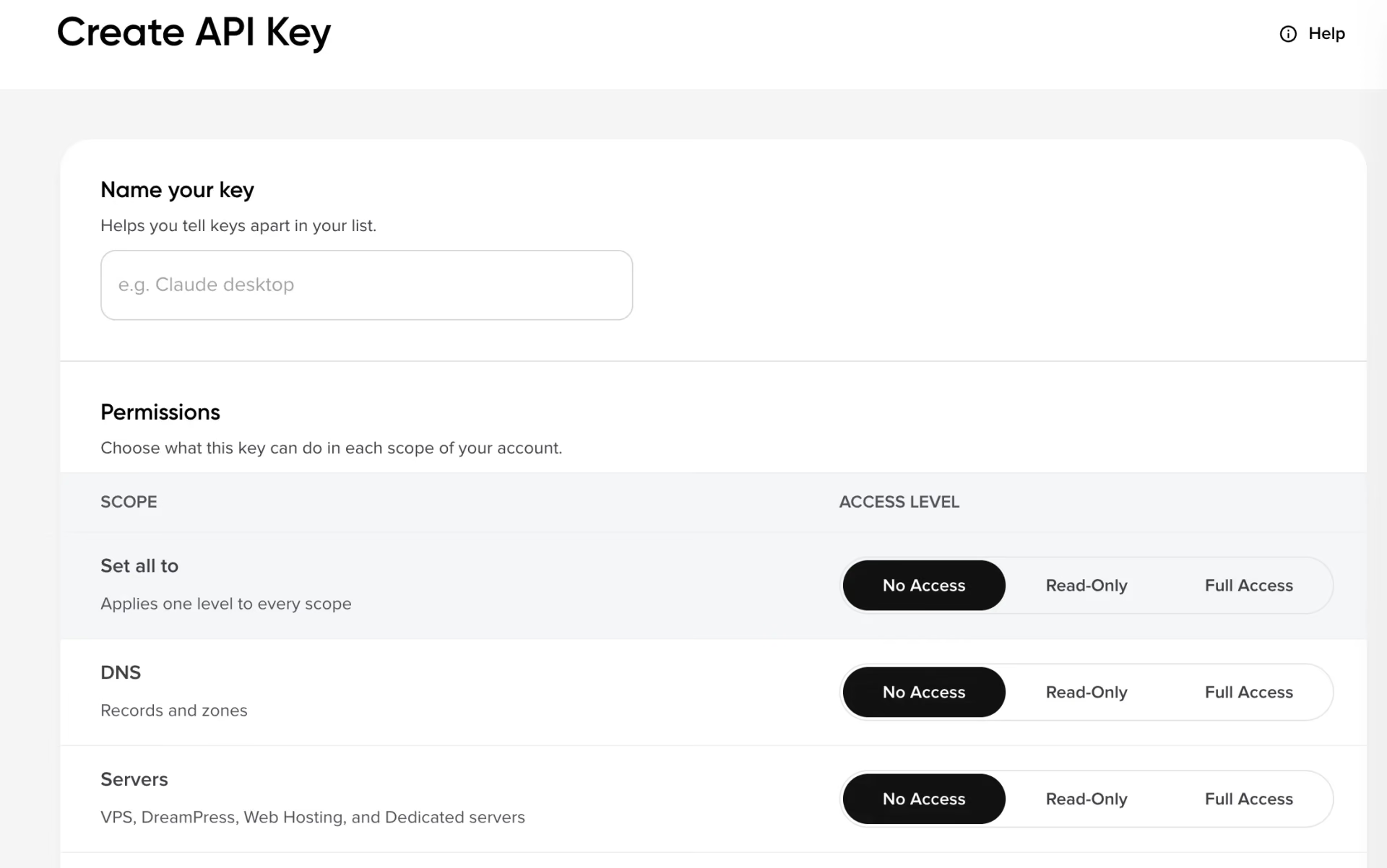
You set each key to Full Access, Read-Only, or No Access for every scope, from DNS to server users. Ask for anything outside that and you get a 403 that names the missing permission.
You create, rename, and revoke keys in the panel, one per tool, and name each one for the job it does. A missing or invalid key gets a 401.
Every response carries a correlation ID. Quote it to support and they can find the exact request. Start with a read-only key and widen it once you trust the tool.
JSON over HTTPS
One address, api.dreamhost.com. Plain JSON in and out.
Bearer key
Your API key goes in the Authorization header, like every other API.
Safe retries
Send an idempotency key with a write and a retry never runs twice.
Tasks for slow actions
A restart or a DNS change returns a task ID you can poll.
Pagination with totals
Lists come in pages and tell you how many items exist.
Versioned at /v1
The version is in the URL, so today’s scripts keep working.
Rate limits per endpoint
A 429 comes with a Retry-After header that says how long to wait.
Pick your plan
Pick a plan and create a key with the access your tools need.
Length of subscription
Already a customer? Create a key in your panel.
Have another question? Chat may start with an AI assistant, and you can ask for a person at any time.
Nothing. It comes with any DreamHost product. Once you have a plan or a domain with us, you can create keys in your panel.
On the API Keys page in the panel. Name it, choose what it can do area by area, and copy it into your tool. Account owners create keys. Keys for other users on the account come later.
The DreamHost API ships as a REST API with an OpenAPI spec, with no official CLI, SDK, or Terraform provider. The spec lets you generate a typed client in most languages.
Yes. Limits vary by endpoint and operation. Past one you get a 429 and a Retry-After header that says how long to wait.
All of them. Web Hosting, DreamPress, Managed VPS, and Dedicated get the full set. On VPS, root access is in your hands to manage sites, users, logs, and traffic; the API handles DNS, server details, metrics, and restarts. If you only have a domain or email with us, you get DNS.
Any tool that can read an OpenAPI description and run commands can use the DreamHost API. A direct connector for chat assistants comes next.
An MCP server is coming soon, built on this API.
Pick a plan, create a DreamHost API key, point your tools at it.