
Here’s the short answer up front: for most service businesses, self-hosted WordPress is the best platform to build on. You own your content and data, you control every SEO element (including the local SEO that wins nearby clients), and you can add booking, payments, and CRM integration as you grow. A website builder makes sense mainly when a simple site launched fast matters more than long-term flexibility.
Still, this is one of the most overwhelming questions for small business owners considering their online presence: Where do you build it all?
There are dozens of platforms to choose from, and each one seems to promise to be the only tool you’ll ever need. But finding the right tool, from self-hosting to WordPress to website builders, is more complex than that.
One platform promises it’s “all-in-one.” Another says it’s “built for growth.” Meanwhile, you’re trying to run an actual business. You need a website that explains what you do, earns trust, gets found in search, captures leads, and isn’t too difficult to set up and maintain.
The platform you start on tends to be the platform you stay on: leaving a builder later means exporting only what it allows and rebuilding the rest (more on that below), so it’s worth getting the choice right. There isn’t one perfect tool for every service business, but a solo consultant may not need the same setup as a remodeling company with project galleries, estimate forms, location pages, online payments, and scheduling. And the wrong platform shapes what your website can and can’t do — now and in the future.
In this guide, we’re breaking down WordPress vs. website builders, which plugins and integrations you should consider, when to connect a CRM, and how to think about other additions like payment processing. Let’s get started.
What’s the best website platform for a service business?
For most service businesses, self-hosted WordPress is the best website platform. You own your content and data outright, you control every SEO element (including local SEO), and you can add booking, quote forms, payments, and CRM integration as you grow. Choose a website builder only when a simple brochure site, launched fast, is genuinely all you’ll need.
One of the biggest decisions you’ll make is whether to use a customizable platform like WordPress or a simpler site builder like Squarespace, Webflow, or Wix. Here’s how the two approaches compare:
| Factor | WordPress (Self-Hosted) | Website Builder |
| Flexibility | Nearly unlimited; you choose your theme and can expand through plugins and custom code. | Limited to the platform’s templates and features. |
| Learning curve | Moderate; may be steeper initially, but there’s a vast library of tutorials, documentation, and professionals who can help. | Low; many platforms are beginner-friendly with drag-and-drop capability designed to help you get started quickly. |
| SEO | You have full control over every SEO element. | It depends on the platform, but many only offer basic SEO tools and limited technical SEO. |
| Cost | The platform itself is free; you’ll pay for a domain (typically $10–$20 per year) and hosting (often around $2 per month on an introductory offer, renewing at $10–$20 or more per month); premium themes and plugins can add additional costs. | Platform and hosting costs are bundled, typically for ~$15–$100 per month; a domain may be included initially — check its renewal price. |
| Scalability | Grows indefinitely with your business. | May hit feature walls as your business needs expand. |
| Maintenance | You or your host is responsible for managing updates. | The platform manages updates. |
| Ownership | You own everything: your content, design, data, etc. | This is platform-dependent; if you choose to leave the platform in the future, migrating your data elsewhere may be difficult. |
Run the cost math over 3 years, not 1. On the WordPress side, a domain typically runs $10 to $20 per year (Shopify, February 2026), and hosting that starts around $2 per month on an introductory offer commonly renews at $10 to $20 or more (Forbes Advisor, February 2026), plus any premium themes or plugins you add. On the builder side, Squarespace’s 2026 plans run $16 to $99 per month billed annually (JAKS Digital, April 2026), and costs typically climb when a feature you need, like commerce or more marketing tools, lives on a higher tier. Whichever route you take, budget for the renewal price, not the promo.
One 2026 wrinkle worth knowing: AI site generation now lives on both sides of this divide. Builders generate starter sites from a prompt, and so do WordPress hosts — DreamHost’s Liftoff AI Website Builder launches a personalized WordPress site you own in under 60 seconds. Speed to launch is no longer the builder’s exclusive advantage; the durable trade-off is ownership and flexibility.
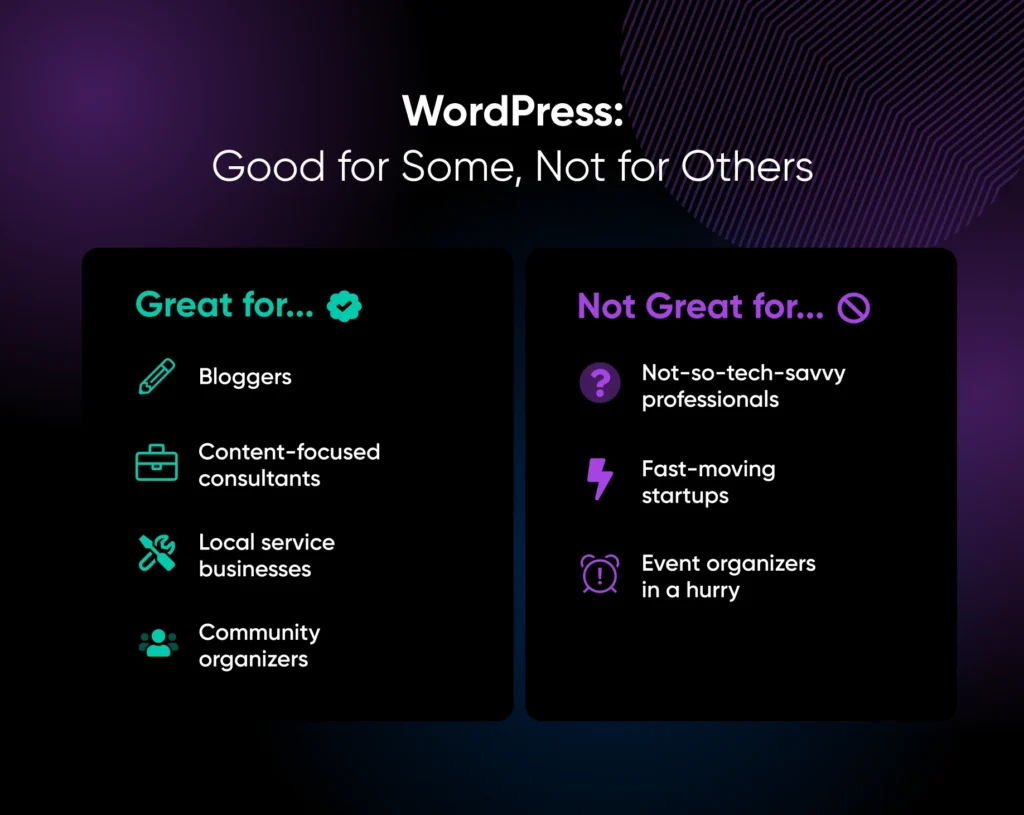
So our verdict stands: for most established service businesses, WordPress is the best choice, and the exceptions are narrow — a one-page brochure site you’ll rarely touch, or a business with zero appetite for maintenance. For a wider tour of the alternatives, see Choosing a Website Builder: WordPress vs. Everything Else.
Which platform fits which service business?
Here’s how the four platforms service businesses shortlist most often score on the criteria that matter: lead capture, booking, local SEO control, ownership, and cost as you grow.
| Platform | Best for | Lead capture & booking | Local SEO control | Ownership & cost as you grow |
| WordPress | Most service businesses that run on leads. | Any form or booking plugin you want (WPForms, Amelia), connected straight to your CRM. | Full: unlimited location pages, schema via the SEO plugins below. | You own the site and can change hosts; costs vary with hosting, traffic, and any premium tools you add. |
| Squarespace | Design-led brochure sites with simple scheduling needs. | Built-in blocks handle lead capture; appointment booking runs through Acuity Scheduling, its scheduling product, shown on your site with scheduling blocks. | Basic settings; limited technical control. | Exports “certain content” only, per its own documentation; plans run $16–$99/month billed annually (2026), and new needs can push you up a tier. |
| Wix | Beginners who want drag-and-drop and the fastest setup. | Built-in tools plus 500+ add-ons in the Wix App Market, within plan limits. | Basic tools; limited technical control. | The site is built on, and stays on, the platform, so leaving means rebuilding; tier upgrades are the usual cost pressure. |
| Webflow | Teams with real design skills who want fine visual control without code. | A customizable built-in Form block; booking is typically added through embeds (like the Calendly example below). | More technical control than template builders, still within the platform’s limits. | A proprietary, hosted platform: moving away means rebuilding, and costs rise with site and CMS needs. |
Your vertical shapes the shortlist, too. A solo consultant doesn’t need the same setup as a remodeling company, so match the platform to the features your kind of business can’t live without:
| Service business type | Must-have features | Platform profile that fits |
| Booking-heavy (salons, trainers, cleaners, clinics) | Online scheduling, reminders, deposits at booking. | WordPress with a booking plugin like Amelia or Bookly; a template builder can work if your scheduling needs stay simple. |
| Portfolio-heavy (photographers, designers, remodelers) | Project galleries, fast-loading images, before-and-after pages. | WordPress with an image optimization plugin; a template builder if the site is purely a showcase. |
| Quote- and estimate-driven (contractors, consultants, agencies) | Intake forms, CRM connection, a page for every service area. | WordPress, for full control of forms, integrations, and local SEO. |
Local SEO: the platform test that matters most
Local SEO is where platform choice bites hardest for a service business. Clients search for “[service] near me,” and ranking in your city takes three things your platform has to let you control: a dedicated page for each location or service area, a site you can connect to your Google Business Profile, and LocalBusiness schema markup so search engines understand what you do and where you do it.
On WordPress, all three are fully in your hands: create as many location pages as you have service areas, and the SEO plugins covered below handle schema markup and sitemaps. On builders, it depends on the platform — many only offer basic SEO tools and limited technical control, which is fine for a single-location brochure site and a ceiling for a multi-area operation.
What actually happens if you leave a website builder?
Your written content mostly survives; your operational data often doesn’t. Squarespace’s own export documentation (updated February 2026) says you can export “certain content” from your site into an .xml file for importing to WordPress — the operative word being “certain.” Treat that as the honest baseline for closed platforms: pages and posts are largely portable, while the data your business runs on — booking histories, form entries, client records — typically lives inside the platform’s own tools, so check each tool’s export options before you commit.
A migration that protects your rankings looks like this: export what the platform allows, rebuild the site on WordPress, match your old URLs where you can and set 301 redirects where you can’t, then watch Google Search Console for crawl errors. It’s a real project, which is why so few businesses ever make the move. Going the other direction is easier: a WordPress site can be exported and moved wholesale, plugins and all, to any host.
DreamHost-hosted WordPress vs. Squarespace
With Squarespace, you rent the whole stack: design, hosting, and tools live inside one closed subscription, genuinely easy and genuinely polished. With WordPress hosted on DreamHost, you own the site and rent only the hosting under it. DreamPress, DreamHost’s managed WordPress hosting, keeps the convenience: WordPress comes pre-installed, with daily backups, 1-click staging, and 24/7 in-house WordPress support, while your content, design, and data stay yours to customize or move at any time.
For the service-business jobs specifically: on Squarespace you use the platform’s built-in tools within your plan’s limits, while on DreamHost-hosted WordPress you pick your own booking, forms, and payments stack from the plugins in this guide, and you control every local SEO element yourself.
On cost, run the same formula for both. Squarespace: plan subscription (the 2026 ranges are in the table above) + domain renewal after any first-year deal + a tier upgrade whenever a feature you need sits on a higher plan. DreamPress: plan rate (both the introductory and the renewal price are printed on the DreamPress plan page before you buy) + a domain, free for the first year on annual terms + any premium plugins you choose. Total each side over 3 years at renewal rates, not first-term promos, and you’re comparing like with like.
Essential plugins for service sites
One of WordPress’s biggest strengths is its plugin library — but it can easily become a liability for sites that install too many plugins, so it’s important to install plugins one at a time and test your site for performance issues in between each. Before installing any plugin, check three things:
- When it was last updated — a plugin that hasn’t been updated in over a year, or hasn’t been tested with recent WordPress releases, deserves extra scrutiny.
- How many active installations it has
- Whether it has reliable support
Here are some plugin categories service businesses may want to explore:
| Plugin Category | Use It For… | Plugins To Check Out |
| SEO | On-page optimization, schema markup, sitemaps. Hosting with DreamHost? The DreamHost SEO Toolkit covers the same ground with guided tasks and keyword tracking via its own WordPress plugin. | All in One SEO, Yoast SEO, Rank Math |
| Forms | Contact forms, quote requests, and intake forms. | WPForms, Gravity Forms |
| Scheduling | Online booking embedded on your site. | Amelia, Bookly |
| Site speed/caching | Caching to improve page load times. | WP Super Cache, W3 Total Cache |
| Security | Firewall, malware scanning, brute-force protection. For sites fully hosted on a DreamHost plan, the DreamShield add-on runs daily malware scans (one domain per plan). | Wordfence, Kadence Security (formerly iThemes Security) |
| Backups | Automated backups (if your host doesn’t handle them). | UpdraftPlus, All-in-One WP Migration and Backup |
| Analytics | Google Analytics + Search Console integration. | Site Kit by Google |
| Image optimization | Compress images without visible quality loss. | ShortPixel, Smush |
| Note: Even though not every SaaS has a plugin to integrate with WordPress, there are usually easy ways to do so by inserting embed codes, such as this example from Calendly. | ||
CRM integration
A customer relationship management (CRM) platform is where your leads go after they submit a form or book a consultation. Without one, you’ll have to manage leads manually in your email inbox, which puts them at risk of getting buried or falling through the cracks.
For service businesses that get fewer than around 50 leads per month, a simple CRM is enough. Zoho CRM, HubSpot’s free tier, or even a well-organized spreadsheet can work. The most important feature is making sure every website lead gets captured, tracked, and followed up on within a defined timeframe.
If you use CRM software, connect your website forms directly to it; most form plugins offer native integrations or Zapier connections. That way, no matter when a visitor submits a form, the lead should appear in your CRM immediately, with no manual entry required.
Payment processing
Not every service business needs online payments, but if you collect deposits, offer prepaid services, or sell gift certificates, online payment processing removes friction that can cost you revenue.
This is also a platform trade-off worth naming: website builders market scheduling, invoicing, and payments as built-in tools. That’s convenient (one bill, no setup), but you’re renting those tools, and they work only as long as you stay on the platform. The WordPress route assembles the same capabilities from plugins you choose and own; it takes more setup, and it moves with you.
WordPress integrates with payment processors through plugins. WooCommerce is the most flexible option (the core plugin is free, though many extensions cost extra), but for simple payment needs, a Stripe payment plugin or a similar setup may be all you need. If you go the WooCommerce route on DreamHost, pair it with a premium plan like DreamPress — that’s the setup behind DreamHost’s Online Store offering. Make sure to consider:
- Transaction fees: The industry standard is 1.5% to 3.5% of the transaction total. Online payments commonly cost around 2.9% plus 30 cents per sale (NerdWallet, July 2026). Shop around, but don’t stress over a fraction of a percent if it’ll cost you reliability and ease of use.
- Recurring payments: If you offer maintenance plans or retainer services, you need a processor that supports subscriptions.
- Invoicing: Some processors include invoicing, which simplifies billing workflows for certain types of service providers.
Even if you don’t need online payments now, it’s a good idea to choose a platform that supports them. As your business grows, the ability to collect deposits at the time of booking is a competitive advantage you may want later on.
Choose the setup that won’t box you in
The best website platform for any service business is the one that fits how your business works now while leaving room for your planned future growth.
You don’t need to chase every new tool, plugin, app, or platform feature that shows up in your feed. More software doesn’t automatically mean a better website. In fact, it often just gives you more things to update, troubleshoot, and pay for.
Start with what your site needs to do today:
- Can people understand your services quickly?
- Can they contact you easily?
- Can you keep track of your leads after they reach out?
- Can you maintain and update your site’s content?
But also think about the growth you have planned, and whether the platform you choose will constrain it.
Choose your platform deliberately — it’s a foundation for your website and your business, giving you the structure to stand on today and keep building tomorrow.
FAQs about choosing a website platform for a service business
Is WordPress or a website builder better for a service business?
WordPress is better for most service businesses: you own your data, control local SEO, and can add booking, forms, and payments as you grow. A website builder wins only when a simple brochure site, launched fast with zero maintenance, is all you need.
What’s the difference between hosting WordPress with DreamHost and building on Squarespace?
Ownership. Squarespace bundles design, hosting, and tools into one closed subscription. WordPress hosted with DreamHost delivers similar convenience — managed plans like DreamPress come with WordPress pre-installed, daily backups, and 24/7 expert support — while your content, data, and design stay yours to customize or move anytime.
What’s the best website platform for professional services?
WordPress, for most consultants, agencies, and firms: it supports the intake forms, scheduling, content marketing, and local SEO that professional-services leads depend on. If your site is a static credentials page and nothing more, a template builder can do the job.
Do service businesses need a CRM connected to their website?
Once leads matter, yes. Under roughly 50 leads per month, a simple CRM or even a disciplined spreadsheet works — what matters is that every website lead gets captured and followed up. Connect your forms directly so leads land in the CRM without manual entry.
Can you switch from a website builder to WordPress later?
Yes, but plan for a partial rebuild. Written content usually exports (Squarespace, for example, lets you export certain content to an .xml file for WordPress import), while designs and tool data often don’t. Match old URLs or set 301 redirects to protect your rankings.

Stop Losing the Comparison Round
69% of consumers say a local business needs a website to be credible — and a business website delivers a 41% trust lift, the strongest credibility signal outside of online reviews. This 38-page playbook gives service business owners the strategy, pages, trust signals, lead generation, platform, and mobile performance blueprint to win the comparison round.
Get the eBookThis page contains affiliate links. This means we may earn a commission if you purchase services through our links, at no extra cost to you.