If your website is growing, sooner or later you hit this question: stay on shared hosting, or move up to a VPS?
It matters more than it looks. The plan behind your website decides how fast pages load, how well your site handles a traffic spike, and how much you pay each month.
This guide explains both types of hosting in plain language. We’ll walk through the seven differences that actually matter, give you a side-by-side comparison, and show you the warning signs that it’s time to upgrade.
VPS vs. Shared Hosting: The Short Answer
Shared hosting stores your website on a server where it shares CPU, RAM, and storage with many other sites. VPS hosting splits one physical server into isolated virtual servers, each with resources reserved for one customer. Shared hosting costs less and is easier to run. A VPS gives you more consistent performance, stronger isolation, and more control.
A quick rule of thumb:
- Choose shared hosting if you’re starting out, your traffic is modest, and you want the host to handle everything technical.
- Choose VPS hosting if your site is growing, your traffic arrives in bursts, or you need resources and software that shared plans can’t offer.
Neither option is “better” across the board. It depends on where your website is today and where it’s headed. Let’s look at each one.
What Is Shared Hosting?
Shared hosting is a plan where many websites live on one physical server and split its resources. It’s the least expensive way to host a website, and the hosting company handles all of the server maintenance for you. (At DreamHost, this type of plan is called web hosting.)
Think of it like an apartment building. You get your own unit, but you share the building’s common resources with your neighbors. In hosting terms, those common resources are the server’s processing power, memory, storage, and bandwidth.
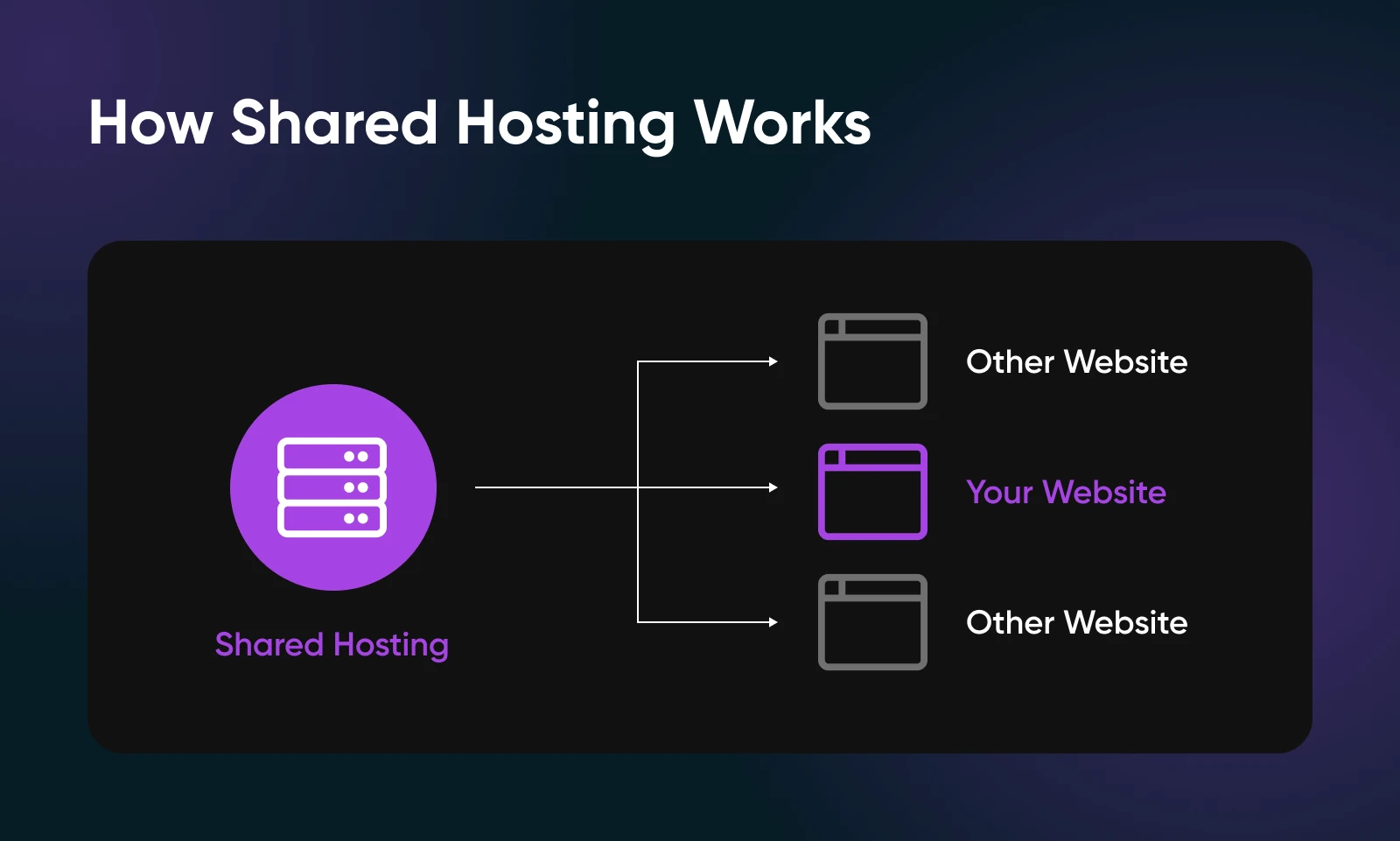
Sharing a server doesn’t mean sharing your data. On a properly configured shared server, other customers can’t see your files, and you can’t see theirs. You’re only sharing the physical hardware underneath.
Because one machine serves many customers, providers can keep prices low. The trade-off is that the server’s total resources are shared. If another site on your server gets a burst of traffic at the same moment yours does, both of you are pulling from the same pool.
What Is VPS Hosting?
A virtual private server (VPS) is one slice of a physical server that behaves like its own independent machine. Virtualization software divides the server into isolated environments, and each one gets its own guaranteed slice of CPU, RAM, and storage.
VPS Hosting
A Virtual Private Server (VPS) is a virtual platform that stores data. Many web hosts offer VPS hosting plans, which give site owners a dedicated, private space on a shared server.
If shared hosting is an apartment, a VPS is a condo. You still share the physical building, but you own your space. You can renovate however you like, and your neighbors’ guests never crowd your living room.
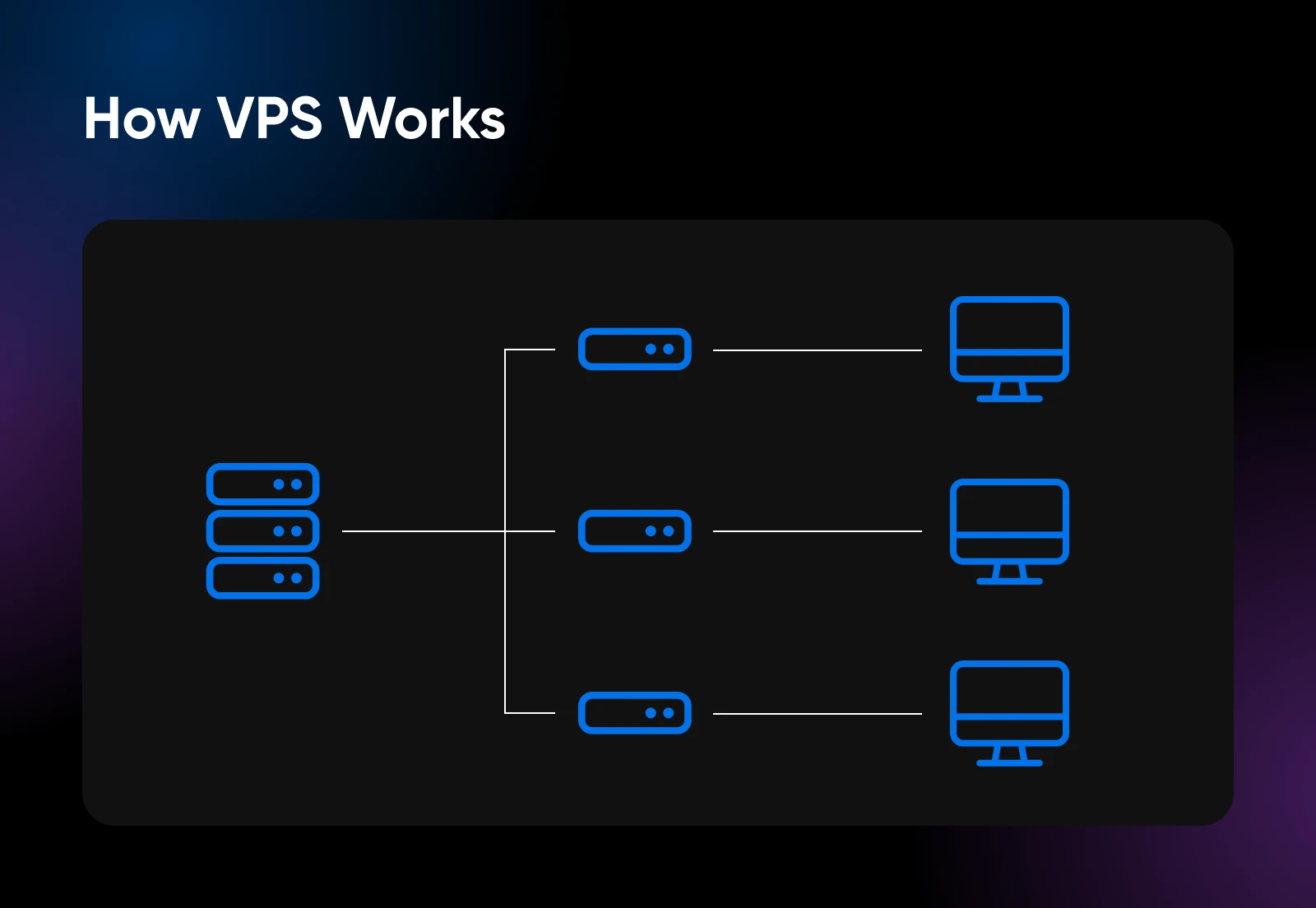
Because your resources are reserved for you, busy websites on the same physical server are far less likely to slow yours down. That’s the core difference, and it’s where most of the benefits below come from.
VPS plans cost more than shared hosting, but far less than renting an entire physical server. If you want the full deep dive on how virtual private servers work, read our beginner’s guide to VPS hosting.
7 Key Differences Between VPS and Shared Hosting
Here are the seven areas where the two options really separate, starting with the one most people feel first.
1. Performance
A VPS is usually faster and more consistent than shared hosting, because its computing resources are reserved for your site alone.
Speed affects your bottom line. In Portent’s 2022 update to its site speed research, a site that loaded in one second had an e-commerce conversion rate 2.5 times higher than a site that loaded in five seconds. Slow pages cost you visitors and sales.
Picture a food festival where every stand shares one line: you wait behind everyone, even if you only want a lemonade. Shared hosting is the single line; a VPS is your own.
That said, a well-run shared plan is plenty for a small site. If your pages are light and your traffic is steady, you may never notice the difference. The gap shows up as your site (or your neighbors’) gets busier.
2. Reliability and Uptime
Both types of hosting can be reliable, but a VPS is more predictable, because your reserved CPU and RAM are insulated from traffic spikes on other customers’ sites.
Reliability is measured in uptime: the percentage of time your website is up and working. The numbers look close until you translate them into hours offline.

A “99% uptime” plan sounds fine until you realize it allows over seven hours of downtime per month. For a store or a business site, that’s real money. Look for 99.9% or better, and check how the provider backs it up. DreamHost, for example, backs its hosting plans with a 100% uptime guarantee.
Much of your uptime also depends on the data centers behind your host: the hardware, the network, and the people watching them.
Data Centers
A data center houses computer systems and telecom equipment like servers and routers. It stores and manages large amounts of data for businesses, governments, and hosting companies.
3. Security
VPS hosting gives you stronger isolation. Your virtual server is walled off from every other customer, so a compromised or badly maintained site elsewhere on the machine is much less likely to affect yours.
On shared hosting, you rely more on the provider’s server-level protections. Good hosts invest heavily here, and for most personal and small business sites, that protection is enough. DreamHost’s web hosting and managed VPS plans include free SSL certificates automatically, so traffic to and from your site is encrypted either way.
If your website handles customer accounts, payment details, or other sensitive data, the extra isolation of a VPS is a meaningful upgrade, and it may help if you need to meet payment-security rules like PCI DSS.
4. Price
Shared hosting is the cheaper option, and it’s not close. Because many customers split the cost of one server, entry plans across the industry often start at just a few dollars a month.
VPS plans reserve hardware for you, so they cost more: typically anywhere from around $10 to $80+ per month across the industry, depending on how much CPU, RAM, and storage you need. You can see current DreamHost pricing on the web hosting and managed VPS pages.
One cost that’s easy to miss: bandwidth overages. Many VPS providers give you a monthly transfer allowance, then bill per gigabyte once you pass it. As of June 2026, 10 TB of monthly transfer runs $810 in overage charges on AWS Lightsail, per its published rates. DreamHost VPS plans include unmetered bandwidth, so the same traffic costs $0 in overage fees.
5. Management: Who Runs the Server?
Shared hosting is always managed for you. The provider’s team keeps the server updated, patched, and monitored. You never touch the machinery.
With a VPS, you choose who does that work:
- Managed VPS: The host handles updates, security patches, and monitoring, and you focus on your website. DreamHost’s Managed VPS Hosting works this way, with resource dashboards and proactive alerts built in.
- Self-managed VPS: You get full root access and run the server yourself, from the operating system up. That’s DreamHost’s Self-Managed VPS, built for developers who want total control.
If you’re moving up from shared hosting and don’t want new chores, managed is the natural next step. Our VPS guide has a full managed vs. self-managed breakdown if you’re weighing the two.
6. Scalability
A VPS scales further, and more smoothly. When your site grows, you move to a bigger plan and your dedicated CPU, RAM, and storage grow with it.
Shared plans are sized for a certain amount of traffic. For example, DreamHost’s entry web hosting plan is sized for about 40,000 visits per month. That covers most small business sites comfortably. But if your traffic arrives in bursts — a product launch, a holiday rush, a post that takes off — a shared server has less headroom to absorb the spike.
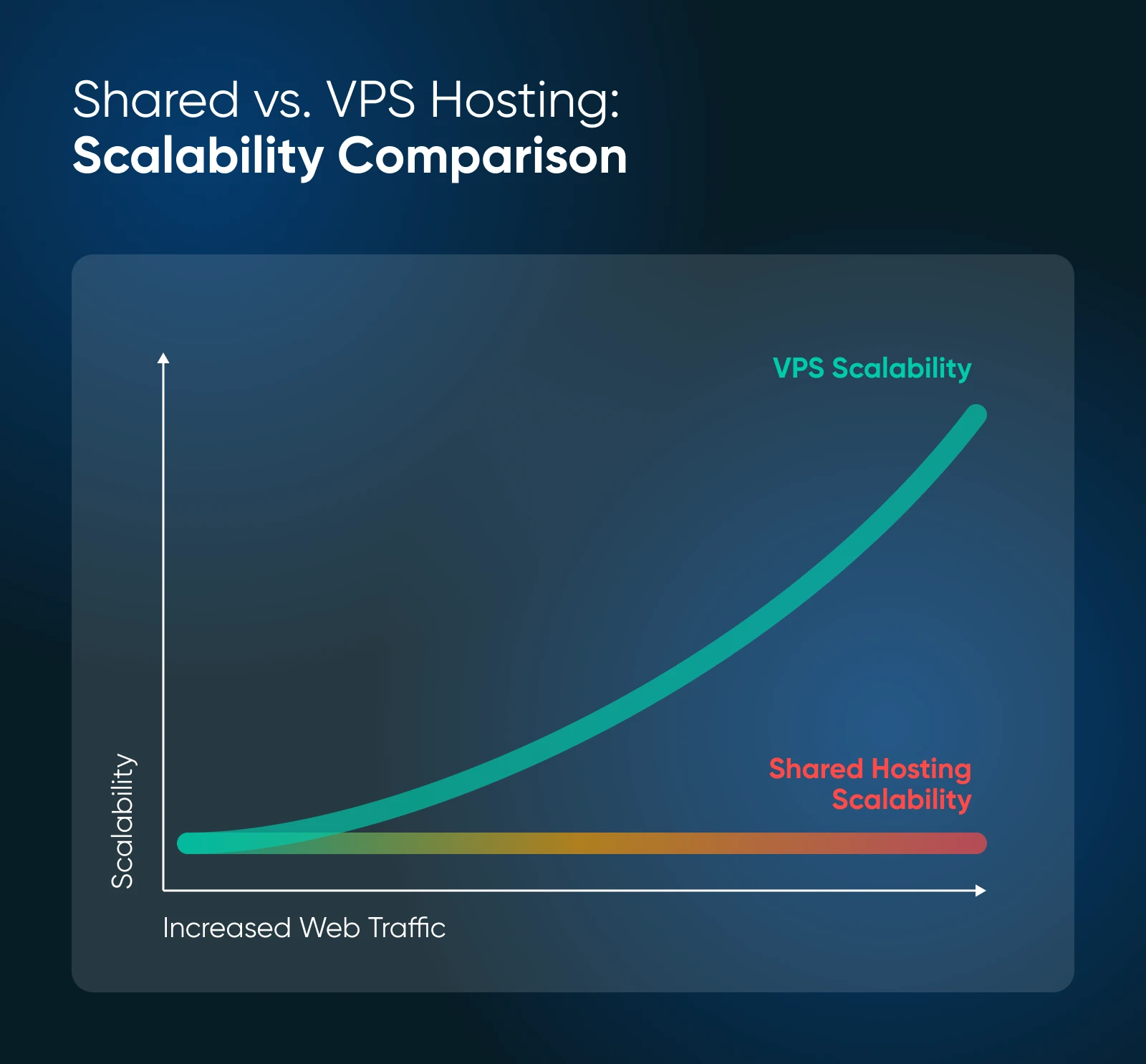
Some managed VPS plans smooth out spikes automatically. DreamHost Managed VPS includes Auto-Boost RAM Protection, which temporarily adds memory during a surge so your site stays up, with no overage fees.
If you’re planning for rapid growth from day one, starting on a VPS saves you a migration later.
7. Customization and Control
Shared hosting comes preconfigured and optimized for the average website. For beginners, that’s a feature: there’s nothing to break.
A VPS removes the guardrails. On a self-managed VPS you can pick your Linux distribution, run Docker containers, install custom server software, and tune the stack however your project needs. If it runs on Linux, you can run it.
That control comes with responsibility. On a self-managed server, a bad config change is yours to fix. If you want VPS power without the sysadmin work, that’s exactly the gap managed VPS plans fill.
VPS vs. Shared Hosting at a Glance
Here’s how the two stack up side by side:
| Feature | Shared Hosting | VPS Hosting |
| Server resources | Shared with other websites | Dedicated to your site |
| Performance | Good for small sites; can dip when the server is busy | Faster and more consistent under load |
| Isolation | Lower — one shared environment | High — your own virtual server |
| Typical monthly cost (industry) | A few dollars | Roughly $10–$80+, by resources |
| Server management | Always handled by the host | Managed by the host, or by you (self-managed) |
| Root access | No | Yes, on self-managed plans |
| Scalability | Limited by plan sizing | Upgrade CPU, RAM, and storage as you grow |
| Best for | New sites, blogs, small business sites | Growing sites, online stores, web apps, custom stacks |
Shared Hosting vs. VPS Hosting: How To Decide
Three questions settle most cases: How much traffic do you get today, and where is it trending? Does your site need anything a preconfigured server can’t run? And what does downtime or a slow page actually cost your business?
When To Choose Shared Hosting
Shared hosting is the right call when simplicity and price matter most. It fits:
- Blogs, portfolios, and personal websites
- Small business sites that mainly share information and collect leads
- New projects and startups still testing an idea
- Sites comfortably within their plan’s traffic sizing (tens of thousands of visits a month, not hundreds of thousands)
When To Choose VPS Hosting
VPS hosting is worth the higher price when your website is a serious part of your business. It fits:
- Businesses growing past what shared plans are sized for
- Online stores, membership sites, and web apps that handle sensitive data
- Sites expecting a big traffic jump in the next few months
- Anyone hosting many websites, or running custom software that needs root access
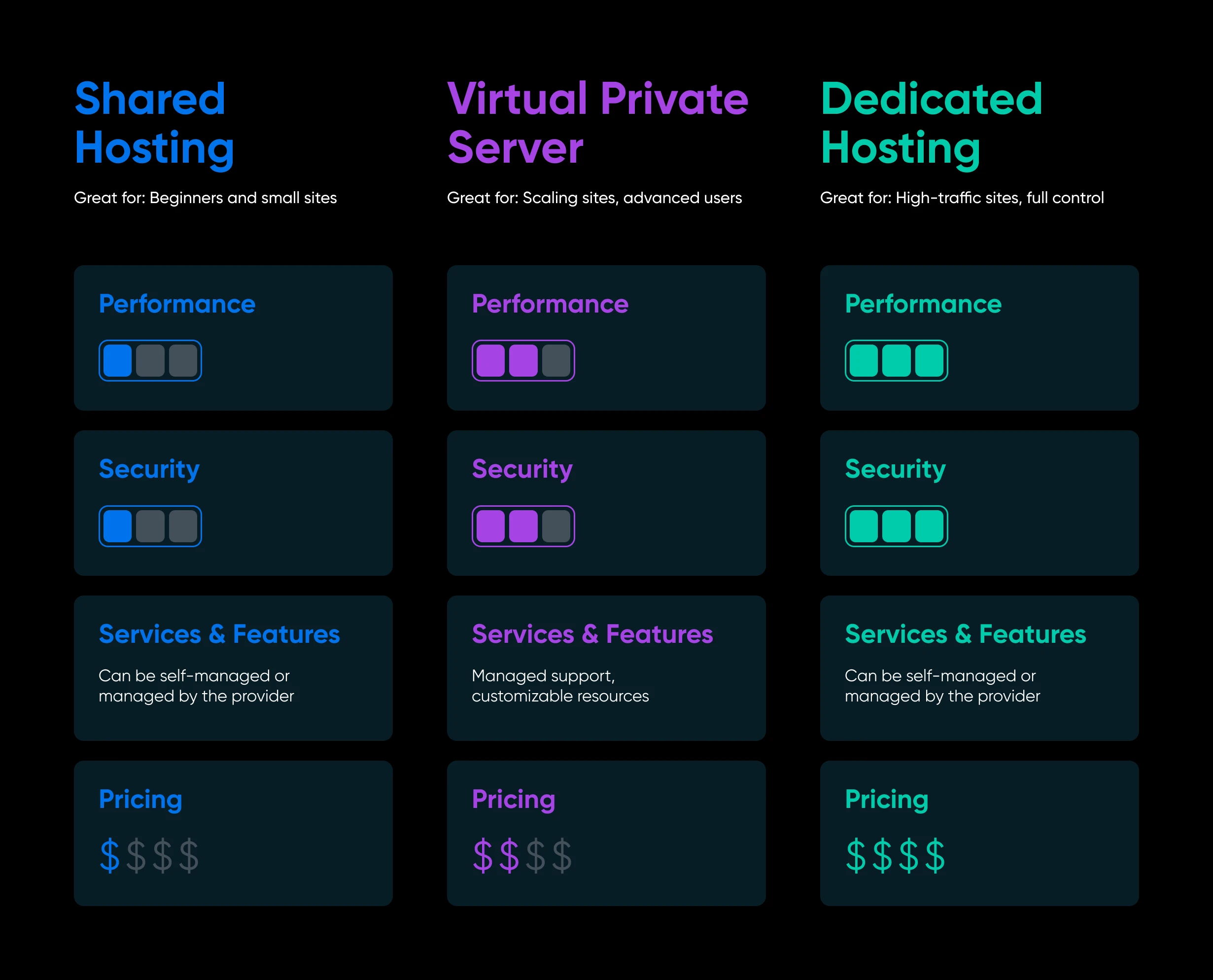
There’s a third rung on the ladder: a dedicated server, where an entire physical machine is yours. It’s the most powerful and most expensive option, and most websites never need it. A VPS covers the wide middle ground between “just starting” and “millions of visits.”
When To Upgrade From Shared Hosting to VPS Hosting
Already on shared hosting? Watch for these five signals. Any one of them is a hint; two or more mean it’s time.
- Your site slows down at your busiest hours. Consistent slowdowns at peak traffic are the classic sign you’ve outgrown a shared resource pool.
- Pages take more than three seconds to load even after you’ve optimized images and enabled caching.
- You’re hitting resource limits. Memory errors, database connection errors, or 503 “server busy” errors during traffic spikes mean your plan’s ceiling is too low.
- Your traffic is approaching your plan’s sizing. If you’re regularly near the visit count your plan is built for, upgrade before growth turns into downtime.
- You need something a shared plan can’t run — a custom application, a specific server stack, or root access.
The switch itself is routine. At DreamHost, support can help you move a site from web hosting to a VPS, and once you’re on a VPS, moving between plan sizes is a quick change in your panel. Here’s how VPS plan upgrades work when you need the next size up.
VPS vs. Shared Hosting FAQs
Is VPS hosting better than shared hosting?
A VPS is better for performance, security isolation, and control. Shared hosting is better for price and simplicity. For a small site with steady traffic, shared hosting is usually the smarter buy; for a growing business site, the VPS advantages start to pay for themselves.
How much more does VPS hosting cost?
Across the industry, shared plans typically cost a few dollars a month, while VPS plans typically run from around $10 to $80+ depending on resources. Check bandwidth policies, too — overage fees on metered plans can dwarf the base price.
Can I switch from shared hosting to a VPS later?
Yes. Starting on shared hosting and upgrading later is the most common path. If you stay with the same host, the move is usually handled for you or done with a plan change, with no domain or rebuild required.
Is shared hosting safe for a business website?
With a reputable host, yes. Free SSL, server-level monitoring, and regular patching cover most small business needs. If you store customer data or process payments on your site, a VPS’s isolation is a worthwhile upgrade.
Do I need root access?
Only if you plan to install custom server software or manage the operating system yourself. If that’s you, look at a self-managed VPS. If you just want a faster, more reliable website, a managed VPS gives you the performance without the sysadmin work.
Should I skip VPS and go straight to a dedicated server?
Almost never as a first step. Dedicated servers make sense for very high-traffic sites and heavy workloads. A VPS delivers most of the same benefits at a fraction of the cost, and you can scale up when the numbers justify it.

When You Expect Performance Get DreamHost VPS
Big or small, website or application – we have a VPS configuration for you.
See MoreChoose the Right Hosting Plan
There’s no single right answer in web hosting. The best plan is the one that fits your site today and can grow when it needs to.
If affordable and simple is what you need, start with web hosting. If your site is growing, handling sensitive data, or straining its current plan, step up to a managed VPS.
Either way, you’re not locked in. Start where your website is now, and upgrade when the traffic tells you to.