
The clock strikes 9 AM on a crisp Monday morning. You settle into your favorite chair, ready to start a new web project. You’ve been using Node for most of your projects, but now this “Bun” thing has come along.
So you’re sitting there, wondering, “Should I go with my tried-and-trusted Node.js or give Bun a try?”
While this question may seem simple, it will influence your project’s performance and potentially your team’s workflow for months to come.
And you’re not alone in this dilemma.
But what exactly sets these two apart? How do they compare in terms of features and performance? Most importantly, which one should you choose for your project?
In this article, we’ll explore these questions and compare Node.js and Bun across various dimensions. Our goal? To equip you with the knowledge required to make an informed decision that aligns with your project’s needs, team expertise, and long-term objectives.
So here’s the short answer up front.
Bun vs. Node.js: The Short Answer
Choose Bun for faster tooling and strong benchmark results: it led the synthetic CPU and HTTP tests below by 2x–4x and builds in a package manager, bundler, test runner, and database clients. Choose Node.js for maximum npm compatibility and established production workflows. For existing projects, migration cost usually decides; for new ones, weigh tooling, compatibility, and workload.
The rest of this article is the evidence. But first, for your article-reading-listening pleasure…
Okay, now we’re ready. Let’s take a look at each runtime briefly.
Node.js at a Glance
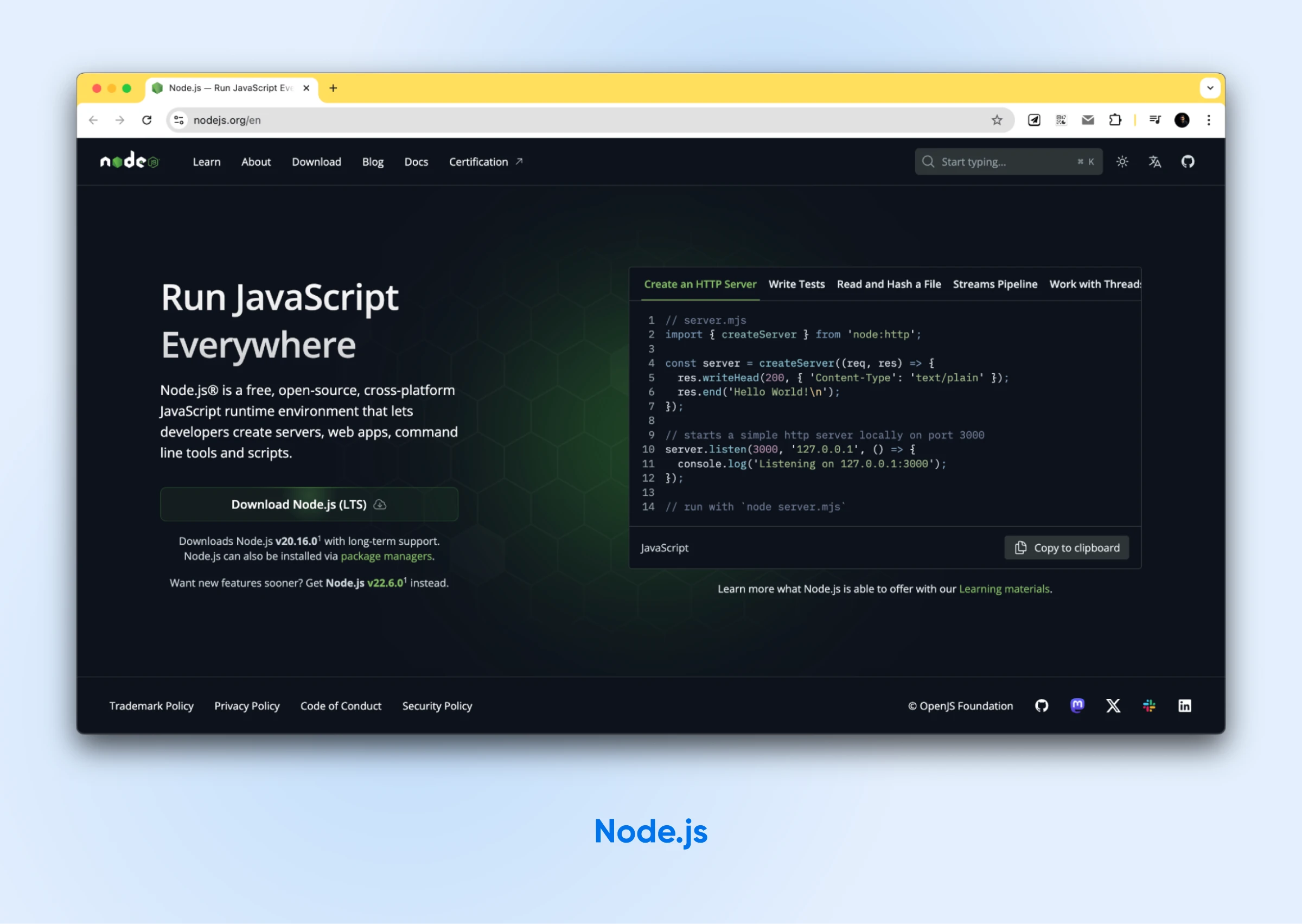
Node.js, first released in 2009 by Ryan Dahl, changed server-side JavaScript.
It allowed developers to use JS outside the browser, opening up new possibilities for building scalable network applications.
Node.js runs on the V8 JavaScript Engine, the same engine that powers Google Chrome. Its event-driven, non-blocking I/O model is well-suited for building fast, scalable network applications.
Key features of Node.js include:
- A mature package registry, with millions of packages available through npm (Node Package Manager).
- Great performance for synchronous tasks.
- Strong community support and extensive documentation.
- Wide adoption in enterprise environments.
What Is Bun?
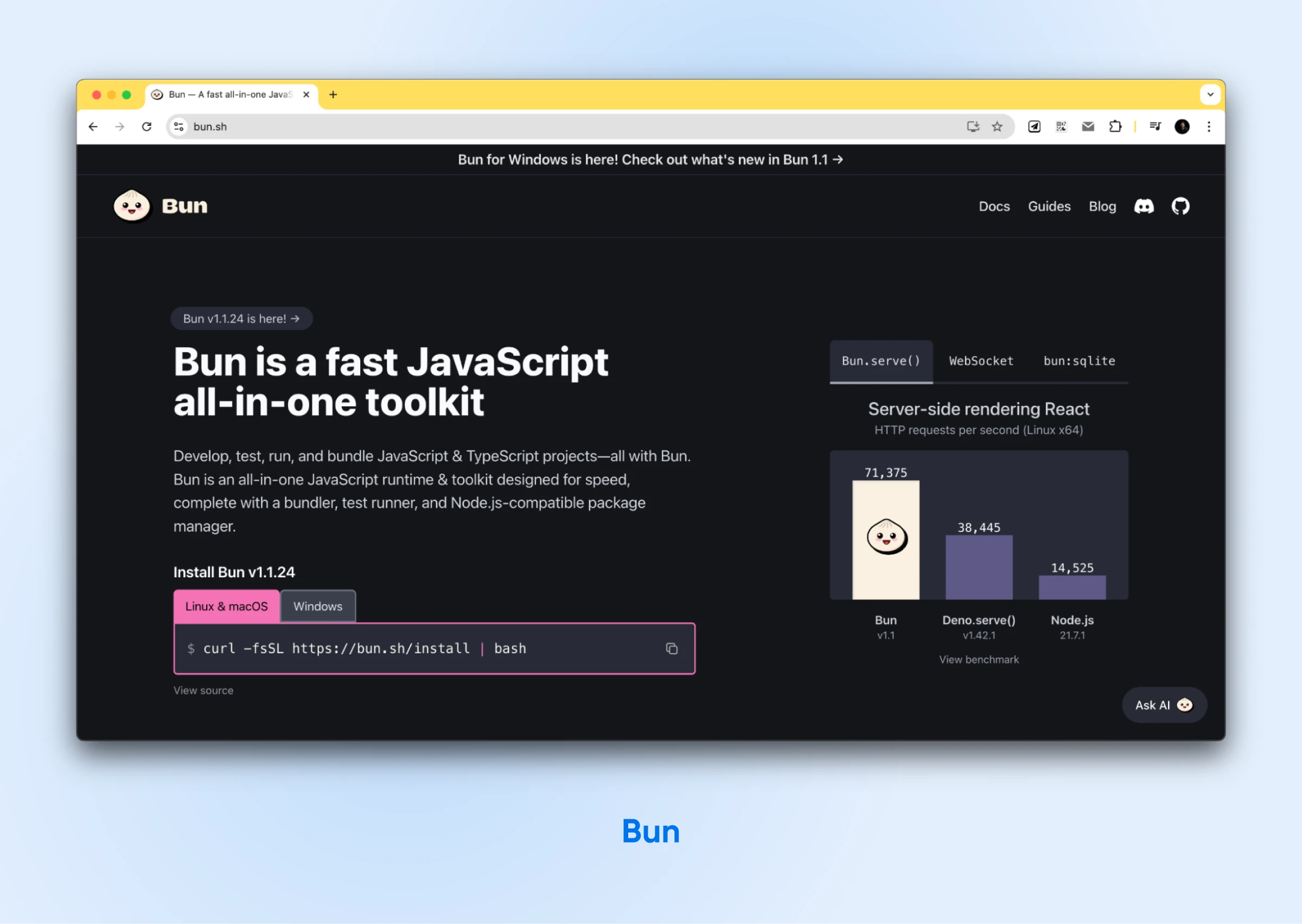
Bun is the younger of the two runtimes, but it’s no longer an unproven one.
First released in 2022 by Jarred Sumner, Bun shipped a stable 1.0 in September 2023, now runs on the 1.3.x line, and was acquired by Anthropic in December 2025. It positions itself as a drop-in replacement for Node.js, promising faster performance and an improved developer experience.
Bun is written in Zig, a low-level programming language, though that is changing: per Bun’s July 2026 announcement, v1.3.14 is the last Zig version and v1.4 will be the first written in Rust. It uses the JavaScriptCore engine (the same engine used in Safari) instead of V8. Per Bun’s docs, that low-level implementation and engine choice reduce startup time and memory usage, improving throughput in many workloads. We’ll look at this in a bit.
Key features of Bun include:
- All-in-one toolkit — runtime, package manager, bundler, and test runner, plus built-in PostgreSQL, MySQL, SQLite, Redis, and S3 clients added in Bun 1.2 and 1.3.
- Native TypeScript support without additional setup.
- Faster startup times and improved performance for many operations.
- Growing package selection and community.
Bun vs. Node.js: Performance Comparison
Let’s dive into the most talked-about aspect when comparing Bun vs. Node.js: performance.
We’ll walk through benchmark results from development agency Fively (5ly.co) — tests run in 2023 on pre-1.0 Bun, in an article last updated December 2025 — plus newer third-party numbers where the picture has since changed. One framing note before the charts: synthetic benchmarks reward tight loops. In real, database-bound apps, the gap often shrinks to almost nothing, and you’ll see exactly that in the CRUD test below.
1. CPU-Intensive Tasks
For CPU-bound operations, Bun shows impressive performance gains over Node.js. This first test involved generating and sorting 100,000 random numbers 10 times consecutively.
These were the results:

- Node.js: 3400 ms (median response time)
- Bun: 1700 ms (median response time)
Bun completed the task in half the time of Node.js. This 2023 result has aged well, too: Strapi’s 2026 comparison cites the same test and calls it “a reliable 2× advantage.” If your application involves heavy computation or data processing, that gap compounds into real compute savings.
2. CRUD API Operations
When it comes to typical CRUD (Create, Read, Update, Delete) operations, which are common in many web applications, the difference in performance is less pronounced.
The following were the results of running these CRUD operations with DynamoDB:

- Node.js: 22 ms (median response time)
- Bun: 23 ms (median response time)
Here, Bun’s performance was very close to Node.js, with just a 4.5% difference. If you’re using a different database like MySQL or PostgreSQL, the results may differ. However, we haven’t tested the results on these databases.
Database
A database is a collection of information accessible to computers. Databases are used to store information such as customer records, product catalogs, and financial transactions.
3. Cold Start Times
Cold start times are particularly important for serverless environments, where functions may need to initialize frequently.
A test executing a “Hello World” function with induced cold starts revealed:

- Node.js: 290 ms (median response time)
- Bun: 750 ms (median response time)
In Fively’s 2023 tests, Bun showed significantly longer cold starts than Node.js — early Bun simply wasn’t optimized for serverless platforms. More recent evidence points the other way: a 2026 production migration write-up measured its heaviest AWS Lambda function cold-starting at about 940 ms on Node.js 22 and about 290 ms on Bun 1.2, with Node.js cold starts across its functions ranging from 800 ms to 1.4 seconds depending on each function’s dependency footprint.
Cold-start behavior clearly swings with runtime version and platform, so benchmark your own functions in serverless environments before you let this number decide anything.
4. Memory Usage
Efficient memory usage is important for scalability and resource management.
Monitoring memory consumption during CRUD operations showed:

- Node.js: 40 MB (average memory used)
- Bun: 70 MB (average memory used)
In these 2023 tests, Bun used noticeably more memory than Node.js. Newer data disagrees: Strapi’s 2026 comparison reports Bun using 25–40% less memory than Node.js for API servers, and a production migration found the two within about 15% of each other under sustained load. Memory behavior has shifted from release to release, so profile your own workload rather than trusting either number.
5. HTTP Server Performance
Bun has long claimed to outperform both Node.js and Deno in HTTP server performance; its 2022-era launch marketing put Bun.serve() at 377% faster than Node.js and 102% faster than Deno. Current third-party numbers are more grounded but point the same direction: in Better Stack’s January 2026 runtime comparison, Bun handled over 52,000 requests per second, roughly 4x Node.js. Add a database and real routing, though, and the gap nearly vanishes: ByteIota’s test of a production-grade URL shortener, cited in Strapi’s 2026 comparison, measured 12,400 requests per second on Bun versus 12,000 on Node.js — a difference of less than 3%.
These are impressive numbers, suggesting that Bun could be particularly well-suited for building high-performance web servers. However, note that these benchmarks are a result of a small set of tests. (Wondering where Deno fits in? It’s the security-first pick of the three — programs start with zero permissions unless you grant them — while Node.js is the stability pick and Bun the speed pick.)
The best way to gauge the performance differences is to actually perform similar tests on your customized setup to determine if switching to Bun makes a significant difference in your app performance.
Server
A server is a computer that stores data. A web server is a type of server that stores web page data and then sends these web pages to users who request them over the internet.
Bun vs. Node.js: How Do the Features Compare?
Now that we’ve covered the performance differences, let’s also look at the differences in features so you can decide which out of the two would be good for you.
| Feature | Node.js | Bun |
| First release | 2009 | 2022 (stable 1.0 in September 2023) |
| Current version (July 2026) | 26.x (24.x LTS) | 1.3.x |
| JavaScript Engine | V8 | JavaScriptCore |
| Written in | C++ and JavaScript | Zig (Rust from v1.4) |
| Package manager | npm (bundled) | Built-in |
| TypeScript support | Native (type stripping; stable since Node.js 24.12) | Native (full transpilation, including enums) |
| Bundler | Requires external tools | Built-in |
| Test runner | Built-in (node:test) | Built-in (Jest-compatible) |
| Database clients | Via npm packages | Built-in (PostgreSQL, MySQL, SQLite, Redis, S3) |
| Windows support | Native | Native (including ARM64) |
| Package availability | Very large | Growing |
| Production readiness | Battle-tested | Production-proven (Anthropic-backed since December 2025) |
1. Package Management
One of the first things you’ll interact with when starting a new project is the package manager. Node.js and Bun take different approaches here.
Node.js relies on npm as its primary package manager. At this point, npm comes bundled with Node.js installations and has been the go-to solution for JavaScript developers for years. It’s powerful, widely adopted, and has a vast registry of packages.
However, npm can sometimes be slow, especially for large projects with a lot of dependencies.
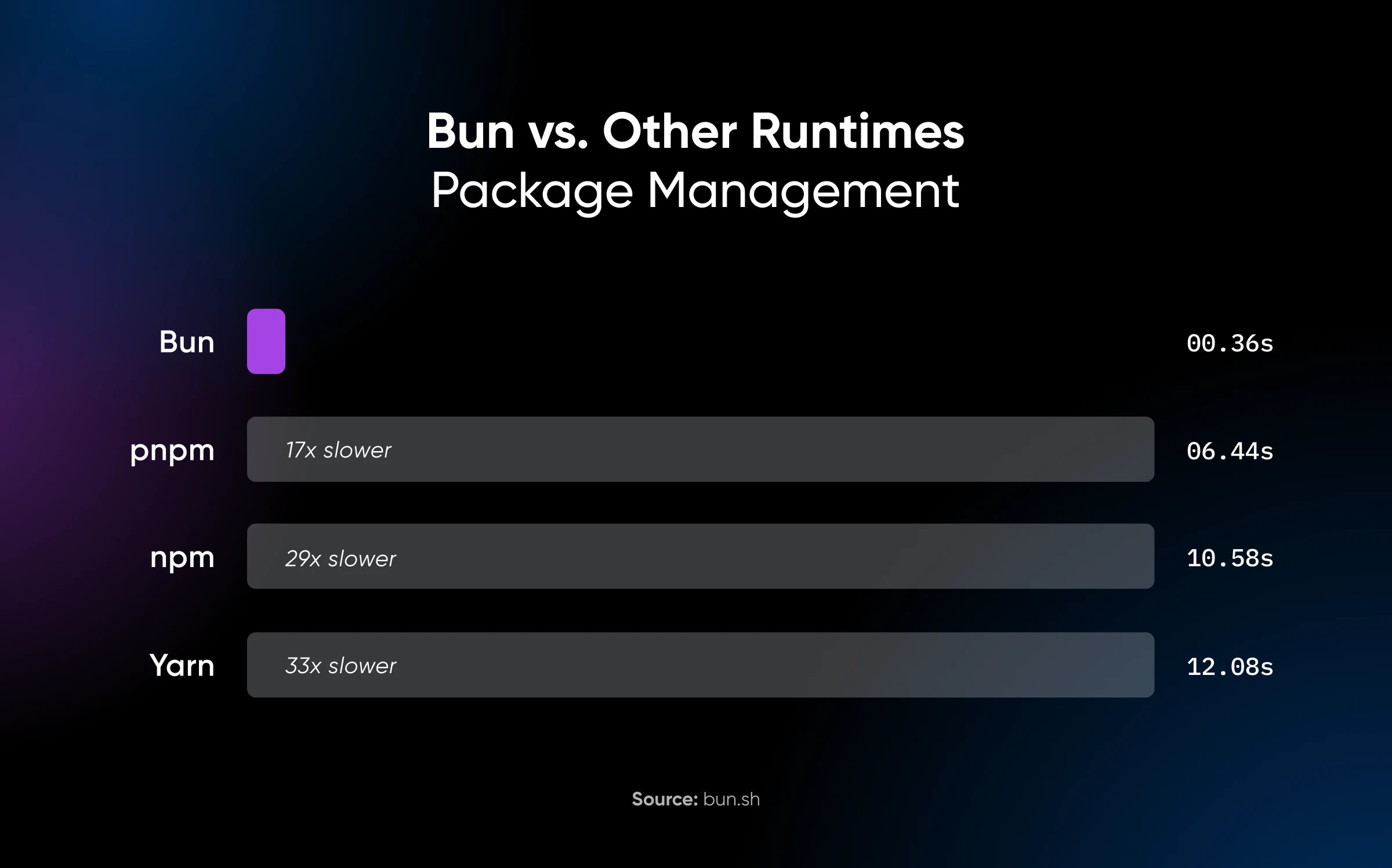
Bun, on the other hand, includes a built-in package manager that is significantly faster than npm.
Here’s the performance benchmark Bun published for its package manager vs. pnpm, npm, and Yarn, captured from bun.sh in September 2024. Bun’s current claim (bun.com, 2026) is that installs run up to 30x faster than npm.
It can use existing package.json files and node_modules directories, making it easier to transition existing projects. Bun’s package manager is designed to be compatible with npm, allowing you to use most npm packages without issues.
The built-in Bun package manager means you don’t need to install or configure a separate tool and can simplify your development setup, potentially speeding up your workflow.
You don’t have to switch runtimes to get that speed, either. Bun bills its tools as incrementally adoptable: bun install and bun test work inside an existing Node.js project while Node.js keeps serving production. If you adopt Bun piecemeal, commit the lockfile Bun generates and point CI at the same tool so every environment installs identically.
2. TypeScript Support
TypeScript has become increasingly popular in recent years, offering static typing and improved tooling for JavaScript developers. The level of TypeScript support differs significantly between Node.js and Bun.
Node.js added experimental type stripping in v22.6.0 (August 2024), and the transition has since completed: native TypeScript execution has been enabled by default since v23.6.0 (January 2025) and is marked stable as of Node.js 24.12, per the official Node.js docs. Plain node your-file.ts now just works — no ts-node, no build step. Two caveats remain: Node.js strips only erasable syntax (enums and namespaces still need a build step or a third-party loader like tsx), and it ignores your tsconfig.json settings.
Bun, however, offers native TypeScript support out of the box. You can run .ts files directly without any additional configuration. That out-of-the-box TypeScript support saves a setup step and keeps your project configuration lean.
Bun’s remaining edge is fidelity: it transpiles the full TypeScript syntax — enums, namespaces, JSX — with zero configuration. If your project leans on those features, Bun still saves you a setup step.
On the basics, though, Node.js has caught up: both runtimes now run everyday TypeScript natively, and the choice comes down to transpilation fidelity and speed rather than support at all.
3. Bundling
Developers use a “bundler” to reorganize and consolidate code from multiple files into fewer files. This is generally done to simplify deployment and efficiently manage dependencies.
Node.js doesn’t come with a built-in bundler. Instead, developers typically use external tools like Vite, esbuild, or Rollup for bundling their applications. While these tools are powerful and flexible, they require additional setup and configuration, which can add complexity to your project.
Bun, staying true to its all-in-one philosophy, includes a built-in bundler. The integrated bundler aims to simplify the development workflow by eliminating the need for separate bundling tools. It’s designed to be fast and efficient, potentially reducing build times compared to traditional bundlers.
4. File Input/Output (I/O) Operations
File I/O operations are common tasks in many applications, from reading configuration files to processing large datasets. You want a runtime that handles I/O quickly and with minimal fuss.
Node.js offers a comprehensive set of APIs for file I/O operations through its fs (file system) module. These APIs are well-documented, widely used, and provide both synchronous and asynchronous methods for file operations. Node.js’s event-driven architecture makes it particularly well-suited for handling I/O-bound tasks efficiently.
Bun also provides APIs for file I/O operations, and it claims to offer faster performance in this area compared to Node.js. Bun’s file I/O APIs are designed to be largely compatible with Node.js, making it easier to port existing code.
The potential performance improvements in file I/O operations could be significant for applications that deal with frequent file reads and writes, such as build tools, static site generators, or data processing scripts.
5. API Compatibility
Switching runtimes or frameworks isn’t the easiest job for a developer. You need to consider how much of your existing codebase needs to change. That’s the same case for switching between Node.js and Bun.
Node.js has a well-defined and stable API that developers have relied on for years. It includes core modules for tasks like file system operations, networking, cryptography, and more. The stability and completeness of the Node.js API are one of its strong points.
Bun aims for a high degree of compatibility with Node.js APIs. Many core Node.js modules and APIs work out of the box with Bun. Apart from the existing ones, Bun has many web standard APIs, which can make it easier to write code that works both in the browser and on the server.
However, even if Bun is compatible with Node.js APIs, it may not support everything you have already coded in Node. Some more nuanced use cases of Node in your project may require more work transitioning to Bun. One box Bun has ticked since its early days is platform support: it now runs natively on Windows, and the 1.3.10 release added ARM64 builds, per Bun’s release notes.
6. Packages and Community
The package selection and community surrounding a runtime can be just as important as its technical features.
The thing is, there are thousands of people coding every day, solving new problems, creating reusable packages for the solutions, and sharing them with the community. You don’t need to code everything from scratch every time.
Instead, a strong package registry and community give you access to these pre-made solutions, so you can simply put the pieces of the puzzle together and complete your code.
How do Node.js and Bun compare in this aspect, then? Let’s check it out.
Node.js boasts a vast package registry: millions of packages available through npm. Whatever functionality you need, chances are there’s already a package for it. That depth can significantly speed up development, since you can use existing solutions instead of building everything from scratch.
Node.js also has a large, established community.
This means abundant resources, tutorials, blog posts, and third-party tools. If you encounter a problem, it’s likely that someone else has already solved it and shared the solution.
Bun, being newer, has a smaller but rapidly growing package selection and community. While it can use most npm packages, which helps bridge the gap, there may be fewer Bun-specific packages and resources available. That gap matters less than it once did: Bun’s own site lists Claude Code, Midjourney, and Railway among its production users.
The community is active and enthusiastic, but it’s not yet as large or established as the Node.js community. The stewardship question, at least, is settled: Anthropic acquired Bun in December 2025 and runs it as core infrastructure for Claude Code, while the project itself remains MIT-licensed open source. The old worry that a small-team runtime might stall midstream now has a payroll behind it.
However, Bun’s growing community brings fresh energy and ideas to the JavaScript world. As an early adopter, you have the opportunity to shape the future of the platform and contribute to its growth.
7. Test Runners
Testing used to be an easy win for Bun. Not anymore — both runtimes now ship a built-in test runner.
Node.js includes a stable built-in runner, node:test, with describe/it syntax, mocking, and snapshot testing — no Jest required for a basic suite. Bun’s runner is Jest-compatible (the familiar expect() API, snapshots, watch mode, and DOM testing via happy-dom) and is typically faster. The catch when porting a large Jest suite to Bun is at the edges: module-mocking behavior doesn’t match Jest in every case, so run your whole suite under Bun before you commit.
When to Choose Bun
Bun’s performance advantages and modern features make it well-suited for certain types of projects:
- CPU-intensive applications: Bun’s performance advantages could be significant if your application involves heavy computation or data processing. Think of tasks like data analysis, machine learning, or complex calculations.
- TypeScript-heavy projects: The native TypeScript support cuts build configuration for TypeScript-centric applications, which saves developer time and keeps CI simpler.
- Quick prototyping: The built-in, all-in-one toolkit can help you get projects up and running quickly with less configuration. This could be particularly useful for hackathons, proof-of-concept projects, or rapid prototyping scenarios.
- Performance-critical microservices: For microservices where every millisecond counts, Bun’s speed improvements could be beneficial. This could apply to high-traffic APIs or services that need to handle a large number of requests quickly.
- Developer tools: Bun’s faster execution times could improve the experience for CLI tools and build scripts, potentially speeding up development workflows.
When to Choose Node.js
Node.js remains the go-to choice for many JavaScript projects due to its maturity, stability, and package depth:
- Large-scale enterprise applications: Node.js’s proven track record and extensive package support make it a safer choice for critical enterprise systems where stability and long-term support are crucial.
- Projects with complex dependencies: If your application relies on a wide range of npm packages, Node.js ensures maximum compatibility and stability. This is particularly important for large, complex applications with many interdependent parts.
- Serverless stacks you’ve already tuned for Node.js: The cold-start evidence is split, as covered in the benchmarks above, so raw startup speed shouldn’t decide this one. What still favors Node.js is familiarity: your existing layers, deployment tooling, and monitoring already assume it, and that maturity is worth something in production.
- Security-sensitive deployments: Node.js ships a stable Permission Model (since v22.13.0) that can restrict filesystem, network, and child-process access at runtime — a meaningful defense while npm supply-chain attacks keep making headlines.
- Memory-constrained environments — maybe: Fively’s 2023 tests gave Node.js the smaller footprint, but Strapi’s 2026 comparison found Bun using 25–40% less memory for API servers. This one has flipped between benchmarks, so measure your own app before it tips your decision.
- For teams with deep Node.js expertise: If your team is already highly proficient with Node.js, the productivity gains from familiarity might outweigh Bun’s performance benefits — at least in the short term.
How to Migrate From Node.js to Bun (Without Betting Production)
If the benchmarks have you curious, don’t flip production over in a weekend. A staged migration keeps the risk boring:
- Start with the tooling. Run bun install and bun test in your existing Node.js project. They’re designed as drop-in tools, so you get the speed win without touching your runtime.
- Audit the risky dependencies. Bun aims for 100% Node.js compatibility and passes over 90% of the Node.js test suite, but the usual friction points are native addons and observability agents. One 2026 production migration ran for two weeks with database query spans missing from Datadog, because dd-trace depends on Node.js internals (vm module behavior and async_hooks edge cases) that Bun implements differently. Run your full test suite under Bun and see what breaks.
- Roll out in stages, with a rollback. Move one low-risk service first, keep your Node.js deployment path alive, and widen the rollout only after your metrics hold. In that same production write-up, the runtime swap took about a day (package.json scripts went from ts-node commands to plain bun src/index.ts), while restoring full monitoring took weeks.
So, Bun vs. Node: What’s Your Choice?
You’ve made it through the Node.js vs. Bun comparison, and now you’re wondering which runtime you’ll choose for your next project.
The seasoned veteran Node.js, or the fast-moving challenger, Bun?
Actually, we do have a recommendation. Choose Node.js by default for established production systems and dependency-heavy applications: its compatibility guarantees are still unmatched. Choose Bun when its faster tooling, or a gain you’ve measured on your own workload, justifies the compatibility testing. And if you’re torn, adopt Bun incrementally; bun install on a Node.js project is the lowest-risk first step.
Node.js is like that comfy old sweater you’ve had for years. It’s reliable, familiar, and gets the job done. You know its quirks, and it knows yours. If you want a solid foundation with tons of packages at your fingertips, Node.js has your back.
And Bun? It brings faster tooling and more built-ins, and it’s well past the experiment stage. The honest caveat is compatibility at the edges: native addons and observability agents still deserve a test run before production trusts them.
So, why not take Bun for a spin on a small project? See how it handles your usual tasks. You might just find some use for it in your upcoming projects.
Oh, and don’t forget about finding a good home for your code. A DreamHost VPS gives you the Linux environment and full root access you need to run either runtime: Node.js or Bun. Use systemd or a compatible process manager for restarts and logs, and test your Bun-specific tooling before you deploy.
Bun vs. Node.js FAQs
Is Bun faster than Node.js?
For HTTP throughput and package installs, yes: Better Stack’s January 2026 benchmark measured Bun at over 52,000 requests per second, roughly 4x Node.js. In database-bound applications, though, the two often land within a few percent of each other.
Is Bun production-ready in 2026?
Yes, for many workloads. Bun shipped a stable 1.0 in September 2023, sits on the 1.3.x line, and has been backed by Anthropic since December 2025, with production users including Claude Code, Midjourney, and Railway. Test native addons and monitoring agents before switching.
Can Bun replace npm or Yarn?
Yes. bun install is an npm-compatible package manager that reads your existing package.json, and you can use it in a Node.js project without changing runtimes. Bun claims installs run up to 30x faster than npm.
How does Bun compare to Deno?
Both are modern alternatives to Node.js. Bun optimizes for speed and all-in-one tooling, while Deno optimizes for security — programs start with zero permissions unless granted. In Better Stack’s January 2026 HTTP benchmark, Bun led all three runtimes.
Can Bun run existing Node.js projects?
Often, yes. Bun aims for 100% Node.js API compatibility and passes over 90% of the Node.js test suite, but native addons and tools that patch Node.js internals are common exceptions. Run your test suite under Bun before moving production.

When You Expect Performance Get DreamHost VPS
Big or small, website or application – we have a VPS configuration for you.
See More