
You’ve been using Supabase Cloud for a few months, and the bill keeps creeping up.
Every extra bit of database egress adds a line item. Every 10,000 monthly active users pushes you closer to an overage.
The Pro plan that started at $25 a month now looks more like $70.
Somewhere between the pricing page and your actual invoice, the economics stopped feeling like a steal.
Self-hosting is the obvious alternative, but “obvious” is doing a lot of work there. Supabase isn’t a single binary you drop on a server. It’s a full backend stack — a Postgres database, an authentication service, a REST API, real-time subscriptions, storage, edge functions, and a dashboard — all wired together and running as a small fleet of Docker containers.
Running that fleet on your own server costs between $12 and $25 per month for a VPS with enough RAM to hold everything in memory. That’s two streaming subscriptions a month for a backend that won’t bill you extra when traffic spikes.
What Is Supabase, and Why Are People Self-Hosting It?
Supabase is an open-source Backend as a Service (BaaS) platform that packages a Postgres database, authentication, a REST API, realtime subscriptions, storage, and edge functions into a single deployment.
It’s the Firebase alternative that runs on your own infrastructure if you want it to. The GitHub repository has crossed 100,000 stars as of May 2026, and the platform powers backends for enterprises like Mozilla, PwC, Johnson & Johnson, and 1Password.
The question is whether you want to own the operational work Supabase Cloud handles for you or pay someone else to do it. We’re talking backups, logs, email delivery, and updates.
People self-host Supabase for three reasons:
- They want predictable costs that don’t scale with usage.
- They want their data on infrastructure they control.
- They want out of the vendor lock-in trap that made Firebase so painful to leave.
Supabase itself is refreshingly candid about who should and shouldn’t self-host. The official self-hosting docs say it plainly: “Self-hosted Supabase is community-supported. You won’t receive the same level of official support as Supabase Cloud customers.”
Translation: If something breaks at 2 AM, you’re on your own.
What Supabase Actually Gives You Out of the Box
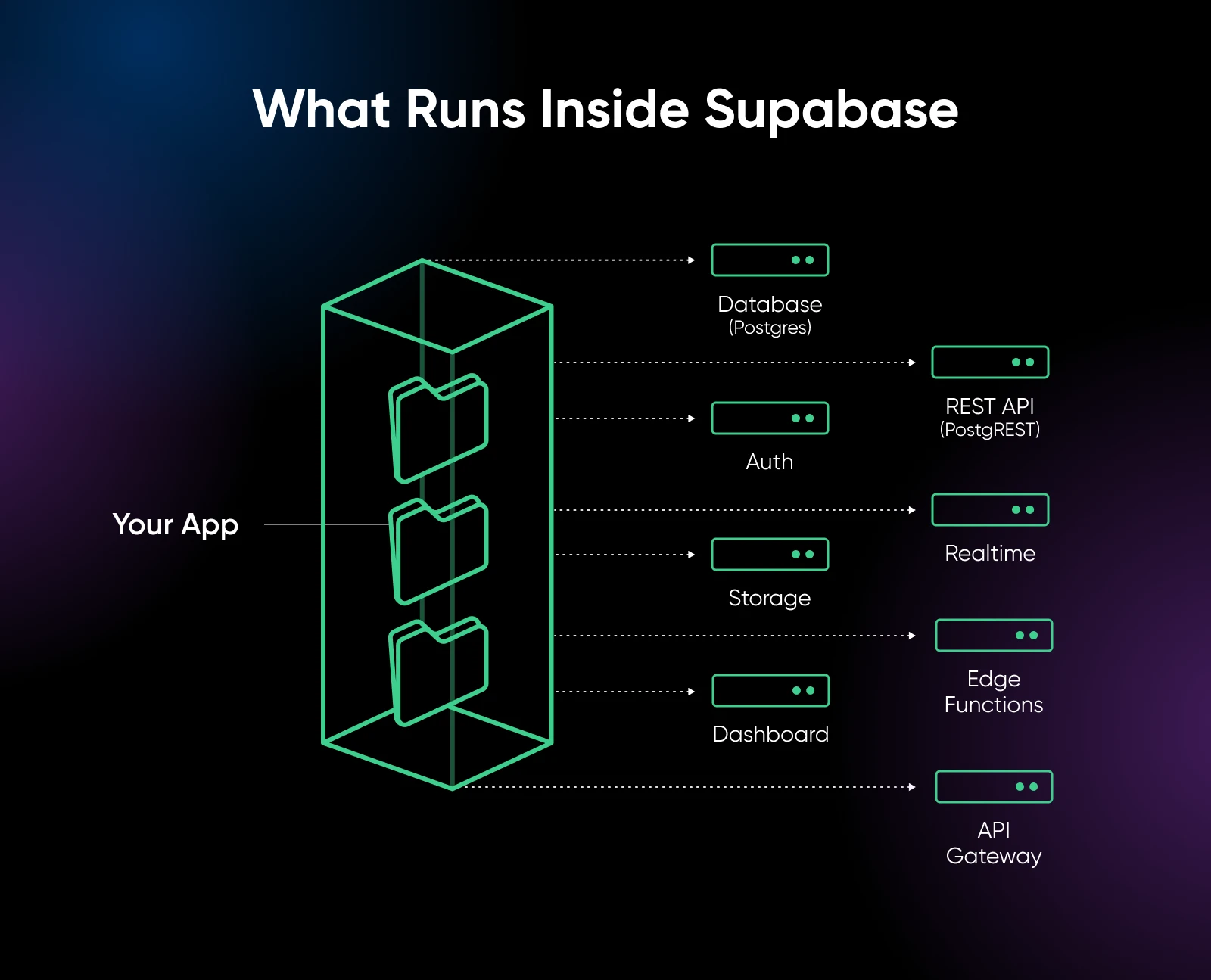
If you thought Supabase was just “Postgres with a REST API,” it’s not. The self-hosted stack runs about 12 containers in parallel.
The parts you’ll touch most often are pretty straightforward:
- Postgres. The database at the core of everything. Supabase uses a modern PostgreSQL build with extensions for auth, realtime, and full-text search.
- PostgREST. Auto-generates a REST API from your Postgres schema. A table becomes an endpoint, and you don’t write any backend code to make that happen.
- Auth (formerly GoTrue). Handles signups, logins, password resets, OAuth, and JWT issuance.
- Realtime. Pushes database changes to connected clients over WebSockets.
- Storage. S3-compatible object storage with access control tied to your database.
- Edge Functions. Deno-based serverless functions that run close to your users.
- Supabase Studio. The dashboard where you browse tables, run SQL, and manage auth users.
You also get Kong as the API gateway, imgproxy for image handling, Supavisor for connection pooling, and Logflare for analytics. Put it all together, and you’re looking at a full backend stack, not a simple app.
How Much Does It Cost to Self-Host Supabase?
Self-hosting Supabase on a VPS costs $12–$25 per month, covering the server, storage, and bandwidth. The Supabase software itself is free.
Pull up your last Supabase Cloud invoice for a second. The line item that sneaks up on people isn’t the base $25. It’s database egress and additional storage, which the Pro plan meters separately (Supascale’s 2026 cost breakdown walks through the line items).
Compare that to Supabase Cloud:
| Plan | Base Cost | What You Get |
|---|---|---|
| Free | $0 | 500 MB database 50K monthly active users 1 GB storage Pauses after 7 days of inactivity |
| Pro | $25/month | 8 GB database 100K monthly active users 100 GB storage 250 GB egress |
| Team | $599/month | Priority support Single Sign-On (SSO) Audit logs Usage-based scaling |
| Self-hosted VPS | $12-$25/month | Unlimited (bound only by server capacity) |
The base Pro price looks comparable, but real-world usage pushes it higher fast.
Supascale’s analysis shows most small-to-medium production apps land at $100–$200/month on Pro once compute add-ons and usage overages factor in — Supabase’s compute tiers alone run from $10/month up to $3,730/month for the 16XL instance. Apps with 100K–200K monthly active users can push well above that, and at 500K MAUs bills can reach $1,000–$2,000/month.
The Free tier is free — until you try to use it for production.
Projects pause automatically after seven days of inactivity, which means your staging environment dies every week and your side projects break every time you take a vacation. According to UI Bakery’s 2026 pricing breakdown, this is the most common reason people leave the Free plan sooner than expected.
Self-hosting flips the equation. Your costs stay tied to your infrastructure, not your usage. Running 50,000 MAUs costs the same as running 500,000, limited only by what your VPS can handle. No egress fees, no storage overages, no compute add-ons.
Self-Hosting Isn’t Just a VPS Bill
The VPS bill isn’t the only cost to self-host. You’ll also be spending in other ways:
- Your time. Plan on one to two hours per month for routine maintenance, such as security updates, Docker image pulls, checking logs, and verifying backups. Allow more time if you add features or scale.
- Email delivery. Supabase Cloud handles auth emails (e.g., password resets, magic links, email verification) as a managed service. Self-hosted doesn’t. You’ll need an SMTP provider like SendGrid, Mailgun, or AWS SES. Plan on $0-$30/month depending on volume.
- Object storage for files. The Storage service defaults to the local filesystem, which is fine for testing and a ticking time bomb in production. You’ll need S3-compatible object storage — AWS S3, Backblaze B2, Wasabi, or DreamHost’s DreamObjects all work. Budget $5–$20/month for a small-to-mid production app.
- Backup infrastructure. Self‑hosting doesn’t come with automatic backups, so you’ll need to set them up yourself. Write a
`simple pg_dump`cron job and store the output somewhere reliable. Don’t skip this part; your future self will thank you.
What Server Specs Does Supabase Need?
Supabase is memory-hungry. Running 12 containers simultaneously, most of them database-adjacent, means RAM matters more than CPU. The practical minimum is 4 GB for a development instance with optional services disabled. Production deployments want 8 GB or more.
The reason is the container count, not any single service. Postgres wants shared buffers. PostgREST wants a connection pool. GoTrue needs a small footprint for the Go runtime. Realtime holds WebSocket connections open. Edge Runtime spins up V8 isolates.
Individually, each service is modest. Combined, they add up fast.
If you haven’t provisioned a VPS before, start with our beginner’s guide to VPS before sizing your server.
At DreamHost, our Self-Managed VPS Stack 8 plan provides 8 GB of RAM with NVMe SSD storage and full root access, the right size for a standard Supabase deployment running all optional services.
What VPS Size Does Supabase Need?
| Workload | RAM | CPU | Good For |
|---|---|---|---|
| Dev / light | 4 GB | 2 cores | Testing, small side projects, Analytics and Realtime disabled |
| Production standard | 8 GB | 4 cores | Small SaaS apps, mobile app backends, all services enabled |
| Heavy | 16 GB+ | 4-8 cores | Higher traffic, large Postgres workloads, Edge Functions at scale |
You can also strip optional services from the Docker Compose file to shrink the footprint.
Don’t need real-time subscriptions? Skip the Realtime container.
Not using Edge Functions? Remove the Edge Runtime.
Analytics not critical? Cut Logflare.
A stripped-down stack could fit more comfortably on a 4 GB VPS.
NVMe storage matters more than you’d think. Postgres is constantly reading and writing, and SSD latency directly affects how fast queries run. Older SATA drives or spinning disks will slow you down long before the database gets interesting.
How Does the Self-Hosted Supabase Setup Work?
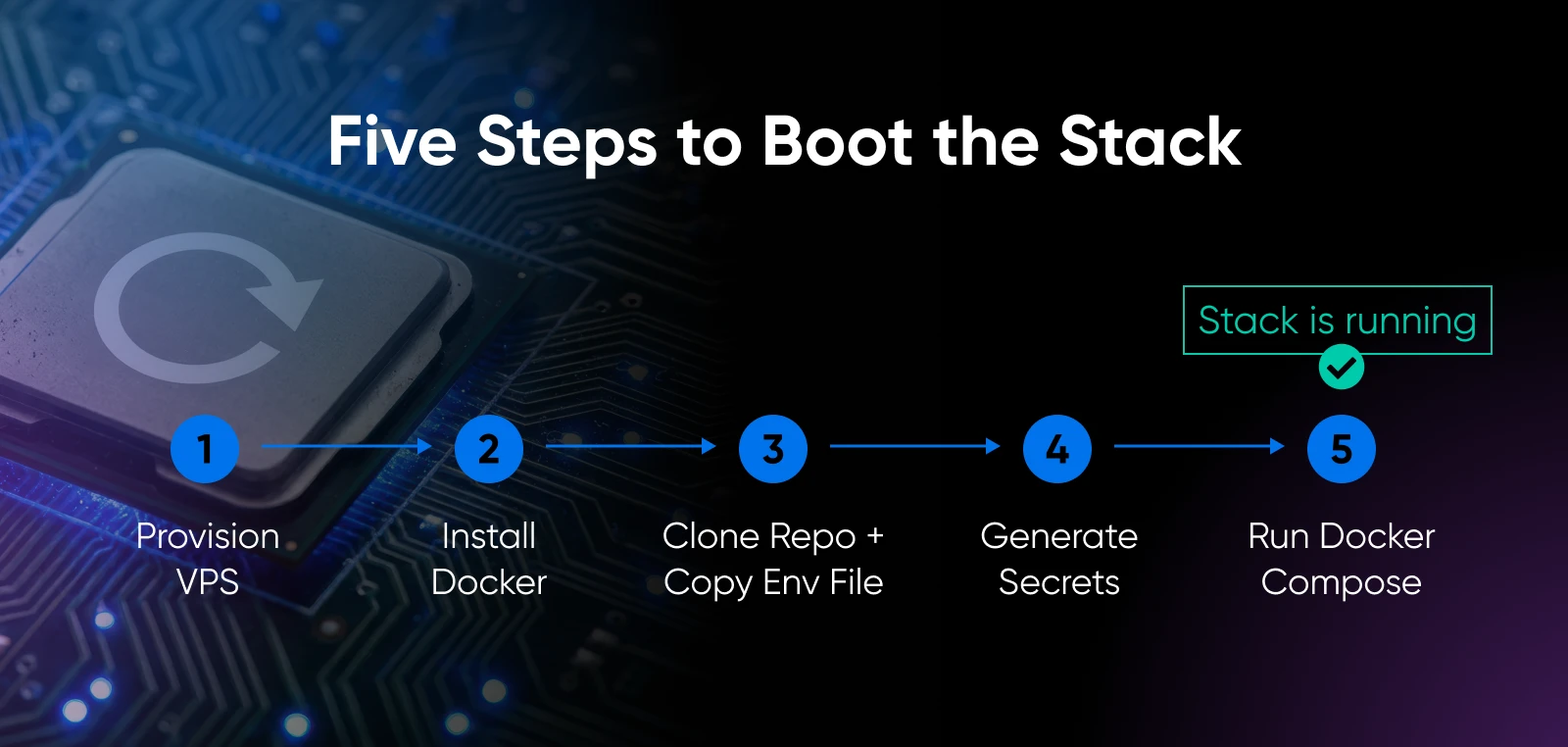
The full deployment is about five steps and takes one to two hours if you’re comfortable in a terminal.
Here’s what you need to do:
- Provision a VPS with Ubuntu 22.04 or newer, 8 GB RAM, and SSH access.
- Install Docker and Docker Compose on the server.
- Clone the Supabase repository and copy the example environment file:
`git clone https://github.com/supabase/supabase && cp supabase/docker/.env.example supabase/docker/.env` - Generate and set secrets. Run Supabase’s
`generate-keys.sh`script to produce yourJWT_SECRET,ANON_KEY, andSERVICE_ROLE_KEY, then setPOSTGRES_PASSWORDand dashboard credentials in the .env file. - Run
`docker compose up -d`from the docker directory, and the full stack boots.
You’ll know it worked when `docker compose ps` shows every service in a `running` or `healthy` state, and `curl http://localhost:8000/rest/v1/` returns a JSON response from PostgREST.
If any container is in `restarting` or `exited`, check that container’s logs first. Postgres is the usual culprit, and the cause is usually a missing or malformed env var.
The official Supabase Docker self-hosting docs walk through every environment variable.
Kong, the API gateway, sits in front of everything and handles routing. In production, you’ll typically put a reverse proxy (a server that sits between the internet and your application, handling SSL and routing) like Caddy or Nginx in front of Kong to terminate HTTPS and restrict dashboard access.
Save your JWT_SECRET, ANON_KEY, and SERVICE_ROLE_KEY somewhere reliable the moment they’re generated. Losing them isn’t catastrophic because you can regenerate, but rotating forces every active user session to expire and every client app to get new keys.
What You’ll Need to Self-Host Supabase
- A VPS running Ubuntu 22.04+ with at least 8 GB RAM and root/SSH access
- A domain name pointed to your server’s IP
- Docker and Docker Compose installed
- An SMTP provider configured for auth emails (SendGrid, Mailgun, AWS SES)
- S3-compatible object storage for production file uploads (optional but recommended)
- Basic terminal comfort and about one to two hours
How Do You Keep a Self-Hosted Supabase Instance Secure?
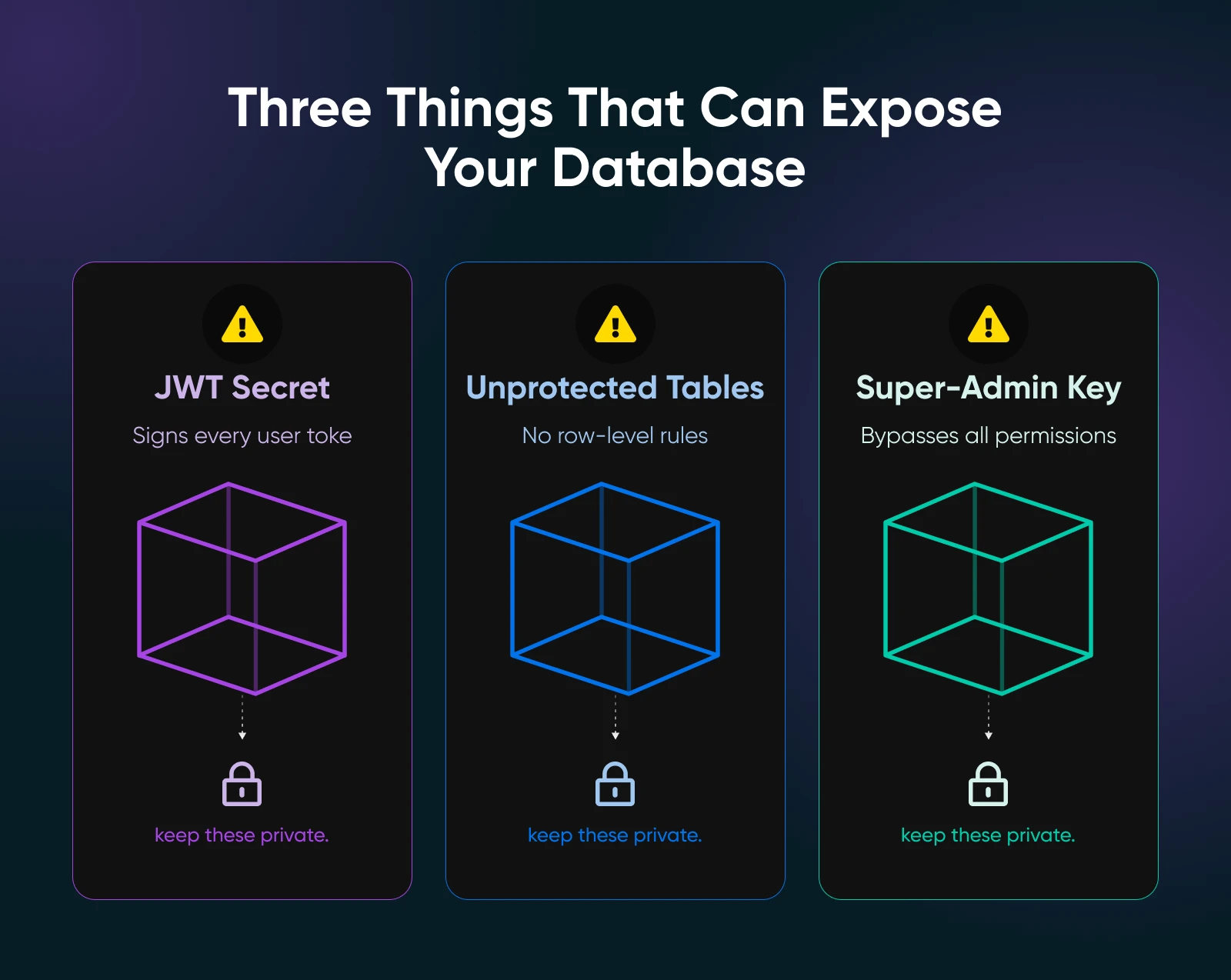
Self-hosted Supabase security lives on three pillars specific to the platform, plus the standard VPS hygiene.
The JWT Secret
Every authorization token that Supabase issues is signed with your JWT_SECRET. If it leaks, attackers can forge tokens that impersonate any user.
The Supabase token security docs explain how it works: “A shared secret that is in the hands of a malicious actor can be used to impersonate your users [and] give them access to privileged actions or data, and it is difficult to detect or identify when or how a shared secret has been given to a malicious actor.”
Treat the JWT_SECRET like a production database password because, functionally, that’s exactly what it is. Store it in a secrets manager, not a `.env` file in Git, and never in your frontend bundle.
The recommended production path is asymmetric signing keys (RS256 or ECC). They’re harder to leak by accident than a shared secret, and Supabase supports both.
Row Level Security
Supabase’s PostgREST service exposes every table in your database as a REST endpoint.
Without Row Level Security policies on each table, every authenticated user can read and write every row. This is the single biggest self-hosting mistake new users make.
Enable RLS on every table from day one, including the tables you think don’t need.
Service Role Key
The SERVICE_ROLE_KEY is a super-admin key that bypasses Row-Level Security entirely.
It’s meant for backend-to-backend calls where you explicitly need to skip user-level permissions. The key must never appear in frontend code, public repos, or client app bundles. If it leaks, your entire database is exposed.
Beyond Supabase-specific concerns, standard server hardening applies. Enable a firewall that only exposes ports 22 (SSH), 80 (HTTP), and 443 (HTTPS). Run everything behind a reverse proxy with HTTPS. Restrict Supabase Studio to known IPs and keep the server patched. Our cloud security tips cover the general hardening checklist, so you want to have a look.
One last thing: rotating the JWT secret invalidates every active user session immediately. Plan a maintenance window, and don’t rotate on a Friday afternoon — or you’re gonna have a bad time.
What Are the Trade-Offs of Self-Hosted vs. Supabase Cloud?
Self-hosted Supabase and Supabase Cloud aren’t interchangeable. Each wins on different axes.
| Feature | Self-Hosted | Supabase Cloud |
|---|---|---|
| Monthly cost | $12-$25 VPS + add-ons | $25 base + usage overages |
| Scaling beyond the base | Bounded by your VPS | Automatic (for a price) |
| Automated backups | DIY (pg_dump cron) | Daily automated + PITR |
| Logs (PostgREST, Edge Functions) | DIY observability stack | Built into dashboard |
| Edge Functions editing | CLI only | In-dashboard editor |
| Email delivery | DIY SMTP provider | Managed |
| Support | Community (GitHub, Discord) | Paid tiers with SLA |
| Data location | Wherever you want | Supabase’s cloud regions |
| Compliance | You own it | Pro+ required |
Self-hosting makes sense when predictable costs matter more than managed convenience, when you need data physically on infrastructure you control, or when you’re running multiple projects that would each cost $25+ per month on Cloud.
Cloud wins when ops capacity is scarce and when automated backups and SLA-backed uptime are non-negotiable. It’s also a good choice when your team is small and the total cost of ownership math actually favors managed hosting.
There’s also a middle ground.
Tools like Coolify, Dokploy, and Railway can deploy and manage Supabase on your VPS, handling updates, backups, and some observability without the full manual Docker Compose approach.
Simply put, you get most of the self-hosted economics with less of the ops overhead. None of them match Cloud’s dashboard polish, but all of them cost less than Cloud at scale.
Should You Actually Self-Host Supabase?
Self-hosting Supabase isn’t a cost decision as much as an operational one.
The VPS is cheap. What you’re actually signing up for is owning the backups, the logs, and the auth email plumbing. For most small teams, that trade makes sense only when Cloud’s pricing starts to sting or when data residency stops being a nice‑to‑have and becomes a requirement.
If you’re not ready for the full manual setup, tools like Coolify and Dokploy sit in the middle. They’ll manage the stack on your VPS with less overhead than raw Docker Compose and at a lower cost than Cloud once you scale.
Month one of self-hosting is the rough one. You’ll tweak resource limits you didn’t know existed, discover failure modes nobody documented, and write the runbook you wish someone else had handed you.
Months two through 12 get quiet. You pull updates with Docker Compose, run a nightly pg_dump to S3, and your invoice stays flat.
The best way to find out which side of this you’re on: spin up a $12 VPS, run a non-production Supabase instance for a week, and let the experience make the call for you.
The economics will tell you the rest.

Own Your Entire Stack. Apps, AI, Databases, and More.
Keep every credential and conversation on a server you control, with NVMe speed and unmetered bandwidth built in.
Explore VPS Hosting PlansFrequently Asked Questions About Self-Hosting Supabase
Not sure if self‑hosting Supabase is the right move? Below are some questions most people ask before taking the leap.
Is self-hosted Supabase really free?
Self-hosted Supabase is free, open-source software licensed under Apache 2.0. Your actual costs are the VPS, an optional SMTP provider for auth emails, and optional S3-compatible storage for production file uploads. Budget roughly $15 to $50 per month all-in for a small production deployment.
What server do I need to self-host Supabase?
The recommended production spec is 8 GB of RAM, 4 CPU cores, and NVMe SSD storage. The full Supabase stack runs about a dozen containers, and most of them hold working memory.
You can run a minimal development instance on 4 GB if you disable Analytics, Realtime, and Edge Runtime in your Docker Compose file. DreamHost’s Self-Managed VPS Stack 8 plan provides 8 GB RAM with full root access; see our VPS hosting plans for the full range.
What features are missing from self-hosted Supabase?
The biggest gaps are automated database backups, point-in-time recovery, dashboard-based edge function editing, unified logging for PostgREST and Edge Functions, and managed email delivery. You can build replacements for all of them (e.g., `pg_dump` cron jobs, a custom observability stack, an SMTP provider), but nothing is out of the box. The Supabase Studio dashboard works on self-hosted, but the Cloud dashboard has more polish and newer features first.
How do I update a self-hosted Supabase instance?
Run `docker compose pull` to fetch the latest images, then `docker compose up -d` to restart with the new versions. The whole update takes about five minutes on a healthy instance.
Back up your Postgres database with `pg_dump` before any major version update, pin your Docker images to specific version tags in production, and read the Supabase release notes for breaking changes. Auth and storage services occasionally require migration steps.
Can I migrate from Supabase Cloud to self-hosted?
Yes, but it takes more than a database export. The Postgres data migrates with `pg_dump` from Cloud and `pg_restore` on self-hosted. Auth users, storage objects, and edge functions each have their own migration paths.
Plan for a few hours of work for a small project and longer for complex schemas.
