Your Next.js app started selling something, so it can't stay on Vercel's free Hobby plan. Vercel's fair use rules limit Hobby to personal, non-commercial use, and advertising a product or service counts as commercial. On Pro, the invoice grows with each developer you add and with whatever the app does past the usage credit.
If the Vercel story you remember is a surprise bandwidth bill, check when it was written. On Sep 8, 2026, Vercel turned on Flat Rate CDN for new Pro teams, which moved CDN traffic onto fixed monthly tiers and made that part of the bill much easier to predict. Seats, image optimization, functions and build minutes sit outside those tiers, and the tiers themselves step up as you grow. We priced all of it for three hypothetical Next.js apps from Vercel's Sep 28, 2026 list prices.
What a Vercel Pro bill is made of
The $20 monthly platform fee covers one deploying seat and $20 of usage credit. Each extra Owner or Member seat adds $20 a month, or $240 a year. Viewers don't cost anything. When your team grows to five developers who deploy, you're paying $1,200 a year in seats before a single visitor shows up.
Everything else the app does is metered outside the CDN tier: function invocations, Active CPU, provisioned memory, Fast Origin Transfer, ISR reads and writes, image optimization and build minutes. The credit pays for it from the first unit, and you pay on demand for whatever it doesn't cover. Unused credit expires at month's end.
If your functions spend their time waiting on a database, watch provisioned memory. It bills for the whole time an instance is alive, while Active CPU bills only while your code runs. Image optimization bills a transformation on every cache miss and then charges cache reads and writes in 8 KB units, so a 150 KB image costs 19 units each time it's read from the image cache. Builds bill by the CPU minute, from $0.0035 on the Elastic machines new Pro teams use by default, so a three-minute build on 4 vCPU is 12 CPU minutes, or about 4 cents.
How Flat Rate CDN tiers work now
Open the CDN Requests chart on your usage page. Every paid tier includes 50 TB of data transfer, so for the apps in this guide the request count is what sets the tier. Any request that reaches Vercel counts, cached or not, and a page view that loads its HTML, scripts, fonts and images makes many of them. At 15 requests per page view, our assumption for a typical page, the steps in Vercel's Flat Rate CDN docs fall like this:
| Page views a month | CDN requests a month | Data transfer included | Flat Rate CDN tier |
|---|---|---|---|
| Up to about 67,000 | Up to 1 million | 1 TB | Included with Pro |
| About 67,000 to 667,000 | Up to 10 million | 50 TB | $20 a month |
| About 667,000 to 3.3 million | Up to 50 million | 50 TB | $100 a month |
| About 3.3 million to 10 million | Up to 150 million | 50 TB | $300 a month |
Vercel sizes tiers by the typical month. By its own math, 1 million requests a month is about 33,000 a day, and you can go over that on single days without paying more. If a whole billing cycle runs over your tier, Vercel moves you to a higher tier at the start of the next cycle. Past 150 million requests, it moves you to on-demand pricing. The tiers are meant for normal web apps, so they exclude bulk file distribution and download services, along with large-scale media delivery that makes up most of your bandwidth. Vercel can move those projects to its Flex CDN, which has no latency or availability guarantees.
Three Next.js apps, priced line by line
Every bill below rests on these assumptions:
- Vercel Pro on a new team with Flat Rate CDN on, US East (iad1) prices read Sep 28, 2026, in USD before tax. Each bill is a typical month, with the app already on the tier its usual traffic needs.
- We assume the $20 credit doesn't pay the CDN tier fee, since Vercel's docs call the tier a subscription and don't say whether the credit applies to it. If the credit does cover it, app A could be $63.18; B and C don't change because their usage spends the whole credit anyway.
- Function calls count as CDN requests too. Functions run at the default 2 GB of memory, and each call holds its own instance for its full run time, so the memory line is an upper bound; shared instances would bill less.
- ISR and image cache objects round up to whole 8 KB units, each image transformation writes its result to the cache once, and builds run on Elastic machines at Vercel's starting rate of $0.0035 per CPU minute.
- Left out: add-ons such as password protection ($20 per project) or SAML SSO ($300 a month), Blob storage, CDN Request CPU above the included hour, domains and tax.
App A is a marketing site and blog. App B is a SaaS dashboard whose function calls spend most of their time waiting on a database. App C is a content site with a large image library. This is what each one does in a month:
| Monthly usage | A: marketing site | B: SaaS dashboard | C: content site |
|---|---|---|---|
| Deploying developers | 3 | 5 | 2 |
| Page views | 100,000 | 400,000 | 1 million |
| CDN requests per page view, function calls included | 15 | 12 | 15 |
| CDN requests a month | 1.5 million | 4.8 million | 15 million |
| CDN data transfer | 150 GB | 160 GB | 2 TB |
| Function calls | 10,000 | 3 million | 500,000 |
| CPU time and run time per call | 50 ms and 300 ms | 40 ms and 250 ms | 60 ms and 300 ms |
| Fast Origin Transfer (function responses and ISR misses) | 1.5 GB | 60 GB | 30 GB |
| ISR cache misses and rewrites | 20,000 and 300, 50 KB pages | none | 250,000 and 30,000, 80 KB pages |
| Image transformations and cache reads | 2,000 and 50,000, 100 KB images | 1,000 and 20,000, 30 KB images | 200,000 and 2 million, 150 KB images |
| Builds | 60 of 3 minutes on 4 vCPU | 200 of 4 minutes on 4 vCPU | 90 of 8 minutes on 8 vCPU |
Multiply each quantity by Vercel's list rate, using its US East prices where the rate depends on region, and you get this bill. Subtotals use the unrounded amounts, so they can differ by a cent from the lines added up.
| Line, USD a month | A: marketing site | B: SaaS dashboard | C: content site |
|---|---|---|---|
| Platform fee and seats | $60.00 | $100.00 | $40.00 |
| Flat Rate CDN tier | $20.00 | $20.00 | $100.00 |
| Function invocations, $0.60 per million | $0.01 | $1.80 | $0.30 |
| Active CPU, $0.128 an hour | $0.02 | $4.27 | $1.07 |
| Provisioned memory, $0.0106 per GB-hour | $0.02 | $4.42 | $0.88 |
| Fast Origin Transfer, $0.06 per GB | $0.09 | $3.60 | $1.80 |
| ISR reads and writes, $0.40 and $4.00 per million units | $0.06 | none | $2.20 |
| Image transformations, $0.05 per 1,000, and cache reads and writes, $0.40 and $4.00 per million units | $0.46 | $0.10 | $40.40 |
| Build minutes, $0.0035 per CPU minute | $2.52 | $11.20 | $20.16 |
| Usage subtotal | $3.18 | $25.38 | $66.81 |
| Pro usage credit | -$3.18 | -$20.00 | -$20.00 |
| Estimated month total | $80.00 | $125.38 | $186.81 |
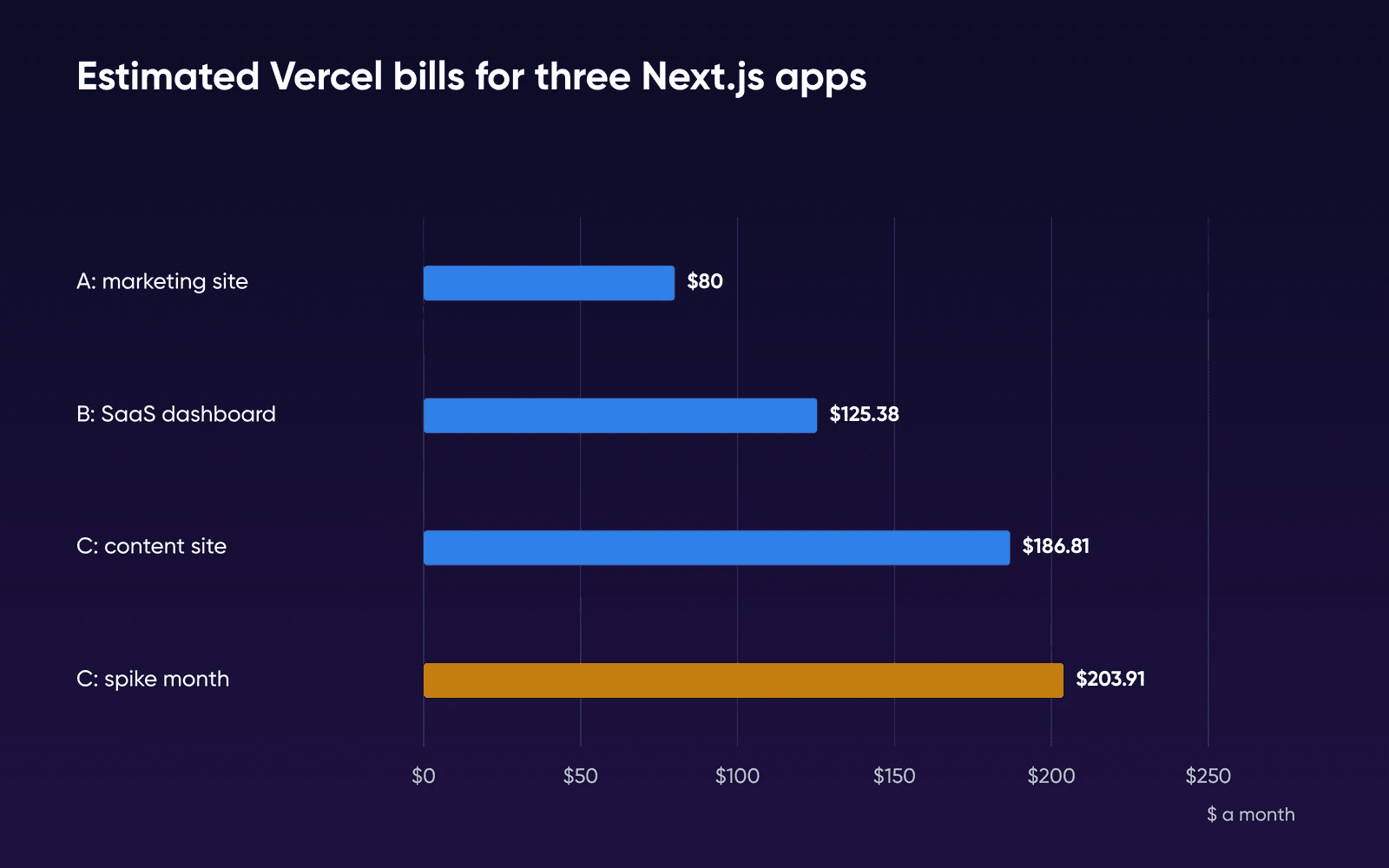
Seats make up 75% of app A's bill and 80% of app B's, while all 3 million of B's function calls cost $14.08 across invocations, CPU, memory and origin transfer. App C is the exception. Its CDN tier costs $100 and image optimization adds $40.40, made of $10.00 in transformations and $15.20 each in cache reads and writes, next to $40 for developer seats.
Requests per page view is the assumption to check first, because it sets the CDN tier. If app C made 9 requests per page view instead of 15, it would make 9 million requests a month, fit the $20 tier and come to $106.81. Put in your own CDN Requests number from your last full month before you trust any total here.
Set beside a server priced by plan, those totals look like this:
| App | Vercel Pro (estimated) | DreamHost Stack 4 |
|---|---|---|
| A: marketing site and blog, 3 devs | $80.00 | $8.99/mofor 3 months, then $15.99/mo |
| B: SaaS dashboard, 5 devs | $125.38 | |
| C: content site, 2 devs, normal month | $186.81 | |
| C: same site, spike month | $203.91 |
What a traffic spike costs now
Say a post on app C takes off. An uncached route gets 3 million extra requests in one month, each sending back 20 KB. The CDN side won't cost you anything extra. C goes from 15 million to 18 million requests and picks up 60 GB of transfer, still well inside the $100 tier's 50 million requests and 50 TB. Since 18 million is still inside the tier, Vercel won't move you up a tier next cycle, either.
The functions behind that route aren't part of the tier, so they bill per unit:
- Invocations: 3 million at $0.60 per million is $1.80.
- Active CPU: 60 ms each is 50 hours, at $0.128 an hour, for $6.40.
- Provisioned memory: 0.3 seconds at 2 GB each is 500 GB-hours, at $0.0106, for $5.30.
- Fast Origin Transfer: 20 KB each is 60 GB, at $0.06, for $3.60.
Those four lines add $17.10 and bring the month to $203.91. If the traffic stays, the jump is bigger: once app C settles at 55 million requests a month, past the $100 tier's 50 million, Vercel moves the team to the $300 tier at the start of the next cycle. The tier line alone rises by $200 a month, and the extra compute, image and origin transfer usage bills on top.
What the server side costs you
A DreamHost VPS on Stack 4 has 2 vCPU, 4 GB of RAM, 75 GB of NVMe storage and unmetered bandwidth, and one monthly plan price that comes in under Pro's one-seat floor. If Stack 4 fits your app, the gap in plan price is at least what your extra seats cost, before any usage line.
The Next.js self-hosting docs say next/image works with zero configuration under next start, and ISR works on a single server with persistent local disk, which means your own server won't charge you per transformation, per ISR write or per second of function memory. For an app like C, that's the $40.40 of image optimization and $2.20 of ISR off the bill, although the resizing now runs on your server's CPU.
Bandwidth on our Node.js VPS plans is unmetered, with no overage fees, and the product page's bandwidth comparison, dated June 2026, shows no overage charge at 10 TB or at 50 TB a month. Fair use applies, and our Resource Allocation Policy explains that unmetered describes how we bill, and that we can limit bandwidth on an account that trips our abuse safeguards while we review it.
We haven't run these three apps on a DreamHost server. Our sizing is an estimate built on our Node.js server guide, which points SSR-heavy or real-time apps to Stack 8. We'd start A and B on Stack 4, the plan for lightweight apps, and move them to Stack 8, the plan our pages label for apps running in production, once real traffic or a load test calls for it. If your app server-renders most pages or resizes a lot of images on the fly, as C might, start with Stack 8 and load-test a copy first.
Stack 8 doubles the memory to 8 GB but keeps the same 2 vCPU as Stack 4. Resizing images is CPU work, so in that test watch image resizing time, peak requests per second and memory under next start. If resizing is what slows it down, extra memory won't fix it. Stack 16 has 4 vCPU, the count our Node.js guide lists for SSR-heavy apps.
What a small Next.js app did on our test VM
To see which part of a server fills up first, we ran a small Next.js 16 app on a test VM with 2 vCPU and 4 GB of memory, the shape of Stack 4. It was the default create-next-app plus three test routes, built as standalone output with Next.js's own Docker example. The VM ran on an arm64 Mac, so it's our test machine, not a DreamHost server.
| What we ran | What we saw |
|---|---|
| The app at rest, 1 and 5 minutes after start | About 36 MiB of memory |
| A page rendered on the server for every request, 50 connections for 60 seconds | About 313 requests a second, median 148 ms, no errors; memory peaked at 388 MiB |
| A JSON API route, 30 seconds | About 4,600 requests a second, median 9 ms |
| First resize of a 2400 x 1600 photo through next/image | 0.04 to 0.18 seconds for each of 8 widths |
| The same resized image once cached, 30 seconds | About 1,760 requests a second |
While it rendered pages, the two vCPUs filled up first: CPU reached 142% of the 200% available, while memory stayed under 400 MiB. That's why we'd watch requests per second and resizing time in your own test before memory. This was a tiny app with no database and no outside API calls, so a real app's pages will serve far fewer requests a second, and 313 a second doesn't translate into a visitor count for yours. The load came from the same Mac, and we ran it once. We couldn't measure Vercel's side, its edge caching or cold starts. Even at their regular prices, Stack 8 and Stack 16 both cost far less than app C's Vercel bill in the table. You can move up as far as Stack 32 later, and your environment moves with you.
DreamHost support is available 24/7 for the hardware, network and connectivity. You manage the OS, software and configuration. Our Node.js server guide estimates that work at one to three hours a month, covering apt updates, occasional dependency bumps and a quarterly look at log volume. To price it for your team, take your Vercel bill and subtract the price of the plan that fits (the table shows Stack 4) and anything you'd add, such as a CDN or offsite backups. Then divide by what an hour of your time costs. That's how many hours of routine server work a month the move pays for. Incidents and the first migration take extra time on top, and these estimates don't include them.
Vercel Pro and your own server, side by side
| Vercel Pro | Your own server | |
|---|---|---|
| How the price moves | It moves with seats, CDN tier steps and metered usage past the credit | A plan price that traffic and team size don't change |
| Adding a developer | $20 a month for each deploying seat | Another developer doesn't change the plan price |
| When traffic spikes | A one-day spike doesn't move your CDN tier; functions, images and ISR still bill per unit | Nothing new lands on the bill, since bandwidth is unmetered, unless you outgrow the plan and move up a size |
| Bandwidth | Covered by the CDN tier, 1 TB to 50 TB a month | It's unmetered, with no overage fees, and fair use applies |
| Where visitors are served from | Vercel's CDN, with 126 points of presence in 51 countries caching content near your visitors | One data center, so visitors far from it wait longer unless you put a CDN in front |
| In front of your app | Vercel's managed CDN | On the Node.js server, Nginx comes installed, the kind of reverse proxy Next.js recommends; Dokploy uses Traefik |
| Deploys and previews | A unique preview URL for every branch, with a custom preview domain suffix as a $100-a-month add-on | Dokploy adds Git push deploys, and it can build a preview for each GitHub pull request once you turn that on |
| Running the platform | Vercel runs it | You manage the OS, software and configuration; DreamHost support is available 24/7 for the hardware, network and connectivity |
| Long-lived connections | WebSockets generally available since Oct 20, 2026, billed like other function invocations; functions run 300 seconds by default and up to 800 on Pro (1,800 in beta) | A Node.js process under PM2 can hold long-lived connections with no function duration cap; your proxy and app settings set the limits |
| next/image and ISR | Billed per transformation and per 8 KB cache unit | No per-unit charge; more than one server needs a shared cache |
Distance is harder to match. Vercel's CDN caches content near your visitors. DreamHost's Help Center says every VPS is hosted in its US East data center in Ashburn, Virginia, so your server answers every request from there, and a visitor on another continent waits longer for each page. If your visitors are spread out like that, you can put a CDN in front of the server to cache pages and files closer to them. The Next.js self-hosting docs allow for that, though it's one more service you'd set up and pay for.
Dokploy can cover per-pull-request previews. Its preview deployments (docs read Sep 28, 2026) work for apps connected to GitHub. Once it's turned on, Dokploy builds a preview for each pull request against your target branch, rebuilds it on every commit and removes it when the pull request closes. It'll keep three previews per app by default. It uses free traefik.me addresses unless you point a wildcard DNS record at the server.
For the setup steps, our guides show how to run a Node.js app on your own server and how to self-host Dokploy.
Stay on Vercel or move
Stay on Vercel Pro if
You're the only one deploying and your usage fits inside the $20 credit, or the managed CDN and preview deployments are worth more to you than what you'd save, once you count the hours a server takes.
Move to your own server if
You pay for two or more deploying seats or a paid CDN tier every month, the savings cover a few hours a month of updates and upkeep, and a load test shows the server handles your app.
Start with last month's Vercel invoice. Write down your deploying seats, your CDN tier and your CDN Requests, and run them through the tables above.
How we priced and tested this
The Vercel bills are DreamHost's arithmetic on Vercel's US East list prices and docs, read September 28, 2026, applied to usage we assumed for three example apps. We didn't open a Vercel account to test them. The server figures were measured by DreamHost on October 22, 2026, on a test VM (arm64) under Colima with 2 vCPU and 4 GB of memory, running Next.js 16.4.2 on Node.js 24. That's our test machine, not a DreamHost server; our plans run on x86 AMD EPYC processors.
Vercel pricing FAQs
Is Vercel free?
Hobby is free for non-commercial use and can't buy extra usage past its caps, so a project that sells or advertises anything needs Pro or Enterprise.
Which is cheaper, Vercel or my own server?
On plan price, your own server wins from month one if the app fits on Stack 4, and every deploying seat you'd add on Pro widens the gap. Counting your time, ask whether that gap pays for the move and the one to three hours a month we'd estimate.
Does Flat Rate CDN mean my Vercel bill can't spike?
It can still spike, just less. On eligible projects, the tier covers CDN requests and Fast Data Transfer. Functions, Fast Origin Transfer, image transformations and ISR writes still bill per unit, as the spike example above shows.
What does Vercel charge for each team member?
Only Owner and Member seats are charged, because those are the roles that can deploy, and Pro includes one. Viewer seats are free and read-only, so a designer who only needs to look at previews costs nothing.
Can I cap my Vercel bill?
You can set a spend amount, and new Pro teams start with a $200 on-demand budget and alerts. The amount alone doesn't stop usage. You'd have to turn on pausing, which takes production offline until you resume it.
Will next/image and ISR work on my own server?
On a single server they work as Next.js ships them, as the server-side section explains. If you run more than one instance, you'll need to configure a shared cache.
Sources
- Vercel Pricing: Hobby, Pro, and Enterprise plans, Vercel, Sep 28, 2026. vercel.com/pricing
- Vercel Pro Plan, Vercel, Sep 28, 2026. vercel.com/docs/plans/pro-plan
- Introducing Flat Rate CDN, Vercel, Sep 28, 2026. vercel.com/blog/introducing-flat-rate-cdn
- Flat Rate CDN, Vercel, Sep 28, 2026. vercel.com/docs/pricing/flat-rate-cdn
- Washington D.C., USA (iad1) pricing, Vercel, Sep 28, 2026. vercel.com/docs/pricing/regional-pricing/iad1
- Fluid compute pricing, Vercel, Sep 28, 2026. vercel.com/docs/functions/usage-and-pricing
- Configuring Memory and CPU for Vercel Functions, Vercel, Sep 28, 2026. vercel.com/docs/functions/configuring-functions/memory
- ISR Usage and Pricing, Vercel, Sep 28, 2026. vercel.com/docs/incremental-static-regeneration/limits-and-pricing
- Limits and Pricing for Image Optimization, Vercel, Sep 28, 2026. vercel.com/docs/image-optimization/limits-and-pricing
- Managing Builds, Vercel, Sep 28, 2026. vercel.com/docs/builds/managing-builds
- Spend Management, Vercel, Sep 28, 2026. vercel.com/docs/spend-management
- Fair Use Guidelines, Vercel, Sep 28, 2026. vercel.com/docs/limits/fair-use-guidelines
- Vercel Functions limitations, Vercel, Sep 28, 2026. vercel.com/docs/functions/limitations
- WebSockets on Vercel Functions, Vercel, Sep 28, 2026. vercel.com/docs/functions/websockets
- How to self-host your Next.js application, Next.js, Sep 28, 2026. nextjs.org/docs/app/guides/self-hosting
- WebSocket support is now generally available (changelog, Oct 20, 2026), Vercel, Oct 22, 2026. vercel.com/changelog
- Vercel CDN overview, Vercel, Sep 28, 2026. vercel.com/docs/cdn
- Preview Deployments, Dokploy, Sep 28, 2026. docs.dokploy.com/docs/core/applications/preview-deployments
- Dokploy installation, Dokploy, Sep 28, 2026. docs.dokploy.com/docs/core/installation
- Node.js Hosting on a VPS, DreamHost, Sep 28, 2026. dreamhost.com/hosting/vps/nodejs
- Dokploy on a VPS, DreamHost, Sep 28, 2026. dreamhost.com/hosting/vps/dokploy
- Resource Allocation Policy, DreamHost, Sep 28, 2026. dreamhost.com/legal/resource-allocation-policy