Ten thousand leads a month through a five-step Zap comes to 50,000 Zapier tasks, or $433.50 on Professional, billed monthly. Zapier counts a task each time an action step succeeds. Its help article on how task usage is measured says Zap triggers never use tasks,
so the form submission that starts each run is free and each of the five actions after it costs one. On n8n, the same lead counts as one execution, however many steps the workflow has.
We priced that one workflow at three volumes on both services, ran it on self-hosted n8n on a test machine, and set beside them one server whose price doesn't change with volume, counting the hours you'd spend looking after it.
How Zapier and n8n count the same workflow
Zapier bills by the task, and n8n bills by the execution.
The two meters part ways on more than action steps:
| What happens | Zapier | n8n Cloud |
|---|---|---|
| An action step succeeds | 1 task | Part of one execution |
| A Filter or Formatter step runs | No task | Part of one execution |
| An AI step runs | 1, 3 or 5 tasks, by model tier | Part of one execution |
| A polling trigger checks for new data | No task | 1 execution, only when it finds new data |
| A schedule fires every 5 minutes | No task until an action runs | About 8,600 to 8,900 executions a month |
| You pass the monthly limit | Extra tasks bill at a higher rate, up to 3x the plan | New runs fail until the month resets or you upgrade |
To convert your own account, open Zapier's usage page and take last month's task count. Divide it by the number of actions in a typical Zap, and you've got roughly your monthly runs, which is what n8n bills. Say the page shows 18,000 tasks and your Zaps average four actions. That's about 4,500 runs. They fit n8n Cloud Pro at $60, while the same month sits on Zapier's 20,000-task tier at $283.50, billed monthly.
The same workflow at three volumes
Every bill here is arithmetic on the two price lists, checked Oct 2, 2026, and the workflow and the volumes are assumptions you can swap for your own:
- A form submission starts each run, and five actions follow: add the lead to your CRM, alert the sales rep, enroll the lead in an email nurture, create a follow-up task and log a spreadsheet row.
- The first four steps are Zapier's own example on its rates page. The spreadsheet row is our addition.
- Every run succeeds and every step runs.
- Zapier is priced on Professional for one user, billed monthly, in US dollars before tax. Each row uses the cheapest tier, or tier plus overage, that covers the month. The Team plan costs more than Professional at the same task tier, so it isn't priced here.
- n8n Cloud is priced on the smallest plan that covers the month, billed monthly, at the US-dollar prices its pricing page shows a US visitor.
- The trigger uses no task, as Zapier's help article and pricing FAQ both say, though Zapier's rates page words it differently, listing
Trigger and action steps
together at1 task per step
. If the trigger did count, the three Zapier bills would be $166.90, $542.50 and $1,599.
The table stops at 50,000 runs because n8n Cloud's published prices stop at 50,000 executions a month.
| Monthly workload | Zapier Professional | n8n Cloud | Stack 8, n8n preinstalled |
|---|---|---|---|
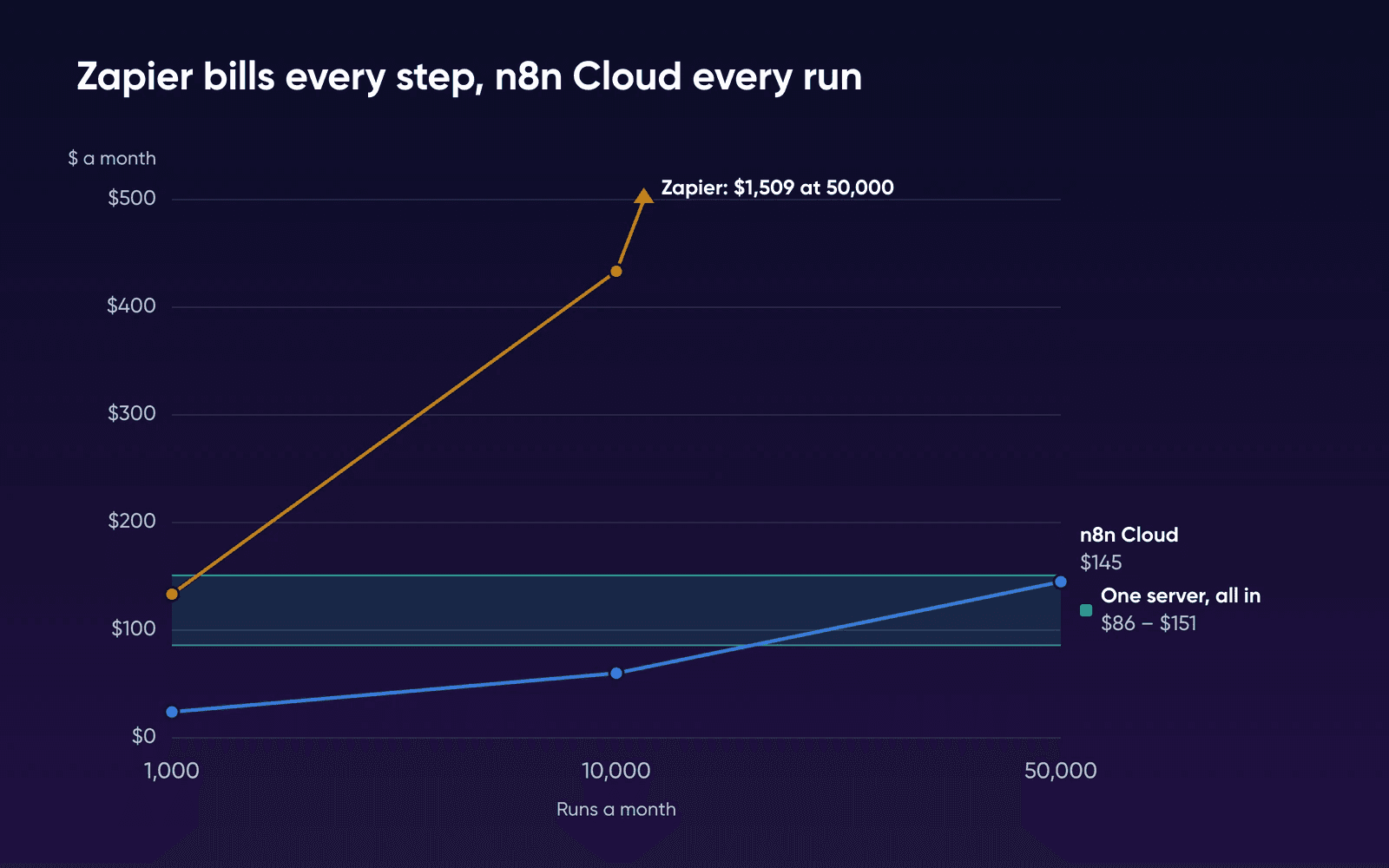
| 1,000 leads (5,000 tasks) | $133.50 | $24.00 | $13.99/mofor 3 months, then $21.99/mo |
| 10,000 leads (50,000 tasks) | $433.50 | $60.00 | |
| 50,000 leads (250,000 tasks) | $1,509.00 | $145.00 |
Most of these rows land exactly on a plan limit. The two services handle a busier month very differently. Take the 10,000-lead row. Say a month comes in 20% higher. On Zapier, the extra 10,000 tasks bill at the 50,000-task tier's pay-per-task rate of $0.0109, which adds $109. Zapier's smallest row works the same way at a steeper rate, $0.0334 for each task past 5,000. On n8n Cloud, Pro covers exactly 10,000 executions, so the extra 2,000 runs fail unless you move up to the $145 plan. The 50,000-execution plan on n8n Cloud is just as full, and it's the last plan with a published price, so past it you can add executions or move to Enterprise at prices n8n doesn't publish.
The odd-looking $1,509 is Zapier's cheapest route to 250,000 tasks, which is the 200K tier at $1,149 plus 50,000 pay-per-task tasks at $0.0072 each. Those extra tasks add $360. That's still $90 less than moving up to the 300K tier at $1,599.
The server's price doesn't change between rows. Runs, steps and bandwidth don't add a line to it.
Zapier's pricing page leads with Starting from $19.99 /month
, the yearly price of its smallest tier. We've used monthly billing on both services throughout. Yearly billing lowers every row. If you'd rather pay a year up front, here's what the same rows cost per month:
| Monthly workload | Zapier, billed yearly | n8n Cloud, billed yearly |
|---|---|---|
| 1,000 leads | $89.00 | $20.00 |
| 10,000 leads | $289.00 | $50.00 |
| 50,000 leads | $1,014.00 | $120.83 |
Why a Zapier bill climbs faster than your lead count
Add one advanced-model AI step to the 10,000-lead workflow, and each run uses 8 tasks, or 80,000 a month, which puts you on the 100K tier at $733.50. Zapier's pricing page now says AI steps, code and SDK all follow the same task-based pricing. An AI step costs 1 task on standard models, 3 on advanced models and 5 on premium ones. On n8n Cloud, the run still counts once and the plan stays at $60. If you bring your own model key, your AI provider bills each call directly on either service, outside every figure here.
Zapier also keeps your Zaps running when you go over. On accounts opened since January 2024, pay-per-task billing switches on by default once you pass your plan's task limit. Those overage tasks cost more than plan tasks. Billing stops at three times your plan's limit. After that, your Zaps are held until the next cycle, according to Zapier's article on how pay-per-task billing works.
For a lead form, a failed run leaves that lead out of your CRM until someone retries it by hand. If your volume swings from month to month, size the plan for your busiest month, or pick a setup that has no cap.
When n8n Cloud counts more than Zapier
A Zap that checks a spreadsheet every few minutes for new rows costs nothing on Zapier until it finds one, because a polling trigger never uses a task. On n8n Cloud, a Schedule Trigger counts one execution every time it fires, whatever it finds. By n8n's pricing FAQ, a check every five minutes comes to about 8,600 to 8,900 executions a month. That's most of the 10,000-execution Pro plan before a single lead arrives.
If your account is mostly scheduled checks, run your own numbers before you move to n8n Cloud. On your own server, the free Community edition has no execution quota, since n8n puts quotas only on its paid plans.
What the server price leaves out
The plan price buys a server with n8n already running on PostgreSQL with automatic SSL. Your time isn't in it. A few other costs land on you too:
- Rebuilding your Zaps as n8n workflows is the big one-time cost, and the next section sizes it against your savings. Moving off n8n Cloud is easier, because workflows export as JSON and import into the new editor, though credentials don't come with the export, so you'll re-enter each one.
- AI model charges aren't in any bill here. Budget for your AI provider's API fees if a workflow calls a model.
- Backups need a home off the server. The server ships with an
n8n-backuphelper that snapshots your workflow database, and you'll want those snapshots copied somewhere else.
What one server gives you
- There's no monthly execution quota for a busy month to run into.
- Stack 8 has 8 GB of RAM, against 1,280 MiB on n8n Cloud's 50,000-execution plan.
- Root access lets you install any community node from npm, with no approval list.
- The price stays the same whatever your run count or step count.
What you take on
- Updates and monitoring are yours to run. DreamHost support covers the hardware, network and connectivity, 24/7.
- The free Community edition has no SSO, projects, workflow sharing or Git version control.
- A failed disk or a bad update is yours to recover from, using your own backups.
On sizing, n8n's Docker Compose install guide asks for at least 4 GB of RAM and 2 vCPUs. Stack 8 has 2 vCPU and 8 GB of RAM, twice n8n's memory minimum, and the product page labels it For apps running in production
. Stack 4 also meets n8n's minimum, and its label is For lightweight apps and solo projects
, so it's the step down for a light workload. We ran n8n on a test VM the size of Stack 4, below; the plan pick is still n8n's own guidance. The published n8n benchmark ran on a 4 GB machine and handled up to 220 executions a second on a simple two-node workflow, while 50,000 runs a month averages about 0.02 a second. According to n8n's docs, memory usually matters more than CPU. Watch it as you add heavier workflows.
What the workflow did on our test VM
We ran a five-node stand-in for the lead workflow on n8n 2.44.5 with PostgreSQL, from n8n's own Docker Compose files, on a test VM with 2 vCPU and 4 GB of memory, the shape of Stack 4, on October 22, 2026. It took a webhook, cleaned up the fields, scored the lead, checked the score and wrote a message, all with n8n's built-in nodes in place of the CRM, email and spreadsheet apps, then we sent it 2,000 leads, 10 at a time. Nothing outside the VM was called. The VM ran on an arm64 Mac, so it's our test machine, not a DreamHost server.
| What we checked | What we saw |
|---|---|
| Memory at rest, n8n with PostgreSQL and its task runner | About 550 MiB, with 3,163 MB of the VM still free |
| 2,000 runs of the stand-in workflow | All 2,000 succeeded in 68 seconds, about 29 a second |
| Time for each run to finish | Median 315 ms, 95th percentile 556 ms |
| Database growth from saved run history | About 9.5 MB for 2,000 runs, roughly 5 KB each |
| Memory after the run | About 620 MiB |
Because its steps were built-in nodes, the test shows what n8n uses to run a workflow of that length, not the tasks Zapier would count for your real apps. By our arithmetic, 50,000 runs a month at about 5 KB each adds about 250 MB of run history a month if you never prune it, so set n8n's execution pruning before the database grows. This was a light workflow with no outside apps, credentials or AI steps, so 29 runs a second is our test's rate and not a ceiling for n8n, and we ran it once. We couldn't measure Zapier's side; its task counts and bills come from Zapier's published rules and prices.
Where the server starts paying off
Your own upkeep is the cost the bill table can't show. We've assumed one to two hours of it a month, for a snapshot with n8n-backup, a copy off the server, n8n-update and a check afterward that your workflows still run. Swap in your own hours if you know them.
The Bureau of Labor Statistics puts the May 2025 US median wage for software developers, QA analysts and testers at $64.44 an hour. That makes those hours worth $64.44 to $128.88 a month, and adding them to the server's renewal price in the bill table gives the band of about $86 to $151 in the chart. Price those hours at a lower wage, and the band drops. The same BLS page puts the May 2025 median wage for all US workers at $50,980 a year. That's about $24.51 an hour over a 2,080-hour work year, by our conversion, and at that rate the band runs about $47 to $71.
At the developer rate, Zapier's 1,000-lead bill of $133.50 sits inside the band. At 10,000 and 50,000 leads, Zapier costs between about $280 and $1,360 a month more than the server and two hours of your time. The n8n Cloud bills of $24 and $60 sit below the band. The server is still the smaller bill, but once you count your hours, n8n Cloud costs less for a small workload. Its $145 bill at 50,000 leads sits inside the band, close to a tie on money. At that volume, the server's edge is room to grow, with 8 GB of RAM against the 1,280 MiB that n8n Cloud's 50,000-execution plan gives n8n.
The monthly figures leave out the one-time rebuild. We found no published rebuild time from Zapier or n8n. The table below is our estimate. It assumes 10 Zaps at about 2 hours each, or 20 hours of work, plus 2 hours a month of upkeep, and it measures the saving against the Zapier bill at each volume. Each cell is the months it takes the saving to cover the rebuild, with your time priced at the developer median and at the all-worker median.
| Monthly workload | At $64.44 an hour | At about $24.51 an hour |
|---|---|---|
| 1,000 leads | Never: the server and upkeep cost more than Zapier | About 8 |
| 10,000 leads | About 5 | Under 2 |
| 50,000 leads | Under 1 | Under 1 |
Your Zap count and hours will differ. Twice the Zaps roughly doubles the months in each row.
What the free license lets you do
The self-hosted Community edition is free under n8n's Community license, officially the Sustainable Use License, for your own internal business purposes. The license FAQ draws the line at who builds the workflows. Client work is allowed. You can build automations for clients on your instance and charge for them, as long as only people in your organization create or edit them, but you can't host n8n for clients to build their own.
Some features aren't in the Community edition at all, according to n8n's edition comparison, including SSO, projects, workflow and credential sharing, and Git version control. If your team needs SSO or shared credentials, price n8n's paid plans before you move.
Staying or moving
Stay on Zapier if
The move itself is the cost you can't carry. n8n Cloud is cheaper at every volume we priced, but 10 Zaps take about 20 hours to rebuild by our estimate, and Zapier connects more than 9,000 apps. Check that n8n connects to every app your Zaps use. If your account predates pay-per-task billing, turn it on, so a busy month keeps your Zaps running.
Move to n8n Cloud if
Your volume is modest and steady. Size the plan for your busiest month, since runs past the cap fail and n8n Cloud bills no overage. Count your scheduled checks too: one every 5 minutes uses most of the 10,000-execution Pro plan by itself.
Run n8n on your own server if
Someone on your team can give it an hour or two a month for updates and backups. At 50,000 leads, the saving covers a 20-hour rebuild in under a month. Rebuild your busiest Zap first and run both side by side before you cancel Zapier.
Zapier and n8n pricing FAQs
How much does Zapier cost per month?
Zapier Professional starts at $19.99 a month for 750 tasks billed yearly, or $29.99 billed monthly. From there the bill climbs by task tier, plus pay-per-task overage, as the tables above show.
Why is Zapier so expensive?
It bills one task for every action step that succeeds, so a five-step workflow costs five tasks per run, and AI steps on the bigger models cost more than one. Tasks past your plan's limit bill at a higher rate than plan tasks.
What happens when I hit my n8n Cloud limit?
New runs fail until the month resets or you upgrade, as the warning above explains, and you can retry the failed ones by hand. On the 50,000-execution plan billed monthly, you can add executions yourself, up to 500,000 a month, at a price n8n doesn't publish.
Is self-hosted n8n free for business use?
For your own internal business use, it is, according to n8n's license FAQ. Our guide on self-hosted n8n for client work covers where client work crosses the license line.
Can I move my Zaps to n8n?
Plan to rebuild each Zap as an n8n workflow in the editor. The payback table above assumes about 2 hours a Zap, so time your first rebuild and swap in your own figure.
Sources
- Plans & Pricing, Zapier, Oct 2, 2026. zapier.com/pricing
- Task usage rates, Zapier, Oct 2, 2026. zapier.com/pricing/rates
- How is task usage measured in Zapier?, Zapier, Oct 2, 2026. help.zapier.com/hc/en-us/articles/8496196837261-How-is-task-usage-measured-in-Zapier
- How pay-per-task billing works in Zapier, Zapier, Oct 2, 2026. help.zapier.com/hc/en-us/articles/15279018245901-How-pay-per-task-billing-works-in-Zapier
- n8n Plans and Pricing, n8n, Oct 22, 2026. n8n.io/pricing
- Understand executions, n8n, Oct 2, 2026. docs.n8n.io/build/understand-workflows/understand-executions
- Can you reset my executions?, n8n, Oct 2, 2026. support.n8n.io/article/can-you-reset-my-executions
- Manage your data (n8n Cloud), n8n, Oct 2, 2026. docs.n8n.io/deploy/use-n8n-cloud/configure-cloud/manage-your-data
- Community license, n8n, Oct 2, 2026. docs.n8n.io/n8n-community-license/community-license
- License FAQ, n8n, Oct 2, 2026. docs.n8n.io/n8n-community-license/community-license/license-faq
- Compare editions, n8n, Oct 2, 2026. docs.n8n.io/deploy/host-n8n/community-edition-features
- Install using Docker Compose, n8n, Oct 2, 2026. docs.n8n.io/deploy/host-n8n/install-options/install-using-docker-compose
- Measure performance, n8n, Oct 2, 2026. docs.n8n.io/deploy/host-n8n/configure-n8n/scaling/measure-performance
- OEM prerequisites, n8n, Oct 2, 2026. docs.n8n.io/deploy/host-n8n/deploy-as-an-oem-integration/prerequisites
- Software Developers, Quality Assurance Analysts, and Testers (Occupational Outlook Handbook), US Bureau of Labor Statistics, Oct 2, 2026. bls.gov/ooh/computer-and-information-technology/software-developers.htm