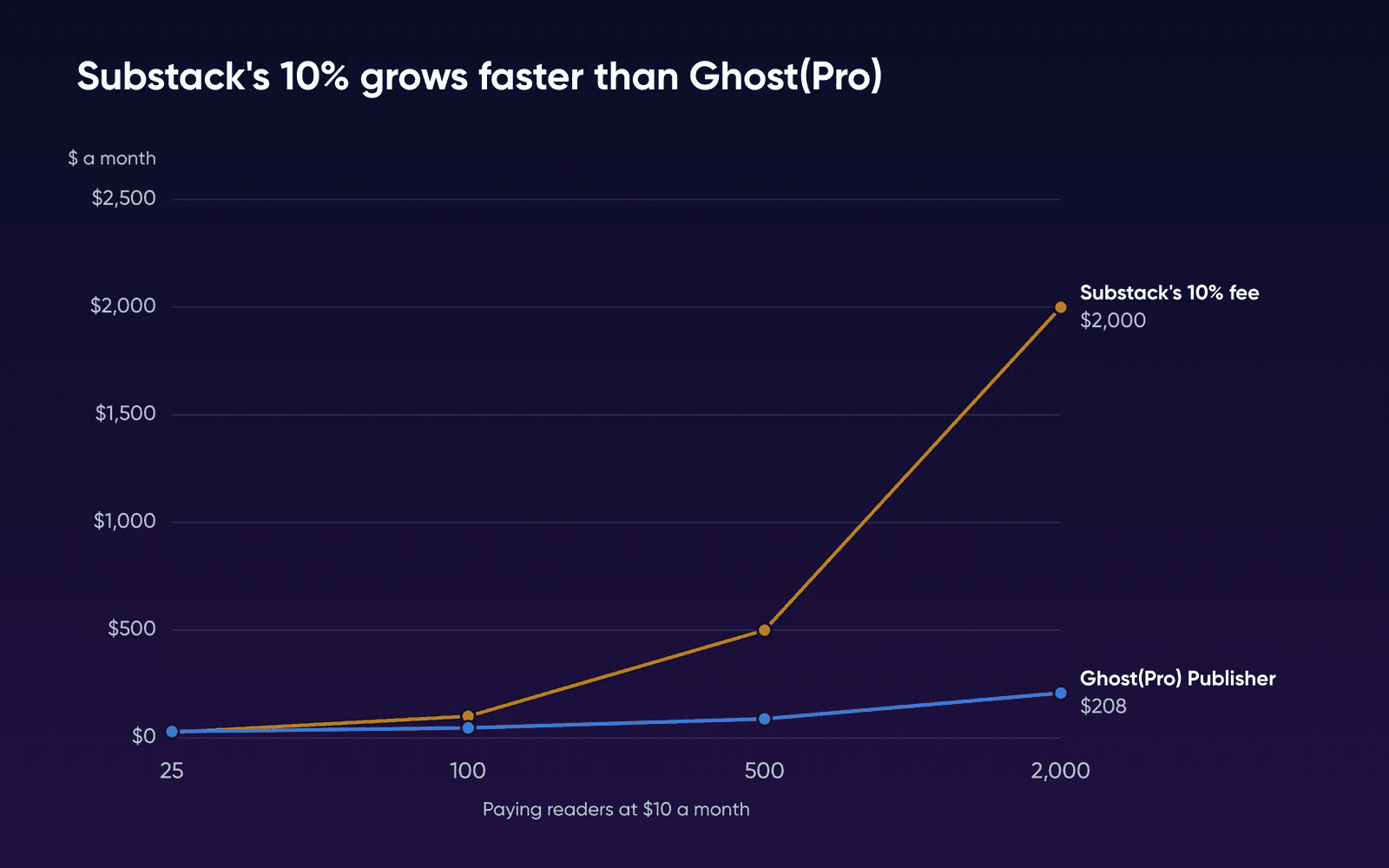
Substack keeps 10% of every paid subscription, annual and founding-member plans included, and Stripe's card and billing fees come on top of that. A newsletter with 500 readers paying $10 a month hands Substack $500 every month. Ghost doesn't take a cut on any plan. What you pay for Ghost depends on the size of your list.
What each option costs at four list sizes
Each row prices a subscription at $10 a month, a preset in Substack's revenue calculator, with 5% of the list paying, the low end of what Substack tends to see. Ghost(Pro) counts every free and paid member toward its price, and every list gets one newsletter a week. Stripe's 2.9% plus $0.30 per US card payment and 0.7% for Billing apply whichever you pick, since all three take payments through Stripe, so the table leaves them out.
| Paying readers at $10 (list at 5% paying) | Substack's 10% fee | Ghost(Pro) Publisher, billed yearly | Mailgun, on your own server | Ghost on VPS, Stack 8 (Mailgun extra) |
|---|---|---|---|---|
| 25 paying, 500 on the list | $25.00 | $29.00 ($35 billed monthly) | $15.00 (Basic) | $13.99/mofor 3 months, then $21.99/mo |
| 100 paying, 2,000 on the list | $100.00 | $46.00 ($55 billed monthly) | $15.00 (Basic) | |
| 500 paying, 10,000 on the list | $500.00 | $88.00 ($105 billed monthly) | $35.00 (Foundation 50k) | |
| 2,000 paying, 40,000 on the list | $2,000.00 | $208.00 ($249 billed monthly) | $155.67 (Foundation 100k plus overage) |
The Mailgun column is there because Ghost sends newsletters only through Mailgun. It supports no other bulk mail service, and plain SMTP can't send them.
With 25 paying readers, it's cheapest to stay on Substack. With a list under 1,000 members, Ghost(Pro) starts costing less than the fee at 30 paying readers.
Ghost(Pro) moves up to $46 a month once the list passes 1,000 members. From there to the 40,000 members in our last row, a Stack 8 server plus Mailgun costs less than Ghost(Pro) at every tier. That holds at the server's regular monthly rate, after the first 3 months. In the bottom three rows, both Ghost options cost less than half the fee. Ghost(Pro) keeps stepping up as members pass each tier, while the server plan has no member caps and only the Mailgun plan moves with how much you send. A lower conversion rate widens that gap. At 2%, the same 500 paying readers come with a 25,000-member list, and Ghost(Pro) rises to $141 a month while Mailgun comes to $84.17.
To work out your own case, take 10% of what your paying readers pay each month, then look up Ghost(Pro) by your whole list. With 3,000 on the list and 200 paying $6, Substack's fee is $120 a month. Ghost(Pro) bills that list at its 5,000-member tier, $63 a month billed yearly, and a weekly send of about 13,000 emails costs $20.40 on Mailgun's Basic plan.
Ghost's hosting page says self-hosters have to pay for your own email delivery, analytics and CDN
, and that for heavy users of Ghost, self-hosting generally works out more expensive than Ghost(Pro). The table's Mailgun column covers the email delivery. Ghost's web analytics need a Tinybird account on a self-hosted install, and the table doesn't price it. Above our last row, the Mailgun bill keeps climbing with each send while Ghost(Pro) includes sending, so you'll want to redo the sums for a much larger list.
There's also your time on the server side. We assume 1 to 2 hours a month for updates and for running your own backups, since DreamHost's Help Center says a VPS doesn't include automated backups.
What a Ghost server did with 40,000 members
A 4 GB test server (not a DreamHost server) imported a 40,000-member Substack list and sent a post to all of it without using half its memory. We ran Ghost's official Docker install, which Ghost still labels a preview, on a test VM with 2 vCPU and 4 GB of memory, the same size as Stack 4. At idle, Ghost 6.71.0, MySQL and Caddy used 596 MiB together, 417 MiB of it MySQL, and the three images took about 2.2 GB of disk.
The list was a Substack-format file of 40,000 free members. Ghost accepted it at once and worked through it in the background for 605 seconds, then emailed Your member import is complete.
Its import report listed Substack's signup-date column as mapped. After the import and one send, the MySQL data folder held 456 MB.
When we published one post to all 40,000 members, Ghost handed the list to a local stand-in for Mailgun's API in 15.6 seconds, as 40 calls of 1,000 recipients each. Real Mailgun adds its own time and does the actual sending. Memory on the VM peaked at 1,398 MB of 3,904 during the send and 1,334 MB during the import. Ghost asks for at least 1 GB of memory.
DreamHost's own Ghost guide also puts a newsletter under 10,000 subscribers on Stack 4. It moves up to Stack 8 once the list passes 10,000 or you run more than one publication on the same server. Stack 8, the plan the Ghost on VPS page labels For apps running in production
, is our pick for a paid newsletter that's growing, so the table prices it in every row. If you'd rather start smaller, our 4 GB run peaked at 1,398 MB with 40,000 members, so Stack 4 can carry one newsletter that size.
What you give up by leaving Substack
Substack says more than half of new subscribers come from its own network, along with 30% or more of paid subscriptions, counted across the whole platform. Recommendations, the app, Notes, trending topics and leaderboards all put posts in front of Substack readers, and you lose them when you move to a Ghost site.
Ghost has recommendations of its own, built on the open Webmention standard, with one-click subscribe between Ghost sites. A self-hosted Ghost can also post to the social web through Ghost's hosted service, free within set limits on followers and daily interactions. Both reach people who read other Ghost sites or follow the social web. If most of your new readers find you through Substack today, you'll get fewer new signups after the move.
Keep publishing on Substack if
Most of your new readers find you through Substack's app and recommendations, or you have a few dozen paying readers.
Move to Ghost(Pro) if
You want Ghost without looking after a server yourself.
Move to your own Ghost server if
Your list is past 1,000 members and growing, or you want several publications on one server.
If you're leaving Substack and also weighing WordPress, our guide to Ghost vs WordPress for a paid newsletter prices both at 2,000, 10,000 and 40,000 readers, plugin fees and email included.
How to move without losing paying readers
Ghost's Substack migrator imports posts, free subscribers and paid subscribers from Settings, Advanced, Import/Export in Ghost Admin. Do the steps around it in this order, or you'll risk dropping or refunding paying readers.
- Connect the Stripe account Substack uses
Set up Ghost first, then connect it to the same Stripe account your Substack is connected to, before you import anyone. Our test install had no Stripe connection. It accepted a file of 2,000 paid subscribers and added none of them, with the same reason on every row:
Cannot link Stripe Customer without a Stripe Connection.
- Set up email
Add Mailgun for newsletters and any SMTP service for login and signup emails. On our test install, Ghost emailed a verification code the first time the owner signed in, so you can't get into Admin until that email arrives.
- Run the migrator
Enter your Substack URL, create an export in Substack and upload the zip. Then upload the free subscribers CSV and the paid subscribers CSV. Substack's list export carries email addresses but no names.
- Ask Substack support to disconnect Stripe
Ghost's migration guide warns that
Substack will continue to take 10% fees on your existing paid subscriptions.
Open Substack's support widget and ask for a human support specialist, which is what Substack's help page tells people moving to a new platform to do. Ghost's concierge team also helps get the fees removed. - Check Stripe for late signups
A writer on Ghost's forum found one paid signup that landed between the export and the disconnect and never reached Ghost. Look in Stripe for new subscriptions after the disconnect and add any you find.
- Move the domain and fix old links
Substack post URLs use /p/, which Ghost uses for post previews, so point your domain at Ghost and add the redirect below. In Stripe's public details, change the statement descriptor if it still says Substack.
Ghost's rule for redirects.yaml sends old Substack links to the same post on your Ghost site:
301:
  \/p\/(?![0-9a-fA-F]{8}-[0-9a-fA-F]{4}-[0-9a-fA-F]{4}-[0-9a-fA-F]{4}-[0-9a-fA-F]{12})(.*): /$1
302:
How we measured
DreamHost ran Ghost's official Docker compose files, with a test override for ports and mail, on October 20, 2026, on a test VM under Colima on an Apple-silicon Mac: Ubuntu 24.04 on arm64, 2 vCPU and 3,904 MB of memory, with no swap. The versions were Ghost 6.71.0, MySQL 8.0.44 and Caddy 2.10.2, as Ghost's files pin them. Idle memory is the median of 12 docker stats readings.
The free and paid members were made-up addresses in Substack's export format. The newsletter went to a local stand-in for Mailgun's API that delivers nothing, and login emails went to a local test inbox. We didn't use a real Stripe or Mailgun account. The run doesn't show real delivery, a posts import, Ghost(Pro), the social web, an x86 server or a DreamHost server.
Leaving Substack for Ghost FAQs
Will readers who pay by card have to enter their card again?
No, as long as Ghost is connected to the same Stripe account your Substack uses before you import them, as Ghost's migration guide says. Ghost links each imported paid member to their existing Stripe customer, which is why our test import added no paid members without that connection. Only readers who paid through Substack's iPhone app need to subscribe again.
What happens to readers who pay through Substack's iPhone app?
Substack's help page says Apple manages those subscriptions, and they don't transfer to another platform. You keep each reader's email address and payment history, so you can ask them to subscribe again on your Ghost site.
Can I send the newsletter from a DreamHost email address?
No. Ghost sends newsletters only through Mailgun. Its login and signup emails are transactional email, which Ghost says can be configured to send with any SMTP, or another mail service that you prefer
. Professional Email comes with DreamPress, Managed VPS and Dedicated plans, not with a VPS: DreamHost's Help Center says VPS does not include Professional Email
Do I need Mailgun if I only publish on the web?
No. If you don't deliver posts to members by email, Ghost needs no Mailgun account, and you can leave the newsletter settings alone. You can also sync members to another newsletter tool.
Who keeps the server and Ghost updated?
You do. The Ghost on VPS page says you'll handle management tasks like software updates on your own, and that DreamHost support is available 24/7. Hardware, network, and connectivity are all supported by our team.
Can I start on Stack 4 and move up later?
Yes. The Ghost on VPS page says Moving from Stack 4 to Stack 32 is straightforward, and your environment moves with you.
Sources
- Ghost Hosting, No Member Caps, DreamHost, read Oct 22, 2026. dreamhost.com/hosting/vps/ghost
- VPS overview, DreamHost Help Center, read Oct 22, 2026. help.dreamhost.com/hc/en-us/articles/50476238203028-VPS-overview
- Migrating between a VPS and a managed hosting plan, DreamHost Help Center, read Oct 22, 2026. help.dreamhost.com/hc/en-us/articles/17876957977515-migrating-between-a-vps-and-a-managed-hosting-plan
- How do I delete my Substack publication?, Substack, read Oct 19, 2026. support.substack.com/hc/en-us/articles/360037465892-How-do-I-delete-my-Substack-publication
- Self-Host Ghost CMS: The Complete Guide, DreamHost, read Oct 22, 2026. dreamhost.com/blog/ghost-self-hosted
- How much does Substack cost?, Substack, read Oct 19, 2026. support.substack.com/hc/en-us/articles/360037607131-How-much-does-Substack-cost
- How do I turn off paid subscriptions on Substack?, Substack, read Oct 19, 2026. support.substack.com/hc/en-us/articles/360060408872-How-do-I-turn-off-paid-subscriptions-on-Substack
- How do I export my email list on Substack?, Substack, read Oct 19, 2026. support.substack.com/hc/en-us/articles/6314498343700-How-do-I-export-my-email-list-on-Substack
- Can my subscribers pay on the Substack iOS app?, Substack, read Oct 19, 2026. support.substack.com/hc/en-us/articles/19718129670420-Can-my-subscribers-pay-on-the-Substack-iOS-app
- About Substack, Substack, read Oct 19, 2026. substack.com/about
- Going paid, Substack, read Oct 19, 2026. substack.com/going-paid
- The going paid guide, Substack, read Oct 19, 2026. substack.com/going-paid-guide
- Pricing, Ghost, read Oct 19, 2026. ghost.org/pricing
- Migrating from Substack, Ghost, read Oct 19, 2026. docs.ghost.org/migration/substack
- Why do I need Mailgun for newsletters?, Ghost, read Oct 19, 2026. docs.ghost.org/faq/mailgun-newsletters
- Hosting Ghost, Ghost, read Oct 19, 2026. docs.ghost.org/hosting
- Install Ghost with Docker, Ghost, read Oct 19, 2026. docs.ghost.org/install/docker
- Recommendations, Ghost, read Oct 19, 2026. docs.ghost.org/recommendations
- Sort-of bug report for Substack migrations, Ghost Forum, read Oct 19, 2026. forum.ghost.org/t/sort-of-bug-report-for-substack-migrations/29620
- Pricing, Mailgun, read Oct 19, 2026. mailgun.com/pricing
- Billing pricing, Stripe, read Oct 19, 2026. stripe.com/billing/pricing