
In the dying embers of 2025, the primary team behind WordPress released a new thing called Telex.
This AI-powered tool lets you describe any block in your mother tongue, and see it coded from scratch before your eyes.
We know what you’re thinking… using AI to build websites is not new. We even have our own tool for DreamHost customers!
But many people say Telex represents a huge leap forward. This AI coder can create custom functionality — the type that would typically require a plugin or the help of an experienced developer.
Sounds ah-maze-ing. But does Telex live up to the hype? We had to take it for a test drive ourselves.
What Is WordPress Telex?
In the words of Automattic (one of the companies behind WordPress):
“Telex is an experimental tool from the Automattic AI team that turns natural-language prompts into working WordPress blocks. You simply describe what you want, and Telex generates the block.”
Telex runs on the WordPress Playground: a platform that lets you mess around with WordPress without hosting.
It’s currently free to use with no limits, and you can download anything you make to install on your own self-hosted website.
How Does WordPress Telex Work?
Like most AI coding tools, Telex uses a large language model (LLM) to interpret your text instructions. Then, it works out a plan for building the block, before finally writing the necessary code.
Let’s take a closer look at the app in action.
1. Building Your Prompt
The workflow is pretty simple. You have a text box for prompts, and the option to add images (up to five) to illustrate your request.
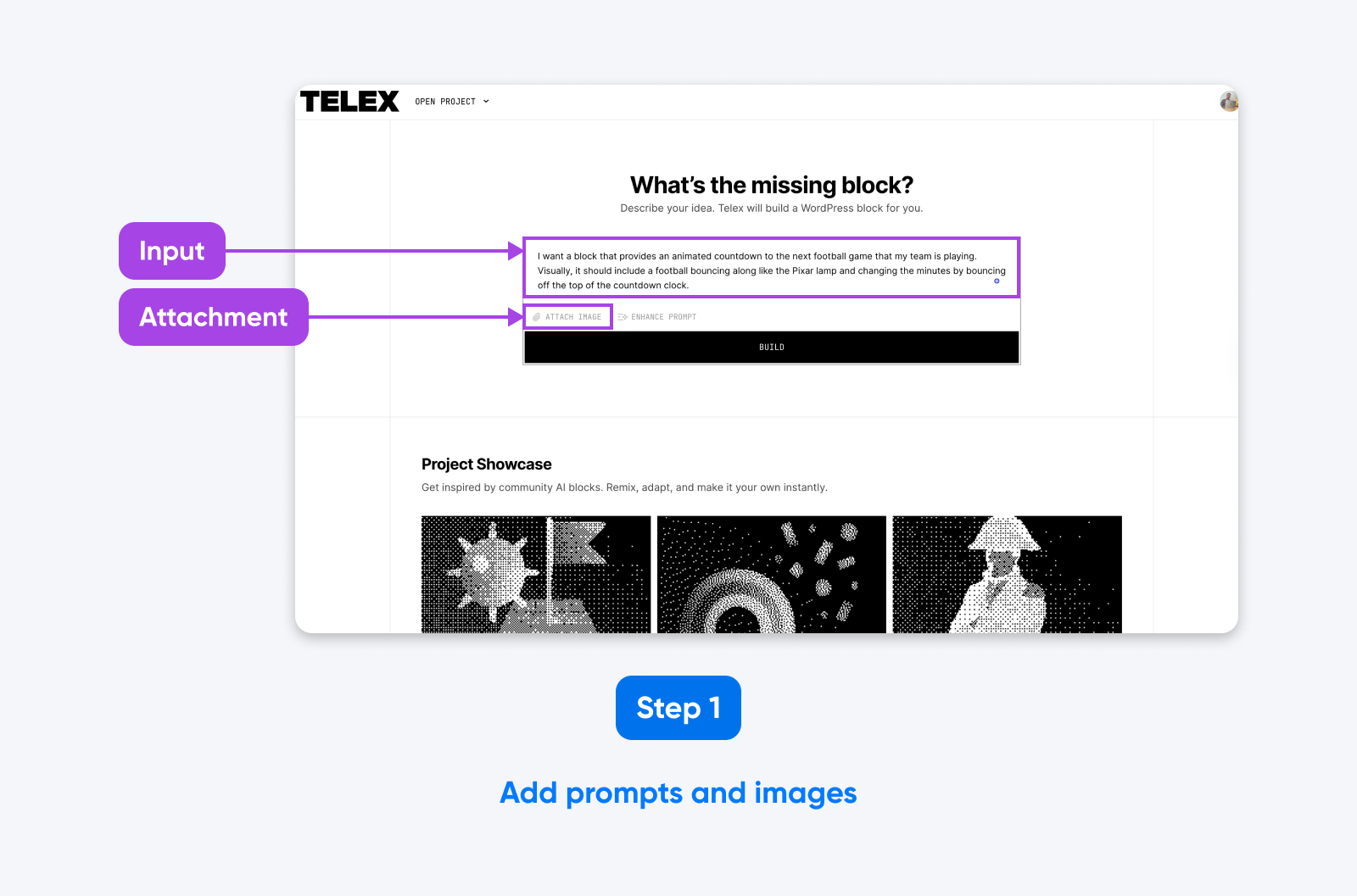
After you begin writing your prompt, the “Enhance Prompt” button appears; this uses AI to flesh out your original prompt.
🤓Nerd note: The prompt enhancer doesn’t seem to work if you already have an image attached to your prompt. We recommend using this feature before adding visuals.
2. Telex Writes the Code
Once you set Telex into action, you can watch the AI “thinking” in the terminal at the bottom of the screen. It’s quite endearing, really.
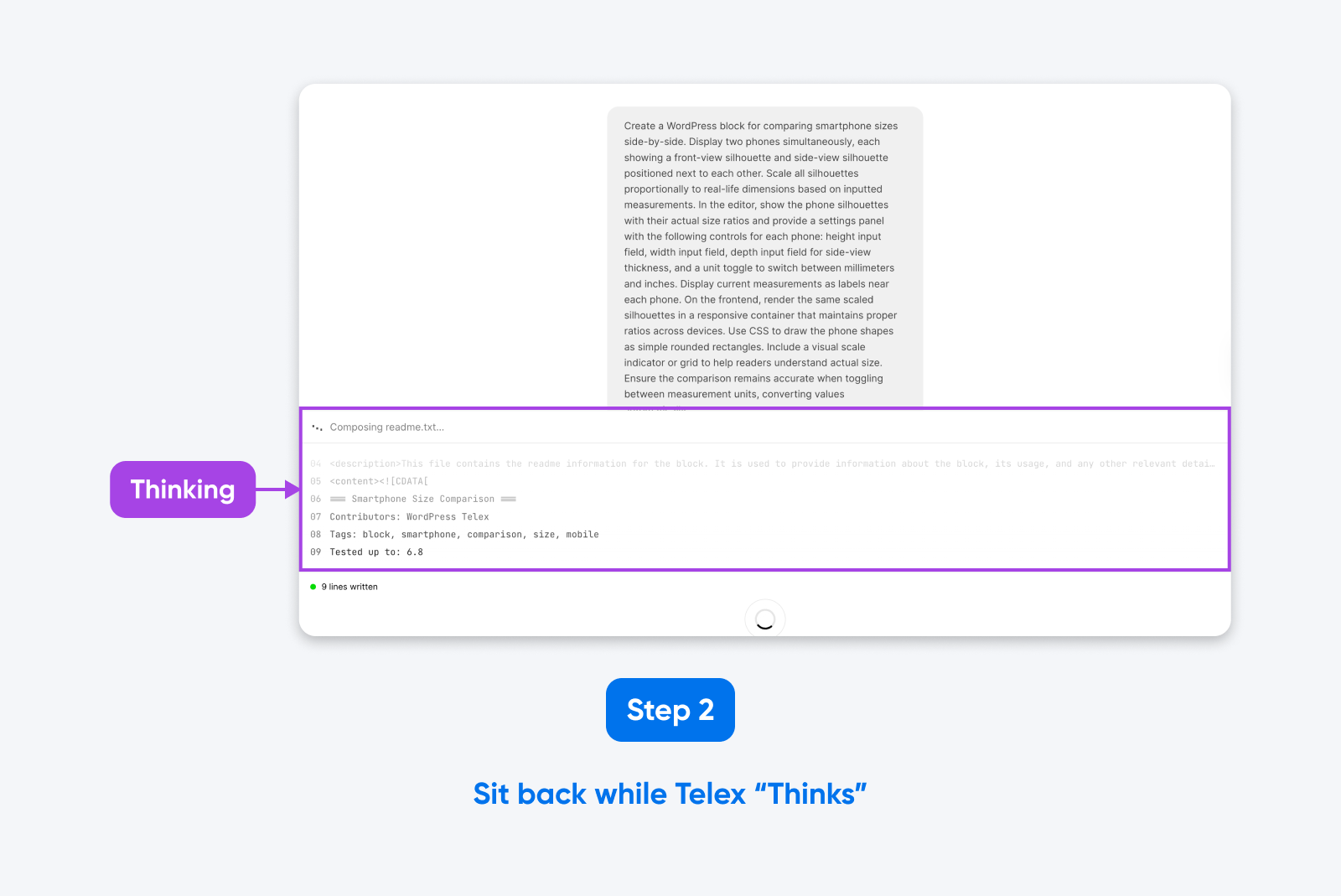
Telex then starts writing code like a hackathon contestant who’s had too much coffee. You usually get the final result inside two minutes.
3. Testing and Refining
Once the first build is complete, you can test a real, working version of your creation in the block editor. This area also allows you to see a preview of the front end, and your admin area.
Not quite right? You can either ask Telex for revisions or switch to the “Code” tab to make the changes yourself.
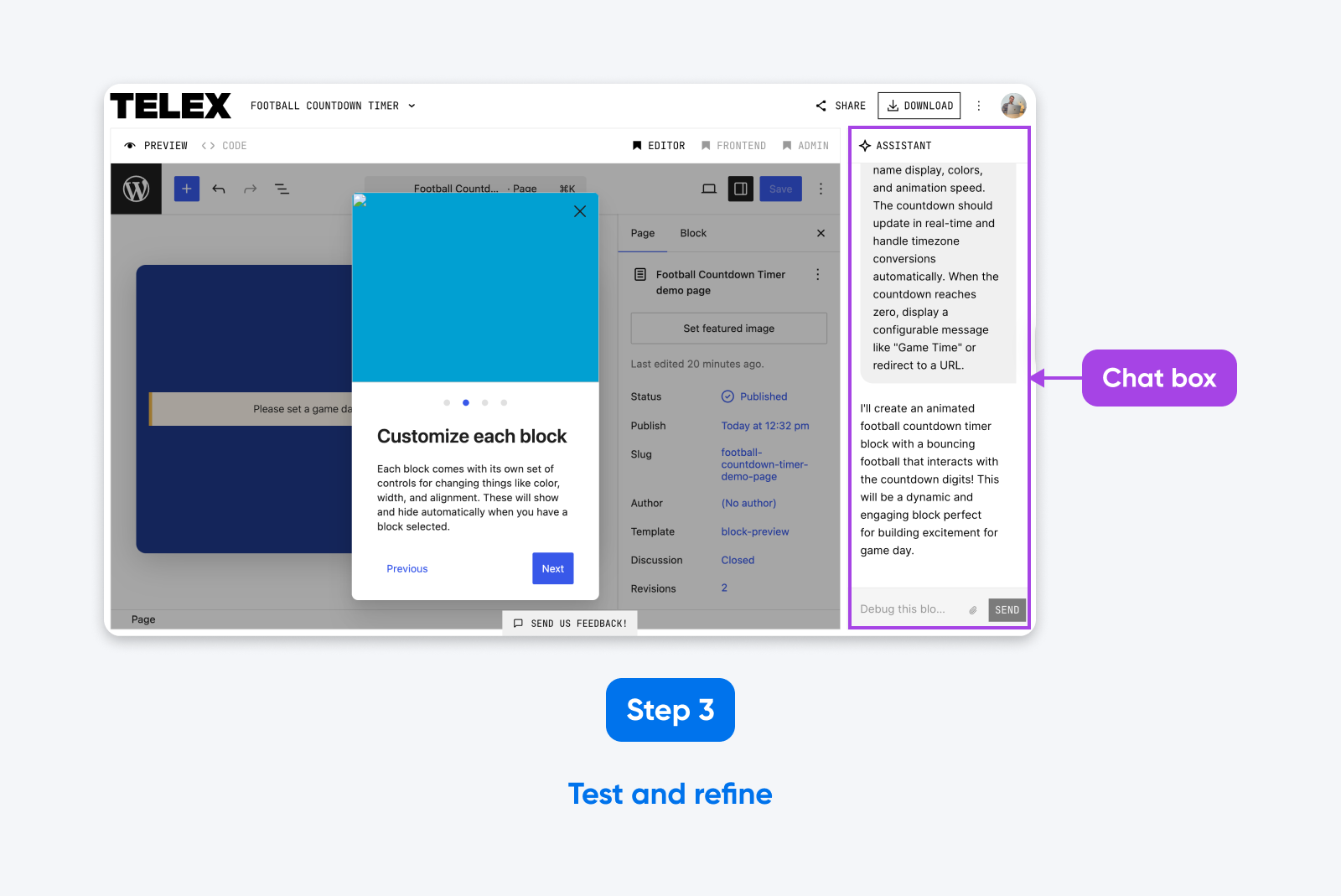
Throughout testing, we found the revisions a bit hit-and-miss. However, persistence sometimes pays off — if the first edit doesn’t work, try, try, try again.
Hands-on With Telex: Building 5 Custom Blocks From Scratch
There’s only so much you can learn from a product release blog. So, we decided to put Telex through its paces ourselves.
Is it legit or just another breath in the AI hype bubble? Let’s find out.
Project 1: Animated Football Countdown Timer
Who loves football? For true fans, the next gameday can’t come around soon enough. If only there were some way of tracking the time until kick-off…
Enter the football countdown timer.
The aim of this block project was to create a fun, animated clock that would display the days, hours, and minutes until the next fixture. (Perfect for a fan blog or the homepage of your flag football team…)
Our initial prompt was pretty simple:
Create a block that displays an animated countdown timer to a future date, set via the block settings. The timer should have days, hours, and minutes. Each time the minutes change, a football graphic should “fly” in from the left, bounce on the minutes counter, and continue off to the right, in a realistic ball flight.
We used the Enhance Prompt option to add a little more detail, and then set Telex into action. The tool took around one minute to spin up the new block.
The first pass was decent. Telex created a working countdown timer, with the block options we requested. It even threw in a bonus setting — color choices for the timer.
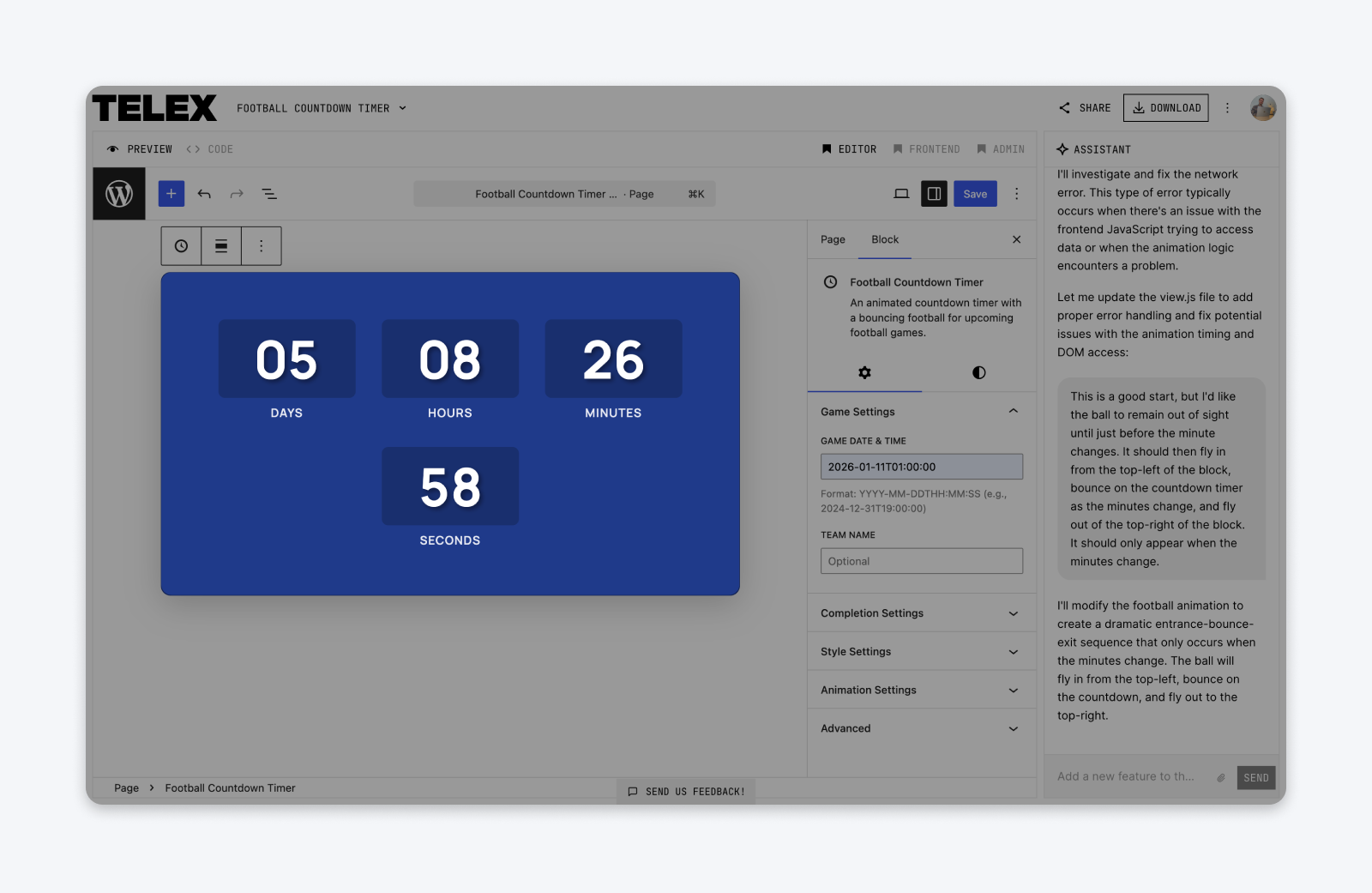
On the downside, Telex didn’t quite get the animation we wanted. Rather than a football flying in every minute to change the timer, we got a constant bouncing ball on the clock. Okay, but not exactly a touchdown.
We tried several different revision prompts to fix the issue. None of them worked fully. But at least we had a working timer.
- Prompt enhancement: C+
- First pass: B-
- Revisions: C-
Overall grade: C+
Project 2: Smartphone Size Comparison Tool
Notice how smartphones seem to keep getting bigger?
To make the task of finding a pocketable device a little easier, we thought it would be useful to create a size comparison tool — just so you can see how different phones measure up.
Here’s the prompt we started with:
Make a block that allows users to see a side-by-side comparison of the size of two smartphones. The block should display two phone-shaped silhouettes on each side: one from the front perspective, and one from the side view.
Each silhouette should be displayed at the same ratio to real life based on the dimensions given in the block settings. The block settings should include boxes for height and width dimensions in millimeters, with the option to change to inches as the measurement.
Already a bit of detail in there, as you can see (we tried to copy the style of the example prompt in the Telex launch blog).
But the “Enhance Prompt” feature extended the instructions to three paragraphs, listing both the exact controls needed and the technical details (“Render the same scaled silhouettes in a responsive container that maintains proper ratios across devices”).
Top marks here.
With an image attached showing a similar feature on an existing website, we set Telex to work. This build took a little longer — closer to two minutes — but the output was really good.
We got exactly the layout and block options we were looking for. At the first attempt, we had a block that you could publish.
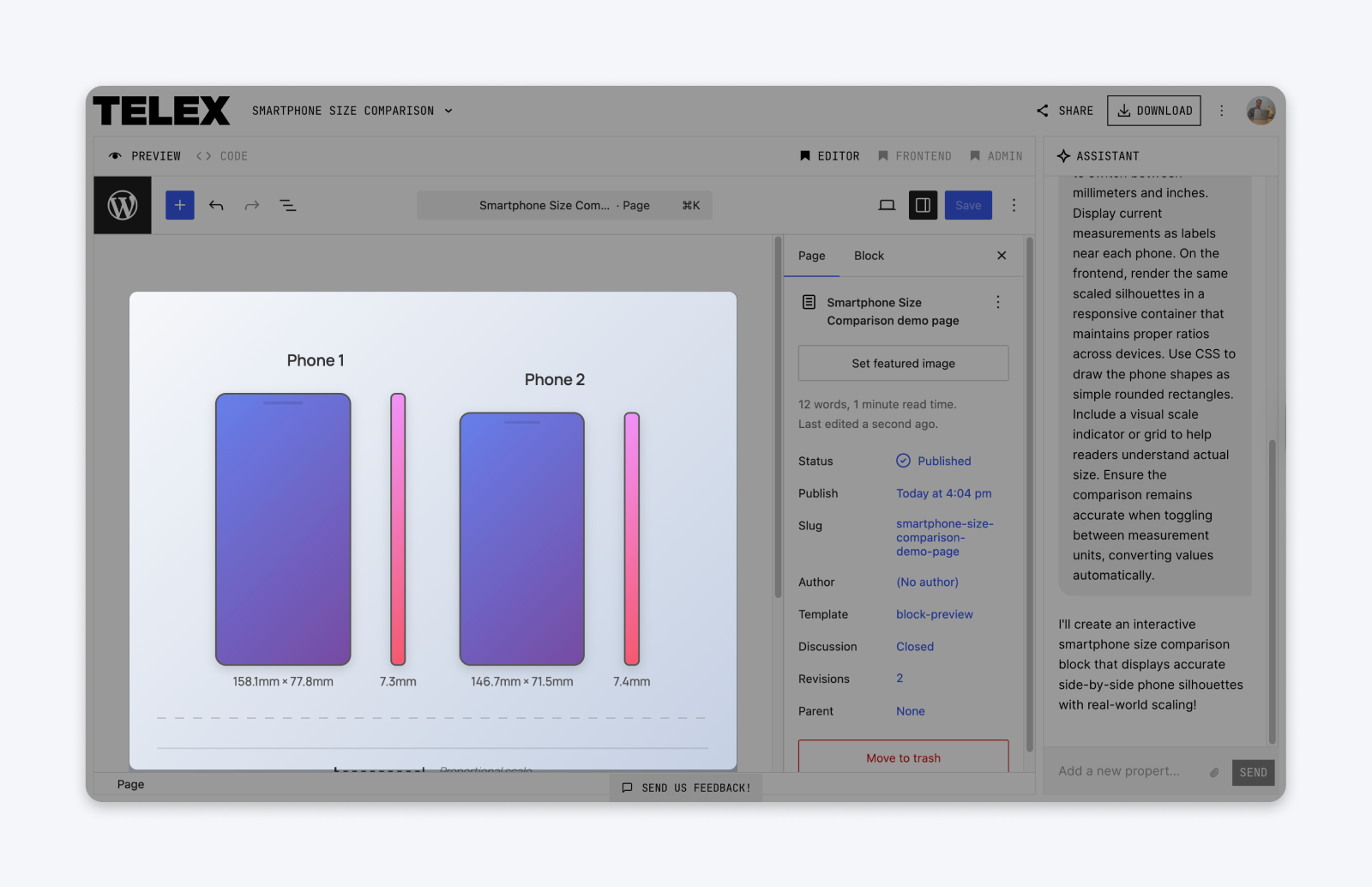
Just to stretch Telex a little, we asked the AI to add color options and remove the scale from the block. It handled these revisions perfectly. Good work, Telex.
- Prompt enhancement: A+
- First pass: A-
- Revisions: A+
Overall grade: A+
Project 3: Dynamic Pricing Calculator
Let’s try something a little more serious now. If you run a business, you might want to allow customers to see what they’ll pay based on their needs.
This is what a dynamic pricing calculator makes possible: users simply plug in their choices, and the block should spit out a price.
Here’s our starting prompt for the calculator:
I run a website design business and want a pricing calculator block. The visitor selects options and sees the price update in real time. Options would be: number of pages (dropdown: 1–5, 6–10, 11–20), whether they need e-commerce (yes adds $500), whether they need SEO setup (yes adds $300), and hosting plan (monthly $29 or yearly $299). Show the total at the bottom and have a “Request Quote” button that doesn’t actually submit anything, just shows a message saying we’ll be in touch.
That’s a pretty comprehensive prompt, if we do say so ourselves. Telex agreed; it only made minor changes when we enhanced the prompt.
The output was spot on. Not super pretty, but neat and fully functional. We particularly liked that Telex added sliders to the block options, making it easy to tweak the price of individual line items.
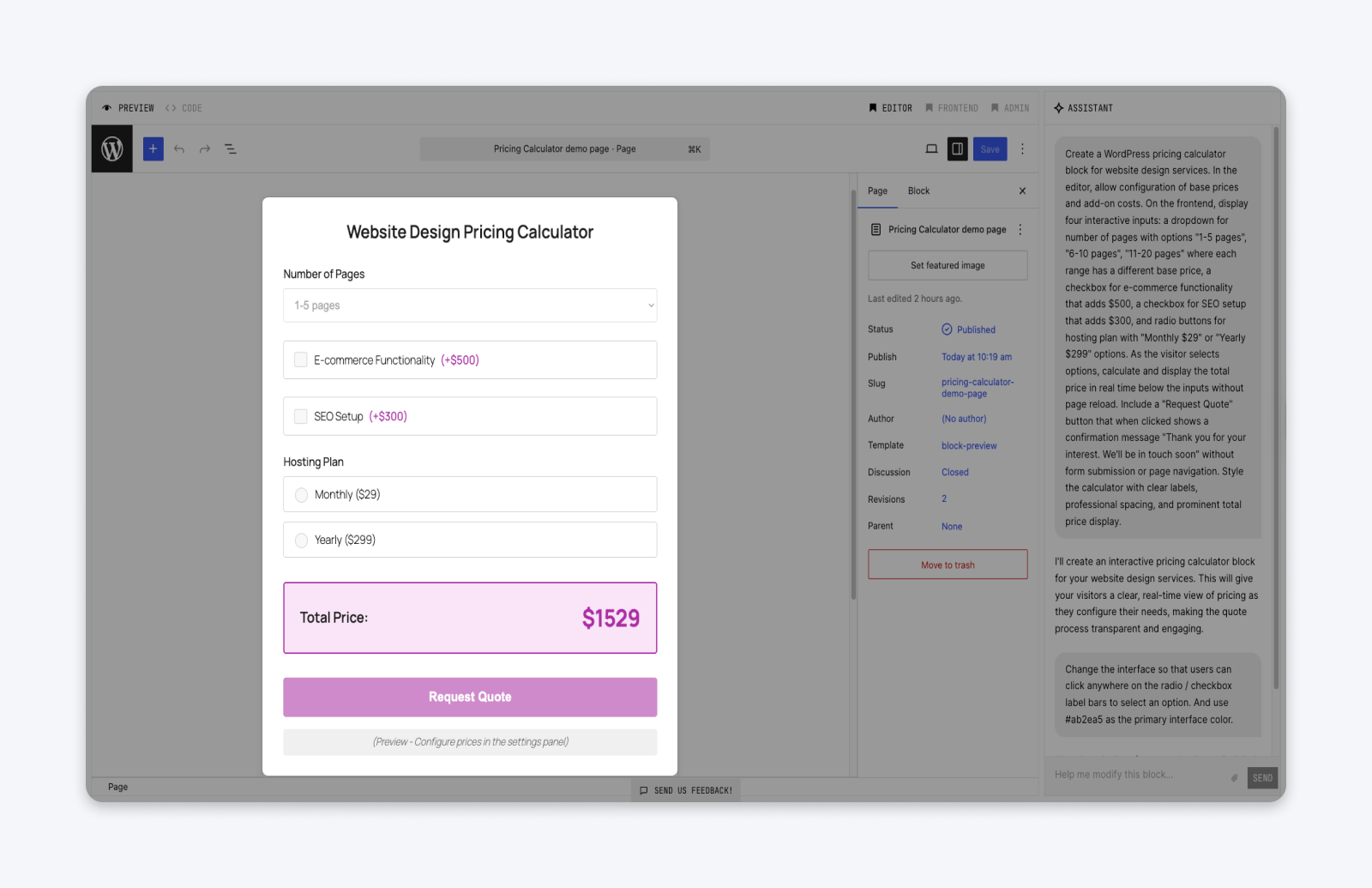
We asked for two minor revisions: make the option labels selectable, and change the main color scheme to purple. And both adjustments were completed perfectly within 30 seconds.
All round, very impressive stuff.
- Prompt enhancement: C+
- First pass: A+
- Revisions: A+
Overall grade: A+
Project 4: Drag-and-Drop Movie Rankings
If you want to connect with a cinephile, just ask them to rank a collection of movies. Instant conversation starter.
It works online, too. That’s why most movie bloggers regularly share polls. Seems like a good project for testing Telex, no?
We used a very “real world” prompt this time. Something that the average person might write, rather than the work of an AI nerd:
Build a block that lets visitors rank a list of items by dragging them into order. For example, I might list 5 movies and ask people to rank them from favorite to least favorite. When they’re done ranking, there should be a submit button, and it should show a thank you message. In the editor, I want to type in the items for the list and add a title/question at the top.
Telex did a great job of enhancing these instructions into something more concrete and specific. The finished prompt detailed exactly how the block should work, including descriptions of all the frontend elements.
Once again, Telex came up with the goods. The initial output is exactly what we had in mind, with editable labels, good spacing between the list items, and a custom confirmation message.
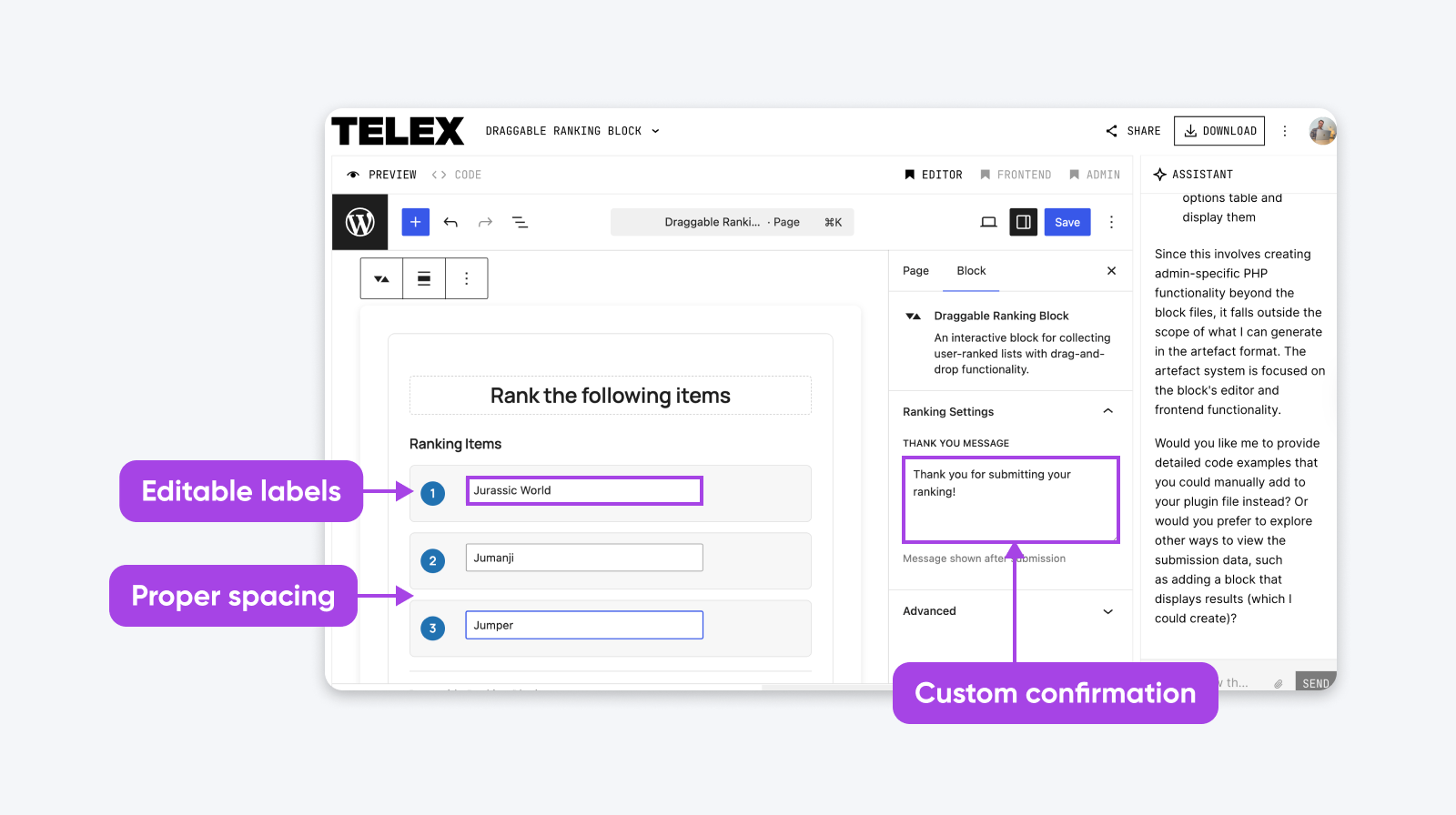
Of course, users will probably want to know how other people have voted. So, we asked Telex for a revision:
When users submit the form, display the most common rankings from all submissions.
This obviously requires some way to store submissions. Telex rapidly figured this out, updating both the frontend and backend.
The problem? Telex didn’t quite get the server-side code right. As a result, the block could track the results of each user, but didn’t keep an overall tally.
Just to stretch Telex a little further, we asked for one more addition — a new section to the admin area, with a dashboard for analyzing incoming votes. But the AI confirmed our suspicions: Telex can’t actually tinker with anything outside one specific block.
While you could add this feature manually on top of the block, it might be easier to just grab a ready-made plugin!
- Prompt enhancement: A-
- First pass: A+
- Revisions: B-
Overall grade: A-
Project 5: Live Cryptocurrency Price Tracker
Right, enough with the easy stuff. To really test the limits of Telex, we decided it was time to try something truly ambitious: a cryptocurrency price tracker, powered by live market data.
To make this possible, we obviously needed a data source. We chose to work with the CoinMarketCap API, because it offers a generous free plan.
We then prompted Telex. Would it be able to build around a third-party API? Our starting instructions:
Build a block that shows the current price of Bitcoin and Ethereum. It should update automatically every few minutes and show whether the price has gone up or down since the last update (maybe a green or red arrow). I’d like to be able to choose which cryptocurrencies to display in the block settings. I will be using an API key from CoinMarketCap, so include a block field for this key.
As you can see, we left Telex to figure out the details. The “Enhance Prompt” feature really impressed us here: the tool expanded our prompt to three paragraphs, adding some bonus functionality and carefully outlining the frontend.
Unfortunately, Telex couldn’t figure out the API. We tried multiple rounds of debugging, but couldn’t get past the errors. We even tried switching to a different API provider — but no luck.
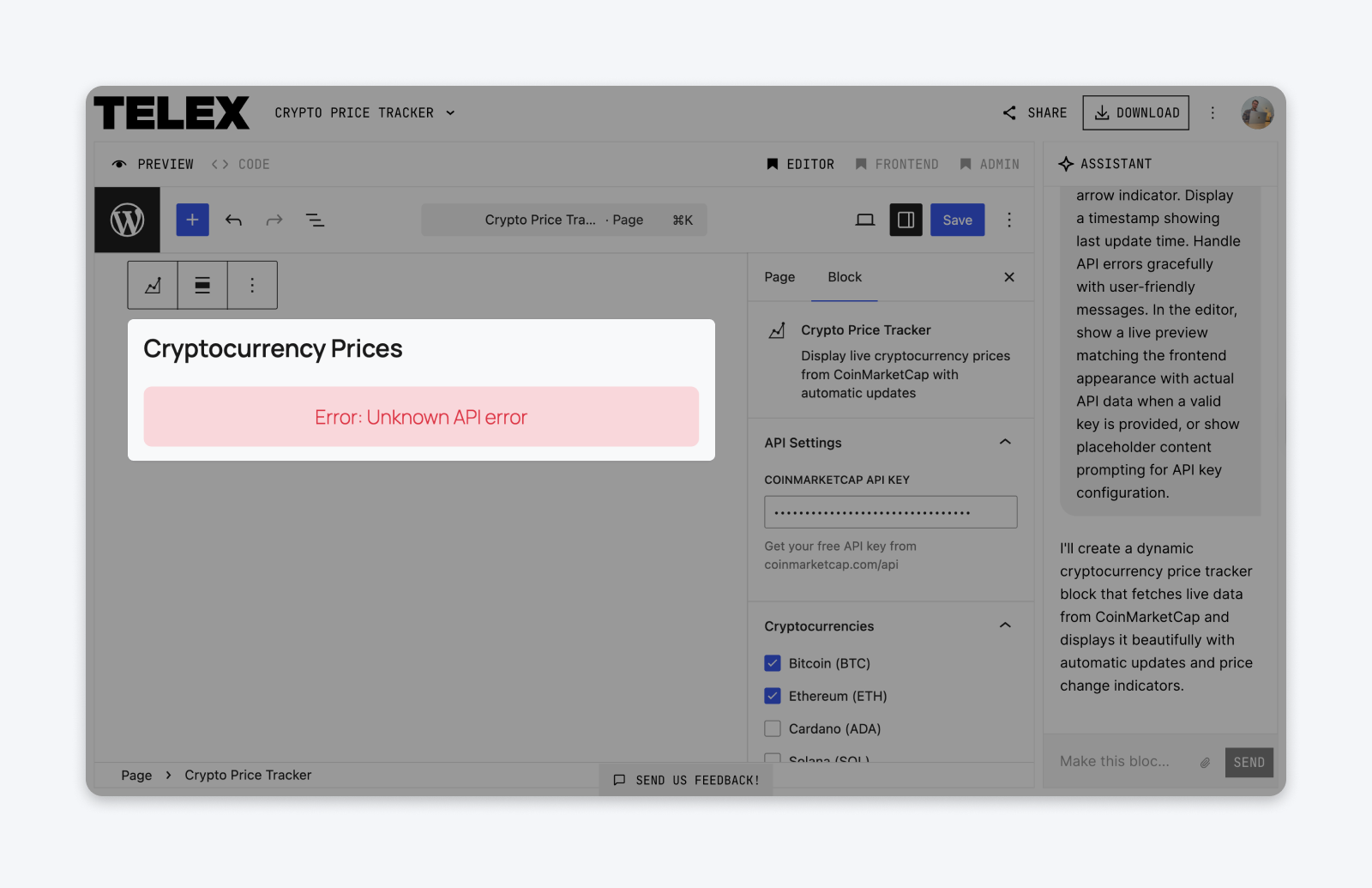
The only way to rescue this project would be to go in and fix the code yourself. Not a major issue, but it shows the AI isn’t perfect.
- Prompt enhancement: B+
- First pass: C-
- Revisions: F
Overall grade: D+
The Verdict: How Does Telex Perform in the Real World?
Looking back on our five projects, it’s clear that Telex is genuinely useful for anyone who owns, maintains, or builds websites.
While the outputs vary in quality, Telex can produce unique blocks from relatively simple instructions. You don’t need to be an experienced WordPress developer to create custom blocks with this tool. And it can build those blocks faster than any human.
Overall, we were really impressed with Telex — it’s a great addition to the WordPress toolbox, and it will probably improve over time.
That said, we don’t think Telex is quite ready to take over web development just yet.
Why Telex Can’t Replace Plugins (Yet)
For most simple projects, Telex works perfectly. But as you ramp up the complexity, things get a little shaky.
As our tests revealed, Telex doesn’t always come up with the goods. It couldn’t quite figure out the football animation, and pulling API data from an outside source proved a step too far. Complex logic is another weakness.
Telex also tends to stick to tried-and-tested block layouts, and making fine adjustments to the design can be hard work.
Then, there is security to consider. While most plugin developers run tests on their code, Telex doesn’t care. If the block works, that’s job done.
Most important of all, there are things Telex isn’t allowed to do:
- You can’t add any new sections to your admin area.
- You can’t upload files other than images to assist the AI.
- You can’t build a block within a block (although you can connect two separate blocks).
In summary: Telex doesn’t replace professional WordPress developers — it’s not even close, yet.
So, When Should You Use Telex?
Right now, we think that Telex fills the gap between code snippets and powerful plugins.
The AI allows you to go beyond ready-made templates, so you can add custom functionality and design options — but there are technical limitations.
Take Project 1 (the countdown timer) as an example. The easiest way to add a countdown to your site is by finding a ready-made template, and copy-pasting the code. However, you might not get much flexibility in terms of design or functionality.
With Telex, you can insert your own animation, add color options, and decide what happens when the counter reaches zero. It’s still quick and easy, but you have way more control.
But what if you wanted to upload an entire season schedule via a WordPress admin page and pull in live scores on gameday? Well then, you’re probably better off using a purpose-built plugin or writing custom code.
| Copy-Paste Code | Telex | Full Plugin/Custom Code |
| Quick and easy, but what you see is what you get. | Quick and flexible, with custom styling and settings you control. | Powerful features, but more to learn and manage. |
Ultimately, we recommend trying Telex for yourself. We can’t wait to see what you build with this impressive new AI tool!

Unbeatable WordPress Hosting
Reliable, lightning-fast hosting solutions specifically optimized for WordPress.
See MoreWordPress Telex FAQs
Still curious about WordPress’ new AI tool? Here are the answers you’re looking for!
Do you need to be a developer to use WordPress Telex?
No, anyone can build blocks with this tool. The only caveat: it’s a good idea to review and debug the code before putting Telex blocks on an important website. So, technical skills are useful in that sense.
Can you use WordPress Telex offline?
Not at the moment. It’s only available via the WordPress Playground. You’ll also need a WordPress.com account to access the tool.
Can you use Telex-Made blocks on production websites?
Yes, but with caution. WordPress stresses that Telex is an experimental tool and that it might produce utter nonsense from time to time. So, make sure to check the code before you go live.
Which AI models does WordPress Telex use?
We don’t know exactly which AI technologies Telex uses. But the CEO of Automattic, Matt Mullenweg, has said that the project was inspired by V0 and Lovable: two AI platforms that allow you to build apps through prompts.
These similar apps use a mix of advanced models to interpret prompts and write code. Telex probably does something similar.