
Let’s say you’ve got a solid marketing strategy in place to reach new customers. You’ve done the research, built the perfect customer profile, and spent hours crafting sales copy that ends with an irresistible call to action.
There’s just one problem: your email address.
A custom email address is one that uses a domain name you own — like “jane@yourbusiness.com” — instead of a free provider’s domain like gmail.com or yahoo.com. To get one, you register a domain, connect it to an email hosting service, and create mailboxes for yourself and your team. From then on, every message you send carries your brand instead of your email provider’s.
Why does it matter? To save on costs when starting a new business, you probably used a free email provider. So when your carefully crafted sales email lands in potential customers’ inboxes, they’re tempted to buy — they just don’t know if “YourBusiness@HotInbox.net” is legit. And who can blame them?
First impressions are a big deal in business. Free email providers are easy, affordable solutions for your basic email needs. They just can’t give your business the professionalism and credibility of a custom email domain.
In this article, we’ll cover custom email addresses: what they are, why they’re so important, and how to set one up for your small business. Let’s jump right in.
What Is an Email Domain?
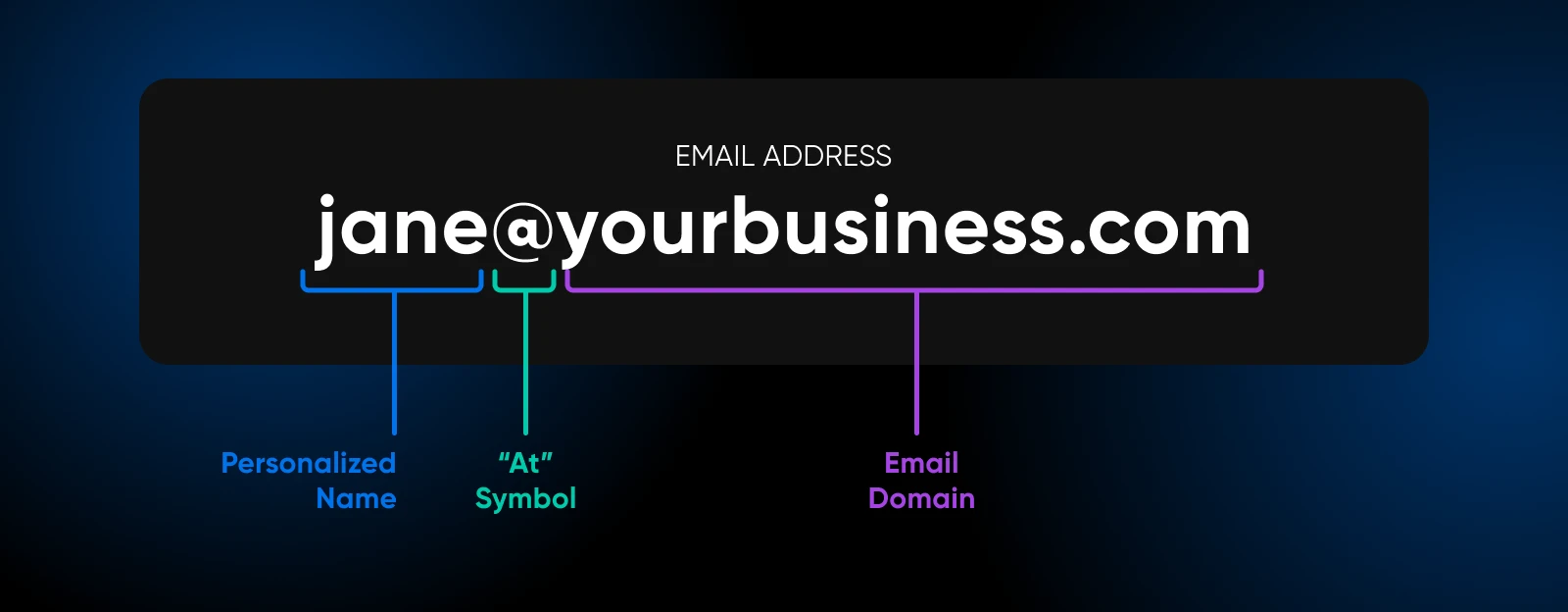
An email domain is the part of an email address that comes after the “@” symbol. It typically represents the email provider or a business’s name. For instance, “example.com” in john@example.com. Email domains tell the internet’s mail servers where to route each message so it reaches the correct recipient.
What Is a Custom Email Domain?
A custom email domain is a domain name you own and use after the “@” in an email address — for example, “yourbusiness.com” in “yourname@yourbusiness.com” — instead of a provider’s domain such as gmail.com or yahoo.com.
This type of email address enhances your brand’s credibility and visibility, making your business appear more professional and trustworthy.
Why Is Having a Custom Domain Email Address Good for Your Business?
Having a custom domain email address offers businesses tons of benefits, including increased credibility and professionalism. It not only enhances your brand image but also gives you better control over your communications and their security.
Let’s explore the top nine reasons why a custom email address is essential for your small business.
1. It Gives You Better Brand Visibility
A custom email address boosts your brand visibility by incorporating your business name directly into your email communications. Every time you send an email, your brand name is front and center, making it easier for customers to remember you — and giving you the kind of repeated top-of-mind exposure that’s essential to building brand awareness.
2. It Lends Your Business Credibility
Customers are more likely to trust an email from “yourname@yourbusiness.com” than one from a generic provider like Gmail or Yahoo. A customized email address helps you look more professional and shows you’re serious about your business and willing to invest in its image.
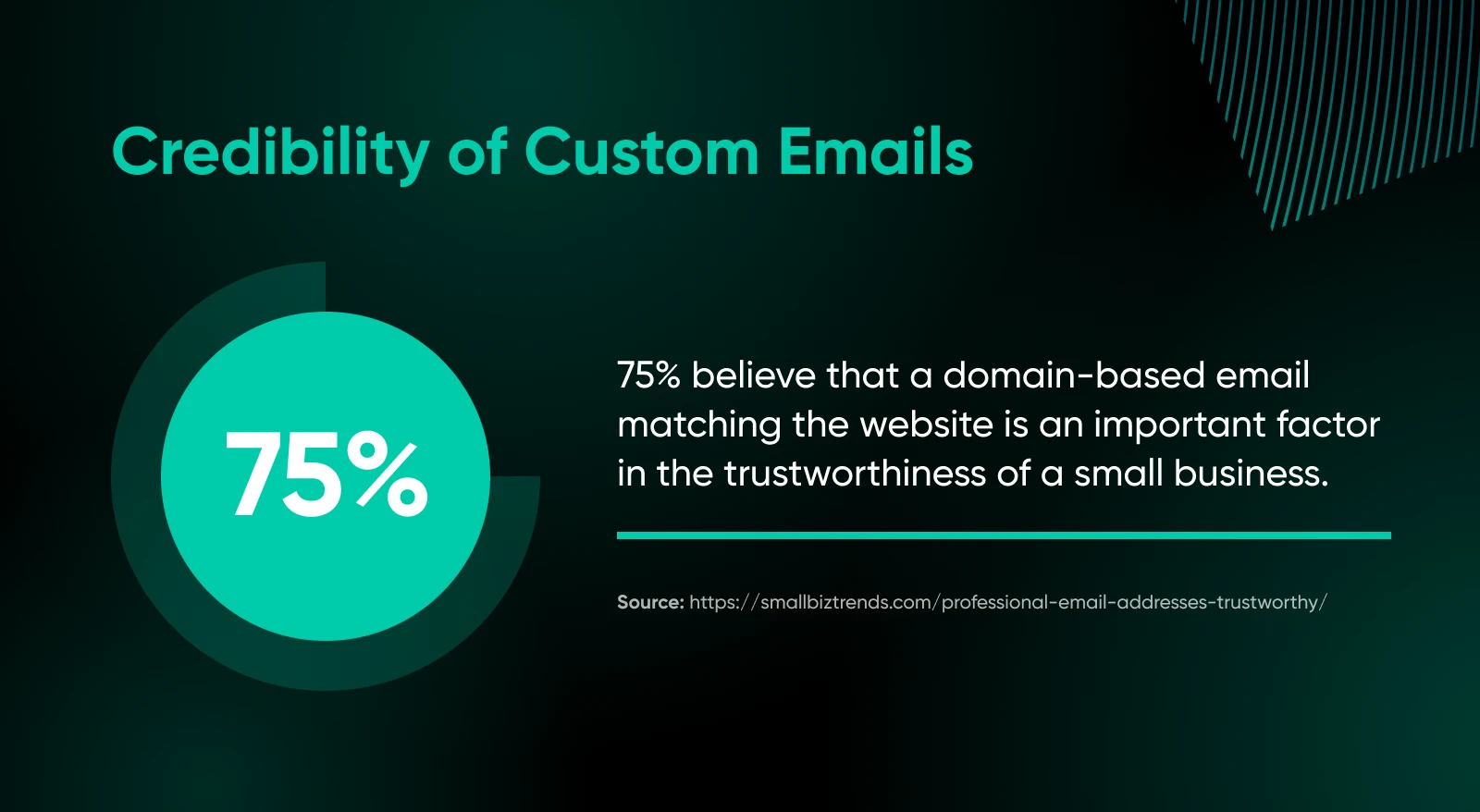
An address that matches your website also gives customers a quick way to check you out: they can visit yourbusiness.com and see a real company behind the message. A “no-reply” from a random free inbox offers no such trail.
A little extra credibility can make the difference between a potential customer choosing your business over a competitor’s.
3. It Creates Consistency Across Your Business’s Email Addresses
When you have a custom domain for your business’s email addresses, you can create a standardized format for emails across different employees or departments. For example, all employee email addresses can be “firstname@yourbusiness.com”, and all departments can be set up like “sales@yourbusiness.com” or “support@yourbusiness.com.”
This kind of consistency not only looks more polished, but also helps customers easily identify and reach the right contact within your business (especially as it grows). Anything that simplifies professional communication helps everyone stay organized and on top of their inboxes.
4. It’s a Cost-Effective Brand Marketing Tool
Investing in a custom email domain is a cost-effective way to market your brand. Unlike other marketing strategies that require continuous investment, setting up a custom email address is a relatively low cost that continues to promote your brand with every email you send.
Email marketing consistently ranks as a high-ROI channel. In Litmus’s 2025 State of Email survey of nearly 500 marketing professionals, 35% of marketing leaders reported a return of $10–$36 for every $1 spent on email marketing, and another 30% reported $36–$50. Those figures describe email marketing overall, rather than the incremental return from using a custom domain.
5. It Gives You More Control Over Email Security
With a custom email domain, you get greater control over your email security settings. You choose the email hosting provider, you can require two-factor authentication for your team, and you can publish the authentication records (SPF, DKIM, and DMARC) that make your address harder for scammers to spoof — none of which is possible on a free provider’s shared domain.
Email security is worth taking seriously: Verizon found that email was the delivery mechanism in 94% of malware attacks in 2019. Controlling your own domain lets you put stronger safeguards around your business communications — for your sake and your customers’.
6. It Gives You More Freedom and Control
A custom email domain grants you the freedom to change email providers without the hassle of changing all of your email addresses. If your current email provider fails to meet your expectations or goes out of business, you can move to another provider without losing your addresses — your business is less affected and your brand doesn’t lose visibility.
7. It Gives You Freedom To Create More Email Addresses As You Grow
One of the major advantages of a custom email domain is that the addresses are yours to create. You can set up unique email addresses for different departments, roles, or employees — “sales@yourbusiness.com,” “support@yourbusiness.com,” “hr@yourbusiness.com” — and add more as your team grows. How many separate mailboxes you get depends on your email hosting plan, but aliases and forwarding usually let one mailbox answer to several addresses.
8. It Lets You Control Email Authentication
Mailbox providers now expect proof of who’s sending. Since February 1, 2024, Google’s email sender guidelines have required all senders emailing personal Gmail accounts to authenticate with SPF or DKIM — and senders of 5,000 or more messages per day to set up SPF, DKIM, and DMARC.
Here’s the catch: those authentication records can only be published on a domain you control. A custom email domain lets you set them up properly, so your messages are less likely to be marked as spam.
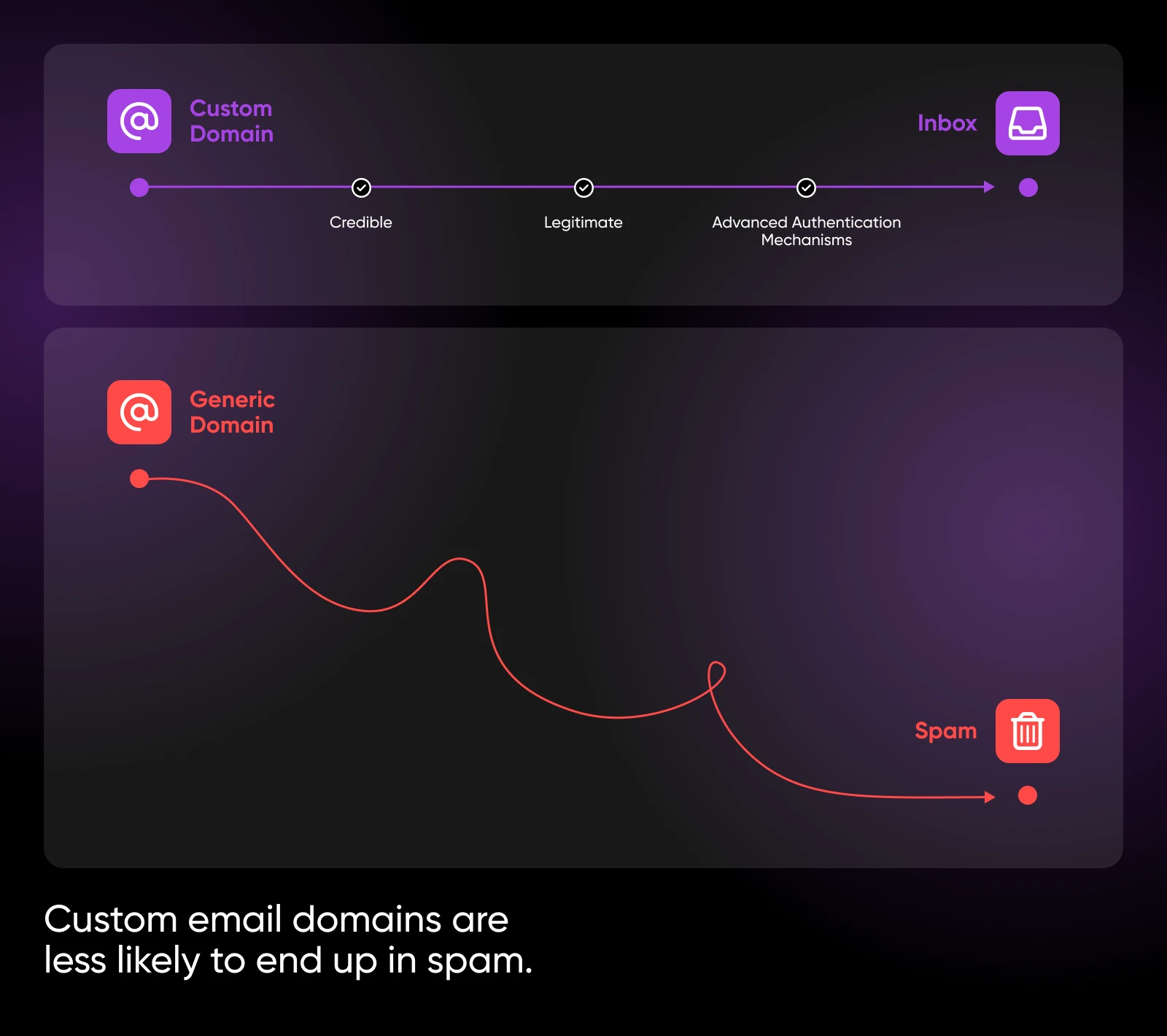
SPF and DKIM authenticate the sending domain, while DMARC tells receiving servers what to do with messages that fail those checks.
9. It Often Comes With Other Useful Tools
Custom email domain services may come bundled with additional tools that can enhance productivity and simplify business operations. For example, services like Google Workspace and Microsoft 365 offer not only email hosting, but also access to a range of applications such as shared calendars, task management tools, video conferencing, contact lists, and document collaboration platforms.
These integrated tools can help businesses of all sizes facilitate better communication and collaboration by managing their team schedules, sharing files, coordinating tasks, and more.
Some custom domain platforms even offer CRM integrations, which can help your business manage customer relationships and track service interactions directly from your email app.
Custom Email Domains: Pros and Cons
| Pros | Cons |
| Professionalism: A custom email domain conveys a more professional image, helping to build trust with customers and partners. Brand recognition: Every email sent from your domain reinforces your brand, boosting its visibility and recognition. Control and security: Owning your domain allows you to implement stronger security measures and data protection protocols. Better deliverability: You control the SPF, DKIM, and DMARC records that mailbox providers check before trusting your mail. Flexibility: You can create multiple email addresses for different departments or roles, and simplify communication. | Cost: Setting up and maintaining a custom email domain involves additional costs compared to a free address. Technical setup: The initial setup and ongoing management require some technical know-how or hiring of IT services. Maintenance: Regular maintenance and updates are necessary to preserve security and optimal performance. Dependence on providers: Switching providers can be complex and may disrupt your email services temporarily. Learning curve: There may be a learning curve for you and your team to adapt to new email management tools and protocols. |
How To Come Up With Custom Email Addresses for Your Business
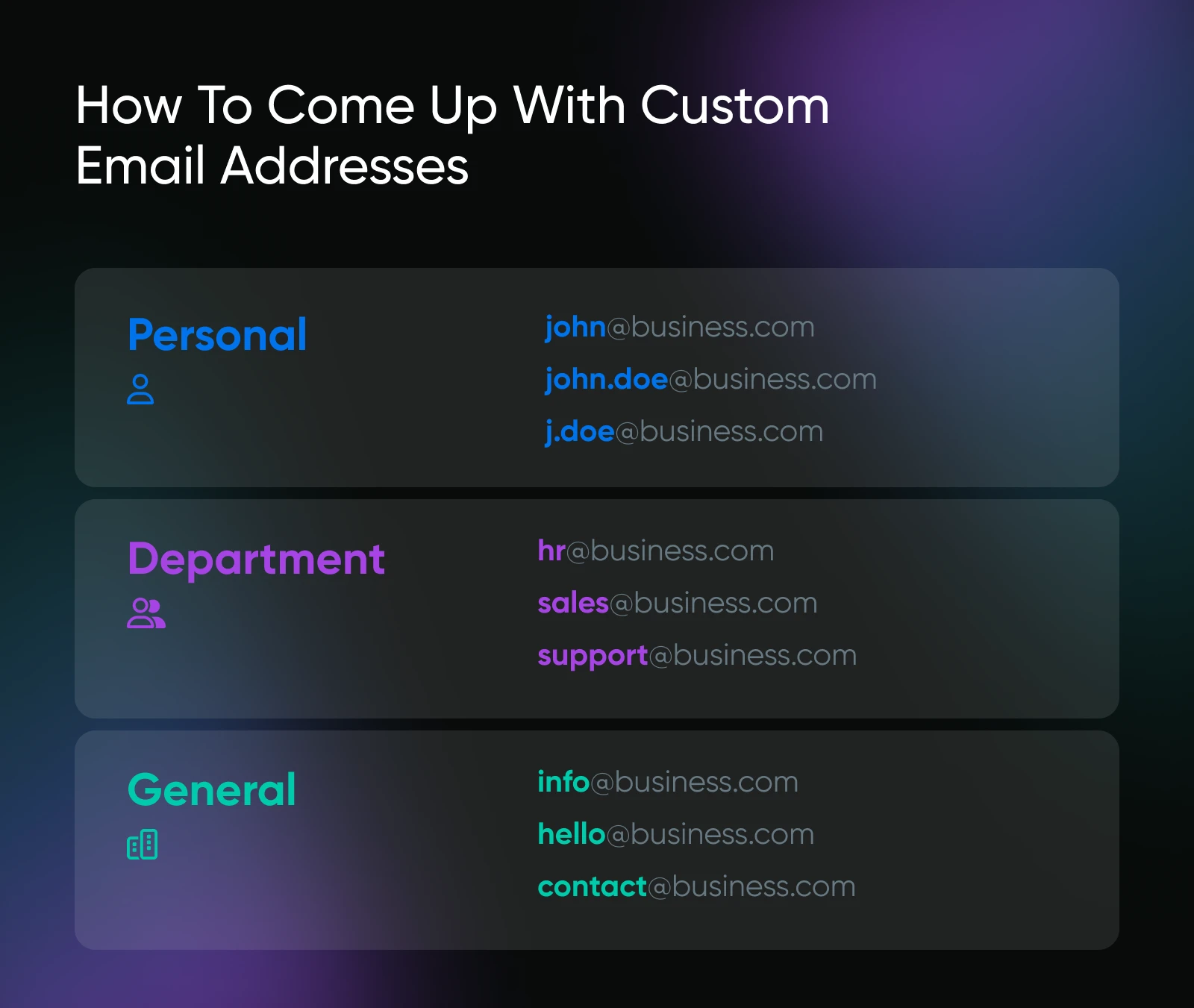
Creating personalized email addresses for your business is an important step in establishing a professional online presence.
Here are some tips to help you come up with effective and organized email addresses:
- Use your domain name: Make sure all your custom email addresses use your business’s domain name (e.g., “yourname@yourbusiness.com”) This reinforces your brand’s trustworthiness and makes your communications look professional.
- Keep it simple and professional: Use simple and straightforward addresses that are easy to remember and spell. Avoid using nicknames, numbers, or special characters. For example, use “john@yourbusiness.com” instead of “john123@yourbusiness.com.”
- For individual employees: Use the first name, last name, or a combination of both. Common formats include: “john@yourbusiness.com,” “john.doe@yourbusiness.com,” or “j.doe@yourbusiness.com.” This makes it easy for clients to contact specific team members.
- For departments: Be consistent. Examples include “sales@yourbusiness.com,” “support@yourbusiness.com,” and “hr@yourbusiness.com.” This makes it easier to get inquiries directed to the correct department.
- Create a general purpose email address: This is for general inquiries. Examples include “info@yourbusiness.com” or “contact@yourbusiness.com.”
How To Get a Custom Email Address for Your Small Business
Creating a personalized business email address is a pretty straightforward process.
Follow these steps to get started:
Step 1: Choose a Domain Name
If you already own a domain, you can skip this step. But if you’re starting from scratch and don’t have a domain name yet, the first thing to do is choose and buy a new domain for your email address.
Choose a domain name that reflects your business. It should be easy to remember, spell, and relevant to your brand (e.g., “www.yourbusiness.com”). Then, use a domain registration service to check if your preferred domain name is available. If it isn’t, you’ll have to pick something else.
Consider alternative names, variations, or different spellings.
Once you’ve found an available domain name, register it through a domain registration service or web hosting provider. This typically requires you to create an account and pay a yearly registration fee.
Domain Registrar
A domain registrar is an organization that manages domain registration for Top-Level Domain (TLD) registries. Registrars provide registration services and sell domain names to registrants.
DreamHost is a domain registrar, so you can search for and register your domain in one place. And if you want a website to go with your email, every DreamHost web hosting plan on an annual or multi-year term includes a free domain for the first year — plus 3 months of professional email at your domain, free, on every plan.
Step 2: Select an Email Hosting Provider
If your web hosting service doesn’t offer email hosting (or you don’t want to use its included service), the next step is to choose an email hosting provider for your new email address. There are many reputable providers that allow users to create professional email addresses. Popular options include Google Workspace, Microsoft 365, and Zoho Mail.
DreamHost’s own option is Professional Email @yourdomain: ad-free webmail, 25 GB of storage per mailbox, spam filtering, and IMAP sync with desktop and mobile clients. It works with any domain you own — even one registered or hosted elsewhere. Prefer Google’s tools? You can also get Google Workspace through DreamHost, with setup and the domain connection handled for you.
Compare the features and pricing of different plans offered by the email hosting provider. Then, choose a plan that suits your business needs and budget. Finally, sign up for the service.
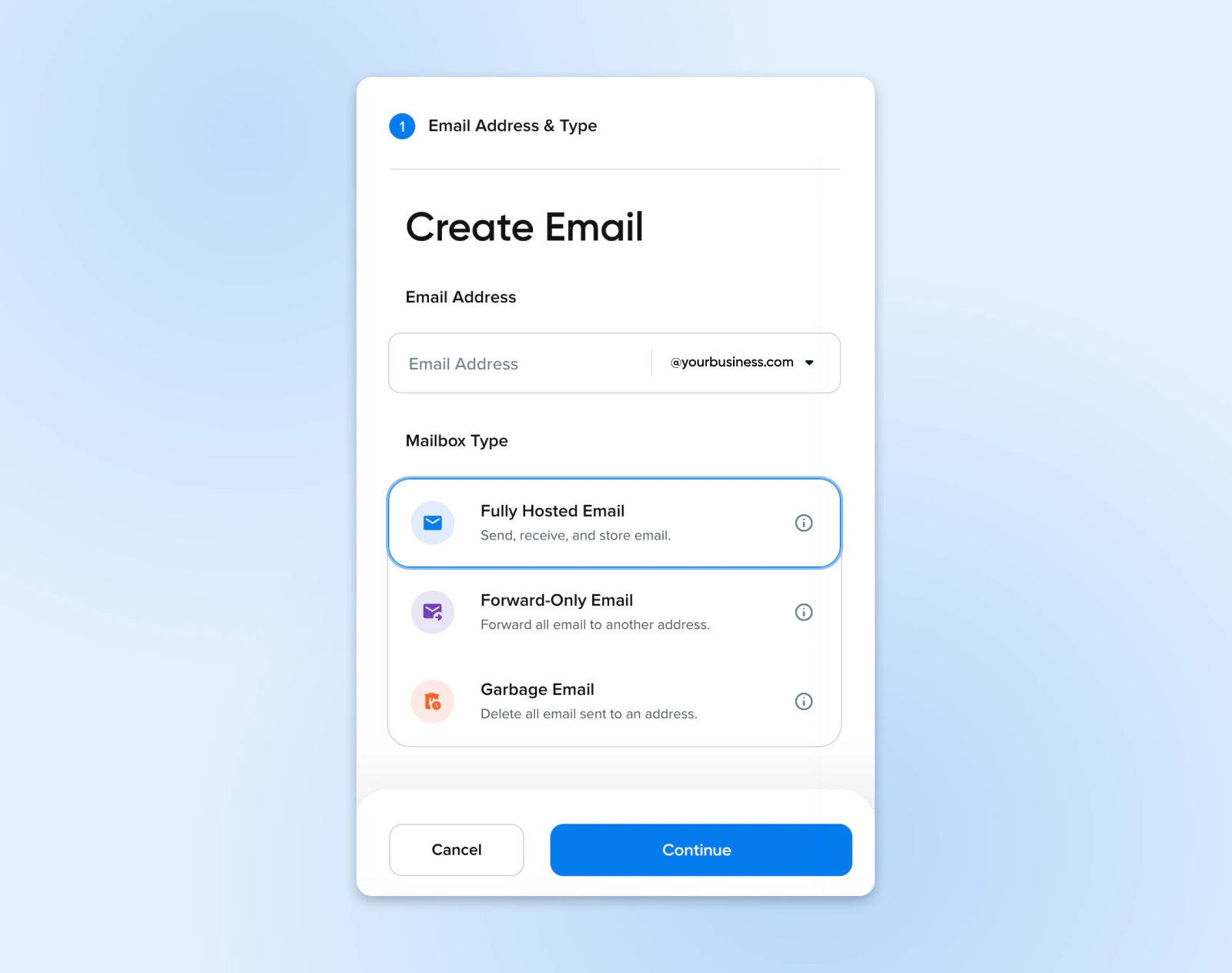
Step 3: Set Up Your Email Account
Log in to the admin console of your email hosting provider using the account you created during signup. Follow the provider’s instructions to add your domain to the email hosting service. To do this, you’ll usually need to verify domain ownership by updating DNS records through your domain registrar.
DNS
The Domain Name System (DNS) protocol keeps records of which domain names correspond to specific IP addresses. DNS enables you to browse the web by typing in regular URLs instead of IP addresses.
In the admin console, create custom email addresses for yourself and your employees. For example, you might create “john@yourbusiness.com” for yourself and “sales@yourbusiness.com” for your sales department.
Configure your email clients (e.g., Outlook, Apple Mail, or mobile email apps) so you can send or receive emails using your new personalized email addresses. The email hosting provider will provide the necessary settings: IMAP/POP3 and SMTP server details.
If needed, set up email forwarding to direct emails from one address to another. Also, make sure you create email aliases so you can receive emails from different variations of your email address without having to set up separate accounts.
Frequently Asked Questions About Custom Email Addresses for Small Businesses
How much does a custom email address cost?
A custom email setup usually involves two services: domain registration, generally renewed yearly, and email hosting, often billed per mailbox per month. The total depends on the provider and plan you choose — basic plans cost a few dollars per month, while higher-tier plans with extra collaboration features cost more.
Can I get a custom email domain for free?
Sometimes, through introductory bundles. A provider may include the domain, email hosting, or both for a limited period. Every DreamHost web hosting plan includes a free 3-month trial of professional email at your domain, and annual or multi-year terms include a free domain for the first year. DreamPress, VPS, and dedicated server plans include unlimited email hosting. You can also transfer an existing domain to DreamHost and add email to it.
What are the most common email domains?
The email domains you see every day belong to free providers: gmail.com, outlook.com, yahoo.com, and icloud.com, for example. Those domains belong to the provider, not to you. A custom email domain flips that — the part after the “@” is a domain you own and control.
Is .email a good domain for a business?
It can be. .email is a real top-level domain you can register and use for a website or custom email address once the necessary hosting and DNS records are configured. It’s a natural fit when you want the address itself to say what it’s for — think “support@yourbusiness.email” — or when your preferred name is taken in .com. Just keep it easy to say out loud, since customers will type it.
Can I use a custom email address with existing email clients?
Yes, you can configure your custom email address to work with most popular email clients, such as Outlook, Apple Mail, and mobile email apps. Email hosting providers usually provide the necessary settings (IMAP/POP3 and SMTP server details) and instructions to help you set up your email clients.
Can I switch email providers and keep my custom email address?
Yes, you can switch email providers and keep your custom email address. Usually, you’ll need to migrate your email data from the old provider to the new one and update your domain’s DNS settings to point to the new provider’s servers. Most email hosting providers offer migration tools or services to assist you with this process.
Professional Email @yourdomain
You may have quickly launched a small business with a free Gmail account — that’s how most of us start. But if you’ve been wondering how to grow your business with email, creating a custom address is one of the simplest upgrades you can make.
Setting up your DreamHost email hosting plan is as simple as following a few easy steps:
- Select a monthly or yearly plan.
- Register a new domain, use an existing domain, or decide later which domain to use.
- Provide payment information and select how many email boxes you need.
- Complete your email set up in your new email administration panel.
Ready to crank up your email address’s professionalism and marketing power? Whether you want DreamHost web hosting with your email and website in one place, or just our Professional Email @yourdomain plan on a domain you already own, DreamHost is here to help you take your business to the next level!

Everything You Need to Get Anything Done
With custom and secure business email, plus an office suite with real-time collaboration built in, Google Workspace helps teams work together from anywhere!
See More