Bookworm. Bullseye. Jessie. Sarge. Woody. Potato.
Every Debian release going back to 1996 is named after a Toy Story character. Debian’s project leader at the time, who happened to work at Pixar — started slipping the codenames in, and nobody since has decided to stop.
The distribution draws its release names from a Pixar franchise older than half of its current maintainers, and is still going strong more than thirty years later.
That tells you something about Debian’s priorities.
The Debian Project does not chase the news cycle. It has no marketing team. It has no parent company. It can’t pivot, get acquired, or change its commercial terms, because there are no commercial terms to change.
It ships a release when the release is ready, and then that release sits on a virtual private server (VPS) doing exactly what you provisioned it to do for the next five years.
That’s the entire pitch, really. Debian is the Linux you choose when you’d rather not think about your operating system again.
The only interesting question — and the one we’re here to answer — is whether to pick the proven release (Debian 12) or the current one (Debian 13).
Linux
Linux refers to a collection of open-source Operating Systems (OS). There’s no single Linux OS. Instead, users can choose from a broad group of Linux distros, all of which provide different experiences.
What Makes Debian Different From Ubuntu and AlmaLinux?
Debian is a community-governed Linux distribution with no commercial owner anywhere in the supply chain.
The Debian Project is run by its developers and funded as a non-profit through Software in the Public Interest. Nobody owns Debian, which means nobody can sell it, change its license, or pivot the roadmap.
That structural fact drives everything Debian is known for.
It’s conservative by design. When a package goes into a stable release, it stays at that version for the life of the release in all but rare, security-team-approved exceptions — fixes are backported instead.
It’s lean. A cold-booted Debian 12 or 13 server install lands around 100 MB of RAM, lower than both Ubuntu Server and AlmaLinux, which typically idle in the 150–200 MB range. That headroom goes to your actual workload.
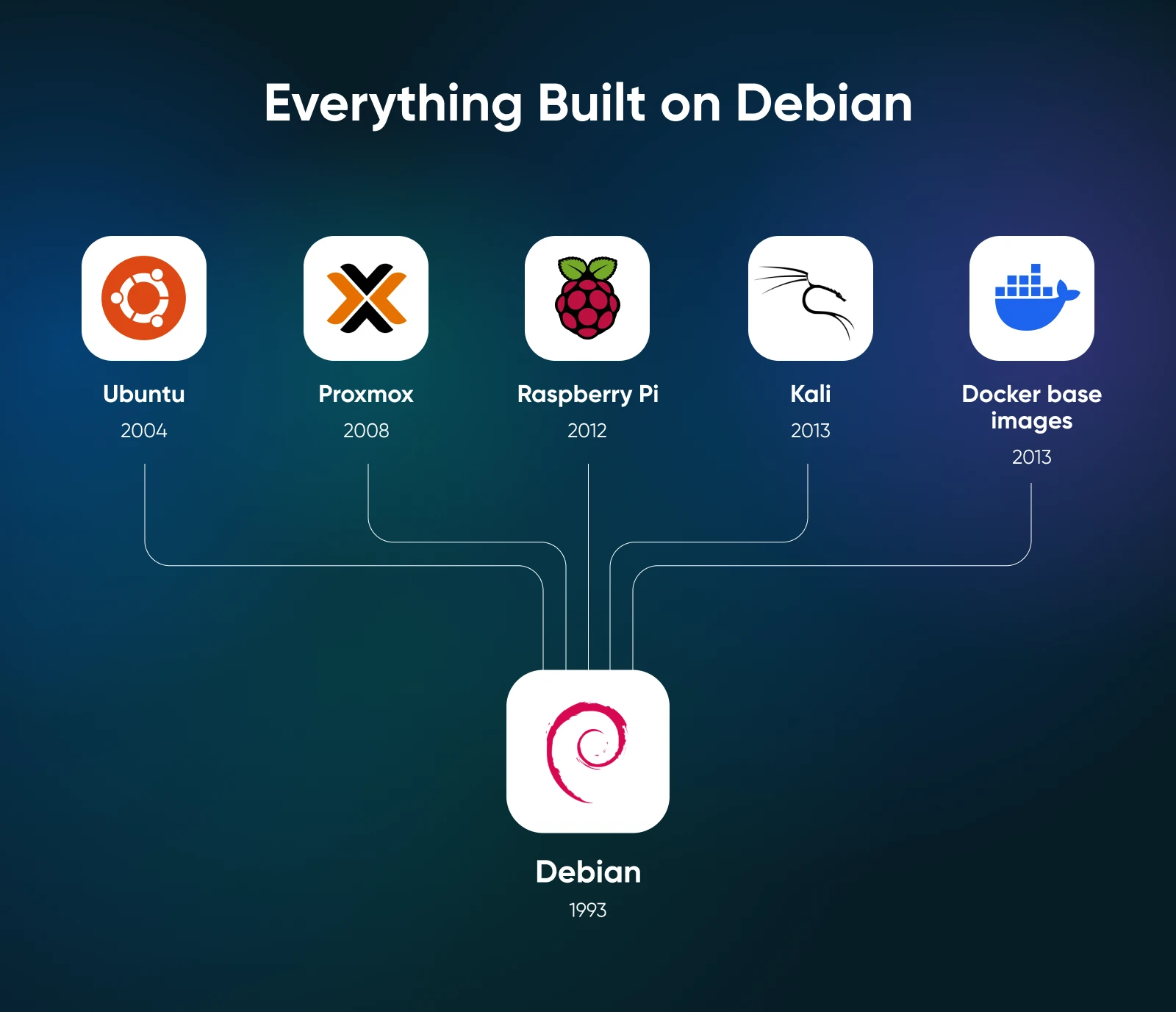
It’s the foundation everything else is built on. Ubuntu, Kali, Proxmox VE, and Raspberry Pi OS all derive from Debian. So do the de facto Docker base images for production containers: debian:bookworm-slim and debian:trixie-slim.When you run Debian on a VPS, you’re running the same OS that’s already inside most containers on most servers on the internet.
Support runs roughly five years per release — about three years from the Debian Security team, then two more from the Debian LTS team, with an optional Extended LTS layer beyond that if you need it.
Debian 12 vs. Debian 13: Which Version Should You Pick?
For any new VPS deployment in 2026, pick Debian 13 (Trixie). Pick Debian 12 (Bookworm) only if you have a specific reason to match an existing production server’s toolchain. On a DreamHost self-managed VPS, you’ll provision Debian 13 directly; choose Debian 12 only on platforms where you control the image.
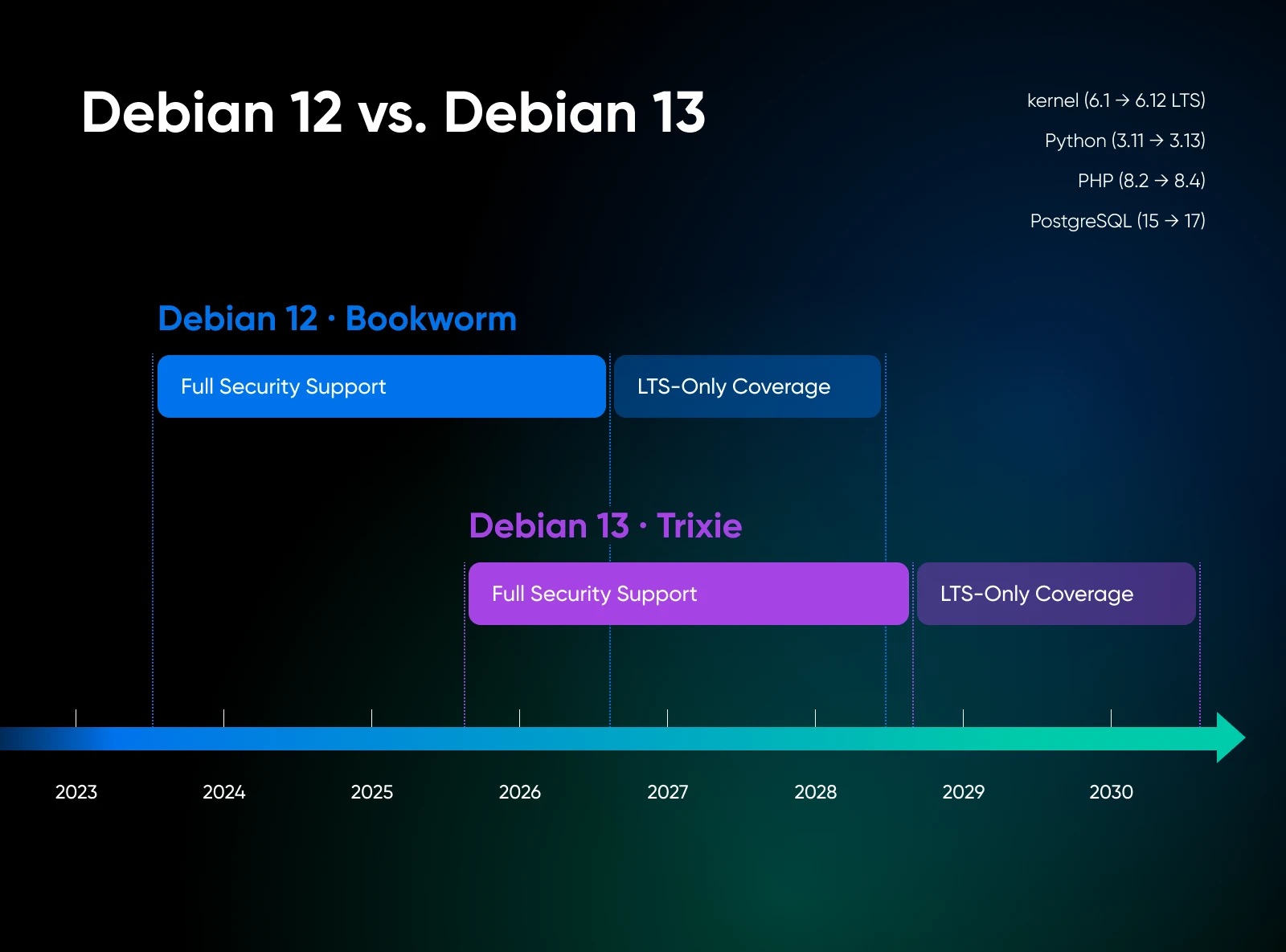
Debian 12 (Bookworm) shipped in June 2023 with Linux kernel 6.1, Python 3.11, PHP 8.2, and PostgreSQL 15. Full security support ended July 11, 2026; the Debian LTS team now carries security updates through June 30, 2028. Existing Bookworm servers running cleanly don’t need to be rebuilt. The package set is mature, the corners are well-documented, and the migration story to Debian 13 via apt full-upgrade is supported.
Debian 13 (Trixie) shipped in August 2025 with kernel 6.12 LTS, Python 3.13, PHP 8.4, PostgreSQL 17, and APT 3.0. Combined Security + LTS coverage runs through June 30, 2030. Phoronix benchmarks measured roughly 13% better performance on AMD EPYC against Debian 12 across mixed workloads, mostly attributable to the newer kernel and the GCC 14 toolchain.
| Factor | Debian 12 (Bookworm) | Debian 13 (Trixie) |
|---|---|---|
| Released | June 2023 | August 2025 |
| Linux kernel | 6.1 | 6.12 LTS |
| Python | 3.11 | 3.13 |
| PHP | 8.2 | 8.4 |
| PostgreSQL | 15 | 17 |
| APT version | 2.6 | 3.0 (Solver3) |
| Full security support ends | June 2026 | August 2028 |
| LTS support ends | ~June 2028 | June 30, 2030 |
| Default for new VPS in 2026? | No | Yes |
Pick Debian 13 if you’re starting fresh, want the longer support runway, or need the newer toolchain versions. Pick Debian 12 if you’re cloning a working production server, running software validated only against Bookworm, or working inside an organization that hasn’t approved Trixie yet.
Plenty of teams have stayed on Bookworm for 18 months past Trixie’s release to keep their puppet manifests unchanged, and that was the right call for them.
The in-place upgrade path between releases works, but provisioning a new VPS directly on Debian 13 is less work than upgrading in place on production.
How Much RAM and Disk Does Debian Need on a VPS?
Officially, Debian’s minimum for the graphical installer is 780 MB of RAM and 1160 MB of disk. With swap enabled, the installer technically completes on as little as 350 MB. Those are floor numbers — don’t plan around them.
In practice, a cold-booted Debian 12 or 13 server uses around 100 MB of RAM, leaving the rest of your VPS for your actual workload. A 1 GB VPS gives you roughly 900 MB for the application after the OS loads. That’s comfortable for a small web app, a personal Mastodon instance, a low-traffic mail server, or a couple of lightweight containers.
Disk is similarly lean. A clean install consumes a bit over 1 GB. Budget 10 GB total for the OS partition once package caches, log files, and the journal have had a few months to breathe.
Here’s a practical starting point for sizing:
| Workload | Recommended RAM | DreamHost Plan |
|---|---|---|
| Web + database on one box, multi-container Docker host | 4 GB | Stack 4 (recommended baseline) |
| Production database + app + sync service together | 8 GB | Stack 8 |
| Heavy multi-tenant workload, large database, CI runner | 16 GB+ | Stack 16 |
| Large production workload, memory-intensive database, analytics platform, or multiple services | 32 GB | Stack 32 |
Based on what we see across DreamHost VPS deployments, Stack 4 (4 GB RAM) is the sweet spot for most setups. Debian’s footprint leaves so much room that your workload, not the OS, determines when you need to scale up. Move to Stack 8 when you’re running a database, a web server, and an application simultaneously and want each one to have breathing room.
One last thing worth calling out: NVMe storage matters even when disk capacity doesn’t. Package installs, container layer extraction, and database fsync calls all live on disk I/O, and NVMe is roughly five to ten times faster than SATA on small-block random reads and writes. It’s the kind of thing you don’t notice until you’re on a server without it.
How Do You Set Up a Debian VPS?
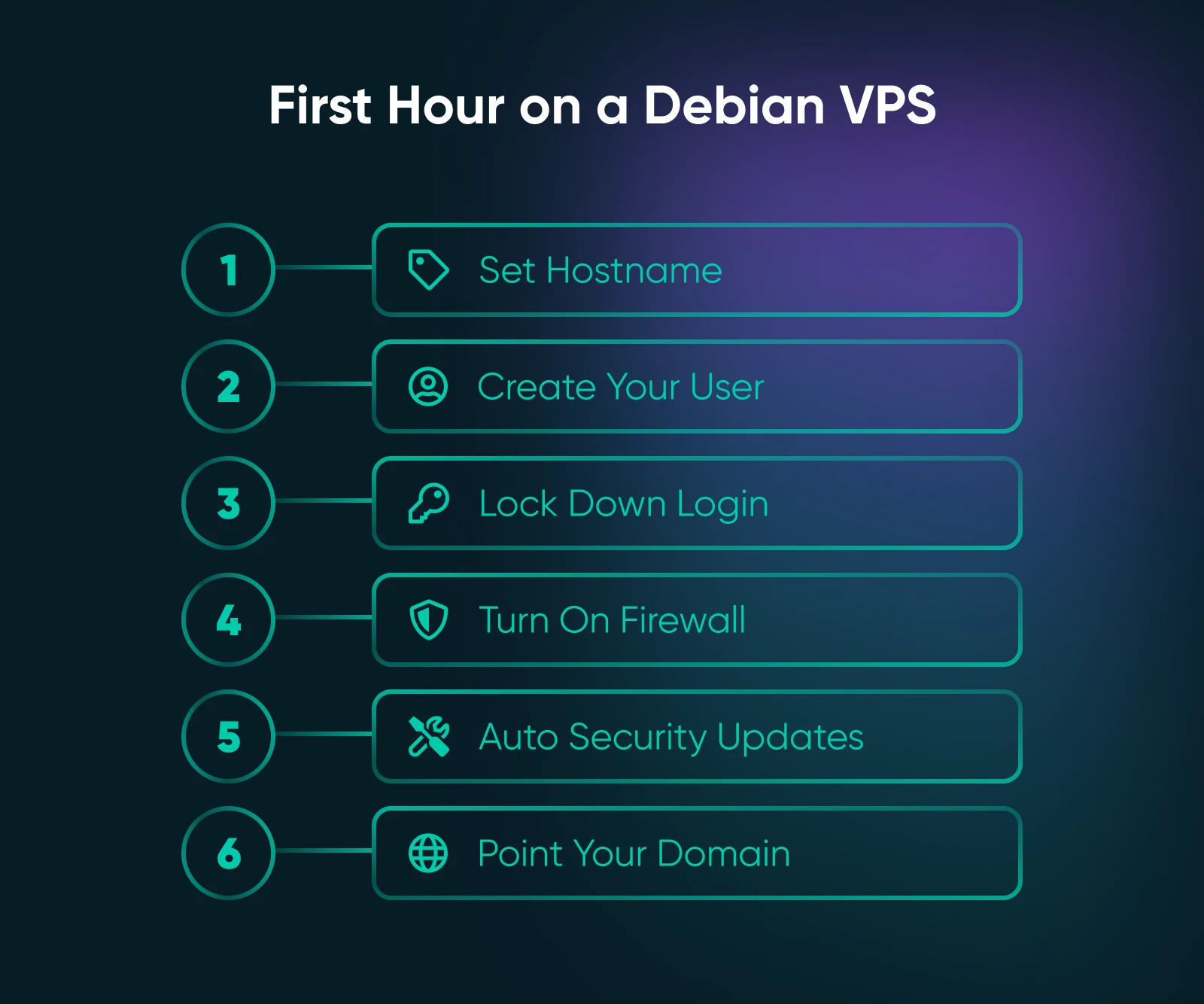
Six steps cover the first hour after a fresh Debian install. Do them in order: hostname, sudo user, SSH, firewall, automatic security updates, DNS. Debian will largely take care of itself from there.
1. Set the Hostname
sudo hostnamectl set-hostname your-server-nameThe hostname shows up in logs, shells, and any monitoring you add later. Pick something descriptive. You’ll thank yourself when you’re managing three VPSes at once.
2. Create a sudo User
sudo adduser deploy
sudo usermod -aG sudo deploy
Don’t run a production server day-to-day as root. The sudo group on Debian grants full root access via sudo with a password prompt, which is the right default. After this step, log out of root and log back in as deploy.
3. Lock Down SSH
Copy your public key first:
ssh-copy-id deploy@your-server-ipThen, disable password authentication and root login by dropping a config file into /etc/ssh/sshd_config.d/:
# /etc/ssh/sshd_config.d/99-hardening.conf
PasswordAuthentication no
PermitRootLogin no
Reload the SSH daemon:
sudo systemctl reload sshBefore you close your current terminal, confirm you can still log in from a second one. Every server admin has a story about why this step matters.
4. Enable a Firewall
The simplest path is ufw (Uncomplicated Firewall), which manages the firewall in two commands.
sudo apt install ufw
sudo ufw allow 22/tcp
sudo ufw allow 80/tcp
sudo ufw allow 443/tcp
sudo ufw enable
If you’d rather configure nftables directly, it comes pre-installed, and the Debian wiki has a current example config. Either way, the firewall should default-deny and explicitly open only the ports you need.
Firewall
A firewall is a set of rules that governs incoming and outgoing connections for a network or a specific device. The goal of firewalls is to protect against intrusions and unwanted outgoing connections.
5. Turn on Automatic Security Upgrades
This is the single most underrated Debian feature for VPS deployments — and one of the first things we recommend enabling on any DreamHost VPS. The Debian Security team ships fixes for high-profile CVEs fast — often within a day or two for coordinated disclosures — and unattended-upgrades applies them automatically while you’re not paying attention.
sudo apt install unattended-upgrades
sudo dpkg-reconfigure -plow unattended-upgrades
Select “Yes” at the prompt. Confirm it’s running with systemctl status unattended-upgrades. That’s it — Debian patches itself overnight as advisories ship.
6. Point a Domain at the VPS
In your DNS provider, add an A record for your VPS’s IPv4 address and an AAAA record for the IPv6 address if you have one. Wait a few minutes for propagation, then run ping yourdomain.com from the VPS to confirm everything is resolved correctly.
When Should You Use Debian on a VPS?
Debian is the right pick for any workload where you want the OS to disappear into the background and stay there. That covers most of what people actually run on VPSes.
Pick Debian for:
- Production web servers running nginx, Apache, or Caddy
- Docker hosts, where running Debian on the host and debian:*-slim inside the containers removes a whole class of glibc and packaging edge cases
- PostgreSQL, MySQL, and MariaDB production databases
- Mail servers built on Postfix and Dovecot — a stack that’s been running on Debian boxes for two decades
- Backup servers, file servers, anything that runs once and serves quietly
- Any VPS where you want to provision the box, set unattended security upgrades, and genuinely not look at it again for a year
Don’t pick Debian for:
- Workloads that need bleeding-edge kernel modules, such as freshly merged GPU support or networking hardware released in the last six months
- GPU-heavy ML or AI workloads where you want the latest CUDA toolkit aligned with the newest kernel
- Desktop Linux on a workstation where you want the latest GNOME or KDE every six months
- Anything that explicitly requires a Red Hat–style ecosystem (rpm, SELinux on by default, RHEL package versions), which is AlmaLinux territory
How Does Debian Compare to the Alternatives?
Debian isn’t the right call for every situation. Knowing where it loses is as useful as knowing where it wins. Two comparisons cover most of the decision points:
Debian vs. Ubuntu LTS: Ubuntu gets you newer packages by default, commercial backing from Canonical, and up to ten years of Extended Security Maintenance via Ubuntu Pro. The trade-off is a slightly heavier install and a corporation in the supply chain.
Pick Ubuntu when you want a commercial backstop or need newer packages out of the box. Pick Debian when you want the leanest, longest-running base with nobody upstream who can change the deal.
Debian vs. AlmaLinux 9: AlmaLinux is a different ecosystem entirely. It’s RHEL binary-compatible, uses yum/dnf for package management, and ships SELinux on by default. Pick AlmaLinux when your team already runs RHEL or CentOS in production, or when compliance frameworks require RHEL-family parity. Pick Debian for almost everything else.
At DreamHost, we’d point most personal projects, indie production servers, and small-team workloads toward Debian by default — unless the Red Hat ecosystem is already in play, or you have a specific reason to need Ubuntu’s package freshness.
When Does Self-Managed VPS Make Sense for a Debian Server?
A self-managed VPS should offer full root access, a clean Debian install at provision time, and no managed-services layer interpreting your apt commands. That suits Debian, which assumes its administrator knows what they’re doing and is wired to stay out of the way.
A few specifics line up well with the way Debian is typically run on a VPS:
- NVMe storage on every Stack tier. Apt operations, container layer extraction, database commits, log rotation — all the operations that dominate a Linux server’s perceived speed — live on disk I/O.
- Unmetered bandwidth. Backup servers, mail relays, sync targets, container registries, and anything else that ships data out runs without a billing surprise.
- Choice of OS at provision time. Debian 13 is available at provision time, alongside Ubuntu 24.04 LTS and AlmaLinux 9.
4 GB RAM is the recommended starting point for most Debian deployments.
Step up to 8 GB when you’re running a database, a web tier, and an application on the same box and want each one to have memory headroom.
For a deeper dive into the OS layer specifically, explore our pages covering Debian, Ubuntu and AlmaLinux. And if you’re moving an existing application off shared hosting, a self-managed VPS gives you the path from managed to root-access deployment.
Forky Is Next
Debian 14, codenamed Forky, is currently in testing. By the time it ships sometime in 2027 or 2028, the Bookworm VPS you provision today will still be running, still patching itself overnight, and still consuming around 100 MB of RAM. The Trixie VPS will look identical to the day you booted it.
That’s the thing about boring infrastructure: it compounds. Every hour you’re not thinking about your operating system is an hour you’re spending on the thing you actually set the server to do.
Pick Bookworm if you have a reason to. Pick Trixie if you don’t. Either way, Debian has a way of becoming the part of your stack you never have to worry about again.

Own Your Entire Stack. Apps, AI, Databases, and More.
Keep every credential and conversation on a server you control, with NVMe speed and unmetered bandwidth built in.
Explore VPS Hosting PlansFrequently Asked Questions About Debian on a VPS
Is Debian 12 still supported in 2026?
Yes — Debian 12 (Bookworm) is still supported in 2026. Full Debian Security team coverage ended July 11, 2026, and the Debian LTS team now provides security updates through June 30, 2028. Existing Debian 12 production servers don’t need to migrate immediately, though new deployments should default to Debian 13 for the longer support runway.
Should you upgrade from Debian 12 to Debian 13?
Bookworm has already passed its June 2026 handoff from the Security team to the LTS team, so there’s no immediate emergency — but plan the move before LTS coverage ends in June 2028.
Is Debian better than Ubuntu for a VPS?
Debian is better than Ubuntu for a VPS when you want a minimum-overhead install, no commercial entity in the supply chain, and the longest-running stable base. Ubuntu is better when you need newer packages by default, commercial support via Canonical, or Ubuntu Pro’s ten-year Extended Security Maintenance window.
For most personal projects, indie production servers, and small-team workloads, Debian’s leaner footprint and unhurried release cadence make it the better fit. For teams that already standardize on Ubuntu, or need newer package versions in mainline (not via backports), Ubuntu LTS is the right call.
What is the minimum RAM for a Debian VPS?
The official minimum RAM for a Debian VPS is 780 MB for a normal install, per the Debian installation manual. With swap enabled, the installer technically completes on as little as 350 MB. In practice, a cold-booted Debian server install uses 100 MB of RAM, leaving the rest of the VPS for the actual workload. Most production VPS plans start at 1 GB, which is comfortable for a single-app deployment.
Why is Debian the default Linux for Docker base images?
Debian is the default Linux for production Docker base images because debian:bookworm-slim and debian:trixie-slim produce a compact container base (roughly 30 MB compressed) while keeping glibc compatibility for the vast majority of software.
Alpine images are smaller, but Alpine uses musl libc, which breaks compatibility with some Python wheels, Node.js native modules, and any binary compiled against glibc. Debian-slim is the safe default; you only step away from it for specific reasons.
Can you run Debian on a $5/month VPS?
Yes, Debian is the strongest choice of major Linux distros for a $5/month VPS specifically because its cold-boot footprint is roughly 100 MB of RAM. A 1 GB VPS gives you around 900 MB for the application after the OS loads. That headroom is enough for a small web app, a personal Mastodon instance, a low-traffic mail server, or a couple of lightweight containers. Step up to a 2 GB or 4 GB plan once the workload starts pressing against that envelope.
